Business Intelligence
Row-Level Security for Embedded Analytics: A Practical Guide
Practical Postgres guide to tenant-aware RLS for embedded analytics: identity-scoped policies, pool isolation, cache/export checks, and tests.
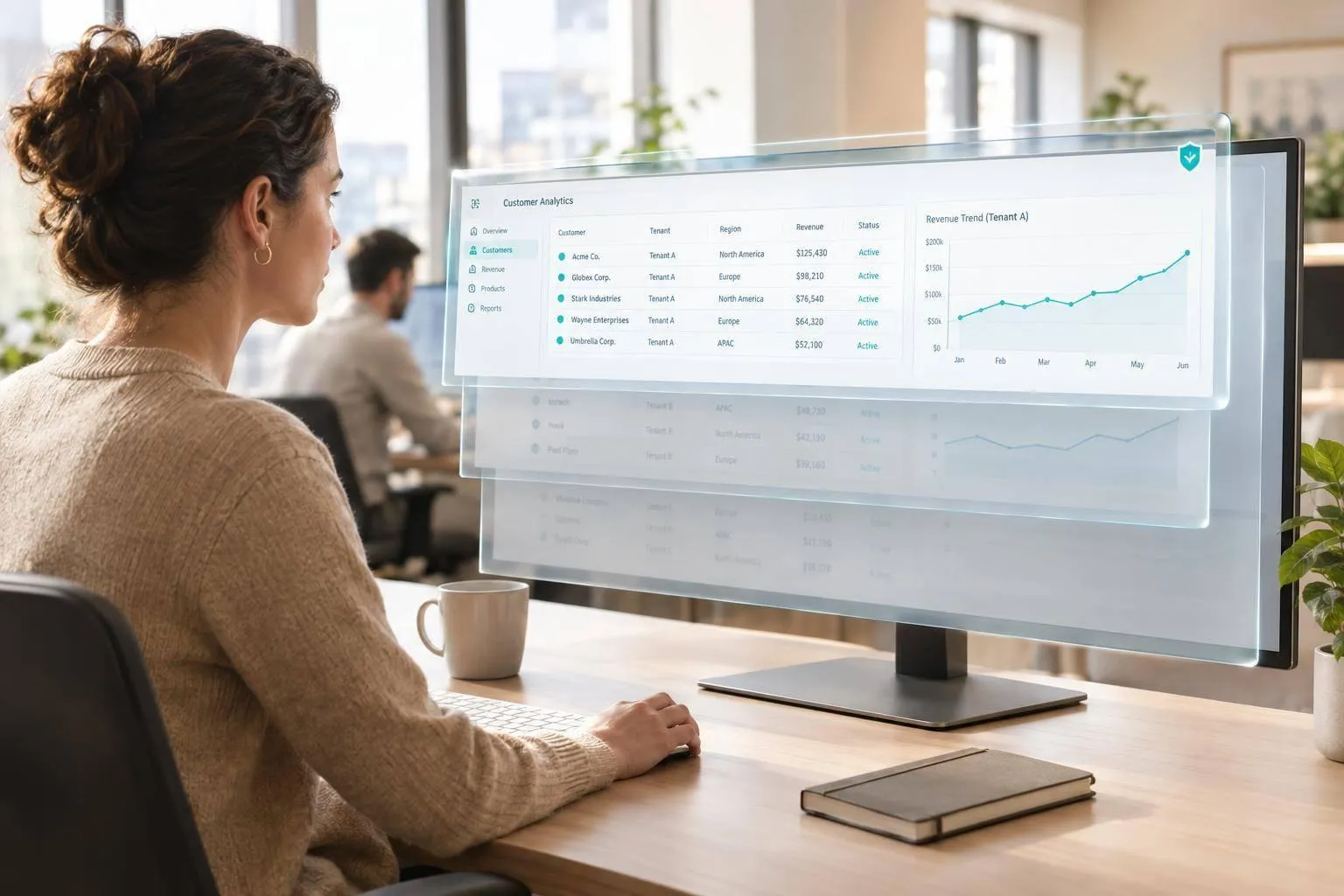
I use PostgreSQL row-level security to enforce who can see each row - not dashboard filters. Start with tenant IDs, server-verified user permissions, and transaction-local identity settings. Reject requests with missing identity before running queries.
In this guide, I cover how to:
- Set tenant and user policies with read-only database roles.
- Check writes, views, and derived tables separately.
- Keep identity isolated across pooled connections.
- Recheck permissions for cached results, exports, and scheduled reports.
- Gate deployment with 14 access tests, including allowed rows, cross-tenant denial, and missing identity.
- Assign owners and check access rules across warehouses and Querio.
My rule: test the entire data path. A protected query is only one part of a protected dashboard.
::: @figure 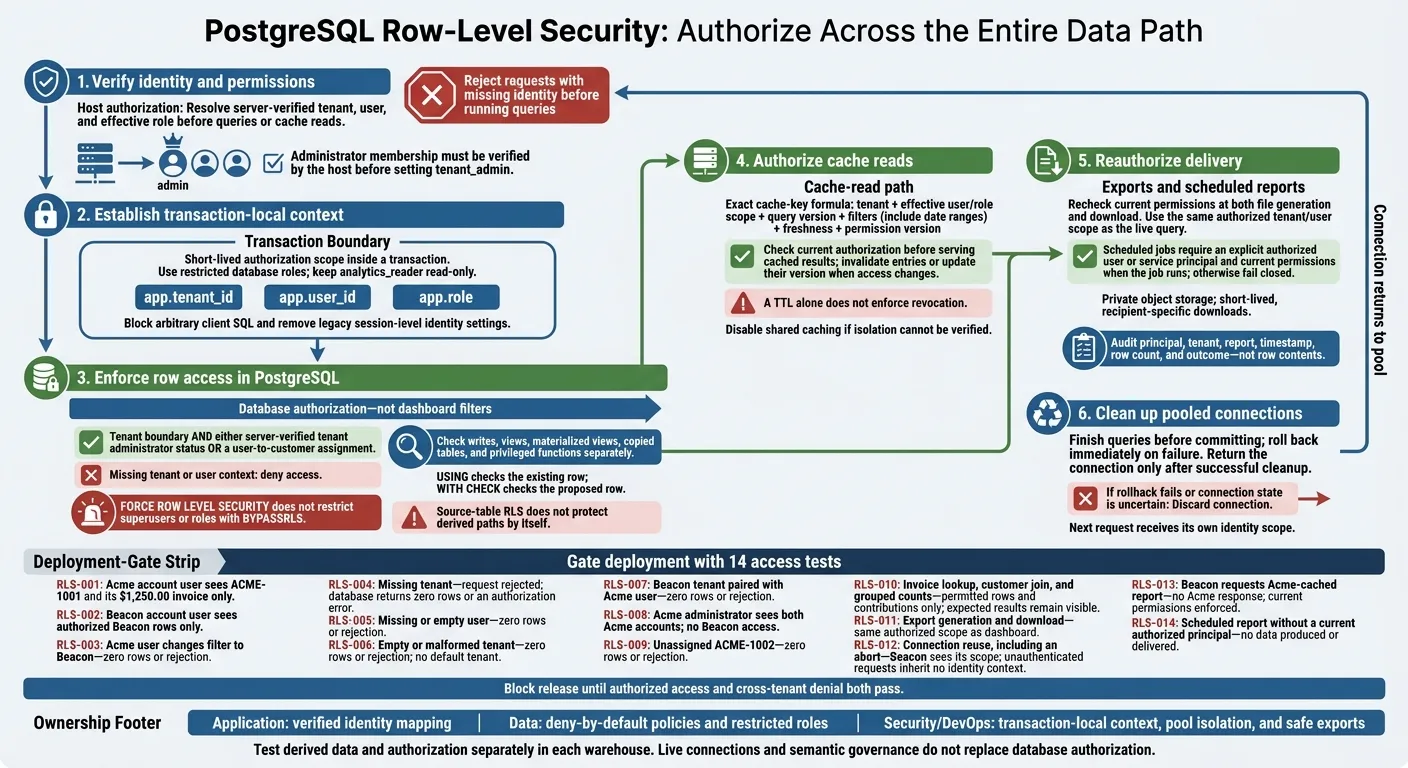 {Embedded Analytics Security: Protect the Entire Data Path}
:::
{Embedded Analytics Security: Protect the Entire Data Path}
:::
Set Up PostgreSQL Tenant and User Policies
Create Tenant-Aware Tables and a Read-Only Role
Run this setup as an administrative role. The tables enforce tenant boundaries inside the warehouse, so embedded dashboards don't have to rely on UI filters, a key requirement when evaluating embedded analytics tools. This example uses two tenants. Composite foreign keys keep invoices and assignments from pointing to another tenant's customers.
The analytics role has no direct access to tenant metadata or assignments. Keep connection credentials in a server-side secrets manager.
CREATE SCHEMA reporting;
REVOKE ALL ON SCHEMA reporting FROM PUBLIC;

CREATE ROLE analytics_reader
  NOINHERIT;

CREATE TABLE reporting.tenants (
  tenant_id uuid PRIMARY KEY,
  name text NOT NULL
);

CREATE TABLE reporting.customers (
  tenant_id uuid NOT NULL REFERENCES reporting.tenants (tenant_id),
  customer_id bigint GENERATED BY DEFAULT AS IDENTITY,
  account_no text NOT NULL,
  name text NOT NULL,
  PRIMARY KEY (tenant_id, customer_id),
  UNIQUE (tenant_id, account_no)
);

CREATE TABLE reporting.invoices (
  tenant_id uuid NOT NULL,
  invoice_id bigint GENERATED ALWAYS AS IDENTITY,
  customer_id bigint NOT NULL,
  amount_usd numeric(12,2) NOT NULL CHECK (amount_usd >= 0),
  invoice_date date NOT NULL,
  PRIMARY KEY (tenant_id, invoice_id),
  FOREIGN KEY (tenant_id, customer_id)
    REFERENCES reporting.customers (tenant_id, customer_id)
);

CREATE TABLE reporting.user_customer_access (
  tenant_id uuid NOT NULL,
  customer_id bigint NOT NULL,
  user_id uuid NOT NULL,
  PRIMARY KEY (tenant_id, user_id, customer_id),
  FOREIGN KEY (tenant_id, customer_id)
    REFERENCES reporting.customers (tenant_id, customer_id)
);

INSERT INTO reporting.tenants VALUES
  ('00000000-0000-0000-0000-000000000001', 'Acme'),
  ('00000000-0000-0000-0000-000000000002', 'Beacon');

INSERT INTO reporting.customers
  (tenant_id, customer_id, account_no, name)
VALUES
  ('00000000-0000-0000-0000-000000000001',
   1001, 'ACME-1001', 'Acme Account 1'),
  ('00000000-0000-0000-0000-000000000001',
   1002, 'ACME-1002', 'Acme Account 2'),
  ('00000000-0000-0000-0000-000000000002',
   2001, 'BEACON-2001', 'Beacon Account 1');

-- Advance the identity sequence after explicit seed IDs.
SELECT setval(
  pg_get_serial_sequence('reporting.customers', 'customer_id'),
  2001
);

INSERT INTO reporting.invoices
  (tenant_id, customer_id, amount_usd, invoice_date)
VALUES
  ('00000000-0000-0000-0000-000000000001',
   1001, 1250.00, DATE '2026-01-15'),
  ('00000000-0000-0000-0000-000000000002',
   2001, 875.50, DATE '2026-02-03');

INSERT INTO reporting.user_customer_access VALUES
  ('00000000-0000-0000-0000-000000000001', 1001,
   '11111111-1111-1111-1111-111111111111'),
  ('00000000-0000-0000-0000-000000000002', 2001,
   '22222222-2222-2222-2222-222222222222');

REVOKE ALL ON ALL TABLES IN SCHEMA reporting FROM PUBLIC;
GRANT USAGE ON SCHEMA reporting TO analytics_reader;
GRANT SELECT ON reporting.customers, reporting.invoices
  TO analytics_reader;
Next, make PostgreSQL reject rows when verified tenant and user context is missing.
Deny Access Without Tenant and User Context
This narrowly scoped security-definer function checks assignments without exposing the assignment table. After the host app passes verified context, it gets only a Boolean result.
The function follows the existing app.role convention: a server-verified tenant_admin can read every row for its tenant. Other users need an assignment. Convert missing context to NULL before checking policies.
Postgres combines permissive policies with OR, so use one clear SELECT policy model per table. FORCE ROW LEVEL SECURITY does not restrict superusers or roles with BYPASSRLS.[2][5]
-- Run as the administrative setup role.
CREATE FUNCTION reporting.can_access_customer(
  row_tenant uuid, row_customer bigint
)
RETURNS boolean
LANGUAGE sql
STABLE
SECURITY DEFINER
SET search_path = pg_catalog
AS $$
  SELECT
    NULLIF(current_setting('app.tenant_id', true), '') IS NOT NULL
    AND NULLIF(current_setting('app.user_id', true), '') IS NOT NULL
    AND row_tenant =
      NULLIF(current_setting('app.tenant_id', true), '')::uuid
    AND (
      current_setting('app.role', true) = 'tenant_admin'
      OR EXISTS (
        SELECT 1
        FROM reporting.user_customer_access AS a
        WHERE a.tenant_id = row_tenant
          AND a.customer_id = row_customer
          AND a.user_id =
            NULLIF(current_setting('app.user_id', true), '')::uuid
      )
    );
$$;

REVOKE ALL ON FUNCTION
  reporting.can_access_customer(uuid, bigint) FROM PUBLIC;
GRANT EXECUTE ON FUNCTION
  reporting.can_access_customer(uuid, bigint) TO analytics_reader;

ALTER TABLE reporting.customers ENABLE ROW LEVEL SECURITY;
ALTER TABLE reporting.customers FORCE ROW LEVEL SECURITY;
ALTER TABLE reporting.invoices ENABLE ROW LEVEL SECURITY;
ALTER TABLE reporting.invoices FORCE ROW LEVEL SECURITY;

CREATE POLICY customers_select_policy
ON reporting.customers FOR SELECT TO analytics_reader
USING (reporting.can_access_customer(tenant_id, customer_id));

CREATE POLICY invoices_select_policy
ON reporting.invoices FOR SELECT TO analytics_reader
USING (reporting.can_access_customer(tenant_id, customer_id));
Test with SET LOCAL ROLE, rather than the administrative role's privileges. The Acme user should see ACME-1001 and its $1,250.00 invoice - but not ACME-1002 or Beacon's $875.50 invoice. An Acme administrator should see both Acme accounts. The host must verify administrator membership before setting that role.
BEGIN;
SET LOCAL ROLE analytics_reader;
SELECT set_config('app.tenant_id',
  '00000000-0000-0000-0000-000000000001', true);
SELECT set_config('app.user_id',
  '11111111-1111-1111-1111-111111111111', true);
SELECT set_config('app.role', 'account_user', true);

SELECT tenant_id, account_no, name
FROM reporting.customers
ORDER BY account_no;

SELECT tenant_id, invoice_id, amount_usd, invoice_date
FROM reporting.invoices
ORDER BY invoice_date;

-- Same user, wrong tenant: both counts must be zero.
SELECT set_config('app.tenant_id',
  '00000000-0000-0000-0000-000000000002', true);
SELECT
  (SELECT count(*) FROM reporting.customers) AS customers,
  (SELECT count(*) FROM reporting.invoices) AS invoices;

-- Missing tenant context: both counts must remain zero.
SELECT set_config('app.tenant_id', '', true);
SELECT
  (SELECT count(*) FROM reporting.customers) AS customers,
  (SELECT count(*) FROM reporting.invoices) AS invoices;
ROLLBACK;
Check Write Policies and Derived Data
Read access covers only half the model. Write paths and derived objects need the same tenant checks.
Keep analytics_reader read-only. This setup grants write access to a separate service role: USING checks the existing row, while WITH CHECK checks the proposed row.[2] Reusing the account check stops an invoice from being moved to a tenant or customer the user cannot access.
-- Run as the administrative setup role.
CREATE ROLE invoice_writer
  NOINHERIT;

GRANT USAGE ON SCHEMA reporting TO invoice_writer;
GRANT EXECUTE ON FUNCTION
  reporting.can_access_customer(uuid, bigint) TO invoice_writer;
GRANT INSERT, UPDATE ON reporting.invoices TO invoice_writer;

CREATE POLICY invoices_insert
ON reporting.invoices FOR INSERT TO invoice_writer
WITH CHECK (reporting.can_access_customer(tenant_id, customer_id));

CREATE POLICY invoices_update
ON reporting.invoices FOR UPDATE TO invoice_writer
USING (reporting.can_access_customer(tenant_id, customer_id))
WITH CHECK (reporting.can_access_customer(tenant_id, customer_id));
Audit each derived path separately: views, materialized views, copied tables, execution privileges, underlying grants, SECURITY DEFINER ownership, search_path, and context checks. Source-table RLS does not protect these paths by itself. Give these objects equivalent tenant isolation, or expose them only through a protected access layer. Then test the policies with pooled connections, caches, and exports.
Everything you need to know about Postgres Row Level Security | POSETTE 2024
::: @iframe https://www.youtube.com/embed/vZT1Qx2xUCo :::
Prevent Leaks Through Pools, Caches, and Exports
PostgreSQL RLS doesn’t prevent every leak. Pooled connections, caches, and exports can expose data when they outlast the request’s identity context. Treat each request as a short-lived authorization scope, then clear or discard anything that could reuse that context.
Keep Identity Context Isolated in Pooled Connections
A session-level SET can leave one tenant’s identity on a connection that another request later reuses. With pools such as PgBouncer, keep the tenant/user policy context established earlier scoped to each transaction. Finish all queries before committing.[9][11]
If a request fails, roll back immediately. Return the connection to the pool only after checking that cleanup succeeded. If rollback fails or the connection’s state is uncertain, discard it.
Remove legacy session-level identity settings. Block arbitrary client SQL - not just SET - including context-changing functions, role changes, and multi-statement payloads. Log the request ID, tenant, user, database role, failure category, and whether the connection was returned or discarded. Keep tokens and sensitive row contents out of logs.[8]
Once the connection is clean, verify that cache reads and file generation use the same identity.
Check Permissions for Caches and Exports
Cache keys should include tenant + effective user/role scope + query version + filters + freshness + permission version. Include date ranges in the filters. A tenant-only key won’t separate users who have different permissions.
Check current authorization before serving cached results. When access changes, invalidate entries or update their version. A TTL alone does not enforce revocation. Disable shared caching if you can’t verify isolation.[7]
Recheck current permissions both when generating and when downloading CSV, PDF, or spreadsheet exports. Use the same authorized tenant/user scope as the live query.
Exports and scheduled jobs must use the same request-scoped identity checks or fail closed. Background jobs need an explicit authorized user or service principal, with current permissions resolved when the job runs. Store files in private object storage and require short-lived, recipient-specific downloads. Audit the principal, tenant, report, timestamp, row count, and outcome - not row contents.[12]
Compare Filters and Access Controls
Each layer protects a different boundary. The matrix below separates presentation controls from access enforcement: filters shape the UI, while RLS, cache isolation, and export authorization enforce access beyond it.
| Control | What It Does | Boundary | Risk | Recommended Use |
|---|---|---|---|---|
| Dashboard filters | Narrows displayed data | UI | Bypassable requests | Navigation only; never authorization |
| Host authorization | Verifies identity and scope | Request | Forged or stale context | Resolve identity before queries and cache reads |
| PostgreSQL RLS | Enforces row access | Database | Bypass roles or stale context | Restricted roles; request-local identity |
| Cache isolation | Enforces result separation | Cache layer | Incomplete keys or stale permissions | Full scope and permission version |
| Export authorization | Enforces file access | Generation and delivery | Stale permissions or reusable links | Reauthorize; recipient-specific downloads; audit |
Test User Access and Tenant Isolation
Make permission tests a deployment gate. Use verified tenant and user context from the host app, along with the deployed database role, connection pool, and pooling mode. PostgreSQL table owners normally bypass RLS, as do superusers and roles with BYPASSRLS.[6][10] Test through the same request path your embedded dashboard uses in production.
Build a Permission-Test Matrix
Use the Acme and Beacon fixtures from the policy setup to gate deployment. For each test, record the execution role, identity, expected result, actual result, and pass/fail status. Block deployment if any row, identifier, or aggregate contribution falls outside the user's permissions.[17]
| Test | Setup: Execution Role and Identity | Expected Result | Actual Result | Pass/Fail |
|---|---|---|---|---|
| RLS-001 | analytics_reader; Acme account user |
ACME-1001 and its $1,250.00 invoice only | ||
| RLS-002 | analytics_reader; Beacon account user |
Authorized Beacon rows only | ||
| RLS-003 | Acme user changes filter to Beacon | Zero rows or rejection | ||
| RLS-004 | Missing tenant context | Request rejected; database returns zero rows or an authorization error | ||
| RLS-005 | Valid tenant; missing or empty user context | Zero rows or rejection | ||
| RLS-006 | Empty or malformed tenant context | Zero rows or rejection; no default tenant | ||
| RLS-007 | Beacon tenant paired with Acme user | Zero rows or rejection | ||
| RLS-008 | Acme admin | Both Acme accounts; no Beacon access | ||
| RLS-009 | Acme user requests unassigned ACME-1002 | Zero rows or rejection | ||
| RLS-010 | Invoice lookup, customer join, and grouped counts | Permitted rows and contributions only; expected results remain visible | ||
| RLS-011 | Acme export generation and download | Same authorized scope as the dashboard | ||
| RLS-012 | Reuse connection after Acme request, including an abort | Beacon sees its scope; an unauthenticated request gets no identity context | ||
| RLS-013 | Beacon requests Acme-cached report | No Acme response; current permissions enforced | ||
| RLS-014 | Scheduled report lacks a current authorized principal | No data produced or delivered |
Use these cases to drive the automated checks below.
Run SQL Assertions and Review Query Paths
Run these assertions against the previously seeded reporting.invoices(tenant_id, customer_id) and reporting.customers(tenant_id, customer_id) tables. Use analytics_reader as the execution role. Keep identity changes within the test harness's verified host identity path - not an endpoint that accepts arbitrary SQL.[15][16]
BEGIN;
SET LOCAL ROLE analytics_reader;
SELECT set_config('app.tenant_id',
  '00000000-0000-0000-0000-000000000001', true);
SELECT set_config('app.user_id',
  '11111111-1111-1111-1111-111111111111', true);
SELECT set_config('app.role', 'account_user', true);

DO $$
DECLARE
  acme uuid := '00000000-0000-0000-0000-000000000001';
  beacon uuid := '00000000-0000-0000-0000-000000000002';
BEGIN
  IF current_user <> 'analytics_reader' THEN
    RAISE EXCEPTION 'Wrong execution role';
  END IF;

  -- Positive checks prevent an always-empty policy from passing.
  IF NOT EXISTS (
    SELECT 1 FROM reporting.invoices
    WHERE tenant_id = acme AND customer_id = 1001
      AND amount_usd = 1250.00
  ) THEN
    RAISE EXCEPTION 'Expected authorized invoice is missing';
  END IF;

  IF EXISTS (
    SELECT 1 FROM reporting.invoices
    WHERE tenant_id IS DISTINCT FROM acme
       OR customer_id IS DISTINCT FROM 1001
  ) THEN
    RAISE EXCEPTION 'Unauthorized invoice scope';
  END IF;

  IF EXISTS (
    SELECT 1 FROM reporting.invoices WHERE tenant_id = beacon
  ) THEN
    RAISE EXCEPTION 'Beacon invoices exposed';
  END IF;

  IF NOT EXISTS (
    SELECT 1
    FROM reporting.invoices i
    JOIN reporting.customers c
      ON c.tenant_id = i.tenant_id
     AND c.customer_id = i.customer_id
    WHERE i.tenant_id = acme AND i.customer_id = 1001
  ) OR EXISTS (
    SELECT 1
    FROM reporting.invoices i
    JOIN reporting.customers c
      ON c.tenant_id = i.tenant_id
     AND c.customer_id = i.customer_id
    WHERE c.tenant_id IS DISTINCT FROM acme
       OR c.customer_id IS DISTINCT FROM 1001
  ) THEN
    RAISE EXCEPTION 'Join visibility failed';
  END IF;

  IF EXISTS (
    SELECT 1
    FROM (
      SELECT tenant_id, customer_id, count(*) AS invoice_count
      FROM reporting.invoices
      GROUP BY tenant_id, customer_id
    ) totals
    WHERE tenant_id IS DISTINCT FROM acme
       OR customer_id IS DISTINCT FROM 1001
       OR invoice_count <> 1
  ) THEN
    RAISE EXCEPTION 'Grouped counts failed';
  END IF;
END;
$$;

ROLLBACK;
Test missing settings on a new connection, then test empty values separately. These checks expect zero rows, but the application must reject the request. If your policy returns an authorization error instead, have the runner assert that specific error.[6][18]
-- Fresh connection.
BEGIN;
SET LOCAL ROLE analytics_reader;

DO $$
BEGIN
  IF NULLIF(current_setting('app.tenant_id', true), '') IS NOT NULL
     OR NULLIF(current_setting('app.user_id', true), '') IS NOT NULL THEN
    RAISE EXCEPTION 'Test connection already has identity context';
  END IF;

  IF EXISTS (SELECT 1 FROM reporting.invoices)
     OR EXISTS (SELECT 1 FROM reporting.customers) THEN
    RAISE EXCEPTION 'Missing context exposed data';
  END IF;
END;
$$;
ROLLBACK;

-- Empty tenant.
BEGIN;
SET LOCAL ROLE analytics_reader;
SELECT set_config('app.tenant_id', '', true);
SELECT set_config('app.user_id',
  '11111111-1111-1111-1111-111111111111', true);
SELECT set_config('app.role', 'account_user', true);

DO $$
BEGIN
  IF EXISTS (SELECT 1 FROM reporting.invoices)
     OR EXISTS (SELECT 1 FROM reporting.customers) THEN
    RAISE EXCEPTION 'Empty tenant exposed data';
  END IF;
END;
$$;
ROLLBACK;

-- Empty user.
BEGIN;
SET LOCAL ROLE analytics_reader;
SELECT set_config('app.tenant_id',
  '00000000-0000-0000-0000-000000000001', true);
SELECT set_config('app.user_id', '', true);
SELECT set_config('app.role', 'account_user', true);

DO $$
BEGIN
  IF EXISTS (SELECT 1 FROM reporting.invoices)
     OR EXISTS (SELECT 1 FROM reporting.customers) THEN
    RAISE EXCEPTION 'Empty user exposed data';
  END IF;
END;
$$;
ROLLBACK;
Once the assertions pass, inspect the generated SQL and query plans.
- Inspect policies: Review
pg_policies,pg_class.relrowsecurity,pg_class.relforcerowsecurity, execution-role attributes, and query-time identity across dashboards, exports, caches, and pooled connections. - Inspect query plans: Run
EXPLAIN (ANALYZE, BUFFERS)under the restricted role for detail, join, and grouped-count queries. Add indexes onreporting.invoices (tenant_id, customer_id)andreporting.user_customer_access (user_id, tenant_id, customer_id)only if needed. Don't weaken policies to improve the plan. - Rerun after changes: Repeat the matrix whenever policies, semantic models, dashboards, or execution paths change.[6][13][14]
Conclusion: Align Database Security and Analytics Governance
Once the permission-test matrix passes, assign named owners before release. Application owns verified identity mapping; data owns deny-by-default policies and restricted roles; Security/DevOps owns transaction-local context, pool isolation, and safe exports.
Apply Access Rules Across the Warehouse Stack
Recreate RLS behavior in each warehouse. Test identity mapping, role enforcement, and derived-table behavior separately in Postgres, Snowflake, BigQuery, or Redshift. In dbt, retain tenant keys and test derived tables on their own. Don’t assume source-table policies carry through.
Block release until authorized access and cross-tenant denial both pass. Use the analytics layer for review, not access enforcement.
Review Governed Analytics in Querio
Querio’s live warehouse connections let teams inspect the SQL that runs. Governed context files, versioned in GitHub alongside dbt, help keep tenant-aware metric definitions versioned and auditable.
Live connections and semantic governance do not replace database authorization. Before approving an embedded workflow, trace its verified identity to the warehouse execution role and access policy. Confirm the full path from the signed token to the warehouse role that runs the query. The FAQ below covers the rollout questions teams encounter most often.
FAQs
::: faq
How can I measure RLS performance overhead?
Benchmark the queries your dashboards and notebooks actually run, not isolated table scans. Track execution time, latency, and compute costs. Poorly optimized Row-Level Security (RLS) policies can increase latency and costs by up to 30% or make scans of large datasets 2–5 times slower.
Test with real multi-tenant data during your proof of concept. Verify that 95% of requests load in under 3 seconds. If performance falls short, simplify filter predicates to avoid complex joins, recursion, or string transformations. :::
::: faq
How should I handle users with access to multiple tenants?
Define Row-Level Security (RLS) policies that check the user's ID or role against the tenant IDs they’re allowed to access. Use boolean logic in the USING clause to grant access to organizations or departments based on the user's attributes.
For example, check whether the user's assigned
tenant_idsarray contains the row'stenant_id.
This gives you fine-grained access control with consistent security across dashboards and API endpoints. :::
::: faq
What if permissions change while a report is running?
Row-level security (RLS) uses the permissions active when the database executes the query, even if the report is still running [1][2]. Just before the query runs, Querio adds the user's security context - such as tenant ID or role - to the database session. The database then applies the active policy to that query execution [1][3][4]. :::