Business Intelligence
What Is a Semantic Layer, and Why Does AI/BI Need One?
Governed semantic layers enforce metric definitions, joins, and access so AI, BI, and dashboards deliver consistent, decision-ready results.

If every team can query the same warehouse and still get different ARR or MRR numbers, the problem is usually logic, not data. I’d sum it up like this: a semantic layer gives dashboards, SQL, and AI one shared set of metric rules, join rules, and access rules so people stop arguing over KPIs and start using the same answer.
In plain terms, here’s what it does for you:
- Defines metrics once so MRR, ARR, churn, and NRR mean the same thing everywhere
- Sets approved dimensions and joins so users don’t double-count revenue or query at the wrong grain
- Applies access rules at query time so a manager, analyst, and exec each see only what they should
- Gives AI business context so it stops guessing from raw schema alone
That matters more than most teams expect. A wrong join or date filter can shift a result by 10% to 20%. And at a B2B SaaS company, one off KPI can affect forecasts, board slides, and even a $500,000 upsell discussion.
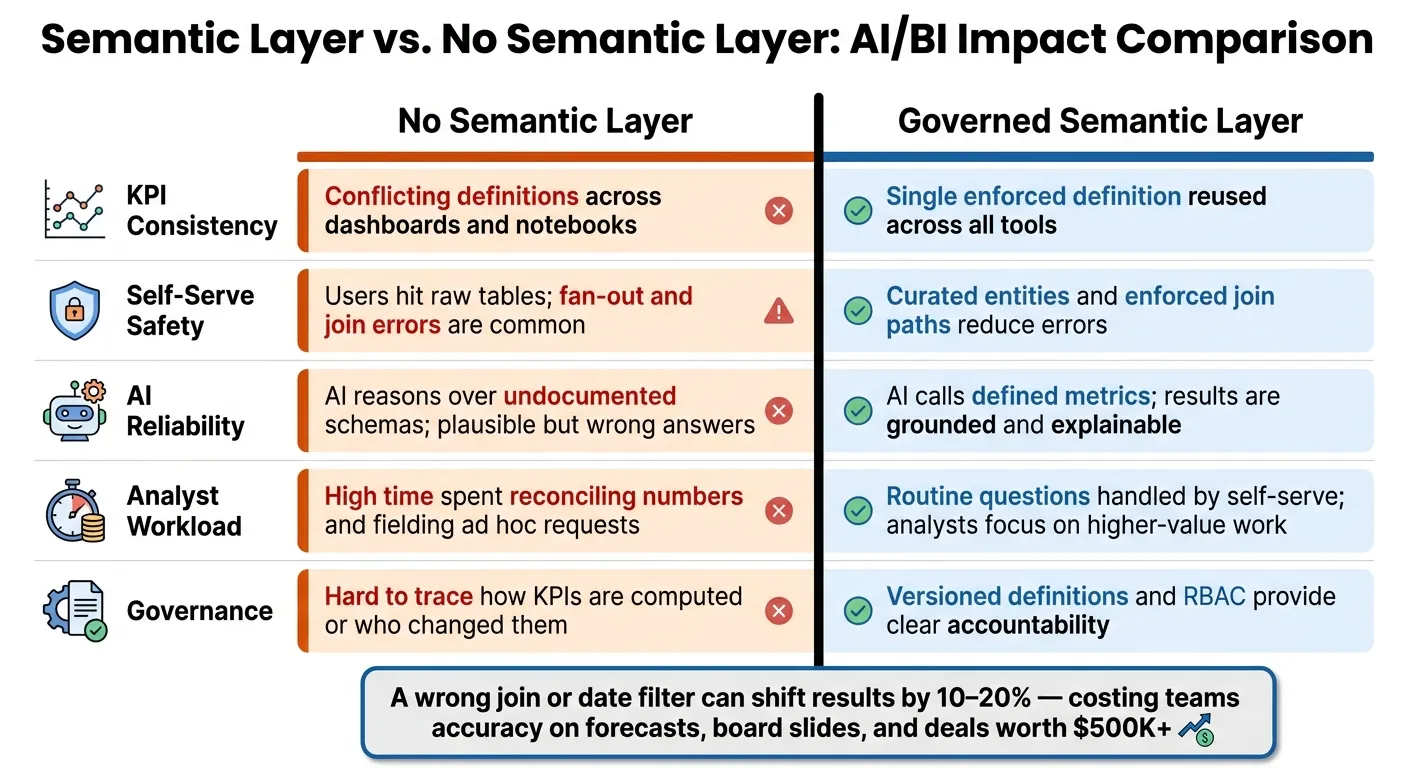
Here’s the short version: without a semantic layer, BI tools, notebooks, and AI each build their own version of the truth. With one, they all query the same governed model.
| Area | Without a semantic layer | With a semantic layer |
|---|---|---|
| KPI definitions | Different teams use different formulas | One shared formula across tools |
| Self-serve reporting | Users hit raw tables and make join mistakes | Users query approved entities and paths |
| AI answers | AI writes valid SQL but may answer the wrong business question | AI uses defined metrics and approved logic |
| Access control | Rules vary by tool | Same rules apply across dashboards, SQL, and AI |
When evaluating a future tech stack for SaaS analytics, I look for a few simple checks: live warehouse querying, inspectable SQL, versioned definitions, and the same RBAC and row-level filters in every tool. If those pieces are there, the layer is doing more than labeling data. It is helping keep answers consistent and ready for decisions.
The problems a semantic layer solves for AI/BI teams
Once a semantic layer is in place, it fixes three repeat problems in AI/BI work. Most analytics trust issues come from one thing: the same metric gets defined in different ways by different teams. Finance, Product, Sales, and AI can all pull from the same warehouse and still end up with different numbers.
Conflicting KPI definitions produce multiple versions of the truth
A common example is MRR. Finance may subtract refunds and delinquent customers, while Product reads raw subscription amounts and lands on a higher figure. The same kind of drift shows up in Expansion MRR, NRR, and Active Seats when logic is hard-coded across dbt, Looker, Salesforce, and notebooks. [3][8]
Self-serve reporting breaks when users query raw tables
The problem gets worse when people build reports straight from raw tables. A sales manager might join tables at the wrong grain and double-count MRR. Or they might filter on the wrong date field and move revenue into the wrong quarter.
As a company grows, the schema usually gets messier too. Multi-product SaaS companies often deal with subscription histories that include slowly changing dimensions, multiple invoice line items per account, and many-to-many relationships between users, accounts, and product instances. That’s a lot to sort through.
So when a non-technical user asks, “How many mid-market customers expanded last quarter?”, it’s easy to get the wrong answer. They may filter on the current plan from an SCD table instead of the plan at the time of expansion. That can label enterprise expansions as mid-market and shift the result by 10% to 20%. Governed dimensions and approved join paths are what make self-serve safe:
- raw table → wrong grain → wrong number
- governed join path → consistent answer
AI-generated answers go wrong without business context
AI tools run into the same problem when they try to infer business logic from schema alone. Context-aware AI helps, but it doesn’t solve the whole issue. An AI assistant can write valid SQL and still answer the wrong question if it guesses metric logic instead of using governed definitions.
Without clear metric definitions, an AI might count subscriptions instead of customer accounts. Or it might use the wrong date field and shift revenue into the wrong period. In plain English: missing metric definition → wrong SQL; governed metric object → consistent answer.
A semantic layer gives AI governed metric objects to query instead of raw columns it has to guess from. [2][4][6][9]
How semantic layers work across analytics, SQL, and AI
A semantic layer defines business logic once, then makes that same logic available to every downstream tool. That includes metrics, dimensions, joins, and access rules. The payoff is simple: BI tools, SQL workflows, and AI systems all work from the same definitions.
That consistency comes from two things: reusable definitions and query-time enforcement.
Define once, reuse everywhere
A data team sets up metrics and dimensions as versioned definitions. Those definitions include grain, filters, valid dimensions, and aggregation rules. When a definition changes, that update flows to every downstream user automatically. No one has to go back and patch dashboards or notebooks by hand.
The exact setup depends on the stack. dbt Semantic Layer and LookML are two common examples. Both put definitions in one place, track changes with version control, and expose the same logic to downstream tools.
This hits hardest for lean data teams. If one small analytics group supports product, finance, and sales, it can't spend time maintaining separate metric logic in every tool. A centralized semantic layer fixes that. One engineer updates Active Customer once, and that change shows up everywhere.
But reuse alone isn't enough. The model also needs to control joins and access when queries run.
Enforce joins, grain, and access at query time
A semantic layer doesn't just describe definitions. It applies them when a query runs. That's the part that makes self-serve analytics and AI-generated queries more dependable.
The model stores relationship metadata, like valid join paths, one-to-many or many-to-many relationships, and metric grain. When someone runs a query, the semantic layer generates SQL with the right joins automatically.
For SaaS companies, this matters a lot. If you join subscription, invoice, and usage event tables at the wrong grain, revenue and retention numbers can drift fast. Many-to-many fan-out errors can quietly inflate MRR or active users before anyone spots the problem. That's the kind of issue that can derail a meeting in a hurry.
Access controls work the same way. Role-based access and row-level security are applied as SQL filters at query time, whether the request comes from a dashboard, a notebook, or an AI assistant. A regional sales manager sees only their accounts. An executive sees everything.
So the semantic layer acts like a traffic cop. It stops bad joins, grain mismatches, and unauthorized access before the result gets to the user.
| What the semantic layer enforces | Why it matters |
|---|---|
| Valid join paths and relationships | Prevents fan-out errors that inflate revenue or user counts |
| Metric grain and aggregation rules | Prevents grain mismatches in retention and MRR |
| Row-level security and RBAC | Ensures AI and self-serve queries respect data access policies |
| Approved metric definitions | Keeps AI-generated SQL aligned with finance-reported KPIs |
Those are the controls data leaders should look at next.
What data leaders should look for in a semantic layer
Key criteria: consistency, transparency, and warehouse fit
Once the semantic layer sets the logic, the next step is simple: can you trust it enough to use for day-to-day decisions?
That’s the test.
A governed semantic layer does more than sit on top of data. It needs to hold up under daily use, across dashboards, notebooks, and AI tools. The checks below help separate a real control layer from a thin wrapper.
Live warehouse querying is non-negotiable. The layer should connect straight to Snowflake, BigQuery, Redshift, or Postgres and run queries against live data. No extracts. No closed storage. If the query doesn’t show up in warehouse history, then it isn’t warehouse-native.
Inspectable SQL matters just as much. Every result should let you see the exact SQL behind it. If you can’t inspect the query, you’re being asked to trust a black box. That rarely ends well.
Versioned, code-based definitions are a must if metric logic is going to be reviewed and owned. When logic lives in Git-backed YAML or another declarative config, teams can review changes, test them, roll them back, and track ownership. Version control makes metric changes reviewable, testable, and reversible. [11][10]
RBAC and row-level security must return the same permitted data in every tool. A simple way to test this: use the same user in a dashboard and in an AI query. Both should return the same allowed slice of data.
Those checks draw a clear line between a layer that just stores definitions and one that actually governs them.
| Evaluation check | What to look for |
|---|---|
| Live querying | Query appears in warehouse history; no data extracts |
| Inspectable SQL | "View SQL" pane or logs; reproducible in warehouse console |
| Documented formulas, joins, and grain | Central catalog with documented formulas, join paths, and grain |
| Versioned logic | Git-backed definitions with change history and rollback |
| Same definitions across tools | Same metric definitions served to dashboards, notebooks, and AI |
| Role-based access | RBAC and row-level security enforced consistently at query time |
For growing SaaS teams, this stuff matters because one off metric doesn’t stay isolated. It spreads. A mismatch in one dashboard can turn into repeated cleanup across notebooks, board slides, and AI queries.
| No semantic layer | Governed semantic layer | |
|---|---|---|
| KPI consistency | Conflicting definitions across dashboards and notebooks | Single enforced definition reused across all tools |
| Self-serve safety | Users hit raw tables; fan-out and join errors are common | Curated entities and enforced join paths reduce errors |
| AI reliability | AI reasons over undocumented schemas; plausible but wrong answers | AI calls defined metrics; results are grounded and explainable |
| Analyst workload | High time spent reconciling numbers and fielding ad hoc requests | Routine questions handled by self-serve; analysts focus on higher-value work |
| Governance | Hard to trace how KPIs are computed or who changed them | Versioned definitions and RBAC provide clear accountability |
Why this matters for lean data teams at growing SaaS companies
For lean SaaS teams, these checks cut rework, disputes, and analyst drag.
When MRR, churn rate, and active accounts are defined once and enforced everywhere, the payoff is pretty direct: fewer metric arguments in executive reviews, faster ad hoc answers because stakeholders can self-serve from certified metrics, and less analyst time spent checking reports that should have been right the first time. [11][1]
That’s what keeps the layer useful as dashboards, SQL, and AI usage grow.
Conclusion: A semantic layer makes AI/BI outputs consistent and decision-ready
Across analytics, SQL, and AI, the same issue keeps popping up: different logic leads to different answers. A semantic layer gives each analytics tool the same governed business logic. That closes the gaps behind conflicting KPIs, shaky self-serve reporting, and AI answers you can’t rely on.
As more people use AI to query data, the price of inconsistent definitions goes up. Consistent context becomes the line between useful answers and confident mistakes. Querio puts that idea into practice through a governed context layer, so natural-language questions, notebooks, and dashboards all rely on the same metric definitions and join paths.
That’s why a semantic layer is more than metadata. It’s the control point that keeps AI/BI trustworthy. The outcome is simple: consistent, decision-ready answers across AI, dashboards, and notebooks.
FAQs
How is a semantic layer different from a data model?
A data model is the structural backbone of your data. It defines how data is organized, linked, and stored.
A semantic layer sits on top of that model. It turns technical tables into business terms like Revenue or Churn.
That matters because it keeps metric definitions consistent and access under control. As a result, non-technical users and AI can work in plain business language instead of raw schemas or messy SQL.
When should a SaaS team add a semantic layer?
A SaaS team should add a semantic layer when core metrics like revenue, churn, or active users mean different things across teams or tools.
It also helps when reporting is scattered, analysts spend too much time turning business questions into SQL, or AI-generated insights miss the business meaning behind the data.
A semantic layer creates a single source of truth by putting verified definitions right on top of the warehouse.
What should I validate before trusting a semantic layer?
Validate that the semantic layer works as a single source of truth that matches your organization’s business logic. Look closely at your data structure, metadata quality, and consistency so you can spot tribal knowledge, hidden assumptions, or metric drift before they turn into bigger problems.
Make sure canonical metrics like revenue, churn, and active users have agreed-upon formulas, clear owners, and documented edge cases and time windows. On top of that, verify RBAC and data lineage so teams can inspect where numbers come from and who can access what.