Business Intelligence
How to Query BigQuery from Claude: 3 Methods Compared
Compare three ways to use Claude with BigQuery—manual SQL, direct connector, or a governed semantic layer; tradeoffs in security, speed, and consistency.

If you want the short answer: there are 3 ways to use Claude with BigQuery, and each one trades setup, control, and consistency a bit differently. I’d use manual SQL when a person must review every query, direct BigQuery access when analysts need live answers in chat, and a governed layer like Querio when the main goal is stable metrics and tighter control.
Here’s the article in one view:
-
Method 1: Claude writes SQL, and you run it
- Lowest setup
- Lowest access risk
- Best for pilots and strict review workflows
- Weak point: results can vary based on prompt quality and schema context, leading to potential SQL hallucinations
-
Method 2: Claude connects to BigQuery through MCP or a native connector
- Live schema access and live query results
- Better for analyst workflows
- Weak point: IAM mistakes can expose too much data or lead to high query spend
-
Method 3: Claude connects through Querio
- Adds approved joins, metric rules, and centralized logs
- Better for self-serve use across teams
- Weak point: more setup than just prompting Claude for SQL
The comparison comes down to 7 things:
- setup time
- IAM and credentials
- permission scope
- SQL quality
- metric consistency
- audit trail
- ease of use for analysts and business users
A few facts stand out from the article:
- Claude web app does not support MCP
- Direct BigQuery access usually needs roles like
bigquery.dataViewerandbigquery.jobUser - BigQuery job logs can show fields like
totalBilledBytesandtotalSlotMs, which matter when query cost can jump fast - For teams handling HIPAA, SOC 2, or PCI workloads, dataset separation and column/row security matter a lot more once Claude can run queries itself
::: @figure 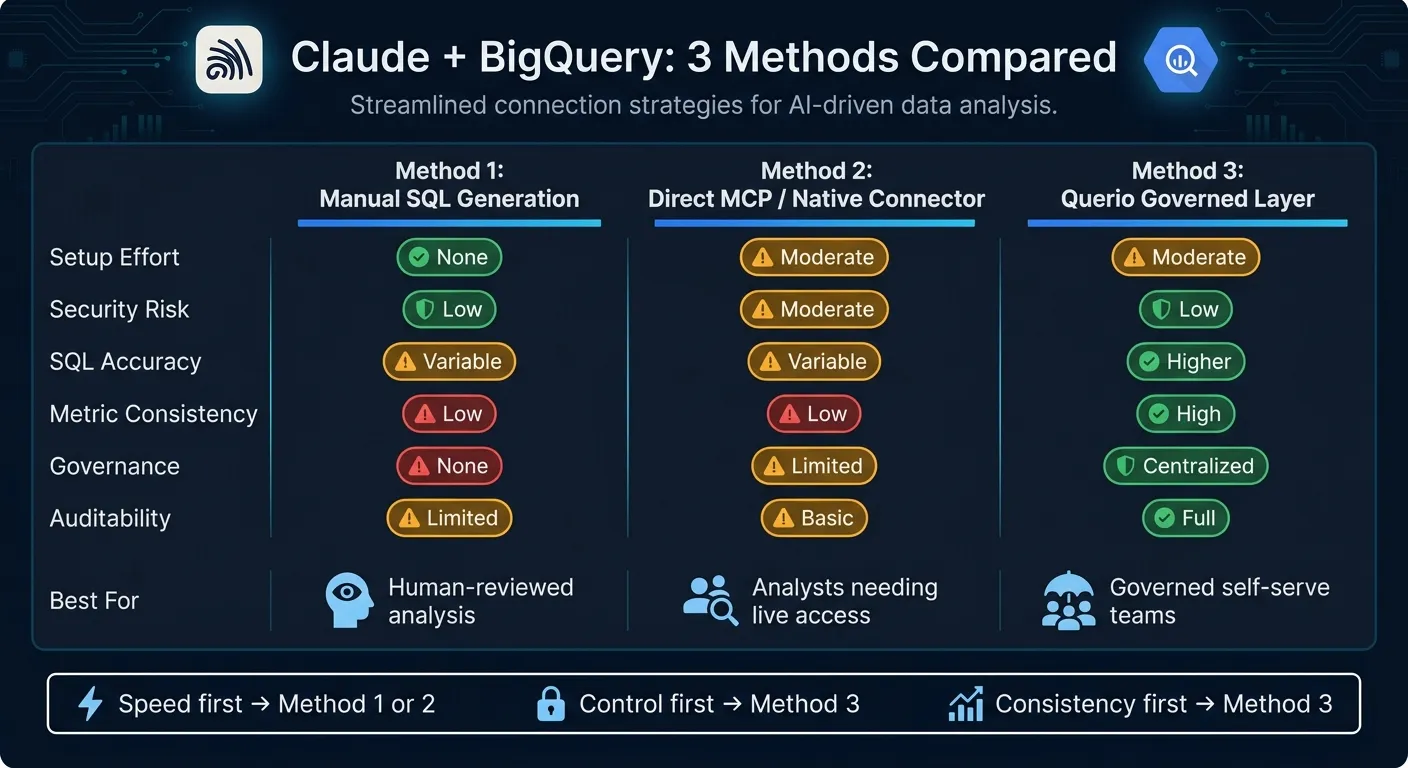 {Claude + BigQuery: 3 Methods Compared at a Glance}
:::
{Claude + BigQuery: 3 Methods Compared at a Glance}
:::
✅ Connect BIGQUERY to CLAUDE - Fast and Easy!
::: @iframe https://www.youtube.com/embed/I9VfxU_5B_s :::
sbb-itb-284a532
Quick Comparison
| Method | Setup | Access risk | Metric consistency | Best for |
|---|---|---|---|---|
| Manual SQL generation | Low | Low | Low | Human-reviewed analysis |
| Direct MCP / connector | Medium | Medium | Low | Analysts who need live warehouse access |
| Querio governed layer | Medium | Low | High | Teams that want controlled self-serve answers |
My take: if you care most about speed, start with manual SQL or direct access. If you care most about control and repeatable numbers, a governed layer is the safer path. The rest of the article breaks down where each method fits and where it tends to fail.
Method 1: Have Claude Write BigQuery SQL and Run It Yourself
This is the simplest path: you describe the question, Claude writes BigQuery Standard SQL, and a person runs it in BigQuery Console, the bq CLI, Hex, Jupyter, or Looker. Claude never connects to BigQuery or touches warehouse credentials. That keeps risk low. The tradeoff is simple too: output quality depends on the prompt and schema context you give it.
The main upside is speed. Claude can draft SQL much faster than writing it from scratch.
Setup and permissions: no connector needed, but BigQuery IAM still applies
Claude needs no GCP-side setup. The person running the query still needs bigquery.dataViewer and bigquery.jobUser. That split makes it easier to separate read access from query execution.
What Claude does need is context in the prompt: exact table names, column names and types, join keys, and metric definitions. For example, a prompt like "Write BigQuery Standard SQL for monthly active users from analytics.events, grouped by calendar month in UTC" will usually lead to reliable SQL. A vague prompt pushes Claude to guess. And guesses lead to broken queries.
That low-friction setup is nice at first, but it starts to wobble when schema drift or metric complexity makes hand-run SQL harder to trust.
When this method works and when it breaks down
This approach is a good fit for pilots, sandbox environments, and regulated teams that require a person to review every query before it runs. A U.S. healthcare or financial services team that can't let an AI system touch PHI or PCI data can still get solid value from this setup - Claude drafts the SQL, a person audits it, and existing warehouse-native data analysis tools and BigQuery audit logs capture everything that actually runs.
It starts to break in three common situations:
- Schema drift: If your dbt models or raw tables change often, schema snippets in prompts go stale. Then Claude writes SQL against columns that no longer exist.
- Metric ambiguity: Definitions for ARR, net revenue retention, or multi-touch attribution rarely fit neatly into one prompt. Without a shared source of truth, two analysts asking Claude the same question on different days can end up with two different numbers.
- Scale: When product managers, finance, and ops all send "quick data requests" to an analyst who manually builds prompts and pastes SQL, the data team turns into a bottleneck instead of a force multiplier. This is often where teams look to conversational BigQuery interfaces to clear backlogs.
This works best when a person can review every query. When teams need live warehouse access and less manual handling, the next method changes that tradeoff.
Method 2: Connect Claude Directly to BigQuery via MCP or a Native Connector
This setup cuts out the middle step. Claude connects to BigQuery, checks schemas, writes SQL, and runs queries in real time. The results come back in chat, so analysts can keep working without all the copy-paste.
Google’s managed MCP endpoint (https://bigquery.googleapis.com/mcp) works with Claude Desktop and Claude Code. Claude’s web app does not support MCP. Compared with Method 1, the tradeoff changes. You save manual work, but permissions and query control become a much bigger deal.
Architecture, setup steps, and IAM model
Before Claude can query BigQuery directly, you need four pieces in place:
- Enable the BigQuery API and audit logs.
- Create a dedicated service account for Claude.
- Assign least-privilege roles:
roles/bigquery.dataViewer,roles/bigquery.jobUser, androles/bigquery.readSessionUseronly when needed. - Configure the MCP server or connector in Claude Desktop or Claude Code.
For HIPAA, SOC 2, or PCI teams, dataset segregation is the main control. Keep PHI, cardholder data, and PII in separate projects or datasets where Claude’s service account has no access. Then add BigQuery row-level and column-level security, so sensitive fields stay blocked even if the service account is set up the wrong way. It’s also smart to test all of this in a non-production sandbox before you point Claude at production data.
What direct warehouse access gets right and where it falls short
One big win here is that Claude can inspect live schemas instead of relying on pasted table descriptions. That usually means fewer column-name mistakes and better SQL on the first pass. It also makes back-and-forth analysis feel much smoother. An analyst can ask, “break that down by product line and sort by highest revenue,” and Claude can fire off the next query right away.
There’s another plus: every query Claude runs shows up under the service account identity. That makes ownership clear in job logs. BigQuery also shows per-job metrics like totalBilledBytes and totalSlotMs, which helps teams spot expensive or inefficient queries before costs get out of hand.
But speed doesn’t fix definition drift. Claude can see raw tables and field names, not shared business definitions. So if someone asks for “net revenue retention,” Claude has to infer the metric from schema context. That can lead to different queries - and different numbers - across sessions.
There’s also a clear permission risk. If IAM is too broad, the blast radius gets bigger fast. A project-level dataViewer grant can expose sensitive datasets and trigger expensive full-table scans. BigQuery won’t stop that by itself. IAM is the guardrail. Direct access helps with speed, but it doesn’t solve governance. That’s the hole a governed semantic layer is there to fill.
Method 3: Use Querio as a Governed Layer Between Claude and BigQuery
If Method 1 is human-reviewed SQL and Method 2 is direct warehouse access, Method 3 adds a governed layer in the middle.
Here’s the big shift: Methods 1 and 2 leave schema and metric logic up to the user. Querio puts a context layer between Claude and BigQuery, so Claude uses approved joins and metric definitions instead of guessing from raw schema.
How Querio changes the connection model
Querio connects to BigQuery in read-only mode through a dedicated service account. Claude then connects to Querio through an MCP endpoint or API.
When someone asks a question in Claude, Slack, or Teams, Querio applies approved joins, metric definitions, and business logic before it queries BigQuery live. That means no CSV exports and no data extracts.
OAuth maps each user to their current access rights, which helps keep permissions least-privilege. If your team already models metrics in dbt, those definitions can stay version-controlled instead of getting buried in prompts. For dbt teams, the context layer can live in GitHub as SQL, Markdown, and Python.
How this improves governance, consistency, and usability for stakeholders
The biggest day-to-day difference shows up when people ask for the same metric in different ways.
With direct SQL generation, a metric like retention or revenue might get built from different tables or filters based on how the prompt is phrased. That’s where things can drift. With Querio’s governed layer, the definition is set once and reused each time.
Answers also stay inspectable. Every answer is backed by editable SQL and Python in a reactive notebook, so analysts can review and change joins, filters, and transformations directly.
That makes life easier for both sides:
- Analysts can inspect the logic instead of taking the output on faith
- Non-technical stakeholders can ask Claude for BigQuery-backed answers without dealing with table names, joins, or metric rules
The data team, then, spends less time fielding ad hoc requests and more time governing definitions and access.
That tradeoff is what the comparison table below weighs against the simpler methods.
Side-by-Side Comparison and Decision Guide
Comparison table: setup, security, query quality, governance, and usability
The table below pulls the main tradeoffs into one quick view. If you want the short version, this is it:
| Criteria | Method 1: Manual SQL Generation | Method 2: Direct MCP / Native Connector | Method 3: Querio Governed Layer |
|---|---|---|---|
| Setup effort | None | Moderate - service accounts, MCP server config, IAM roles | Moderate - semantic model setup, then centralized going forward |
| Permissions model | Existing BigQuery IAM on the signed-in user; Claude never touches BigQuery credentials | Dedicated service account with least-privilege BigQuery roles | Read-only service account; queries inherit the signed-in user's permissions |
| Security risk | Low - Claude never touches the warehouse directly | Moderate - misconfigured IAM can expose sensitive tables | Low - Claude queries governed views, not raw tables |
| SQL accuracy | Variable - depends on prompt quality and human review | Variable - live schema access helps, but joins and filters still depend on the prompt | Higher - queries run against tested, approved metric definitions |
| Metric consistency | Low - the same question can produce different SQL on different days | Low - no enforced semantic layer across sessions | High - definitions are set once and reused every time |
| Governance | None | Limited to BigQuery IAM and warehouse logs | Centralized - approved joins, metrics, audit logs, role-based access |
| Auditability | Limited - whatever logging exists in BigQuery and the analyst's tooling | Basic - API calls, query text, and warehouse logs | Full - requests, generated SQL, and results are logged centrally |
| Usability | Technical users only | Technical users and power users | Analysts and non-technical business users |
Which method fits your team
Choose Method 1 when human review is required and you want zero connector setup. It makes sense as a low-risk pilot when a technical analyst will check every Claude-generated BigQuery query before anything runs. The downside is pretty plain: it doesn't scale well. Metric definitions can drift over time, and non-technical stakeholders won't be able to use it on their own.
Choose Method 2 when analysts need live Claude-to-BigQuery queries inside a technical workflow. This option fits teams that want direct access and are comfortable managing IAM with care. It also calls for tight control over query costs. Without a semantic layer, one session's "revenue" may not match another session's "revenue." That's where things can get messy.
Choose Method 3 when you need governed self-serve and steady business definitions. If your organization works under HIPAA, SOC 2, or similar compliance rules, this route lowers risk in a meaningful way by keeping Claude away from raw tables and putting audit trails in one central place. It's a strong fit when business users need BigQuery-backed answers they can trust again and again.
Use the method that matches your biggest concern: speed, access control, or metric consistency.
FAQs
::: faq
Which method is best for a small data team?
For a small data team, the best setup is to use Querio to connect Claude to your warehouse through its MCP endpoint. That gives you Claude’s reasoning on top of Querio’s governed semantic layer.
Why does that matter? Your team can work from the same metrics without getting stuck in manual SQL queues or dealing with the mess that often comes with direct LLM-to-database queries.
Compared with Metabase for highly technical small teams, Querio is a better fit for teams that want self-serve analytics that feels easier to use, stays dependable, and comes with more predictable budgeting, without as much hands-on work from technical staff. :::
::: faq
How can I limit BigQuery cost when Claude runs queries?
Use Querio’s built-in governance and query optimization features. Querio applies the BigQuery limits you already have in place, including query timeouts, row-level access rules, and compute caps.
It also helps tighten queries with smarter filters and joins, so Claude scans only the data it needs instead of chewing through whole tables. That matters under BigQuery’s scan-based pricing, because broader queries can drive up costs fast. :::
::: faq
When do I need a governed layer instead of direct access?
Use a governed layer when you need consistent, repeatable metrics across users and conversations. Direct access works for quick ad hoc queries, but it can also leave teams with different calculations for the same KPI.
A governed layer puts table relationships, metric logic, and business terms in one place. That way, teams work from the same verified definitions, while security rules like role-based access control and data masking are applied automatically. :::