Business Intelligence
Querio vs Power BI: AI-first analytics for non-technical teams
Compare Querio and Power BI for non-technical teams—ease of use, live warehouse queries, SQL transparency, governance, and pricing differences.

Choosing between Querio and Power BI comes down to ease of use and purpose. Power BI is a feature-rich tool from Microsoft, offering advanced data modeling and visualization, but it requires technical skills like DAX formulas and navigating complex data models. Querio, on the other hand, is designed for simplicity, allowing non-technical users to query data in plain English and get instant, SQL-backed results.
Key Takeaways:
- Power BI: Suits technical users, integrates with Microsoft tools, and supports AI features like Copilot. However, it has a steep learning curve and relies on traditional workflows.
- Querio: Built for non-technical teams, offering natural language querying, live data connections, and transparent SQL for every query. It's faster to set up and easier to use.
Quick Comparison
| Feature | Querio (AI-First) | Power BI (AI-Integrated) |
|---|---|---|
| Interface | Conversational chat | Dashboards with AI sidebar |
| Learning Curve | Minimal | High |
| Data Connection | Live, read-only warehouse | Hybrid (live + in-memory) |
| Governance | Centralized semantic and metrics layer | Microsoft Fabric measures |
| Pricing | Free plan; Core $2,499/mo (unlimited users) | $10–$14/user/month + AI costs |
Querio is ideal for teams seeking fast, intuitive analytics without technical expertise, while Power BI works better for organizations with dedicated data analysts and a Microsoft-centric ecosystem.
::: @figure 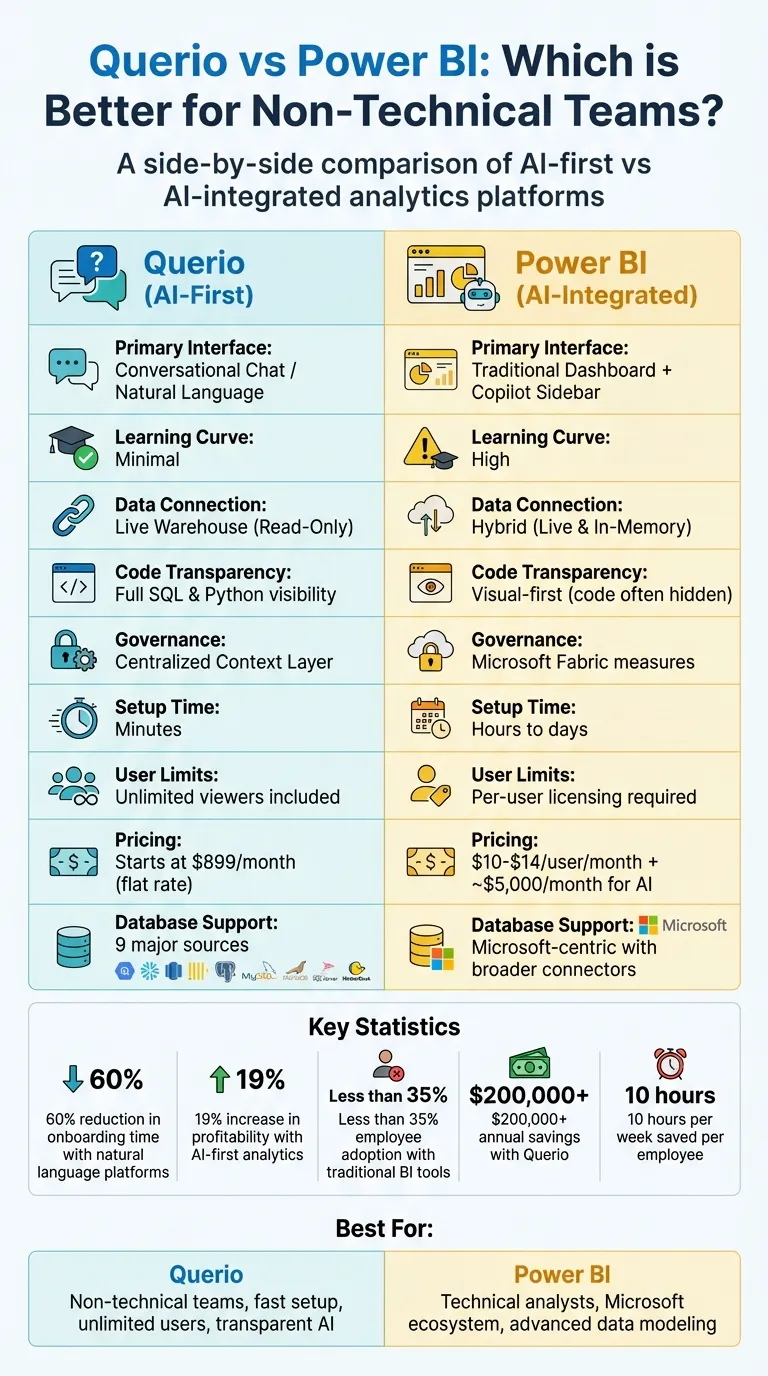 {Querio vs Power BI: Feature Comparison for Non-Technical Teams}
:::
{Querio vs Power BI: Feature Comparison for Non-Technical Teams}
:::
Power BI Demo - Copilot and AI
::: @iframe https://www.youtube.com/embed/hxffziDVcLU :::
sbb-itb-284a532
What is Power BI?
Power BI is Microsoft's business intelligence platform designed to bring data modeling, visualization, and reporting together in one place. It offers tools for both technical experts and everyday users, making it a versatile choice for organizations of all sizes.
The platform caters to a wide audience - from business analysts creating intricate data models to non-technical team members who simply need to view and interact with dashboards. Power BI integrates seamlessly with the Microsoft ecosystem, including Excel, Teams, and SharePoint, which makes it especially appealing for those familiar with Microsoft 365 tools.
While Power BI includes AI-powered features to simplify certain tasks, it still relies heavily on AI BI vs traditional BI principles. For instance, Smart Narrative can automatically create written summaries that explain the insights behind charts, while Quick Insights scans datasets to highlight trends and anomalies without requiring manual analysis. The Key Influencers visual allows users to pinpoint factors driving specific business metrics, all through an easy-to-use drag-and-drop interface.
In May 2025, Microsoft introduced Copilot in Power BI, a standalone AI feature that takes user input in natural language and generates reports, visualizations, summaries, and even DAX calculations. This tool reflects Microsoft's push to integrate AI into its BI tools, but users still need a solid understanding of their data models to ensure accurate outputs.
Though Power BI includes many accessible features, it remains rooted in traditional BI practices. Its interface, which feels familiar to Office users, is often praised, but the advanced capabilities come with a steep learning curve. For teams without dedicated technical expertise, mastering these features can be a significant challenge.
What is Querio?
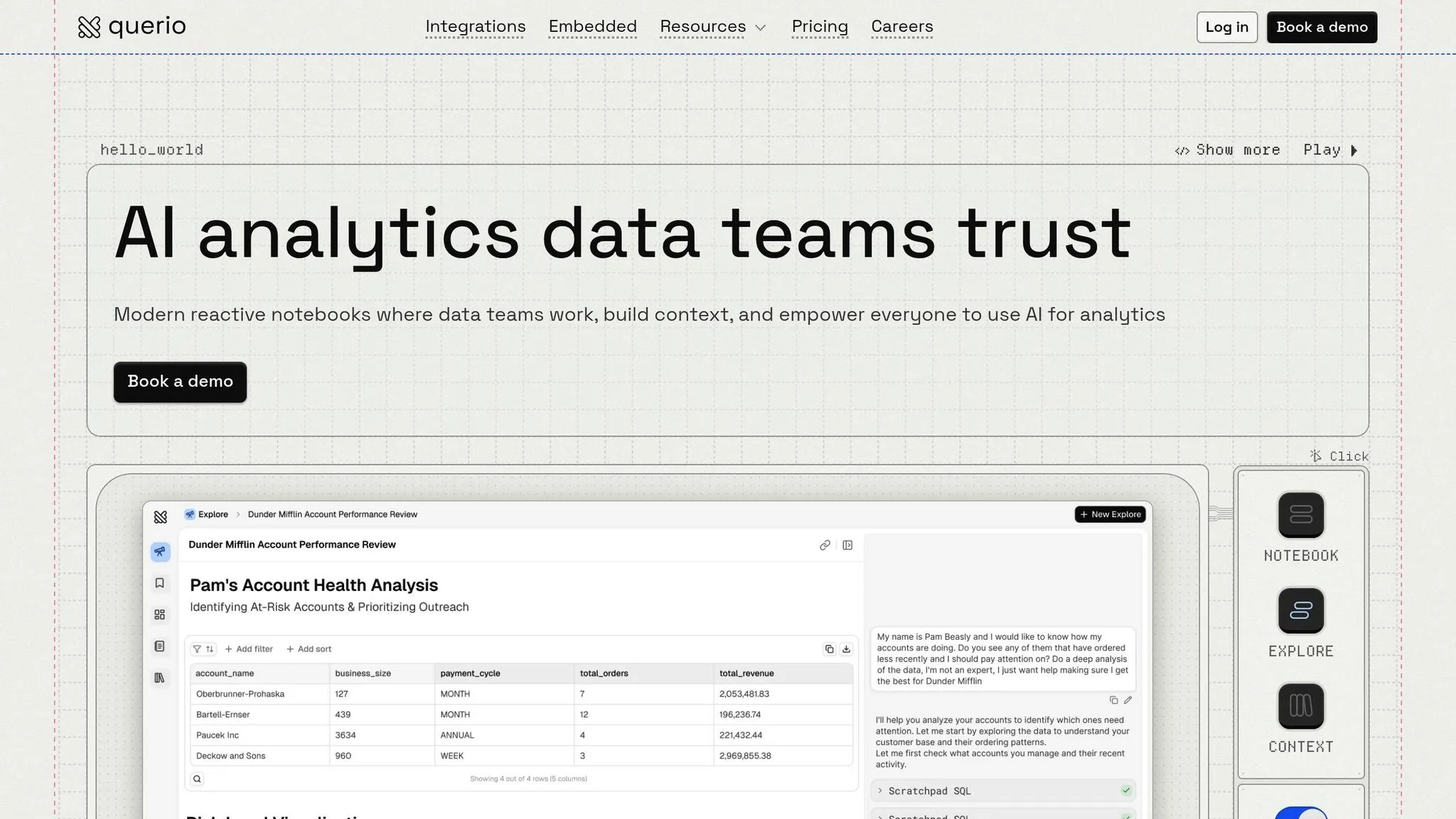
Querio is an AI-driven analytics platform designed to connect business questions directly to reliable data insights. Unlike traditional tools that treat AI as an add-on, Querio uses natural language as its core interface for exploring data. This allows teams to ask questions and get instant, accurate visualizations - no need for SQL expertise.
The platform connects live and read-only to your data warehouse, including popular options like Snowflake, BigQuery, Amazon Redshift, ClickHouse, PostgreSQL, MySQL, MariaDB, and Microsoft SQL Server. By querying data in real time, these live connections eliminate issues like data duplication and refresh delays. When you ask a question, Querio generates SQL in the background, executes it instantly, and delivers results in seconds.
What sets Querio apart is its governance through context. The platform understands your schema, table relationships, and business terminology intuitively. Data teams can define joins, metrics, and business definitions in a shared context layer. This ensures that when users ask about metrics like "revenue", everyone gets consistent and reliable results. This governed context keeps data accurate and accessible across teams.
As one G2 reviewer shared: "The ease of use is outstanding. I can query our CRM data in natural language and get accurate SQL-backed results in seconds. The AI agent is accurate - it understands our schema... No more writing SQL queries or building dashboards." [1]
Querio’s user-friendly design empowers non-technical teams to take charge of their analytics. Marketing managers can evaluate campaign performance, sales leaders can track pipeline metrics, and operations teams can monitor workflows - all without needing help from data analysts or mastering complex query languages. Plus, with SOC 2 Type II compliance and role-based security controls, Querio ensures that its accessibility never compromises security.
Feature Comparison
Looking at these platforms side by side, their distinct design philosophies become clear. Power BI started as a traditional dashboard tool, later integrating AI features like Copilot. In contrast, Querio was built with AI at its core, focusing on making data interaction more conversational and intuitive. These foundational differences shape how each tool operates and serves its users.
The contrast is most evident in day-to-day usage. Power BI requires users to work through dashboards, apply filters, and interact with an AI assistant via a sidebar. Querio, on the other hand, begins with a conversational chat interface. Users simply type questions in plain English and receive immediate answers backed by SQL. Plus, Querio generates fully visible and editable code for every query, giving users greater transparency and control.
Data connectivity is another key distinction. Power BI employs a hybrid model, combining live queries with in-memory data extracts. Querio connects directly to your data warehouse in a live, read-only mode, ensuring that all insights are based on real-time data. Warehouse permissions are automatically enforced, streamlining access and security.
When it comes to governance, Querio's context layer stands out. Power BI relies on Microsoft Fabric and complex measure definitions, which can be cumbersome. Querio allows data teams to define joins, metrics, and business terms in a shared context layer. This ensures consistent answers across the board - whether someone asks about "revenue" or "customer retention", the response is always accurate and aligned.
Feature Comparison Table
| Feature | Querio (AI-First) | Power BI (AI-Integrated) |
|---|---|---|
| Primary Interface | Conversational Chat / Natural Language | Traditional Dashboard + Copilot Sidebar |
| Code Generation | Transparent SQL & Python | DAX & Narrative Text |
| Data Connection | Live Warehouse (Read-Only) | Hybrid (Live & In-Memory Extracts) |
| Semantic Layer | Centralized Context Layer | Microsoft Fabric / Power BI Measures |
| Governance | Inherits Warehouse Permissions | Microsoft Purview & DLP Policies |
| Notebooks | Reactive Python Versions | Integration with Fabric Notebooks |
| Customization | Programmable AI "Skills" and Rules | Pre-configured AI "Quick Insights" |
| Transparency | Full Code Visibility (SQL/Python) | Visual-First (Code Often Hidden) |
| Database Support | 9 Major Sources (BigQuery, Snowflake, Redshift, ClickHouse, PostgreSQL, MySQL, MariaDB, SQL Server, MotherDuck) | Microsoft-Centric with Broader Connectors |
This breakdown highlights the core differences, setting the stage to determine which platform better supports non-technical teams in their data-driven efforts.
Which Platform is Easier for Non-Technical Teams?
It all boils down to how workflows are designed. Traditional platforms follow a "build, publish, analyze" approach, while Querio simplifies this into an "ask-and-act" process. This shift dramatically boosts efficiency, allowing users to gain insights and take action right away.
With traditional BI tools, non-technical users often depend on IT teams for tasks like setting up data connections, creating formulas, or managing joins. Querio eliminates these obstacles entirely. It lets users interact with data as easily as having a conversation - no SQL or technical expertise required.
This simplicity leads to measurable results. For example, less than 35% of employees actively use analytics with traditional BI tools due to their complexity. On the other hand, platforms like Querio, which use natural-language analytics, can cut onboarding time by up to 60% and even drive up profitability by as much as 19% [2]. Real-world examples include Lumen, which reduced its sales summary process from 4 hours to just 15 minutes per seller, and Midwest Precision Manufacturing, which saved $45,000 annually by removing technical barriers.
Querio’s setup is also lightning-fast. In some cases, it can be operational within minutes - especially if your data team has already configured the context layer. Traditional tools, by contrast, often require hours or even days of data modeling and dashboard creation before they’re ready to use.
While traditional platforms are tailored for data analysts and specialists comfortable with tools like DAX and Power Query, Querio is built for everyone else. It’s perfect for marketers, operations managers, sales leaders, and executives who need actionable insights immediately, without waiting on IT. Querio empowers non-technical teams to sidestep complexity and get the insights they need, right when they need them.
AI Capabilities: How They Compare
Querio stands out by offering clarity and control that set it apart from competitors. One of the biggest contrasts lies in transparency. While Power BI's AI features, like Copilot and Q&A, can generate visualizations and summaries, the process behind those results remains hidden. Non-technical users may get answers, but they have no way of knowing how the AI interpreted their question or arrived at the conclusion.
Querio takes a different approach by generating inspectable SQL (and optional Python) code for every query. This means you can review, tweak, and reuse the exact code behind the results. Each insight shows the specific queries run against your data warehouse, including how tables were joined and calculations performed. This ensures that every answer is firmly rooted in real, verifiable data.
This level of transparency is a game-changer for decision-making. Take Maria, an Operations Director at a regional manufacturing firm, for example. She previously relied on 14 Power BI dashboards and had to wait 48 hours for IT to resolve specific efficiency questions. After switching to Querio, she was able to identify a raw-material shortage correlation in Plant C within a single day by simply asking a direct question. The visible SQL confirmed that her findings were based on accurate data [2].
Additionally, Querio’s shared context layer eliminates ambiguity by standardizing business definitions for every query. For example, when someone asks about "revenue" or "active customers", the AI applies pre-defined, consistent logic set by the data team. This removes the risk of misinterpreting key metrics due to varying definitions.
This self-service, transparent approach not only empowers non-technical teams to get fast and reliable insights but also boosts profitability - by as much as 19% [2]. Querio replaces the traditional "build-publish-analyze" workflow with a more efficient "ask-see-act" process, cutting out the delays of IT ticket systems that typically slow down traditional BI tools [2].
Pricing and Deployment Options
Power BI offers pricing that starts at $10–$14 per user/month for Pro licenses. However, advanced AI features require an additional investment of approximately $5,000/month for Microsoft Fabric capacity. While this pricing structure might seem manageable for small teams, costs can rise quickly as the number of users increases. Power BI also provides a 60-day free trial of its Pro version, allowing up to 25 users full access during that period. After the trial, every user who needs to collaborate or share reports must have a paid license.
Querio, on the other hand, has no per-seat pricing. The Free plan costs $0 and includes unlimited users, unlimited data connections, 500 AI credits per month, a Slack agent, and the shared context (metric layer). Core, at $2,499 per month (or $25,000 a year billed annually), adds 10,000 AI credits per month, 16GB of RAM, SSO, API access, and SSH tunneling and VPN. Enterprise has custom pricing. Because there are no per-user fees, the gap with per-user licensing widens as teams grow, especially once Power BI's Fabric capacity for AI is added. This structure also allows for greater flexibility in deployment.
Querio supports both cloud-based and self-hosted deployment options, offering more versatility than Power BI, which is primarily cloud-based and tightly integrated with Microsoft's ecosystem. With Querio's self-hosted option, you can run the platform on your own infrastructure using PostgreSQL, MySQL, or MariaDB. This gives organizations full control over data residency and security, an essential feature for those with strict compliance requirements. On-prem deployment is an Enterprise add-on, with pricing on request. For companies prioritizing control and security, this can be a worthwhile investment.
Querio also offers a free plan, free forever, that includes unlimited users, unlimited data connections, and natural language querying. This contrasts with Power BI's trial, which is limited to 25 users, making Querio's free plan more accessible for larger teams evaluating the platform.
Pricing and Deployment Table
| Feature | Querio | Power BI |
|---|---|---|
| Pricing Model | Per plan, no per-seat pricing | Per-user + capacity-based |
| Starting Cost | Free plan; Core $2,499/mo ($25,000/yr) | $10–$14/user/month + ~$5,000/month for AI |
| User Limits | Unlimited users on every plan | Per-user licensing required |
| Free Trial | Free plan, unlimited users | 60 days, up to 25 users |
| Cloud Deployment | Yes | Yes (primary) |
| Self-Hosted Option | On-prem as an Enterprise add-on | Limited |
| AI Features | Included (500 AI credits/month on Free, 10,000 on Core) | Requires Fabric capacity |
| Scalability | Unlimited data connections; extra AI credits billed per use | Capacity-based (CU-seconds) |
Querio’s pricing and deployment options highlight its focus on offering accessible, AI-powered analytics that cater to teams without requiring technical expertise.
How Teams Use These Platforms
Querio's straightforward design and powerful tools help teams achieve practical results across industries. For fintech teams, the platform simplifies decision-making by allowing plain English queries. This semantic context is what allows the AI to interpret intent accurately. For example, a finance manager might ask, "What was our customer acquisition cost last quarter?" and get instant, SQL-backed visualizations - no need for technical support.
E-commerce teams benefit from Querio’s centralized semantic layer, which ensures everyone speaks the same data language. When a data team defines terms like "Active User" or "Monthly Recurring Revenue" in the glossary, those definitions apply across all departments - whether it’s marketing, finance, or operations. This shared understanding eliminates confusion and fosters smoother collaboration.
The platform’s live connections enable quick, informed decisions. A fintech team, for instance, might query "Show budget vs. actual spend for Q1 by department" and reallocate resources immediately based on real-time insights, bypassing the usual lag from monthly reports. Similarly, e-commerce teams can ask "What is the CAC for our referral channel vs. paid search?" and tweak campaigns the same day based on live performance data. This level of immediacy is a game-changer compared to traditional workflows.
Querio’s read-only connections to platforms like Snowflake, BigQuery, and Postgres ensure teams always access up-to-date data without the risk of altering it. This feature is especially critical for compliance-heavy industries like fintech, where proving data integrity during audits is non-negotiable.
Governance tools further enhance collaboration. When a marketing analyst and a finance manager both query revenue metrics, they’ll see identical results because the business logic is defined once and applied consistently. This eliminates conflicting reports and unnecessary reconciliation meetings, making Querio a trusted tool for delivering clear, actionable analytics across teams.
Why Querio is the Better Choice for AI-First Analytics
Querio gives non-technical teams exactly what they need: instant analytics without the hassle of complex setups. Unlike traditional platforms that demand lengthy configurations, Querio allows users to dive right in. Just connect your data sources, and you’re ready to ask questions in plain English. Its AI-first design removes technical barriers from the start, simplifying workflows and delivering measurable financial gains.
The results speak for themselves. Querio helps organizations save over $200,000 a year, while individual employees recover up to 10 hours per week to focus on more meaningful work[3]. These aren’t just small tweaks - they represent a fundamental shift in how teams interact with and benefit from data.
"Querio is built around a simple idea: analytics should be treated like software; written in real code with context saved as you work." - Querio[3]
Querio's transparent SQL and Python code ensures trust and allows users to refine queries immediately. Features like unlimited viewer access and the ability to handle up to 200 million rows streamline operations even further[2][3]. This makes it easier for business users to independently uncover insights without waiting on technical teams.
Beyond its operational strengths, Querio empowers users with autonomy while maintaining robust data governance. Its AI-driven design, clear workflows, and adaptable deployment options allow non-technical users to gain immediate insights, all while ensuring data teams can uphold the governed self-service BI best practices needed for reliable analytics.
FAQs
::: faq
How does Querio keep metric definitions consistent across teams?
Querio keeps everyone on the same page by enforcing consistent metric definitions through built-in data governance tools. These features eliminate confusion and ensure that all teams are working with the same standards. It connects effortlessly with major data warehouses, making it easy to manage definitions from a single location. Plus, AI-powered automation and natural language querying simplify how metrics are understood, allowing even non-technical users to stay aligned in their analysis and reporting. This ensures decisions are based on accurate and dependable insights. :::
::: faq
Can I inspect or edit the SQL behind Querio’s answers?
Querio gives you the ability to review and tweak the SQL code it generates. The platform creates SQL statements in a transparent way, allowing you to view and adjust them to suit your exact needs. This ensures you can fine-tune queries to match your specific requirements effortlessly. :::
::: faq
What data warehouses and databases can Querio connect to?
Querio integrates seamlessly with leading data warehouses and databases like Snowflake, BigQuery, Redshift, PostgreSQL, MySQL, MariaDB, Microsoft SQL Server, and ClickHouse. This broad compatibility allows teams without technical expertise to access and analyze data effortlessly across multiple platforms. By doing so, it supports real-time insights and simplifies workflows - all without the need for advanced technical know-how. :::