Business Intelligence
AI BI vs Traditional BI: What’s the Difference?
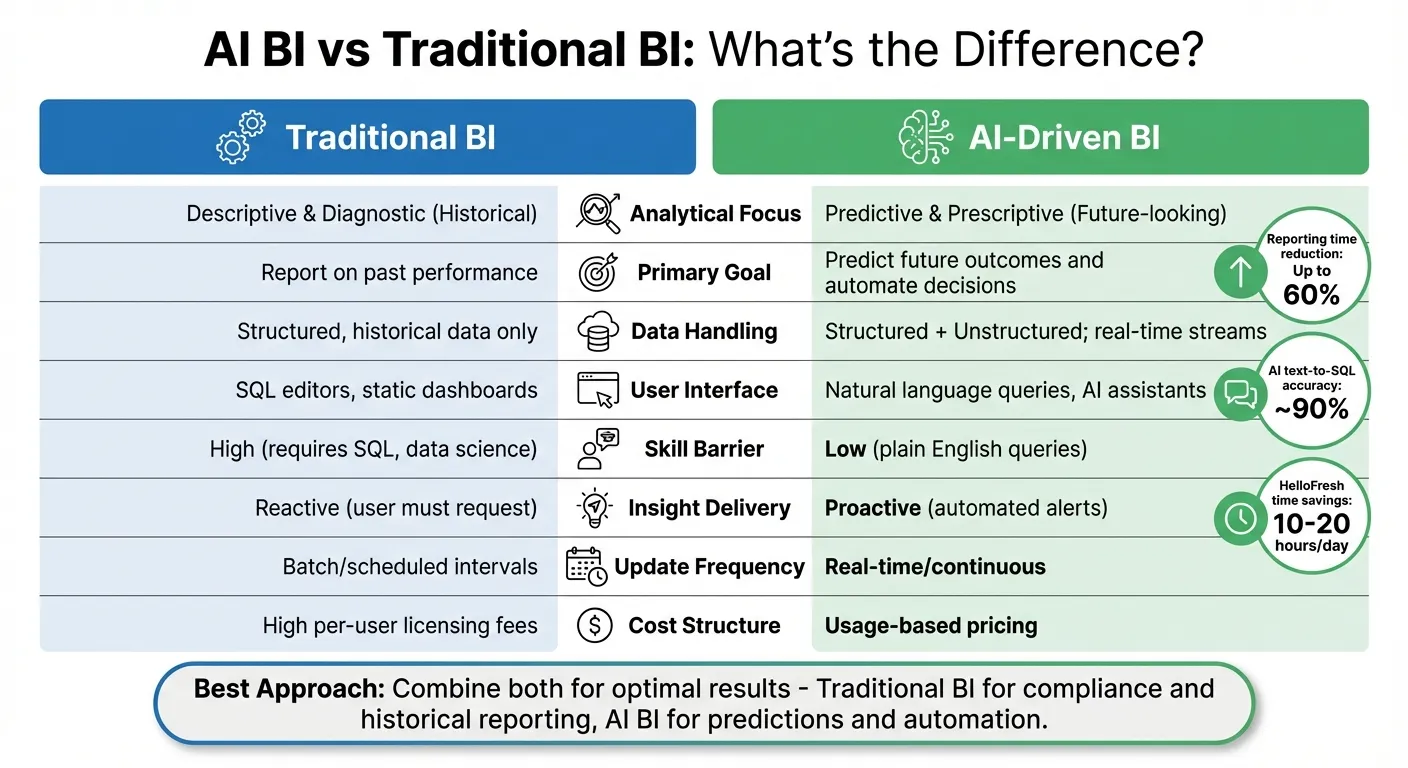
AI BI brings real-time, predictive, and conversational analytics to traditional BI's historical reporting—combine both for speed, governance, and accuracy.

AI BI (Artificial Intelligence Business Intelligence) and Traditional BI are two distinct approaches to analyzing business data. Here’s a quick breakdown:
- Traditional BI focuses on analyzing historical data using static dashboards, SQL queries, and manual processes. It’s reliable for routine reporting but requires technical expertise and struggles with real-time insights.
- AI BI leverages machine learning and natural language processing to predict future trends, automate tasks, and make data accessible through conversational interfaces. It handles real-time data and unstructured formats, making it more dynamic and user-friendly.
Key Differences:
- Focus: Traditional BI explains past events, while AI BI predicts future outcomes and suggests actions.
- Data Handling: Traditional BI works with structured, historical data; AI BI processes both structured and unstructured data in real-time.
- User Accessibility: Traditional BI requires technical skills like SQL for BI and analytics; AI BI uses natural language queries, making it easier for non-technical users.
- Insights: Traditional BI is reactive, requiring users to request reports. AI BI is proactive, surfacing trends and anomalies automatically.
- Cost: Traditional BI often has high per-user licensing fees, while AI BI typically uses usage-based pricing models.
Quick Comparison:
| Feature | Traditional BI | AI BI |
|---|---|---|
| Focus | Historical analysis | Predictive and prescriptive |
| Data Type | Structured | Structured + Unstructured |
| User Interface | SQL, static dashboards | Natural language, AI tools |
| Insights | Manual reports | Automated, real-time alerts |
| Skill Barrier | High (technical expertise) | Low (plain English queries) |
| Cost | High per-user fees | Usage-based pricing |
For businesses, the choice depends on their goals. If you need reliable, historical reporting, stick with Traditional BI. But if you want faster, predictive insights and automation, AI BI is the way forward - or combine both for the best results.
Traditional BI: How It Works and Where It Falls Short
Architecture and Workflows
Traditional BI operates on a well-established three-layer architecture. At its core lies the ETL (Extract, Transform, and Load) process, which pulls data from various sources - such as ERP systems, CRM platforms, and spreadsheets - and then cleans and restructures it to ensure consistency [8]. Once processed, the data is stored in a centralized data warehouse, ready for analysis. The final layer, the reporting layer, generates static dashboards and scheduled reports, typically delivered in formats like PDFs or Excel files [8][6].
This workflow is heavily IT-driven. Data engineers handle ETL processes, database administrators oversee the centralized data warehouse, and analysts create dashboards. Business users, however, often depend on IT for follow-up questions or additional reports. Unfortunately, these requests frequently end up at the bottom of IT's reporting queue, leading to frustrating delays [7][6]. As AWS points out:
Traditional business intelligence has focused on descriptive, diagnostic, and predictive reporting of historical and current business activities [4].
While this structured approach ensures reliability, it also introduces some notable drawbacks.
Where Traditional BI Excels
Traditional BI is a strong choice for scenarios where stability, governance, and reliability are non-negotiable. It’s particularly effective for financial reporting, regulatory compliance, and any situation requiring precise audit trails. Its standardized processes ensure consistent metrics across the organization, making it ideal for monitoring long-term trends and operational benchmarks [6][9].
As Tableau highlights:
Traditional business intelligence is still a common approach for regular reporting and answering static queries [6].
For tasks like generating monthly sales reports or quarterly financial statements with accuracy, traditional BI gets the job done.
Where Traditional BI Falls Short
Despite its dependability, traditional BI faces challenges when it comes to delivering immediate insights or handling advanced analytics. It struggles to address questions like "what's happening now?" or "what's next?" because it is inherently retrospective, focusing on historical data instead of predicting future scenarios [1][4]. The infrastructure wasn’t built for real-time analysis, and attempting to adapt it for high-performance, complex data streams often results in fragile and overly complex systems [1].
Another significant limitation is the technical skill barrier. As Matthew Kosinski, Staff Editor at IBM Think, explains:
Traditional BI tools and workflows are highly manual, requiring significant time and technical expertise to transform raw data into actionable insights [3].
Non-technical users often need SQL knowledge or proficiency with complex visualization tools just to answer basic questions. This reliance on technical expertise creates bottlenecks, making it harder for business users to access insights independently. Moreover, traditional BI systems struggle with unstructured data, such as documents and images, which limits their ability to handle today’s increasingly diverse data types [3]. These rigid systems highlight the growing demand for more flexible BI solutions.
AI-Driven BI: What It Adds to the Mix
Core Features of AI BI
AI-driven business intelligence (BI) takes traditional BI tools to the next level by integrating machine learning, natural language processing, and automation. While traditional BI focuses on answering "what happened?" AI BI steps further by using predictive analytics to anticipate future trends and prescriptive analytics to suggest actionable steps [1][3]. This evolution shifts BI from reactive to forward-looking insights.
For example, AI-powered text-to-SQL tools, like Snowflake's Cortex Analyst, boast an impressive accuracy rate of about 90% [2]. Additionally, AI BI streamlines data preparation by automating tasks like data cleansing and structuring, slashing reporting time by as much as 60% [12].
Another standout feature is its ability to handle unstructured data - think emails, social media posts, or customer reviews - types of information that traditional BI tools struggle to process. AI BI also excels in real-time anomaly detection, instantly flagging issues such as unexpected revenue drops or potential security breaches. Unlike batch-processed reports that might miss these anomalies until the next cycle, AI BI acts immediately.
From these capabilities, it’s clear that AI BI is reshaping how organizations gather and act on insights. Up next, we'll explore how these advancements impact daily workflows and team dynamics.
How AI BI Changes Workflows and Roles
AI BI is transforming the way analytics teams and business users operate, building on the foundations of traditional BI. One of its key contributions is empowering business users with self-service tools. These tools allow them to independently explore data and ask follow-up questions without relying on IT or waiting for custom reports. As Gigi J.K., a Digital Growth Strategist, aptly describes it:
AI business intelligence is like giving your data a brain and a voice [12].
This shift not only empowers business users but also frees up data teams to focus on higher-value tasks. Instead of spending time on repetitive reporting, these teams can dive into developing advanced models, crafting data strategies, and supporting complex decision-making. The result is a more collaborative workflow: business users manage exploratory analysis while data professionals ensure data quality, governance, and advanced analytics.
Still, human oversight remains critical. Andrew Chen, Founder of Explo, emphasizes:
AI is an evolution of BI, not a replacement [11]. Business context and ethical considerations still require human judgment that AI models cannot fully replicate [11][13].
Technical Characteristics of AI BI
At its core, AI BI operates with an adaptive intelligence layer powered by machine learning models. These models continuously learn from data patterns and user interactions, allowing the system to improve over time - unlike the static, rule-based nature of traditional BI.
AI BI also processes streaming data in real time, a significant upgrade over traditional BI's batch processing. As data strategist Donald Farmer explains:
AI enables more complex data handling with higher performance, making real-time business intelligence much more effective [1].
Another advantage is its ability to handle both structured data (like databases) and unstructured sources (such as emails or social media). Some platforms, like Databricks AI/BI, have even removed seat-based licensing restrictions, enabling organizations to share insights broadly without incurring additional per-user costs [10]. This approach aligns with AI BI's mission to make data accessible to everyone, not just a select group of technical experts.
With these technical advancements, AI BI sets the stage for broader adoption and practical applications across industries.
AI BI vs Traditional BI: Side-by-Side Comparison
Comparison Table: AI BI vs Traditional BI
Now that we've covered how each approach operates, let's take a closer look at their differences across some of the most important dimensions for analytics teams.
| Dimension | Traditional BI | AI-Driven BI |
|---|---|---|
| Analytical Focus | Descriptive & diagnostic (historical) | Predictive & prescriptive (future-looking) |
| Primary Goal | Report on past performance [5] | Predict future outcomes and automate decisions [5] |
| Data Handling | Primarily structured, historical data | Structured and unstructured; real-time streams |
| User Interface | Drag-and-drop, SQL editors, static filters | Conversational (NLP), search bars, AI assistants |
| Skill Barrier | High (SQL, data science, visualization) | Low (natural language, business context) |
| Insight Delivery | Reactive (user must ask/build) | Proactive (system alerts/surfaces trends) |
| Decision-Making | Reactive; based on past performance | Proactive; based on forecasts and simulations |
| Logic | Fixed, rule-based reporting [5] | Adaptive, model-driven learning [5] |
| Update Frequency | Batch/scheduled intervals | Real-time/continuous analysis |
| Governance | Centralized; IT-managed; rigid policies | Decentralized; requires human-in-the-loop; bias monitoring |
| Cost Structure | Often high per-user licensing [5] | Often developer-based or usage-based licensing [5] |
Breaking Down the Differences
The table above outlines the key contrasts, but let's dive deeper into what these differences mean.
One of the most striking distinctions is time orientation. Traditional BI focuses on analyzing past events, helping businesses understand what happened and why. AI BI, on the other hand, looks ahead, offering predictions and actionable recommendations for the future.
Ease of use is another game-changer. Traditional BI often requires technical expertise in SQL or data modeling, which can slow down decision-making. AI BI simplifies access with conversational tools and NLP - users can type questions in plain English and get instant insights. Sheary Tan from Livedocs sums it up well:
Traditional BI tools answer the questions you ask them. AI data analysis figures out what questions you should be asking [14].
Governance models also differ significantly. Traditional BI depends on centralized IT oversight to maintain consistency, but this can create bottlenecks. AI BI decentralizes insights, allowing faster decision-making while still requiring human oversight to address issues like bias and ethics. As Farmer points out:
AI implementation raises ethical questions about data privacy, bias and the responsible use of data... the increased autonomy of AI tools makes better analytics practices an urgent concern [1].
Costs are another important factor. Traditional BI often comes with high per-user licensing fees, making it expensive as teams grow. AI BI, however, typically uses developer-based or usage-based pricing, which can lower costs as more users come on board [5].
The impact of these differences is clear in real-world examples. For instance, HelloFresh automated its marketing reporting with Tableau, cutting down manual data compilation. This saved their digital marketing team 10 to 20 working hours per day, freeing them to focus on creating more targeted regional campaigns [6]. While this highlights the efficiency gains possible with traditional BI, AI BI takes automation to an entirely new level by predicting trends and making proactive recommendations.
These differences provide a roadmap for analytics teams to weigh the strengths and trade-offs of each approach, helping them choose the right fit for their needs.
How to Choose the Right Approach
What to Consider When Evaluating
Choosing the right BI tool starts with understanding your business objectives. If you’re focused on understanding past performance through descriptive analytics, traditional BI is a solid choice. But for predicting future outcomes or determining the best course of action, AI-driven BI becomes a necessity [1][5].
Another key factor is the user experience. Traditional BI often requires technical skills, while AI-driven BI, powered by natural language processing, allows users to query data in plain English [1][2]. If making data accessible across your organization is a priority, this user-friendly approach can be a game-changer.
Before committing to any BI strategy, ensure your data is clean, unified, and free from silos. Both approaches depend on high-quality data, but AI systems are especially sensitive since they learn from patterns in the data. If your organization operates in a highly regulated industry, traditional BI’s transparency and audit trails may be better suited - or you could combine it with AI-driven BI for a balanced approach [13][1].
Speed versus control is another decision point. AI-driven BI excels at delivering rapid insights, while traditional BI offers more control and precision [15]. If time is critical and you can handle some trade-offs, AI BI can help you act faster. On the other hand, if precision and customization matter more, traditional BI may be a better fit.
Here’s a practical indicator: if your analysts spend over half their time answering repetitive questions, it’s a clear sign that AI BI could step in to handle routine tasks. This shift allows your team to focus on strategic, high-value work instead of being bogged down by repetitive data requests [14].
Ultimately, these considerations can help you determine whether to choose one approach, the other, or a combination of both.
Using Both Approaches Together
Once you’ve identified your needs, blending both traditional and AI-driven BI can offer the best of both worlds. Many organizations successfully combine the two approaches. Traditional BI provides a reliable foundation with historical reporting, scheduled dashboards, and well-established metrics. Meanwhile, AI BI adds a layer of prediction and recommendations, helping you spot trends early and take proactive action.
This hybrid strategy works especially well when roles are clearly defined. For example, traditional BI might focus on monitoring and compliance, while AI BI tackles exploration and innovation. A finance team could rely on traditional dashboards for monthly reporting, while a marketing team uses AI BI to predict customer churn or optimize ad spending in real time.
CIBC Capital Markets illustrated this approach in 2025. Their Quantitative Solutions group moved beyond static spreadsheets and rigid BI tools by building custom data apps using Dash Enterprise. These apps integrated machine learning models, enabling faster, more interactive analytics tailored to specific teams and workflows. They maintained their traditional BI setup for core reporting while introducing AI-powered tools where they added the most value [5].
This hybrid model also addresses concerns about AI’s "black box" nature. Traditional BI ensures transparency and auditability, while AI BI delivers speed and predictive insights. When AI identifies something unexpected, analysts can validate findings using traditional tools, creating a system of checks and balances that builds trust in AI-driven insights.
To adopt this approach, start small. Test AI BI in a specific department or for a single use case while keeping traditional BI systems in place [1]. This lets you experiment without disrupting established workflows. As your team becomes more comfortable with AI, you can expand its use gradually.
Upskilling your current team is often more effective than hiring new staff. Train your existing analysts on AI tools - they already understand the business challenges and can apply AI to solve them faster and more effectively [1].
How Querio Fits Into AI BI
Querio seamlessly integrates into a hybrid BI strategy, addressing common challenges while complementing traditional methods. It’s an AI-native analytics workspace that connects directly to your data warehouse - whether you’re using Snowflake, BigQuery, or Postgres - without requiring data to be moved or duplicated. This ensures you retain control over your data while gaining the benefits of AI-powered analytics.
What makes Querio stand out is its focus on transparency and governance. When you ask a question in plain English, Querio generates real SQL and Python code that you can review. This eliminates the "black box" issue that often discourages organizations from adopting AI tools. For teams needing audit trails or validation, this feature is invaluable.
Querio also includes a shared context layer where data teams can define joins, metrics, and business terms once. This ensures consistency across all reports and queries. For instance, when both the marketing and finance teams ask about "customer lifetime value", they’ll get the same answer because the definition is standardized.
Whether used in pure AI BI setups or hybrid models, Querio enhances analytics workflows. Teams can query data using natural language while maintaining the ongoing visibility of traditional dashboards. Its built-in analytics notebooks support iterative analysis, and its embedded analytics feature allows organizations to deliver governed insights directly to end users.
Querio is designed for companies that want self-serve analytics without compromising accuracy, consistency, or control. With SOC 2 Type II compliance and enterprise-grade access controls, it ensures that democratizing data doesn’t come at the expense of governance. By bridging the gap between AI and traditional BI, Querio empowers teams to work smarter and more efficiently.
Conclusion
The key distinction between traditional BI and AI-driven BI lies in their focus: traditional BI emphasizes historical analysis, while AI-driven BI introduces predictive insights. Traditional BI is great for structured analysis and historical reporting - it's dependable, clear, and ideal for routine monitoring and compliance. On the other hand, AI-driven BI builds on these strengths by adding predictive capabilities, automation, and natural language querying, making data analytics more accessible to a wider audience.
Experts agree that AI doesn't replace traditional BI but enhances it. As Donald Farmer puts it, AI tools add new dimensions to BI software, but human judgment remains crucial for strategic decisions [1]. The future isn't about picking one over the other - it's about knowing where each fits best and using them together to maximize value. This evolving approach requires solutions that combine reliability with forward-thinking innovation.
By blending the strengths of traditional BI with the advanced features of AI, businesses can create a system that offers both historical dependability and predictive intelligence. If your team struggles with repetitive queries or decisions that take too long, AI-native solutions can change the game. Conversational analytics - featuring natural language querying and proactive insights - is quickly becoming the go-to interface, transforming how organizations interact with their data [1].
For businesses looking to move beyond static dashboards without losing control, Querio provides a straightforward AI BI solution that turns queries into actionable insights. Start by evaluating your analytics needs: What decisions are you making now, and how fast do you need results? Understanding these factors will help you decide whether to stick with traditional BI, embrace AI BI, or adopt a hybrid approach that combines the strengths of both.
FAQs
How does AI-driven BI improve decision-making compared to traditional BI?
AI-powered Business Intelligence (BI) takes data analysis to the next level, turning it from a static reporting tool into a proactive partner for decision-making. Unlike traditional BI, which often depends on manual processes and historical data, AI BI leverages machine learning and natural language processing to uncover patterns, spot anomalies, and deliver real-time forecasts. This means businesses can respond faster and make decisions based on up-to-the-minute insights.
Some standout benefits include predictive analytics, which not only forecast future trends but also suggest actionable steps, and automation, which eliminates repetitive tasks like data preparation and report generation. Insights that once took days can now surface in minutes. Plus, with natural language querying, even non-technical users can easily explore and interact with data, making it accessible across teams. These capabilities make AI BI a dynamic and forward-looking tool, far surpassing the limitations of traditional BI.
What challenges do businesses face when switching from Traditional BI to AI-powered BI?
Switching from traditional BI to AI-powered BI brings a set of challenges that businesses need to address. One of the biggest obstacles is moving from manual, scheduled data processes to systems that operate in real-time and are fully automated. This shift often means adopting entirely new tools and technologies, which can require significant updates to both infrastructure and workflows. And let’s be honest - those updates can take a lot of time, money, and effort.
The skills gap within analytics teams is another pressing issue. Traditional BI tends to focus on skills like SQL and creating dashboards. But AI-driven BI? That’s a different ballgame. It demands expertise in areas like machine learning, training models, and advanced analytics. Many teams simply don’t have people with these specialized skills, creating what’s often referred to as a "human bottleneck."
Then there’s the issue of data governance and quality. AI-powered BI systems are far less forgiving when it comes to messy or inconsistent data. Unlike traditional BI, which can still function with some imperfections, AI systems need clean, well-organized data to produce reliable results.
Finally, cultural resistance can also slow things down. People might be skeptical of insights generated by AI or hesitant to move away from tools they’ve been using for years. Whether it’s doubt about the technology or just a reluctance to change, these attitudes can hold back progress.
Tackling these technical, talent, and mindset challenges is key to making a smooth transition to AI-powered BI.
How does AI-driven BI manage unstructured data differently from traditional BI?
AI-driven Business Intelligence (AI BI) takes on the challenge of working with unstructured data - think emails, social media posts, PDFs, images, or audio files. Using advanced machine learning techniques like natural language processing (NLP) and computer vision, AI BI can pull out essential details such as entities, sentiment, topics, or visual elements. What’s more, it transforms this raw data into structured, actionable insights in real time, cutting out the need for time-consuming manual prep work.
On the other hand, traditional BI operates differently. It requires data to be pre-processed, cleaned, and organized into structured formats like tables or data warehouses before any analysis can happen. This often involves manual tagging and batch processing, which makes it less efficient when dealing with unstructured data sources. Traditional BI is typically focused on answering "what happened" by relying on predefined metrics, whereas AI BI pushes the boundaries further, offering predictive and prescriptive insights directly from raw, unstructured data.