Business Intelligence
Omni to Querio: What a Migration Actually Involves
Plan a rebuild, not a file transfer: inventory assets, recreate metrics, test permissions, and run parallel validation.

If you're moving from Omni to Querio, plan for a rebuild - not a file transfer. I’d treat this as a 4-part project: assets, logic, permissions, and workflows. Miss one, and the switch can break numbers, access, or scheduled outputs.
Here’s the short version:
- I’d inventory everything first: dashboards, saved queries, metrics, users, schedules, embeds, and AI flows
- I’d give each item a decision: rebuild, fix, merge, replace, archive, test in parallel, or retire
- I’d separate scripted work from human review
- I’d rebuild metrics and access rules before trusting any dashboard
- I’d run both systems side by side for at least one reporting cycle
- I’d expect validation to take 25%–60% of the total migration work
- I’d size the project by logic and access risk, not by dashboard count alone
A 10-tile dashboard can still fail if just one rule changes - like date grain, churn treatment, currency logic, or row-level access. That’s why this kind of migration is less about visuals and more about meaning.
My takeaway: if your team uses Snowflake, BigQuery, Redshift, or Postgres, plus dbt models and tight access rules, this move can work well - but only if you review the hard parts by hand and get sign-off on numbers and access before cutover.
| What matters most | What I’d do |
|---|---|
| Assets | Build a manifest with owners, usage, and dependencies |
| Logic | Recreate metric rules in Querio’s governed semantic layer |
| Permissions | Test row, column, role, and tenant access by user type |
| Workflows | Rebuild schedules, alerts, embeds, and AI outputs |
| Validation | Compare outputs on the same dates, filters, and identities |
| Cutover | Keep Omni live until reconciliation is done |
If I had to sum up the article in one line, it would be this: move the business logic first, then the dashboards.
::: @figure 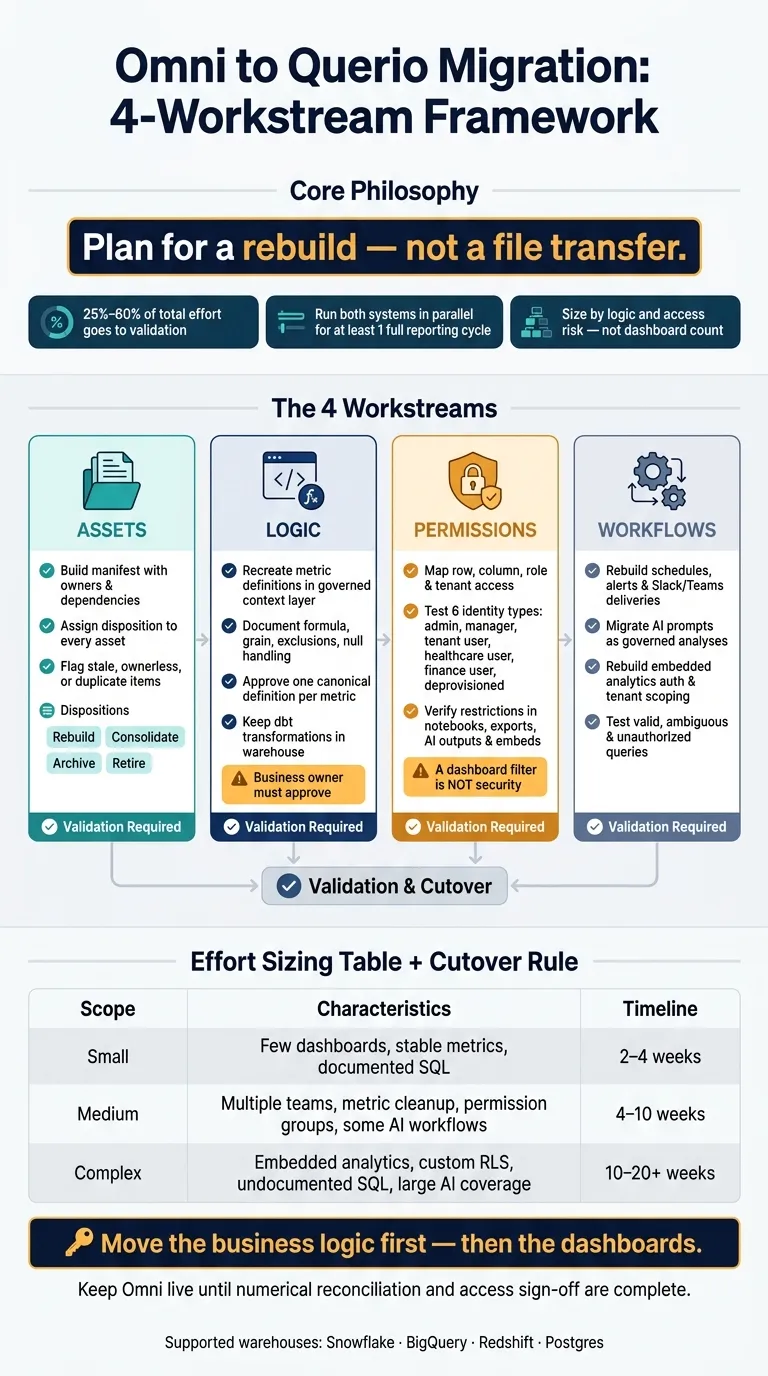 {Omni to Querio Migration: 4-Workstream Framework}
:::
{Omni to Querio Migration: 4-Workstream Framework}
:::
Why this migration is more than a dashboard export
The hard part of this migration isn't moving charts from one screen to another. It's turning Omni behavior into a governed Querio setup without changing what the business means by the numbers.
That means keeping metric definitions, access rules, and delivery paths in place across live, warehouse-backed analysis, not just rebuilding the same-looking visuals. That's why the first deliverable should be a full asset and dependency inventory.
Here's the risk in plain terms: a finance Gross Margin tile can break if fiscal calendar logic, exclusions, or currency treatment change. The chart still shows up. But the meaning behind it drifts.
The four workstreams: assets, logic, permissions, and workflows
A clean way to handle the migration is to split it into four workstreams: assets, logic, permissions, and workflows.
Each one needs its own owner, mapping, and validation plan:
- Assets need an inventory and a keep, rebuild, or retire decision.
- Logic needs a semantic review, plus proof that the warehouse behavior matches.
- Permissions need access rules mapped and tested against healthcare, finance, or SaaS tenant needs.
- Workflows need recurring reports, delivery paths, and AI workflows rebuilt and checked end to end.
Once those streams are separated, the migration becomes much easier to map asset by asset.
What the target setup looks like in Querio
The target setup shapes what you can map directly and what you have to rebuild.
Querio runs live connections to Snowflake, BigQuery, Redshift, or Postgres. Queries run against the actual warehouse, not CSV exports. Analysts work in inspectable SQL and Python analysis, so every calculation is visible and editable.
The governed context layer keeps metric definitions, joins, and trusted queries in versioned SQL, Markdown, and Python. That gives teams one approved definition they can use across notebooks, Boards, scheduled reports, Slack, Microsoft Teams, and AI workflows.
And because those definitions live in versioned files, teams can review changes through standard pull-request practices.
Inventory everything before you rebuild anything
Before you rebuild a single dashboard in Querio, get a full picture of what you have in Omni.
That sounds obvious, but this is where teams often trip. If you skip this step, hidden dependencies stay hidden until cutover day. Then a finance report goes missing, a scheduled email stops, or an access rule breaks. None of that is fun.
The goal here is simple: create a manifest that guides rebuild work, validation, and cutover decisions.
Your inventory should include dashboards, reports, workbooks, embedded views, metrics, dimensions, calculated fields, filters, joins, saved queries, custom SQL, warehouse connections, users, groups, roles, row-level rules, column restrictions, scheduled deliveries, alerts, integrations, and AI workflows.
What to inventory: dashboards, metrics, SQL, users, and automations
For each asset, track what sits behind it: saved queries, metric definitions, scheduled deliveries, permission rules, and any automated workflows tied to it.
A Weekly Pipeline Review dashboard is a good example. It isn't just one thing. It's the dashboard, the revenue metric under it, the Monday scheduled email, the Slack/Teams delivery workflow to a regional sales channel, and the AI-generated commentary. Each of those needs its own destination in Querio and its own validation owner.
For every asset, capture enough metadata to rebuild it the right way inside Querio's governed context layer, keep access rules intact, and validate it without drift. At a minimum, record owner, audience, last-used date, source tables, joins, metric formula, time-zone rules, sensitivity classification, and current access model.
Also flag the usual trouble spots:
- hard-coded fiscal-year rules
- user-specific filters
- row-multiplying joins
- deprecated tables
These are common sources of silent errors.
Assign a disposition to every asset
Once the inventory is done, every row needs a clear decision.
Your options are: rebuild unchanged, rebuild with corrected logic, consolidate, replace with a Querio notebook or automation, archive, keep temporarily for parallel validation, or retire.
Use usage data to make these calls. Don't guess.
An asset with no views in the past 12 months and no named owner is a strong retirement candidate. On the flip side, a low-use regulatory report may look inactive but still matter for a quarterly compliance deadline. That's why every archive or retirement needs approval from a named business owner. And anything that touches PHI, PII, or financial controls needs security review.
| Disposition | When to use it |
|---|---|
| Rebuild unchanged | Actively used, logically correct, clear Querio target |
| Rebuild with corrected logic | Important asset with definition, join, or time-zone issues to fix during migration |
| Consolidate | Multiple dashboards serving the same audience - merge into one governed analysis |
| Replace with Querio notebook or automation | The recurring analytical question matters more than the original dashboard format |
| Archive | Retained for audit or historical reference, not rebuilt |
| Parallel validation | Keep Omni version live while Querio version is numerically reconciled |
| Retire | No active owner, no meaningful recent usage, no continuing business requirement |
Migration checklist and inventory manifest
Store the manifest in a reviewable spreadsheet, database table, or Git-tracked CSV/YAML file so changes can be reviewed and ownership stays clear. Every row needs both an owner and a disposition before rebuild work starts. "Owner unknown" is a blocker.
The fields below are the minimum set needed to avoid cutover surprises, especially for teams running Snowflake, BigQuery, Redshift, or Postgres with dbt-managed definitions:
| Manifest field | Purpose |
|---|---|
| Asset ID and name | Uniquely identify the source object |
| Asset type | Dashboard, metric, SQL, user, delivery, alert, integration, or AI workflow |
| Omni location or URL | Enables source verification |
| Business and technical owner | Assigns decisions and troubleshooting responsibility |
| Audience and recipients | Preserves intended consumption and distribution |
| Usage and last-used date | Supports scope and retirement decisions |
| Criticality | Executive, operational, financial, healthcare, or compliance impact |
| Source warehouse objects | Schemas, tables, views, and columns |
| Joins and filters | Reproduces logic and identifies row-multiplication risks |
| Metric definitions | Formula, grain, exclusions, and certification status |
| Time-zone and date rules | Prevents schedule and reporting-period discrepancies |
| Sensitivity classification | PHI, PII, financial, or other restricted data |
| Current permission model | Users, groups, roles, and row-level rules |
| Target Querio destination | Notebook, layout, model, automation, or archive |
| Disposition | Rebuild, correct, consolidate, replace, archive, parallel-test, or retire |
| Validation owner and test case | Assigns proof responsibility and expected result |
| Status and blockers | Discovery, mapping, build, test, approval, and cutover |
| Evidence and sign-off | Comparison results, approvals, and exception records |
Once the manifest is complete, map each row to its Querio destination. That manifest then becomes the working source for mapping Omni assets into Querio.
Map Omni assets to Querio and separate automation from manual work
Once you have a full manifest, the next job is simple to describe and harder to do: decide where each Omni asset belongs in Querio, and draw a clear line between what a script can do and what still needs a person to review.
Side-by-side mapping table: Omni assets to Querio destinations
The table below covers the asset types teams deal with most often. The automation potential column shows what a solid extraction script can usually handle in practice, not what someone might claim on a sales call.
| Omni asset | Querio destination | Automation potential | Required manual work |
|---|---|---|---|
| Dashboards | Querio boards, layouts, or embedded experiences | Medium - export titles, filters, queries, and ownership metadata | Rebuild layout, interactions, filter behavior, annotations, and stakeholder-approved presentation |
| Charts and visualizations | Notebook cells, saved results, or board components | Medium - carry over source SQL, dimensions, measures, and chart type as a draft | Recheck visualization types, sorting, labels, formatting, and whether the chart answers the same business question |
| Saved queries and workbooks | SQL notebook cells or governed context files | High for SQL and metadata extraction | Validate dialect compatibility, joins, filters, date logic, parameters, and business intent |
| Metric definitions | Governed Querio context layer | Low to medium - extract names, formulas, descriptions, and source fields | Resolve conflicting definitions, confirm grain and exclusions, identify the accountable business owner, and approve the canonical definition |
| Python analyses | Reactive notebook cells | Medium - copy code, dependencies, inputs, and output descriptions | Adapt packages, credentials, execution order, visual outputs, and assumptions; test reproducibility |
| Scheduled reports | Querio automations | Medium to high - migrate schedule, recipients, prompts, and source analysis as a draft | Recreate delivery format, alert thresholds, failure handling, timezone, and recipient authorization |
| User groups | Querio roles or identity-group mappings | High when the identity provider exposes stable group membership | Map group names, ownership, environment access, and least-privilege roles; test effective permissions |
| Row-level security rules | Querio access rules, warehouse policies, or tenant filters | Medium - extract predicates, roles, and referenced attributes | Prove equivalent behavior for every role and tenant, including nulls, inherited access, service accounts, and embedded sessions |
| AI prompts and agent instructions | Querio explore prompts, context files, or governed automations | Low to medium - preserve prompt text, examples, and expected outputs | Rewrite instructions around Querio’s context and notebook behavior; test rewritten prompts against known questions, ambiguous terms, adversarial requests, restricted data, and changed schemas |
| Embedded analytics architecture | Querio iframe or Embedded API implementation | Medium - inventory URLs, parameters, tenants, and host-product placements | Rebuild authentication, tenant scoping, branding, frontend state, error handling, navigation, drilldowns, downloads, and performance monitoring |
What can usually be automated
Automation does best with the repetitive, nuts-and-bolts work. That includes extracting saved-query SQL, pulling dashboard references, chart metadata, owners, folders, schedules, and last-used timestamps. It also helps with parsing schemas, tables, joins, filters, date fields, and calculated expressions.
A script can also flag stale, duplicate, ownerless, or failed assets. It can generate draft notebook cells and context-file entries, sync identity-provider groups into proposed role mappings, and run side-by-side result-set checks using the same date range, filters, and user identity. Those checks should include exception reports for changed row counts, null rates, totals, distinct counts, query failures, and latency.
Warehouses like Snowflake, BigQuery, Redshift, and Postgres make this much easier because their system catalogs and information schemas are queryable by code. Snowflake’s Information Schema, for example, exposes table functions and system views that cover account-level object metadata[2]. So a script can build a large share of the mapping manifest without anyone clicking through the UI.
Where automation falls short is judgment. A script can tell you that two metrics have similar names. It cannot tell you whether “active customer” and “monthly active customer” use the same population, time window, exclusions, and grain. That part has to come from people talking through the logic.
What still needs manual review
The trickiest parts usually come down to meaning, trust, and authorization.
Analysts still need to decide whether a saved query is a core analysis or just someone’s temporary workaround. They also need to check whether two metrics are actually the same, not just close enough at first glance. And they need to make sure a dashboard layout still tells the right story for the decision it supports.
Business owners have a big role here too. Definitions like revenue, churn, active user, utilization, patient census, and gross margin need explicit approval, including grain, time window, exclusions, currency, and source of truth. If that sounds picky, it is. But this is exactly where migrations go sideways.
Conflicting logic is usually the biggest trap. One dashboard may define conversion rate as purchases divided by sessions. Another may define it as purchases divided by unique visitors. Both queries can run fine. Only the product or marketing owner can decide which one becomes the approved version in Querio’s governed context layer.
Row-level security needs the same kind of care. You need a full permission test matrix, not a quick visual check. That matrix should cover:
- administrators
- standard employees
- contractors or partners
- customer or tenant users
- users with multiple group memberships
- deactivated or unassigned users
- service accounts used by automations or embeds
This is where edge cases show up. A rule may look right for the average user and still fail for someone with inherited access, a null attribute, or multiple roles.
Dashboard layout, database-specific SQL translation, AI prompt rewrites, and embedded authentication flows all work the same way. A script can get you a draft. A person still has to verify it before it gets anywhere near production.
Rebuild semantics, permissions, and AI workflows without breaking trust
Once you've mapped the assets, the next job is to rebuild the logic, access, and workflows behind them. This is where migrations usually go sideways. Logic starts to drift. Permissions loosen in quiet ways. People stop trusting the numbers. And when that happens, a clean-looking dashboard doesn't mean much.
Getting semantics, permissions, and AI workflows right takes deliberate validation. A visual spot check won't cut it.
Recreate metric definitions in the governed context layer
Start with a metric parity sheet for every important definition you're moving. For each metric, document the formula, grain, exclusions, null handling, fiscal-calendar behavior, and one known-good test value. That gives you a concrete way to confirm the Querio version returns the same result against the same warehouse snapshot.
Keep transformations, modeling, tests, and warehouse policy in dbt or the warehouse itself. Keep business definitions, approved terminology, query patterns, exclusions, and AI instructions in Querio context files, stored in GitHub next to your dbt project. That way, when someone changes a term like "active customer" to "paying customer," the update moves through a pull request with the right details:
- the old and new definition
- affected dashboards or automations
- test results
- owner approval
- the effective date
This is one of the biggest trust traps in a migration. Two metrics can sound almost the same and still mean different things because they use different populations, time windows, or exclusions. A script can't settle that. A data engineer shouldn't make that call alone either. The business owner has to decide.
Once the canonical definition is approved, test who can see it.
Rebuild access rules for SaaS, healthcare, and finance teams
A dashboard filter is not security. Access has to be enforced in the warehouse, then checked in every Querio surface.
For each representative identity, verify that restrictions hold in Querio notebooks, boards, and shared outputs; scheduled Slack or email automations; export and download paths; AI-generated SQL; and any external agent or MCP-connected workflow. Your test matrix should include:
- a full-access analyst
- a manager with regional restrictions
- a SaaS customer or tenant-restricted user
- a healthcare user who must not see protected fields
- a finance user restricted from payroll, PII, or confidential forecasts
- a deprovisioned or suspended identity
Querio's OAuth model means agent queries inherit each user's data permissions, but that only works if the warehouse roles are mapped correctly first. In mature setups, access may be governed at several layers: datasets, columns, rows, and even individual metric definitions. [3] For healthcare teams working under HIPAA, or finance teams handling payroll, PII, or confidential forecasts, column-level restrictions on sensitive fields need explicit verification. A note in the docs is not enough.
Migrate AI workflows as governed analyses, not ungoverned prompts
Use the same governance standard for AI outputs. That means defined inputs, fixed owners, and explicit refusal behavior.
Before rebuilding any recurring workflow, write down a fixed specification: the business question, intended audience, source tables and approved metrics, prompt or question template, required filters, expected output format, delivery schedule and channel, reviewer or owner, and expected behavior when data is stale, ambiguous, or unauthorized.
Each workflow maps cleanly to a Querio notebook connected to Snowflake, BigQuery, or Redshift, then scheduled as an automation, with the generated SQL and context definitions visible and auditable. Querio's guidance requires human review for financial, regulatory, customer-impacting, or executive outputs before distribution. [1] Build that review step into the workflow spec from day one, not after something slips out.
Before go-live, test valid questions, missing metrics, ambiguous terms, unauthorized fields, stale data, and empty-result handling.
Estimate effort, validate the cutover, and decide if the switch is worth it
Use the inventory and mapping work from the previous sections to size the rebuild and validation work that’s still left.
Effort ranges and what drives complexity
Dashboard count by itself is a bad way to estimate migration effort. A team with 25 well-documented dashboards may move faster than a team with five dashboards filled with custom logic, messy definitions, and no clear owner.
| Migration scope | Typical characteristics | Planning range |
|---|---|---|
| Small, focused | Limited dashboards, stable metrics, documented SQL, few user groups, little or no embedded analytics | 2–4 weeks |
| Medium environment | Several business teams, shared dashboards, moderate metric cleanup, multiple permission groups, some scheduled or AI-assisted workflows | 4–10 weeks |
| Complex estate | Embedded analytics, custom row-level security, many workspaces or tenants, undocumented SQL, extensive automations, and large AI workflow coverage | 10–20+ weeks |
If your mapping table shows a lot of assets that need manual review, expect the project to drift toward the high end of these ranges.
The biggest effort multipliers are ambiguous metrics, duplicated SQL, permission sprawl, data-quality issues, and slow owner approvals. Stakeholder availability isn’t a nice-to-have here. It’s a hard schedule dependency.
Validation plan and common failure points
Start with the highest-risk assets in the manifest and use them as your pilot set.
Validation often takes 25%–60% of total project effort [4], but teams often under-scope it early on. The safest path is to pilot high-value assets first:
- one executive report
- one operational dashboard
- one scheduled delivery
- one permission-sensitive view
- one AI workflow
Then connect Querio to the live warehouse with encrypted, read-only credentials and compare outputs against the same date ranges and refresh timestamps.
Run both systems in parallel for at least one full reporting cycle. If finance or executive reporting is in scope, that means including month-end or quarter-end close. Keep Omni available for rollback until the reconciliation window is over.
Most failures come from definition, security, or process mistakes - not rendering bugs.
| Failure point | Mitigation |
|---|---|
| Metric ambiguity | Approve one canonical definition per metric; test against known-good values |
| Undocumented SQL | Extract source SQL, interview the original owner, preserve edge-case tests |
| Permission mismatch | Test dashboards, AI surfaces, exports, and scheduled outputs for each representative identity |
| Timezone mismatch | Standardize timezone rules; test daylight-saving and reporting-boundary cases |
| Late-arriving data | Compare refresh timestamps and rerun after backfills |
| Cutover too early | Define exit criteria, preserve rollback access, retire in waves |
Collect written sign-off from data engineering, security, analytics, and business owners. Do this separately for numerical correctness and access behavior.
A good acceptance threshold is not exact equality. It’s being able to document, approve, and trace every intentional difference back to a changed definition, refresh time, source, timezone, or permission rule.
How to decide whether the migration is worth it
Once validation shows that the numbers line up and access rules behave as expected, the last issue is simple: is the new operating model worth the work?
The switch makes sense when you can centralize definitions, inspect the SQL or Python behind each answer, stay warehouse-native on Snowflake, BigQuery, or Redshift, and give non-technical users governed self-service analytics in Slack, Teams, or Claude without expanding warehouse permissions.
The case is weaker when Omni is stable, lightly used, or when no one is clearly named to own validation. That’s usually where migrations bog down.
A solid business case compares subscription and implementation costs with avoided maintenance, fewer metric disputes, lower export risk, and the upside of governed AI self-service.
The final decision package should spell out scope, deliverables, effort, and validation requirements.
FAQs
::: faq
What should we migrate first?
Start with high-value, decision-critical workflows like revenue reporting, board metrics, and product usage analysis.
Begin by auditing usage and rebuilding the dashboards people rely on most in Querio. Retire the ones nobody uses. After that, move shared business logic and metric definitions into a governed semantic layer. Then run a 30-day shadow period to check outputs before decommissioning. :::
::: faq
How much of the migration can be automated?
Automation can speed up semantic layer setup, dashboard rebuilds, inventory work, and validation. But it doesn't turn migration into a simple lift-and-shift.
AI can help translate legacy logic into SQL or dbt models. It can also suggest joins, filters, and business definitions. That saves time, especially when you're dealing with old reports that no one wants to untangle by hand.
The biggest wins usually come from a few places:
- exporting metadata
- rebuilding core queries
- comparing results during validation
That said, people still need to review the work. Human checks are needed to approve definitions and confirm parity. :::
::: faq
How do we prove metrics and permissions still match?
Run a 30-day shadow period with the same reports in both systems. Then compare the outputs line by line. Use a predefined set of 30 core questions to check results against the previous platform.
This side-by-side phase matters because metric logic and permissions don’t map one-to-one. You need to manually test each rule against actual user groups and data definitions.
When numbers don’t match, don’t guess. Trace the gap back to the source. In most cases, the issue comes from transformations, metric definitions, or filters. It also helps to verify the generated SQL and Python so you can see exactly where the logic split. :::