Business Intelligence
Julius AI Review (2026): Great for Individuals, But for Teams?
Good for solo data exploration but not as a team BI system—lacks shared metrics, warehouse permission inheritance, and repeatable reporting.

My take: Julius AI is a solid fit for one-person analysis, but I would not use it as a team BI system.
If you work alone, Julius can help you move from question to chart fast. But if your team needs shared metrics, warehouse-based permissions, auditable SQL, and the same report to return the same numbers each time, Julius starts to fall short.
Here’s the short version:
- Strong for solo analysts: good for ad hoc work, file uploads, and notebook-style analysis
- Works with live warehouses: Snowflake, BigQuery, Redshift, and Postgres
- You can inspect the logic: generated SQL or Python is visible and editable
- Weak for teams: no shared semantic layer tied to dbt or MetricFlow
- Weak on governance: it does not inherit warehouse RBAC, row-level security, or column-level security
- Weak for repeat reporting: built more for session-based work than scheduled reporting
- Risk goes up with team use: the article notes that LLM text-to-SQL accuracy can drop to about 50% on enterprise-grade benchmarks as schema complexity grows
- Security matters: 97% of organizations that reported an AI-related security incident lacked AI access controls
::: @figure 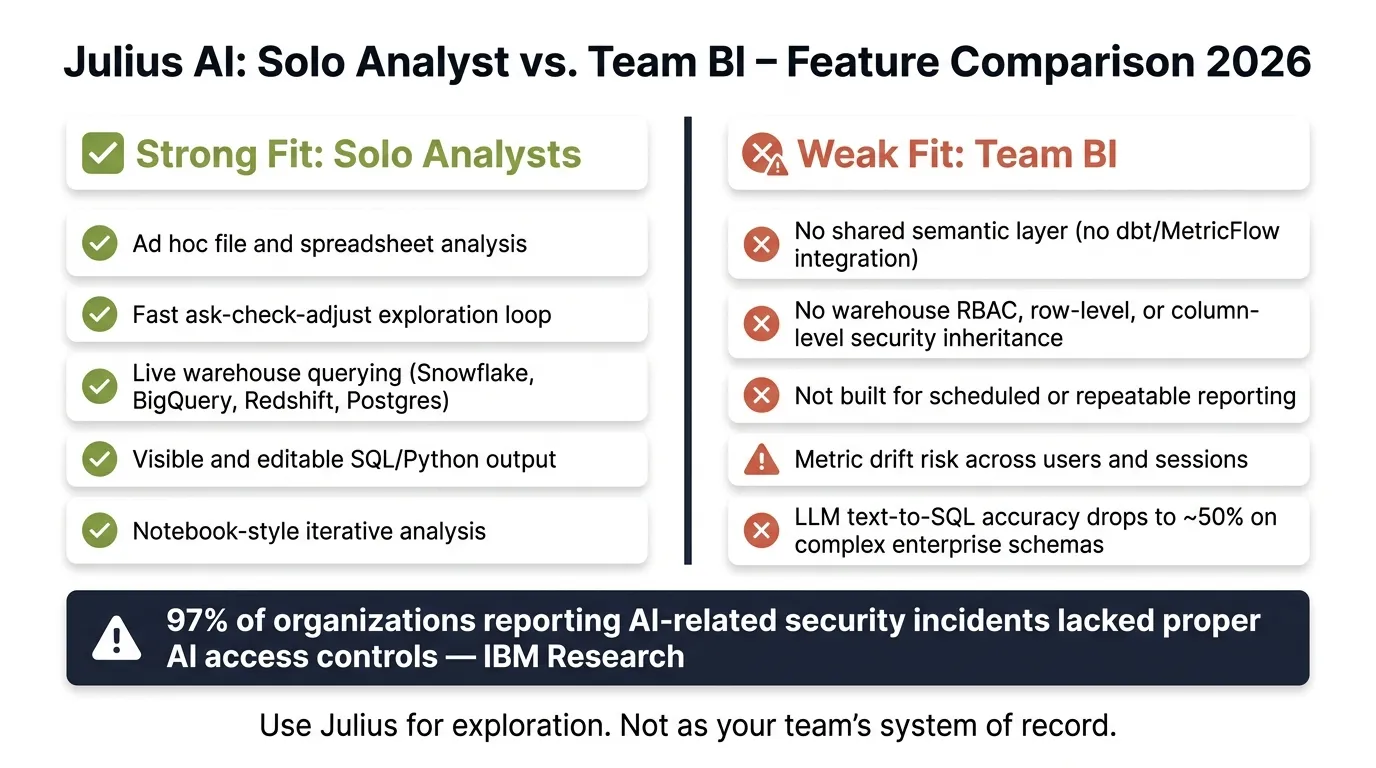 {Julius AI: Solo Analyst vs. Team BI – Feature Comparison 2026}
:::
{Julius AI: Solo Analyst vs. Team BI – Feature Comparison 2026}
:::
Julius AI Review: Best AI Data Analysis Tool in 2026? (Honest Review)
::: @iframe https://www.youtube.com/embed/tX6eAx3bKg4 :::
Quick comparison
| Area | Julius AI |
|---|---|
| Solo analysis | Good fit |
| File analysis | Good fit |
| Live warehouse querying | Supported |
| SQL/Python visibility | Yes |
| Shared metric layer | No |
| Warehouse permission inheritance | No |
| Repeatable reporting | Limited |
| Team BI fit | Weak |
So if I were buying for a 100–500-person company, I’d treat Julius as an analyst tool, not the team’s main reporting layer.
That’s the core point of this review.
Where Julius AI works well for individual analysts
Julius AI fits solo analysts best when they already know the schema and can sanity-check what comes back. In that setup, it makes exploratory analysis much faster: ask a question, get a chart, then keep refining in the same interface.
Ad hoc analysis, charting, and notebook iteration
Say a revenue analyst connects Snowflake, BigQuery, Redshift, or Postgres and asks, "show monthly NRR by customer segment for the last four quarters." Julius can generate the SQL or Python, show the result, and let the analyst tweak filters or joins without leaving the session [1]. It also does file-based analysis well. If you're matching a CSV export from your CRM against live warehouse data, Julius lets you work with both in one place without building a data pipeline [1].
That fast ask-check-adjust loop is the main draw. For one person doing isolated analysis, that speed can save a lot of time. The tougher test comes when the work depends on live warehouse data that other people use.
Why Julius works best when the analyst can check the output
Julius is at its best when a trained analyst can review joins, filters, and metrics before sharing anything. The SQL or Python is visible and editable, which means someone with the right skill set can spot problems and fix them before a conclusion goes out [4]. For one analyst, that human review is often enough. For a team, though, it doesn't turn into a governed workflow.
That setup works well for individual exploration, but the cracks start to show when the analysis needs to stay consistent across users and sessions.
How Julius AI handles live warehouse data
Moving from file uploads to live warehouse queries brings Julius AI's main limit into plain view: it can query the warehouse, but it doesn't give you a governed semantic layer. You can work with warehouse data directly, without exporting CSVs. So the problem isn't data access. The real issue is consistency. Can the output stay steady enough for a team to use with confidence?
Connection setup, query inspection, and refresh behavior
Setup is simple: connect your source and ask questions in plain English. Julius turns those prompts into runnable Python for filtering, sorting, and aggregation [1]. You can see the generated code and edit it before using the results.
That sounds good, and for one-off analysis, it often is. But Julius is built for interactive work, not repeatable refreshes [1]. That's a big gap. For teams, being able to rerun the same logic and get the same result on schedule isn't a nice extra. It's the baseline.
Metric accuracy under real business definitions
This is where the warehouse connection story starts to get messy. Julius does not use dbt or MetricFlow definitions as a governed metric layer [1]. In plain terms, the tool doesn't anchor metrics to one shared source of truth. Teams have to restate definitions again and again if they want numbers to line up.
For a solo analyst, that may be fine. You know what you meant, and you can course-correct on the fly. But for a team working across dashboards and reports, that turns into a structural problem. One person says "revenue", another means "booked revenue", and suddenly the same business is telling two different stories.
Julius also does not deeply integrate with warehouse-level security controls like RBAC, row-level security (RLS), or column-level security [1]. So even when it's querying live Snowflake or BigQuery data, it doesn't inherit the permission model your data team has already built. That's where things get risky. Once more than one person needs to review, share, and trust the same analysis, those gaps stop feeling small.
Where Julius AI breaks down for team analytics
Collaboration, permissions, and review in practice
Julius works well when one person is exploring data on their own. But once that analysis needs to support a team, the notebook-style setup starts to show cracks.
The main issue is context. Julius builds it as each prompt comes in, instead of grounding answers in a shared semantic layer. That can lead to metric drift when teams don't have one central place for definitions [1][2][3].
Permissions are another weak spot. Julius offers app-level permissions, but it does not inherit warehouse RBAC, row-level security, or column-level security [1]. For teams working in SOC 2 or HIPAA settings, that matters a lot.
Comparison table: Julius AI against team BI requirements
The gap is easier to see when you line Julius up against what a data team usually needs.
| Requirement | Observed Julius Behavior | Implication for a Data Team |
|---|---|---|
| Shared metrics and semantic-layer alignment | Builds context dynamically per query; does not compile dbt or LookML logic [2][3] | Definitions must be kept in sync by hand; metric drift across users is likely [2][3] |
| Access control and security inheritance | App-level permissions only; does not inherit warehouse RBAC, row-level security, or column-level security [1] | Security must be managed separately from the warehouse; sensitive fields are harder to govern |
| Repeatable reporting and refresh behavior | Built for interactive work, not scheduled refreshes [1][2] | Cannot serve as a reliable reporting layer for recurring business questions |
Why data teams still need a governed layer
Here's the heart of it: collaborative analysis is not the same thing as governed self-serve BI.
A governed analytics model needs a few basics. Metric definitions should live in one place. Users should inherit the right data permissions. Answers should connect back to warehouse-native governance. Without that, teams end up doing extra manual work and taking on more risk than they may realize.
IBM research found that 97% of organizations reporting AI-related security incidents lacked proper AI access controls [1]. That's hard to brush off when an AI tool is querying live Redshift or Postgres data without using your existing permission model.
This is the problem a secure context layer is meant to solve. Querio stores metric definitions, joins, and trusted queries as plain SQL and Markdown files synced to GitHub, alongside your dbt project. The agent can suggest new definitions, but only a logged-in human can approve and commit what stays. Every query runs against the live warehouse through encrypted, read-only credentials, and role-based access means each user only sees what they're allowed to see.
That shifts the discussion. The question isn't whether Julius can analyze data. It's whether it can support governed, repeatable workflows for a team.
Final verdict: who Julius AI fits in 2026 and who needs more
Julius AI works well for solo analysts. But for team BI, it has clear limits.
It shines when you need fast analysis on files or live warehouse data. The trouble starts when a team needs shared metrics, inherited permissions, and reports they can run the same way every time.
Decision matrix by use case
Once Julius shifts from solo work to team analytics, those limits show up fast.
| Use Case | Julius Fit | Why | What the Team Still Needs |
|---|---|---|---|
| One-off spreadsheet analysis | Strong | Fast, handles files natively | N/A |
| Analyst-led exploration | Strong | Flexible, notebook-style chat | Peer review and version control |
| Warehouse-backed ad hoc analysis | Conditional | Works for exploratory queries, but teams still need governed metrics and repeatable refreshes | Live warehouse connection and SQL visibility |
| Shared metric management | Weak | No central semantic layer; metric drift can emerge [1][3] | dbt or a governed context layer |
| Governed self-serve BI | Weak | Lacks RBAC and row-level security inheritance [1] | Warehouse-level permissions sync |
| Executive reporting | Weak | Not built for standing dashboards or repeatable reporting | Durable, repeatable visualizations |
Key takeaways for data leaders
The buying call is pretty simple: use Julius for exploration, not as the team’s system of record.
If a team treats it like the main BI layer, metric inconsistencies tend to show up fast. And what looks like a small design tradeoff at first can turn into an ops headache later.
For data leaders working in Snowflake, BigQuery, Redshift, or Postgres, Julius makes the most sense for ad hoc analysis. It fits best next to a governed context layer, not instead of one.
FAQs
::: faq
Can Julius AI be trusted for executive reporting?
Generally, no.
Julius AI doesn’t have a persistent semantic layer. That means metric definitions can change from one session to the next, which makes reporting less consistent over time.
Its chat-based, session-focused setup works better for ad hoc analysis than for the repeatable, governed workflows executive reporting depends on. In most teams, that kind of reporting needs:
- centralized business logic
- inspectable, auditable SQL
- steady metric definitions across sessions and users
Without those pieces in place, drift can creep in fast. :::
::: faq
What breaks first as a team scales Julius AI?
First, capacity and trust tend to break. As usage grows, Pro/Team can start to feel tight, and credits or compute may run out in the middle of a workflow.
More importantly, Julius’ chat- and session-based setup doesn’t provide a persistent, governed semantic layer. That means metric definitions can drift from person to person and change over time. Collaboration can also start to slip, because governance and repeatable, warehouse-native reuse aren’t as strong as most teams need. :::
::: faq
What should data teams pair with Julius AI for governance?
Pair Julius AI with a centralized, governed semantic layer that defines metrics, joins, and business logic in one place. Julius is built for ad hoc, session-based exploration, so teams should anchor it to shared dbt models or semantic definitions to avoid metric drift.
It also makes sense to use Enterprise controls like SSO/SAML, RBAC, and audit logs. And before anyone uses the output in business-critical reporting, review the underlying Python or SQL. That extra check can save a lot of trouble later. :::