Business Intelligence
Best AI-powered self-service analytics platforms in 2026
A comparison of AI self-service analytics platforms covering AI features, governance, data connectivity, and pricing.
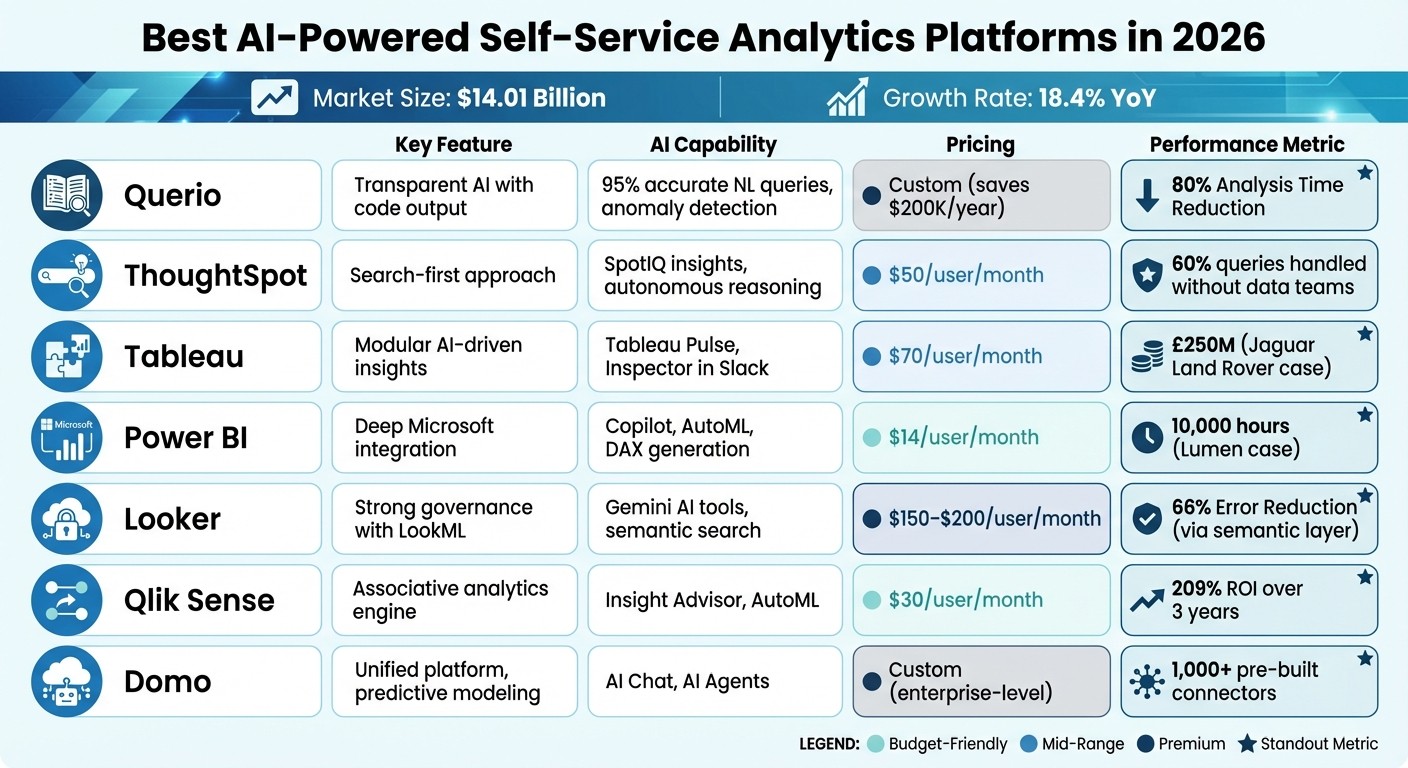
AI-powered self-service analytics platforms have transformed how businesses analyze data in 2026. These tools now act as autonomous AI agents, offering features like anomaly detection, contextual explanations, and automated reporting. This evolution has driven the market to $14.01 billion, growing at 18.4% year-over-year. Key platforms like Querio, ThoughtSpot, Tableau, Power BI, Looker, Qlik Sense, and Domo stand out for their ability to deliver insights quickly, reduce analysis time, and improve decision-making.
Key Highlights:
Querio: Transparent AI agents with SQL/Python output, reducing analysis time by 80%.
ThoughtSpot: Search-first analytics with SpotIQ for anomaly detection.
Tableau: AI-driven insights like Tableau Pulse and dynamic mobile visualizations.
Power BI: Copilot for natural language queries and deep integration with Microsoft ecosystem.
Looker: Strong governance with LookML semantic layer and AI tools like Conversational Analytics.
Qlik Sense: Associative engine for pattern detection and AutoML for forecasting.
Domo: Unified platform with AI Chat and predictive modeling.
Quick Comparison:
Platform | Key Feature | AI Capability Highlights | Pricing (Starting) |
|---|---|---|---|
Querio | Transparent AI with code output | 95% accurate NL queries, anomaly detection | Custom (savings $200K/year) |
ThoughtSpot | Search-first approach | SpotIQ insights, autonomous reasoning | $50/user/month |
Tableau | Modular AI-driven insights | Tableau Pulse, Inspector in Slack | $70/user/month |
Power BI | Deep Microsoft integration | Copilot, AutoML, DAX generation | $14/user/month |
Looker | Strong governance with LookML | Gemini AI tools, semantic search | $150–$200/user/month |
Qlik Sense | Associative analytics engine | Insight Advisor, AutoML | $30/user/month |
Domo | Unified platform, predictive modeling | AI Chat, AI Agents | Custom (enterprise-level) |
These platforms cater to diverse business needs, from reducing manual work to delivering actionable insights. Querio stands out for its transparency and cost efficiency, while others like Power BI and Tableau excel in ecosystem compatibility and AI-driven features. Choose based on your organization's data complexity, budget, and integration requirements.
AI-Powered Self-Service Analytics Platforms Comparison 2026
What are Best AI Analytics Tools and Strategies for 2026?
1. Querio
Querio transforms self-service analytics by blending an interactive, dynamic workspace with transparent AI functionality. Acting as an AI-native analytics platform, it connects directly to your existing data warehouse, translating natural language queries into executable SQL or Python code. Unlike traditional AI tools that operate as black boxes, Querio ensures transparency by displaying the underlying code for every result, allowing data teams to verify logic and build trust. The platform’s reactive notebook adjusts computations as dependencies shift, offering the flexibility of a spreadsheet while scaling to warehouse-level data. These foundational features pave the way for Querio's advanced AI capabilities.
AI Capabilities
Querio’s AI agents excel at interpreting natural language queries with 95% accuracy, delivering sub-second responses even on datasets that span petabytes [5]. Users can ask conversational questions like, "What are sales trends by region?" and instantly receive visualizations, complete with forecasts, significantly cutting analysis time - up to 80%, according to user feedback [4]. The AI retains context during multi-turn conversations, so follow-up questions like, "What about last year?" don’t require restating the original query.
In one compelling retail case study, a marketing team analyzed "underperforming products by customer segment" across 50TB of data without needing input from data scientists. The AI generated segmented insights and actionable recommendations, which led to a 15% increase in revenue, showcasing how business users can independently drive results [4][8]. Additionally, the platform’s Chart Builder suggests the best visualizations while exposing the underlying code for compliance and auditing purposes.
Querio’s seamless data integration further enhances its ability to deliver these insights effectively.
Data Connectivity
Querio offers live, read-only connections to nine major data sources, such as Snowflake, BigQuery, and Redshift, using encrypted credentials to eliminate the need for data duplication [3]. This direct connectivity has enabled organizations to reduce reporting times from 3 weeks to just 30 minutes [3].
The platform also includes a semantic YAML layer and a business glossary to ensure consistent definitions across all analyses. One organization reported saving over $200,000 annually by switching to Querio’s streamlined connectivity and ditching outdated tools [3]. Integration options include APIs, iFrames, MCP, Slack, and Python notebooks, along with embedding capabilities for CRM and ERP platforms like Salesforce and HubSpot.
Governance and Security
Querio prioritizes enterprise-grade security, meeting SOC 2 Type II, GDPR, and HIPAA standards [3]. Role-based access controls and row-level security ensure that administrators can enforce policies, such as limiting finance teams to departmental data. This prevents unauthorized access while maintaining audit trails to meet regulatory requirements [5][7]. The platform’s shared context layer ensures that versioned logic created by data teams is consistently applied across dashboards, embedded analytics, and AI-generated answers, closing the governance gaps often found in older self-service tools.
2. ThoughtSpot
ThoughtSpot takes a search-first approach to analytics, making it easier for users to find insights without needing advanced technical skills. With this platform, business users can query data in plain language instead of writing SQL commands. Its architecture delivers lightning-fast responses, even when working with massive datasets stored in cloud warehouses like Snowflake and BigQuery. According to reports, about 60% of user queries can be handled without involving data teams, making it a powerful tool for self-service analytics [9].
AI Capabilities
ThoughtSpot's AI features stand out, particularly its SpotIQ tool, which automatically identifies anomalies and insights. A Capterra reviewer described SpotIQ as an extra analyst, highlighting its ability to autonomously surface valuable insights [9].
Another key feature is the Spotter AI Agent, included in the Pro tier for $50 per user per month. This tool supports up to 25 AI-driven queries per month and handles tasks like autonomous reasoning and data preparation. However, setting up the platform can be challenging. Administrators often face a steep learning curve with ThoughtSpot Modeling Language (TML), which requires significant effort upfront for data modeling and metadata configuration to ensure the AI understands complex business rules [9].
Data Connectivity
ThoughtSpot’s zero-copy architecture allows it to query data directly in cloud warehouses without duplicating or moving it. This ensures real-time accuracy and strong data governance. Its Analyst Studio combines data from sources like cloud warehouses and Google Sheets, offering flexibility with SQL, Python, R, or spreadsheet-based workflows.
The platform also includes SpotterModel, an AI-driven modeling tool that quickly creates semantic models by mapping relationships, dimensions, and measures from raw data. ThoughtSpot integrates seamlessly with major services such as Snowflake, Databricks, Amazon Redshift, Google BigQuery, Azure Synapse, Salesforce, ServiceNow, Slack, and Microsoft Teams.
Governance and Security
ThoughtSpot prioritizes security and compliance, with certifications including SOC 1/2/3, ISO 27001, HIPAA, GDPR, and CCPA. It offers detailed security controls at the row, column, and object levels, along with features like multi-tenant isolation, SAML-based single sign-on, multi-factor authentication, IP whitelisting, and automated session timeouts.
Its AI governance is equally robust, featuring human-in-the-loop validation and transparent query translation that shows how natural language inputs are converted into SQL. This prevents the "black-box" effect often associated with AI. Importantly, customer data is not stored by the AI - providers like Azure OpenAI delete prompts and responses immediately after processing.
With a consensus score of 8.29/10 based on 384 verified reviews as of February 2026, ThoughtSpot's security and governance framework strengthens its appeal as a reliable analytics platform [9]. This combination of features and safeguards positions it as a strong option for businesses seeking advanced, user-friendly analytics tools.
3. Tableau
Tableau Next combines advanced AI with a modular design to turn insights into autonomous actions. Recognized as a Leader in the 2025 Gartner® Magic Quadrant™ for Analytics and Business Intelligence Platforms, Tableau has proven its value, with Jaguar Land Rover reporting £250 million in business value through its analytics capabilities [10].
AI Capabilities
Tableau is testing several AI tools for data analysis in beta. Tableau Pulse delivers concise, AI-generated insight briefs and mobile visualizations that adapt dynamically to dashboard filters [11]. The Inspector in Slack feature sends natural language alerts when critical metrics are exceeded, allowing users to ask follow-up questions directly in Slack [11]. Data Pro simplifies data preparation by using natural language to automatically create structured semantic models from raw data in Tableau Next Workspaces. For routine tasks, the Data Interpreter cleans up messy Excel files, handling issues like merged headers and empty columns. Additional features include AI-generated color palettes based on text descriptions and forecasting tools compatible with bars, donuts, and text visualizations [11].
Data Connectivity
Tableau's Model Context Protocol (MCP) allows custom AI agents to query its analytics engine directly while maintaining security through the Agentforce Trust Layer [11]. The platform’s Private Connectivity ensures secure access to enterprise data stored in Snowflake and Redshift on AWS. A beta feature for Snowflake introduces in-database processing, enabling data flows to run within the database instead of Tableau Prep, which reduces memory use and speeds up processing [10]. Tableau also supports a wide range of secure connections, including new connectors for Google Drive and Starburst with JWT authentication. For geospatial analysis, the Mixed Geometry feature lets users visualize points, lines, and polygons from a single data column [10]. Integration with Microsoft 365 provides seamless embedding of live Tableau dashboards and Pulse metrics into PowerPoint and Word documents, complete with one-click refresh capabilities [11].
Governance and Security
Tableau prioritizes data security and governance, especially when leveraging generative and agentic AI. The Agentforce Trust Layer ensures AI agents only access verified data sources, with administrators able to define approved semantic models [11]. Tableau emphasizes this commitment with the statement:
"AI Can Draw the Chart. Tableau Defines the Truth" [11].
For added protection, External Key Management (EKM) lets organizations encrypt Tableau Cloud extracts using their own AWS Key Management Service keys. Tableau also supports SCIM-agnostic provisioning, extending beyond SAML to include the OpenID Connect (OIDC) protocol. For offline work, Tableau Desktop offers a controlled environment for data exploration and modeling [10]. By combining advanced AI with stringent governance, Tableau empowers businesses to make faster, more reliable decisions without sacrificing data integrity or security. This evolution reflects the broader future of data analytics powered by AI, where automation and human oversight coexist.
4. Power BI
Power BI has established itself as a top-tier AI-driven data intelligence platform, as highlighted in the June 2025 Gartner Magic Quadrant [17][18]. Its seamless integration with Azure, Teams, and Microsoft 365 makes it especially appealing for businesses already using Microsoft products.
AI Capabilities
The Copilot for Power BI, powered by Azure OpenAI, has transformed how users interact with data. It allows for natural language-based report creation and automatic generation of DAX formulas [12][13]. In February 2026, the platform increased its prompt input limit from 500 to 10,000 characters. Additionally, built-in AI visuals like Key Influencers, Decomposition Trees (supporting up to 50 drill-down levels), and Smart Narratives make it possible for users to conduct root cause analyses without needing to write code [12][13][16].
The platform also includes an AutoML feature within Dataflows, enabling business analysts to create binary, classification, and regression models directly in the interface. AI-powered data preparation tools further streamline workflows, cutting manual data-cleaning efforts by 40-60% in enterprise settings [12].
Since March 2026, Translytical Task Flows have enabled users to update records and initiate workflows straight from reports, with write-back capabilities to Fabric SQL databases and lakehouses [14][15]. Lumen’s Director of Data Engineering, Jerod Ridge, shared how Microsoft's automation tools saved nearly 10,000 hours of manual labor last year, allowing teams to focus on higher-value tasks [17].
Power BI’s deep integration with Microsoft's ecosystem amplifies its utility and accessibility.
Integration and Ecosystem Compatibility
As part of Microsoft Fabric, Power BI leverages OneLake for high-performance Direct Lake queries on Parquet files, eliminating the need for frequent data refreshes [14][15]. Its compatibility with Microsoft 365 applications enables users to interact with reports directly within Teams, Excel, PowerPoint, Outlook, and SharePoint. Micah Dail, Walmart’s Director of Finance Data & Analytics, emphasized its importance:
"At Walmart, we use a myriad of different vendors in our technology stack, so having a tool like Power BI that can bring everything together was critical" [17].
Power BI Pro is included for users with Microsoft 365 E5 or Office 365 E5 licenses, while standalone pricing starts at $14 per user per month for the Pro version and $24 per user per month for Premium Per User [17][18]. Kaya, a wellness brand, saw a 4% year-over-year increase in sessions booked and an 11% rise in collections from new customers after integrating Microsoft Dynamics 365 with Power BI in early 2026 [17][18].
Governance and Security
Power BI’s multi-layered governance and security framework ensures robust data protection. Features like Row-Level Security (RLS), Object-Level Security (OLS), and Azure AD Conditional Access safeguard data based on user identities [19][20]. Integration with Microsoft Purview adds automated data lineage tracking and sensitivity labels that stay intact even when data is exported to Excel or PDF [19][20]. The platform’s Data Loss Prevention (DLP) scans semantic models for sensitive information, triggering alerts or blocking risky sharing actions when necessary [19].
Administrators have granular control over AI features such as Copilot and AutoML at both the tenant and workspace levels. Furthermore, AI processing is restricted to the tenant’s geographic region, ensuring compliance with GDPR and HIPAA standards [12]. As Raju Easwaramoorthy from Presidio aptly put it:
"Deploying Power BI without governance is like building a city without traffic rules. Without guardrails, a BI deployment can quickly spiral into a tangled web of unmanaged datasets, sensitive data leaks, and uncontrolled sharing" [19].
5. Looker
Looker uses its proprietary LookML semantic layer to tackle generative AI data errors, achieving a 66% reduction through centralized business logic and version control [28]. Its in-database architecture directly queries data from sources like BigQuery, Snowflake, and Redshift, cutting out delays caused by traditional ETL processes [27].
AI Capabilities
The Gemini integration in Looker introduces a wide range of generative AI features. These include Conversational Analytics, which allows users to query data using natural language, and the LookML Assistant, which automates code generation. Additionally, the Visualization Assistant enables chart customization through simple text prompts [22][24].
For more advanced tasks, the Code Interpreter (available in version 25.8 and later) supports Python-based forecasting and anomaly detection directly within the platform [22][24]. Another standout feature is Automated Slide Generation, which turns reports into Google Slides presentations, complete with AI-generated summaries and storytelling elements [21][24]. Looker's Semantic Search understands business concepts rather than just keywords - so a search for "customer acquisition cost" will yield relevant results, even if those exact words don't appear [22][25].
However, not everything is perfect - 38% of reviewers in 2025 mentioned slow dashboard loading times [24].
Unlike basic text-to-SQL tools that often make educated guesses about database structures, Looker’s AI uses its semantic layer to ground outputs in LookML, delivering consistent and well-governed results [26]. As highlighted by AI:PRODUCTIVITY:
"Looker excels at enterprise-scale data governance through its LookML semantic layer – for organizations struggling with inconsistent metrics across teams, this is the solution" [28].
All these AI capabilities are seamlessly integrated into Looker’s unified connectivity framework, ensuring smooth operation across the platform.
Data Connectivity
Looker’s strength lies in creating a single source of truth across an organization. Its LookML semantic layer defines business metrics once and applies them consistently across all analyses [29]. After acquiring Spectacles.dev in 2025, Looker added native continuous integration (CI) capabilities. These automate testing and validation for SQL and LookML changes, helping prevent metric inconsistencies before they hit production [21][28].
For enterprise deployments, implementation costs usually fall between $50,000 and $200,000. User costs are estimated at $150–$200 per month, with a minimum commitment starting at 50 users [28][29].
Governance and Security
Looker’s governance framework includes role-based access control (RBAC), private networking, and Git-based version control. RBAC ensures precise control over data and AI feature access through specific roles and permissions, such as access_data for querying models or develop for LookML projects [22][25]. Additionally, Conversational Analytics data is region-specific, meeting residency requirements [22][25].
The platform also supports private networking to keep data within secure environments and integrates with Google Cloud Assured Workloads for certain regulatory needs [23]. Git-based version control allows analytics teams to manage code with software-level discipline, including reviews and merge requests [29].
However, as of April 2026, some generative AI features, such as Conversational Analytics, are not yet included in FedRAMP High or Medium authorization boundaries. These features are not recommended for highly regulated workloads without prior approval [22][25].
6. Qlik Sense
Qlik Sense uses an associative analytics engine to map data relationships upfront, making it easier to explore freely while filtering out irrelevant data. This approach helps uncover hidden patterns and can process over 40 million records in just about a minute [30][31].
AI Capabilities
In 2026, Qlik introduced Qlik Answers, a feature powered by generative AI that responds to natural language queries [30]. The platform's Insight Advisor uses machine learning to automatically create visualizations and highlight anomalies or trends, reducing the need for manual configurations. With Qlik AutoML (also called Qlik Predict), even non-technical users can build forecasting models and run what-if scenarios without writing any code. The AI Splits feature within the Decomposition Tree identifies the most impactful factors in a dataset automatically [30][31].
A Forrester study revealed that Qlik Cloud Analytics delivered a 209% return on investment (ROI) over three years. Users reported a 35% faster analysis time when using its AI-powered tools [30]. While the platform earned a 4.4/5 rating on AI:PRODUCTIVITY in December 2026, some reviewers noted that its learning curve is steeper compared to newer self-service tools [30].
These AI capabilities integrate seamlessly with Qlik Sense's extensive data connectivity options.
Data Connectivity
Qlik Sense supports over 100 connectors for platforms like SAP, Salesforce, Snowflake, and Databricks [30][31]. Updates in 2026 introduced native regex support, direct JSON loading (replacing REST connectors), and dedicated integration for Databricks datasets [30]. The platform offers multi-cloud deployment across AWS, Google Cloud Platform, and Microsoft Azure, in addition to on-premises setups. This flexibility is particularly valuable for industries like healthcare and finance, where data often cannot be stored on public clouds [31].
Pricing starts at $30 per user per month for the Business tier (billed annually). The Premium tier costs $2,700 per month, covering 20 full users and 10,000 basic users for viewing and interacting [30].
Governance and Security
Qlik Sense combines its robust AI and connectivity with strong governance measures. The Qlik MCP Server, introduced in 2026, allows organizations to use trusted data with external AI tools like Claude and ChatGPT while maintaining governance and Section Access controls [32]. The Qlik Trust Score™ evaluates data quality and readiness, helping users identify reliable datasets during analytics workflows [32]. The platform also supports both role-based access control (RBAC) and attribute-based access control, along with a data catalog for tracking lineage and managing row- or column-level security in enterprise setups [31].
Integration and Ecosystem Compatibility
Qlik Sense integrates seamlessly into existing business workflows, enabling analytics to be embedded across various processes. The Application Automation module offers a low-code, visual environment for creating workflows that trigger actions across Qlik Sense and other cloud platforms. It integrates with tools like Slack, Microsoft Teams, Jira, and ServiceNow to enable data-driven alerts within familiar environments [30][31].
For customization, the platform provides an open API framework (REST, WebSocket, and JavaScript), allowing users to embed interactive analytics into external applications. Reports can be generated in formats like Excel, PowerPoint, Word, and PDF [30]. Additionally, the mobile app supports offline functionality, letting users download dashboards and explore data even without an internet connection [31].
7. Domo
Domo presents itself as a comprehensive business intelligence platform, offering tools for data integration, transformation, visualization, and AI - all in one place. With its unified platform and hybrid architecture, Domo represents a forward-thinking approach to self-service analytics by blending AI, connectivity, and security. This positions it as a strong player in the rapidly advancing world of AI-powered analytics heading into 2026. The platform boasts over 1,000 pre-built connectors, supporting cloud applications, databases, and on-premises systems, while its hybrid architecture enables cloud data warehousing alongside data federation [33].
AI Capabilities
Domo's AI Chat simplifies data analysis by allowing users to ask questions in plain English, delivering instant visualizations and insights. In 2026, the platform introduced AI Agents, which can autonomously monitor data, trigger alerts, and suggest actions based on set business rules. For users interested in predictive analytics, Domo offers built-in modeling tools that help forecast trends and uncover patterns, even for those without technical expertise. Additionally, its AI Service Layer Settings ensure governance with features like human-in-the-loop approvals for AI-generated suggestions and RAG (Retrieval-Augmented Generation) context grounding for enhanced accuracy [33].
Data Connectivity
Domo's Magic ETL tool provides a user-friendly, drag-and-drop interface for transforming data, while also catering to advanced users with support for SQL, Python, and R. However, handling large files (over 100 MB) via SFTP might experience delays, and workflows like SFTP uploads may occasionally require manual steps due to rate limits or cost-related constraints [33].
Governance and Security
Security is a key focus for Domo, which offers single sign-on (SSO), multi-factor authentication (MFA), and role-based access control (RBAC). Its Personalized Data Permissions (PDP) allow for precise control over user access to data at a granular level. Features like Content Certification help teams identify reliable datasets, while activity logs and audit trails track user actions across the platform. Additional security measures, such as IP allowlisting and authorized domain restrictions, further enhance network protection. These safeguards also extend to Domo's integration capabilities, ensuring data remains secure throughout its lifecycle [33].
Integration and Ecosystem Compatibility
Domo supports secure dashboard embedding and API access for custom integrations, making it versatile for various business needs. While its pricing reflects an enterprise-level investment, it includes the entire platform - covering integration, ETL, business intelligence, and AI capabilities. Some reviewers have praised its real-time analytics features, though others have noted that its visual customization options are somewhat limited compared to platforms more focused on aesthetics [33].
Platform Comparison: Strengths and Weaknesses
Querio tackles a major challenge in analytics: providing both easy access to data and the ability to dig deep into the "why" behind data trends. While basic data access allows users to retrieve information, true analytics go further - uncovering the reasons behind the numbers. This is where Querio's AI agents shine, generating SQL and Python code that’s not only inspectable but also explains the logic behind every insight [1]. By combining investigative insights with seamless connectivity, Querio addresses these needs head-on.
Many analytics platforms struggle when it comes to detailed investigative analysis, often functioning as opaque systems or "black boxes." Querio differentiates itself with its transparent AI approach, where every result is backed by visible, verifiable code. Some platforms focus heavily on visual storytelling but require extensive training for non-technical users to move beyond simple dashboards [2]. Others enforce consistency in metrics through rigid semantic layers, but maintaining these systems requires ongoing technical expertise [2]. Additionally, platforms tied closely to specific cloud ecosystems primarily benefit organizations already committed to those infrastructures.
Other solutions excel in handling complex data scenarios through specialized engines, but their data modeling can be challenging for new users. Meanwhile, all-in-one cloud platforms often boast massive connector libraries - some exceeding 1,000 options - but their AI capabilities frequently lag behind more advanced competitors [2].
Querio’s unlimited-users model and native integration with data warehouses provide cost savings and live, uninterrupted data access. Enver, Co-Founder of Growdash, highlights this impact:
"Querio's impact on our operational efficiency has been profound. We saved over $200K annually and drastically reduced our reliance on data analysts" [34].
While other platforms offer value through extensive connector libraries and real-time features, they often come with higher entry costs for enterprises. Querio’s design strikes a balance, delivering speed, strong governance, and advanced analytics. Its AI-driven approach - monitoring KPIs and investigating anomalies 24/7 - sets it apart as a leader in agentic analytics.
Conclusion
Querio stands out as a frontrunner in the world of AI-powered analytics. As the analytics journey moves away from manual exploration toward automated insights, Querio delivers exactly what today’s organizations demand: clear, actionable solutions without the mystery of a "black box."
Amanda Wilson, Head of Revenue Marketing at Tellius, puts it best:
"The issue is not the tools. The issue is the model. Self-service analytics assumes business users want to explore data. Most do not. They want answers" [1].
Querio meets this need head-on with AI agents that produce inspectable SQL and Python code, ensuring non-technical teams can trust the insights they receive. The platform’s unlimited-users model and flat-rate pricing make it easier for businesses to scale analytics across their teams without breaking the budget. Plus, its AI agents work around the clock, monitoring performance indicators and diving into deeper analyses - no manual dashboards required.
By connecting directly to live data warehouses, incorporating governance tools, and offering autonomous investigative capabilities, Querio provides the speed, affordability, and analytical depth businesses need to make informed decisions fast.
At its core, Querio delivers what businesses crave: actionable insights. With its combination of transparency, governance, and investigative power, this platform empowers organizations to achieve measurable outcomes and drive smarter decisions.
FAQs
What makes an analytics AI “transparent”?
An analytics AI is described as transparent when it operates with clear and well-defined metric standards, offers insights that are easy to explain, and shows the reasoning behind its conclusions. This level of clarity helps users trust the AI's results and better understand how decisions are made, ultimately making data analysis easier to interpret and more dependable.
How does Querio connect to my data warehouse without copying data?
Querio integrates seamlessly with your data warehouse - whether it's Snowflake, BigQuery, or Postgres - offering live, read-only access. This approach keeps your data secure and current, eliminating the need for copying or duplication.
What governance controls does Querio offer for sensitive data?
Querio offers strong governance controls to safeguard sensitive data. These include role-based access controls, automated compliance checks, audit trails, encryption, and secure connections. Together, these features help keep your analytics secure, compliant, and running smoothly.
Related Blog Posts