Business Intelligence
Self-Service Analytics Without Losing Governance: A Data Leader's Guide
Enable self-service analytics safely with a semantic layer, RBAC, versioned metrics, automated tests, and query logs.

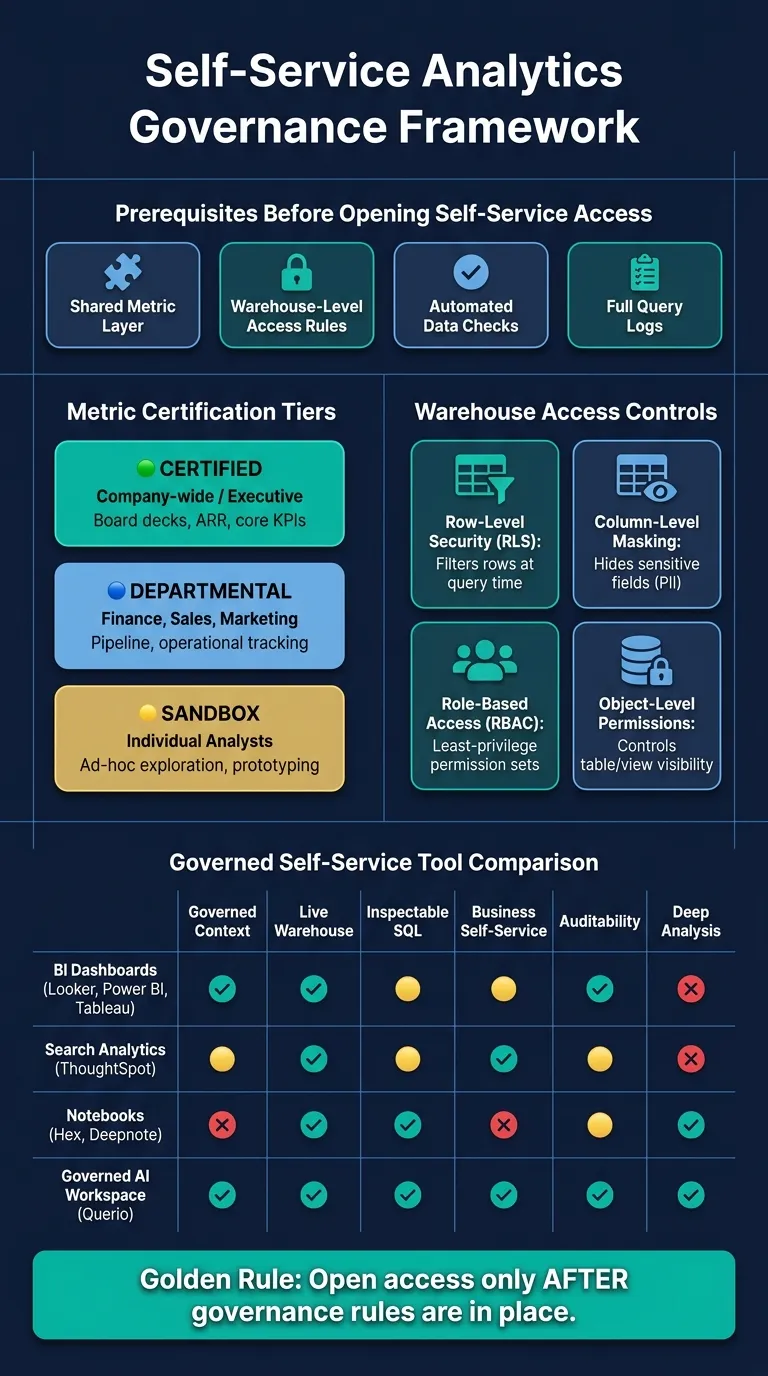
If I want self-service analytics to work, I need four things in place first: one shared metric layer, warehouse-level access rules, automated data checks, and full query logs.
Without those controls, self-service often creates conflicting KPIs, PII risk, and low trust in dashboards. For a B2B SaaS company with 100–500 employees, that usually means more ad hoc requests, more debate over numbers, and more time lost across sales, finance, product, and ops.
Here’s the short version:
- Define metrics once in a semantic layer, dbt model, or governed warehouse view
- Label metrics by trust level: Certified, Departmental, or Sandbox
- Version SQL and metric logic in Git so changes are traceable
- Enforce access in the warehouse with RBAC, row filters, and column masking
- Log every query with user, SQL/Python, objects touched, and policy checks
- Test certified data for freshness, duplicates, and schema changes
- Make AI query governed views, not raw tables
- Set ownership clearly between the central data team and business stewards
- Use tools based on the job, not as a fix for weak governance
A simple rule I’d use: open access only after the rules are in place. That’s how I let business users move faster without losing control of definitions, access, or data quality.
| Area | What I’d put in place | What it helps avoid |
|---|---|---|
| Metrics | Shared semantic layer and glossary | KPI drift and dashboard fights |
| Access | RBAC, row-level security, column masking | PII leaks and overexposure |
| Change control | Git-based versioning and review | Mystery metric changes |
| Data quality | Freshness, uniqueness, schema tests | Silent breaks in reports |
| Audit | Query logs, lineage, policy records | Slow compliance reviews |
| AI use | Governed context plus inspectable SQL/Python | Wrong answers from raw-table guesses |
Bottom line: self-service is not just about giving people BI access. It works when the warehouse remains the control point and every tool, dashboard, notebook, and AI workflow uses the same approved logic.
Build the governance foundation before opening access
Open self-service only after the shared logic is in place. If you skip that step, people will pull different numbers from the same data. The fix is simple: set the rules before anyone starts running queries.
Use a semantic layer to centralize joins, dimensions, and KPI logic
A semantic layer sits between your warehouse and the tools your team uses. Its job is straightforward: define joins, dimensions, and KPI formulas once, then serve that same logic to dashboards, notebooks, and AI-assisted queries.
That way, one question leads to one answer no matter which tool runs it. Without this layer, the same metric can end up being calculated in different ways depending on who built the report. In practice, dbt models or warehouse views usually define the grain and join paths, and downstream tools use that layer instead of rebuilding logic inside every report.
Once that logic lives in one place, the next move is to mark which metrics are certified and which are still exploratory.
Certify metrics and publish a business glossary
Governance works better in tiers than as an all-or-nothing gate. Not every metric in your semantic layer should carry the same level of trust, and business users need a clear signal that shows which numbers are certified and which are exploratory.
| Governance Tier | Who Uses It | Review Process | Typical Use Case |
|---|---|---|---|
| Certified | Company-wide / Executive | Data owner and business sign-off | Board decks, ARR, core KPIs |
| Departmental | Finance, Sales, Marketing | Domain steward review | Pipeline, operational tracking |
| Sandbox | Individual analysts | Minimal review | Ad-hoc exploration, prototyping |
Every certified metric should include:
- an assigned owner
- a plain-language description
- a defined grain
- a refresh cadence
- documented limitations
Terms like MRR, ARR, churn, and pipeline should each have one definition that everyone agrees on before any dashboard is built on top of them. A Certified label makes it easier for users to separate trusted metrics from sandbox work.
That tiered setup gives business users a clear path from sandbox analysis to governed reporting.
Version your logic as the warehouse changes
Source schemas change. dbt models get refactored. Business definitions shift over time. When the warehouse changes, version history helps you see whether the data changed or the logic changed.
Treat your SQL and metric definitions as code: track them in Git, review them before merging, and release them through controlled deployments. That gives you a rollback path when something breaks. It also means that when a downstream consumer asks why an ARR number changed, you can point to a specific commit instead of guessing.
No metric should enter the certified tier without version history and an owner.
With definitions versioned, the next control is who can see which rows and objects.
Control access and make every action auditable
Once definitions are versioned, the next step is access: who can see which rows, columns, and objects? Governance starts to matter inside the warehouse when definitions turn into policy, and policy turns into query-time access control. That’s what moves governed definitions from theory to enforcement, and it sets up the data-quality and AI checks that come next.
Role-based permissions, row-level rules, and object-level access
The old setup was messy. Teams would make separate sanitized copies of the same dataset for Finance, Marketing, and everyone else. That means duplicated logic, slower updates, and broken lineage.
A better option is fine-grained access control enforced at query time.
Modern warehouses like Snowflake, BigQuery, and Redshift support row-level security and column masking out of the box. With row-level security, a sales rep querying an accounts table sees only the rows for their assigned territory. The filter happens at runtime, not through a separate dataset. With column masking, an analyst can count customer records without seeing IDs, emails, or account numbers.
If you need more flexibility, attribute-based access control can check things like department or region at query time without spinning up separate secure datasets. Use least privilege as the default: each user gets only the access needed to do their job, and anything broader needs an explicit grant. Executives get certified dashboards. Business users get approved datasets. Power analysts get governed modeling paths.
| Access Control Method | How It Works | Compliance Benefit |
|---|---|---|
| Row-Level Security (RLS) | Filters rows at query time based on user attributes | Prevents cross-territory or cross-account data exposure |
| Column-Level Masking | Hides or redacts sensitive fields for unauthorized roles | Protects PII in SaaS customer and financial data |
| Role-Based Access (RBAC) | Assigns permission sets to roles, not individuals | Enforces least privilege and simplifies access reviews |
| Object-Level Permissions | Controls which tables, views, or models a role can query at all | Keeps restricted models invisible to unauthorized users |
Audit trails and query logs for trust and compliance
Access controls tell the system what it should allow. Audit trails show what actually happened. If your team handles customer data or financial records, that log is the gap between a defensible answer and a shrug.
A full audit trail should record the user, the exact SQL or Python, the objects accessed, the timestamp, and whether row-level security was active. So when a compliance team asks who accessed a certain customer table, or which query fed an executive dashboard, you can pull the answer from logs in minutes instead of spending days piecing it together.
| Audit Component | Investigation Use Case |
|---|---|
| User Identity | Identify who accessed a sensitive customer table during a security review |
| Query Logic (SQL/Python) | Verify that an AI-generated query used the correct "churn" definition |
| Object-Level Access | Confirm that a marketing analyst did not reach restricted PII columns |
| Policy Evaluation | Confirm that RLS rules were enforced during a specific session |
| Lineage Metadata | Trace a disputed dashboard figure back to its raw source table |
These logs matter when someone asks who accessed PII, when metric logic changed, or which query powered a report. Record ownership, lineage, and query logs in a central catalog so compliance can verify access fast without rebuilding the pipeline.
With access and logs in place, the next risk is metric drift and AI bypassing governed logic.
Keep data quality, change management, and AI in check
Access controls and audit logs help limit who can see what. But governance can still fall apart when data drifts or AI skips past approved logic. This layer keeps both the warehouse data and the tools querying it in sync. Once access is locked down, the next problem is the data changing underneath you.
Data quality checks that prevent metric drift
Conflicting numbers often start with a model or schema change that hits dashboards before anyone reviews it. A dbt refactor or a renamed column can shift dashboard values quietly, and no one spots it until people are already arguing over the numbers.
dbt tests handle the basics well. Freshness checks make sure data arrived on time. Uniqueness tests catch duplicate rows. Schema consistency checks flag breaking changes before they show up in a dashboard.
Automation helps, but it’s not enough on its own. Each certified dataset should have one owner responsible for meaning and one owner responsible for reliability. Moving a dataset to Certified should require tests, review, and written assumptions. Start with the KPIs teams rely on most, like churn, revenue, activation, and ARR.
That same discipline needs to apply to AI too. If it doesn’t, users will go around governed logic and get answers from whatever the model can piece together.
AI-assisted querying must follow governed logic, not bypass it
AI tools stay accurate only when they query governed definitions. If they read raw tables, they’re forced to guess joins and business logic from schema alone. That doesn’t scale insight. It scales inconsistency.
"Natural language interfaces translate questions into queries against a semantic layer - without it, AI generates plausible-sounding but incorrect answers." - Promethium [1]
The rule here is simple: AI should query your semantic layer, where joins, filters, and KPI logic are already defined. That way, every answer uses the same certified churn definition.
You should also require inspectable SQL or Python so analysts can check and reuse the logic. When the code is visible and editable, analysts can review AI-generated queries against governed definitions, catch mistakes, and reuse that work in notebooks or dashboards.
"Governance is now an accuracy requirement... AI must access governed views, not raw tables." - Alex Merced, Head of Developer Relations, Dremio [2]
That’s where a governed, warehouse-native workspace starts to matter most.
Where Querio fits for governed, warehouse-native self-service
Querio is git-native analytics for data teams and their AI agents. It connects straight to Snowflake, BigQuery, Amazon Redshift, and PostgreSQL, so teams work from live data instead of CSV exports or stale extracts. Governed definitions (joins, metrics, and business terms) are plain files in a git repo your team owns. They are defined once and reused across Querio's answers, notebooks, and dashboards. Saving context or promoting a dashboard opens a pull request, so your reviewers approve it.
When a business user asks a question in plain English, Querio's agent answers with SQL and Python based on that context, in a notebook analysts can open, check and rerun. That gives business users a safe way to self-serve while the data team spends less time handling ad hoc tickets. Claude, Claude Code and Cursor can work from the same definitions through Querio's MCP server and CLI.
Pick the right operating model and tools for governed self-service
Once governance is in place in the warehouse, the next call is simple: who owns day-to-day self-service, and which tools should each team use?
A clear operating model for data leaders
Governance falls apart when ownership is fuzzy. A hub-and-spoke model usually works best: a central data team sets the core rules, while domain stewards in Finance, Sales, and Marketing handle context from the business side.
Business leaders should approve metric definitions. The data team should then encode those definitions in the semantic layer and keep them up to date. That split matters. If no one owns each side, definitions start to drift, and teams end up arguing over numbers instead of using them.
Don’t try to certify everything at once. That’s a fast way to get stuck. Start with the ten KPIs people debate most, like churn and net revenue, and certify those first. Only certify datasets that meet all three checks:
- They come from governed models
- They’re approved by the business owner
- They’re covered by quality SLAs
Also, retire dashboards with zero usage for 90 days. [3]
Comparison table: BI dashboards, search analytics, notebooks, and governed AI workspaces
The operating model should guide tool choice. Different users need different levels of flexibility, audit trails, and shared context.
| Tool Category | Examples | Governed Semantic Context | Live Warehouse Access | Inspectable SQL/Python | Business-User Self-Service | Auditability | Deep Analysis Flexibility |
|---|---|---|---|---|---|---|---|
| BI Dashboards | Looker, Power BI, Tableau | High (with a semantic layer) | Yes | Limited | Moderate | High | Low |
| Search Analytics | ThoughtSpot | Moderate | Yes | Limited | High | Moderate | Low |
| Notebooks | Hex, Deepnote | Low (user-defined) | Yes | High | Low | Moderate | High |
| Git-native analytics | Querio | High (shared context layer) | Yes | High | High | High | High |
Looker is a good fit for standardized executive reporting, especially when its semantic layer is kept in shape. ThoughtSpot is useful for fast ad hoc questions from business users. Hex works well for deep, iterative exploratory work. Querio fits teams that want governed self-service on live warehouse data, with inspectable SQL/Python and shared definitions kept in a git repo.
Speed and governance can scale together
The aim isn’t to pile on more tools. It’s to make sure the same governed logic reaches every tool people use.
Self-service works when definitions stay centralized, access stays governed, and every tool reads from the same semantic layer.
FAQs
How do I start self-service without creating KPI conflicts?
Start with a centralized semantic layer as the single source of truth for business definitions. When people build from shared, certified metrics, KPIs like revenue or churn stay consistent across teams.
To keep metrics from drifting:
- implement a semantic layer
- certify trusted datasets
- maintain a shared business glossary
- separate exploration from production
- automate governance with policy-based guardrails
Which metrics should we certify first?
Start with metrics tied to core business performance: revenue, churn rate, conversion, retention, and pipeline.
These KPIs tend to come up in high-stakes decisions, and teams often debate what they mean or how they should be calculated. Standardizing them first cuts down on conflicting definitions across the business.
It also makes sense to focus early on metrics that don’t have a single source of truth or that are easy to misread. When you define those metrics in a governed semantic layer, everyone works from the same calculation logic. That helps stop metric drift before it turns into a bigger problem.
How do we let AI query data without exposing raw tables?
Use a centralized semantic layer between AI and your warehouse. Instead of giving access to raw tables, let AI work only with governed virtual views that apply your business logic.
With Querio, you connect straight to Snowflake, BigQuery, or Postgres. On Snowflake and BigQuery, queries run as the person asking, so the warehouse's access rules apply. On Postgres, a service account plus Querio's policies set what each user sees. Metrics come from definitions in your git repo, so queries stay in line with them.