Business Intelligence
8 Best dbt Companion Tools for Analytics Teams
Pick the tool that fixes your team's biggest dbt gap—orchestration, observability, governance, reverse ETL, or self-serve analytics.

If I had to boil this down to one line, it’s this: pick the tool that fixes the part of dbt your team feels every day.
dbt handles SQL transforms, tests, docs, and Git-based workflows. But it does not cover everything around analytics work. In this list, I’d group the 8 tools like this:
- Airflow for scheduling and job order
- Looker for governed BI
- Hex for notebook analysis
- Monte Carlo and Elementary for data checks
- Atlan for catalog and lineage
- Census for reverse ETL
- Querio for self-serve questions on live warehouse data
If your issue is pipeline timing, look at Airflow.
If your issue is metric consistency, look at Looker or Querio.
If your issue is data checks, look at Monte Carlo or Elementary.
If your issue is getting warehouse data into Salesforce or HubSpot, look at Census.
There are 8 tools here, but only a few core decision points:
- Do you need orchestration, BI, notebooks, observability, cataloging, reverse ETL, or self-serve analytics?
- Do you want logic to stay close to your dbt repo?
- Does your team have 1–5 data people or a larger platform group?
- Are you okay with more setup work for more control?
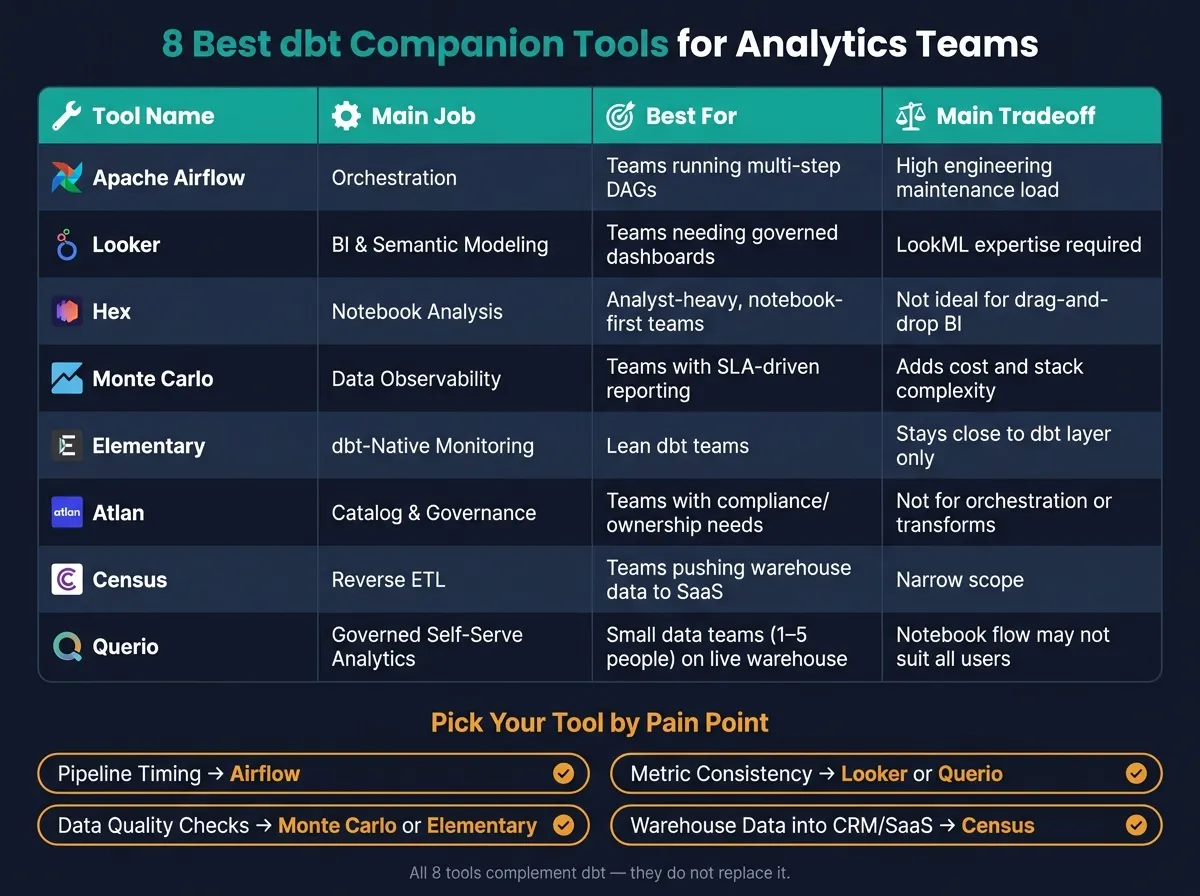
Quick Comparison
| Tool | Main job | Best for | Main tradeoff |
|---|---|---|---|
| Apache Airflow | Orchestration | Teams running multi-step DAGs | More setup and upkeep |
| Looker | BI and semantic modeling | Teams that want governed dashboards | LookML adds work |
| Hex | Notebook analysis | Analyst-heavy teams | Less suited for drag-and-drop BI |
| Monte Carlo | Data observability | Teams with SLA-driven reporting | Added cost and stack depth |
| Elementary | dbt-focused monitoring | Lean dbt teams | Stays close to dbt only |
| Atlan | Catalog and governance | Teams with compliance and ownership needs | Not for orchestration or transforms |
| Census | Reverse ETL | Teams pushing warehouse data into SaaS tools | Narrow scope |
| Querio | Governed self-serve analytics | Small data teams on live warehouse data | Notebook-style flow won’t fit every user |
My takeaway: most teams do not need “more tools.” They need the right missing layer next to dbt. This list helps map that gap fast, without turning the article into a feature checklist.
1. Apache Airflow
Apache Airflow is the orchestration layer many analytics teams use alongside dbt, ingestion jobs, warehouse loads, and downstream refreshes. It doesn't replace dbt. It schedules the work around it.
Use Airflow when dbt needs to run as part of a larger DAG, not when dbt is acting as a standalone scheduler.
How It Integrates with dbt
Airflow sits between your ingestion layer, your warehouse, and dbt itself. A common setup looks like this:
- ingest data
- run dbt
- refresh dashboards
It can manage retries, dependency chains, and failure logic across those steps. It also works well for API calls or custom Python-based logic that needs to happen before or after dbt runs.[2]
That said, Airflow's strength is orchestration. It helps jobs run in the right order, but it doesn't tell you whether the data itself should be trusted.
Where It Falls Short
Airflow manages execution order and retries, but it does not come with built-in data quality monitoring, semantic modeling, or native lineage. For those parts, teams still lean on dbt for internal model dependencies and use companion tools like Monte Carlo or Elementary for observability.[2]
Which Teams It Fits Best
Airflow tends to fit teams that have the engineering time to maintain it. If your team is small and doesn't have dedicated data engineering support, the operational overhead can feel heavy.[1][2]
If your dbt workflow is mostly self-contained and your main need is scheduling transformations, dbt Cloud's native scheduler is often enough.[1]
2. Looker
Looker works as the BI layer on top of dbt. dbt builds the warehouse model, and LookML turns that work into governed reporting for end users. So if dbt already sets the source of truth, Looker is often a good fit for packaging that data into reports people can use without a lot of confusion.
How It Integrates with dbt
dbt writes tables and views in Snowflake or BigQuery. Looker then reads those outputs and adds dimensions, measures, dashboards, and Explores.[3]
The big choice here is where metric logic should live. LookML is a mature semantic layer built for BI, while the dbt Semantic Layer is headless and meant to serve metrics across multiple downstream tools. If your team is all-in on Looker, keeping metric definitions in LookML is usually the better move. If you need the same metric definitions to show up across more than one tool, dbt's semantic layer can help you avoid repeating logic.[3]
Where It Helps Most
Looker is strongest for governed reporting at scale. One metric definition can keep revenue, churn, and other KPIs lined up across dashboards, which matters a lot when teams rely on self-service reporting tools every day.[6][7]
Where It Costs More Time
The tradeoff is modeling overhead. Funnels, retention, and cohort analysis usually need custom LookML, which can add setup time and extra work for the team.[5]
Which Teams It Fits Best
Looker fits mid-market and enterprise teams on Google Cloud or BigQuery that can maintain LookML alongside dbt.[2][4] Teams that want more exploratory, notebook-style analysis often end up choosing a different workflow.
3. Hex
Hex is a collaborative SQL and Python notebook platform. Analysts build logic in cells, then turn the output into interactive data apps that stakeholders can use.[2] For teams that want analysis to stay close to dbt models, Hex keeps that work in a single notebook flow. Analysts can dig in, check their work, and share dbt-backed analysis before it turns into a formal BI asset.
How It Integrates with dbt
Hex connects straight to your warehouse and can use the dbt Semantic Layer through MetricFlow. That means analysts can query dbt models and marts inside a notebook while leaving transformations and business logic in dbt.[3]
What It Handles Best
Hex is a strong fit for exploratory, multi-step analysis that doesn't belong in a dashboard. It works well for analyst-heavy teams with a notebook-first style that need a better way to share deep investigations.
This matters most when analysts need to see their steps clearly as they explore.
Governance and Lineage
Hex provides cell-level lineage, which helps teams track how data changes across SQL queries and Python steps. Project-level permissions inherit warehouse row-level security, but Hex is not a semantic governance layer.[6]
Which Teams It Fits Best
Hex fits best for analyst-heavy teams that spend most of their time in notebooks and need a cleaner way to publish analysis. Non-technical stakeholders can view published apps, but they can't ask new questions without help from the data team.[2]
4. Monte Carlo
dbt defines the transformation logic. Monte Carlo keeps an eye on what shows up in production.
Monte Carlo is a data observability platform built to protect dbt-managed models after they land in the warehouse. It works alongside dbt, not instead of it. The goal is simple: catch data issues in the outputs dbt creates before those problems spread to dashboards, reports, or other downstream systems.
How It Integrates with dbt
Monte Carlo monitors the warehouse tables that dbt produces in Snowflake, BigQuery, Databricks, and Redshift. It alerts teams to changes in freshness, volume, schema, and distribution.[2]
What It Handles Best
Monte Carlo is strongest at alerts, triage, and root-cause analysis for broken models and downstream dashboards. It’s a good fit for freshness monitoring, quality checks, and upstream/downstream impact analysis. It also maps column-level lineage for incident response, so teams can see which downstream models or dashboards may be affected by a problem.[2]
Which Teams It Fits Best
Monte Carlo fits teams that run production dashboards, work against SLAs, and serve multiple downstream consumers. It makes sense when data incidents can break dashboards, executive reporting, or customer-facing metrics. Because Monte Carlo catches issues after dbt runs, it’s most useful when production reliability matters more than build-time testing.
5. Elementary
Elementary is a dbt-native observability layer for teams that want model health checks built into their current dbt workflow. It’s not trying to be a full incident-management platform. Instead, it stays focused on observability inside dbt operations.
That makes Elementary a lighter option for teams that want better visibility into model health without adding a bigger data platform to the mix.
How It Integrates with dbt
Elementary plugs into dbt projects and Git-based review. It helps catch freshness issues, schema changes, and test failures on dbt models before those problems show up in dashboards and reports.
What It Handles Best
Elementary’s main strength is monitoring dbt-managed models. In day-to-day work, that usually means surfacing model-health issues like:
- test failures
- freshness drift
- schema changes
And it does that inside the same Git and dbt process teams already use for model development and review.
Scope and Role
Elementary stays centered on dbt assets, not broader catalog or governance workflows.
Which Teams It Fits Best
Elementary is a good fit for lean analytics engineering teams that want dbt-native observability without taking on a broader platform. If model health is the first need, the next step is usually figuring out how to document and govern those dbt assets across the rest of the stack.
6. Atlan
Where observability keeps an eye on dbt model health, Atlan focuses on organizing and governing those same assets so people can find them, trust them, and use them the right way. It works as a catalog and governance layer for dbt-managed assets.
In plain English: Atlan adds searchable metadata, ownership details, and governance around dbt models. It pulls dbt metadata into one place so analysts and governance teams can search models, review lineage, and manage policy without bouncing between tools.
What It Handles Best
Atlan works best for teams that need to organize dbt models, document ownership, trace lineage, and manage access across a warehouse-backed stack. It helps teams handle dbt assets for discovery, ownership, lineage, and compliance.
That matters in day-to-day work. Analysts can find trusted models faster, while governance teams get one place to manage policy.
Common tasks include:
- Model discovery
- Lineage review
- Ownership assignment
- Glossary management
- Access governance
Which Teams and Stacks It Fits
Atlan fits analytics teams in regulated SaaS, healthcare, or finance settings that need controlled access to trusted warehouse data. It tends to make the most sense for larger regulated teams with formal security and compliance needs, plus dedicated governance or platform owners.
For smaller or leaner teams, lighter dbt-native documentation is often enough until cataloging and compliance needs start to grow.
7. Census
If the earlier tools help keep dbt dependable and easy to track, Census takes the next step. It pushes those models into the systems where teams actually do the work.
Census is a reverse ETL tool that syncs dbt models into Salesforce, HubSpot, Marketo, and other operational SaaS tools.
How It Integrates with dbt
Census uses dbt models as direct sync sources, so teams can launch a sync from an existing model. It can also pull in dbt metadata automatically, including table and column descriptions. That way, downstream fields keep the same dbt context in the destination.
What It Handles Best
Census is built for data activation: moving warehouse data into operational systems. Common workflows include:
- Syncing product-qualified lead scores into Salesforce
- Pushing customer health scores into HubSpot to support renewal workflows
- Syncing audience segments into Marketo for campaign targeting
This means teams can use warehouse data in Salesforce, HubSpot, or Marketo without dealing with CSV exports. If modeled warehouse data needs to drive sales, marketing, or customer-success work - not just reporting - Census fits that job.
Which Teams and Stacks It Fits
Census works well with Snowflake, BigQuery, Redshift, and Postgres. It’s a strong fit for growth-stage B2B SaaS teams that need to get warehouse insights into CRM and marketing systems as part of day-to-day operations.
There’s one catch: teams need clear ownership of sync logic, field mapping, monitoring, and refresh timing. That matters even more when responsibility across dbt and destination systems is fuzzy.
When the need shifts from activation to governed self-serve analysis, the next tool covers that workflow.
8. Querio
Querio is git-native analytics for data teams and their AI agents, and it works as a dbt companion for governed self-serve analytics on live warehouse data. Business users ask questions in the app or Slack, and agents like Claude and Cursor work through Querio's MCP server and CLI. The data team keeps metric definitions, context and saved queries as files in a git repo, which can be the dbt repo itself.
How It Integrates with dbt
Querio connects live to Snowflake, BigQuery, Redshift, Postgres and other warehouses. There are no extracts and no CSV round-trips. It reads dbt's semantic_manifest.json, so MetricFlow metrics are defined once in dbt and Querio uses them, with no second copy. Its context files can sit in your dbt repo, so a model change and the context that describes it go in one pull request.
When an agent finds a better join or metric, it proposes the change as a pull request. Your repo's own branch protections and reviewers apply, and merging makes it live. In CI, renaming a dbt model flags every dashboard, query and context file that uses it before the PR can pass. That matters because teams can improve definitions without losing control of the review process.
What It Handles Best
Here’s what that looks like in day-to-day work: a user asks a question, and Querio's agent writes inspectable SQL and Python against the live warehouse. It returns the result in a reactive notebook, and analysts can open, check and rerun it.
Results worth keeping become dashboards, and promoting one opens a pull request. It’s a clean setup for teams that want business users to move fast without cutting analysts out of the loop.
Notebooks run in a sandbox with no internet access, and agents can keep a dataframe and build on the last result.
Governance and Lineage
Querio logs every query, agent action and promotion. Dashboards are also marked by trust level:
- trusted
- experimental
- team
An agent sees only what its user sees. On Snowflake, BigQuery and Databricks, per-user OAuth runs each query as the person asking, and roles come on every plan.
Which Teams and Stacks It Fits
Querio fits small data teams, usually one to five people, at 100–500-employee B2B SaaS, healthcare, or fintech companies that already have a real warehouse and are dealing with more ad hoc requests.
It is SOC 2 Type II and HIPAA compliant [7], and it has a free plan. Core is $2,499 per month, with no per-seat pricing and unlimited users on every plan.
Teams already running dbt on Snowflake, BigQuery, Redshift, or Postgres will usually get the fastest payoff, since the context layer drops into an existing dbt repo without much friction.
That makes Querio a useful comparison point for governed self-serve analytics on live dbt data.
How Each Tool Performs Across Four Key Decision Criteria
Use this grid to pick the dbt companion that fills the gap in your workflow, whether that's orchestration, BI, observability, cataloging, reverse ETL, or governed self-serve. The table below pulls those tradeoffs into one place, so you can scan the options side by side.
Read across each row to compare how the tools stack up on the same decision point.
| Criterion | Strongest Tools | Why They Stand Out | Tradeoff to Note | Best Fit |
|---|---|---|---|---|
| dbt integration | Elementary, Querio, Atlan | Elementary is dbt-native; Querio reads dbt metrics and keeps its files in your git repo alongside dbt; Atlan adds catalog and lineage around the stack | None of these manage transformations themselves | Analytics engineers maintaining dbt projects |
| Primary workflow | Airflow, Looker, Hex, Census | Airflow orchestrates end-to-end DAGs; Looker centralizes metrics in LookML; Hex enables notebook analysis; Census moves modeled data into operational systems | No single tool covers orchestration, BI, and reverse ETL end to end | Teams with clearly defined, specialized needs |
| Governance and lineage | Looker, Atlan, Querio | Looker enforces metric consistency across dashboards; Atlan catalogs lineage across systems; Querio flags affected dashboards and queries in CI when a dbt model changes, with dashboard trust levels | Looker requires LookML expertise; Atlan benefits from active curation | Regulated industries or teams with metric consistency issues |
| Best fit | Hex, Elementary, Querio | Notebook-first analysis, dbt-native observability, and lightweight self-serve all fit lean teams | Hex is notebook-centric; Elementary stays close to dbt | Small analytics teams without dedicated platform engineers |
A simple way to read this: Elementary stays close to dbt, Querio helps teams self-serve without drifting away from trusted logic, and Atlan gives you catalog and lineage around the stack. On the workflow side, Airflow, Looker, Hex, and Census each do one job well, but they don't cover the full path from orchestration to reporting to activation on their own.
That means your pick often comes down to the bottleneck. If your team is wrestling with pipeline control, Airflow makes sense. If metric consistency is the pain point, Looker or Querio will feel like a better match. If you need modeled data to land in business tools, Census fills that gap. And if a lean analytics team just wants fast analysis or dbt-focused monitoring, Hex and Elementary are often the easiest fit.
Pros and Cons of Each Tool
The comparison above shows where each tool fits. This table shows the tradeoff that comes with each choice.
| Tool | Pros | Cons | Best For |
|---|---|---|---|
| Apache Airflow | Strong orchestration for complex pipelines; highly flexible for custom multi-step workflows | High engineering maintenance load | Engineering-heavy teams managing complex, multi-step data workflows |
| Looker | Mature semantic layer (LookML) enforces consistent metric definitions across dashboards | Requires LookML expertise; best fit for teams already standardized on Google Cloud/BigQuery and LookML | Orgs that need strict metric governance across many teams |
| Hex | Collaborative SQL and Python notebooks; analysts can publish work as interactive data apps | Notebook-first; not ideal for drag-and-drop BI users | Analyst teams that live in notebooks and want to share polished outputs |
| Monte Carlo | Strong data observability; deep lineage and automated quality checks | Adds another integration layer and cost to an already complex stack | Teams that need high data reliability and automated monitoring |
| Elementary | dbt-native monitoring | Focused on the dbt layer, so it is less useful when monitoring needs extend beyond dbt | Analytics engineers who want monitoring without adding a separate platform |
| Atlan | Strong metadata, lineage, and governance across heterogeneous stacks | Not a transformation or orchestration tool | Enterprise teams managing lineage and metadata across a heterogeneous stack |
| Census | Reverse ETL into operational tools | Narrower scope than platforms that also handle reporting or observability | Teams that need warehouse data in operational systems |
| Querio | Warehouse-native; context layer alongside dbt; inspectable SQL and Python for every answer; changes reviewed as pull requests | Notebook-style workflows may not suit users who want pure drag-and-drop BI | Lean data teams that need governed self-serve on top of a real warehouse |
Think of the table as a shortcut: one row, one job, one main compromise.
Conclusion
This comparison comes down to one thing: where does your dbt workflow need the most help?
For orchestration, Apache Airflow is the pick. For BI and reporting, it’s Looker. If your team works best in notebooks, Hex fits that job. For observability, Monte Carlo makes sense at scale, while Elementary is a good fit for monitoring at the dbt layer. If you need to send warehouse data into day-to-day tools, Census is the one to look at. And for governed self-serve on live warehouse data, Querio stands out.
There’s one simple filter to use: does the tool extend dbt without duplicating metric or semantic logic?
That part matters more than it may seem. Definitions, lineage, and permissions should stay close to the warehouse and stay tied to your dbt project. The goal is to fill the gap around dbt, not stack on another layer that repeats the same job.
FAQs
How do I choose the right dbt companion tool for my team?
Start with your team’s main bottleneck: metric governance, API delivery for embedded analytics, or a self-serve interface.
If you already use dbt, the dbt Semantic Layer is the most direct dbt-native way to keep metric definitions in one place right next to your transformations.
If you need embedded analytics, API-first delivery, or advanced caching, Cube is a strong fit.
For governed self-serve analytics for non-technical users, Querio offers an AI-first interface with direct warehouse querying and inspectable, reusable logic kept in your git repo. Claude, ChatGPT, Claude Code and Cursor work from the same definitions through its MCP server and CLI.
When is dbt alone enough for analytics workflows?
dbt alone is enough for teams that want code-based transformation, testing, and documentation in a Git-versioned workflow.
It works best when SQL-based modeling handles what you need, and you don't need dedicated low-latency API delivery, embedded analytics, or high-concurrency metric serving. For many growing teams, dbt gives you a maintainable base without adding extra infrastructure before those needs show up.
Can a small data team use more than one dbt companion tool?
Yes. Small data teams often use more than one dbt companion tool to cover different jobs. A common setup looks like this: dbt handles transformations and metric definitions, while a tool like Cube supports high-concurrency API delivery, or Kaelio adds a governed natural-language interface.
The main decision is simple: pick where governance lives. In most cases, dbt should be the backbone for transformations. Then bring in other tools only when there’s a clear gap to fill, like:
- low-latency embedded analytics
- AI query interfaces
- complex access controls