Business Intelligence
6 Best AI Tools to Query Postgres in Plain English
Compare six AI solutions for converting plain-English prompts into Postgres SQL, weighing accuracy, governance, setup, and outputs.
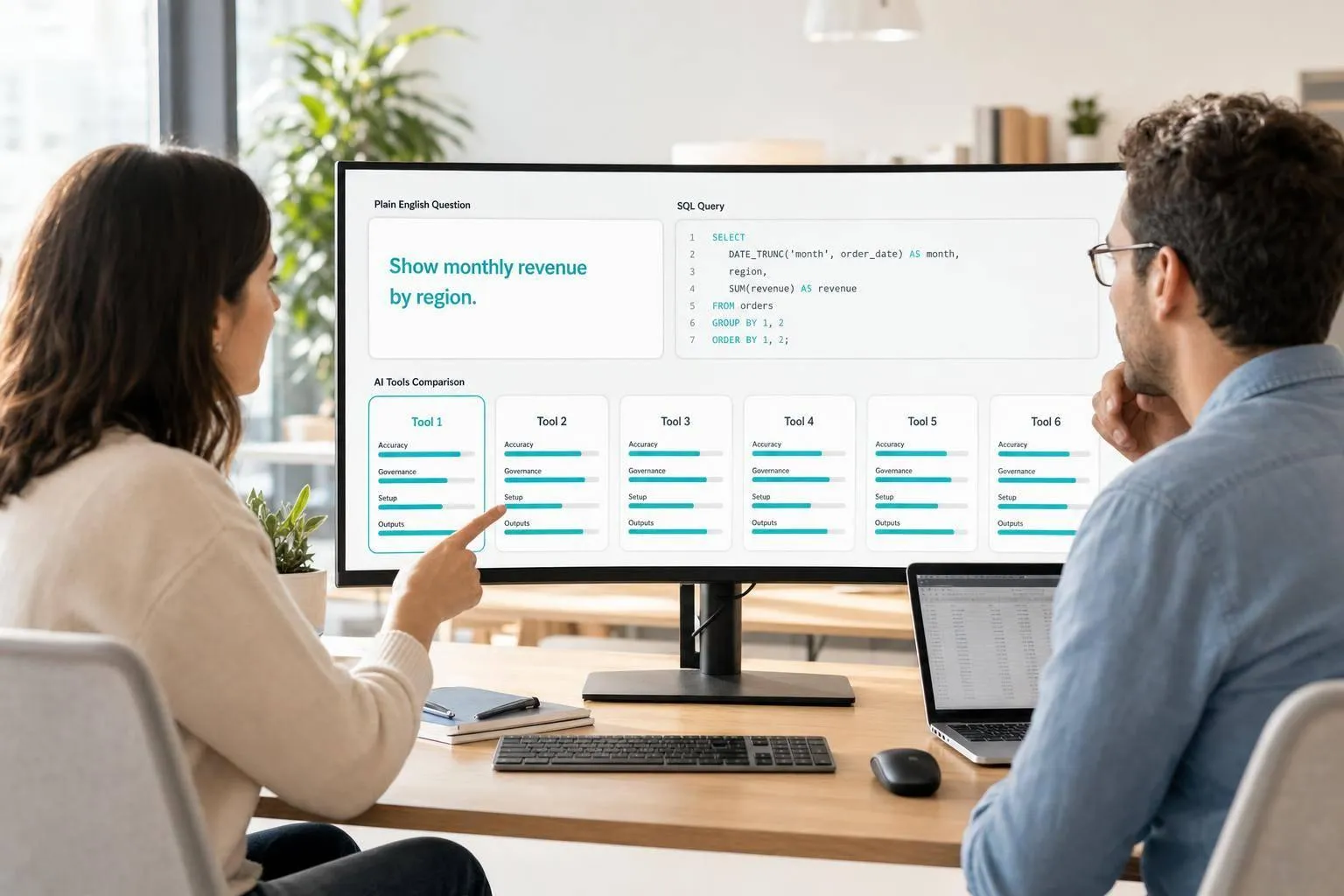
If you want plain-English Postgres queries that you can trust, the main choice is simple: use a semantic layer for business reporting, or use a database-native copilot for ad hoc SQL. In the source article, raw text-to-SQL can drop to 51% on business questions, while curated metric layers can reach 90%+ SQL accuracy. So I’d pick based on accuracy, governance, setup time, and output.
Here’s the short version:
- Querio: best if you want governed self-serve on live Postgres with inspectable SQL
- ThoughtSpot: best for teams already working from a curated BI model
- Hex: best for notebook-based analyst work and published data apps
- Looker: best for strict metric control through LookML
- dbt + AI workflows: best if your team already runs dbt and documented models
- Postgres-native copilots: best for engineers and analysts who want direct SQL from a live schema
What matters most is not just whether the AI can write SQL. It’s whether it can map vague business questions like “monthly revenue by state” to the right joins, filters, and metric definitions.
::: @figure 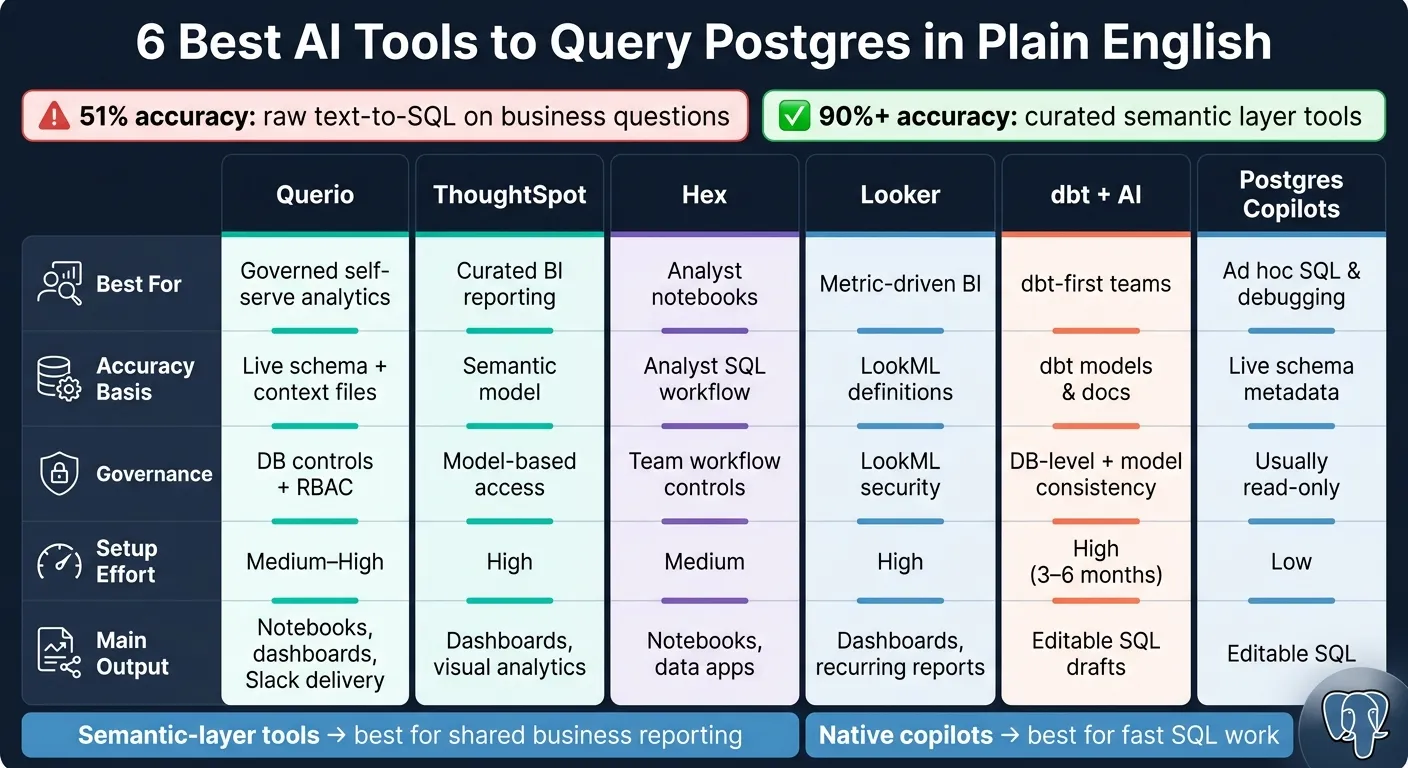 {6 Best AI Tools to Query Postgres in Plain English: Side-by-Side Comparison}
:::
{6 Best AI Tools to Query Postgres in Plain English: Side-by-Side Comparison}
:::
Using AI to Simplify Postgres Database Queries
::: @iframe https://www.youtube.com/embed/cIUlugfsy_s :::
Quick Comparison
| Tool | Best For | Accuracy Basis | Governance | Setup | Main Output |
|---|---|---|---|---|---|
| Querio | Governed self-serve analytics | Live schema + context files | DB controls + RBAC | Medium to high | Notebooks, dashboards, scheduled delivery |
| ThoughtSpot | Curated BI reporting | Semantic model | Model-based access | High | Dashboards, visual analytics |
| Hex | Analyst notebooks | Analyst workflow around SQL | Team workflow controls | Medium | Notebooks, apps |
| Looker | Metric-driven BI | LookML definitions | LookML security | High | Dashboards, recurring reports |
| dbt + AI | dbt-first teams | dbt models and docs | DB-level access + model consistency | High | SQL drafts |
| Postgres-native copilots | Ad hoc SQL and debugging | Live schema metadata | Usually read-only | Low | Editable SQL |
If I had to boil the article down to one point, it’s this: semantic-layer tools are better for shared business reporting, while native copilots are better for fast SQL work. That’s the lens I’d use before choosing any of these tools.
1. Querio
Querio is built for data teams that need governed, self-serve analytics on PostgreSQL. It connects to Postgres with read-only live access and turns plain-English questions into inspectable SQL and Python inside a reactive notebook. That matters when a business question depends on approved definitions, not just whatever column names happen to say.
Postgres SQL accuracy
Querio gets its SQL accuracy from synced SQL, Markdown, and Python context files stored in GitHub. That’s where your team defines joins, metrics, and business terms. So instead of guessing what “monthly revenue” means from table and column names alone, the agent works from the context your team already approved.
Querio also supports Macros for parameterized filters and Skills for reusable analysis patterns, like period-over-period comparisons. Human review still matters, especially when narrative output reads a template file the wrong way. But that same context helps keep access rules and business logic in sync.
Permissions and governance
Querio respects the access controls already set in your connected Postgres or warehouse setup and adds built-in RBAC. Every generated query is transparent, which means users and data teams can inspect and edit the SQL before or after it runs.
The platform is SOC 2 Type II compliant and supports HIPAA with signed BAAs. Centralized context also helps keep metric definitions and business terms consistent across teams.
Setup and context modeling
Querio needs upfront context modeling before it starts giving steady, governed answers. That’s the tradeoff. You put in setup work early so the answers hold up later.
The context lives as plain files in the same GitHub repo as your dbt project, which fits neatly into an existing data engineering workflow. As the agent learns, it can propose context updates, and your team decides what gets committed. As those context files get better over time, reliability improves too. Once that context is in place, the workflow can move past one-off query generation into repeatable analysis and reporting.
Outputs and workflow fit
Querio does more than generate SQL. Answers show up in a reactive notebook, where charts update on their own when the underlying SQL changes. Dashboards, called Boards, are built right from those notebooks.
Results can also be sent to Slack, Microsoft Teams, or email on a schedule. That includes automated anomaly investigations that surface root causes before your team even starts digging. For non-technical stakeholders, that means they can self-serve without writing SQL. For analysts and business teams, it means governed answers instead of raw query output.
| Criteria | Querio |
|---|---|
| SQL accuracy method | Live schema awareness plus a governed semantic context layer |
| Governance | Warehouse-inherited permissions, built-in RBAC, SOC 2 Type II, HIPAA with signed BAAs |
| Setup effort | Requires upfront context modeling |
| Outputs | Reactive notebooks, dashboards, Slack/Teams delivery, automations |
| Best fit | Data teams at B2B SaaS, healthcare, and finance companies that run a real warehouse |
2. ThoughtSpot
ThoughtSpot adds natural-language querying on top of an existing BI semantic model [2]. In plain English, it works best when your team has already done the hard work of shaping Postgres data into a curated analytics model.
That setup makes ThoughtSpot a strong pick for governed reporting. But there’s a catch: it’s less useful when someone wants to poke around raw tables, test oddball questions, or run loose ad hoc analysis.
Postgres SQL accuracy
ThoughtSpot does well when users ask about metrics, joins, and business logic that data teams have already modeled [2]. That’s where it tends to shine.
The tradeoff is pretty clear. If a question depends on raw or unmapped tables, performance drops off [2]. So if your Postgres setup includes a lot of data that hasn’t been cleaned up and mapped into the model, users may hit a wall.
Permissions and governance
ThoughtSpot handles governance through the semantic model, not straight from the Postgres layer [2].
That matters because access control follows the modeled analytics layer your team defines. For companies that want tight control over what people can see and how metrics are used, that can be a strong fit.
Setup and context modeling
ThoughtSpot is an enterprise-heavy platform with high setup costs [3]. Teams need to invest time up front in semantic modeling and curation if they want answers to stay consistent.
Once that model is in place, the payoff shows up most clearly in dashboards and visual analytics. That’s where the platform tends to feel most at home.
Outputs and workflow fit
ThoughtSpot is strongest in governed dashboards and visualization workflows. It fits analytics consumers and BI teams better than analysts who want direct SQL over raw tables.
If your team lives inside curated models and shared metrics, ThoughtSpot makes sense. If people need to dig through raw Postgres tables and ask messy, open-ended questions, it’s a weaker match.
| Criteria | ThoughtSpot |
|---|---|
| SQL accuracy method | Best on pre-modeled metrics and joins; struggles with raw or unmapped tables [2] |
| Governance | Governs access through the semantic model, not directly at the Postgres layer [2] |
| Setup effort | High; requires upfront semantic modeling and curation [3] |
| Outputs | Dashboards, visualizations, analyst workflows |
| Best fit | Teams with curated data models and a strong governance need |
3. Hex
If your team wants analysts to work in notebooks instead of dashboards, Hex fits that setup. It’s a notebook-first AI workflow for analysts who want to turn plain-English Postgres questions into SQL, then publish the results as data apps.
Collaborative notebook workflow
Hex is built for analysts and data teams that live in notebooks. They can share finished analyses with business users through published apps [7]. So the point isn’t just query generation. It’s taking SQL, building analysis around it, and turning that work into reusable, shareable apps.
Performance tradeoff
That teamwork angle comes with a cost: speed. Hex’s reported average response time is 198.2 seconds per task [7], which can slow iterative analysis and make fast prompt testing hard.
Use Hex when collaboration and app delivery matter more than rapid back-and-forth exploration.
| Criteria | Hex |
|---|---|
| Primary interface | Notebooks and data apps [7] |
| Best fit | Analysts publishing governed self-service apps [7] |
| Tradeoff | Slow iteration [7] |
4. Looker
Looker runs on LookML, a central semantic layer that defines Postgres tables, metrics, and join paths once, then reuses them across the stack. That setup is why plain-English questions can map cleanly to approved Postgres metrics instead of bouncing around raw tables.
Postgres SQL accuracy
Because measures live in LookML, Looker can rely on the approved definition of revenue instead of guessing from source tables. That matters a lot. When the metric logic is already defined, the model has far less room to drift. In practice, semantic-layer grounding can push SQL accuracy into the 90%+ range on real business questions [3][2].
Permissions and governance
Governance is one of Looker’s big strengths. Row-level security, access controls, and metric definitions all run through LookML, so AI-generated answers follow the same guardrails your BI team already uses. Put simply, it’s not just about getting the SQL right. It’s also about making sure people only see what they’re allowed to see.
Setup and context modeling
There’s a catch: Looker needs a well-documented LookML layer before its AI features become dependable. If dimension names and measure names are clear, plain-English prompts map to fields much more cleanly [3][4][5]. If the model layer is messy, the results can get messy too.
Outputs and workflow fit
Once that semantic model is set up, Looker tends to work best for recurring reporting. For teams already running Postgres data through a modeled BI layer, it’s a strong choice for governed self-serve reporting. Think executive dashboards, operating reviews, and repeatable team reports - places where consistency matters more than open-ended digging.
| Criteria | Looker |
|---|---|
| SQL accuracy basis | Governed LookML metric definitions [3] |
| Governance | High - inherits LookML row-level security and access controls [3] |
| Setup requirement | Well-documented LookML semantic layer. |
| Best fit | Enterprise self-serve dashboards. |
5. dbt with AI-Assisted Workflows
dbt is a transformation layer, not a query interface. When you pair it with AI help like dbt Copilot, teams can query modeled data in plain English instead of digging through raw Postgres tables.
Postgres SQL accuracy
Accuracy tends to be high only when dbt models are documented well and named in a consistent way. If the AI is grounded in dbt models - with pre-defined joins, business logic, and metric definitions already built in - it avoids one of the most common text-to-SQL problems: SQL that runs fine but answers the wrong question.
Permissions and governance
dbt doesn't enforce row-level security on its own. That still sits at the Postgres database level [6]. What dbt does give you is metric consistency. Business logic is defined once in the transformation layer, so the AI isn't forced to rework the same metric a different way every time someone asks for it.
A smart way to start is pretty simple:
- Give the AI read-only Postgres access
- Start with a small set of well-documented dbt models
- Expand only after the outputs prove reliable
That setup turns plain-English prompts into SQL drafts that map back to approved business logic.
Setup and context modeling
This is the part where dbt-assisted workflows ask the most from your team. Plain-English querying only works well when the YAML documentation is deep enough to support it - column descriptions, synonyms, and clear relationship definitions all matter. Building a mature semantic layer for enterprise text-to-SQL usually takes 3 to 6 months of modeling work [2].
Outputs and workflow fit
For analysts already working inside the dbt stack, the output is practical: editable SQL drafts tied to trusted metrics instead of raw tables. For business users, dbt tends to work best when it's paired with a BI layer or another self-serve surface. In other words, this setup fits analytics teams that already run dbt and a BI layer. It's not the right match for teams that want a turn-key query box.
| Criteria | dbt with AI-Assisted Workflows |
|---|---|
| SQL accuracy basis | Pre-defined dbt models, joins, and metric definitions [4] |
| Governance | Metric consistency via the transformation layer; row-level security handled at the database level [6] |
| Setup requirement | 3–6 months to build a mature semantic layer [2] |
| Outputs | Editable SQL drafts; best paired with a BI layer for self-serve reporting |
| Best fit | Analytics teams already running a dbt-centric stack |
Teams that don't want to maintain a modeled layer themselves usually need a lighter, database-native approach.
6. Postgres-Native Copilots
Postgres-native copilots connect straight to a live Postgres database and generate SQL from the schema that already exists there. If your team wants the fastest route to AI-assisted Postgres querying, this is the lightest option. Tools like Chat2DB, DataGrip AI, Beekeeper Studio, TablePlus AI, and DBHub read live schema metadata at query time instead of asking you to upload schemas by hand or pass in file-based context.
Postgres SQL accuracy
The main draw is simple: these text-to-SQL query tools can see the live schema, which helps them handle SQL better, especially when queries get messy. DataGrip AI and Chat2DB connect to a running Postgres instance, which is stronger than working from static schema uploads [1]. DataGrip AI stands out for complex SQL. It can explain queries, suggest fixes, and inspect execution plans to spot performance bottlenecks [1][4].
That said, there’s still a catch. Even good native copilots can get tripped up by fuzzy business language. Ask for "revenue growth" without saying how that metric should be defined, and you may get SQL that runs fine but answers the wrong thing. So these tools work well for ad hoc SQL and debugging, but they’re less suited for governed business definitions.
Permissions and governance
Most production-ready copilots default to read-only access, which helps stop accidental writes or destructive actions [6]. Chat2DB also supports local query processing, so sensitive schema data does not have to go to a third-party LLM server [1]. For regulated teams, that can matter a lot from a privacy standpoint.
Setup and context modeling
Native copilots are quick to connect, but they don’t bring metric context on their own unless you add a semantic layer. That’s why they’re strong for ad hoc SQL and debugging, yet weaker when teams need shared business definitions.
Outputs and workflow fit
The main output is editable SQL. That’s the point. You ask, the tool drafts the query, and you can inspect or change it before running anything. Chat2DB also adds AI-generated dashboards for quick charts from query results [1].
These tools fit best for analysts and engineers who spend most of their time in Postgres. In practice, the tradeoff is less about raw SQL generation and more about how your team works day to day.
| Tool | Key Strength | Best Fit |
|---|---|---|
| DataGrip AI | Complex SQL, query explanation, and execution plan analysis [1][4] | Engineers debugging Postgres |
| Chat2DB | 30+ databases, AI dashboards, and local query processing [1] | Technical teams and regulated industries |
| Beekeeper Studio | Polished GUI with AI SQL Shell [1] | Lightweight analyst use |
| TablePlus AI | Native feel and flexibility with your own AI keys [4] | Mac-first analysts |
| DBHub | Connects Claude or Cursor to Postgres via MCP [1] | MCP workflow users |
Teams that need governed metrics or self-serve access for non-technical users should use a semantic layer, not just an AI database client.
Pros and Cons
Choose the tool based on the mix you need: governed metrics, editable SQL, and self-serve access. The table below shows how each option lines up with the level of governance and flexibility your team needs.
| Tool | Pros | Cons | Best-fit Team |
|---|---|---|---|
| Querio | Governed context layer; editable SQL; live Postgres access | Requires upfront context modeling | Mid-market data teams (100–500 employees) needing governed self-serve without a black box |
| ThoughtSpot | Best for curated models and enterprise governance | High setup effort; steep setup burden | Large enterprises with established data warehouses and dedicated BI engineering resources |
| Hex | Best for notebook-based exploration and delivery | Less focus on strict governed metric consistency [8] | Data scientists and analysts who need exploration flexibility over standardized reporting |
| Looker | Best for governed metrics at scale | Requires a mature LookML model before AI output is reliable | Large organizations with strict governance requirements already standardized on Google Cloud |
| dbt with AI-Assisted Workflows | Best for teams already standardized on dbt | Not a general-purpose SQL client or self-serve tool for business users | Analytics engineering teams that already run dbt for their transformation layer |
| Postgres-Native Copilots | Fast to connect; high SQL accuracy for developers; fits existing IDE workflows | No shared metric governance; requires strong SQL literacy to validate results | Database developers and technical analysts doing ad hoc Postgres work |
The tradeoff becomes pretty clear once you look at team needs. This often highlights why AI is the missing layer in many setups. Some teams want tight control over metrics. Others care more about open-ended analysis or developer speed. Querio lands in the middle for teams that want governed SQL and editable outputs in the same workflow.
Conclusion
After looking at accuracy, governance, setup work, and output format, the choice mostly comes down to workflow fit. The best option depends on what you need most: governed self-serve, semantic-layer accuracy, or a fast notebook-style workflow.
If SQL accuracy is the main goal, the semantic layer often matters more than the model itself. Curated definitions in LookML or dbt tend to give more reliable answers than prompting an AI on raw tables alone. And if your team does collaborative analysis, Hex has a clear edge because it puts SQL, Python, and charts in one notebook. That setup makes sense when the job is deeper analysis, not just generating a query.
For teams in finance or healthcare, access controls should come first. Stick with tools that enforce read-only access and let you limit exactly which tables and columns the AI can see [6].
If you already have a mature dbt or BI layer, use the semantic layer you already trust. That will usually give you the most reliable results. If you need governed self-serve on live Postgres data, Querio is a better fit for data teams at companies with 100–500 employees because it keeps SQL inspectable and connected to a context layer your team controls. A good way to start is small:
- Begin with one schema
- Focus on one use case
- Check join logic before opening access more broadly
If you still need a fast answer, the FAQ below covers the most common decision points.