Business Intelligence
7 Best AI Notebooks for Data Analysis in 2026
Compare top AI notebooks for warehouse-native data analysis, tradeoffs on collaboration, governance, and AI accuracy.

If you need one short answer: the top picks are Hex, Deepnote, Mode, Databricks Notebooks with Databricks Assistant, DataLab, Microsoft Fabric Notebooks, and Amazon SageMaker Unified Studio Notebooks.
I’d group them into two buckets:
- Analyst-first notebooks: Hex, Deepnote, Mode, DataLab
- Platform-tied notebooks: Databricks, Microsoft Fabric, SageMaker Unified Studio
Here’s the part I’d pay attention to first: AI help is still hit-or-miss for data work. The article cites 52.8% error rates on BIRD and 66.1% on Spider 2.0-Snow in 2026. So I wouldn’t judge these tools by AI chat alone. I’d look at:
- Live warehouse access
- SQL + Python in one place
- Collaboration
- Governance
- Whether the generated code is visible and editable
If you work in Snowflake, BigQuery, Redshift, Databricks, or Postgres, these notebooks can cut tool switching. But the best choice depends on one thing: Do you want flexible notebook work, or do you need shared business definitions across teams?
My short take:
- Hex: best for analyst-led notebook work with reactive cells and publishable apps
- Deepnote: best for hands-on team notebook work
- Mode: best for SQL-first reporting and repeat analysis
- Databricks: best if your stack already runs on Databricks
- DataLab: best for lighter analyst work
- Fabric: best for Microsoft-first teams with Power BI models
- SageMaker Unified Studio: best for AWS teams centered on Redshift
Quick Comparison
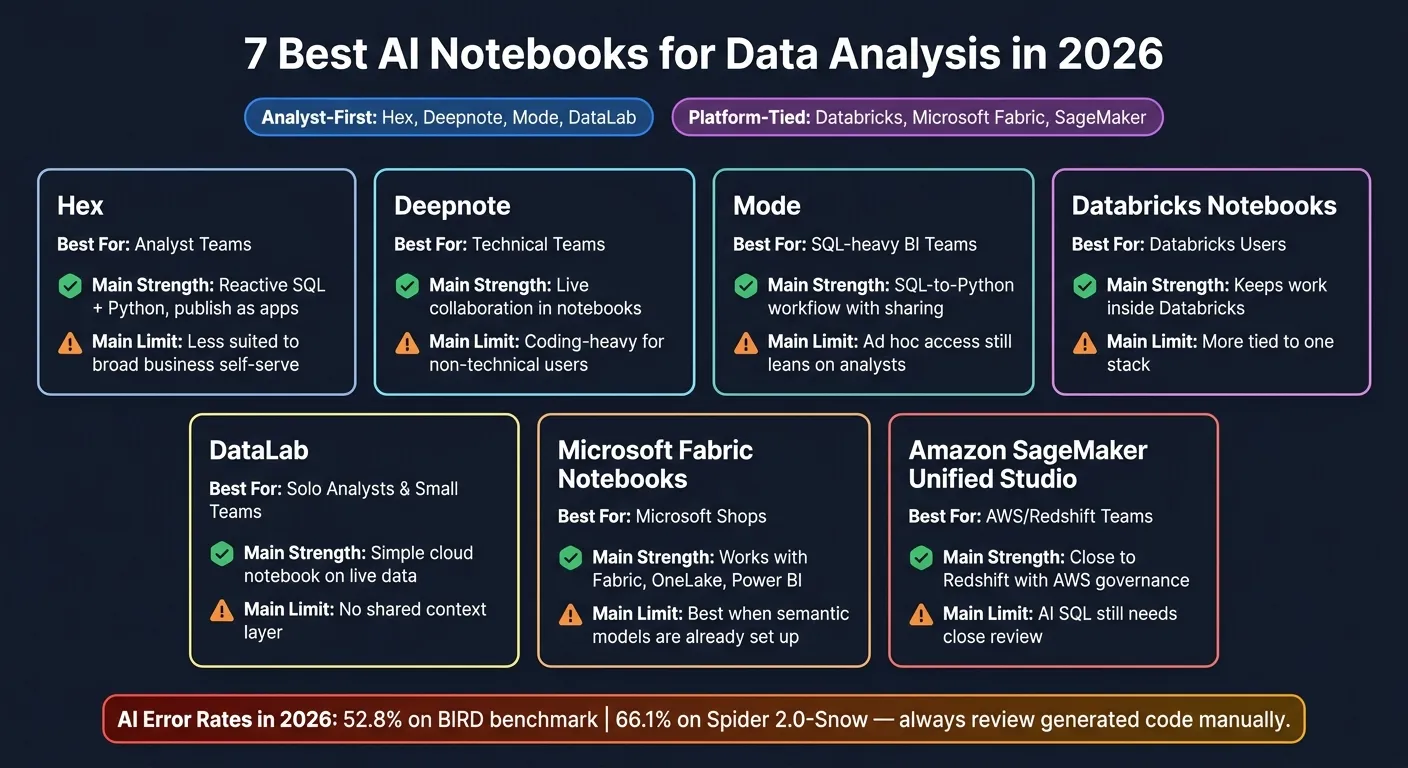
| Tool | Best fit | Main strength | Main limit |
|---|---|---|---|
| Hex | Analyst teams | Reactive SQL + Python, publish as apps | Less suited to broad business self-serve |
| Deepnote | Technical teams | Live collaboration in notebooks | Coding-heavy for non-technical users |
| Mode | SQL-heavy BI teams | SQL-to-Python workflow with sharing | Ad hoc access still leans on analysts |
| Databricks Notebooks + Assistant | Databricks users | Keeps work inside Databricks | More tied to one stack |
| DataLab | Solo analysts and small teams | Simple cloud notebook on live data | No shared context layer |
| Microsoft Fabric Notebooks | Microsoft shops | Works with Fabric, OneLake, Power BI | Best when semantic models are already set up |
| Amazon SageMaker Unified Studio | AWS/Redshift teams | Close to Redshift with AWS governance | AI SQL still needs close review |
So if I were picking fast, I’d start with stack fit first, then check governance, then test the AI output by hand.
1. Hex
Hex is an analyst-first AI notebook that brings SQL, Python, reactive execution, and warehouse connections into one workspace. It connects straight to Snowflake, BigQuery, Amazon Redshift, and Postgres, so for many data analysts and scientists, it works as a notebook-first option instead of Jupyter.
Where Hex shines is the day-to-day analyst workflow. You can run warehouse queries, move into Python, build charts, and keep downstream cells synced without juggling tools. Hex Magic can generate SQL and Python, create charts, and fix errors right inside the notebook. And when one cell changes, reactive cells update the results below it on their own. For a finance team, that means a single filter change can flow through the whole analysis without a full rerun.
That setup makes Hex a strong fit for work that stays warehouse-native and analyst-led. It handles SQL digging, Python analysis, visualization, and team collaboration in one place, which cuts a lot of back-and-forth.
Analysts can also publish finished notebooks as interactive data apps with dropdowns and date pickers. Business users get governed access to the final analysis without touching the notebook itself. For SaaS and healthcare teams, that can move cross-functional review along a lot faster.
The tradeoff is pretty clear: Hex’s AI is built for analysts working in notebooks, not for business users asking ad hoc questions. As Kateryna Kozachenko of Bruin notes, Hex is built for analysts in notebooks, while non-technical users consume published apps. That matters if teams like Sales, CS, or Ops need governed self-serve access to warehouse data.
Hex is strongest for analyst-led workflows that end in published, governed apps.
| Hex Plan | Price | Key Features |
|---|---|---|
| Community | Free | 5 notebooks, standard data connections |
| Team | $75/editor/month | Unlimited apps, scheduled runs, semantic model agent |
| Enterprise | Custom | SSO, HIPAA compliance, audit logs, embedded analytics |
2. Deepnote
Deepnote is a collaborative AI notebook built for technical data teams that work in SQL and Python. It works best when people need to analyze data together in a shared notebook.
Its best use case is team-based exploratory analysis. Say a team is digging into a KPI drop. Deepnote gives them one place to run queries, build charts, and test ideas as they go. AI-assisted code generation helps speed up SQL and Python drafting, and the code it produces stays fully visible and editable right in the notebook.[2] That matters because technical teams can inspect it, tweak it, and reuse it without guessing what happened behind the scenes.
The tradeoff is pretty simple: Deepnote is built for coders. So if your team includes non-technical users, or if you need shared metric definitions across the business, it’s a weaker fit. If your goal is governed, warehouse-native self-serve, the picture changes. For teams that need shared metric definitions and plain-English answers for everyone, Querio fits better.
| Feature | Deepnote | Querio |
|---|---|---|
| Primary user | Technical analysts | Data teams and their AI agents, plus business users |
| Non-technical self-serve | Requires coding knowledge | Plain-English questions, answered with SQL and Python you can inspect |
| Metric governance | Manual definitions | Definitions as files in a git repo on GitHub, changed by pull request |
| Warehouse connectivity | Snowflake, BigQuery, Redshift, Postgres | Snowflake, BigQuery, Redshift, ClickHouse, Postgres, and more |
Deepnote stands out when technical teams want hands-on collaboration in the same notebook. The next tool becomes more relevant when a company needs governed access across a broader group of users.
3. Mode
Mode is an enterprise analytics notebook built for technical teams. It fits data teams that run recurring, complex analysis across large schemas. It works best when a team needs live warehouse analysis, reusable SQL and Python, and shareable outputs in one place.
Mode stands out in a SQL-to-Python workflow. An analyst can write a SQL query against a live warehouse connection, pull the results into a Python cell, and share reports from the same notebook. That setup is handy when one project moves from querying to analysis to reporting without a bunch of tool switching.
The collaboration layer also helps. Teammates can view reports and leave comments, which tends to work well when the audience is mostly analysts or other technical stakeholders.
The main limit is the audience. Mode is analyst-first, so non-technical users still lean on the data team for ad hoc questions.
Teams that want a more collaborative AI data notebook startup workflow may find a better fit in the next platform.
4. Databricks Notebooks with Databricks Assistant
Databricks Notebooks with Databricks Assistant is a strong fit for teams that already run on Databricks and want to keep analysis inside the warehouse stack. If your notebook work already lives in a Databricks-first setup, this option tends to feel like the natural next step.
The Assistant can generate SQL and Python, and the code stays right there in the notebook where people can see it, check it, and edit it. That kind of visibility is useful. But speed alone matters less when a team also needs shared business definitions across the warehouse.
The main tradeoff is lock-in to one ecosystem. Teams that also work in Snowflake, BigQuery, Redshift, or Postgres often end up juggling separate workflows for each system. It also tends to suit technical users more than business analysts who need governed self-serve for ad hoc analysis.
And there’s a catch with business context. Without a semantic layer, multi-table analysis can produce SQL that is technically right but still misses what the business actually means. So the real issue isn’t just whether the notebook can generate code. It’s whether it can keep analysis inspectable and hold onto business context at the same time.
5. DataLab (DataCamp)
DataLab is a good fit for teams that want a lighter notebook for day-to-day analyst work on live warehouse data. It's DataCamp’s cloud notebook, and it connects straight to Snowflake, BigQuery, Amazon Redshift, and Postgres. That means teams can pull live data into a single notebook and do the work there.
Here’s what that can look like in practice: an analyst queries product usage events in Snowflake, cleans and models the data in Python, builds charts, and then shares the results with stakeholders. It’s a solid option for analyst-led notebook workflows.
The catch is that DataLab doesn’t include a built-in semantic layer for governed metrics and shared business context.
6. Microsoft Fabric Notebooks
Microsoft Fabric Notebooks make sense for teams that already live inside Microsoft Fabric, Power BI, and OneLake. They support Spark SQL for data exploration and Python through PySpark for deeper analysis. A common workflow looks like this: use Spark SQL to join large datasets, switch to Python for statistical work, then pass the output to Power BI Copilot for reporting [1].
Fabric tends to shine when Power BI semantic models already define the business terms analysts use. That part matters more than it may seem. If the semantic model is well set up, analysts can move faster. If it’s weak, Copilot has less to work with.
The AI layer here is Power BI Copilot. It gives analysts natural-language access to semantic models for questions and report generation [1]. In plain English, people can ask for answers and draft reports without digging through every field by hand. But there’s a catch: Copilot works best when the semantic model behind it is already in good shape [1].
Fabric also uses Microsoft security and admin controls, which can be hard to manage [1]. On pricing and access, Copilot requires Fabric F2 or Power BI Premium P1. Power BI Pro alone does not qualify [1]. So while Fabric can be a strong match for Microsoft-centered BI teams, it’s less suited to teams that want more freedom across multiple warehouses.
The tradeoff is pretty direct: Microsoft-native governance versus broader warehouse flexibility.
| Feature | Microsoft Fabric Notebooks | Querio Notebooks |
|---|---|---|
| Primary storage | OneLake-native | Warehouse-native |
| AI assistance | Copilot over semantic models | Inspectable SQL and Python |
| Governance | Microsoft security model | Context files in a git repo, changed by PR |
| Best for | Microsoft-first BI teams | Data teams and their AI agents |
That makes Fabric a strong Microsoft-first option; the next notebook shows a different cloud-native tradeoff.
7. Amazon SageMaker Unified Studio Notebooks
Amazon SageMaker Unified Studio Notebooks are a good match for AWS-native teams that do most of their work in Redshift. They keep SQL and Python close to Redshift, which makes AWS-native analysis and governance easier to handle in one place.
There’s a big tradeoff, though: accuracy. Generative SQL can drift when it doesn’t have semantic context, so human review still matters, especially for sensitive financial work and regulated reporting.
Redshift also includes native row-level and column-level security. That means governance can sit inside the AWS stack instead of living in a separate layer you have to manage.
The next section groups these notebooks by team type and workflow.
Pros and Cons by Team Type
The right notebook comes down to a few plain factors: team size, technical depth, warehouse stack, and governance needs.
This is where the seven tools start to separate. Some work best for analyst-heavy collaboration. Others make more sense for SQL-first BI teams or platform-specific setups. The table below gives you the tradeoffs in one place.
| Product | Best For | Better Fit for a Different Need |
|---|---|---|
| Hex | Collaborative analyst teams | When you need a governed context layer and reusable metric definitions |
| Deepnote | Small data teams doing exploratory work | When you need live warehouse connections plus consistent shared business logic |
| Mode | BI-focused teams with SQL-heavy workflows | When you need inspectable SQL and Python in a reactive notebook |
| Databricks Notebooks + Assistant | Databricks-native technical teams | When analysts and business users need governed self-service on live warehouse data |
| DataLab (DataCamp) | Individual analysts and small teams | When you need warehouse-connected analysis for production use |
| Microsoft Fabric Notebooks | Microsoft-centric analytics teams | When you need direct, live access to Snowflake, BigQuery, or Redshift without tying the workflow to Azure |
| Amazon SageMaker Unified Studio | AWS-centric teams using Redshift | When you want warehouse-agnostic governed analysis across Snowflake, BigQuery, and Redshift |
Where Querio differs is the context layer.
Instead of leaving joins, metric definitions, and trusted queries scattered across dashboards, notebooks, and tribal knowledge, Querio keeps them as plain files in a git repo your team owns, which can be the same repo as your dbt project. Changes go through pull requests, and the app, Slack, Claude and Cursor all answer from the same files. That setup helps teams keep metric definitions consistent instead of re-figuring out the schema every time someone starts fresh, especially when you need to chat with Snowflake, BigQuery, or Redshift directly.
The next section wraps up the shortlist and sums up the best fit by use case.
Conclusion
These seven notebooks fall into two clear camps.
On one side, you have analyst-first tools built for flexible SQL and Python work. On the other, you have platform-native tools that fit teams already set up on Databricks, Fabric, or AWS.
The main split isn't just about AI quality. It's about whether a team can keep shared business logic intact as analysis spreads across more people, more notebooks, and more use cases.
Most tools still show the code, which helps. But that doesn't solve everything. Shared metric definitions, join logic, and trusted queries can still drift when there's no governed context layer behind them. That's where the notebook model starts to crack for team analytics that need control and consistency.
The missing piece is shared context.
For B2B SaaS, healthcare, and finance teams, a governed semantic or context layer helps keep definitions aligned across notebooks and chat surfaces. Without that, two people can answer the same question in two different ways and both think they're right. That's a headache no team wants.
Choose a notebook when flexible, code-first analysis matters most.
Choose governed, warehouse-native self-serve when consistency, inspectability, and shared metrics matter more.
FAQs
How do I choose between analyst-first and platform-tied notebooks?
It depends on your warehouse strategy and how much control versus governance you need.
Choose a platform-tied native tool, such as Snowflake Cortex Analyst or Databricks Genie, if your stack is fixed in one ecosystem.
Choose an analyst-first or cross-warehouse notebook if your data spans multiple warehouses, or if you need portable, governed definitions with inspectable, editable SQL and Python.
Why does a semantic or context layer matter in AI notebooks?
A semantic or context layer ties natural-language queries to your organization’s business logic, metric definitions, and data relationships. Without that layer, AI often falls back on raw table and column names. And that can lead to inaccurate queries, fuzzy joins, and metrics that don’t match from one analysis to the next.
When you define business concepts once in a governed layer, the SQL or Python that gets generated is much more consistent, transparent, and accurate. Put simply, teams are less likely to end up with conflicting answers from the same data.
When is AI-generated SQL safe to trust?
AI-generated SQL is safe to trust only when it’s tied to a governed semantic layer, open for human review, and checked against actual business questions.
Here’s the plain truth: language models can sound sure of themselves while still getting things wrong if they don’t have enough context. That’s why they should never be treated like a black box.
Before anything makes its way into a dashboard, analysts should inspect the underlying SQL or Python. That review step matters. It’s the difference between “looks right” and “is right.”