Healthcare Analytics
Top 6 HIPAA-Ready AI Analytics Tools (BAA Included)
Compare six HIPAA-ready AI analytics tools and learn which meet BAA, live-warehouse, RBAC, and audit-log requirements.
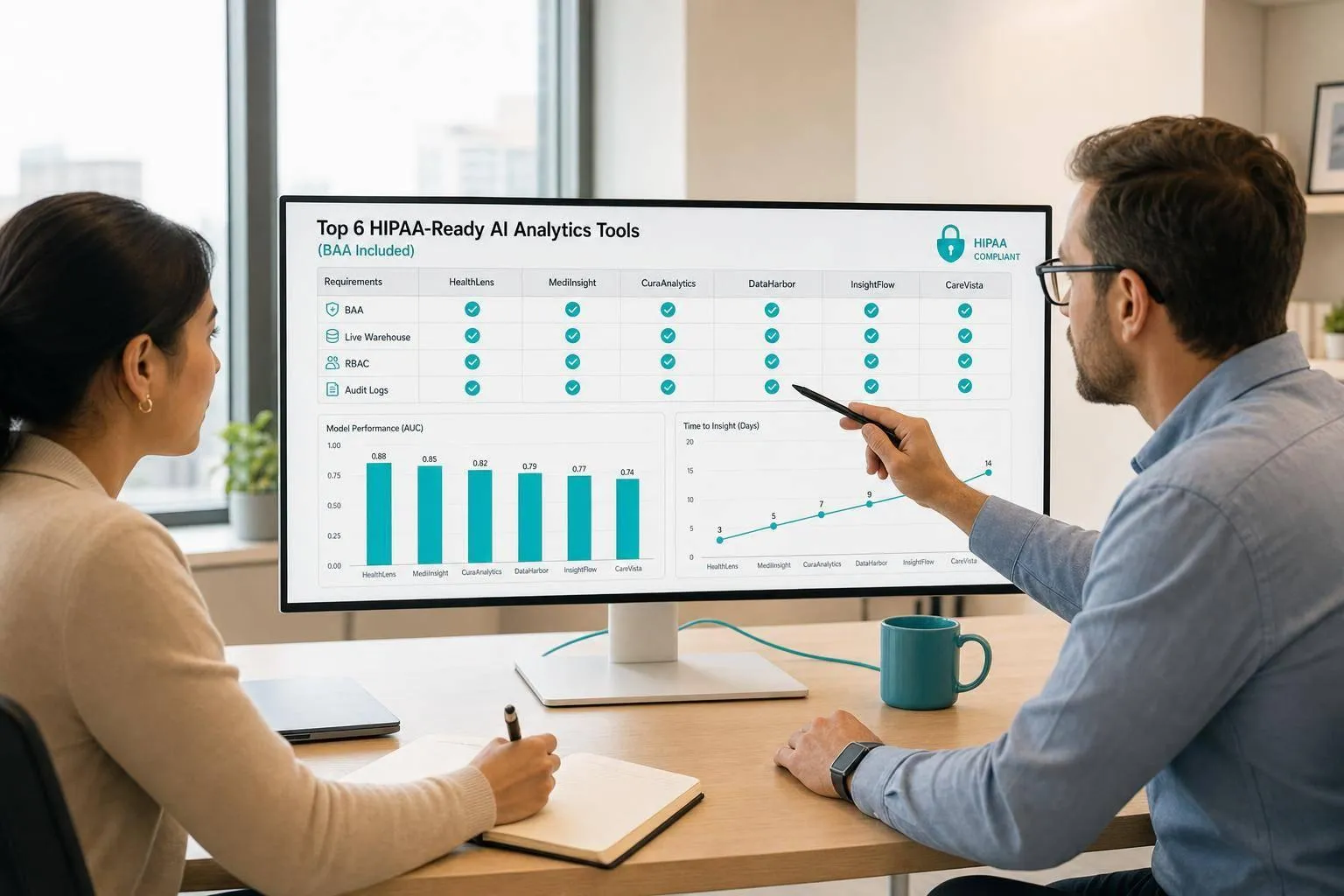
If you handle PHI, start with two checks: BAA coverage and deployment control. That is the main takeaway here. I’d only shortlist tools that let you keep PHI inside clear data boundaries, support live warehouse queries, and provide RBAC plus audit logs.
Here’s the short version:
- Querio: best if you want live warehouse access, inspectable SQL/Python, and a clear query trail.
- ThoughtSpot: fits teams that already have governed metrics and want search-based analytics.
- Looker: fits Google Cloud teams that rely on LookML for metric control.
- Power BI: fits Microsoft shops using Azure, Microsoft 365, and Fabric.
- Qlik Cloud: only worth review if the vendor confirms BAA coverage in writing.
- Sigma Computing: fits analyst-led teams that want spreadsheet-style work on live warehouse data, but BAA status must be checked first.
What matters most is not the AI label. It’s whether the tool supports:
- Signed BAA
- Live access to Snowflake, BigQuery, Redshift, or Postgres
- RBAC and SSO
- Audit logging
- A setup that keeps PHI inside your approved boundary
A few price points stand out too: Querio has a free plan, with Core at $2,499/month, Looker at $5,000/month, and Power BI Copilot often means Fabric F64 at about $6,400/month plus user licenses.
::: @figure 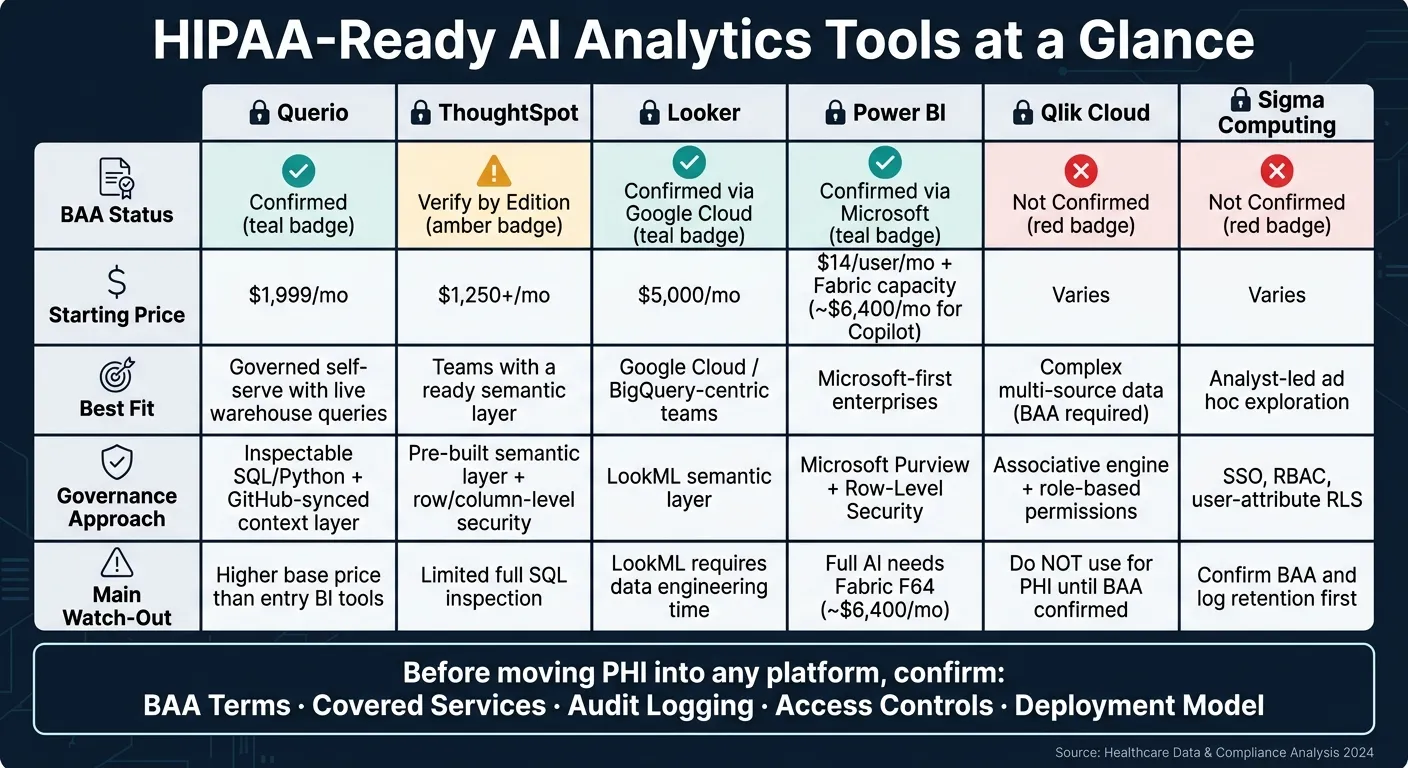 {HIPAA-Ready AI Analytics Tools: Side-by-Side Comparison}
:::
{HIPAA-Ready AI Analytics Tools: Side-by-Side Comparison}
:::
Quick Comparison
| Tool | BAA Status | Best Fit | Main Watch-Out | Starting Price |
|---|---|---|---|---|
| Querio | Yes | Teams that want governed self-serve with live queries | AI credits past the monthly allowance, with a spending cap | Free plan; Core $2,499/mo |
| ThoughtSpot | Verify by edition/deployment | Teams with a ready semantic layer | Limited full SQL inspection | $1,250+/month |
| Looker | Yes, via Google Cloud | BigQuery and Google Cloud teams | LookML setup takes engineering time | $5,000/month |
| Power BI | Yes, under Microsoft coverage | Microsoft-first enterprises | Full AI features often need Fabric capacity | $14/user/month + capacity |
| Qlik Cloud | Not confirmed | Teams with tight metric control | Do not use for PHI until BAA is confirmed | Varies |
| Sigma Computing | Not confirmed | Analyst-led warehouse teams | Confirm BAA and log retention first | Varies |
So if I were narrowing this list fast, I’d start with confirmed BAA support, then check deployment model, audit logs, and metric governance before anything else.
1. Querio
Querio signs a BAA and supports HIPAA-sensitive deployments when it's set up under that BAA. That includes self-hosted setups and physically separated enterprise deployments. For healthcare teams, that makes Querio pretty straightforward to review against HIPAA-sensitive analytics needs.
Querio also has SOC 2 Type II certification, runs annual third-party penetration tests, and uses RBAC, SSO, and read-only encrypted warehouse credentials for live access to Snowflake, BigQuery, Redshift, Postgres, and ClickHouse. Every query runs live against the warehouse. In plain English, PHI stays in the warehouse, which gives compliance teams a cleaner path when they review how data is handled.
When someone asks a question in Querio, Slack, or Microsoft Teams, the answer links back to a real notebook and query history. So healthcare teams get a query-level audit trail showing how the answer was produced, not just the final output. That same governed setup also carries over to metric definitions and AI context.
The context layer - joins, metric definitions, and trusted queries - stays in plain files synced to GitHub next to your dbt project. That helps keep metrics consistent across notebooks, Slack, and Claude via MCP. The result is a governed self-serve layer for analysts and data teams.
Querio's Trust Center shows 99.9% stability. That's a big deal for teams handling time-sensitive reporting on claims, utilization, or patient outcomes. Core is $2,499/month, or $25,000 a year billed annually, with unlimited users on every plan.
| Feature | Querio HIPAA Deployment Details |
|---|---|
| BAA | Yes - available on Core and Enterprise plans |
| Deployment | Cloud SaaS, self-hosted, physically separated enterprise |
| Access controls | RBAC, SSO, read-only encrypted warehouse credentials |
| Audit trail | Query-level audit trail via notebook-backed queries, including Slack and Teams |
| Live connections | Snowflake, BigQuery, Redshift, Postgres, ClickHouse - no data extracts |
| AI transparency | Inspectable, editable SQL and Python for every answer |
| Stability | 99.9% (Trust Center) |
| Pricing (Core) | $2,499/month, or $25,000 a year billed annually, unlimited users |
2. ThoughtSpot
ThoughtSpot is a good fit for teams that already have governed metrics in place and want natural-language search on warehouse data. It’s a search-first BI platform with a natural-language query layer, Sage (formerly branded as Spotter), which lets people query data in plain English.
Before using PHI, check the edition and deployment model. ThoughtSpot supports row-level and column-level security, but it depends on a pre-built semantic layer. So the governed definitions need to exist before you get started. That makes it a better match for teams with governance already set up, not teams that are still sorting out what their metrics should mean.
One thing to watch: full SQL inspection is limited. If your team needs to inspect every query end to end, that’s worth checking during the evaluation process.
| Feature | ThoughtSpot Details |
|---|---|
| Conversational AI | Sage (formerly branded as Spotter) |
| Access controls | Rule-based row-level and column-level security |
| Auditability | Audit logging available; verify scope and retention for PHI use cases |
| Modeling | Requires a pre-built semantic layer |
| Live connections | Snowflake, BigQuery, Redshift, Postgres |
| SQL transparency | Full SQL inspection is limited |
| Compliance note | Verify the edition and deployment model before handling PHI |
| Pricing | Starts at $1,250+ per month [2] |
| Watch-out | Validate data catalog connectivity during POC [2] |
3. Looker
For healthcare teams that care most about governance on Google Cloud, Looker puts LookML at the center of the workflow. Google Cloud offers BAAs for its core services, including Gemini in BigQuery, which powers Looker’s AI features [2]. That said, compliance still comes down to how the system is set up and managed.
Looker’s main strength is LookML, its code-based semantic layer that keeps metrics consistent. In healthcare, that matters a lot. If the same metric shows up in payer, provider, and operations reports, teams need it to mean the same thing every time. Looker also uses BigQuery policy tags and row-level access policies for fine-grained security [2]. On top of that, audit logs show lineage and the source data behind AI-generated calculations [1][2]. Of course, this only works well if the semantic model is kept in good shape.
The trade-off is pretty clear: LookML takes data engineering time to build and maintain, and the quality of AI output depends on how mature that LookML model is.
Looker also supports on-premises and cross-cloud deployments for healthcare organizations with data residency needs [3]. Pricing starts at $5,000/month for Looker Core [3].
| Feature | Looker Details |
|---|---|
| BAA availability | Yes, via Google Cloud BAA [2] |
| Governance layer | LookML semantic layer [3] |
| Access controls | Column-level policy tags, row-level access policies via BigQuery [2] |
| Auditability | Lineage and data-source transparency for AI-generated calculations [1][2] |
| Deployment options | Cloud-native on Google Cloud, plus on-premises and cross-cloud [3] |
| Live connections | BigQuery, Snowflake, Redshift, Postgres |
| Pricing | Starts at $5,000/month [3] |
| Trade-off | LookML maturity directly affects AI output quality; budget for data engineering work [3] |
4. Power BI
For healthcare teams already using Azure, Microsoft 365, or SQL Server, Power BI slides into the Microsoft setup they already know. It also falls under Microsoft's HIPAA BAA coverage, which covers the first big compliance checks: BAA coverage, access controls, auditability, and control over deployment. When PHI is involved, the dashboard itself isn't the main issue. Governance is.
For PHI use, think of row-level security (RLS), Microsoft Purview sensitivity labels, and audit logging as the main compliance layer. If those controls are set up the right way, Power BI can support PHI-driven workflows for payer reporting and provider operations dashboards, similar to other HIPAA-ready data analysis tools.
Power BI's Copilot adds natural-language querying and DAX generation, which can shorten reporting cycles. Full Copilot access usually means Fabric F64 or higher, at about $6,400 per month, plus Power BI Pro at $14 per user per month [4]. At that point, the bigger issue isn't Copilot. It's the model behind it.
Copilot is only as good as the semantic model underneath it. If metric definitions aren't governed and consistent before Copilot is turned on, you'll likely end up with conflicting numbers across reports [4].
| Feature | Power BI Details |
|---|---|
| BAA availability | Yes, under Microsoft's HIPAA BAA coverage |
| Governance layer | Microsoft Purview sensitivity labels, RLS |
| Access controls | Row-level security |
| Auditability | Audit logs via Microsoft 365 compliance center |
| AI mechanism | Copilot plus DAX generation |
| Pricing | $14 per user per month for Power BI Pro; approximately $6,400 per month for Fabric F64 Copilot capacity [4] |
| Best fit | Microsoft-committed enterprises [4] |
| Trade-off | Full AI features require Fabric capacity; compliance depends on tenant configuration [4] |
5. Qlik Cloud
Qlik Cloud belongs in this roundup only if BAA coverage is confirmed. Until procurement verifies that point, it should not be used for PHI.
If that coverage checks out, the next issue is governance. More specifically: does Qlik’s governance model line up with your warehouse stack and the way your team defines metrics across tools?
Qlik Cloud stands out for its associative engine and its connections to Snowflake, BigQuery, Redshift, Postgres, and dbt. That’s a strong setup on the analytics side. But in practice, governance becomes the deal-breaker. If teams define the same metric in different ways across sources, things can get messy fast.
| Feature | Qlik Cloud Details |
|---|---|
| BAA availability | Not confirmed - verify before handling PHI |
| Access controls | SSO, role-based permissions, encryption, logging |
| Auditability | Logging required; scope and retention must be verified |
| Analytics strength | Associative data engine |
| Data stack fit | Snowflake, BigQuery, Redshift, Postgres, dbt |
| Best fit | Enterprise teams with mature governance and verified BAA coverage |
| Trade-off | Metric drift across teams and sources is the main risk at scale |
In short, Qlik Cloud can make sense for enterprise teams that already have tight control over governance and a clear source-of-truth model. Without that, the main risk isn’t the dashboard layer. It’s metric drift between teams and systems.
6. Sigma Computing
Sigma Computing gives teams a spreadsheet-style interface that sits on top of live warehouse data. That means people can analyze data without exporting it first, which helps keep work inside a controlled setting. For PHI workflows, the big checks are simple: BAA status, access control, and auditability. So for PHI use, governance is the main thing to look at.
Confirm Sigma's BAA in writing before using it with PHI.
Sigma supports SSO, RBAC, user-attribute RLS, and audit logging. During procurement, make sure you verify the retention scope for those logs. Sigma also asks teams to define datasets and metrics up front. That can take some setup, but it helps keep reporting more consistent across the team.
The table below shows the main trade-offs for PHI review.
| Feature | Sigma Computing Details |
|---|---|
| BAA availability | Not confirmed - verify before handling PHI |
| Access controls | SSO, RBAC, user-attribute RLS |
| Auditability | Audit logging available; confirm retention scope |
| Analytics strength | Spreadsheet-style analysis on live warehouse data |
| Data stack fit | Snowflake, BigQuery, Redshift, Databricks, Postgres |
| Best fit | Analyst-led teams wanting governed, ad hoc exploration |
| Trade-off | Requires upfront semantic-layer work; SQL is not the default workflow |
Best fit: analyst-led teams that want governed ad hoc exploration on live warehouse data. It’s a weaker fit for teams that need SQL as the primary workflow.
Pros, Cons, and Best Fit by Tool
No single tool wins in every situation. The right pick comes down to your current stack, your team’s technical skill level, and how tightly you need to limit PHI access. Here’s a practical look at how each option compares for healthcare data teams.
| Tool | Pros | Cons | Best Fit |
|---|---|---|---|
| Querio | SOC 2 Type II + HIPAA with signed BAAs; live, encrypted, read-only warehouse connections with no data extraction; inspectable, editable SQL in reactive notebooks; GitHub-synced context layer; SSO and role-based access controls | Core is $2,499/month ($25,000/yr); unlimited users on every plan | Small-to-mid data teams on Snowflake, BigQuery, Redshift, or Postgres that need governed self-serve and inspectable analysis for PHI work |
| ThoughtSpot | Strong enterprise RLS and column-level security; conversational analytics; WEX Field Service Management reached a 65% AI adoption rate within 90 days and cut report generation time from 5 minutes to under 3 seconds [1] | SQL visibility is partial | Enterprise health systems or payers that want conversational exploration with strong access controls |
| Looker | Centralized LookML governance enforces consistent metrics across teams; explainable SQL | Core starts from $5,000/month [3] | Google Cloud-standardized orgs, especially BigQuery-centric teams, that want centrally governed metrics |
| Power BI | 30 million monthly active users and 18 consecutive years as a Gartner Magic Quadrant Leader [3]; broad Microsoft ecosystem fit | Pro tier starts at $10/user/month; full Copilot features require Fabric F64 (about $6,400/month) [3] | Microsoft-standardized organizations where mass adoption across all employee levels is the goal |
| Qlik Cloud | Associative engine surfaces hidden correlations across complex, multi-source data; works across common warehouse environments; strong data integration | The associative model is different from standard SQL, so teams need time to learn it | Teams that need to uncover non-obvious relationships in complex, multi-source data |
| Sigma Computing | Spreadsheet-style interface on live warehouse data; SSO, RBAC, and user-attribute RLS; no data extraction required; HIPAA-ready with signed BAAs | Spreadsheet-style workflow can feel more natural to analysts than to teams that want a traditional BI authoring experience | Analyst-led teams wanting governed ad hoc exploration on Snowflake, BigQuery, or Redshift |
The table makes the trade-offs pretty clear. The main split is governance.
If your team already knows its warehouse, governance model, and compliance boundary, you can trim the shortlist fast. Governance is the clearest divider here. Looker and Querio both centralize metrics, but they get there in different ways. Querio does it through inspectable, editable SQL and Python on live warehouse data. Looker does it through LookML. Power BI leans on model-driven governance and row-level security, while Qlik asks teams to work inside its associative model.
That difference matters more than it might seem at first glance. Two tools can both claim “self-serve analytics,” but if one lets people work inside clear guardrails and the other leaves room for drift, the day-to-day experience changes a lot. In healthcare, that drift can turn into access issues, reporting conflicts, or PHI risk.
Power BI is the clearest fit when Microsoft 365, Azure, and Fabric already sit at the center of the analytics stack. In that setup, adoption tends to be easier because the tool matches systems people already use.
Beyond governance, BAA status is the first procurement gate for PHI use. For PHI workflows, focus on the tools with confirmed BAA coverage and verify the deployment model before approval. For ThoughtSpot and Qlik, confirm BAA coverage directly with the vendor before any PHI use.
Governed self-serve analytics is the practical goal in healthcare analytics. Business users need answers on their own, but not by stepping around access controls. That’s the balance that matters most: self-serve speed on one side, PHI control on the other. Some tools make that balance easier to hold than others.
Conclusion
The right tool fits your warehouse, your governance setup, and your compliance boundary.
So the shortlist usually comes down to a few things: BAA coverage, access controls, audit logs, and live warehouse queries. In day-to-day use, the call often hinges on live warehouse access, governed metrics layer, auditability, and verified BAA coverage.
HIPAA compliance depends on how the platform is deployed and configured, not the label on the product.
Before you move PHI into any platform, confirm:
- BAA terms
- Covered services
- Processing locations
- Tenant settings
- Audit logging
- User permissions
A signed BAA is the starting point. Governed setup is what makes a platform workable for PHI.
FAQs
::: faq
What does a HIPAA-ready AI analytics tool need?
A HIPAA-ready AI analytics tool needs more than a certification. It needs strong governance, clear audit trails, and tight security controls built into the analytics workflow.
That means looking for a few core things: a BAA, row-level security, auditability and lineage through inspectable SQL or Python, semantic grounding so metrics stay consistent, and secure, encrypted live warehouse connections with strong access management. :::
::: faq
Is a signed BAA enough to approve a tool for PHI?
No. A signed Business Associate Agreement (BAA) is required under HIPAA, but by itself, it does not mean a tool is approved for PHI.
Approval depends on how the tool is set up and used in practice. That includes controls such as row-level security, audit trails, governed metric definitions, and encryption at rest and in transit. :::
::: faq
How should we evaluate audit logs and deployment controls?
Prioritize systems that log every user interaction: prompts, SQL queries, and results. A good audit trail should show who accessed which data and when. That matters for transparency, compliance, and investigations.
For deployment, look for customer-managed VPC or on-premises options. Also make sure row-level security and column-level masking are enforced before queries run across live data warehouse connections. :::