Business Intelligence
AI Analytics for Fintech: Trust, Audit Trails & Wrong-Number Risk
Make AI analytics auditable in fintech with live warehouse queries, versioned KPIs, RBAC, audit logs, and human approvals.

If one AI-generated number can change a board call, affect close, or trigger a compliance review, you need proof behind the answer - not just the answer itself.
I’d sum up the article like this: in fintech, AI analytics only works when every result is tied to the live warehouse, the exact query or code used, the metric definition in force at that time, and the person who ran and approved it. Without that, wrong-number risk grows fast - through bad joins, date mistakes, drifting KPI definitions, manual spreadsheet edits, and alert logic nobody can explain.
A few points stand out right away:
- 46% of financial services leaders ranked data quality and accuracy as their top priority, and 38% said it was their biggest challenge.
- A board KPI should trace from reported number → semantic definition → dbt model → warehouse query → source data.
- Live, read-only access to Snowflake, BigQuery, Redshift, or Postgres keeps logs and lineage in place. CSV exports do not.
- AI should run under the user’s own warehouse role, so RBAC, masking, and row filters still apply.
- High-impact outputs - like ARR, GAAP revenue, reconciliations, fraud thresholds, and filing drafts - need human review and logged sign-off.
- Common failure points are simple but costly: one-to-many joins, wrong date fields, mixed KPI definitions, false positives, drift, invented numbers, and silent overrides.
- For a small team, the order matters: lock KPI definitions first, connect live data second, centralize trusted queries third, then turn on logs, approvals, and self-serve access.
Here’s the short version: the article is about making AI analytics traceable, permission-aware, and reviewable before teams use it for money, controls, or reporting.
| Area | Main point |
|---|---|
| Trust | Every answer needs a clear trail back to data, query, user, and metric version |
| Audit trail | Log prompts, SQL/Python, timestamps, run details, result snapshots, approvals, and lineage |
| Data access | Keep AI under user-level warehouse permissions |
| Metric control | Use one version-controlled definition for each KPI |
| Wrong-number risk | Most errors come from joins, timing, metric drift, and manual edits |
| Rollout | Start with definitions, then live connections, then trusted queries, then approvals and self-serve |
So if I were putting this in plain English: don’t let AI guess, don’t let spreadsheets become the source of truth, and don’t let board or compliance numbers go out without a traceable record.
AI agents in audit: more coverage, new blind spots
::: @iframe https://www.youtube.com/embed/-szu7KVmAT0 :::
What auditable AI analytics looks like on a live warehouse
The trust layer starts with a complete audit trail. Auditable AI analytics should return not just the number, but also the prompt, code, warehouse run, and result behind it. For finance teams, that proof matters most when a number ends up in a board pack, close process, or regulated report. Without that trail, the number is hard to defend. With it, the result becomes reproducible, reviewable, and attributable.
In plain terms, audit logs let a team trace every answer back to who asked it, how it ran, and what data it used.
The minimum audit trail finance and analytics teams need
If an output touches a board KPI, a revenue figure, or a regulated metric, the audit trail should capture user identity and role, the original prompt, the generated SQL or Python code, execution metadata such as run ID, timestamp, and warehouse context, a result snapshot, the version of the semantic definition used at query time, the approval status, and lineage links back to the source tables or views.
Snowflake QUERY_HISTORY and ACCESS_HISTORY record query text, users, timing, and accessed tables and columns. ACCOUNT_USAGE keeps 365 days of logs by default [2].
The table below shows how each artifact maps to finance and compliance needs:
| Audit Artifact | Purpose for Finance and Compliance |
|---|---|
| User ID and role | Tracks accountability for every query and access event |
| Original prompt | Shows exactly what question the system was asked |
| Generated SQL or Python | Allows auditors to verify the logic behind the number |
| Execution metadata | Establishes when and where the query ran |
| Result snapshot | Supports "what did we report, when" questions during reviews |
| semantic layer for SaaS version | Confirms the KPI followed the approved formula at that time |
| Approval status | Records human-in-the-loop validation for board-level figures |
| Lineage links | Trace the result back to source tables, views, and upstream models |
Once those artifacts are in place, the next test is simple: can a reviewer follow one reported number all the way back to the source?
Tracing a number from board KPI to source row
In fintech, the traceability chain looks like this: board KPI → semantic definition → dbt model → warehouse view → executed SQL → source table or row → returned result. A reviewer should be able to inspect each step directly, not guess what happened in between.
Take a simple example. If ARR as of 08/31/2026 is $2,750,000.00, a reviewer should be able to open the query log, see the exact SQL that produced that figure, confirm that it ran against the production warehouse, and check that the semantic definition of "ARR" in use was the approved version. If ARR is later restated to $2,762,500.00 because a dbt model was updated to include a new revenue stream, both versions should still appear in the log, along with the reason for the change and the identity of the person who initiated it.
That kind of record is what makes a number defensible months later, when an investor or auditor asks why it changed.
Inspectable SQL or Python is what makes a result defensible.
Why live warehouse connections matter more than exports
That traceability breaks the second the result leaves the warehouse. CSV exports break lineage. A file export creates a second version of the truth. A live connection does not.
Live, read-only warehouse connections lower that risk. When AI analytics tools query Snowflake, BigQuery, Redshift, or Postgres directly with least-privilege credentials, every result stays tied to a specific query run against a specific state of the data. That gives analysts a clean path to verify numbers in place instead of spending time reconciling spreadsheet copies.
Live, read-only warehouse connections keep the audit trail intact.
Permission-aware data access and metric governance
After traceability, the next control is access. For finance teams working in shared warehouses, this shows up every day. The next issue is simple: who can see what data, and which metric definition are they looking at?
RBAC, row-level controls, and inherited warehouse permissions
The safest setup is also the simplest one: run AI under the user's warehouse role, not through a shared service account. When you do that, RBAC, masking, and row-level security policies apply by default. [4][6]
In fintech, that difference matters in plain terms. An FP&A analyst may be allowed to view summary totals, but not raw PANs, full addresses, or account IDs. [12] Row-level security goes one step further. A regional risk analyst sees only fraud cases for their region, while a business unit controller sees only revenue rows for their own entity. [3][5] The AI follows those same filters without extra setup.
Querio uses OAuth-based authentication, so agent queries inherit each user's warehouse permissions across connected surfaces. [13]
Access control protects the data. Semantic governance protects the number.
Semantic-layer governance for revenue, ARR, and board KPIs
Permissions decide who gets access. A governed semantic layer decides what a metric means. Without that layer, two analysts can ask the same question about ARR last quarter and end up with different answers. One query may exclude one-time fees; the other may not.
The fix is to define ARR, GAAP revenue, NRR, churn, and other board KPIs once in version-controlled dbt models and curated warehouse views, then point every reporting surface to those same definitions. [1][14] When the AI writes SQL, it should use the approved metric object, not piece together its own math from raw billing tables.
Any change to a core metric should go through a pull request, peer review, finance sign-off, an effective date, and a changelog entry. [9][10] That way, if a board number changes from one quarter to the next, there's a clear record showing when the definition changed and who approved it.
Querio keeps metric definitions, approved joins, and trusted queries in version control alongside dbt. The agent can suggest a new definition based on usage, but only a logged-in user can approve and commit it.
Once definitions are fixed, high-impact numbers still need a person to review them before they land in reporting.
Approval workflows for high-impact numbers
Some numbers should not go from AI output straight into a board deck. Revenue reconciliation results used in the monthly close, changes to ARR or NRR definitions, anomaly-detection thresholds in fraud review, and any draft tied to a regulatory filing all need named sign-off. [7][8][11]
Here’s the safer model:
- The AI produces a reconciliation output or KPI report as a versioned artifact.
- A designated reviewer, such as the Controller or Head of FP&A, checks the evidence, runs spot checks in the warehouse, and records approval or a change request against that exact version. [10]
Log approval against the specific version. That is a very different way of working than treating AI outputs as if they approve themselves.
Even with access controls and metric definitions in place, wrong-number failures still happen in practice.
Common wrong-number failure modes in fintech and the controls that fix them
Wrong numbers in fintech usually come from a few structural problems: bad joins, the wrong date field, mixed metric definitions, and AI that makes up logic because no one boxed it in.
Even with audit logs, permissions, and governed metrics, the risk doesn’t disappear. It tends to show up in three spots: joins, thresholds, and manual overrides.
Revenue reconciliation: join errors, timing mistakes, and definition mismatches
The most common reconciliation failure is a one-to-many join error. This happens when Stripe or Zuora data is matched to the ledger with a non-unique key like customer_id and invoice_date instead of invoice_id. That sounds small. It isn’t.
The result is duplicate rows that inflate recognized revenue, sometimes by a lot. A query that should return $1,250,000.00 in recognized revenue for 09/30/2026 can come back overstated because partially paid invoices matched multiple ledger entries. [16][17][18]
Timing mistakes are another common source of bad numbers. If revenue is tied to created_at instead of service-delivery dates, revenue lands in the wrong period. The fix is plain: embed booked vs. recognized flags in the semantic layer, then run period-cutoff tests in dbt that reject any recognized revenue row outside the reporting window.
Definition mismatches create a different kind of mess. If ARR means one thing in one tool and something else in another, the team ends up arguing about math instead of the business. Keep one version-controlled ARR definition in the semantic layer, and require finance approval before any change.
Transaction anomaly review: false positives, drift, and unexplained outputs
For fraud and AML teams, wrong-number risk usually shows up as false positives, drift, and alerts nobody can explain.
When thresholds are too sensitive, alert volume explodes. Compliance teams get swamped. Analysts start triaging by sheer volume instead of risk, and the activity that matters most gets buried. That’s why false-positive rate should be tracked as a core tuning metric.
Model drift makes things worse over time. Customer behavior changes with new products, seasonal swings, or macroeconomic shifts. A model that looked fine a few months ago can start slipping without much warning. Trigger an investigation when PSI exceeds 0.2 on critical features so models stay calibrated. [15][19]
Unexplained outputs create a direct compliance problem. If an analyst can’t say why a transaction was flagged, which features pushed the score up, or which rule fired, there’s no solid basis for filing a SAR or blocking a card.
Every alert object should include:
- the triggering threshold
- the feature breakdown
- the model version
That data should be stored in the warehouse with a foreign key to the transaction. Analysts should review that full context before taking any material action, and every decision should be timestamped and logged.
Board KPI reporting: invented numbers, silent adjustments, and inconsistent metrics
Board reporting is where wrong numbers hit hardest because they shape decisions at the top.
Invented numbers show up when an AI answers a natural-language prompt like "What was our ARR last quarter?" by aggregating raw billing tables instead of using the governed semantic layer. The answer can look clean and polished. It can also be dead wrong. Limit AI to approved, read-only KPI views. Don’t allow freeform aggregation on raw tables.
Silent adjustments are the manual override issue. If someone changes a number in a spreadsheet, the trail goes cold fast. Every adjustment should happen in the source model or the governed KPI definition, not in a side file.
Inconsistent metrics are the third failure mode. Looker’s ARR definition, a notebook’s ARR calculation, and the figure in a slide deck can drift apart without anyone noticing if they aren’t all pulling from the same semantic layer.
The table below maps each failure mode to its root cause and the control that stops it.
| Failure Mode | Business Impact | Root Cause | Recommended Control | Control Layer |
|---|---|---|---|---|
| One-to-many join error | Inflated recognized revenue | Non-unique join key | Governed join paths, uniqueness tests | dbt / Semantic Layer |
| Month-end cutoff error | Revenue in wrong period | created_at used instead of delivery date |
Explicit date-field mapping, period tests | Semantic Layer / Warehouse |
| Definition mismatch | Multiple ARR figures | No canonical metric definition | Version-controlled KPI definitions | dbt / MetricFlow |
| False positive (anomaly) | Analyst overload, missed true positives | Threshold not tuned to current behavior | False-positive rate tracking | Warehouse / BI monitoring |
| Model drift | Missed fraud, increased false positives | Score distribution shifts undetected | PSI monitoring, retraining triggers | Warehouse / dbt |
| Unexplained output | Indefensible compliance actions | No feature lineage or threshold metadata | Alert objects with full feature breakdown | Warehouse / Notebooks |
| Invented number | Wrong KPI in board deck | AI queries raw tables | Restrict AI to approved read-only KPI views | BI / AI Layer |
| Silent adjustment | Untracked manual override | Spreadsheet edits outside source systems | All changes made in source model | Warehouse / BI Layer |
| Inconsistent metrics | Conflicting board narratives | Different definitions across tools | Single semantic layer for all surfaces | dbt / Semantic Layer |
Inspectable SQL makes each correction traceable before a board number ships.
Next, turn these controls into a rollout plan the team can run in production.
A practical operating model for fintech teams, and where Querio fits
::: @figure 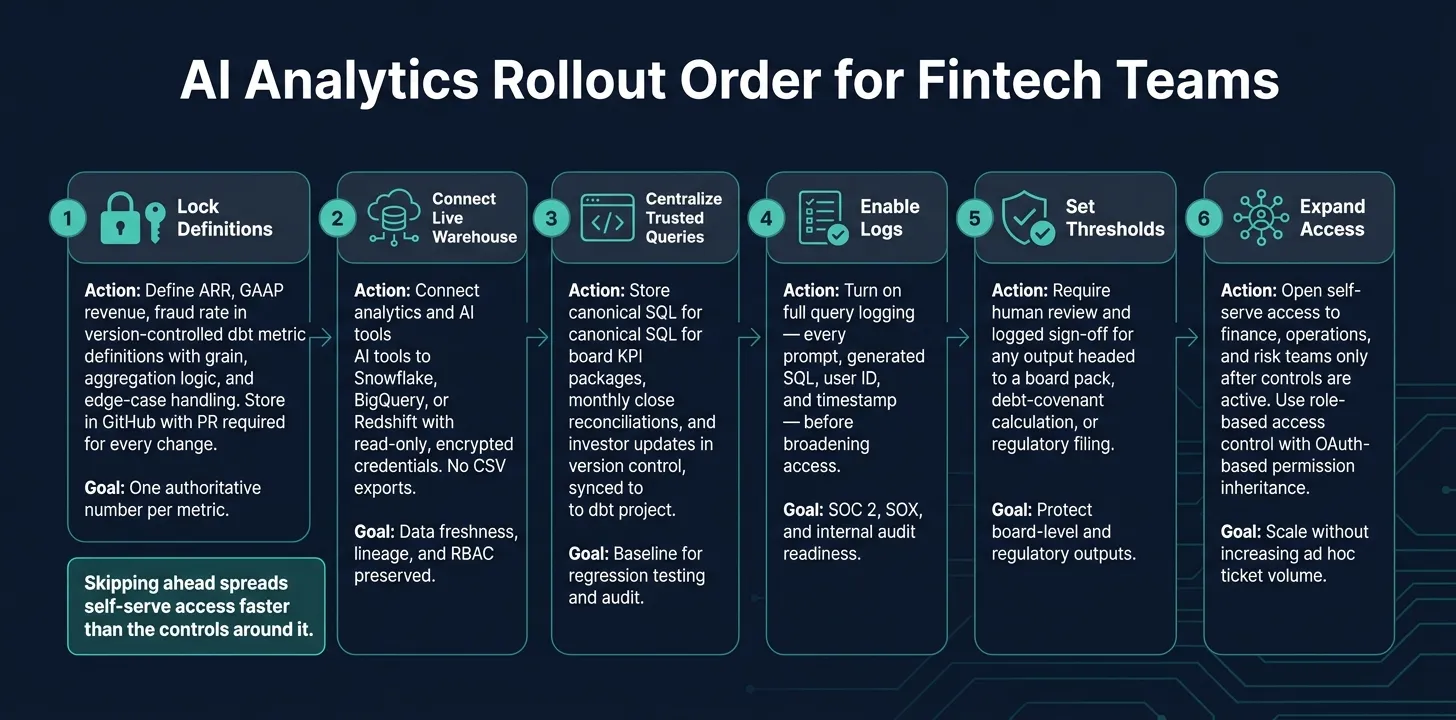 {AI Analytics Rollout Order for Fintech Teams: 6-Phase Implementation Guide}
:::
{AI Analytics Rollout Order for Fintech Teams: 6-Phase Implementation Guide}
:::
These controls work best in order. For a small data team, opening up self-serve too early - before metric definitions are fixed - usually leads to rework. The shortest path is simple: lock definitions first, connect live data second, expand access last.
Audit-trail checklist for rollout
Before any AI tool touches a board number or a regulatory output, make sure these eight items are in place:
| Checklist Item | Action |
|---|---|
| Query logging | Log every prompt, generated SQL, user ID, and timestamp |
| Warehouse lineage | Trace metrics to dbt models and source tables |
| Metric ownership | Assign a named owner in Finance or Data for each KPI |
| Permission inheritance | Confirm AI queries respect warehouse RBAC and row-level policies |
| Version-control SQL/Python | Store all scripts in GitHub |
| Trust labels | Tag outputs as "Draft", "Internally Validated", or "Approved" |
| Approval records | Require timestamped sign-offs for board, investor, and regulatory outputs |
| Scheduled review procedures | Run monthly or quarterly checks of critical metrics against source data |
Snowflake query logs such as QUERY_HISTORY and ACCESS_HISTORY, along with BigQuery's INFORMATION_SCHEMA.JOBS, support query logging for both ad hoc notebook queries and scheduled runs.
Implementation order for a 1–5 person data team
This sequence works well for small teams that need to move fast without creating a mess they have to clean up later. Each phase depends on the one before it. If you skip ahead, self-serve tends to spread faster than the controls around it.
Phase 1: Lock KPI definitions. Start with the metrics that show up in board packs, investor updates, or regulatory filings - ARR, GAAP revenue, and fraud rate. Define each one with version-controlled dbt metric definitions, including grain, aggregation logic, and edge-case handling for items like refunds or FX conversions. Store everything in GitHub, and require a pull request for every change. That upfront work stops ARR, revenue, and fraud-rate drift from showing up later in board reporting.
Phase 2: Connect live warehouse data. Connect analytics and AI tools straight to Snowflake, BigQuery, or Redshift with read-only, encrypted credentials. No CSV exports. Live connections keep warehouse permissions and lineage in place.
Phase 3: Centralize trusted queries. Put canonical SQL for recurring reports - board KPI packages, monthly close reconciliations, and investor updates - into version control. These canonical queries should run through approved dbt models and semantic-layer definitions so the same logic powers board packs, reconciliations, and investor updates. This is where Querio fits. Its context layer stores definitions, joins, and trusted queries as plain SQL and Markdown files, synced to the same GitHub repo as the dbt project, so the assistant uses approved definitions instead of guessing from raw columns.
Phase 4 onward: Logs, thresholds, then self-serve. Turn on full query logging before you broaden access. Then set approval thresholds: any output headed for a board pack, debt-covenant calculation, or regulatory filing needs human review and a logged sign-off. That is what makes board metrics, close outputs, and regulatory numbers defensible. Only after those controls are active should self-serve access expand to finance, operations, and risk teams. Querio's role-based access control and OAuth-based MCP integration mean that when a finance analyst asks a question in Slack or Claude, the query inherits their warehouse permissions automatically, with query logs and notebook history available for review.
| Phase | Action | Primary Goal |
|---|---|---|
| 1 | Lock definitions | One authoritative number per metric |
| 2 | Connect live | Data freshness, lineage, RBAC preserved |
| 3 | Centralize queries | Baseline for regression testing and audit |
| 4 | Enable logs | SOC 2, SOX, and internal audit readiness |
| 5 | Set thresholds | Protect board-level and regulatory outputs |
| 6 | Expand access | Scale without increasing ad hoc ticket volume |
FAQs
::: faq
What makes an AI-generated number auditable?
An AI-generated number is auditable only when it comes from live, governed execution - not a cached guess - and links back to fully inspectable SQL or Python.
That means anyone reviewing the result can see the exact joins, filters, and metric definitions behind it. No black box. No hand-waving. Just the logic, out in the open.
That logic should come from a governed semantic layer or a central metrics repository. In plain terms, the AI shouldn't invent how a metric works on the fly. It should pull from the same shared source the team already trusts.
An auditable result also needs a persistent log that records:
- the user
- the timestamp
- the prompt
- the generated code
- the data sources accessed
With that trail in place, teams can review the output, reproduce it later, and defend the number when someone asks, "Where did this come from?" or "Why does this not match the dashboard?" :::
::: faq
Why are live warehouse connections safer than CSV exports?
Live warehouse connections are safer because they avoid duplicate or out-of-date copies of data. They keep analysis tied to the current source of truth.
Every query runs straight against your warehouse, so your existing security controls still stay in place. That includes row-level permissions and column masking. Your data stays in your controlled environment, and your audit trail remains intact for reporting and decisions. :::
::: faq
Which fintech metrics need human approval before use?
Human approval is usually required for high-risk KPIs tied to financial reporting, board updates, or sensitive decisions. That includes metrics like ARR, NRR, logo churn, CAC, LTV, payback period, and monthly active users.
Review is also required for queries that involve PII, sensitive domains, new metric definitions, or logic with four or more joins. The same goes for requests that trigger data exports or go over cost thresholds. :::