Business Intelligence
Top BI Tools in 2026: AI Features, Pricing & Enterprise Fit
Compare top BI platforms by AI features, governance, pricing, and enterprise fit to find the best match for your data stack.

If I had to boil this down to one point, it’s this: the best BI tool in 2026 depends more on your data stack and metric control than on AI demos. Most teams are choosing between Power BI, Tableau, Looker, ThoughtSpot, Sigma, Looker Studio, and Querio based on four things: AI features, price, governance, and fit for their team.
Here’s the short version:
- Power BI fits Microsoft-first companies and starts at $14/user/month
- Tableau fits dashboard-heavy BI teams and starts at $15/user/month
- Looker fits BigQuery teams that want code-based metric control and starts around $66,600/year
- ThoughtSpot fits search-driven self-serve and starts at $25/user/month
- Sigma fits spreadsheet-heavy teams and uses custom pricing
- Looker Studio fits low-cost departmental reporting and is free
- Querio fits warehouse-first SaaS teams that want AI-generated SQL and Python, with a free plan, Core at $2,499/month, and unlimited users on every plan
What matters most is simple:
- Do AI answers use approved metric definitions?
- Does the tool run on live warehouse data or copies?
- What will it cost at 100 to 300 users?
- Can business users and analysts trust the same numbers?
A few standouts from the article:
- Power BI Copilot often needs Fabric F64, at about $6,400/month
- Looker can hit $250,000 to $500,000+ in first-year cost
- Tableau and ThoughtSpot often land around $145,000 to $270,000 in Year 1 for mid-size teams
- Sigma can add warehouse compute cost as usage grows
- Looker Studio is low-cost up front, but metric drift is a common issue
::: @figure 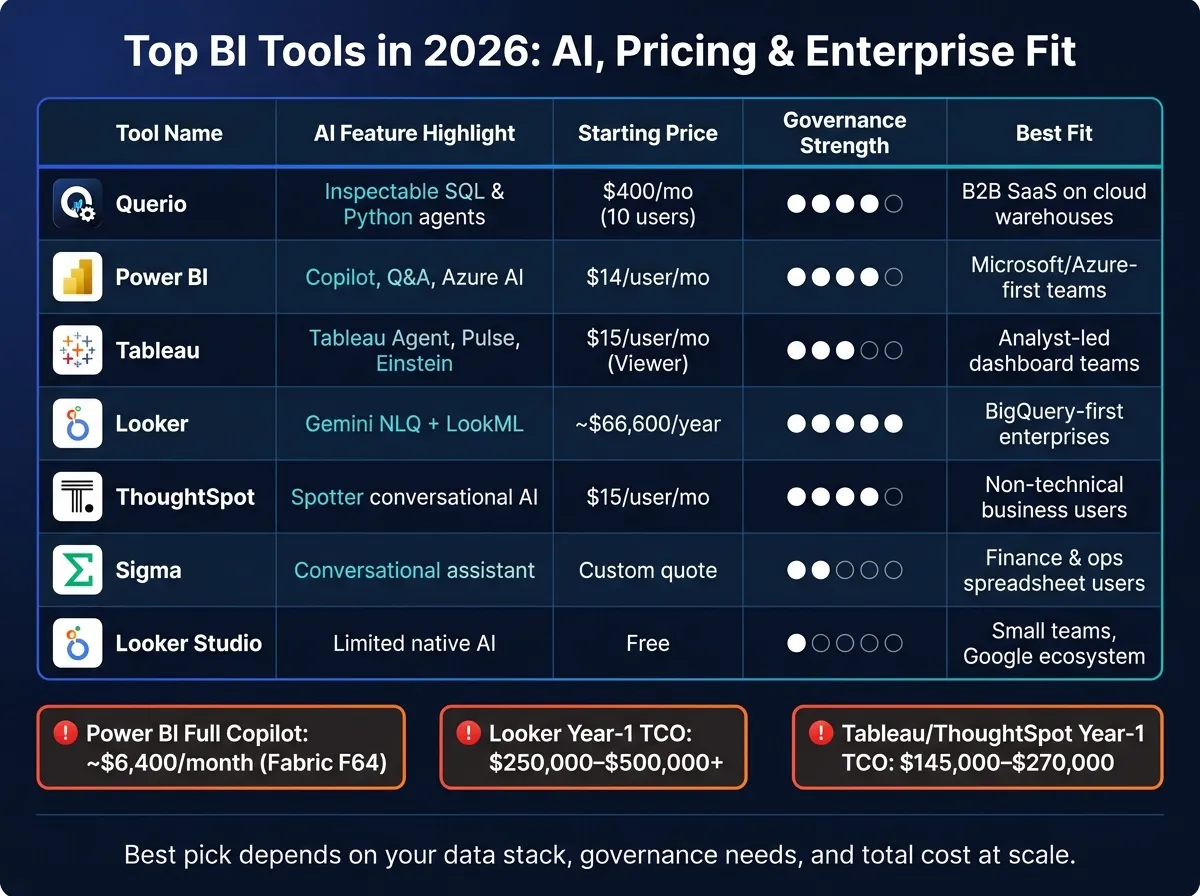 {Top BI Tools 2026: AI Features, Pricing & Enterprise Fit Compared}
:::
{Top BI Tools 2026: AI Features, Pricing & Enterprise Fit Compared}
:::
Looker vs Power BI vs Tableau (2026) - Which One Is BEST?
::: @iframe https://www.youtube.com/embed/0g3kAYWJ0f8 :::
sbb-itb-284a532
Quick Comparison
| Tool | AI Focus | Starting Price | Governance | Best Fit |
|---|---|---|---|---|
| Querio | AI agents that generate inspectable SQL and Python | Free plan; Core $2,499/month; unlimited users on every plan | Shared context layer; dbt-friendly | B2B SaaS teams on Snowflake, BigQuery, Redshift, PostgreSQL |
| Power BI | Copilot, Q&A, summaries, automated insights | $14/user/month | Strong semantic models if set up well | Microsoft 365, Azure, Fabric teams |
| Tableau | Tableau Agent, Pulse, Einstein Discovery | $15/user/month Viewer | Lighter code-based control | Analyst-led dashboard and exec reporting teams |
| Looker | Gemini for NLQ and follow-up analysis | ~$66,600/year | LookML with version control | BigQuery-first teams with data engineering support |
| ThoughtSpot | Spotter for search and conversational analysis | $25/user/month | TML with version control | Business teams that want search-first analytics |
| Sigma | Conversational assistant | Custom quote | Lighter semantic layer | Finance and ops teams that like spreadsheet-style work |
| Looker Studio | Limited native AI | Free | Weak governance | Small teams doing simple Google-based reporting |
If I were shortlisting tools today, I’d group them like this: Power BI for Microsoft, Looker for BigQuery governance, Tableau for dashboards, ThoughtSpot for search-first business users, Sigma for spreadsheet-style live analysis, Looker Studio for low-cost reporting, and Querio for warehouse-first SaaS teams that want inspectable AI analysis.
That framing makes the rest of this business intelligence tools comparison much easier to read.
1. Querio
Querio is an AI-native analytics workspace built for B2B SaaS teams that work from a real data warehouse. It connects straight to Snowflake, BigQuery, Amazon Redshift, ClickHouse, and PostgreSQL, so teams run analysis on live warehouse data instead of copies or exports.
Its AI agents turn plain-English questions into inspectable SQL and Python. Analysts can then review, edit, and reuse that work inside reactive notebooks. That setup is useful when nontechnical teammates want fast answers, but the data team still needs to check the logic line by line. And of course, speed alone isn’t enough. The answers also need to come from the same metric definitions every time.
That’s where Querio’s shared context layer comes in. Teams define joins, metrics, and business terms once, and Querio applies them across queries, notebooks, dashboards, and AI-generated answers. If your team already uses dbt, you can keep that same metric logic across the stack instead of rebuilding it somewhere else.
Price is the next big filter. Querio has a free plan, and Core is $2,499 a month (or $25,000 a year billed annually), with no per-seat pricing. So a 100-user SaaS team on Core would spend about $25,000 per year, the same as a 10-user team. Because Querio works with standard SQL and Python, warehouse-native teams can skip a closed query layer and cut down on retraining.
Querio fits best in 100–500-employee B2B SaaS companies using Snowflake, BigQuery, Redshift, or PostgreSQL with a small or midsize data team. It’s a good match for teams that want governed self-serve analytics: nontechnical stakeholders can ask questions on their own, while the business keeps control of metric definitions and query logic.
| Factor | Querio |
|---|---|
| AI approach | Agents generate inspectable SQL and Python |
| Governance | Shared context layer; dbt-compatible |
| Warehouse connections | Live, read-only warehouse access |
| Analysis environment | Reactive notebooks |
| Starting price | Free plan; Core $2,499/mo |
| Best fit | 100–500-employee B2B SaaS with a cloud warehouse |
2. Power BI
Power BI is the go-to BI pick for companies already built around Microsoft 365, Azure, and Teams. You get the most out of it when Microsoft already runs most of your analytics flow. At that point, the big question usually isn't whether Power BI can do the job. It's more about cost, control, and where it sits in the rest of your stack. Microsoft says Power BI has more than 30 million monthly active users across 350,000+ organizations [7].
Power BI's AI layer starts with Copilot, though many modern BI tools with AI capabilities are now competing in this space. It can generate DAX, summarize reports, turn plain-English prompts into Power Query logic, and support Q&A plus automated insights [3][7]. It also connects with Azure Machine Learning and Azure OpenAI for forecasting and scenario planning [3]. If you want the full Copilot setup, you usually need Microsoft Fabric F64 or higher, which is estimated at around $6,400/month [3].
Pricing begins at $14 per user per month for Pro and $24 per user per month for Premium Per User [6]. If your company already has Microsoft 365 E5, Pro is often included at no added cost [7]. For teams with 100 to 300 users, first-year TCO can land between $90,000 and $175,000, including licensing and implementation [3].
Those AI features only help if your definitions stay consistent. That's where Power BI's semantic model does the heavy lifting. Centralized semantic models cut down data mismatches and help teams build reports faster [9]. They also help keep AI-generated answers lined up with approved business definitions. The catch is simple: the model has to be built well from day one. Another limit to keep in mind is that Power BI Desktop is Windows-only, which can be a headache for Mac-based teams [9][6].
| Factor | Power BI |
|---|---|
| AI approach | Copilot, Q&A, narrative summaries, automated insights, Azure AI integration |
| Governance | Semantic models, row-level security, sensitivity labels |
| Warehouse connections | DirectQuery, but warehouse-native support remains partial [1] |
| Starting price | $14/user/month (Pro) [6] |
| Full AI price | About $6,400/month for Fabric F64 capacity [3] |
| Best fit | Microsoft/Azure-standardized enterprises |
The main tradeoff comes down to flexibility. Power BI is strong inside the Microsoft world, but less comfortable in warehouse-native setups. It makes sense for Azure-first teams that already work in Excel and DAX. It tends to be a weaker fit for Snowflake, BigQuery, and Redshift-first teams because warehouse-native support still depends a lot on DirectQuery [1].
3. Tableau
Tableau stands out for polished dashboards and executive-facing storytelling. It also has a mature ecosystem and a large hiring pool, which is a big deal for teams that want tools people already know. That edge shows up most when the same team also wants natural-language analysis and proactive alerts.
Its AI lineup includes Tableau Agent for natural-language analysis and data prep, plus Tableau Pulse for proactive metric alerts. Tableau also offers predictive insights, anomaly detection, and what-if analysis through Einstein Discovery [12][7]. That sounds strong on paper, and it can be. But there’s a catch: these AI features work best when metric definitions stay stable across the business. Advanced AI features also require Tableau+.
Tableau Semantics helps with consistency, but governance still leans more on team process than code-based enforcement. At scale, metric drift can still happen [1][2]. And while Tableau connects to many data sources, many teams still rely on extracts for performance, which can create a second data layer [2][4]. If you need strict control over how metrics are defined and reused, that matters more than dashboard polish.
Pricing follows Tableau’s role-based model:
- Viewer starts at $15/user/month
- Explorer starts at $42/user/month
- Creator starts at $75/user/month
These plans are billed annually [12][5]. For a 100–300 user team, first-year total cost, including licensing and implementation, usually falls between $145,000 and $270,000 [3]. In some enterprise cases, once AI features and infrastructure are added, costs can go past $500/user/month [10][3].
Tableau is a strong match for teams that care most about visual storytelling and analyst-led work. If that priority starts shifting toward semantic-layer rigor, the next comparison is Looker.
| Factor | Tableau |
|---|---|
| AI approach | Tableau Agent (NLQ, narratives), Tableau Pulse (proactive alerts), Einstein Discovery (predictive/what-if analysis) |
| Governance | Tableau Semantics (evolving, not code-enforced) |
| Warehouse connections | 100+ connectors; many teams use extracts for performance [2][4] |
| Starting price | Viewer $15/user/month; Explorer $42/user/month; Creator $75/user/month [12][5] |
| Full AI price | Custom; Tableau+ tier required [12][7] |
| Best fit | Enterprises with dedicated BI teams needing deep visual storytelling |
4. Looker
Where Tableau leans into visual storytelling, Looker leans into governed metrics and code-based modeling.
That makes Looker a better match for teams that need tight control over how metrics are defined and reported. It also helps if your team can support a code-based semantic layer over time. In Looker, that layer is LookML. It lets teams define metrics once and reuse them across dashboards and reports, which helps cut down on metric drift.
Looker’s AI layer is built around Gemini, which supports natural-language questions, follow-up analysis, and automated insights [4]. The big point here is that Gemini works against LookML, not just raw tables. So the answers stay tied to governed business logic instead of pulling from unstructured table prompts [1][13]. In practice, that usually leads to better answer quality.
Looker tends to make the most sense in Google Cloud setups, especially for BigQuery-first teams. It also supports Snowflake, Redshift, and Databricks [1][9]. And if your company already buys through Google Cloud, there’s a nice bonus: you can purchase Looker through the Google Cloud Marketplace and apply committed GCP spend toward licensing costs [4].
The tradeoff is cost and setup time.
Looker uses quote-based enterprise pricing, and the Standard edition starts at about $5,550/month or roughly $66,600/year [6]. Smaller teams should still plan for minimums in the $3,000 to $5,000 per month range [4][9]. For a mid-market deployment, annual licensing can reach $150,000 to $300,000+, first-year implementation can add $100,000 to $200,000+, and total first-year TCO often lands between $250,000 and $500,000+ [3].
There’s also a heavier ramp-up period. Expect 6 to 8 weeks of LookML modeling before analysts can work on their own [6].
| Factor | Looker |
|---|---|
| AI approach | Gemini AI for natural-language questions, follow-up analysis, and automated insights [4] |
| Governance | LookML, a code-based, version-controlled semantic layer [1][13] |
| Warehouse connections | Native BigQuery focus, with support for Snowflake, Redshift, and Databricks [1][9] |
| Starting price | About $66,600/year for the Standard edition [6] |
| Mid-market TCO | About $250,000–$500,000+ in the first year [3] |
| Best fit | Engineering-led teams on BigQuery that can own LookML long term |
5. ThoughtSpot
ThoughtSpot is built for business users who want live answers from the warehouse without touching SQL. Its search-first interface turns plain-English questions into results from Snowflake, BigQuery, Redshift, or Databricks. That makes it a strong choice when the warehouse is already the source of truth.
The AI layer centers on Spotter, an AI agent that supports semantic modeling, auto-generated Liveboards, embedded analytics, and conversational analysis. These AI features are included in all plans, with no separate AI add-on fee [3].
This is especially handy for sales, marketing, and revenue operations teams. A sales leader can ask for revenue by region last quarter and get a live answer from Snowflake or BigQuery without writing SQL [6][8].
Governance runs through ThoughtSpot Modeling Language (TML), a flat-file format for managing metrics and models with version control [3][8]. Search quality depends heavily on the semantic layer. If the model is weak, results can fall apart on complex schemas. If the model is strong, accuracy can go above 95% [10].
On pricing, list rates start at $25/user/month for Essentials and $50/user/month for Pro [3][6]. For a 100–300 user deployment, Year 1 TCO, including implementation, usually lands between $145,000 and $270,000 [3]. Best fit: GTM and business teams doing ad hoc analysis on a modern warehouse. Less ideal for highly customized executive reporting.
| Factor | ThoughtSpot |
|---|---|
| AI approach | Spotter agents: conversational AI, automated modeling, auto-generated dashboards [3] |
| Governance | TML with Git-based version control [3][8] |
| Warehouse connections | Live queries on Snowflake, BigQuery, Redshift, Databricks [6][8] |
| Starting price | $25/user/month (Essentials); $50/user/month (Pro) |
| Mid-market TCO (Year 1) | $145,000–$270,000 [3] |
| Best fit | GTM and business teams needing ad hoc, search-driven self-serve on a mature cloud warehouse |
Teams that need a different analysis flow should compare the next platform against these tradeoffs.
6. Sigma Computing
Sigma gives business users a spreadsheet-style workspace on live Snowflake, BigQuery, Databricks, or Redshift data. That’s a big part of why finance and operations teams pick it up fast. Familiar formulas and pivot-table logic translate into live warehouse queries, so people can work in a way that feels natural from day one [1][8].
That same spreadsheet feel is both Sigma’s edge and its limit. It does include a conversational assistant, which helps with Q&A. But that’s mostly where it stops. It doesn’t go much further into automated insight generation or agent-style workflows [7].
On the control side, Sigma offers enterprise security features and leans on the warehouse’s own permission model, which works well for access management [8][11]. Its semantic layer is lighter than Looker’s LookML, though, so keeping metrics consistent depends more on how disciplined the team is than on strict platform rules [1]. For a mid-market SaaS team that wants one trusted definition of key metrics across every report, that can become a sticking point.
Pricing is sales-led and quote-based, with no public per-user rates [1][3]. Sigma usually sets up licenses around Creator and Viewer roles, but you’ll need to talk with sales to get actual numbers. There’s another cost to watch: live filters, drills, and group-bys can drive up Snowflake or BigQuery compute spend as usage grows [14]. It’s smart to account for that before rollout.
| Factor | Sigma Computing |
|---|---|
| AI approach | Conversational analytics assistant; limited automated insight depth [7] |
| Governance | Moderate; relies on warehouse security, lighter semantic layer [1] |
| Warehouse connections | Live queries on Snowflake, BigQuery, Databricks, Redshift [8] |
| Starting price | Sales-led, custom quote; no public per-user pricing [1][3] |
| Mid-market TCO | Quote-based; warehouse compute can materially raise total cost |
| Best fit | Cloud-forward teams with spreadsheet-heavy users (finance, ops) who need fast rollout on a modern data stack |
For B2B SaaS teams on Snowflake, BigQuery, Databricks, or Redshift, Sigma works best when business users need live analysis without a long modeling project. It makes sense for teams that want fast adoption on top of live warehouse data, but don’t need a strict code-first semantic layer or deep AI automation. If the goal is lighter, browser-first reporting, the next platform is worth a look.
7. Looker Studio
Looker Studio is Google’s free BI tool. It works well for quick dashboards inside Google-heavy teams. But it’s not built for governed enterprise analytics.
The big issue is governance. Looker Studio doesn’t have a native semantic layer like LookML, so teams often end up rebuilding the same metric definitions across multiple dashboards. That can get messy fast. It also doesn’t include row-level security or audit logging, which makes it a poor fit when several teams need the same KPI to stay aligned [6][9].
On the AI side, Looker Studio is fairly light. You don’t get the deeper Gemini-powered SQL generation or conversational analysis that comes with the full Looker platform. Most of the more advanced AI support sits in the broader Google Cloud stack, not in Looker Studio itself [4][10].
| Factor | Looker Studio |
|---|---|
| AI approach | Limited native AI; most intelligence comes from the Google Cloud stack [4][10] |
| Governance | Limited; no semantic layer, row-level security, or audit logging [6][9] |
| Warehouse connections | Strong fit for BigQuery; third-party connectors may require paid subscriptions [6][10] |
| Starting price | Free [10][9] |
| TCO | Low upfront cost; overhead rises with BigQuery usage, paid connectors, and manual metric upkeep [10][6] |
| Best fit | Marketing dashboards, departmental reporting, budget-conscious teams in the Google ecosystem |
If you need fast departmental reporting, Looker Studio makes sense. If you need shared KPI control across teams, you’ll want a stronger platform.
The next section turns these tradeoffs into scenario-based recommendations.
Pros, Cons, and Scenario-Based Recommendations
Use this section to match each BI tool to your stack, governance needs, and user type.
The table below helps separate raw feature strength from day-to-day deployment fit.
| Tool | Main Advantage | Main Limitation | Best Fit | Key Constraint |
|---|---|---|---|---|
| Querio | AI-native governed self-serve for live warehouse data | Smaller market footprint than enterprise incumbents | Lean B2B SaaS data teams on Snowflake, BigQuery, or Redshift | Requires a real warehouse; not a fit for CSV-first workflows |
| Power BI | Best for Microsoft-first environments | Metric sprawl without a centralized semantic model | Microsoft-first stacks on Azure or Fabric | Full AI Copilot requires Fabric F64 capacity, roughly $5,000–$6,400/month [3] |
| Tableau | Best for visual storytelling | High licensing cost at scale | Analyst-led exploration and executive reporting | Tableau Agent requires a Tableau+ premium subscription [12] |
| Looker | Best for code-based metric governance on BigQuery | Higher entry cost and LookML expertise required | BigQuery-centric teams that need strict metric consistency | Requires upfront modeling discipline |
| ThoughtSpot | Best for nontechnical users who want search-driven self-serve | Relies on clean underlying data models | Non-technical business users on a modern warehouse | NLQ can still fail around 20% of the time on production data [10] |
| Sigma Computing | Spreadsheet-style live warehouse analysis | Lighter semantic governance than Looker | Spreadsheet-heavy teams on live warehouse data | Sales-led pricing makes total cost harder to predict upfront |
| Looker Studio | Best for lightweight departmental reporting | Limited governance and advanced modeling | Budget-limited teams doing departmental reporting on Google data sources | Metric definitions can drift without centralized governance |
Start with your main stack. Then map the tool to the people who will use it.
Microsoft-first teams already using Azure, Microsoft 365, or Fabric will usually get the fastest value from Power BI. The reason is simple: low entry cost and tight native integration.
Outside Microsoft-first setups, the choice moves away from licensing and toward two things: visualization depth and governance. Tableau is still the top fit for analyst-led visual storytelling. Looker Studio works for lightweight departmental reporting, but it’s not the place to build a serious governance layer.
For Google Cloud teams, metric governance is usually the swing factor. If you’re centered on BigQuery and need strict metric consistency, Looker should be high on the list. LookML is built for centralized governance, and that pays off most when teams are ready to model metrics once and reuse them everywhere.
In Snowflake and dbt setups, Sigma and Looker can both work well. Sigma often wins when the main issue is adoption and you want non-technical users working with live warehouse data in a spreadsheet-style interface. Looker makes more sense when governance and standardized metrics matter more than spreadsheet familiarity.
For business users, the big split is search-first vs. spreadsheet-first. Teams with lots of non-technical users often line up well with ThoughtSpot. Its Spotter AI agent is built for natural-language analysis, but clean modeling still matters. If the warehouse model is messy, accuracy drops.
Querio fits lean B2B SaaS data teams that need governed self-serve on live warehouse data.
If your stack is already fragmented, compare tools based on one blunt question: do they simplify governance, or do they add one more layer? And if you already run multiple BI tools, use this as a consolidation check, not an add-on list.
Conclusion
In 2026, the best BI tool is the one that fits your data stack, governance needs, and the way your team works day to day. There isn’t one BI tool that wins in every setup. The right pick comes down to your data stack, governance, and total cost.
After looking at AI, pricing, governance, and enterprise fit, the shortlist gets pretty clear. Across this comparison of business intelligence software, the same pattern shows up: in 2026, AI is the baseline. What separates stronger BI platforms is governed semantics and live warehouse access. And what sets the leaders apart is architecture: a governed semantic layer, live warehouse queries, and inspectable logic, used in a steady way across Snowflake, BigQuery, Redshift, or dbt-modeled data.
The next move is simple: cut your shortlist down to two or three tools based on stack alignment and TCO. Then run a POC on live warehouse data. For 100–500-employee B2B SaaS teams, the key test is whether analysts and nontechnical users can trust the same definitions in production. A live test is the only way to see if the tool holds up in production.
FAQs
::: faq
How should I estimate BI cost for 100 to 300 users?
Estimate BI cost by looking at the full picture: licensing, implementation, training, support, and ongoing maintenance. For 100–300 users in 2026, first-year total cost usually lands between $90,000 and $500,000, based on the platform you choose and how pricing works.
Power BI is often the lower-cost option. It usually runs about $14–$24 per user/month, with a first-year total of around $90,000–$175,000.
Tableau and ThoughtSpot tend to cost more, and they often go past $150,000 per year.
Then there are the add-on costs. Support, training, and implementation can tack on another 20%–30%. That part catches a lot of teams off guard, because the license price is only part of the bill. :::
::: faq
When does AI in BI improve decision-making?
AI in BI helps people make better decisions when it does three things well: natural language querying, anomaly detection, and automated insights built on governed metrics.
Here’s the simple version. People can ask questions in plain English instead of digging through dashboards. Teams can spot odd changes in data before those changes turn into bigger problems. And automated insights can point out trends or shifts that someone might have missed.
But speed alone isn’t enough. If those answers aren’t based on governed metrics, you run into a mess fast. One team sees one number, another team sees a different one, and now everyone’s arguing about whose report is right.
That’s why governed metrics matter. They keep answers accurate and consistent, so teams can get to insight faster without losing trust in the data. :::
::: faq
How do I test metric governance before choosing a tool?
Test whether the platform supports centralized, durable metric definitions and uses the same business logic across teams and reports. Start with the semantic layer. Then load your actual data and build the reports your team uses day to day, with real users in the room.
You should also check a few control points that tend to get overlooked until they cause problems:
- Role-based access
- Data security
- Audit trails
- Version control
That mix tells you whether the tool can hold up a single source of truth when people are using it in the wild, not just in a polished demo. :::