Business Intelligence
ThoughtSpot Review (2026): Search-Driven BI Under the Microscope
Search-first BI excels for business users but demands disciplined semantic modeling and ongoing governance to avoid unreliable answers.

Here’s the short answer: I’d put ThoughtSpot in the strong fit, narrow use case camp. If you want business users to ask plain-English questions against warehouse data, it does that well. If you need low setup work, clear pricing, or full code-level review, I’d look harder at Querio, Looker, or Hex.
In this review, I compare ThoughtSpot, Querio, Looker, and Hex on the things that matter most day to day:
- Search accuracy
- Live-query speed
- Semantic governance
- Inspectable analysis
- Setup work
- Pricing clarity
A few numbers stand out right away:
- ThoughtSpot: 8.94/10 from 240 verified reviews
- Hex: 8.68/10 from 432 reviews
- ThoughtSpot works best when a team can spend 2–4 weeks on semantic setup before launch
- ThoughtSpot supports live connections to Snowflake, BigQuery, Redshift, Postgres, and many other sources
The main takeaway is simple: ThoughtSpot is best for search-led self-serve, not low-effort rollout. You get a polished search experience, but only after your team builds and maintains the data model that keeps answers clean.
If I had to sum up each tool in one line:
- ThoughtSpot: best for business-user search on governed warehouse data
- Querio: best for teams that want editable SQL/Python and Git-based control
- Looker: best for strict metric control through LookML
- Hex: best for analyst-led notebook work and published apps
::: @figure 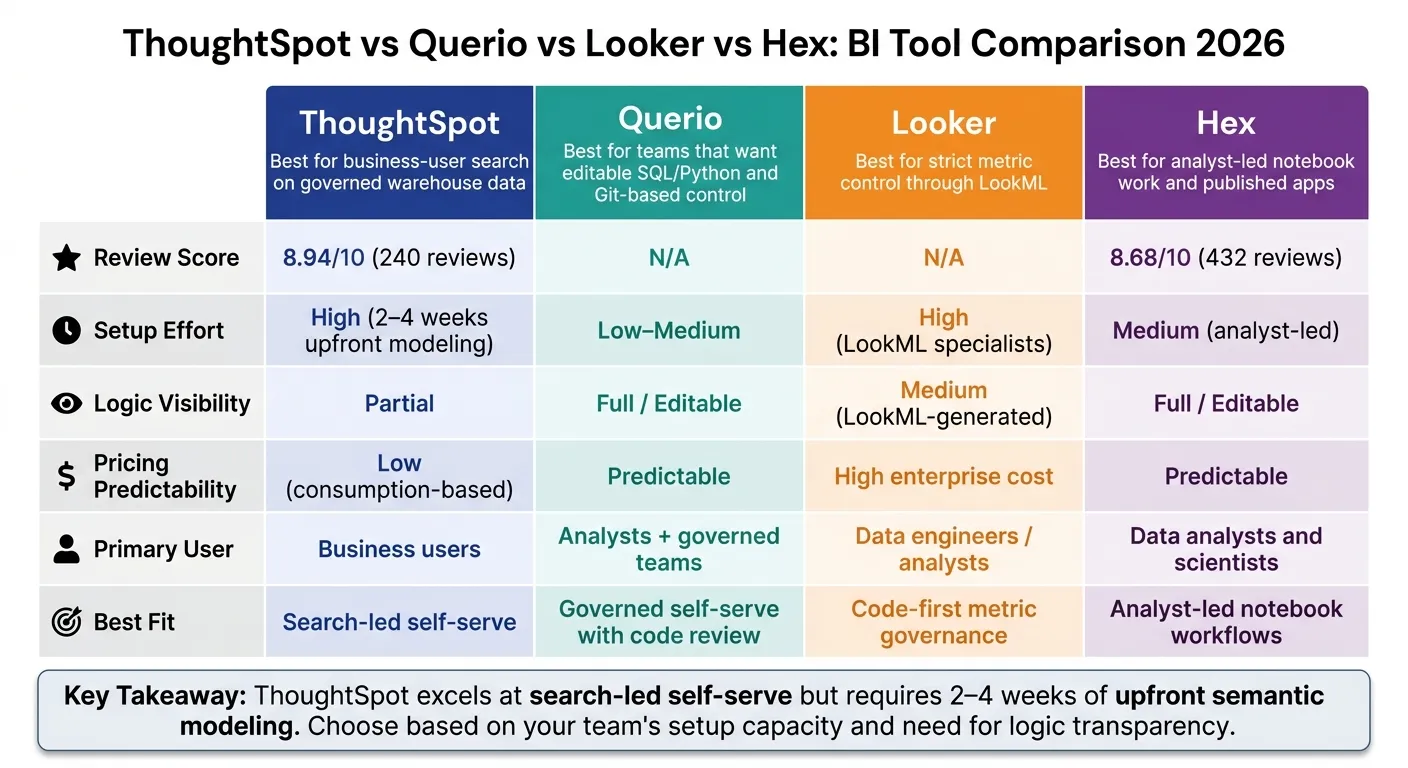 {ThoughtSpot vs Querio vs Looker vs Hex: BI Tool Comparison 2026}
:::
{ThoughtSpot vs Querio vs Looker vs Hex: BI Tool Comparison 2026}
:::
Quick Comparison
| Tool | Best Fit | Main Tradeoff | Logic Visibility | Setup |
|---|---|---|---|---|
| ThoughtSpot | Governed self-serve for business users | Fast search vs. heavy model setup | Partial | High |
| Querio | Governed self-serve with code review | More control vs. less packaged BI polish | Full | Low–Medium |
| Looker | Code-first metric control | Tight governance vs. more model upkeep | Medium | High |
| Hex | Analyst-led notebooks and apps | More analyst control vs. less open self-serve | Full | Medium |
Bottom line: if your team wants plain-English BI with live warehouse access and can handle the setup, ThoughtSpot makes sense. If you care more about inspectable logic, versioned code, or easier cost planning, another option may fit better.
That’s the lens I use in the rest of the review.
1. ThoughtSpot
ThoughtSpot stands out for one big reason: natural-language search. A business user can type something like "revenue by region last quarter" and get an answer in seconds from Snowflake, BigQuery, Redshift, or Postgres. No SQL needed. That cuts down on the usual back-and-forth with analysts, which is a big deal when the semantic layer is already set up well.
Why does that matter? Because ThoughtSpot's search is only as good as the logic it can show back to the user. Spotter has moved from basic token search to explainable logic and early-access reasoning, and each step shows more of what the system is doing behind the scenes:
| Feature | Spotter Classic (v1) | Spotter Agent (v2) | Spotter 3 (Early Access) |
|---|---|---|---|
| Query Logic | Token-based search | Explainable formulas | More advanced reasoning |
| Transparency | Inspectable SQL | Explainable logic | Verifiable plan/reasoning |
| Data Sharing | Metadata only (default) | Opt-in for data values | Opt-in for data values |
There’s a catch, though. Clean semantic modeling and synonym mapping still do a lot of the heavy lifting. If metric definitions are weak, results can get messy or just plain confusing. So the deciding factor isn’t the search box by itself. It’s governance and how well the metrics are defined.
ThoughtSpot also supports row-level security, column-level security, RBAC, and SAML SSO. Its semantic layer relies on Worksheets and TML, connects with dbt, and gives analysts SQL visibility and editing through SpotterCode. SpotterModel helps keep metrics consistent, but it works best when teams stay disciplined about upkeep. The next issue is whether that governance model holds up just as well outside ThoughtSpot’s own workflow.
2. Querio
Querio uses an analytics-native agent that writes SQL and Python for every answer, then shows the output in a reactive notebook. The code runs on live Snowflake, BigQuery, Redshift, or Postgres data, and connected cells update on their own when the logic changes. That detail matters. The main difference isn't the chat box. It's how the logic gets stored, checked, and governed.
Querio stores joins, definitions, and trusted queries as plain SQL, Markdown, and Python in your GitHub repo, right next to dbt. Humans approve all commits. That setup keeps the governed semantic layer portable and reusable outside Querio. For teams using Snowflake, BigQuery, Redshift, and Postgres, a file-based setup makes metric definitions easier to maintain and keeps them consistent without trapping them inside a proprietary modeling layer.
That same idea carries over to where people get answers. Querio delivers answers in Slack and Teams, where a question opens a notebook behind the scenes that the analytics team can still inspect and edit. Claude and other AI assistants connect through MCP with OAuth, so each agent query uses that user's existing permissions automatically. If data is missing, Querio returns no answer instead of guessing. For finance and healthcare teams, that refusal-first behavior can be the safer default.
3. Looker
Looker’s main strength is its LookML semantic layer. It’s a version-controlled, code-based model that sits between your warehouse and your users, so metrics stay consistent across dashboards and ad hoc analysis. It queries data where it lives and inherits warehouse security.
Compared with ThoughtSpot’s search-first model, Looker is the better fit when metric consistency matters more than conversational speed. In plain terms, if your team cares more about governed metrics than fast search-led exploration, Looker is the more structured choice.
As Valiotti Data notes:
"Looker pairs a mature LookML semantic layer with Gemini for plain-English questions. Consistent answers, enterprise pricing, best aligned with Google Cloud and BigQuery." [2]
The tradeoff is LookML maintenance. LookML needs engineering time, and it needs people who can keep it in shape. That work isn’t small. But once it’s done, business users get governed self-serve in Explore, which is a big part of the appeal.
| Feature | Looker | ThoughtSpot |
|---|---|---|
| Primary Interaction | Explores on a governed model | Search / Natural Language |
| Semantic Layer | LookML (version-controlled code) | Worksheets and TML (search-optimized) |
| AI Approach | Looker with Gemini | ThoughtSpot with Spotter |
| Best Fit | Large orgs needing strict metric control | Wide business-user self-serve |
| Main Constraint | Requires LookML maintenance skills | Requires upfront semantic modeling |
Looker puts governance first. ThoughtSpot puts search-led self-serve first. That’s the tradeoff.
If your data team needs predictable definitions across dashboards and ad hoc analysis, Looker’s governed model is the main edge. If your team puts strict metric control ahead of search-first discovery, Looker is the stronger governance-first option.
Hex takes a more notebook-first path, which changes how teams inspect and share analysis.
4. Hex
Hex shifts the center of gravity from self-serve search to analyst-led analysis. It’s an analyst-first, notebook-based workspace built for SQL and Python. ThoughtSpot takes the opposite path: it’s search-first and built for direct business-user self-service.
In Hex, analysts write SQL or Python in shared notebooks and then publish interactive Data Apps for business users. Magic AI and the Notebook Agent add AI help, but analysts still stay in charge. They can approve or reject code changes cell by cell. That matters if your team wants tight control over how logic gets built and changed.
Hex works best when analysts own the logic and business users consume the output. In plain terms, analysts do the building, and everyone else uses what gets published. That puts the next tradeoff front and center: governance versus publishing speed.
Governance in Hex is analyst-curated at the project level, and dbt integrations help keep metric definitions in line. So if your team wants analysis that can be reviewed, checked, and updated with care, Hex makes a lot of sense. But it’s not built for open-ended self-serve search in the way ThoughtSpot is. Business users still rely on analysts to publish and update Data Apps, and that can turn into a bottleneck.
| Feature | Hex | ThoughtSpot |
|---|---|---|
| Primary User | Data analysts and scientists | Business users and BI leaders |
| Interaction Model | AI-assisted SQL/Python notebooks | Natural-language search (Sage) |
| Governance Style | Versioned notebook cells | Centralized semantic layer (SpotterModel) |
| Metric Consistency | dbt integration and analyst curation | Grounded in a central semantic model |
| Logic Visibility | Full cell-level visibility and editability | Limited; SQL viewable via SpotterCode |
| Output Type | Interactive data apps | Liveboards and automated insights |
Hex earns an 8.68/10 Tooliverse consensus score based on 432 reviews [1], while ThoughtSpot scores 8.94/10 from 240 verified reviews [1]. That gap matters most when you’re deciding who should drive analytics day to day: analysts or business users. And that sets up the main tradeoff in the next section - where Hex’s control helps, and where ThoughtSpot’s search-first model scales better.
Pros and Cons
Each tool handles a different analytics job. Choosing between natural language data querying tools depends on your team's technical depth. But none of them covers the full workflow on its own.
| Product | Best For | Main Advantages | Main Limitations | Operational Burden |
|---|---|---|---|---|
| ThoughtSpot | Search-led Q&A for non-technical users | Natural-language search for business users; instant AI insights via Spotter; strong mobile app; live warehouse connections | High enterprise cost; variable consumption pricing; limited visualization customization; steep learning curve for advanced calculations | High: Requires upfront semantic modeling before rollout |
| Querio | Governed self-serve for B2B SaaS, healthcare, and finance teams | Inspectable and editable SQL/Python; context stays versioned with the analytics codebase | No native Microsoft Teams integration; no built-in ETL or transformation layer | Low–Medium: Context layer setup is required upfront, but avoids ongoing black-box outputs |
| Looker | Strict code-first metric governance | LookML delivers very high governance; Gemini AI grounded in approved logic; Git-versioned model | High technical barrier; authoring requires LookML specialists; less intuitive for casual or ad hoc users | High: Requires dedicated analysts or specialists to maintain the LookML model continuously |
| Hex | Analyst-led notebook workflows | Collaborative SQL/Python notebooks; Magic AI for code generation; shareable interactive data apps | Steep learning curve for non-technical users; business users depend on analysts to publish and update apps | Medium: Analysts must build and publish apps before business users can consume results |
What matters next isn't feature depth. It's how much work each tool needs before a team can trust what it sees.
That’s the core tradeoff: setup effort versus self-serve reach.
Hex lands in the middle. Analysts keep control, which helps keep output quality high. But that same model creates a publishing bottleneck, so self-serve only goes so far.
Querio takes a lighter path. The context layer still needs to be set up first, but after that, teams can work with inspectable SQL and Python. That makes the logic easier to review, check, and maintain.
The next section uses these tradeoffs to identify who should choose ThoughtSpot in 2026.
Who Should Choose ThoughtSpot in 2026?
The tradeoff here is pretty clear: The tradeoff between Querio and ThoughtSpot is clear: ThoughtSpot is the better pick when search speed matters more than code-level inspection. In 2026, it makes the most sense for teams with a centralized cloud warehouse and lots of non-technical users who need plain-English access to governed data. It’s a weaker option if you need granular warehouse control, very light setup, or pricing you can map out with confidence.
ThoughtSpot also fits teams that want direct, live queries against Snowflake, BigQuery, Redshift, or Postgres without routing every question through an analyst.
Across 240 verified reviews, ThoughtSpot scores 8.94/10 for democratizing data access, though reviewers still call out the upfront TML/Worksheet modeling and harder-to-forecast consumption pricing [1].
Use the matrix below to line up that tradeoff with your stack and operating model.
| Priority | ThoughtSpot | Querio | Looker | Hex |
|---|---|---|---|---|
| Workflow | Search-first / Liveboards | Agent-led / Notebooks | Governed explores | Notebook-first |
| Setup effort | High (upfront modeling) | Low (days to live) | High (LookML expertise) | Moderate (analyst-led) |
| Logic transparency | Partial / viewable | Full / editable | Generated from LookML | Full / editable |
| Pricing predictability | Low (consumption-based) | Predictable | High enterprise cost | Predictable |
In practice, the main test isn’t feature depth. It’s whether your team can keep the semantic model in good shape over time. That’s the make-or-break point.
ThoughtSpot is usually the right call when your company can put time into upfront modeling and wants to ease the analyst bottleneck for ad hoc business questions, especially when those questions start with search-first access to governed warehouse data.
Pre-purchase checklist before committing to ThoughtSpot:
- Do you have a centralized cloud warehouse such as Snowflake, BigQuery, Redshift, or Postgres?
- Can your data team spend 2–4 weeks on upfront semantic modeling before rollout?
- Is your main goal to cut the analyst bottleneck for ad hoc business questions?
- Are your users comfortable working in a web app instead of Slack or Teams?
- Can you forecast and absorb consumption-based pricing at your expected query volume?
If most of those answers are yes, ThoughtSpot is likely a good fit. If not, it tends to be a weaker match for teams that need inspectable logic, minimal setup, or fixed pricing.
FAQs
::: faq
How much setup does ThoughtSpot really need?
ThoughtSpot usually needs a fair amount of upfront setup before it works the way teams expect. In most cases, teams need to map tables, define joins, and set up worksheets so the semantic layer can return accurate answers.
For most enterprise environments, the first rollout usually takes 1 to 3 weeks of semantic modeling. In more complex deployments, that timeline can stretch to 4 to 9 weeks. :::
::: faq
When does ThoughtSpot work better than a notebook-based workflow?
ThoughtSpot tends to work best when the main goal is search-driven self-service analytics for a large group of non-technical business users. It’s a strong fit in standardized setups where people need to ask questions in plain English, without touching SQL or Python.
That said, it works best when a dedicated data team can keep a mature, governed semantic layer in good shape, with clear metric definitions behind the scenes. If the job calls for deep ad hoc analysis, hands-on code control, or full visibility into how results are produced, notebook-based workflows are usually the better pick. :::
::: faq
What makes ThoughtSpot pricing hard to predict?
ThoughtSpot pricing can be tough to pin down because the listed per-user subscription is only one piece of the bill.
A big part of what you pay depends on usage. That includes query volume, row limits, and dashboard loads, which can cost $5–$6 each. And because ThoughtSpot runs live queries on warehouses like Snowflake, BigQuery, and Redshift, your warehouse compute costs go up as search activity increases and queries get more complex.
There’s another catch: if you hit plan caps, you may have to move to a more expensive tier. So the sticker price rarely tells the whole story. :::