Business Intelligence
Hex Review (2026): Strengths, Gaps and Who It's Really For
Hex excels for SQL/Python notebook workflows and data apps but struggles with governance, metric consistency, and broad self-serve.

My take: Hex is a strong pick for SQL/Python-heavy teams, but a weak fit if you need broad self-serve and tight metric control across the business.
As of June 2026, Hex holds a consensus score of 8.68/10 from 432 verified reviews. That lines up with what I see in the article: Hex does well when analysts want one place for SQL, Python, AI tools that write SQL, and shareable data apps. But if you need one locked KPI definition, clean permissions at scale, and easy use for non-technical teams, I’d test those points hard before signing.
Here’s the article in plain English:
- Best for: analyst-led teams working in Snowflake, BigQuery, Redshift, Databricks, or PostgreSQL
- Core strength: one workspace for notebooks, analysis, and published apps
- Main risk: KPI logic can split across notebooks, which can lead to metric drift
- Self-serve limit: business users may still depend on analysts
- Watch-outs: chart limits, lag in large notebooks, and notebook upkeep
- Bottom line: if your team is notebook-first, Hex can fit well; if governed business access matters more, the tradeoff is harder to accept
Quick Comparison
| Area | Hex | What to test |
|---|---|---|
| Analyst workflow | Very good fit for SQL + Python notebook work | How fast teams move from query to app |
| Governance | Mixed | Whether one KPI stays the same across notebooks |
| Business-user self-serve | Limited | Whether finance or ops can get answers without analyst help |
| AI | Useful, with code you can inspect | Whether AI output follows approved data rules |
| Performance | Can slow in large notebooks | Browser lag and run time on heavy workloads |
If I were piloting Hex today, I’d score it on time to answer, AI SQL review, permissions, notebook speed, and handoff friction. That tells you fast whether Hex fits your team - or only your analysts.
Hex Review: Best AI Data Analytics & Business Intelligence Platform in 2026? (Honest Review)
::: @iframe https://www.youtube.com/embed/T329C_PspZI :::
Where Hex Is Strong
Hex’s main edge is simple: speed from analysis to sharing. Technical teams can query data, shape it, and publish the final result in the same workspace.
SQL and Python notebooks that connect analysis to presentation
Hex keeps analysis, transformation, and presentation in one flow. SQL and Python share state inside a single reactive notebook, so analysts can go from a warehouse query to a chart without bouncing between tools.
That matters because the notebook doesn’t just hold the work. It can also become the thing stakeholders use. Teams can publish finished projects as interactive Data Apps with filters and drill-downs, which turns the notebook into the delivery layer itself.
Hex also builds Git-based version control, branching, and pull requests into that same flow. So before anything goes live, teams can review the logic, check changes, and catch issues early.
This setup helps most when analysts need one notebook that handles both the work behind the scenes and the final experience for stakeholders.
Collaboration, publishing, and AI-assisted analysis
Hex works best for collaboration when technical users are already working together in a shared notebook that combines SQL, Python, and business logic. Instead of splitting work across a bunch of tools, the team stays in one place.
Hex Magic can draft SQL, generate Python, and explain queries. And when teams use Context Studio to curate endorsed tables and semantic models, those AI suggestions stay tied to trusted business rules instead of drifting off course.
That’s a big deal. AI help is a lot more useful when it’s based on the data definitions your team already trusts.
These collaboration and AI features make the most sense when the team already works inside a warehouse-native stack.
How well Hex fits modern warehouse stacks
Hex connects natively to Snowflake, BigQuery, Redshift, Databricks, and Postgres. It also supports OAuth database connections for Snowflake, BigQuery, and Databricks.
On top of that, it integrates with dbt, GitHub, and Slack. So if your team already runs on a warehouse-centered stack, Hex tends to slide in without much friction.
Its reactive DAG execution model is another plus. When an upstream cell changes, Hex automatically reruns downstream dependencies. That means notebook work stays reproducible, and analysts don’t have to babysit cell order by hand.
Where Hex Falls Short
Before you buy, three things deserve a hard look if your team needs governed, reusable analytics. The same notebook strengths that help analysts move fast can turn into friction when the workspace also needs to support non-technical users.
Governance and metric consistency need close scrutiny
The biggest risk is metric drift. If analysts define the same KPI in separate notebooks, the numbers can start to split unless the team is very disciplined about keeping logic in one shared place. That gets risky fast when business logic lives inside individual notebooks instead of dbt or another shared layer.
The main pressure points are governance, self-service, and performance. In practice, they tend to show up like this:
| Area | Hex today | What governed warehouse teams need |
|---|---|---|
| Metric definitions | Analysts can define logic directly in notebooks | A central definition that stays consistent |
| Self-service | Better for technical users than broad business audiences | A smoother path for non-technical users |
| Visualization | Basic or restrictive for advanced presentation needs | More chart control and formatting flexibility |
| Performance | Large notebooks can lag during execution | Responsive analysis on heavier workloads |
Hex is not built for broad business-user self-service
Hex works well for analysts. But the notebook model is tougher to extend across a company, especially for business users who don't live in SQL or Python all day.
Review feedback points to limited visualization, browser lag in large notebooks, complex permissions at scale, and a high learning curve for non-technical users [1]. And that's the heart of it: if every follow-up question still lands back on the data team, you don't have company-wide self-service. You just have a nicer analyst workspace.
Visualization limits, performance issues, and notebook maintenance
These issues get more obvious as usage grows. Visualization is functional, but it can feel limiting when teams want more polish or tighter control over how charts look and behave.
Performance can also become a problem. Large notebooks may slow down during complex runs or when working with big dataframes, which can lead to browser lag and a less smooth experience.
Then there's maintenance. When logic stays inside notebooks, KPI drift becomes more likely and updates get harder to manage. Over time, that puts more upkeep on the analytics team.
Hex vs. Querio: Which Teams Will Notice the Difference
::: @figure 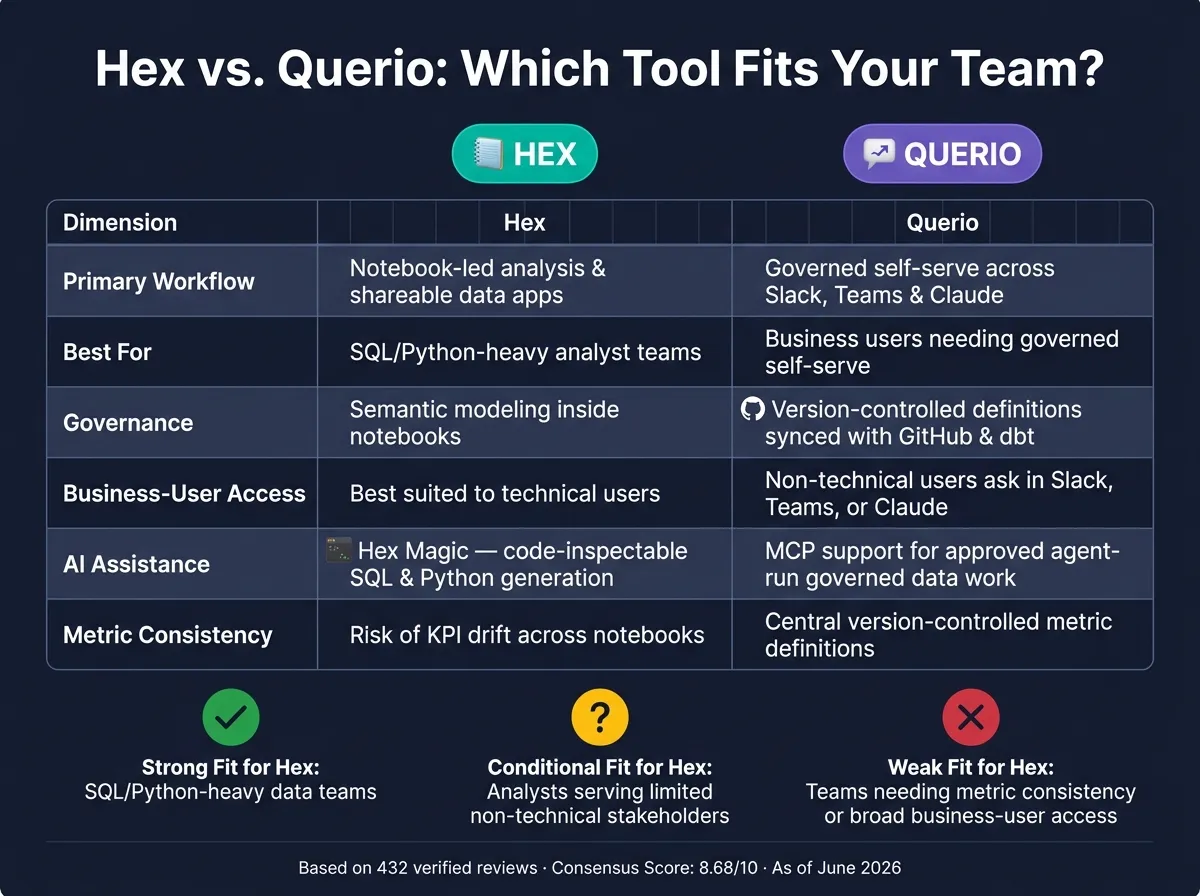 {Hex vs. Querio: Feature Comparison for Data Teams (2026)}
:::
{Hex vs. Querio: Feature Comparison for Data Teams (2026)}
:::
Hex and Querio are built for different kinds of work. Hex is centered on analyst-led notebook work. Querio is built for governed self-serve for business users. That split matters most when a team needs governed self-serve across the business, not just better analyst output.
| Dimension | Hex | Querio |
|---|---|---|
| Primary workflow | Notebook-led analysis and shareable data apps | Governed self-serve across the app, Slack, Teams, and Claude |
| Governance and context | Semantic modeling | Version-controlled definitions and trusted queries synced with GitHub and dbt |
| Business-user access | Best suited to technical users working in notebooks | Business users can ask in Slack, Teams, or Claude |
| Agent workflows | Chat-based agent workflow | MCP support so approved agents can run governed data work directly |
When Hex is the better fit
Hex makes sense for analyst-led teams that are notebook-first. If your team is small, technical, and wants to explore data, build models, and publish work from one notebook, Hex still stands out.
When Querio fits better for governed, warehouse-native self-serve
The picture changes when the goal is governed answers for business users. This is where the gap becomes clear: non-technical users need to get answers on their own, without waiting on analysts or passing around CSV files.
With Querio, business users can ask questions in Slack, Teams, or inside Claude through MCP. They get answers backed by real SQL running on live warehouse data. No CSV round-trips. No side-channel exports.
The safety piece comes from the context layer. Metric definitions, joins, and trusted queries live as version-controlled files synced to GitHub alongside your dbt project. The agent can suggest changes, but your team approves them. That means the context stays in your repo and in your definitions layer, where your team can inspect it.
For data leaders at B2B SaaS, healthcare, and finance companies, this is the line to test in a pilot. If you need both analyst depth and governed access for the broader business, look closely at AI analytics solutions for growing companies that mix inspectable AI work, live warehouse connections, reactive notebooks, and agent delivery across each surface. That difference should shape what your pilot is meant to optimize for.
Who Hex Is Really For and the Final Buyer Verdict
Strong fit, conditional fit, and weak fit scenarios
Hex makes the most sense for data teams that live in SQL and Python and want a notebook-first workspace with a clean way to share work with stakeholders. It’s a weaker pick for broad self-serve across the business, especially when tightly controlled metrics matter a lot. Before you sign, treat multi-entity permissions and cross-team metric consistency as pilot blockers.
| Team Profile | Fit Level | Why |
|---|---|---|
| SQL/Python-heavy data teams building reproducible analysis | Strong fit | Notebook-first workflow, Git-based version control, and fast notebook-to-app publishing |
| Teams with analysts serving a limited set of non-technical stakeholders | Conditional fit | Works well for analysts, but non-technical users still need analyst support |
| Teams needing metric consistency or broad business-user access | Weak fit | Access controls can get complex, and self-serve is still limited |
How to run a pilot before signing
If you’re still on the fence, run a time-boxed pilot with live data against the workflows that matter most. A pilot using live warehouse data from Snowflake, BigQuery, Redshift, or Postgres will tell you far more than a polished demo ever will.
Test four real workflows:
- Investigate a revenue change
- Validate a retention metric
- Segment customers
- Publish a leadership report
Then score each workflow on five areas: time to correct answer, ease of analyst handoffs, inspectability of AI-generated SQL, permission correctness, and browser performance on larger notebooks. If the pilot feels slow, take that seriously before committing to the Team plan [1].
Final verdict
The pilot should answer one simple question: does Hex serve analysts well enough to make up for the tradeoff in governed self-service BI?
Hex fits analyst-led teams that need speed and flexibility. It’s the weaker choice when governed access across the business matters more than notebook-first work.
FAQs
::: faq
How hard is Hex to govern at scale?
Hex can be harder to govern at scale because it’s notebook-first, not a standard BI tool. It gives you project-level access controls, audit logging, and inherited warehouse roles. But on its own, it doesn’t enforce a central semantic layer.
That means governance leans more on team habits and setup. In practice, teams often rely on endorsed notebooks, versioning, Context Studio, and upstream tools like dbt or Cube to keep metrics lined up.
The trade-off is pretty simple: you get a flexible way to work, but data teams may need to stay more hands-on, especially when ad hoc requests start piling up. :::
::: faq
Can non-technical teams use Hex without analysts?
Usually, no. Hex is notebook-first, and it tends to work best for people who are comfortable with code. Because of that, non-technical teams often still rely on analysts to build and publish curated data apps for them.
Hex does support natural language interaction. But it still doesn't offer the broad, governed self-serve experience that most business users need if they want to dig into data on their own, without filing tickets or asking for technical help. :::
::: faq
What should I test in a Hex pilot?
Test three things:
- A realistic, messy dataset with hard joins and conflicting metric definitions
- The AI’s memory across several follow-up questions, while checking the SQL it writes
- Governance workflows, including access changes, audit logs, warehouse security inheritance, and dbt integration
That gives you a clear view of how well Hex handles day-to-day analytical complexity, how transparent it is, and how steady it stays with your current stack. :::