Business Intelligence
search based BI tools natural language
How search-based BI uses natural language to query live warehouses, generate SQL/Python, and deliver fast, consistent insights with governed access.

Search-based BI tools let you ask questions in plain English, like "What were our sales last quarter?" and get instant answers - no SQL or dashboards required. These tools use natural language processing (NLP) to translate your queries into database commands, analyze the data, and present results quickly. Here's why they matter:
- Faster Decisions: No waiting for analysts - get insights instantly.
- Ease of Use: No technical skills needed; just type your question.
- Consistency: Everyone works from the same data source, reducing errors.
- Real-Time Insights: Access live data directly from platforms like Snowflake or BigQuery.
Querio is a standout tool in this space, offering a natural language interface that generates SQL or Python code. It ensures transparency, accuracy, and security while supporting role-based access controls and live data connections. This makes it a powerful option for businesses looking to simplify data access without losing control.
EXL Conversational BI: AI-Powered Natural Language Analytics for Smarter Insights
::: @iframe https://www.youtube.com/embed/lgkX4X09ync :::
How Search-Based BI Tools Work
::: @figure 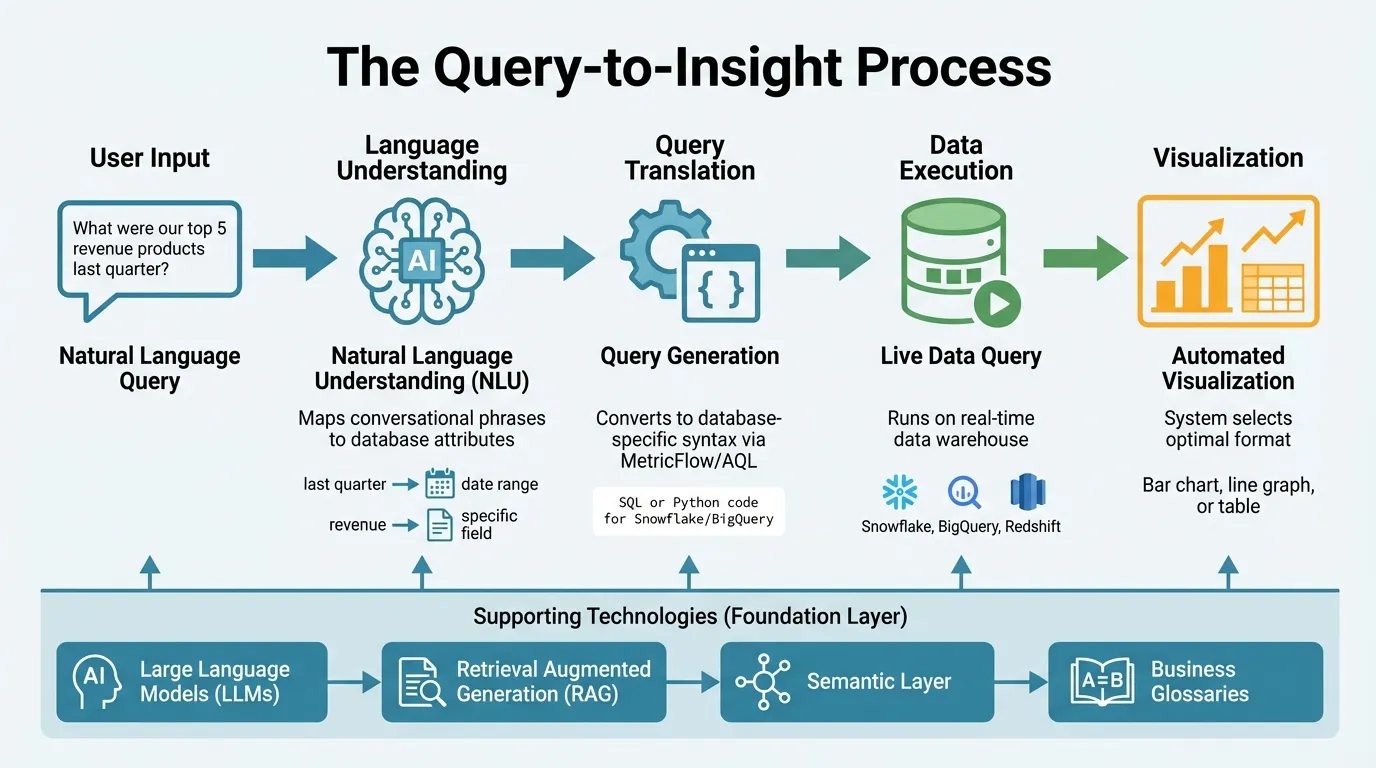 {How Search-Based BI Tools Convert Natural Language to Insights}
:::
{How Search-Based BI Tools Convert Natural Language to Insights}
:::
Behind the simplicity of typing a question lies a complex process that turns everyday language into database queries and visual insights. This workflow ensures users get accurate answers without needing SQL expertise or navigating complicated dashboards. The approachable interface masks a robust system designed to transform natural language into actionable insights.
The Query-to-Insight Process
When you type something like, "What were our top five revenue products last quarter?" the system kicks into action. Natural Language Understanding (NLU) identifies the intent behind your query, mapping conversational phrases like "last quarter" and "revenue" to specific database attributes and date ranges.
From there, intermediary frameworks such as MetricFlow or AQL encode business logic into the query before converting it into the database-specific syntax required by platforms like Snowflake or BigQuery. After running the query on live data, the system automatically determines the most effective visualization - be it a bar chart, line graph, or table. This streamlined process ensures business users get timely and reliable insights, all without technical barriers.
Core Technologies Behind Search-Based BI
A range of advanced technologies work together to make this process possible. Large Language Models (LLMs) handle the nuances of human language, recognizing that terms like "staff" and "employees" mean the same thing. Retrieval Augmented Generation (RAG) reinforces these models by grounding them with real-time metadata and database schemas, ensuring the system references actual tables and fields instead of fabricating them. Meanwhile, agentic retrieval adds an extra layer of accuracy by using DDL statements to prevent errors like invented table names or relationships.
At the heart of this process is the semantic layer, which ensures precision. Michael Hetrick, Director of Product Marketing at Tableau, explains:
"More clarity in the metadata model means that NLP users can receive the right answer from the NLP system" [2].
This layer defines how calculations are executed - whether summing sales or averaging satisfaction scores - and establishes logical hierarchies like Year > Quarter > Month. These elements enable users to drill down into data while maintaining accuracy.
How These Tools Deliver Accurate Results
Accuracy is a top priority for these tools, and they achieve it by addressing ambiguous language and company-specific terminology. Business glossaries map everyday phrases to precise data fields, while metadata enrichment ensures fields have clear descriptions and default aggregations. This prevents nonsensical outcomes, such as averaging customer IDs. Additionally, fuzzy string matching corrects minor spelling errors or variations in field names, ensuring queries still yield the right results [2].
Guided search enhances the user experience by offering real-time feedback as you type, showing how the system interprets your query. This transparency allows users to adjust their questions on the fly, resolving ambiguities before running the query. Many platforms also display the generated SQL and the tables being joined, providing an audit trail that helps users verify results and understand how their query was processed.
Benefits of Search-Based BI Tools
The move from traditional dashboards to search-based BI is reshaping how businesses interact with and utilize data. Natural language BI tools, like Querio, are making it easier for teams to ask questions and get answers instantly. This eliminates the delays of traditional reporting and opens up data access to everyone, not just specialized teams.
Making Data Accessible to Business Users
Natural language queries break down the technical walls that used to separate business users from their data. For example, a marketing manager can simply type, "show campaign performance by region this month," without needing to know anything about database structures or coding.
Embedded analytics take this one step further by allowing users to ask follow-up questions directly within dashboards. Imagine reviewing a sales dashboard and immediately typing, "which sales rep closed the most deals in California?" - you'd get an instant answer without switching tools [1].
Organizations can also create curated data views tailored to specific departments. For instance, a Customer Success team might have a lens that focuses on support tickets, renewal rates, and satisfaction scores, while leaving out irrelevant data [1]. Additionally, defining synonyms in business glossaries ensures that the system understands terms like "car" as "New Vehicle Model" or "incident" as "Case ID" [2][1]. These features make data more accessible and help users uncover insights faster.
Faster Access to Data Insights
Quick decisions need quick data - and these tools deliver. Advanced platforms can analyze billions of rows in cloud data warehouses within seconds, generating visualizations almost instantly.
This speed is transformative. Sales leaders can check pipeline health on the spot, product managers can validate feature adoption in real time, and executives can review trends during meetings without waiting for reports. Instead of being stuck in the past, data becomes a tool for making informed choices in the moment. Fast retrieval also ensures everyone is working with consistent metrics across the board.
Maintaining Consistent Metrics Across Teams
One of the biggest challenges in data usage is ensuring that all teams calculate metrics the same way. Search-based BI tools solve this with governed semantic layers. These layers house the business logic for key metrics, like revenue, in one central place. When someone queries a metric, the system applies the same logic every time, ensuring consistency.
This approach eliminates discrepancies that often arise between departments, helping everyone stay aligned. It also builds trust in the data, reinforcing the importance of accurate and consistent query interpretation.
sbb-itb-284a532
What to Look for in Search-Based BI Tools
When choosing a BI tool, focus on one that can interpret language accurately, integrates smoothly with your data warehouse, and keeps your data secure. Here are some key factors to consider during your evaluation.
Query Interpretation Accuracy
A strong natural language BI tool must understand what users are asking and translate those queries into precise database commands. If the tool misinterprets your query, the insights it provides could be misleading. Tools with robust metadata - clear definitions and relationships between fields - tend to deliver more accurate results.
Before committing, test the tool with real questions your team might ask. For instance, try asking "revenue last quarter" and compare it to "Q4 sales" to see if the results are consistent. Tools often perform better when your data warehouse has well-organized field names and descriptions. Cleaning up your metadata and hiding unnecessary fields ahead of time can also help minimize confusion [2].
Data Warehouse Compatibility
After ensuring query accuracy, confirm that the tool integrates seamlessly with your data sources. Whether your data resides in Snowflake, BigQuery, Redshift, or another cloud warehouse, the BI tool should connect directly to your live data. Some platforms query data in real time, while others rely on importing or creating extracts, which can slow performance and create version control issues.
Live connections to cloud warehouses are generally more efficient, allowing you to work with up-to-date data and scale as needed. Check that the tool supports your specific warehouse and can handle large datasets effectively. Keep in mind that setup times can range from a few days to several weeks, so allocate resources accordingly.
Security and Access Controls
Making data accessible through natural language queries shouldn't compromise security. Look for tools that enforce role-based security best practices, ensuring users can only access data they're authorized to see. Features like row-level security (RLS) and column-level security (CLS) are essential for filtering data based on user roles.
If the tool uses AI for query interpretation, understand where the AI models are hosted and how your data is processed. Many platforms rely on services like Azure OpenAI, which follow strict security protocols. Verify that the tool aligns with your compliance needs, especially if you handle sensitive customer data or operate in regulated industries. A strong security framework allows broader data access without introducing unnecessary risks.
Querio: AI-Powered Natural Language Analytics
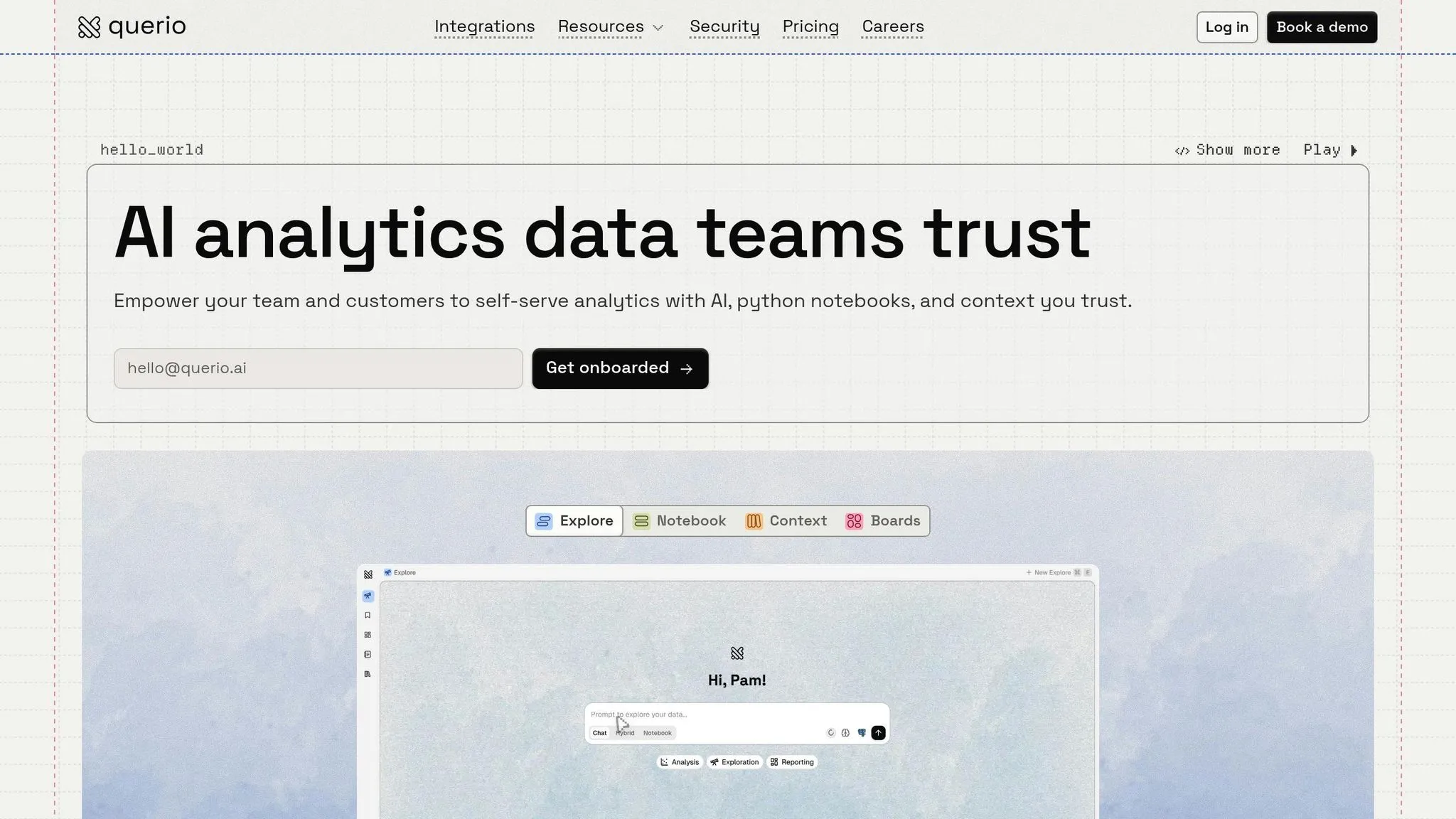
Querio is an AI-driven workspace designed to turn plain English questions into actionable insights. It generates verifiable SQL and Python code, combining the convenience of natural language with the precision required for trustworthy data analysis. This ensures that business users can get fast answers, while data teams maintain the transparency and rigor they need.
How Querio Handles Natural Language Queries
When you input a question in plain English, Querio translates it into real SQL or Python code that runs directly on your live data warehouse. Each response includes the underlying code, giving you full visibility into how the result was calculated. This eliminates the uncertainty often associated with black-box AI tools, ensuring your insights are based on solid data logic rather than statistical shortcuts. Unlike tools that obscure processes, Querio prioritizes inspectable and reusable code, making it ideal for teams that need audit trails and reproducible results.
Querio supports leading data platforms like Snowflake, BigQuery, Amazon Redshift, ClickHouse, and PostgreSQL, running queries directly on live data to keep results both current and scalable.
Core Features of Querio
Querio goes beyond simple queries by offering a dynamic notebook environment for SQL and Python analysis. These notebooks automatically update with any logic changes and are paired with a shared context layer that standardizes joins, metrics, and terminology across the organization. This consistency streamlines collaboration, ensuring everyone works with the same definitions, whether they’re handling ad-hoc queries, dashboards, or embedded analytics.
Key features include:
- Scheduled reports and dashboards: Generate live-data-backed reports and dashboards that update automatically.
- Embedded analytics: Use APIs and iframes to integrate analytics directly into customer-facing applications.
- Role-based access controls: Manage data access securely with granular permissions.
- SOC 2 Type II compliance: Maintain high security standards without compromising accessibility.
These tools empower business users to perform self-service analytics without sacrificing accuracy or control, while also reducing the workload for data teams.
What Makes Querio Different
Querio stands out by combining conversational ease with executable, verifiable code. Every insight is instant yet grounded in inspectable logic, ensuring accuracy and trust. The platform’s shared context layer maintains consistent definitions and versioned logic, enabling collaboration without creating governance issues. Querio simplifies access to data for business users while freeing data teams from repetitive tasks, striking a balance between accessibility and control that traditional tools often fail to achieve.
Conclusion: Getting Started with Search-Based BI
Main Advantages of Search-Based BI
Search-based BI tools simplify data exploration by removing technical hurdles, enabling teams to query data instantly. Business users can independently dive into data, while data teams retain oversight through shared definitions and governance layers. This setup ensures consistent metrics and terminology across the organization, avoiding confusion when multiple teams calculate the same KPI differently. The result? Faster insights, improved data literacy, and fewer bottlenecks in analytics workflows. Together, these benefits create a system that combines ease of use with dependable results.
Why Choose Querio
Querio takes these benefits a step further, showcasing how search-based BI can be both user-friendly and reliable. By generating real SQL and Python code for every query, it offers transparency for data teams while giving business users the intuitive, natural language interface they need. Its shared context layer ensures joins, metrics, and business logic stay consistent across workflows, reinforcing the goal of making data access easy without sacrificing accuracy.
For companies using modern data warehouses like Snowflake, BigQuery, or Redshift, Querio can chat with Snowflake, BigQuery, or Redshift by connecting directly to live data - no extracts or duplicates required. This keeps insights timely and scalable while adhering to SOC 2 Type II compliance and role-based access controls. Querio helps data teams expand analytics access across the organization without increasing governance challenges or compromising precision, making it an ideal choice for teams that value both speed and control in their analytics processes.
FAQs
::: faq
How do these tools know which tables and fields to use?
Search-based BI tools powered by natural language processing (NLP) work by connecting user queries to the right tables and fields within a database. To do this effectively, they depend on well-organized data sources and a clear understanding of user intent. These tools leverage structured metadata, semantic layers, and detailed business glossaries to ensure queries are accurately mapped to the appropriate database attributes.
Preparing data properly is key - this involves defining relationships and ensuring the system can interpret user input correctly. When done right, this preparation allows the tool to match queries with database elements seamlessly, improving the accuracy and reliability of the results. :::
::: faq
How can I verify the answer is correct?
To confirm the accuracy of an answer from a search-based BI tool like Querio, start by examining the search phrases, measures, and filters that were applied to generate the result. Next, compare the output with raw data or existing reports to ensure the numbers align. Run a few queries with known outcomes to verify the tool delivers the expected results. Finally, check that the tool's query transformation process accurately interprets your original question. These steps are crucial for ensuring dependable and precise results. :::
::: faq
What permissions prevent sensitive data from appearing in results?
Permissions, such as data security controls and user access restrictions, play a key role in keeping sensitive information safe. These safeguards ensure that only authorized users can access specific data, effectively protecting confidentiality and supporting secure workflows. :::