Business Intelligence
ThoughtSpot Pricing Explained (2026)
2026 breakdown of ThoughtSpot costs: plans, user/row limits, consumption fees, and hidden warehouse costs.

ThoughtSpot can start as low as $0 or $25 per user per month, but the total bill can move fast once you add more users, more rows, more queries, and warehouse compute.
If I were sizing this up on September 21, 2026, I’d boil it down like this:
- Developer: $0
- Essentials: $25/user/month, with a 5-user minimum and a 25 million row cap
- Pro: $50/user/month, up to 1,000 users and 250 million rows
- Enterprise: custom quote
- Consumption access: starts around $0.10 per query
The main thing to watch is simple: the sticker price is only part of the cost. Your spend can jump when you hit a user cap, cross a row limit, load dashboards often, or run lots of warehouse queries in Snowflake, BigQuery, Redshift, or Postgres.
A few numbers stand out:
- A 10-user team on Essentials is about $3,000/year
- A 40-user team on Essentials is about $12,000/year
- A 55-user team can no longer stay on Essentials, so moving to Pro lands near $33,000/year
- Embedded analytics often starts around $25,000 to $50,000+ per year
- Some dashboard activity may cost about $5 to $6 per load, depending on query count
::: @figure 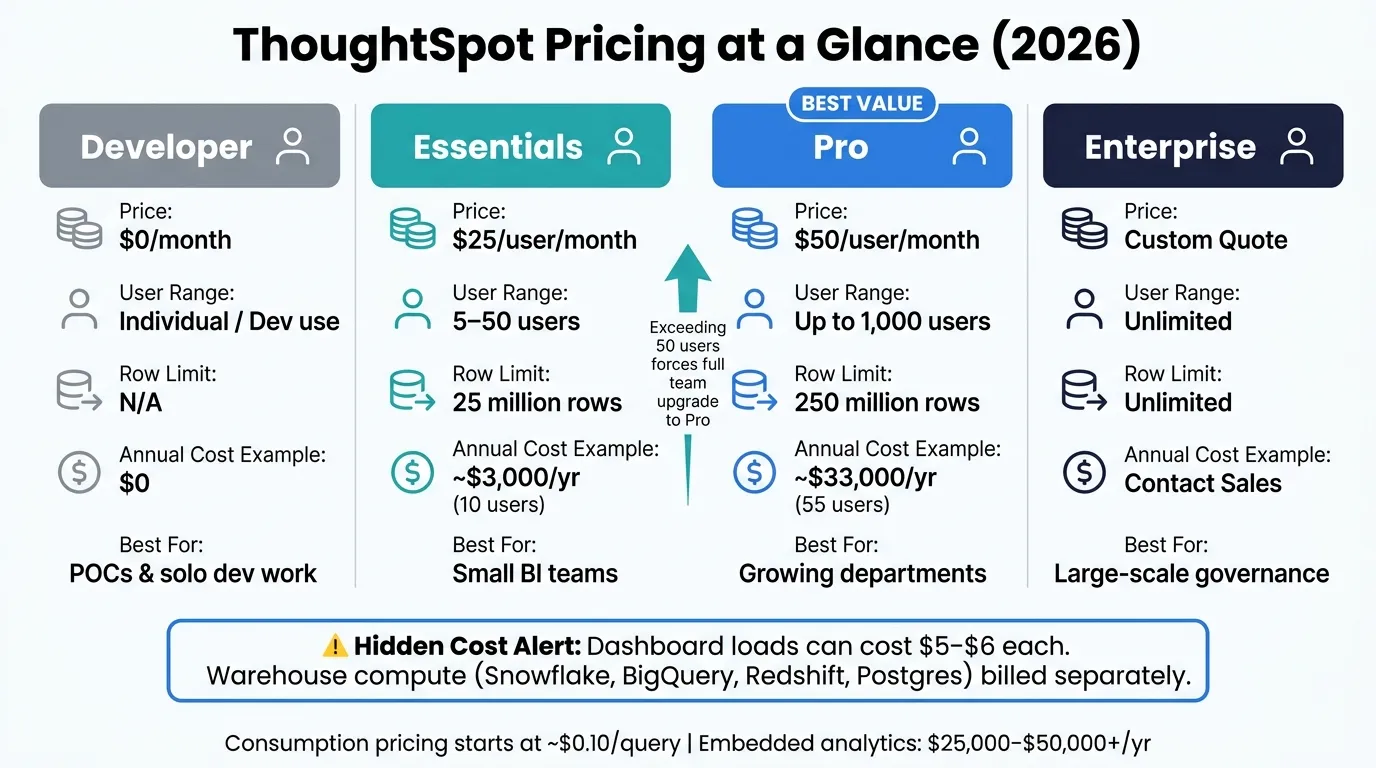 {ThoughtSpot Pricing Plans Compared (2026)}
:::
{ThoughtSpot Pricing Plans Compared (2026)}
:::
Quick Comparison
| Plan | Starting Price | Main Limit | Best For |
|---|---|---|---|
| Developer | $0 | Limited production use | POCs and solo dev work |
| Essentials | $25/user/month | 50 users, 25M rows | Small BI teams |
| Pro | $50/user/month | 1,000 users, 250M rows | Larger teams and department rollouts |
| Enterprise | Custom | Quote-based | Large deployments with tighter governance |
If you’re comparing AI analytics platforms, I’d focus on four questions first:
- How many users will I have this year?
- How many rows do I need now?
- How often will people query dashboards and search data?
- What will warehouse compute and setup work cost outside the license?
That’s the short version: ThoughtSpot pricing is easy to read at first, but your actual budget depends on seat count, row caps, query volume, add-ons, and warehouse usage.
ThoughtSpot Plans, Seat Pricing, and Edition Limits
ThoughtSpot offers four editions in 2026: Developer, Essentials, Pro, and Enterprise. The main breakpoint isn’t just the monthly rate. It often comes down to when row caps and user limits push you into the next tier.
Essentials, Pro, and Enterprise: Side-by-Side
| Edition | Published Price | User Range | Row Limit | Best Fit |
|---|---|---|---|---|
| Developer | $0/mo | Not published | N/A | Individual developers or small teams embedding AI and analytics; limited dashboarding. |
| Essentials | $25/user/mo | 5–50 users | 25 million | Small BI teams with contained data volumes [1] |
| Pro | $50/user/mo | Up to 1,000 users | 250 million | Growing departments needing more scale [1] |
| Enterprise | Custom quote | Unlimited | Unlimited | Enterprise rollouts with advanced governance needs [1][2] |
Essentials and Pro use published rates based on annual billing. Essentials also has a 5-user minimum, which puts the starting cost at $1,500 per year before add-ons [1].
Pro includes unlimited AI usage. But there’s a catch: if you bring in a third-party LLM provider, you may still pay that provider’s fees on top of ThoughtSpot [1].
What Changes as You Move Up Each Tier
The jump from Essentials to Pro is pretty stark. Essentials tops out at 25 million rows and 50 users. Pro moves that up to 250 million rows and 1,000 users [1].
Enterprise is quote-based and aimed at larger rollouts that need things like:
- Custom governance
- Security controls
- Multi-tenancy
- Dedicated support [1][2]
For regulated teams, governance is often the factor that settles the choice.
The pricing jump can hit fast. A 40-person team on Essentials costs $12,000 per year. Add 15 more users, and you go past the 50-user cap. At that point, the whole group has to move to Pro, which comes to about $33,000 per year for 55 users [1].
That’s why it helps to model headcount growth before signing an annual deal. Seat price is just the starting point. Usage and embedded analytics pricing models can shift total spend in a hurry.
Consumption Pricing, Embedded Packaging, and Startup Options
Seat count is only one part of the ThoughtSpot bill. Usage-based charges and add-ons can push costs up fast.
How Credits and Usage-Based Billing Affect Real Spend
On Pro, credits sit on top of seat fees. A single dashboard load can cost $5 to $6, based on how many queries it fires. If your team uses the product a lot, that usage can turn into a noticeable share of monthly spend.
Here’s where cost pressure usually shows up across common use cases:
| Use Case | Primary Cost Driver | Secondary Risk |
|---|---|---|
| Internal BI (small team) | Seat count + row cap | Tier upgrade if data grows past 25 million rows |
| Growing department | Seat count + credits | Tier upgrade if data grows past 250 million rows |
| Embedded analytics | Usage volume | Developer tier has limited production value |
| Enterprise rollout | Negotiated contract | Add-ons like Analyst Studio |
If you're embedding analytics, seat count matters less. In that setup, usage volume and contract packaging tend to drive the bill.
Analyst Studio is a separate add-on for Pro and Enterprise. It includes advanced SQL, R, and Python modeling, so plan for that as its own budget line.
And add-ons aren't the only thing that can shift the math. Special packaging can change the buying model from the ground up.
Embedded Analytics Pricing and the Developer Tier
The free Developer tier is built for individual developers and POCs. It does not include dynamic dashboards or automated alerts. So while it can work for testing, it doesn't have much production use.
If your team plans to launch an embedded analytics setup in production, factor in the move to paid packaging, plus the usage volume that usually comes with it.
StartupSpot and Other Special Packaging
StartupSpot details are not publicly verified here. Check eligibility, pricing, and contract length directly with ThoughtSpot.
Those subscription costs still don't tell the whole story. The next layer is everything you pay outside the license itself.
What Actually Drives Total Cost of Ownership
The subscription price is just the starting point. It’s not the full bill.
Total cost climbs once you layer in implementation, warehouse compute, admin time, and support. And that gap gets bigger when usage grows, models shift, and support requests start piling up.
Costs Beyond the Subscription
Implementation is often the first thing teams underestimate. Upfront onboarding and modeling work can add serious services costs, especially if the rollout needs a dedicated admin to keep things on track. At the pilot stage, those costs may look modest. But they can grow enough to move a team from Essentials to Pro, or even into a custom Enterprise deal.
Warehouse compute is often the biggest moving part. Every search, drill-down, and automated insight runs a real query against Snowflake, BigQuery, Redshift, or Postgres. That means usage doesn’t just affect adoption. It hits your warehouse bill too. Deep drilling and automated insights usually generate the most warehouse queries [2].
Admin and LLM overhead doesn’t go away after launch. Someone still needs to maintain the data model, manage permissions, and keep up with schema changes. If you bring your own LLM provider, that adds separate token charges on top [1].
So while ThoughtSpot’s listed price is easy to spot, it’s only one piece of the spend. Implementation, warehouse queries, admin time, and add-ons often shape the real annual cost.
Next, those cost drivers are mapped to three common buying patterns: a small BI team, an embedded analytics use case, and an enterprise rollout.
Example Budgets and Buying Takeaways
3 Buyer Scenarios: Small BI Team, Embedded Product, Enterprise Rollout
These three scenarios show how ThoughtSpot pricing turns into actual budget ranges.
| Buyer Scenario | Likely Plan | Typical Annual Spend | Primary Cost Driver | Key Procurement Question |
|---|---|---|---|---|
| Small BI Team (10 users) | Essentials | ~$3,000 | Row cap and warehouse compute; implementation and semantic-layer setup | Does our data volume fit within the 25M-row cap? |
| Embedded Product Team | Embedded analytics packaging | $25,000–$50,000+ | Customer count, multi-tenancy, integration complexity, and warehouse query volume | What is our cost per load as usage grows? |
| Enterprise Rollout (500 users) | Pro or Enterprise | Custom quote | Seat count, consumption credits, and row volume against the 250M cap | Can we cap monthly credit spend and avoid overages? |
For a small BI team, the entry point is about $3,000 per year. But that only works if the data stays below the 25M-row Essentials cap [1]. Go past that, and the budget can change fast.
Embedded analytics is a different animal. Spend often lands in the $25,000 to $50,000+ range, and it tends to move with customer count and warehouse query load. That makes it tougher to predict than internal BI use [1].
At the enterprise level, published pricing usually stops being the whole story. Once seat count, credit usage, or row volume push past tier limits, pricing shifts to a custom quote [1] [2].
Key Pricing Questions to Answer Before Talking to Sales
Before you talk to sales, get clear on the inputs that shape your quote. This is where deals can drift from “looks fine on paper” to “why is this so much higher than we expected?”
Start with data volume. Count your rows now, not later. Essentials tops out at 25M rows, and Pro tops out at 250M [1]. If you're already close to either cap, it's usually smarter to budget for the next tier from the start instead of getting pushed into an upgrade in the middle of the contract.
Then look at users and AI access. Per-user pricing scales in a straight line, so if your team grows from 10 users to 40, your seat cost grows by 4x too [1]. You should also pin down any AI query caps, overage terms, and what happens once you hit the limit. That part can get fuzzy if you don't ask directly.
You also need to separate embedded analytics from internal BI. They aren't priced the same way, and they don't move through procurement the same way either. If you're shipping analytics inside a product, ask for direct pricing on per-customer or per-load costs. Don't assume the internal BI rate carries over.
And then there are the side costs. They're easy to miss because they may not show up on the ThoughtSpot invoice at all:
- Warehouse compute on Snowflake, BigQuery, Redshift, or Postgres
- Implementation and semantic-layer setup [1]
- Third-party LLM fees if you're bringing your own provider [1]
Those costs still hit your total analytics budget. They just show up in different places.
The questions below are the fastest way to spot hidden costs before you sign.
FAQs
::: faq
When do I need to upgrade from Essentials to Pro?
Upgrade from Essentials to Pro when your data volume passes 25 million rows or your team needs more firepower, like dynamic interactive dashboards, expanded actionable insights, or the full Spotter AI Agent.
Essentials is built for smaller teams of 5–50 users. Pro is usually the next step for growing organizations that need support for up to 1,000 users and a higher cap of 250 million rows. :::
::: faq
What costs aren’t included in ThoughtSpot’s listed price?
ThoughtSpot’s listed price usually doesn’t include implementation, training, or support. And those extra services can add 20%–30% to your total cost.
There’s another catch too. If you bring your own third-party LLM, you may need to pay that provider separately, on top of what you pay ThoughtSpot.
Base per-user pricing also may not tell the whole story. Costs can climb because of consumption-based charges tied to things like background operations and indexable queries.
And if you need more than the core product, expect extra fees there as well. Features like embedded analytics and Analyst Studio are often sold as add-ons. :::
::: faq
How should I estimate warehouse and query costs before buying?
Estimate both ThoughtSpot pricing and the added load on your warehouse. Because ThoughtSpot runs live queries, your costs will depend on search volume, query complexity, and user growth.
A simple seat price doesn’t tell the whole story. You also need to watch for per-query fees, per-user pricing ($25/user/month or $50/user/month), warehouse compute use in Snowflake, BigQuery, or Redshift, and row caps that can push you into a higher plan.
One practical move: review your historical warehouse query logs. That gives you a clearer picture of likely spend before usage climbs and helps you avoid nasty surprises later. :::