Business Intelligence
Sigma Computing Pricing: What to Expect
Plan for licenses, setup fees, and cloud warehouse compute—year-one costs often range $35K–$500K+ depending on seats and usage.
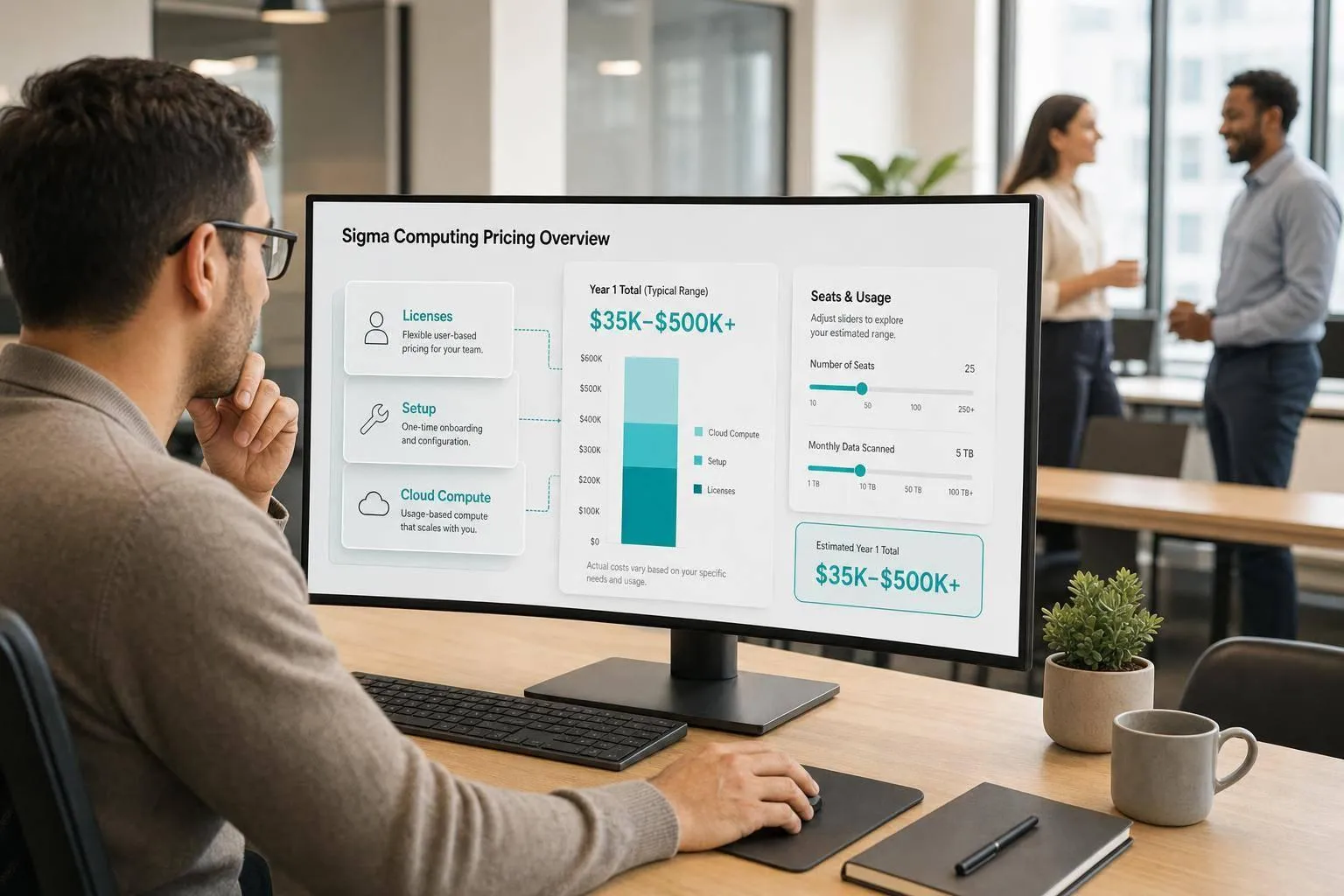
Sigma usually costs more than the quote’s software line item suggests. If I were budgeting for it on September 21, 2026, I’d plan for licenses + warehouse spend + setup fees, not just seats.
Here’s the short version:
- Sigma uses custom pricing
- Reported median annual spend is about $61,158
- Many deals fall between $17,500 and $131,453
- Implementation often adds $15,000 to $75,000+
- Warehouse compute can add a lot if your team runs many live queries in Snowflake, BigQuery, Redshift, or Databricks
- Total cost depends on:
- seat mix
- viewer vs. builder counts
- query volume
- concurrency
- support
- rollout size
If I were evaluating Sigma, I’d focus on three things first:
- How many high-cost author seats do I need?
- What will live querying do to my cloud warehouse bill?
- Are setup, support, and renewal terms clear in writing?
A small deployment may land around $35,000 to $60,000 in year-one spend. A broad rollout can reach $210,000 to $500,000+ once licenses, compute, and services are added together.
Quick comparison
| Area | What I’d expect |
|---|---|
| Pricing model | Custom annual contract |
| Main software cost driver | Role mix and seat counts |
| Hidden cost | Warehouse compute from live queries |
| Setup cost | $15,000 to $75,000+ |
| Small team budget | $35,000 to $60,000 year one |
| Broad rollout budget | $210,000 to $500,000+ year one |
| Main contract checks | seat minimums, extra-seat pricing, support SLAs, renewal terms |
So my takeaway is simple: Sigma can fit teams that want self-serve analytics on top of their warehouse, but the budget only makes sense if I model full year-one spend, not just the subscription.
How Sigma Computing pricing is typically structured
Sigma is usually sold through a custom annual contract, and the final cost often comes down to two things: who needs access and how broadly the product will be used. In practice, that means the quote is usually built from a few core line items.
User roles are the main pricing lever
The biggest driver of contract cost is user mix. Third-party sources often describe four role tiers: View, Act, Analyze, and Build. View users are usually read-only. Build users, on the other hand, create workbooks.
That distinction has a direct effect on budget. A team made up mostly of View users, with only a handful of Build users, will usually land in a very different price range than a team where a large share of users need Analyze or Build access.
When you’re reviewing a quote, get specific about what each role can actually do. For example, who can create workbooks? Who can only filter, drill in, or explore content that already exists? That sounds like a small detail, but it’s often where teams end up paying for more Build seats than they need.
At this stage, the role labels matter most when you’re locking down seat counts and minimum commitments.
Older edition names vs. current role packaging
Older docs and marketplace listings may still show earlier edition names. That can make quote comparisons messy fast.
The safer move is to map those older labels to the current role-based model before you compare pricing. Most newer contracts are more likely to use the role structure above, but buyers should still ask Sigma to spell out the current packaging during the sales process. If the packaging isn’t stated plainly, it’s easy to compare apples to oranges when evaluating AI BI tools like Sigma and ThoughtSpot.
Pricing components to confirm in the contract
Before signing, make sure these line items are spelled out in writing:
| Pricing Component | What to Verify |
|---|---|
| User roles | Specific counts for Build, Analyze, Act, and View seats; cost per additional seat |
| Minimum commitments | Minimum seat counts or annual spend floors |
| Annual platform fee | Base access cost for the Sigma platform |
| Warehouse compute | Estimated impact on Snowflake, BigQuery, or Databricks credits from live queries |
| Add-ons and support | Implementation, support, embedded analytics, and governance add-ons |
| Renewal terms | Price protection caps, automatic escalators, or volume discount triggers |
Once those line items are pinned down, you can start looking at what actually pushes the total up or keeps it in check.
What actually drives total cost
The software fee is only one slice of total cost. If your team runs on Snowflake, BigQuery, Redshift, or Postgres, the bigger issue is what happens after the contract is signed: seat mix, product adoption, and live-query usage can all push spend up over time.
Authoring seats, adoption, and query volume
After seat roles are set, usage becomes the next big cost lever. When more people need creator access, subscription spend can climb faster than expected.
Warehouse compute: the cost most buyers miss
This hits hardest in warehouse-native analytics, where each query can affect cloud spend. Every dashboard load, ad hoc exploration, and scheduled refresh can add warehouse cost. You won’t see that on the Sigma invoice, but you will see it on your Snowflake, BigQuery, Redshift, or Postgres bill.
Teams with heavy dashboard concurrency or lots of ad hoc analysis tend to feel this first. A dbt-built mart layer can help keep queries efficient, so it’s smart to model expected query volume, dashboard refresh patterns, and peak concurrency before you sign. Yes, before you sign.
| Cost Driver | Impact on Total Cost | Mitigation Strategy |
|---|---|---|
| Build seats | High upfront subscription cost | Strict role auditing; limit creator seats to active contributors |
| Viewer adoption | Scales subscription cost with headcount | Negotiate flat-rate or unlimited viewer tiers |
| Live querying | Increases warehouse spend | Use dbt-built marts; implement caching |
| Concurrency | Spikes warehouse credits during peak usage | Monitor peak loads; use capacity-based warehouse sizing |
Implementation, enablement, and support can add $15,000 to $75,000+
Services are the other part of year-one spend that many buyers overlook. First-year costs often land in the $15,000 to $75,000+ range on top of the subscription.
That spread depends a lot on a few things: how clean your data models are at the start, whether you need SSO setup, what governance rules you have to meet, and how much training your end users need. Setup, enablement, and custom integrations can push first-year services costs higher than many teams plan for.
Cost scenarios and how to build a budget
::: @figure 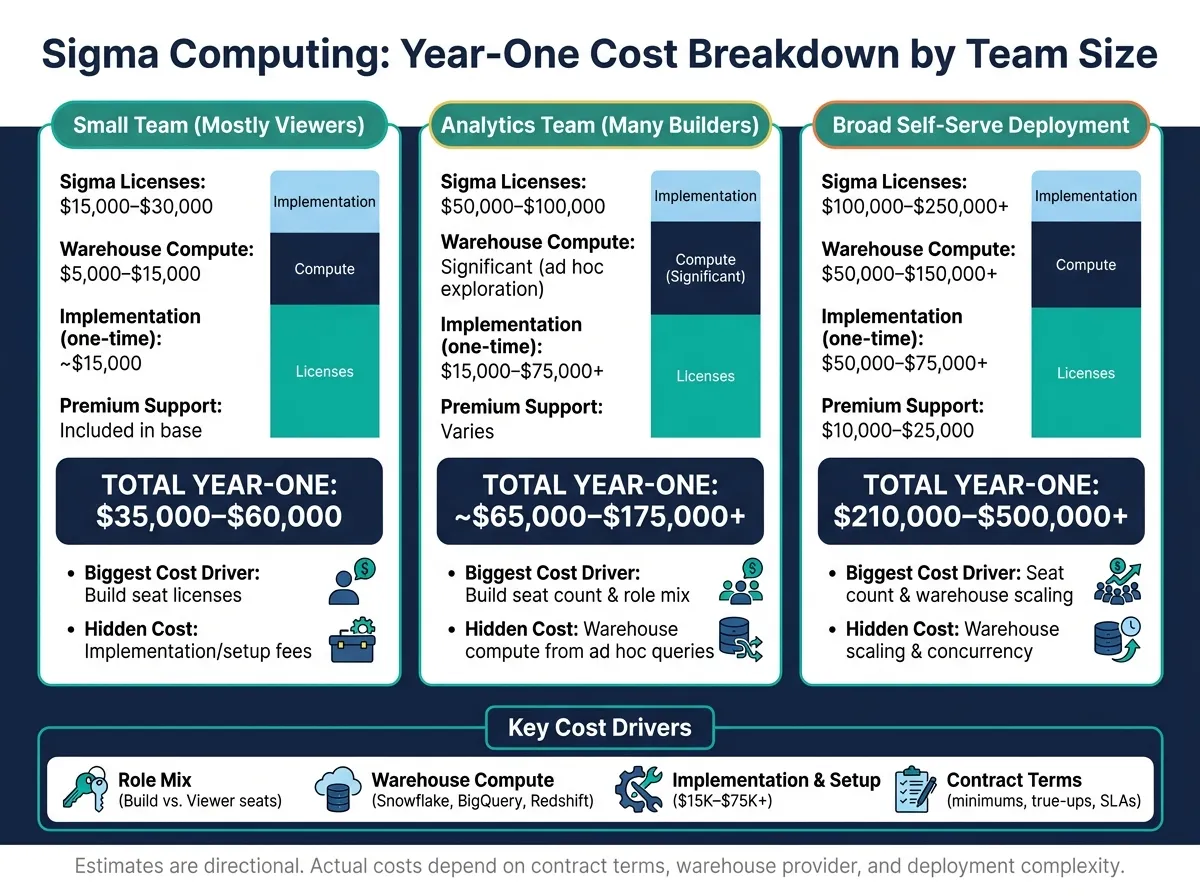 {Sigma Computing Pricing: Total Year-One Cost by Team Size}
:::
{Sigma Computing Pricing: Total Year-One Cost by Team Size}
:::
Once you translate the main cost drivers into dollars, Sigma pricing starts to feel a lot less fuzzy. The scenarios below turn role mix, adoption, and warehouse usage into budget ranges you can actually work with.
Sample scenarios by team size and usage pattern
Most teams fall into one of four patterns:
- Small team (mostly viewers): Teams with mostly viewer access often land around $15,000–$25,000 per year for licenses. Add about $15,000 for implementation and $5,000–$15,000 per year for warehouse compute. That puts the year-one total at $35,000–$55,000.
- Analytics team with several builders: If several people need Build access for ad hoc analysis and workbook authoring, license costs often climb to $50,000–$100,000 before warehouse compute.
- Broad self-serve deployment: Rolling Sigma out across business teams can push license spend into the $100,000–$200,000+ range. At that point, warehouse scaling and concurrency usually become the biggest swing factor.
- Embedded analytics: Embedded analytics should be treated as a separate quote tied to tenant volume, session usage, and security setup.
Cost scenarios and hidden costs side by side
| Team Pattern | Likely Pricing Shape | Biggest Cost Driver | Hidden cost | Confirm in contract |
|---|---|---|---|---|
| Small team (mostly viewers) | Low-tier contract (~$15k–$25k) | Build seat licenses | Implementation/setup fees | Minimum seat requirements |
| Analytics team (many builders) | Mid-tier ($50k–$100k) | Build seat count & role mix | Warehouse compute from ad hoc exploration | Support tier response times |
| Broad self-serve deployment | Upper-tier ($100k–$200k+) | Seat count | Warehouse scaling & concurrency | Viewer concurrency limits; auto-scaling caps |
| Embedded analytics | Custom platform + tenant fee | API/embed usage or tenant count | Multi-tenant security setup labor | Query/API limits per tenant |
Figures vary by workload and negotiated contract terms. Use these as directional ranges, not official list prices.
How to build an internal budget before talking to sales
The safest way to plan is with a bottom-up model using six inputs: role mix (Build vs. viewer), expected active users in year one, implementation scope, warehouse query impact, support tier, and a 12-month adoption curve.
Start by mapping your current role mix and expected seat growth over the next 12 months. Then run a proof of concept before signing anything. Why? Because actual query volume from normal workbooks feeds straight into your warehouse-native data analysis cost estimate for Snowflake, BigQuery, or Redshift. If you skip that step, your budget can look fine on paper and still miss the mark once people start using the tool.
Put the full year-one cost into one internal memo: licenses, warehouse usage, and implementation. That gives finance, IT, and analytics one shared view instead of three different guesses.
Use this table to pressure-test your internal budget before you see a quote.
| Budget Component | Small Team (Est. Annual) | Broad rollout (Est. Annual) |
|---|---|---|
| Sigma licenses | $15,000–$30,000 | $100,000–$250,000+ |
| Warehouse compute | $5,000–$15,000 | $50,000–$150,000+ |
| Implementation (one-time) | ~$15,000 | $50,000–$75,000+ |
| Premium support | Included in base | $10,000–$25,000 |
| Total year-one budget | $35,000–$60,000 | $210,000–$500,000+ |
Estimates are directional. Actual costs depend on contract terms, warehouse provider, and deployment complexity.
How to evaluate fit, negotiate the contract, and decide what matters most
Questions to ask during evaluation
Once you understand the main cost drivers, the next step is simple: test the product against how your team actually works. That means using Sigma with your own data, your own workflows, and your own rules - not a polished demo dataset.
| Evaluation Category | Key Question to Ask Sigma |
|---|---|
| Role permissions | What are the specific functional limitations between a Creator and a Viewer seat? |
| Governance | Does this contract include access to Snowflake Semantic Views and YAML-based version control? |
| Auditability | Are audit logs and usage dashboards included for monitoring Sigma tenants? |
| Warehouse access | Does the tool support write-back via Input Tables for our specific warehouse? |
| AI transparency | Can users inspect and edit the SQL generated by Ask Sigma? |
During the trial, give it a simple stress test. Ask a non-technical coworker to enter an unrehearsed business question. Then check what Sigma does with it. Does it use your company’s business definitions, or does it just infer meaning from column names? That one exercise can tell you a lot.
Negotiation priorities for data leaders
If the trial looks like a fit, focus hard on the terms that can create renewal pain later. The sticker price for seats usually isn’t the part that causes trouble. The terms that tend to catch teams off guard are role definitions, minimum user commitments, viewer-to-creator ratios, annual true-ups, support levels, and warehouse cost language buried deep in the contract.
Get each role defined in writing before you sign. If the wording is fuzzy, costs can climb fast as adoption grows. It also helps to negotiate pre-agreed pricing for adding users or workspaces during the contract. In per-seat pricing, that line item can turn into one of the biggest costs in an analytics budget once usage spreads across the company.
For services, ask for the implementation scope in writing with exact deliverables - not just a bucket of hours. Do the same for support. Response-time SLAs should be spelled out clearly. It’s also worth asking whether higher support tiers come with faster responses or a dedicated success manager. And if warehouse compute is a concern, ask how live queries and materialization are billed so you can estimate warehouse spend with fewer surprises.
What to expect from Sigma pricing
The final call comes down to whether the contract matches the way your team works day to day. Two checks matter most here: role mix and warehouse compute. Also, total spend often ends up higher than the license number alone once implementation and support are added in.
One place teams can run into friction with Sigma is metric consistency at scale. Sigma keeps logic at the workbook level. That can work well for spreadsheet-fluent analysts who do ad hoc analysis. But if your team needs one auditable definition of “ARR” or “active users” shared across many surfaces and version-controlled next to a dbt project, another setup may be a better fit.
Use these checks to tell the difference between a workable quote and an expensive one:
- Governance fit: Can the tool enforce your business definitions across all users and surfaces?
- Contract risk: Are role definitions, expansion pricing, and support SLAs written down before you sign?
- Total cost impact: Have you modeled license cost, warehouse compute, and implementation together as one year-one number?
FAQs
::: faq
How can I estimate warehouse compute before signing?
Review how your team uses the platform day to day - dashboard refreshes, live filters, deep drill-downs, and open-ended analysis. Each of those actions can trigger queries against your warehouse. And because these tools run live queries, costs can climb as more people start using them.
For a more realistic estimate, look at your current warehouse logs, test the platform with your actual data in a trial setup, and ask how query optimization, caching, or semantic layer features can cut duplicate processing and lower total warehouse spend. :::
::: faq
Which user roles drive Sigma costs most?
Costs usually come down to Sigma’s per-seat licensing, with Creator roles doing most of the heavy lifting on price. Because pricing grows with headcount, each new user who needs to build or edit workbooks tends to add more to the bill than a Viewer.
Warehouse compute is the other big cost driver. Heavy live filtering, drill-downs, ad hoc analysis, and tools like Dynamic Tables can push up spend in Snowflake, BigQuery, or Redshift. :::
::: faq
What should I negotiate in a Sigma contract?
Prioritize clarity on total cost of ownership. Ask for pricing projections at 3x your current headcount, and make sure you understand how warehouse compute is billed beyond seat licenses.
You should also ask how live filters, drills, and group-bys affect Snowflake, BigQuery, or Redshift costs as usage grows. That part can sneak up on teams. A dashboard may look simple on the surface, but once more people start clicking, slicing, and drilling into live data, query spend can climb.
It also helps to confirm the difference between Creator and Viewer roles. That way, your licensing model stays workable as your team scales instead of turning into a mess later. :::