Business Intelligence
self service BI tools with natural language query
Compare five self-service BI platforms with natural language query, evaluating NLQ accuracy, governance, transparency, and live data.

Want to analyze data without writing code? Self-service BI tools with natural language query (NLQ) make it possible. These tools let you type plain-English questions - like "What were total sales in Q1 2025 for the West region?" - and get instant answers as charts, tables, or metrics. No SQL or technical expertise required.
Here's what you need to know about five popular platforms: Querio, Google Looker, Microsoft Power BI, Tableau, and Qlik Sense. Each offers unique strengths in NLQ accuracy, ease of use, governance, and live data connectivity.
Quick Takeaways:
- Querio: Best for non-technical users with a focus on transparency and live data.
- Google Looker: Ideal for engineering-led teams leveraging its LookML semantic layer.
- Microsoft Power BI: Great for Microsoft ecosystem users, with advanced Copilot features.
- Tableau: Strong for visual storytelling but requires more training.
- Qlik Sense: Known for its speed and associative engine for uncovering data relationships.
Quick Comparison Table:
| Feature | Querio | Google Looker | Microsoft Power BI | Tableau | Qlik Sense |
|---|---|---|---|---|---|
| NLQ Accuracy | High | Moderate | Advanced | Strong | High |
| Governance | Strong | Strong | Strong | Moderate | Strong |
| Transparency | Full SQL/Python | High for devs | Visual-first | Moderate | Moderate |
| Ease of Use | Very Easy | Requires LookML | Moderate | Steep Learning | User-Friendly |
| Best For | Business Teams | Engineering Teams | Microsoft Users | Advanced Visuals | Speed & Insights |
The right tool depends on your team’s needs, technical expertise, and data goals. Let’s dive deeper into each platform.
::: @figure 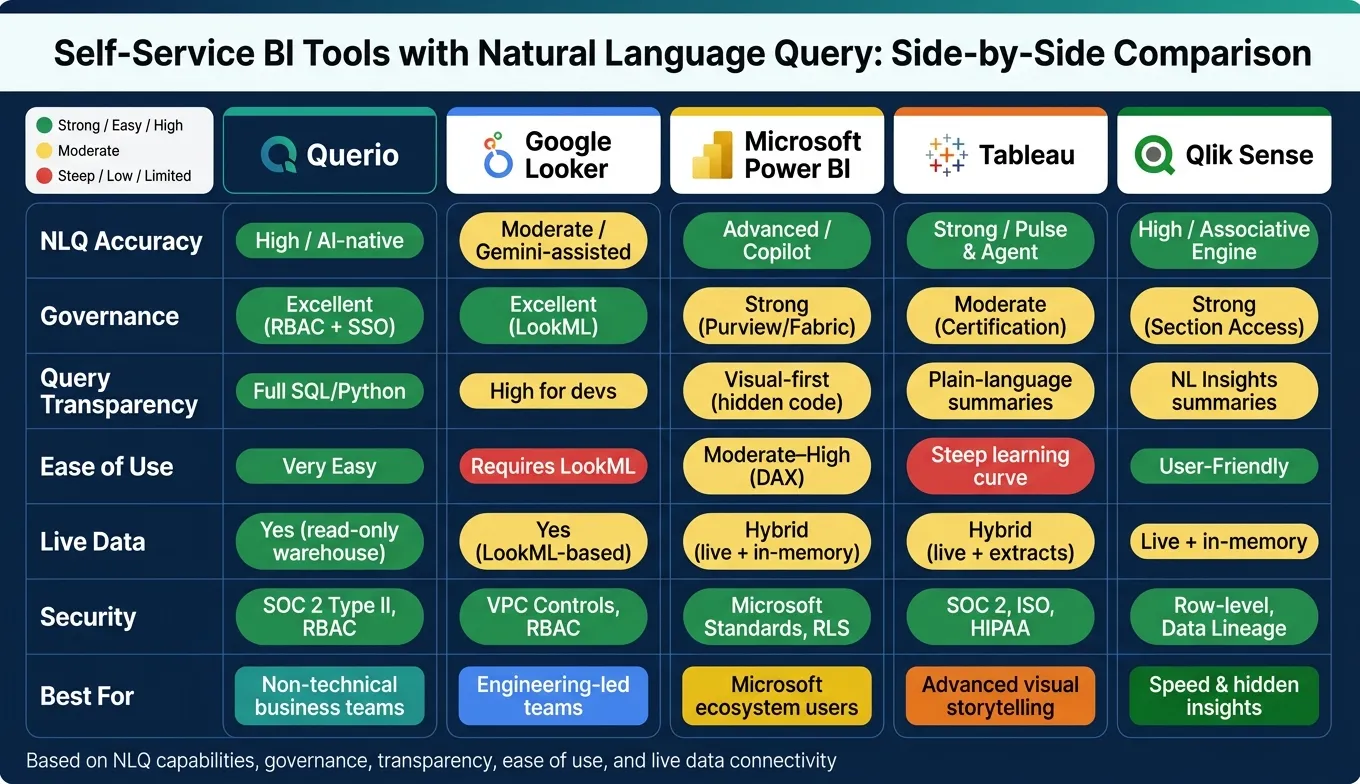 {Self-Service BI Tools Comparison: NLQ Features at a Glance}
:::
{Self-Service BI Tools Comparison: NLQ Features at a Glance}
:::
Modern BI – An Exploration of NLQ (Natural Language Query) - Take30 with a BI Expert
::: @iframe https://www.youtube.com/embed/DVtTLMsIu8c :::
sbb-itb-284a532
1. Querio
Querio is an AI-powered analytics platform that uses natural language queries (NLQ) to make data analysis accessible. It allows business users to ask plain-English questions and get precise answers from live data.
NLQ Accuracy
Querio's NLQ engine shines when paired with a well-structured data model. For instance, queries like "What were total sales by region in Q1 2025?" or "Which products had the highest return rate last year?" are accurately translated into meaningful outputs like filtered aggregations, comparisons, or rankings. However, the system may struggle with vague or overly technical queries such as "How are we doing?" or those using complex field names. To improve accuracy, businesses can define user-friendly synonyms in the semantic layer - for example, mapping "GM%" to "gross margin percentage" - to ensure queries align with everyday business language.
Governance Capabilities
Querio prioritizes data security through role-based access control (RBAC), ensuring users only see data relevant to their role. For instance, a regional sales manager would only access their specific region's data. Permissions are seamlessly integrated with identity providers like Azure AD and Okta via single sign-on (SSO). By querying data directly through governed connections rather than duplicating or importing it, Querio reduces exposure to sensitive information, such as salaries or personally identifiable data. Additionally, detailed audit logs track every query, user interaction, and parameter, making it a reliable choice for teams in regulated industries.
This focus on security is complemented by features that make data processing more transparent.
Query Transparency
Querio's "View SQL" feature provides instant access to the SQL behind each query, allowing analysts to copy, validate, or modify it as needed. The interface also highlights filter chips, such as "Region: West" or "Date: 01/01/2025–03/31/2025", to show how the system interpreted the user's query. This level of transparency is invaluable when results differ from expectations, enabling analysts to review the SQL, compare it with existing reports, and identify any discrepancies.
Live Data Connectivity
Querio connects directly to major cloud data warehouses, including Snowflake, Google BigQuery, Amazon Redshift, ClickHouse, and PostgreSQL, using encrypted, read-only credentials. By running live SQL queries directly against the warehouse, Querio ensures insights are always based on the latest data without relying on extracts or duplicate copies. For teams in the U.S. managing pay-as-you-go data warehouses, features like result caching for frequently asked questions and scheduled aggregation tables for common queries can help control compute costs.
Usability for Non-Technical Users
Querio's interface is designed to make data analysis easy for everyone. The search-box prompt includes guided autocomplete, suggesting relevant metrics, dimensions, and timeframes as users type. Non-technical users can refine results with just a few clicks - adding filters, changing timeframes, or switching visualizations - without needing to write code. Pre-built starter questions tailored to departments, like "Which SKUs drove the biggest year-over-year revenue increase in Q2?" for sales or "What was our CPC and ROAS by campaign last week?" for marketing, help users quickly uncover actionable insights. Assigning a data champion within each team can further boost adoption and understanding.
2. Google Looker
When it comes to delivering actionable, real-time insights, natural language query (NLQ) capabilities play a pivotal role. Google Looker showcases this through its LookML framework, a semantic layer where data experts define business metrics and relationships. Instead of directly querying raw database columns, Looker maps user questions - written in plain English - to these pre-defined fields, ensuring precision and consistency.
NLQ Accuracy
The LookML foundation is key to maintaining query reliability. Vijay Venugopal, Director of Product Management at Google Cloud, highlights this advantage:
"Looker's semantic layer reduces data errors in gen AI natural language queries by as much as two thirds, so that queries are sourced in truth." [2]
Once a query is mapped to the appropriate fields, Looker converts it into SQL with consistent accuracy. Greg Michnikov, Product Manager at Google Cloud, elaborates:
"Conversational Analytics only uses fields defined by your data experts in LookML. Once the fields are selected, they are deterministically translated to SQL by Looker, the same way every time." [1]
To fully utilize this feature, data analysts can create specialized agents tailored to specific business units. For instance, a marketing department's query about "spend efficiency" can be reliably linked to the correct ROAS metric by aligning department-specific terminology with LookML fields. [1]
This reliability is further bolstered by Looker's governance features, which safeguard data and control user access.
Governance Capabilities
Looker's NLQ adheres to role-based access controls (RBAC), ensuring users can only query data they are authorized to access. This eliminates the need for an additional permission layer. For added security, administrators can assign the gemini_in_looker permission to specific data models instead of applying it globally, keeping sensitive datasets - such as HR or payroll information - out of AI interactions. These safeguards are enforced through Identity and Access Management (IAM).
However, it's worth noting that, as of early 2026, Conversational Analytics does not meet FedRAMP High or Medium authorization standards. Organizations with strict compliance needs should consult their compliance teams before enabling this feature. [3]
Query Transparency
Transparency is another strength of Looker. The platform provides clear explanations for each query through its "How was this calculated?" feature and a "Show Reasoning" panel. These tools break down field selections, filters, and calculations, giving users a detailed view of how results are derived.
Looker also offers two query modes: "Fast" mode for quick factual lookups and "Thinking" mode for more complex, multi-step reasoning. [4]
In addition to transparency, Looker ensures insights remain current through its live data connectivity.
Live Data Connectivity
Looker connects directly to data sources like BigQuery and Google Sheets, delivering answers from live data without relying on extracts. For more advanced analysis, Looker can convert natural language into Python code, which is executed within a secure sandbox. This approach keeps complex analytics accessible, even for users without coding skills. [5][6]
Usability for Non-Technical Users
Looker’s conversational interface makes it user-friendly, even for those without technical expertise. It supports multi-turn interactions, allowing users to refine queries naturally. For example, after an initial query, a user can type "Now filter this by the West region" without starting over. Pre-built visualizations update in real time, and users can modify chart types with simple commands.
That said, Looker’s performance heavily depends on a well-maintained LookML model. Without dedicated data engineering support, inconsistencies may arise, which could affect user experience.
3. Microsoft Power BI

After exploring Looker, let's shift our focus to Microsoft Power BI. This platform takes a more structured approach to natural language query (NLQ) solutions, emphasizing the importance of solid data modeling as a foundation for accurate results. This sets it apart from tools that lean more on semantic layer abstraction.
Power BI offers two key NLQ tools: a traditional Q&A visual for straightforward queries and Copilot, which leverages large language models for more advanced, conversational interactions. It's worth noting that the legacy Q&A feature will be retired in December 2026, with Copilot taking its place [8].
NLQ Accuracy
The accuracy of Power BI's NLQ heavily depends on the quality of the underlying semantic model. As Microsoft explains:
"Q&A works best with well-named tables, columns, and measures - semantic model quality directly determines Q&A quality." [9]
To achieve reliable results, teams need to create a well-structured semantic model. This involves using a star schema, hiding technical keys, and explicitly marking date tables to reduce mapping errors [9][11]. Without these steps, non-technical users might encounter incorrect or ambiguous answers.
Governance Capabilities
Power BI provides robust administrative controls to manage NLQ usage and data access. Administrators can enable or restrict NLQ and Copilot features at various levels, including tenant-wide, specific security groups, or individual capacities. Sensitive data can be hidden, and the "Teach Q&A" workflow allows adjustments to how queries are interpreted [7][8][9]. Additionally, organizations can define synonyms within the linguistic schema, ensuring consistent terminology and reducing confusion when users phrase queries differently [9].
Query Transparency
Power BI uses a color-coded confidence system to indicate result reliability: blue for high confidence, orange for medium, and red for low [10]. Users can also convert results into visuals for further inspection, making it easier for non-technical users to validate outcomes without needing to write code [7].
Live Data Connectivity
The platform supports live data connectivity through DirectQuery and Live Connect, enabling access to sources like Azure Synapse, Azure SQL, and SQL Server Analysis Services. However, DirectQuery re-indexes only once a day, so very recent updates may not appear immediately.
Usability for Non-Technical Users
While Power BI's NLQ tools are designed to be user-friendly, their effectiveness still relies on a strong underlying data model. Confidence indicators help users validate results, and the platform's support for over 20 languages makes it accessible to a global audience [9]. With the upcoming transition to Copilot, organizations should prepare for a smoother, more conversational experience before the December 2026 deadline.
Next, we’ll dive into Tableau’s NLQ capabilities to round out our comparison.
4. Tableau
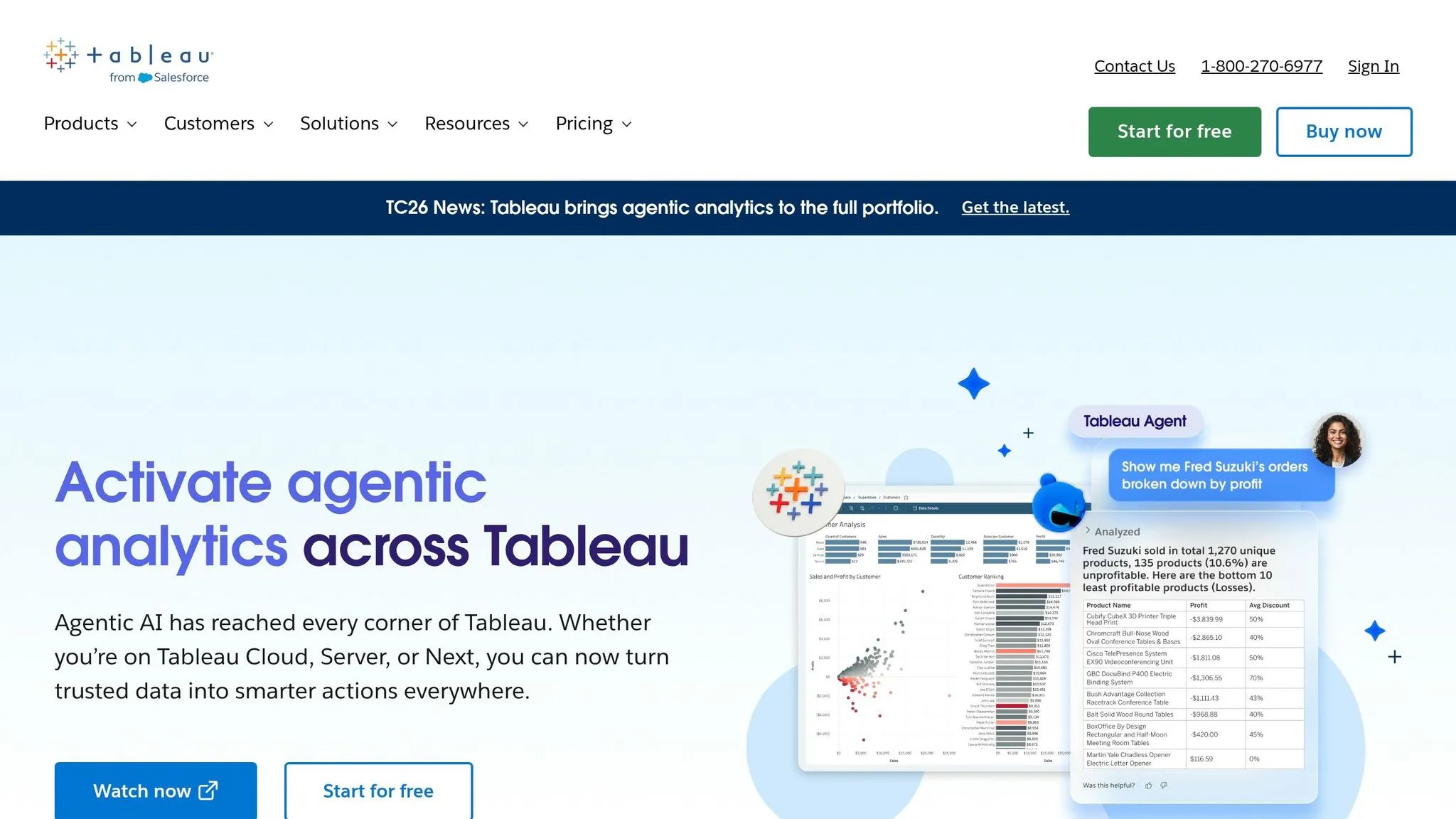
Tableau has revamped its natural language query (NLQ) tools, replacing the retired Ask Data feature with two AI-powered solutions: Tableau Pulse and Tableau Agent. These tools use statistical algorithms and large language models to deliver plain-language insights.
NLQ Accuracy
Tableau Pulse introduces a feature called Enhanced Q&A, branded as "Discover." This allows users to pose natural language questions across various metrics to identify shared contributors, detect outliers, and spot trends moving in opposite directions. For accurate results, clean and validated time-series data with clearly defined dimensions is key. Additionally, using the Tableau Catalog to auto-generate data asset descriptions enhances the NLQ engine's ability to interpret business context. Tableau's governance features further strengthen the reliability of its AI-driven insights.
Governance Capabilities
Governance plays a critical role in ensuring the accuracy and security of Tableau's insights. Features like row-level security, content certification, and the Einstein Trust Layer help protect sensitive data by masking personally identifiable information (PII). This is especially useful for teams managing sensitive customer or financial data.
Query Transparency
Tableau Pulse emphasizes transparency by allowing users to click through and review the source metrics behind any insight [3]. This feature enables non-technical users to verify results without needing a deep understanding of the underlying data model.
Live Data Connectivity
Tableau supports over 100 native data sources, offering live connections or in-memory extracts. This ensures NLQ results reflect real-time data. Users can ask straightforward questions like "What happened last month compared to this month?" and receive timely insights without dealing with complex ETL processes.
Usability for Non-Technical Users
While Tableau's AI capabilities receive positive feedback, its steeper learning curve and more complex setup can slow adoption. The Enhanced Q&A feature is part of the Tableau+ suite, requiring specific site configurations and a Salesforce org connection. This additional setup may feel cumbersome compared to platforms that focus on simpler user experiences.
The next section will take a closer look at Qlik Sense's approach to NLQ.
5. Qlik Sense
Qlik Sense offers a fresh way to approach self-service BI with its Associative Engine, which drives its natural language query (NLQ) capabilities. Instead of sticking to a typical query-and-response format, it dynamically identifies relationships across your entire dataset, uncovering connections that might otherwise go unnoticed.
NLQ Accuracy
The Insight Advisor in Qlik Sense taps into the Associative Engine to process natural language queries. It delivers charts, summaries, and recommendations at lightning speed - handling up to 40 million records per minute. This speed and efficiency are paired with strong data governance features for secure and reliable insights.
Governance Capabilities
Qlik Sense includes robust governance tools like native row-level security and data lineage tracking via Qlik Catalog. These features ensure that users only see data they are authorized to access, making it a trusted choice for industries with strict regulations, such as finance and healthcare.
Query Transparency
The NL Insights visualization feature takes selected dimensions and measures to generate plain-language summaries. This ensures users can easily understand and interpret what the data reveals.
Live Data Connectivity
Qlik Sense supports both live connections and in-memory data loads, enabling interactive data exploration. Its in-memory engine ensures speedy performance, though the speed of live queries can depend on the data source and network conditions. Organizations using Qlik Cloud Analytics have reported a 30% reduction in the time spent on BI analysis. These flexible connectivity options make Qlik Sense accessible to a broad range of users.
Usability for Non-Technical Users
Qlik Sense is designed to be user-friendly, even for those without technical expertise. For example, a U.S. automotive manufacturer leveraged its AI features to boost production efficiency by 12% and cut scrap costs by 25%, achieving a 165% return on investment over 30 months. Pricing starts at $30 per user per month for the Business tier, while the Premium tier costs $2,700 per month and includes access for 20 full users and 10,000 view-only users.
Pros and Cons of Each Tool
Each platform brings a unique approach to natural language querying (NLQ), and their strengths and weaknesses become clear when you compare them across key factors like performance, governance, transparency, and ease of use.
| Feature | Querio | Google Looker | Microsoft Power BI | Tableau |
|---|---|---|---|---|
| NLQ Performance | Outstanding (AI-native with full code transparency) | Moderate (Gemini-assisted) | Advanced (Copilot-assisted) | Strong (Pulse & Agent) |
| Query Transparency | High (Full SQL/Python visibility) | High for developers; low for end users | Low (Visual-first; code hidden) | Moderate (Plain-language summaries) |
| Governance | Excellent (Shared Context Layer) | Excellent (LookML semantic layer) | Strong (Microsoft Purview/Fabric) | Moderate (Content certification) |
| Learning Curve | Minimal (Conversational, no coding) | High (Requires LookML/coding) | Moderate to High (DAX-heavy) | Steep (High training required) |
| Best For | Non-technical self-service across all teams | Engineering-led teams | Microsoft ecosystem users | Advanced visual storytelling |
| Security | SOC 2 Type II; RBAC | VPC Service Controls; RBAC | Microsoft Standards; RLS | SOC 2; ISO; HIPAA |
| Data Connection | Live warehouse (read-only) | Live warehouse (LookML) | Hybrid (live + in-memory) | Hybrid (live + extracts) |
Querio stands out for its ease of use and unmatched NLQ capabilities. It’s designed for non-technical users, allowing anyone to access governed insights without writing code. This sets it apart from platforms like Google Looker, which requires a dedicated data engineering team to manage its LookML layer, or Tableau, which demands significant training to master its advanced visualization tools.
Transparency is another major differentiator. Querio provides full visibility into the SQL or Python code behind every query, empowering teams to inspect and validate results with confidence. In contrast, Power BI hides much of its logic behind a visual interface, making it harder to audit or trust at scale. Tableau offers plain-language summaries through its Pulse feature, but it doesn’t always reveal the detailed logic behind the results.
For organizations already embedded in the Microsoft 365 ecosystem, Power BI’s integration with tools like Teams, Excel, and SharePoint makes it a logical choice. Meanwhile, Tableau is ideal for teams focused on creating highly customized visualizations and willing to invest in the necessary training. Google Looker shines in environments with strong engineering support, thanks to its LookML semantic layer.
Querio’s combination of user-friendly design, transparency, and integrated business definitions gives it a clear edge, especially for teams seeking immediate insights without technical barriers.
Conclusion
Querio stands out by delivering a user-friendly natural language query (NLQ) experience tailored for business users. With its combination of strong governance, smooth integration, and a conversational interface, it empowers non-technical users to access real-time, governed insights quickly and confidently - no coding required.
Its full SQL and Python transparency ensures results can be reviewed and trusted, while role-based access controls and live warehouse connectivity keep data secure and up to date. Querio's impressive 4.7/5 rating highlights its consistent ability to provide reliable, accessible analytics for teams across various departments.
To make the most of Querio's NLQ capabilities, robust data models play a key role. When built on top of well-structured, governed datasets, Querio transforms into a powerful tool for self-service exploration - turning quick questions and executive updates into actionable insights instantly.
Designed with modern teams in mind, Querio aligns with the fast-paced, collaborative, and data-driven nature of today’s work environments. Its blend of ease of use, transparency, and integrated business definitions makes it a top choice for organizations looking to bring real-time analytics to every user.
FAQs
::: faq
How do I prepare my data so NLQ gives accurate answers?
To get precise natural language query (NLQ) responses, it’s essential to start with well-prepared data. Here's how you can make that happen:
- Standardize Naming Conventions: Use clear and consistent terms, like "customer_id", to avoid confusion and ensure easier interpretation.
- Clean Your Data: Remove duplicates and inconsistencies to maintain data integrity.
- Ensure Consistent Formatting: Standardize how you handle currencies, dates, and measurements to avoid discrepancies.
Additionally, centralize your data in a data warehouse and incorporate a semantic layer. This layer translates technical terms into language that aligns with business needs, making it easier to query. Don’t forget to regularly validate and refine both your data and the semantic layer - this ongoing effort helps maintain and even improve accuracy over time. :::
::: faq
How does Querio keep sensitive data secure in self-service analytics?
Querio prioritizes the security of sensitive data by establishing direct, read-only, encrypted connections to major data sources such as Snowflake, BigQuery, and Postgres. This ensures that your data remains protected from unauthorized access.
To further safeguard information, Querio incorporates enterprise-grade security measures, including:
- SOC 2 Type II compliance: Adhering to strict standards for data security and privacy.
- Role-based access controls: Restricting access based on user roles to minimize risks.
- Row-level security: Ensuring users only see the data they are authorized to view.
- Data masking: Hiding sensitive information where necessary.
- Encryption in transit and at rest: Protecting data whether it's being transmitted or stored.
These features work together to provide a robust security framework, giving you peace of mind when managing your data. :::
::: faq
How can I verify and audit the SQL or logic behind an NLQ result?
Querio makes sure everything is clear and accountable by turning natural language queries into readable SQL and Python code. This allows users to easily inspect and understand the logic behind the generated queries. The platform also links these queries to a semantic layer that follows governance rules, ensuring consistency across the board. On top of that, Querio keeps detailed query logs, creating a reliable audit trail. Together, these features - code visibility, governance, and logging - help users verify and audit natural language query results effectively. :::