Business Intelligence
MCP vs API vs SDK: How AI Apps Should Talk to Your Data
Compare MCP, APIs, and SDKs for connecting AI apps to warehouse data—security, latency, maintenance, and governance.

If I need to pick one rule, it’s this: use MCP for chat-based AI on live warehouse data, use an API for fixed back-end jobs, and use an SDK for analytics inside the product UI.
That’s the short answer. The longer answer is that each option shifts control to a different place:
- MCP: the model decides which approved tool to call
- API: the developer decides the exact request path
- SDK: the user works through the app UI
This choice affects four things right away:
- Security: who can see which rows and columns
- Latency: how long it takes before a result shows up
- Maintenance: how much work changes create over time
- Consistency: whether the same question returns the same metric each time
Here’s the part I’d pay the most attention to: the interface alone does not fix data consistency. If metric logic is not defined in one governed layer, the same “active users” question can return different numbers across chat, reports, and dashboards. That is usually the bigger problem.
A few clear use cases:
- Use MCP for Slack, Claude, ChatGPT, or Teams assistants that need live access to Snowflake, BigQuery, Redshift, or Postgres
- Use a direct API for scheduled reports, anomaly checks, and fixed product logic
- Use an SDK for embedded dashboards, filters, and drill-downs in a SaaS app
- Use MCP plus a semantic layer when non-technical teams need self-serve analytics with stable metric definitions
::: @figure 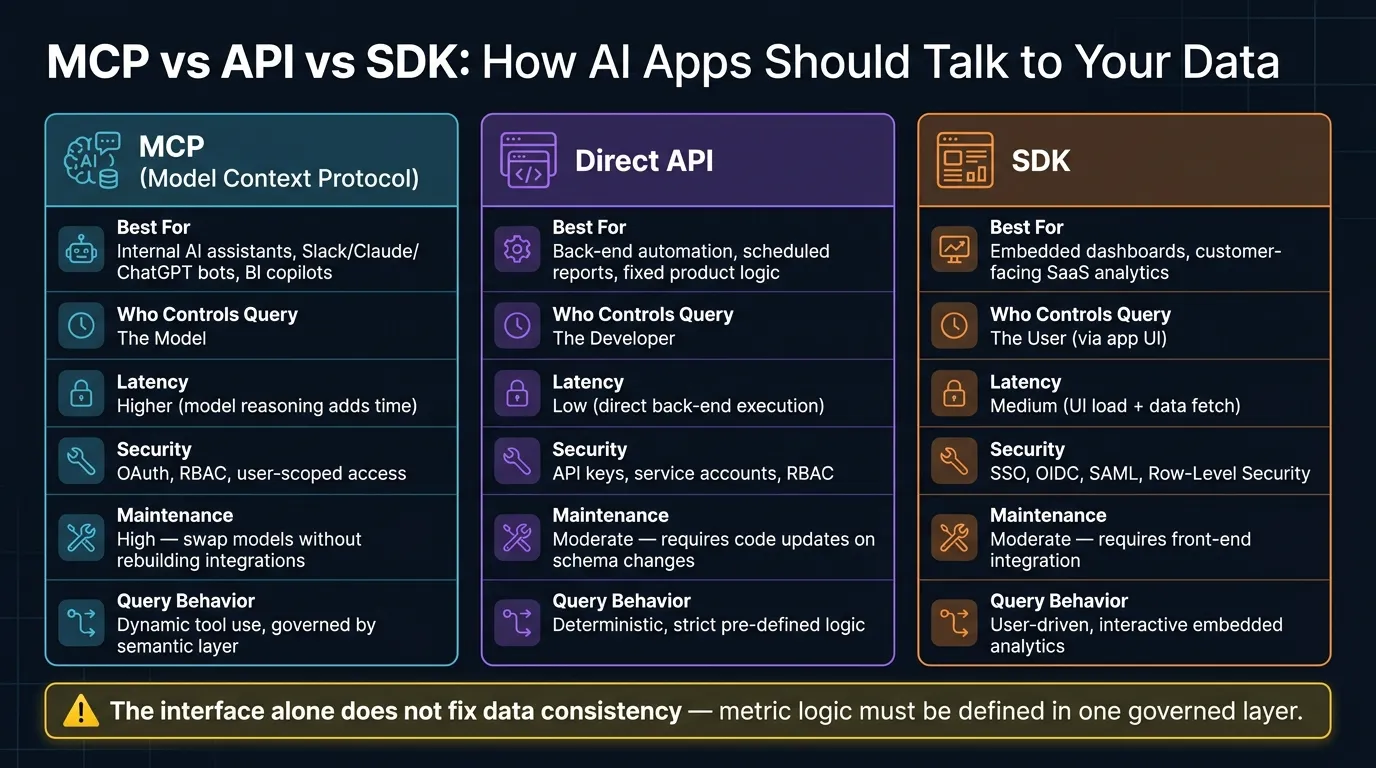 {MCP vs API vs SDK: AI Analytics Interface Comparison}
:::
{MCP vs API vs SDK: AI Analytics Interface Comparison}
:::
MCP vs API Explained: Do You Really Need MCP?
::: @iframe https://www.youtube.com/embed/kn6dxL53NkM :::
sbb-itb-284a532
Quick Comparison
| Option | Best for | Who controls the query path | Speed profile | Security pattern |
|---|---|---|---|---|
| MCP | Internal AI assistants and BI copilots | Model | Higher latency due to tool selection and reasoning | OAuth, RBAC, user-scoped access |
| API | Back-end automation and fixed workflows | Developer | Lower latency with direct execution | API keys, service accounts, RBAC |
| SDK | Embedded analytics in product UI | User | Medium due to UI plus data load | SSO, OIDC, SAML, RLS |
One more fact worth calling out: in this setup, there are 3 main paths, but only 1 should define metrics and joins. That single metrics or semantic layer keeps answers aligned across every surface.
If I’m choosing based on the workflow in front of me, the decision is usually simple. The rest of the article explains where each one fits, where it breaks down, and why governance matters more than the interface by itself.
MCP vs API vs SDK: The core decision framework
What MCP, APIs, and SDKs mean in an analytics stack
MCP, APIs, and SDKs give AI apps three different paths to reach data. Each one fits a different way of working and a different level of control.
MCP (Model Context Protocol) is a standard protocol that lets an AI model call permissioned tools exposed by a server connected to Snowflake, BigQuery, Postgres, or similar sources. The model picks which tool to call based on context.
A direct API is a back-end endpoint your code calls directly. It works well for automation, scheduled reporting, and product logic.
An SDK lets product or front-end engineers embed dashboards, charts, and query tools right inside the product. The end user can work with analytics without leaving your application.
The big difference comes down to who controls the query path. With MCP, the model chooses. With APIs, developers choose. With SDKs, users choose through the product UI.
Use the table below to line up each interface with the workflow it fits best.
Decision table: matching the right interface to common warehouse workflows
| Interface | Security & Permissions | Latency Profile | Operational Overhead | Query Behavior | Best-Fit Workflow |
|---|---|---|---|---|---|
| MCP | OAuth-scoped; RBAC; read-only warehouse users | Higher - model reasoning adds time before query execution | High - swap models without rebuilding integrations | Dynamic tool use, governed by a semantic layer | Internal BI copilots; Slack or Claude assistants |
| Direct API | API keys; service accounts; RBAC | Low - direct back-end execution | Moderate - requires code updates when schemas change | Deterministic; follows strict pre-defined logic | Back-end automation; scheduled reporting; product logic |
| SDK | Embedded tokens; app-inherited session permissions | Medium - UI load plus data fetch | Moderate - requires front-end integration | User-driven; interactive embedded analytics | Customer-facing dashboards; embedded SaaS analytics |
For governed self-serve analytics, consistency matters just as much as access. If you don’t have a semantic layer, the same question can produce different numbers because the model may write different SQL each time [1].
That’s why MCP is most useful when an assistant needs live warehouse access with governed permissions.
MCP for AI assistants querying live warehouse data
Use MCP when an AI assistant needs live, governed access to warehouse data in Slack, Teams, Claude, or ChatGPT. With MCP, the model can call permissioned tools like execute_sql, list_tables, and schema inspection against Snowflake, BigQuery, Redshift, or Postgres. It then returns answers based on live data, not stale summaries sitting in a cache.
That’s why MCP fits best when the assistant needs fresh warehouse answers instead of prewritten reports or delayed snapshots.
Security, permissions, and auditability with OAuth-scoped access
MCP keeps access tied to the user at query time through OAuth. In plain English, the assistant uses the same permissions as the person asking the question, without exposing warehouse credentials.
That means row-level security and column masking still apply, because the warehouse remains the system enforcing those rules.
Once access is under control, the next issue shows up fast: can the agent read and use the schema the same way every time?
Latency, tool use, and why a semantic layer matters for agent behavior
MCP adds an extra step before any query runs: the agent has to discover which tools are available. That adds some latency.
But the bigger issue is business meaning. Without a semantic layer, the agent has to guess metric definitions, joins, and date logic. And that’s where things can go sideways. One session might define “active customer” one way, and the next session might do something else.
A governed semantic layer built in dbt, Looker, or a purpose-built context layer gives the agent those definitions up front. That cuts down on tool thrashing and helps keep answers consistent across sessions.
Where Querio fits for MCP-based analytics
Querio acts as an MCP endpoint for live warehouse analytics with governed context. Definitions, joins, and trusted queries live in the same GitHub repo as your dbt project as SQL, Markdown, and Python. Every answer also stays inspectable and editable in a reactive notebook.
When the workflow calls for fixed back-end logic or embedded product UI, APIs and SDKs are the better fit.
Direct APIs and SDKs: when back-end control or embedded UX matters more
When you don’t want the model deciding the query path, the better move is an API or SDK. If control needs to stay in your back end or inside your product UI, go direct. Use a direct API for fixed server-side work. Use an SDK when analytics needs to live inside your app. That’s where these options make more sense.
When a direct API is the right choice for automation and backend workflows
APIs are a strong fit when the same logic needs to run the same way every time. Picture a back-end service that runs the same revenue check every night against Snowflake or BigQuery data. Or a product workflow that kicks off an anomaly check on Redshift data when a threshold is crossed.
APIs are fast because the path is fixed. The tradeoff is simple: if you want to change the question, you usually need to change code too. That works well for scheduled reports and back-office automation. It’s not a great fit for open-ended analysis.
When an SDK is the right choice for embedded analytics in your app
When analytics needs to sit inside the product itself, it’s time to move from API to SDK. An embedded analytics SDK gives you UI, not just data. Instead of sending back JSON that your team then has to turn into charts, it can deliver interactive dashboards, filters, and drill-downs right inside the app. That’s a big deal when you’re building a customer-facing feature and users expect a polished analytics experience.
SDKs can also cut down the tenant-isolation work your team has to handle by hand. In a multi-tenant SaaS product, each customer should only see their own data. With manual API handling, tenant filters often have to be added to every request. SDK-based embedding frameworks help with SSO, OIDC, and SAML flows, so tenant context stays intact, while row-level security (RLS) enforces data boundaries at the warehouse level.
| Concern | Direct API | Embedded SDK |
|---|---|---|
| Primary use case | Scheduled reports, automation, back-office logic | Customer-facing dashboards, in-app analytics |
| Security pattern | API keys, service accounts, OAuth | SSO, OIDC, SAML, Row-Level Security |
| Tenant context | Managed manually in code | Inherited via app authentication and RLS |
| UI components | None - returns raw data | Pre-built dashboards, filters, drill-downs |
Where Querio fits for APIs and embedded analytics
That shared context keeps metric definitions consistent across API calls and embedded views. Querio supports API and embedded analytics on the same governed semantic layer used across its delivery surfaces. Definitions, joins, and trusted queries live in the same GitHub repo as your dbt project as SQL, Markdown, and Python.
Every answer Querio produces across APIs and embedded views stays inspectable. The SQL and Python behind any result are visible and editable. That matters when a data leader needs to check what a report actually calculated. Embedded analytics also supports row-level security, so the same governed context can work for internal teams and customer-facing products without rebuilding the security model twice.
Choosing the right interface for your specific analytics use case
The interface matters less than the governing layer behind it. Still, the interface affects security, latency, and maintenance, so it’s not a throwaway choice. The practical question is simple: which interface fits the workflow sitting right in front of you?
Best choice for internal copilots and Slack or Claude analytics assistants
MCP is the right call when the main experience is conversational. If your team asks questions in Slack, inside Claude, or through a chat interface, MCP gives the model direct, user-scoped access to live Snowflake, BigQuery, or Redshift data. No one has to manually pull schemas or export CSVs.
That means you can switch models later without rebuilding the warehouse connection. MCP also helps non-technical coworkers self-serve through chat while governance stays in place with OAuth-scoped, role-based access. For chat-first analytics on live warehouse data, MCP is the best fit.
Best choice for customer-facing features and embedded dashboards
When the experience moves from chat to product UI, the choice usually changes too. For customer-facing analytics, the SDK is the right choice when analytics needs to live inside your product UI. It gives you deeper integration for embedded analytics and row-level security, which lines up well with product experiences where the UI matters.
The API fits better when the workflow is backend automation or product logic. It works well when you want a deterministic request-response path and don’t need a user-facing analytics experience.
Best choice for governed self-serve and long-term consistency
Once governance becomes the top concern, consistency matters more than the delivery surface. For governed self-serve, the key requirement is using the same metric definitions across every delivery path. If "active users" means one thing in your Slack bot and another in your embedded dashboard, changing the interface won’t solve the problem.
| Scenario | Best Interface | Why |
|---|---|---|
| Internal BI copilot / Slack or Claude assistant | MCP | Conversational, user-scoped, live warehouse access with OAuth |
| Customer-facing dashboards in a SaaS product | SDK | Native UX with deep app integration and row-level security |
| Back-office automation and product logic | Direct API | Deterministic request-response flow for fixed logic |
| Governed self-serve for non-technical users | MCP + semantic layer | Chat-first access grounded in approved metric definitions |
Querio's context layer - definitions, joins, and trusted queries stored alongside dbt as SQL, Markdown, and Python - runs underneath all three delivery paths. That’s what keeps the same metric definition consistent whether it shows up in a Claude conversation, an embedded dashboard, or an automated report.
FAQs
::: faq
When should I use MCP instead of an API?
Use MCP when AI agents need scoped, permissioned, standardized access to data or tools without touching raw credentials.
A plain API is usually built for app-to-app communication. MCP is different. It gives AI models a standard way to discover, read, and interact with your warehouse or business logic.
That makes MCP a good fit for agent-driven work, like text-to-SQL over a governed semantic layer.
If you're building custom embedded analytics straight into your SaaS product, an API or SDK is the better choice. :::
::: faq
Do I still need a semantic layer with MCP?
Yes. MCP lets AI models like Claude query your warehouse, but that doesn't mean they'll understand how your business defines key metrics.
A semantic layer keeps answers accurate and consistent by grounding the model in one governed source of truth. Without it, two separate conversations can end up interpreting the same metric in different ways. :::
::: faq
How do security and permissions differ across MCP, APIs, and SDKs?
MCP usually gives AI agents scoped, permission-based access to data tools. In many setups, that means read-only access by default, plus limits at the table or column level.
APIs and SDKs shift more control to developers. That includes handling authentication and setting user-specific access rules.
The safest move, either way, is to keep governance centralized instead of hard-coding access rules into every integration. That helps keep permissions and audit logging consistent across the board. :::