Business Intelligence
Leaving Mode Analytics: Your Options in 2026
Compare top Mode alternatives in 2026 by workflow, governance, AI transparency, and migration effort.

If you’re leaving Mode in 2026, start with the reason you’re leaving. If you want lower cost, look at Metabase. If you want notebook work, start with Hex or Deepnote. If you want governed self-serve on top of your warehouse, start with Querio or Looker. If your business users and analysts need different tools, use a split stack.
Mode is no longer a standalone product after its 2025 acquisition by ThoughtSpot. So for many teams, this is not just a feature review. It’s a replacement decision. In most cases, SQL moves over with light cleanup, but dashboards, notebooks, permissions, and semantic logic often need a rebuild. That’s why the main tradeoffs are simple: workflow, governance, AI visibility, and migration work.
Here’s the short version:
- Querio: best when I want AI chat tied to governed metrics and inspectable SQL/Python
- ThoughtSpot Analyst Studio: best when I want the closest path inside the ThoughtSpot ecosystem
- Hex: best when my team lives in reactive notebooks and data apps
- Looker: best when I need tight control through a central model
- Deepnote: best when my team is Python-heavy and notebook-first
- Metabase: best when I want low-cost dashboards or self-hosting
- Sigma: best when finance or ops teams prefer spreadsheet-style work
- Split stack: best when one tool can’t serve both analysts and business users well
::: @figure 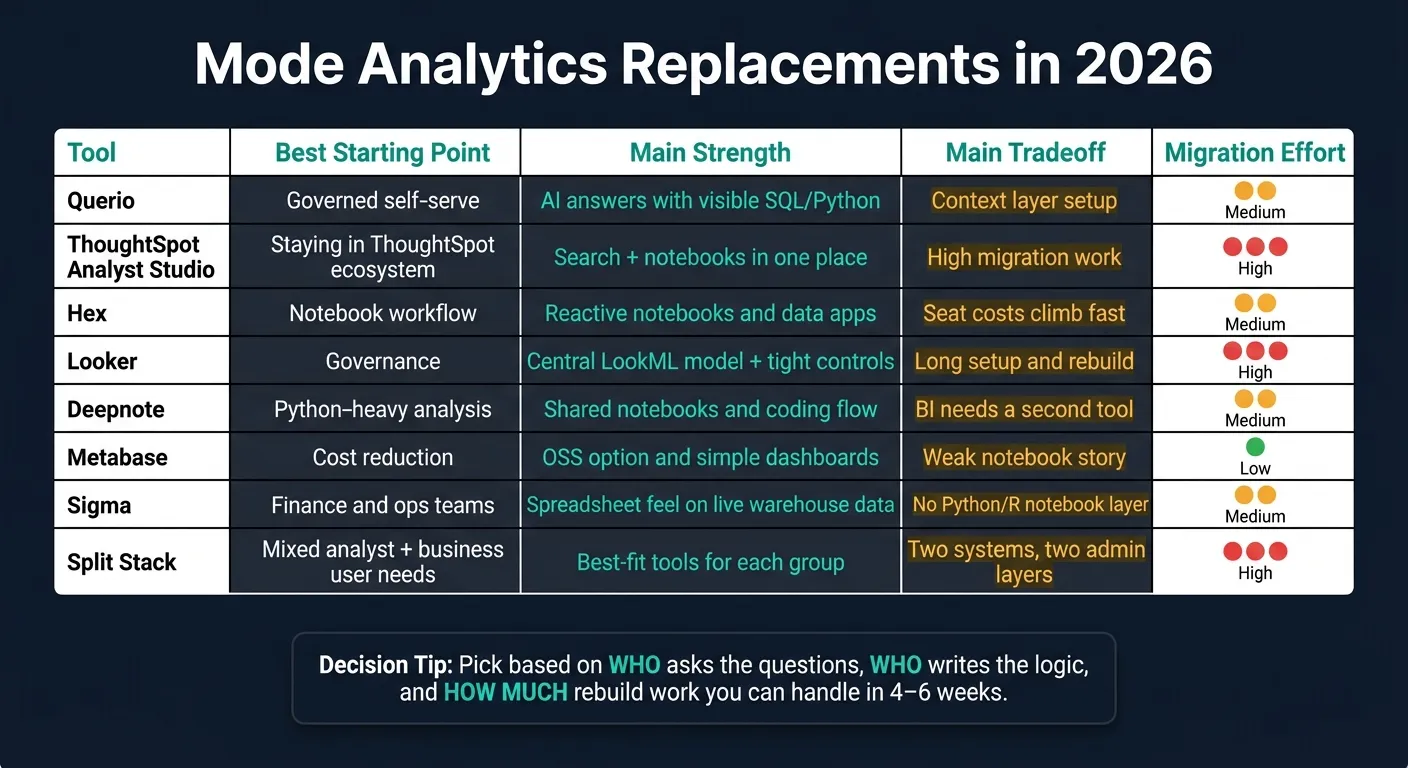 {Mode Analytics Alternatives 2026: Side-by-Side Comparison}
:::
{Mode Analytics Alternatives 2026: Side-by-Side Comparison}
:::
Quick Comparison
| Option | Best starting point | Main strength | Main tradeoff |
|---|---|---|---|
| Querio | Governed self-serve | AI answers with visible SQL/Python | Setup of semantic context layer |
| ThoughtSpot Analyst Studio | Staying close to Mode’s new home | Search + notebooks in one place | Higher migration work |
| Hex | Notebook workflow | Reactive notebooks and apps | Costs can climb with seats |
| Looker | Governance | Central model and tight controls | Long setup and rebuild work |
| Deepnote | Python-heavy analysis | Shared notebooks and coding flow | BI often needs another tool |
| Metabase | Cost | OSS option and simple dashboards | Weaker notebook story |
| Sigma | Finance and ops | Spreadsheet feel on live warehouse data | No Python/R notebook layer |
| Split stack | Mixed needs | Best-fit tools for each group | Two systems, two admin layers |
My takeaway: don’t pick by feature list alone. Pick based on who asks the questions, who writes the logic, and how much rebuild work you can handle over the next 4–6 weeks.
1. Querio
Querio is built for teams where analysts spend too much time fielding ad hoc questions instead of doing the analysis itself. If that’s the main reason you’re moving on from Mode, Querio deserves a close look.
Workflow fit
Querio connects straight to Snowflake, BigQuery, Redshift, and Postgres using live, read-only, encrypted warehouse connections. There are no CSV exports or extracts in the middle.
Business stakeholders can ask questions in plain English in the Querio app, Slack, or Microsoft Teams. The agent then writes SQL and Python inside a reactive notebook, while business users work with that same live data through a conversational interface. That setup sounds simple, but there’s a catch: it only holds up if the metrics and semantic layers stay consistent.
Governance model
Mode relies on project-based organization and dbt Semantic Layer integration to keep things aligned. Querio takes a different route with a centralized context layer. Joins, metric definitions, and trusted queries live as SQL, Markdown, and Python files in GitHub alongside dbt.
The agent can propose changes, and logged-in users approve them before anything is committed. Dashboards are also tagged by trust level:
- trusted
- experimental
- team-specific
Role-based access control keeps permissions tied to each user’s data access. That’s a big part of why the agent feels dependable instead of like a black box.
AI depth
Querio’s AI agent writes inspectable, editable SQL and Python for every answer, so you can see what it did and change it if needed. Nothing is hidden.
If the data can’t answer a question, Querio says it cannot determine the result. That matters. A tool that admits the limit of the data is often more useful than one that guesses. Querio also connects through MCP to Claude and other AI assistants, with OAuth so each query inherits that user’s data permissions. In practice, AI isn’t bolted on here - it sits at the center of the workflow.
Migration effort
Moving from Mode usually means SQL queries carry over with only minor cleanup. The bigger job is rebuilding report parameters and setting up the context layer so answers stay accurate from day one.
Querio has a free plan with unlimited users, and its Core plan costs $2,499/month (or $25,000 a year billed annually) with a guided 4-week pilot. From there, the main question becomes how each option handles governance, AI, and self-serve adoption.
2. ThoughtSpot Analyst Studio
For teams that want the closest continuation of Mode, Analyst Studio keeps notebook work inside ThoughtSpot Cloud and adds search-driven BI on top. If you're already leaning toward staying in the ThoughtSpot world, this is usually the nearest match.
Workflow fit
Analyst Studio keeps SQL, Python, and R notebooks in place while adding natural-language search and Liveboards. That gives analysts and business users one warehouse-connected workspace instead of splitting work across separate tools [1].
Governance model
Analyst Studio also adds a centralized semantic layer and row-level security. That means metric definitions live in one governed layer instead of being scattered across individual notebooks, which can cut down on confusion when teams are working from the same data but not always the same logic [1].
AI depth
Spotter handles natural-language search, and SpotterCode shows the generated SQL. That's a nice middle ground: business users can search in plain English, while analysts can still inspect what the system wrote. The setup works best when the semantic model stays clean and current [1].
Migration effort
There is still work involved. Mode reports need to be rebuilt as Liveboards, business users need retraining to shift from static reports to search-driven analysis, and warehouse connections move to ThoughtSpot Cloud connectors. So if your main goal is cutting spend, Analyst Studio usually isn't the low-cost move [1].
If your team wants a lighter, notebook-first path, the next section goes in that direction.
3. Hex
Hex is a strong Mode replacement for analyst-led teams that want notebook-based analysis with interactive sharing. If your team used Mode as an analyst workspace, not just a reporting layer, Hex is one of the closest fits.
Workflow fit
Hex uses reactive notebooks. Change one input, and the cells below it update on their own. In practice, it feels closer to Excel than a step-by-step notebook.
That setup works well for teams on Snowflake, BigQuery, Redshift, or Postgres that want interactive data apps and flexible SQL-plus-Python analysis. It’s a better fit for statistical modeling or Python-heavy work than for SQL-only teams that just need simple report sharing. Put plainly: if analysts spend a lot of time moving between SQL, Python, and lightweight apps, Hex feels natural.
Governance model
Hex has strong dbt integration, pulling metadata and definitions directly into the notebook environment. It can also inherit modeling work from semantic layers like Cube.
So if your Mode setup relied on shared definitions, Hex can bring in dbt metadata and keep that context close to the analysis. The catch is that it depends more on the team’s modeling habits than on a tightly controlled semantic layer. That means lighter governance, but more room to move fast.
AI depth
Hex's Threads lets users ask questions in plain language inside the notebook. It works best for analyst-led teams, not pure no-code users.
Migration effort
SQL usually moves over with minor dialect cleanup, but reports and dashboards need to be rebuilt as Hex Data Apps. So this isn’t a copy-and-paste migration. You should expect to rebuild reports as interactive apps, not move them over unchanged.
A careful rebuild usually takes 1–2 weeks per 20 active reports [4].
| Migration Component | Effort Level | Notes |
|---|---|---|
| SQL Queries | Low | Ports with minor dialect cleanup |
| Reports/Dashboards | Moderate–High | Must be rebuilt as Data Apps; parameters do not map 1:1 |
| Governance/Security | Moderate | Permissions and SSO require reconfiguration |
If your team wants a more governed, model-first approach, the next option makes that tradeoff more explicit.
4. Looker
If you're leaving Mode mainly because of governance issues, not because analysts need more freedom, Looker is probably the most model-first option on this list.
Looker puts the data model at the center, not the analyst workspace. Analysts define logic in LookML, and business users work from that setup through Explores. That approach can work well, but there's a catch: the model has to stay in good shape.
Workflow fit
Looker fits enterprise teams using Snowflake, BigQuery, Redshift, or Postgres that want governed self-serve reporting. It queries the warehouse directly, so results stay current. And business users can move through Explores without writing SQL [2][5].
Governance model
LookML defines dimensions, measures, joins, and business rules in code. Every dashboard and API call runs through that same layer, which helps keep metrics aligned across departments. Row-level and column-level security also stay centralized, with full audit trails [5].
The downside is pretty simple: this takes time. You're looking at a full modeling project, not a fast import.
AI depth
In 2026, Looker includes Gemini conversational analytics, which lets users ask natural-language questions against governed models [2].
Migration effort
Moving from Mode to Looker is a high-effort migration. SQL reports don't transfer over as-is. They need to be remodeled in LookML instead of being ported directly [5].
| Migration Component | Effort Level | Notes |
|---|---|---|
| SQL Queries | High | Must be rewritten as LookML models, not ported directly |
| Reports/Dashboards | High | Rebuilt on top of LookML Explores |
| Governance/Security | Moderate | Row- and column-level security is powerful but requires reconfiguration |
| AI Features | Low | Gemini is built in for conversational analytics |
If that amount of modeling feels like too much, the next option gives up some structure in exchange for more notebook flexibility.
5. Deepnote
After more governed tools, Deepnote is the more flexible notebook-first pick. It’s built for teams that want to do SQL, Python, and R analysis inside a live warehouse workspace.
Workflow fit
Deepnote fits teams that spend most of their time in notebooks and run SQL, Python, or R against Snowflake, BigQuery, Redshift, or Postgres.
Governance model
Governance is lighter here. Metric consistency has to be managed manually in each notebook, usually with Git-synced YAML and code review [5].
That gives teams more speed and room to work the way they want. The tradeoff is simple: they have to keep metric definitions aligned across notebooks on their own.
Migration effort
Migration is moderate. SQL will usually port over with minor dialect cleanup, but reports and parameters need to be rebuilt for Deepnote’s notebook-based app model [4].
| Migration Component | What to Expect |
|---|---|
| SQL Queries | Usually port with minor dialect cleanup |
| Reports and Parameters | Rebuild for Deepnote's notebook-based app model |
| Governance | Git-synced YAML and code review; metric consistency managed manually per notebook |
Teams that need tighter governance and more standardized reporting should compare this option with the model-first BI tools below.
6. Metabase
Workflow fit
Metabase connects right to Snowflake, BigQuery, Redshift, Databricks, and Postgres. Its no-code question builder makes it easy for teams in marketing, operations, and finance to get answers without writing SQL.
That makes it a good match for startups, product teams, and data-lean companies that want self-serve analytics and embedded reporting without much setup. If your main Mode use case was dashboard delivery, not notebook-based analysis, Metabase lines up well.
That ease of use is the big draw. The catch is simple: governance is lighter unless you move to a paid tier.
Governance model
If stricter permissions and clearer metric definitions were part of the reason for leaving Mode, this is where you need to look closely.
Governance in Metabase depends on the plan tier. The free OSS edition includes metrics support and dbt integration. But row-level and column-level permissions are only available on paid plans. You can use Metabase in the cloud or self-host the OSS edition, which gives teams a bit more control over setup and deployment.
AI depth
Metabot supports natural-language SQL, and MCP server support opens the door to integrations.
Migration effort
For teams with lots of dashboards, migration is usually pretty smooth. SQL queries tend to port cleanly with only minor dialect changes, and dashboards can be rebuilt in the visual builder without much friction.
The main weak spot is notebook-style work. Metabase is not a one-to-one swap for Python or R notebooks, so teams that rely on that kind of analysis may need a separate notebook tool. Cloud and Pro plans add paid governance features, while Enterprise pricing is custom.
| Migration Component | What to Expect |
|---|---|
| SQL Queries | Port cleanly with minimal dialect changes |
| Dashboards | Rebuild in Metabase's visual builder; straightforward for most reports |
| Notebooks (Python/R) | Not a one-to-one replacement; may require a separate notebook tool |
| Governance | Row- and column-level permissions require Pro or Enterprise |
If your team leans more toward spreadsheet-style analytics and finance-focused workflows, Sigma is the next tool to look at.
7. Sigma
Workflow fit
Sigma is a different kind of fit for teams that want spreadsheet-style analysis instead of notebook-first analytics. It uses a spreadsheet-style interface on live warehouse data and connects straight to Snowflake, BigQuery, Redshift, or Postgres.
It works well for finance and operations teams that still wrap up analysis in Excel. In Sigma, pivots, formulas, and what-if analysis happen directly on warehouse data. It also supports writeback and input tables. That means teams can use it for planning and forecasting workflows that Mode doesn’t handle natively.
If your team depends heavily on Python or R notebooks, Sigma isn’t the right match.
Governance model
Sigma applies security at the warehouse level and includes role-based access controls (RBAC), audit trails, and version-controlled Team Workbooks. That matters for Mode teams that want warehouse-level security without building out a full semantic model. It also supports SOC 2 compliance and SSO out of the box.
The tradeoff is pretty simple: logic often ends up living in individual workbooks instead of one central semantic layer. Teams that want something closer to LookML in Looker may see Sigma as more flexible, but also more scattered as the number of workbooks grows.
AI depth
Ask Sigma can generate dashboards, summaries, and analytics apps from natural-language prompts inside a workbook. That helps business users ask questions without waiting on analysts [2].
Migration effort
Existing SQL usually moves over with light cleanup. The harder part is rebuilding reports, parameters, and interactions inside Sigma’s spreadsheet-style workbooks.
| Migration Component | What to Expect |
|---|---|
| SQL Queries | Existing SQL usually needs only light dialect cleanup |
| Dashboards | Rebuild as Sigma Workbooks; moderate effort |
| Notebooks (Python/R) | Not supported; requires a separate tool |
| Governance | RBAC and audit trails included; no centralized semantic layer |
| Pricing | Custom, quote-based - no published tiers |
If your team wants notebooks and BI kept separate, the split-stack option comes next.
8. Replacing Mode with a Split Stack (Notebooks + BI)
If your team needs analyst notebooks and governed dashboards, but doesn't need both in one workspace, a split stack is the fallback.
Use it only when a single platform can't cover both jobs well. One tool handles analyst work. The other handles modern self-service BI stack for the business. That gives you more room to work the way you want, but it also adds more moving parts.
Workflow fit
In this setup, analysts do their work in a notebook tool. Then, once metrics are stable, those numbers move into the BI layer for business users.
That handoff is the upside. It creates a clean path from analysis to reporting. The downside is pretty plain too: now you have a second permissions layer to manage.
Governance model
Two tools mean two permission models. And that usually means more admin work.
The big risk here is metric drift. If dbt isn't defining shared metrics, "Active Customers" can end up meaning one thing in a notebook and something else in a dashboard. That kind of mismatch sounds small until a sales team and a finance team start arguing over which number is right.
AI depth
Notebook AI can help analysts write SQL and Python. BI AI can help business users ask questions in plain English.
Useful in both places, yes. But the context doesn't move cleanly from one tool to the other. So the help you get in the notebook doesn't automatically carry into the dashboard layer.
Migration effort
The hard part isn't SQL conversion.
The bigger lift is rebuilding the handoff, permissions, and metric definitions across two systems. SQL usually ports over with light dialect cleanup, but reports, parameters, and access controls need to be rebuilt twice - once in each tool.
| Migration Component | Estimated Effort |
|---|---|
| SQL Queries | Light dialect cleanup |
| Report Rebuild | 1–2 weeks per 20 reports [4] |
| SSO & Permissions | Moderate - requires dual setup across both tools [4] |
| Admin Overhead | ~10% of a data engineer's time if self-hosting [3] |
| Semantic Layer | Requires dbt or similar to prevent metric drift [2] |
For a 50-person team, the yearly cost can land in the low five figures, depending on the notebook tier and BI tier you choose.
How Each Option Compares on the Key Buying Criteria
No single tool wins on every front. The best choice depends on which part of your workflow breaks first once Mode is gone.
That’s why these buying criteria matter. They line up with the main reasons teams switch away from Mode: dashboard limits, notebook friction, permission issues, and metrics that drift over time. Use this section to cut down the shortlist before you get into side-by-side tradeoffs in the next section.
Workflow fit
For teams using Snowflake, BigQuery, Redshift, or Postgres, the first question is simple: does the tool match how your analysts and business users already work?
The biggest divide is between tools built mainly for analysts and tools built mainly for business users, often bridged by semantic layers in business intelligence. Hex, Deepnote, and Sigma lean toward analyst workflows. Metabase, Looker, and ThoughtSpot lean toward self-serve use or governed reporting. Querio sits in the middle with AI chat and an editable notebook. Metabase is a good fit for non-technical teams that want a GUI and basic SQL.
| Tool | Primary Interface | SQL / Python / R | Best For |
|---|---|---|---|
| Querio | AI Chat / Notebook | SQL, Python | Governed self-serve + analyst depth |
| Hex | Notebook Canvas | SQL, Python | Analyst-driven data apps |
| ThoughtSpot Analyst Studio | Search | SQL | Enterprise search-driven analytics |
| Looker | LookML / Explore | SQL | Governed enterprise reporting |
| Deepnote | Collaborative Notebook | SQL, Python, R | Data science & shared runtimes |
| Metabase | GUI / SQL Editor | SQL (limited Python) | SMB self-serve & embedding |
| Sigma | Spreadsheet | SQL (warehouse-native) | Finance & ops teams |
Workflow fit comes first. But that alone isn’t enough. A tool can feel great for one analyst and still fall apart when more teams start using it.
Governance model
Governance is what decides whether a tool can move beyond a single team.
Looker is still the strongest option here. ThoughtSpot Analyst Studio comes next for governed search and notebook workflows. Hex connects with dbt metadata and adds row-level permissions on paid tiers. Sigma is warehouse-native, so security set in Snowflake or BigQuery carries through. Querio handles governance through a context layer: skills, rules, and metric files stored as plain SQL, Markdown, and Python, then synced to GitHub next to your dbt project. Metabase adds row-level and column-level permissions only on Pro and Enterprise plans. Deepnote uses Git-reviewable YAML for structure.
| Tool | Semantic Layer | Row-Level Security | dbt Alignment | Auditability |
|---|---|---|---|---|
| Looker | LookML (centralized) | Built-in (row & column) | High | Enterprise audit trails |
| ThoughtSpot Analyst Studio | ThoughtSpot semantic layer | Included | High | Full audit logs |
| Hex | dbt metadata integration | Paid tiers only | Good | Version control / logs |
| Sigma | Warehouse-native | Included | High | Audit trails |
| Querio | Context layer (rules / skills) | Role-based + OAuth per user | Metric file support | Inspectable SQL/Python trail |
| Metabase | Basic (Data Studio) | Pro / Enterprise only | Basic | Usage / audit visibility |
| Deepnote | Git-reviewable YAML | Workspace level | Native connectors | Execution history |
Once governance is set, the next issue is AI. More specifically: can AI work inside those rules without turning into a black box?
AI behavior
AI is where these tools differ the most on trust and visibility.
Querio and ThoughtSpot show the SQL they generate. That matters. If users can inspect the query, they can check the answer before they act on it. Without that, AI can save time up front and still create headaches later.
For teams replacing Mode, AI only helps if it cuts analyst bottlenecks without breaking permissions or metric definitions. That’s the real test. Not whether the tool can answer a prompt, but whether it stays inside the rules and shows its work.
After AI and governance, one last filter tends to decide the shortlist: how hard the move will be.
Migration effort
SQL usually ports across tools with only minor dialect cleanup. Notebooks and dashboards are a different story. Those usually need to be rebuilt, not copied.
If your team can’t afford a rebuild, cross off any tool that forces you to remake dashboards and notebooks from scratch. It’s better to face that early than find out halfway through migration.
Before you move anything, sort your current Mode assets into clear buckets:
- Dashboards with zero views in 60 days should be retired
- Legacy one-off SQL should be archived
- Core recurring queries are worth migrating as-is
- Complex notebooks with reactive logic need a full rebuild
| Asset Type | Action | Guidance |
|---|---|---|
| Saved SQL | Migrate | Most standard SQL ports with minor dialect cleanup [4] |
| Notebooks | Rebuild | Python / R logic requires manual porting; reactive notebook behavior differs by platform [4] |
| Dashboards | Rebuild | Layouts and interactive parameters don't map 1:1 [4] |
| Zero-view reports | Retire | Delete dashboards with no views in 60 days |
| Legacy one-off SQL | Archive | Store and don't rebuild |
Training is also part of the migration cost. That piece gets missed all the time. AI-native tools change analyst behavior too. Instead of writing every query from scratch, teams shift toward reviewing and approving generated logic.
The next section turns these criteria into direct tradeoffs for each option.
Pros and Cons of Each Option
Use this table to match each replacement to the Mode gap it fills: notebook work, governed self-serve, dashboarding, or a split stack. It turns the earlier criteria into a shortlist you can act on.
| Platform | Pros | Cons | Best For | Main Risk |
|---|---|---|---|---|
| Querio | Governed metrics through a context layer; inspectable SQL/Python; live warehouse connections | Less notebook-centric than Mode | Lean data teams that need governed self-serve without a separate BI admin layer | AI answer trust - users need to build confidence in generated SQL before acting on it |
| Hex | Reactive notebooks and shareable data apps; strong dbt integration | Per-seat pricing can climb fast as usage grows | Analyst-heavy teams that want a more modern Mode-style workflow | High cost as seat count grows |
| ThoughtSpot Analyst Studio | Keeps SQL, Python, and R notebooks in ThoughtSpot Cloud with search-driven BI | Mode reports must be rebuilt as Liveboards, and users need retraining | Teams already committed to the ThoughtSpot ecosystem | High migration effort |
| Looker | Strong governance through LookML; single source of truth across dashboards and APIs [5] | Steep learning curve; long implementation time [5] | Large enterprises that need a centralized, enforced semantic layer | Implementation burden [5] |
| Deepnote | Collaborative notebook workflows | Usually needs a separate BI layer | Data science teams focused on exploration | BI feature gaps will force a second tool |
| Metabase | Open source, easy to set up, and strong for embedding | Limited notebook support [3] | Startups and SMBs that need SQL dashboards without a lot of overhead | Notebook features lag behind analyst-focused tools [3] |
| Sigma | Spreadsheet UI that feels familiar to finance and ops teams; warehouse-native | No Python/R notebook environment; formula-driven, not notebook-driven | Finance and ops teams that live in spreadsheets and need live warehouse data | Will not replace a notebook-first workflow |
| Split Stack (Notebooks + BI) | Separate tools for notebooks and BI; no single-vendor dependency | Two tools to maintain, license, and train; metric definitions can drift between layers | Teams with distinct analyst and business-user groups that will not overlap | Metric definitions diverge between the notebook layer and the BI layer over time |
If you strip it down, the tradeoff is pretty simple. Some options lean into governance and shared metrics. Others lean into analyst workflow and notebook flexibility. And a few solve one problem while pushing another one into a second tool.
That’s why the “best” pick depends less on feature checklists and more on how your team works day to day. If Mode was mainly a notebook workspace, tools like Hex or Deepnote will feel more familiar. If the bigger issue is governed self-serve and metric control, Looker or Querio make more sense. If your teams already live in spreadsheets, Sigma may feel like the path of least resistance. And if analyst needs and business-user needs are far apart, a split stack can work - but only if you’re ready to deal with drift between layers.
Conclusion
The best Mode replacement comes down to what broke first in your workflow: cost, notebook work, governed self-serve, or a split analyst/BI setup. Start there. That gives you a short list fast instead of turning the process into a long, messy tool hunt.
| Reason for Leaving | Start With | Why |
|---|---|---|
| Cost is too high | Metabase | Open-source core and low overhead |
| Notebook workflow | Hex | Reactive notebooks |
| Governed self-serve | Querio | Governed, warehouse-native self-serve |
| Business reporting and analyst work | Split stack (Metabase + Hex or Deepnote) | Separate notebook and BI layers for teams with distinct analyst and business-user needs |
Once you narrow it down to one or two options, test them against your actual work before you commit. Run a 4–6 week pilot in one department and include:
- one executive dashboard
- one complex SQL analysis
- one notebook workflow
- one self-serve question
- one row-level security report
Then choose the tool that fits how your team works day to day, along with the governance you need, and validate that choice in a live pilot.