Business Intelligence
The Complete Guide to Self-Service Business Intelligence (2026)
Build governed self-service BI with live warehouse queries, a shared metric layer, inspectable SQL/Python, and RBAC security.

Self-service BI works when business users can get answers from live warehouse data without breaking metric rules, access rules, or data quality checks.
If I had to boil this guide down, it says this:
- You need one shared metric or semantic layer for KPIs like MRR, ARR, churn, pipeline, and product usage
- You need live warehouse access to Snowflake, BigQuery, Redshift, or Postgres instead of CSV files and stale extracts
- You need inspectable SQL or Python so analysts can check AI-generated answers
- You need [RBAC, SSO, and SOC 2 Type II](https://querio.ai/articles/best-practices-for-role-based-security-in-bi-platforms) for control and security
- You should roll self-service BI out in phases: core models first, analysts next, business teams last
- The biggest risks are metric drift, raw-data access, and dashboard sprawl
For a 100–500 employee B2B SaaS company, this matters because a small data team cannot keep up with every ad hoc question from finance, sales, product, and customer success. AI can help with routine questions, but it only works well when the data layer is controlled from the start.
A few facts stand out from the guide:
- AI BI tools now support tool-calling workflows that can run queries, inspect results, and keep context across longer sessions
- Board and team reporting still depend on stable KPI definitions
- Security now goes beyond logins alone. Teams may also need Zero Data Retention when prompt and query history should not persist
The Inconvenient Truths of Self-Service Analytics - Tell Me Lies Tell Me Sweet Little Lies
::: @iframe https://www.youtube.com/embed/vIclW1EqeUg :::
sbb-itb-284a532
Quick comparison
| Area | What matters most in 2026 |
|---|---|
| Metric definitions | One shared definition across dashboards, AI answers, and ad hoc analysis |
| Data access | Live warehouse queries, not exported files |
| AI outputs | SQL or Python should be visible and editable |
| User access | Role-based access and SSO |
| Rollout | Start small with trusted KPIs, then expand |
| Common use cases | Revenue reporting, product adoption, renewal risk, exec dashboards |
This guide is not about giving everyone raw table access. It is about giving people fast, governed answers from data the team already trusts.
The Core Components of a Modern Self-Service BI Setup
Self-service BI only works when a few parts line up: governed metrics, live warehouse access, and tight access controls. A single tool won’t carry the whole setup. The stack needs to work as one system.
Each layer has its own job:
- Metric definition
- Live querying
- Presentation
- Control
For a data team using dbt with Snowflake, BigQuery, Redshift, or Postgres, that usually means a semantic layer, live warehouse access, inspectable AI analysis, dashboards, permissions, and data quality checks.
Semantic Layers and Governed Metrics
The semantic layer defines business metrics once, then reuses them everywhere. Looker’s LookML and dbt’s semantic layer, through dbt Metrics and MetricFlow, are common ways to do this. The aim is simple: one metric definition across every surface.
Querio’s shared context layer uses the same metric logic, joins, and terminology across every surface. Since those definitions are versioned, teams can track changes instead of finding out later that a downstream report broke. That consistency helps teams move faster without losing trust in the numbers.
Once metric logic lives in one place, the next step is direct warehouse querying so every answer stays current.
Live Warehouse Access, AI Queries, and Inspectable Analysis
CSV exports and cached extracts create stale copies that are hard to govern. In a modern self-service BI setup, the BI layer should connect straight to the warehouse with encrypted, read-only credentials. Querio does this for Snowflake, BigQuery, Redshift, ClickHouse, MotherDuck, and Postgres, so every query runs live against your actual data.
Connectivity is only part of the story. AI matters too. When a business user asks a question in plain English, the platform should produce real, readable SQL or Python. And every answer should come with code that people can inspect.
As Ian Tracey, a Software Engineer in Applied AI at Ramp, put it:
"GPT-5.6 felt less like a chat assistant and more like an end-to-end technical operator. It could inspect live systems, debug issues, make code changes, validate results, publish artifacts, and carry context across long sessions with strong grounding." [1]
Querio’s live notebooks push that workflow further for analysts who need more depth, with results that update as upstream logic or data changes.
After metric definitions and queries are governed, dashboards become the steady surface for stakeholders who need numbers they can trust.
Dashboards, Permissions, and Data Quality Controls
Dashboards play a specific role in self-service BI. They surface stable KPIs for stakeholders who need a trusted number. They are not meant to be the main place for open-ended analysis. A VP of Sales needs a dashboard that is clearly labeled, refreshes on schedule, and uses the same metric definition found everywhere else.
Role-based access controls and SSO help keep the right data in front of the right people. SOC 2 Type II compliance and SSO are key requirements for any BI platform handling warehouse credentials in 2026 [2]. Querio supports standard SSO integrations and role-based access controls, which lets teams expand access without giving up control.
Data quality is the last piece, and it’s often the one teams miss. Upstream checks should run before a metric appears in self-service. If something fails, that failure should be visible instead of quietly changing a dashboard number. Those controls become the baseline for judging platforms in the next section.
How to Evaluate Self-Service BI Platforms in 2026
The Evaluation Criteria That Actually Matter
Once your stack is in place, the next move is picking a platform that supports self-service without piling up reporting debt.
What you want is simple in theory, but hard in practice: a platform that gives trusted answers fast, consistently, and safely. For analytics leaders at 100–500-employee B2B SaaS companies, six things matter most:
- Direct warehouse connectivity: Can it query Snowflake, BigQuery, Redshift, or Postgres directly, without extracts?
- Semantic layer control: Can it reuse one metric definition across dashboards, ad hoc analysis, and AI answers?
- Inspectable SQL or Python: If a business user gets a number back, can someone see and edit the code behind it?
- Security and compliance: Does it support SOC 2 Type II, SSO, role-based access controls, and Zero Data Retention when prompts and query traces must not persist? [2]
- Analyst power vs. business-user ease: Can it work for both SQL-first analysts and non-technical stakeholders, without making either side give something up?
- Implementation and maintenance effort: How long does it take before a new data source is live and returning governed answers?
Comparison Table: Traditional BI, AI-First BI, and Querio
Use this table to line up each platform style with how your team actually works.
| Criterion | Traditional BI | AI-First BI | Querio |
|---|---|---|---|
| Warehouse access | Scheduled models and cached reports | Usually connects live, but governance may differ | Live warehouse connections with no extracts or data duplication |
| Metric consistency | Strong when modeling is maintained with care | Can drift without a shared semantic layer | Shared context layer keeps joins, metrics, and terminology consistent |
| Inspectable logic | SQL may be visible, but workflows can feel split up | Output may be opaque unless the code path is exposed | Every answer is backed by inspectable SQL or Python |
| Business-user self-service | Usually dashboard-first | Natural-language access can be strong | Plain-English questions with governed self-serve |
| Analyst workflow | Familiar, but can be slow to scale | May not suit deep analyst work well | Reactive notebooks for SQL and Python work |
| Governance and security | Usually mature in established deployments | Varies by platform and setup | SOC 2 Type II, RBAC, SSO, and governed access |
Once the platform is chosen, rollout comes down to scope, governance, and the order in which people start using it.
How Data Teams at Growing SaaS Companies Should Roll Out Self-Service BI
::: @figure 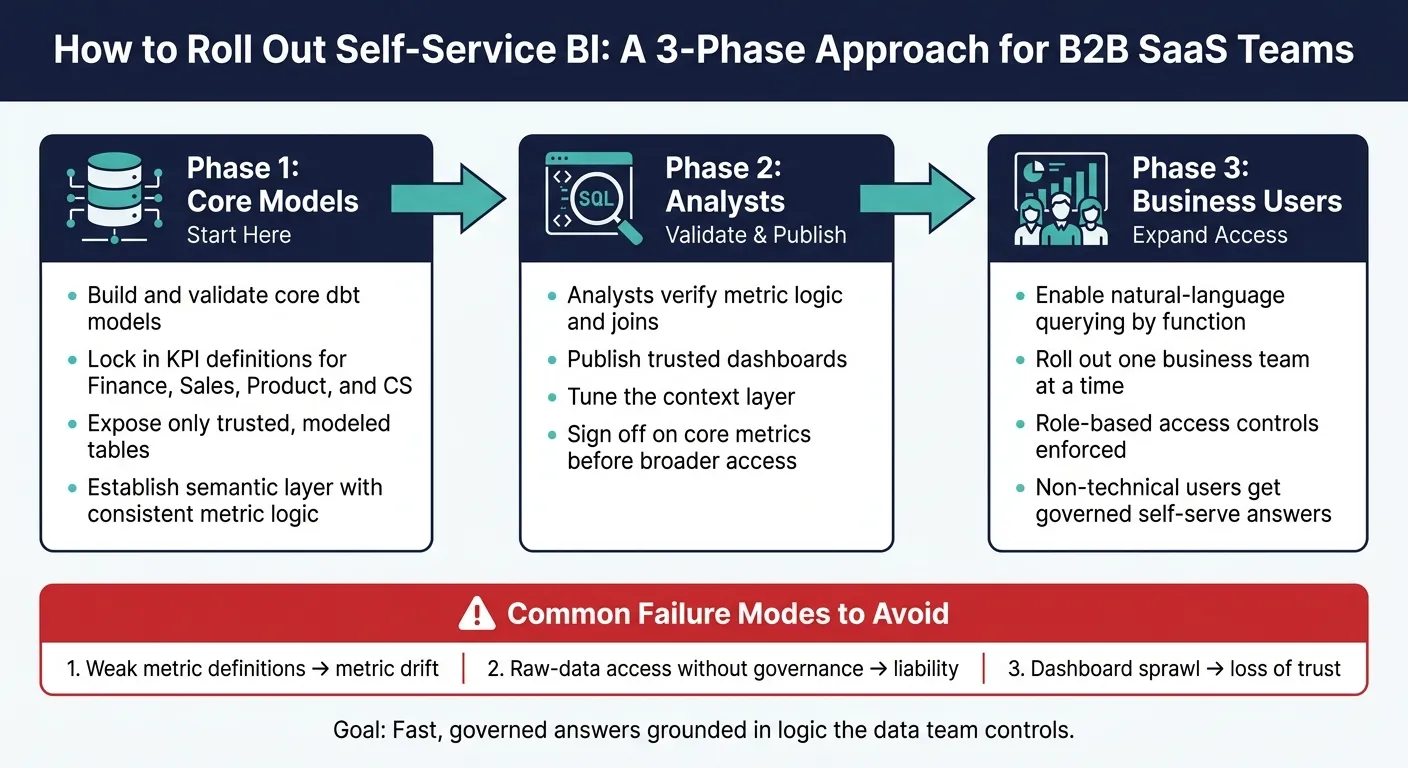 {Self-Service BI Rollout Phases for B2B SaaS Teams (2026)}
:::
{Self-Service BI Rollout Phases for B2B SaaS Teams (2026)}
:::
Start with Core Models and a Narrow KPI Scope
Once the platform is in place, roll it out in three steps: core models, analysts, then business users.
Small data teams often trip up when they try to open up self-service for everything all at once. That usually backfires. A better move is to start with a small set of business-critical KPIs that finance, product, sales, and customer success all use. Then expand only after those definitions are locked in and steady.
Build and validate the core dbt models first. After that, expose only those trusted models for self-service use. This gives analysts a stable base to work from before access opens up to more people.
Roll Out in Phases: Analysts First, Then Business Teams
The order matters more than how fast you move.
Start with analysts. They can check metric logic, make sure joins are right, and publish trusted dashboards before broader access begins. This stage is about trust. If the numbers don’t hold up here, they won’t hold up later when more teams start digging in.
Once analysts sign off on the core metrics, expand natural-language querying one business function at a time. That controlled rollout shows you how people ask questions in practice, not just how you think they will. It also gives you room to tune the context layer before access spreads to more teams.
The goal is a governed system built on warehouse models, not a chatbot that takes a wild guess. Non-technical users should get broader access only after analysts have checked the numbers.
Common Failure Modes to Avoid
A few failure modes show up again and again:
- Weak metric definitions are the biggest problem. If teams use different logic for the same KPI, self-service will expose that mismatch at the worst time. Lock metric logic before opening access.
- Too much raw-data access is the next trap. Giving business users direct access to raw event tables or unmodeled data syncs without a governed semantic layer is not self-service - it’s a liability. Keep self-serve querying limited to trusted, modeled tables.
- Dashboard sprawl chips away at trust. Archive stale dashboards on a set schedule so people know which ones are current.
Use Cases, Buying Guidance, and Final Takeaways
Common B2B SaaS Use Cases for Self-Service BI
Once rollout is under control, the next move is simple: point self-service BI at the questions teams ask every week. Start with finance, GTM, product, and customer success. Those repeat questions are usually where teams get the first payoff.
Revenue reporting is often the first clear win. Finance and RevOps need ARR, MRR, and churn broken down by segment, cohort, or rep. A governed semantic layer makes sure every team is working from the same MRR definition. That matters more than it sounds. If finance and sales each use a different number, reporting turns into an argument instead of an answer.
Product adoption analysis usually comes next. Product managers want to see which features affect retention, where users drop off, and how activation rates change after a release. With live warehouse access to event data, a PM can ask which accounts activated export in the last 30 days and haven’t used it since. That kind of question shouldn’t need a ticket and a two-day wait.
Renewal risk monitoring and customer health scoring are often where CS teams feel the pain most. When health scores sit in a weekly spreadsheet, reps are stuck working from old data. Tie those scores straight to the warehouse, then add role-based access so reps only see their assigned accounts, and the process gets a lot cleaner.
At the exec level, those same governed metrics need to stand up in board-level reporting. Executive dashboards round out the core use cases. Leadership needs one trusted view of pipeline, revenue, and product usage. A governed semantic layer keeps terms like active customer and qualified pipeline consistent across reports.
These use cases only work if the platform can answer them live, consistently, and safely.
What a Strong 2026 Self-Service BI Program Should Include
A strong 2026 self-service BI program needs four things: live warehouse connections, inspectable SQL or Python, a governed semantic layer, and clear access controls.
Role-based access keeps raw tables out of reach. Data quality checks catch broken pipelines early. Data teams own the definitions, while business users own the questions. That split is what keeps self-service from turning into a mess.
Use this checklist of essential BI tool features to judge whether a platform supports self-service without creating reporting debt.
| Capability | Why It Matters |
|---|---|
| Live warehouse connectivity | Queries run against current records |
| Governed semantic layer | Consistent metrics across every team and tool |
| Inspectable SQL and Python | Analysts can audit and correct AI-generated logic |
| Role-based access controls | Business users get answers without touching raw tables |
| Natural-language querying | Non-technical users stay unblocked |
| Reactive notebooks | Keeps deeper analysis current as upstream logic changes |
| Dashboards and scheduled reports | Recurring KPIs without manual exports |
The goal isn’t universal access. It’s fast, accurate answers grounded in logic the data team controls.
FAQs
::: faq
How is self-service BI different from dashboarding?
Self-service BI gives non-technical users a way to dig into data, build charts, and answer their own questions through easy-to-use interfaces. Traditional dashboarding, by contrast, mostly delivers fixed, pre-set views and often needs analyst help when someone wants a new report or even a small change.
Put simply, dashboards show what has already been set up. Self-service BI supports more flexible exploration. It also changes the role of data teams: instead of building every single report, they focus on keeping data models governed and easy to access. :::
::: faq
When should business users get access?
Business users should get access once a solid base is in place: reliable data, consistent metric definitions, and strong security controls.
In practice, that usually means using a semantic layer to turn raw database complexity into business-friendly terms. Teams often move from checking AI outputs against dashboards to working on their own, while the data team still keeps oversight of logic and governance. :::
::: faq
What should we govern before rollout?
Before you roll out self-service BI, lock down your semantic layer, access permissions, and data quality. That way, insights stay reliable and secure instead of turning into a mess.
A few basics matter most:
- Standardize key metrics in the semantic layer
- Use role-based access controls (RBAC)
- Monitor data quality and maintain audit trails
This gives AI-driven tools one trusted source of truth. :::