Business Intelligence
Snowflake Cortex vs Databricks Genie: Warehouse AI Compared
Compare Snowflake Cortex and Databricks Genie: governance-first differences, setup needs, and which warehouse fits best.

If you already run analytics in Snowflake, pick Cortex. If you already run analytics in Databricks, pick Genie. That is the short answer.
I’d sum it up like this: both tools act as an AI data analytics copilot for SQL, both depend on governed data, and both can fail when definitions are loose. The main split is where that governed layer lives. Cortex leans on Semantic Views in Snowflake. Genie leans on Unity Catalog and curated Genie Spaces in Databricks.
Here’s what matters most to me:
-
Cortex Analyst
- Best for Snowflake-first teams
- Uses YAML semantic models
- Fits KPI questions, follow-up analysis, and custom app use through APIs
- Takes more setup if your metric layer is not already in shape
-
- Best for Databricks-first teams
- Uses Unity Catalog metadata and scoped spaces
- Works well for KPI lookups in a controlled table set
- Can struggle once questions move into raw-data digging or multi-step funnels
-
Shared rule
- 0% of these tools fix messy data definitions on their own
- If joins, metrics, and business terms are not defined well, answers can look fine and still be wrong
::: @figure 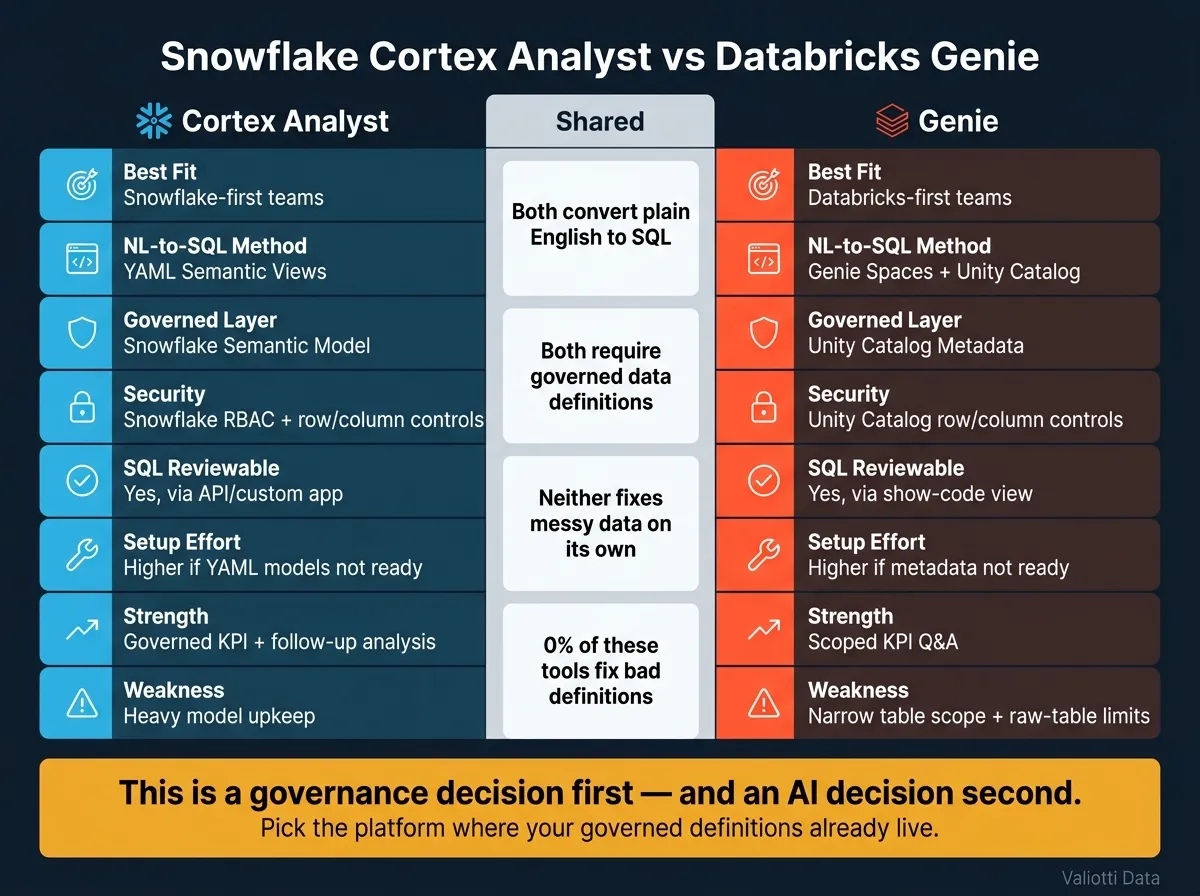 {Snowflake Cortex Analyst vs Databricks Genie: Side-by-Side Comparison}
:::
{Snowflake Cortex Analyst vs Databricks Genie: Side-by-Side Comparison}
:::
Snowflake Cortex Code vs Databricks Genie Code
::: @iframe https://www.youtube.com/embed/mEz1m0rMkvE :::
Both platforms represent the cutting edge of text-to-SQL query tools designed to bridge the gap between natural language and structured data.
Quick Comparison
| Criteria | Snowflake Cortex Analyst | Databricks Genie |
|---|---|---|
| Best fit | Snowflake users | Databricks users |
| NL-to-SQL method | Semantic View grounding | Chat in Genie Spaces |
| Governed layer | Snowflake semantic model | Unity Catalog metadata |
| Security | Snowflake RBAC, row/column controls | Unity Catalog row/column controls |
| SQL review | Yes, through API/custom app | Yes, with show-code view |
| Setup work | Higher if YAML models are not ready | Higher if metadata is not ready |
| Good at | Governed KPI and follow-up analysis | Scoped KPI Q&A |
| Weak spot | Heavy model upkeep | Narrow table scope and raw-table limits |
My takeaway: this is less about which AI is “better” and more about which warehouse already holds your rules, metrics, and access controls. If your team works across more than one warehouse, neither native natural language interface is a clean fit, and a cross-warehouse governed layer may make more sense.
That framing should help you read the rest of the piece with the right lens: this is a governance decision first, and an AI decision second.
How Snowflake Cortex Analyst works
Cortex Analyst is Snowflake's analytics assistant. It turns plain-English questions into SQL, using your semantic model as the source of truth. That means it maps business terms to governed SQL logic based on the metadata your team defines.
"A text-to-SQL tool that writes plausible SQL against raw tables is a productivity toy. A tool that writes correct SQL against governed metrics is infrastructure." - Valiotti Data [1]
Natural-language-to-SQL using semantic models and semantic views
Cortex Analyst generates SQL by grounding each question in a YAML-based Semantic View. In plain terms, you define logical tables, dimensions, facts, metrics, joins, and synonyms in YAML. So when someone asks for "Daily Active Users", the system can tie that phrase to one governed definition instead of guessing.
If your team already uses dbt or Looker, Cortex Analyst can line up with those existing definitions. But there's a catch: the YAML model still needs to be maintained separately in Snowflake.
Governance, setup, and operational limits
Chat doesn't remove analytics engineering work. It just moves that work upstream into model setup.
Before Cortex Analyst can answer with consistency, your team needs the setup below in place:
| Setup Component | What's Required |
|---|---|
| YAML Semantic Views | Define logical tables, dimensions, facts, and metrics |
| Synonyms | Map business language to technical fields |
| Join paths | Document relationships explicitly to prevent join ambiguity |
| RBAC roles | Assign roles to schemas and stages to limit AI access to curated data only |
| Validation suite | Test AI answers against known-good SQL for core KPIs |
Snowflake's native RBAC, including row-level and column-level security, is enforced at query time. The generated SQL is also inspectable through the API, which gives a reviewer a chance to check the logic before users see results.
That said, the model only works as well as its upkeep. If metric definitions change and the semantic model doesn't change with them, the AI can return answers that look consistent on the surface but are factually wrong.
Where Cortex Analyst fits best
Cortex Analyst works best for teams that already have a mature semantic layer. It's a strong fit for executive KPI questions and ad hoc follow-up analysis, where people want answers fast but still need governed logic underneath.
It also supports API and Streamlit integration for custom internal apps. And with Model Context Protocol (MCP) support, external agents like Claude can query Snowflake data while still following existing access controls.
Where it struggles is pretty straightforward. If the semantic model is thin, performance drops. And if your data lives in BigQuery, Databricks, or Redshift, you need to move that data into Snowflake first.
That governance-first approach sets up a different tradeoff from Databricks Genie.
How Databricks Genie works
Databricks Genie is one of several warehouse-native conversational analytics tools. It runs inside Genie spaces - scoped workspaces where analysts choose tables or views, add business context, and control every answer. That tight scope is a big part of why Genie can work well. But it also means setup isn't optional.
Genie spaces, Unity Catalog, and knowledge curation
A Genie space is a scoped workspace tied to Unity Catalog. You pick specific Databricks SQL tables or views, then add business context through Unity Catalog metadata. From there, Genie answers questions only within the scope you set.
In plain English: Genie doesn't roam across your whole data stack. It stays inside the lane your team gives it.
Setup effort and metadata curation
Genie requires a lot of upfront metadata work. Databricks leaves table and column descriptions to the data team, so Genie needs clean metadata before it can answer in a steady way for KPI reporting. Teams also need to add natural-language instructions so the space has enough context to ground its answers.
| Task | Who Owns It | Timing |
|---|---|---|
| Table/column descriptions | Data team | Before launch |
| Natural-language instructions | Data team | Before launch |
That prep work shapes where Genie tends to do well - and where it starts to wobble.
Where Genie fits best
Genie works best for tightly scoped questions, especially KPI lookups, when metadata is kept in good shape. It is less reliable for raw-data exploration and complex funnels.
| Use Case | Genie Performance | Key Dependency |
|---|---|---|
| KPI lookups | Strong | Requires Unity Catalog metadata |
| Ad hoc over raw data | Limited | Often needs manual SQL correction |
| Anomaly follow-up | Moderate | Needs analyst review of joins |
| Complex funnels | Limited | High risk of wrong answers without expert audit |
That scope-first design sets up the main contrast in the workflow comparison below.
Cortex vs Genie by workflow
Ad hoc analysis, KPI questions, and anomaly follow-ups
Once the semantic layer is set up, the day-to-day gap between these tools becomes a lot easier to see. Both of them lean on curated definitions. Without that layer, questions asked against raw tables can drift off course fast. In plain English: neither tool is dependable on raw, uncurated tables.
That matters because these aren't edge-case questions. They're the kinds of questions data leaders at B2B SaaS, healthcare, and finance companies deal with all the time: why revenue moved month over month, which accounts are churning, and what changed in last week's pipeline.
| Workflow | Snowflake Cortex Analyst | Databricks Genie |
|---|---|---|
| KPI lookups | Strong when YAML Semantic Views are in place | Strong when Unity Catalog metadata and Genie Spaces are curated |
| Ad hoc analysis | Answer quality depends on the semantic model | Answer quality depends on metadata quality |
| Anomaly follow-up | Trustworthy only when metrics and dimensions are defined consistently | Trustworthy only when metrics and dimensions are defined consistently |
The pattern is pretty clear. Cortex leans on the quality of the semantic model. Genie leans on the quality of the metadata. Different setup, same core issue: if definitions are loose, answers get shaky.
Governed self-serve and analyst control
Cortex inherits Snowflake RBAC out of the box, and row- and column-level policies carry through. It also exposes SQL through its API. That's useful, but it means review flows need to be built into the app around it. So if an analyst wants to check a result before it gets shared, that extra step can shape how fast the team moves.
Genie uses Unity Catalog row- and column-level security, and its SQL can be reviewed in the Databricks code editor. That's a nice plus for analyst oversight. The tradeoff is that Genie keeps definitions inside Genie Spaces and Unity Catalog, which can narrow portability.
Tooling, portability, and stack fit
Cortex is Snowflake-only. So it makes the most sense when Snowflake is already the main hub for analytics. It's also a solid match for teams already working with dbt, Hex, or Looker on top of Snowflake.
Genie is Databricks-only, and each space works within a limited table set. That makes it a better fit for teams that have already standardized on Unity Catalog and Databricks.
Which platform to choose
Those workflow differences lead to one practical buying call: pick the platform that matches where your governed definitions already live.
Choose Snowflake Cortex when Snowflake is your analytics home
If your warehouse and RBAC policies already sit in Snowflake, Cortex Analyst is the better fit. Its main edge is simple: the governed semantic model lives in the same place your team already works.
Choose Databricks Genie when Databricks is your primary governance layer
If your lakehouse governance already runs through Databricks and Unity Catalog, Genie is the better fit. Its SQL visibility makes analyst review easier, and it brings curated data into a chat-style interface without making users leave the platform.
For teams that need governed self-serve across multiple warehouses
If your team doesn’t work fully inside one warehouse, the native-tool decision looks different. When your analytics stack spans multiple warehouses, neither Cortex nor Genie is the best fit, as they lack the cross-warehouse semantic layer needed to bridge disparate sources. In that case, choose a governed cross-warehouse layer instead.
The tradeoff is pretty clear: native warehouse AI works best when that platform is already the center of your analytics setup. If it isn’t, a governed cross-warehouse layer deserves serious attention.
FAQs
::: faq
How much setup does each tool require?
Both Snowflake Cortex Analyst and Databricks Genie need a lot of setup work upfront if you want output you can trust and control.
Snowflake Cortex Analyst depends on a YAML semantic model that defines tables, metrics, and join paths. If that model is weak, the answers will be weak too. In plain English: the system is only as good as the structure you give it.
Databricks Genie also needs manual setup for each space. That includes curated tables, Unity Catalog metadata, business terms, and example SQL for edge cases. So while Genie can be powerful, it doesn’t just work out of the box. Someone still has to do the hands-on work to shape how it understands the data. :::
::: faq
Can either tool work well across multiple warehouses?
No. Neither Snowflake Cortex nor Databricks Genie works across multiple warehouses.
Each one is tied to its own platform:
- Snowflake Cortex works in Snowflake
- Databricks Genie works in Databricks
So if your stack includes Snowflake, BigQuery, Redshift, and Postgres, these tools can't natively query across all of them. To do that, you'd first need to move or consolidate the data into a single platform. :::
::: faq
Which tool is better for ad hoc analysis?
It comes down to your stack and how much visibility you want into the logic.
Databricks Genie makes sense for teams that already run on Databricks and Unity Catalog. It works well for governed, chat-based KPI checks and straightforward business questions. But when the work shifts from quick answers to deeper analysis, it can start to feel a bit boxed in.
Querio is a better fit when you need a dedicated workspace that analysts can actually inspect. They can open AI-generated SQL or Python, edit it, rerun it, check the numbers, and keep pushing the analysis further without having to start from scratch. :::