Business Intelligence
BlazeSQL vs Julius AI: Lightweight AI SQL Tools Compared
Compare BlazeSQL and Julius AI: BlazeSQL for live-warehouse plain-English SQL; Julius AI for file-based, notebook-style analysis with charts and stats.

If you work from a live warehouse, I’d pick BlazeSQL first. If you work from CSVs, Excel files, PDFs, and notebook-style analysis, I’d look at Julius AI first. That’s the short answer.
Here’s the simple breakdown:
- BlazeSQL is built for plain-English to SQL on live data
- Julius AI is built for file-based analysis with Python, charts, and stats work
- Both support Snowflake, BigQuery, Redshift, and Postgres, but Julius puts some database connectors behind higher plans
- Both show the generated code, so analysts can check the logic
- Neither tool, based on this article, solves metric drift on its own when each query defines business logic separately
I’d frame it this way: if your team wants fast answers from warehouse data, BlazeSQL is the cleaner fit. If your team spends more time mixing uploads with regression, ANOVA, or notebook workflows, Julius AI makes more sense.
What this comparison covers:
- Setup and data connections
- Plain-English SQL generation
- Result explanations and charts
- Team workflow
- Permissions and audit trail
- Best fit by user type
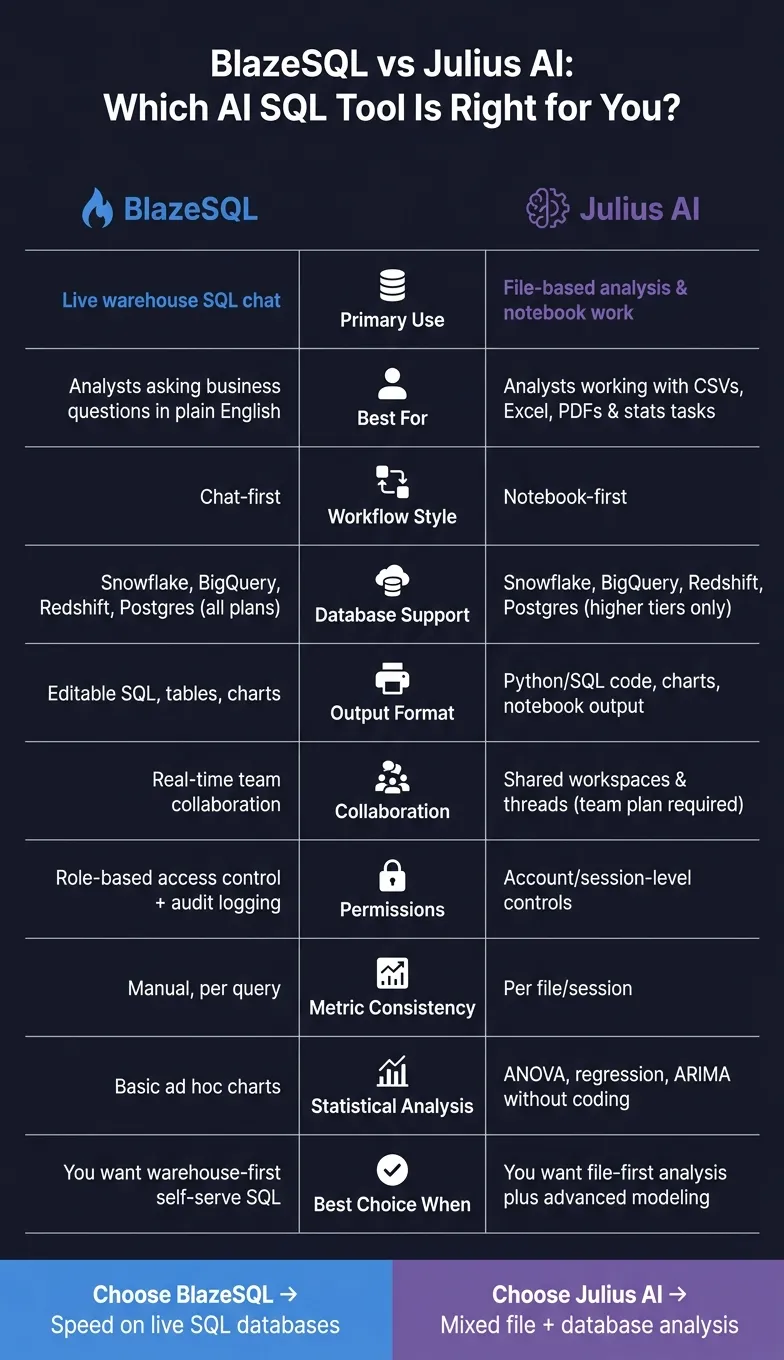
Quick Comparison
| Criteria | BlazeSQL | Julius AI |
|---|---|---|
| Main use | Live warehouse SQL chat | File analysis and notebook work |
| Best for | Analysts asking business questions in plain English | Analysts working with CSVs, Excel, PDFs, and stats tasks |
| Database support | Snowflake, BigQuery, Redshift, Postgres | Snowflake, BigQuery, Redshift, Postgres on higher tiers |
| Output | Editable SQL, tables, charts | Python/SQL code, charts, notebook output |
| Workflow style | Chat-first | Notebook-first |
| Team controls | Role-based access | Session/account-level controls |
| Best choice when | You want warehouse-first self-serve | You want file-first analysis plus modeling |
My read: this article shows a clean split. BlazeSQL is for live SQL work. Julius AI is for mixed-source analysis with deeper stats features. If your problem is team-wide metric consistency and governed self-serve analytics, the article says you may need something else.
That’s the core takeaway for me, and it sets up the rest of the piece well.
BlazeSQL vs Julius AI vs Querio: feature snapshot
Here’s a quick side-by-side look at BlazeSQL and Julius AI. After this, we’ll look at how each one handles the same warehouse questions, SQL generation, and result explanation tasks.
| Feature | BlazeSQL | Julius AI |
|---|---|---|
| Primary Use Case | AI SQL generation & live database chat | Ad hoc file analysis & statistical modeling |
| Workflow | Chat-first SQL workspace with editable SQL panel and dashboards | File-first notebook workspace with reusable templates and repeatable steps |
| Warehouse Connections | Snowflake, BigQuery, Redshift, Postgres | Snowflake, BigQuery, Redshift, Postgres (higher tiers) |
| SQL Transparency | High - generates editable SQL | High - shows Python/SQL code |
| Charting | AI-generated graphs & dashboards | Automated visualizations |
| Collaboration | Real-time team collaboration | Shared workspaces & threads |
| Governance | Role-based access & data masking | Session-based isolation |
BlazeSQL at a glance
BlazeSQL connects to Snowflake, BigQuery, Redshift, and Postgres, then takes plain-English questions and turns them into SQL. From there, it returns either a table or a chart. It also has a desktop version for private database connections, which keeps data local. The setup is chat-first, with an editable SQL panel and dashboards built into the workspace.
Julius AI at a glance
Julius AI is built first for files like CSV, Excel, PDF, and Google Sheets. It also supports statistical modeling and visualization inside a notebook-style workspace. For live warehouse access, it connects to Snowflake, BigQuery, Redshift, and Postgres on higher tiers. That makes it a better fit for file-based ad hoc analysis. The gap stands out more once you compare live connections, SQL output, charts, and team workflow side by side.
How each tool handles the core jobs
The examples below are hypothetical. They show how each tool might handle common analyst requests, not verified head-to-head tests.
Connecting to Snowflake, BigQuery, Redshift, and Postgres
BlazeSQL uses table and column metadata, not row data, to generate SQL. That makes warehouse access simpler to explain to security and data teams.
Julius AI supports uploaded files and live connections to Snowflake, BigQuery, Redshift, and Postgres. Higher tiers add native Snowflake and BigQuery connectors, along with team collaboration [1].
With large schemas, it helps to add a semantic layer as a data interface or dbt context so the tool is less likely to misread fields or table relationships [1].
Once the connection is live, the next check is simple: can the tool turn a business question into accurate SQL using context-aware AI?
Turning plain-English questions into SQL
BlazeSQL turns prompts like "Show monthly MRR by plan for the last 12 months" into editable SQL.
Julius AI can do that too, and it may also show the generated Python code next to charts. That gives analysts more visibility into what the tool is doing and makes debugging easier [1].
If you're working with nested JSON or heavily nested tables, Julius often needs tighter prompts before it returns a clean result [1].
After the translation step, the next thing that matters is how well the tool explains the output.
Explaining results, charting, and ad hoc analysis
After SQL generation, the next question is whether the tool can explain and visualize the result fast.
BlazeSQL is built for quick ad hoc analysis and can return charts for ad hoc questions.
Julius AI leans more toward deeper analysis, including ANOVA and regression without coding [1].
Workflow, governance, and team fit
Which tool fits analysts, data teams, and business users
BlazeSQL fits warehouse-first analysts who want fast chat-to-SQL and live collaboration. Julius AI fits notebook-first analysts who work from files and warehouse data, though native warehouse connectors require the Business tier [1].
The upside with both tools is simple: the code stays visible. That means analysts can check the SQL, test the logic, and make sure the output holds up.
Use BlazeSQL for warehouse-first SQL work. Use Julius AI for notebook-first analysis, especially when files are a big part of the job. If the audience is less technical, Querio is the better fit because anyone can ask in plain English and get answers on live warehouse data, from definitions kept as files in your git repo.
Once the workflow is set, the next issue is harder to ignore: permissions and metric consistency. That’s usually where self-serve either works or starts to drift.
Collaboration, permissions, and metric consistency
Governance is the line that matters most here. Speed alone doesn’t give you consistency. In both BlazeSQL and Julius AI, metric logic still sits inside each query.
BlazeSQL includes role-based access control and basic audit logging, but each query still carries its own logic. Julius AI lands in a similar place: permissions are set at the account or session level, and auditability mostly ends with session history.
That matters more than it may seem. Weak access controls drive AI security incidents, which makes permissions a real concern in self-serve tools [2]. Google Cloud research also found that a semantic layer can reduce data errors in AI-generated queries by up to two-thirds [3].
The table below shows how those trade-offs play out.
| Dimension | BlazeSQL | Julius AI | Querio |
|---|---|---|---|
| Collaboration | Real-time SQL collaboration | Limited; team plan required | Shared explicitly; governed self-serve |
| Permissions | Role-based access control | Account/session level | Roles on every plan; agents see only what their user sees |
| Auditability | Audit logging included | Session history | Every query, agent action and promotion is logged |
| Metric consistency | Manual, per query | Per file/session | Definitions as files in your git repo on GitHub, changes via pull request |
| Data source | Live warehouse connections | File uploads and warehouses | Live warehouse connections, no CSV exports |
| Best fit | Technical analysts | Individual analysts | Data teams and business users |
Querio takes a different path. It is git-native analytics: live warehouse connections, reactive notebooks, and definitions kept as files in a repo your team owns, so terms like monthly recurring revenue or churn stay the same across answers.
Because that context lives as plain files in git, teams can inspect it and update it directly instead of burying logic inside the app. Claude, ChatGPT, Claude Code and Cursor work from the same definitions through Querio's MCP server and CLI.
Final verdict: which tool to pick
BlazeSQL is the better pick when your team wants AI tools that write SQL on a live database. Julius AI makes more sense when the job calls for regression, ANOVA, or ARIMA, or when the analysis combines file uploads with database queries.
Julius AI also stands out for charting. It supports Sankey diagrams, maps, and animated GIFs, which makes it a stronger fit for notebook-style work. That gap matters most when you're choosing between top natural language-to-SQL tools and deeper analysis in a notebook setup.
So the choice is pretty straightforward: use BlazeSQL for speed on live SQL databases, and use Julius AI for analysis that mixes files and databases.
FAQs
Which tool is easier to set up on a live warehouse?
Julius AI is easier to get started with because there’s no need to connect a database first. It uses a file-first approach, so you can jump in by uploading spreadsheets or documents.
Querio asks for more setup upfront. It connects straight to live warehouses like Snowflake, BigQuery, or Postgres. That setup supports governed, warehouse-native analytics, but it also means you need to connect your warehouse and set up context to keep metrics consistent.
How accurate is the SQL on complex schemas?
On complex schemas, BlazeSQL usually performs well. That said, a lot depends on two things: a detailed schema setup and clear instructions. In benchmark testing, its accuracy and reliability score was 4.8/5.
Julius AI can be less steady on complex, multi-step statistical tasks. So if your team is using it for higher-stakes analysis, it’s smart to refine prompts and double-check key results.
Querio leans on reusable metric and join definitions stored in a git repo, and its agent answers with SQL and Python you can inspect. That setup helps keep results on complex schemas consistent and audit-ready.
Which tool is better for team-wide metric consistency?
Querio is the better choice for team-wide metric consistency because it keeps metrics, business terms, and table joins as files in a git repo, defined once, and applies them the same way across notebooks, dashboards, and AI-generated answers. Changes go through pull requests.
Julius AI doesn’t keep persistent metric definitions, so results can change from one session or user to the next. That makes it a weaker fit for day-to-day reporting and company-wide standardization.