Business Intelligence
Julius AI Pricing and Limits: Is It Worth It?
Best for one-off file analysis; Pro fits solo analysts, but warehouse-native tools beat Julius for governed team reporting.

Yes - if you mostly work with files. No - if your team works from a data warehouse every day.
Here’s the short answer: I’d look at Julius Free or Plus for light testing, Pro at $45/month for solo analyst work, and Business or Enterprise only if I need shared access, admin controls, and live data warehouse connections. But once a team hits message caps, credit limits, 32 GB RAM ceilings, or per-seat costs, Julius can start to feel tight.
What stands out most to me:
- Free is only for testing: 15 messages/month and 2 GB RAM
- Plus is the low-cost solo option: $20/month with 250 messages or 2,000 credits
- Pro is the first plan that fits daily analyst use: $45/month, 5,000 credits, 32 GB RAM
- Team/Business adds shared use and warehouse access, but seat-based pricing adds up
- Querio has a free plan with unlimited users, and Core is $2,499/month; it is built for live warehouse workflows and governed team reporting
If I were choosing, I’d use one simple test: Am I doing one-off file analysis, or does my team need repeatable work on Snowflake, BigQuery, Redshift, or Postgres? That question tells you more than the feature list does.
::: @figure 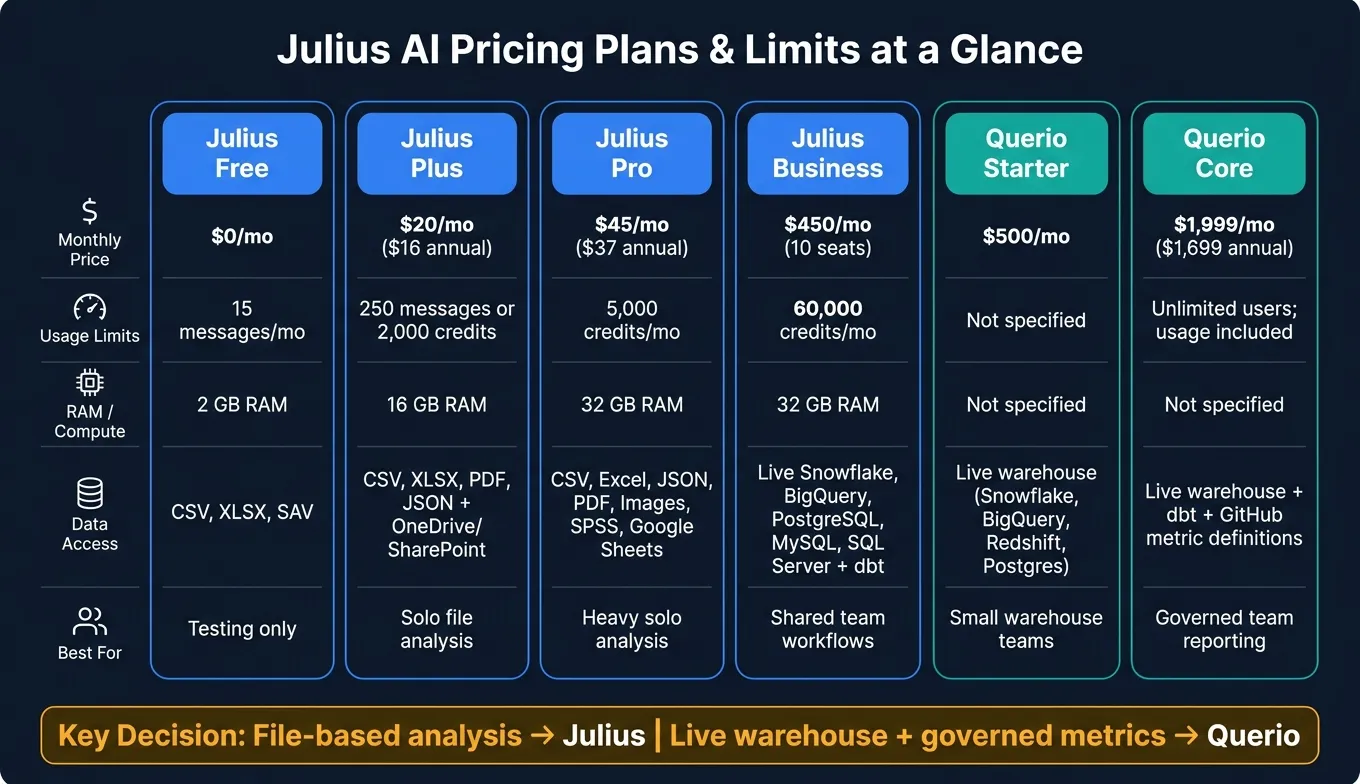 {Julius AI vs Querio: Pricing Plans & Limits Compared}
:::
{Julius AI vs Querio: Pricing Plans & Limits Compared}
:::
Julius AI Review: Best AI Data Analysis Tool in 2026? (Honest Review)
::: @iframe https://www.youtube.com/embed/tX6eAx3bKg4 :::
Quick Comparison
| Option | Starting Price | Best For | Main Limit |
|---|---|---|---|
| Julius Free | $0/month | Testing the product | 15 messages/month |
| Julius Plus | $20/month | Solo file analysis | 250 messages or 2,000 credits |
| Julius Pro | $45/month | Heavy solo analysis | Credits and 32 GB RAM cap |
| Julius Team/Business | $70/seat/month or $450/month | Small teams with shared work | Seat cost and monthly caps |
| Querio Free/Core | Free plan; Core $2,499/mo | Warehouse-based team analytics | AI credits past the monthly allowance, with a spending cap |
Bottom line: Julius is strongest for file-based analysis, while Querio fits better when the warehouse is the center of the workflow.
1. Julius AI Free and Plus
Price and Billing
Free costs $0 and includes 15 messages per month. Plus costs $20 per month, or $16 per month with annual billing[1].
The main gap isn't just the monthly cost. It's how fast each plan hits its limit once you start doing regular work.
Usage Caps and Compute
Free includes 2 GB of RAM. Plus bumps that up to 16 GB of RAM and adds 250 messages, or 2,000 credits, per month[1].
Credits are used based on task complexity and model choice, and any unused credits expire at the end of each month[1]. So yes, the extra RAM helps with larger files. But Julius still works best in a file-first setup, not a warehouse-first one.
Data Access and Notebooks
Free supports .csv, .xlsx, and .sav files[1]. Plus adds PDF and JSON support, along with exports to slides, HTML artifacts, and high-resolution images[1].
Both plans include Julius Notebooks for step-by-step analysis[1]. Plus also adds OneDrive and SharePoint connectors alongside Google Drive[1].
That sounds good on paper. But if your team works straight from Snowflake, BigQuery, Redshift, or Postgres, the setup can start to feel a bit tight. You're still moving around files instead of working where the data already lives.
Governance and Team Fit
Julius AI is SOC 2 Type II, GDPR, and CCPA compliant, and its data is encrypted and not used for model training[1].
That makes Free and Plus a solid fit for solo analysts working with sensitive files. But they don't go all the way to a shared team warehouse workflow. Multiple seats and native Snowflake or BigQuery access sit in the Business tier[1].
Once the analysis gets heavier or starts involving a team, the next bottleneck usually isn't file support. It's capacity.
2. Julius AI Pro and Higher-Capacity Plans
Price and Billing
Julius AI Pro costs $45 per month or $37 per month when billed annually, which comes out to about a 15% discount[1].
Whether that price makes sense comes down to one thing: how often you run into RAM or credit limits. Pro fits a solo analyst who has outgrown Plus on a regular basis but still doesn't need live warehouse access. That's where it tends to make the most sense. For team use, the limits usually show up much faster.
Usage Caps and Compute
The biggest step up with Pro is 32 GB of RAM[1]. You also get 5,000 credits per month, a larger context window for longer analyses, and priority email support[1].
Pro supports:
- CSV
- Excel (multi-tab)
- JSON
- images
- SPSS files[1]
It also opens access to stronger models for heavier analysis. That said, complex AI insight generation can eat through credits fast, so those 5,000 credits may disappear sooner than you'd think.
When Pro Hits Its Ceiling
Pro starts to feel tight once your work moves beyond ad hoc file analysis and into repeatable warehouse analysis. At that point, the jump from Pro to Business or Team isn't just about more compute. It's about live warehouse access and governed workflows.
| Plan | Monthly Price | Monthly Credits | RAM | Data Access |
|---|---|---|---|---|
| Pro | $45 ($37 billed annually) | 5,000 | 32 GB | Uploaded files (CSV, Excel, JSON, PDF, images, SPSS) and Google Sheets[1] |
The next section covers the plan where Julius AI moves from solo analysis into team workflow control.
3. Julius AI Team, Business, and Enterprise
Price and Billing
This is where Julius moves beyond solo file analysis and into shared warehouse work with admin controls.
The Team plan costs $70 per seat per month. It's aimed at teams that want shared billing for warehouse-connected analysis. Business costs $450 per month for 10 seats, which comes out to $45 per seat. Annual billing usually cuts eligible plans by about 15%. Enterprise is custom-priced and sold through Julius AI's sales team. [1]
Usage Caps and Compute
The main split between Business and Enterprise comes down to credit limits, RAM, and automation. Business credits reset each billing cycle, which can be a pain if your workload spikes one month and drops the next. [1]
| Plan | Seats | Monthly Credits | RAM | Scheduled Runs |
|---|---|---|---|---|
| Team | Per seat | Not specified | 32 GB | - |
| Business | 10 included | 60,000 | 32 GB | 3 |
| Enterprise | Custom | Unlimited | 64 GB | Custom |
Data Access and Notebooks
At this stage, live warehouse access matters more than file uploads. Business and Enterprise are the first Julius tiers built for live access to Snowflake, BigQuery, PostgreSQL, MySQL, and SQL Server. That means teams can query warehouse data without pulling it out of the source system.
Julius also supports dbt connections and data dictionary uploads. That helps the AI line up its queries with your company's metric definitions instead of guessing what a field might mean. If you've ever seen two teams argue over what "revenue" means, you know why that matters.
Teams can also share notebooks, workspaces, and threads, which makes group analysis much easier. [1]
Governance and Team Fit
Enterprise adds the controls larger teams often need: SSO/SAML through Okta and Azure, audit logs, role-based permissions, custom agent counts, custom scheduled runs, and optional VPC deployment.
For regulated teams that need SSO, audit logs, and role-based access, Enterprise is usually the right fit. That's the point where admin controls stop being a nice extra and start shaping the purchase decision.
4. Querio
Where Julius starts to feel stuck in files, Querio stays tied to the warehouse. It’s a fit for teams already working from a live warehouse like Snowflake, BigQuery, Redshift, or Postgres and that want governed self-serve analytics on top of that data.
For data leaders and analysts at 100–500 employee B2B SaaS, healthcare, and finance companies, Querio starts to matter when message caps, file uploads, or per-seat pricing become a pain.
Price and Billing
Querio uses plan-based pricing, not per-seat pricing, with AI credits included on every plan. Core can be billed monthly or annually.
| Plan | Price | Users | Connections | Limits and notes |
|---|---|---|---|---|
| Free | $0/month | Unlimited users | Unlimited data connections | 500 AI credits a month; extra credits $0.50 each; 2 automations |
| Core | $2,499/month ($25,000/year billed annually) | Unlimited users | Unlimited data connections | 10,000 AI credits a month; extra credits $0.25 each; guided 4-week pilot; usage alerts and spending cap |
| Enterprise | Custom pricing | Unlimited users | Unlimited data connections | Custom AI credit allowance; single-tenant hosting; on-prem and GovCloud add-ons |
Free works for small teams getting started. Core fits most shared-team setups. Enterprise is for custom deployment or data-separation needs.
Core is the main self-serve plan: unlimited users, unlimited data connections, 10,000 AI credits a month, and an optional spending cap. The MCP server is included on every plan, and API access comes with Core.
Data Access and Notebooks
Every Querio plan connects straight to live warehouse data through encrypted, read-only credentials. There’s no need for CSV exports or copied data.
For each answer, the agent writes real, inspectable SQL and Python inside a reactive notebook. Cells stay connected, and charts update on their own when the SQL changes. That makes it easier to see what happened under the hood instead of taking the output on faith.
Querio also supports dbt project integration, with metrics, joins, and trusted queries stored in GitHub. Metric definitions stay in GitHub too, so your team can review and approve changes before they go live. Querio answers from live warehouse data only.
Governance and Team Fit
Querio is built for data teams that need steady metrics, permissions, and audit trails without giving up self-serve access.
It includes:
- Role-based access control
- SSO
- SOC 2 Type II
- HIPAA compliance with signed BAAs
- Sandboxed query execution
Dashboards can be tagged as trusted, experimental, or team-specific. And when someone asks a question in Slack or Microsoft Teams, Querio spins up a real notebook behind the scenes.
That’s a big deal for teams that need analysts and non-technical users to work from the same source without things getting messy. This is the core tradeoff in this article: file-based analysis vs. governed access to a live warehouse.
When Julius AI Feels Worth It - and When It Gets in the Way
Julius AI makes sense to pay for when the work is file-based and exploratory. It starts to slow things down when usage ramps up or when a team needs repeatable warehouse workflows.
Free and Plus are mostly evaluation tiers, and they hit limits fast. Both plans are fine for occasional file-based analysis. But once people start using them on a regular basis, the caps show up pretty quickly. At that point, the question changes. It’s no longer can Julius help? It becomes do the limits stay out of the way long enough to be useful?
That’s where capacity starts to matter more than feature count. Pro is the first paid tier that feels built for day-to-day analyst work. At $45/month, it gives you more compute room for larger files and longer working sessions [1]. Still, the core limit doesn’t change: compute and credits run out. If that keeps happening, the next decision is pretty simple. Is moving to Business or Enterprise just about getting more room, or is it about needing a different kind of workflow?
For warehouse teams, the problem shifts from analysis power to repeatability. Julius supports direct connections to Snowflake, BigQuery, Postgres, and dbt on higher tiers [1]. That sounds good on paper. But the workflow is still chat-based and session-based. For teams that need a governed semantic layer tied to dbt - with consistent metric definitions, reusable SQL, and outputs people can inspect - that difference matters more than raw message volume.
Here’s the side-by-side view:
| Workflow | Best Fit | First Breaking Limit | Monthly Cost Range |
|---|---|---|---|
| Occasional file-based analysis | Julius Free / Plus | Message caps | Free–$20 |
| Daily analyst work | Julius Pro | Compute and credits | $45 |
| Warehouse-connected analysis | Julius Business or Enterprise | Governance and repeatability | Per-seat or custom |
| Governed team reporting | Querio Core | Onboarding and setup | $2,499 |
For teams standardizing metrics in dbt, Julius is strongest at exploration and weaker at governed reuse.
Pros, Cons, and Who Should Buy What
When plan limits start driving the decision, workflow matters more than the sticker price. The easiest way to choose Julius is to match each plan to the job you need it to handle.
| Plan | Best Reason to Buy | Biggest Drawback | Best-Fit Customer |
|---|---|---|---|
| Julius Free | Free file-test tier | The 15-message cap is easy to hit once you start digging into a dataset | Analysts evaluating fit before paying |
| Julius Plus/Lite | Best low-cost solo tier for regular file analysis | Credits disappear fast on complex tasks | Individual analysts doing one-off spreadsheet work |
| Julius Pro | Best solo tier for larger files and heavier analysis | Better for individual analysis than team-wide governance | Analysts handling larger files or heavier statistical work |
| Julius Team/Business | Best for shared notebooks and governed team use | Per-seat pricing adds up fast | Departments that need shared notebooks and shared metric definitions |
| Querio Core | Best for governed, warehouse-native self-serve analytics | Core is $2,499/month and assumes you already have a warehouse | Data teams standardizing metrics across Snowflake, BigQuery, Redshift, or Postgres |
If you're working alone and doing one-off tasks on larger files, Plus or Pro usually makes the most sense. They fit solo analysts who need file analysis without paying for team features they won't use.
If your department needs centralized billing, shared notebooks, and a Custom Agent that remembers your team's shared metric definitions, go with Team or Business. That's where Julius starts to work less like a personal tool and more like a shared system.
For warehouse teams, the choice changes a bit. At that point, it's less about getting more analysis capacity and more about keeping metrics under control and making reuse easier. If consistency and governance matter more than one-off analysis, a warehouse-native workflow is the better fit. That's the main buying test here: one-off analysis or governed warehouse self-serve.
FAQs
::: faq
How quickly do Julius AI credits run out?
On lower-tier plans, Julius AI limits can disappear fast. If you're doing heavy analysis or running more demanding prompts, you can burn through credits or messages in a single session.
The Free plan comes with 15 messages per month. Entry-level paid options like Plus or Lite top out at 250 per month.
Here’s the catch: each action uses credits based on task complexity and model choice. So if you’re a heavier user, those caps can show up sooner than expected, pushing you toward a higher-tier plan. :::
::: faq
When should I upgrade from Pro to Business?
Upgrade from Pro to Business when your work starts to involve the whole team. That usually means things like shared data connections, one place for billing, and admin controls.
Pro works well for individual analysts.
Business makes more sense for teams that need multiple seats, governed access, automated reporting, and one shared workspace to standardize metrics across departments. :::
::: faq
Is Julius AI a good fit for warehouse-based teams?
Usually, no. Julius AI works best as a file-first tool for ad hoc analysis on uploaded data like CSVs, Excel files, and PDFs.
Its Pro and Team plans do add connectors for Snowflake, BigQuery, and Postgres. But that still doesn’t give warehouse-based teams what they need for repeatable, company-wide reporting.
What’s missing?
- A governed semantic layer
- Persistent metric definitions
- Shared context across the team
That gap matters. Without those pieces, it’s much harder to keep reporting consistent from one person or team to the next. :::