Business Intelligence
How to Connect Claude to Redshift: The Safe Way
Grant agents read-only, scoped warehouse access with secret storage, network locks, and query auditing to protect data.

If you connect Claude to Redshift, the safe setup is simple: use a dedicated read-only user, limit access to approved schemas or views, store secrets in AWS Secrets Manager, and log every query.
I’d treat this as a permissions-first setup, not just a SQL setup. Claude should only be able to SELECT, only see curated data, and only connect through a locked-down network path on port 5439 with TLS turned on.
Here’s the short version:
- Create a separate service user for Claude
- Grant
USAGEandSELECTonly on approved schemas, tables, or views - Use curated marts or masked views instead of raw or PII-heavy tables
- Store credentials outside code and prompts in AWS Secrets Manager or SSM
- Turn on audit logs for connections and user activity
- Tag AI-generated queries so you can track cost and review SQL later
- Review generated SQL against a known source like dbt, Looker, or your semantic layer
- Add default privileges so new tables don’t slip through your grant model
A few details matter more than people expect. For example, missing ALTER DEFAULT PRIVILEGES means new tables won’t be readable until someone adds grants by hand. And giving access to raw schemas can expose fields Claude never needed to see in the first place.
Quick comparison
| Approach | What Claude sees | Risk level | Best use |
|---|---|---|---|
| Raw tables | Base warehouse tables | High | Rarely the right choice |
| Curated views | Cleaned and masked views | Medium | Analyst-facing access |
| Governed layer | Approved metrics, joins, and logic | Low | Business self-serve and repeatable answers |
I’d sum it up this way: lock down identity, scope, secrets, network, and logs before Claude runs its first query. That gives you a setup that is read-only, auditable, and much less likely to expose data or run bad SQL.
::: @figure 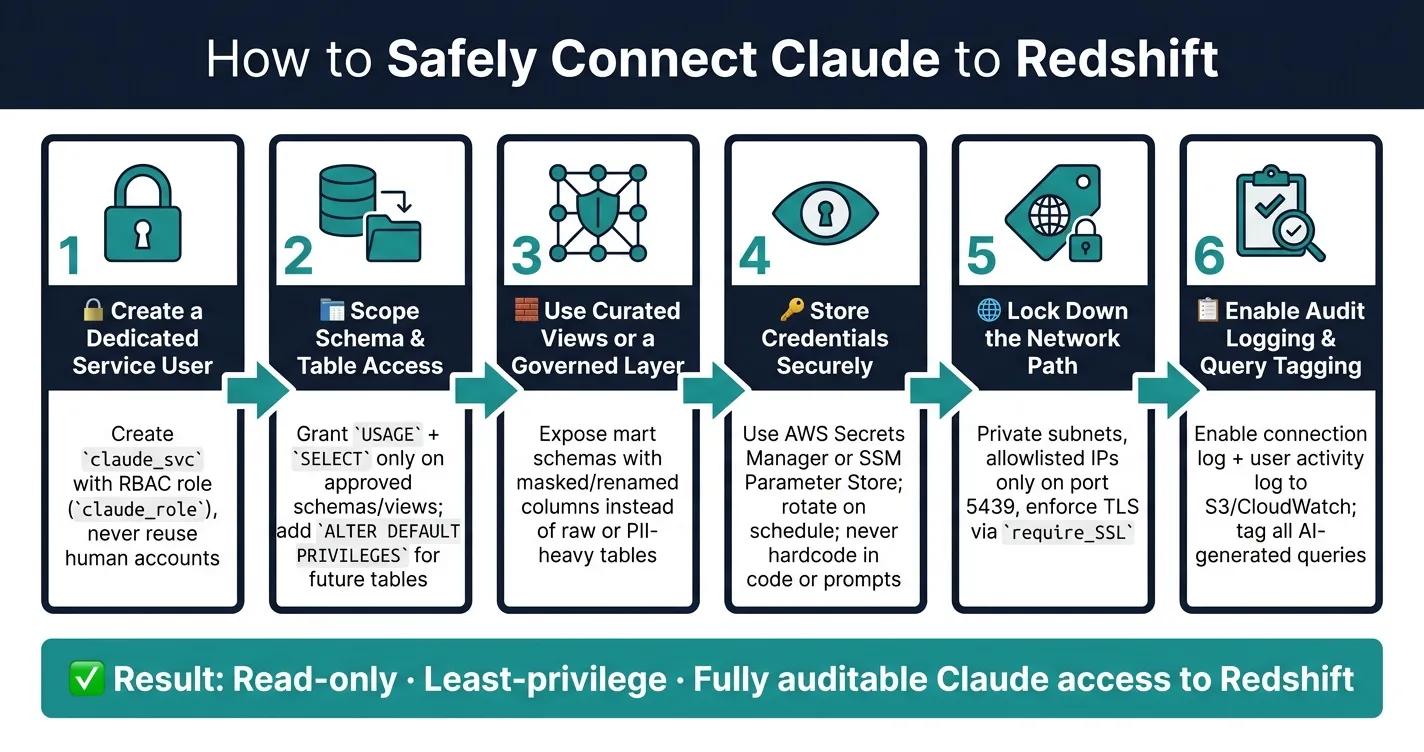 {How to Safely Connect Claude to Redshift: Step-by-Step Setup}
:::
{How to Safely Connect Claude to Redshift: Step-by-Step Setup}
:::
Claude Code Reads Your Amazon Redshift Query Plans and Finds the Slow Ones
::: @iframe https://www.youtube.com/embed/g8TvAf2xgEs :::
The baseline Claude–Redshift architecture
Claude connects to Redshift through an MCP server or integration layer over TLS inside a VPC. Security groups should allowlist only approved IPs on port 5439. But that network path is only as safe as the Redshift permissions behind it.
The main risks here are prompt injection, broad schema access, unsafe queries, and metric drift.
| Risk | Impact in Redshift | Mitigation |
|---|---|---|
| Prompt injection | Malicious patterns reaching the database unchecked | SQL parsing + read-only credentials |
| Overexposed schemas | AI accesses sensitive rows or reasons over wrong tables | Schema-scoped grants + RBAC |
| Unsafe queries | Resource-heavy joins causing cost spikes or timeouts | Dedicated compute, query tagging, row limits |
| Metric drift | Different users get different answers for the same KPI | Governed semantic layer |
Why least privilege matters more with text-to-SQL
With an LLM, you have to assume it can generate DELETE, UPDATE, or DROP unless the connection is locked to read-only.
That changes the risk picture. In healthcare, finance, and B2B SaaS, a broad Redshift connection can expose regulated rows or let an LLM run unsafe SQL. Start with permissions. Don't treat this as a SQL-controls issue first.
Once the network path is locked down, the next move is simple: give Claude read-only access before it can query anything.
Where Querio fits in this architecture
Querio sits between Claude and Redshift as a governed semantic layer. Joins, metrics, and access rules are defined once, then enforced on every request. That helps stop Claude from using different metric logic for the same KPI across sessions.
The Redshift connection stays live, read-only, and encrypted. There are no CSV exports and no data duplication. When Claude answers a question through Querio's MCP, the SQL is inspectable and editable in a reactive notebook. Metric definitions, approved joins, and business glossaries then carry across every surface: Slack, the Querio app, or Claude via MCP.
"Wire your warehouse and context files to MCP once, and when a better model ships next year, you swap the model and keep everything else. It keeps your governance in one place instead of re-implemented per tool." - Rami Abi Habib, Founder [2]
That setup still depends on one thing: Redshift grants must stay tightly scoped, which the next section covers.
Create a read-only, least-privilege role in Redshift
Give Claude its own Redshift identity. Then grant access only to approved schemas, tables, and views. That way, Claude can help with analysis without opening a door to raw or sensitive data.
Create the Redshift role and service user
If the network path is already locked down, the next move is the database identity.
Use Redshift RBAC instead of legacy groups. It gives you tighter scope and is easier to manage as access grows. Also, create a dedicated service user instead of reusing a shared human account.
-- Create the read-only role
CREATE ROLE claude_role;

-- Create a dedicated service account
CREATE USER claude_svc;

-- Assign the role to the service user
GRANT ROLE claude_role TO claude_svc;
Authentication should flow through your approved secret store or brokered access path, not through code or prompts.
Grant access only to approved schemas, tables, and views
Start small. Give access to one mart schema or a curated reporting view, then add more only when there's a clear reason. Keep raw, staging, and PII-heavy schemas off limits.
USAGE lets Claude see the schema. SELECT lets Claude read rows. It needs both, but only for approved objects.
-- Schema visibility
GRANT USAGE ON SCHEMA analytics TO ROLE claude_role;

-- Read access to existing tables
GRANT SELECT ON ALL TABLES IN SCHEMA analytics TO ROLE claude_role;

-- Auto-grant access to tables added in the future
ALTER DEFAULT PRIVILEGES IN SCHEMA analytics
  GRANT SELECT ON TABLES TO ROLE claude_role;
That ALTER DEFAULT PRIVILEGES line is easy to miss. If you skip it, new tables stay invisible to Claude until someone runs the grant again.
Use a dedicated service user for Claude, never a shared human account.
If one schema mixes approved data with sensitive fields, don't grant broad table access. Grant SELECT only on approved views. And for schema discovery, use Redshift metadata views instead of giving broad access to system schemas.
Apply row-level and column-level restrictions where needed
Sometimes schema-level scoping still isn't tight enough. That's when row-level and column-level controls come in.
In multi-tenant setups, Redshift row-level security and data masking can filter rows in the database before Claude ever sees them. A policy tied to org_id or department keeps access inside the allowed boundary.
For SSNs, account numbers, and similar fields, use masked views or column-level security instead of raw tables.
Limit what Claude can see with curated views and governed context
If schema grants are still too broad, tighten what Claude can access by showing it curated marts and governed context only. That means exposing curated mart schemas, not raw ingestion or staging tables. It also means renaming columns, removing or masking sensitive fields, and limiting metadata discovery to approved schemas.[1]
Use mart schemas and masked views instead of raw tables
A good setup is to expose analytics-ready views in a dedicated mart schema. Those views should include renamed columns, approved joins, and any sensitive fields removed or masked before Claude ever sees them.[1]
If you use dbt, this usually maps cleanly to the marts/ layer. Then grant Claude access only to that curated schema.
It also helps to keep a short context file with:
- The 10 most important tables
- What each row means
- Deprecated objects
- Known traps
That small bit of guidance can save a lot of confusion later.
Direct table access vs. curated views vs. a governed layer
These three approaches come with plain tradeoffs:
| Aspect | Raw tables | Curated Views | Governed layer |
|---|---|---|---|
| Risk of PII exposure | High | Moderate - masking applied at view level | Low - governed by semantic layer |
| Governance effort | Low initial, high ongoing | Moderate - views require upkeep as dbt models change | Moderate upfront, lower ongoing as definitions accumulate |
| SQL explainability | Limited - LLM infers logic per session | Better - view logic is static and inspectable | High - SQL is inspectable and editable directly in the UI |
| Fit for self-serve users | Poor | Good for analysts | Best for business users |
Curated views are a solid step up from raw table access. But they still leave metric consistency in the hands of the LLM.
Here’s the catch: two analysts can ask the same revenue question on different days and get different SQL if Claude reads the view structure a bit differently each time.
A governed semantic layer fixes that by defining joins, metrics, and trusted queries once. So instead of re-deciding the logic on every prompt, the system uses the same definitions across the app, Slack, and Claude.
With object scope narrowed, the next step is securing secrets, network paths, and audit logs.
Handle credentials, networking, and auditing safely
Once schema access is scoped and views are set up, the next layer is day-to-day operations: where secrets live, how traffic reaches Redshift, and how every query Claude writes gets recorded and checked.
Store secrets outside code and prompts
After you scope schema access, tighten up how Claude signs in.
Don't hardcode Redshift credentials in code or prompts. Store them in AWS Secrets Manager or SSM Parameter Store, and rotate them on a fixed schedule. Keep the credential out of both code and prompts, then fetch it at runtime through your MCP server or broker. If you use brokered access, use short-lived tokens.
With OAuth in Querio's MCP, Claude uses the signed-in user's warehouse permissions instead of a shared warehouse password.
Lock down network paths and turn on Redshift audit logs
Put your Redshift cluster in private subnets with no public endpoint. Allowlist only the approved source IPs that need access to port 5439 [1]. Turn on TLS by enabling require_SSL in your Redshift parameter group so data stays protected in transit between the MCP server and the warehouse.
Then enable both the connection log and the user activity log, and send them to Amazon S3 or CloudWatch Logs. The connection log records authentication attempts, terminations, and network IPs. The user activity log records the full text of every SQL statement the account runs.
| Control | Destination | What it captures |
|---|---|---|
| Connection Log | S3 / CloudWatch | Authentication attempts, terminations, network IPs |
| User Activity Log | S3 / CloudWatch | Every SQL statement the account runs |
| Query Tagging | Redshift metadata | Labels identifying AI-generated queries for cost and performance tracking |
Tag every agent-generated query with a consistent label. That makes it much easier to track AI-driven workloads on their own in Redshift query history and cost reports.
With network and logging controls in place, the last step is reviewing generated SQL before it touches production reporting.
Build a review workflow for agent-written SQL
Audit logs show what ran. A review workflow decides whether it should run.
Claude writes SQL, a reviewer approves it, and the approved logic gets saved back into governed context.
Querio's reactive notebooks show editable SQL and Python right in the notebook. The data team can inspect the query, adjust it, and commit the approved logic back to the shared context repo, which syncs to GitHub alongside your dbt project. So the next time someone asks the same question in Slack or Claude, the answer pulls from a definition your team already checked and approved.
Before you trust any new Claude-generated query in a production report, compare its output against a known source of truth, such as:
- a dbt model
- a verified Looker dashboard
- a trusted metric in your semantic layer
That step helps catch subtle problems like timezone mismatches or double-counted refunds.
Use that review pass as the final gate before the checklist in the conclusion. Those checks turn a safe connection into a repeatable production standard.
Conclusion: A safe Redshift connection checklist for data teams
Claude should only see the approved data needed to answer the question in front of it.
Use this checklist before giving Claude production access.
| Checklist Item | Control | Security Purpose |
|---|---|---|
| Identity | CREATE USER claude_svc; |
Keeps agent activity separate from human users |
| Access | Grant USAGE on approved schemas and SELECT only on approved tables or views |
Applies least-privilege scoping |
| Networking | Allowlist IPs on port 5439 + enforce SSL/TLS |
Blocks network paths that shouldn't be open |
| Governance | Set statement_timeout in Redshift; enforce row limits in the integration layer |
Helps stop runaway queries and cost spikes |
| Auditing | Enable audit logging and query tagging | Keeps every Claude query logged and easy to review |
Also add ALTER DEFAULT PRIVILEGES for approved schemas so new tables are covered automatically.
If every item is in place, Claude stays scoped, read-only, and auditable.
That gives data teams read-only, auditable Claude access to Redshift without exposing raw data or opening write paths.
FAQs
::: faq
Do I need row-level security?
It comes down to two things: how sensitive your data is and who should be allowed to see what.
If your data includes PII, PHI, or financial records, or if people should only see the rows tied to their role, team, or account, RLS is an important guardrail.
When Claude connects through an MCP server or a governed layer like Querio, it inherits your warehouse security rules, including RLS and column masking. That means your controls live at the dataset level, which is stronger than relying on UI filters alone. :::
::: faq
How often should Redshift secrets rotate?
Rotate Redshift secrets on a set schedule. For production access, avoid long-lived static credentials. If a secret leaks, it stays exposed until you change it.
Use OAuth-based access for user-facing queries when you can. For automated service accounts, use a dedicated secrets manager.
If you detect unauthorized access, rotate credentials right away. Do the same during incident response. :::
::: faq
When should I use views instead of tables?
Use views instead of raw tables when you need a governed, curated, and secure interface for AI agents. Clean, deduplicated views help cut down on bad joins, mixed logic, and extra security risk.
Views also add a logical layer for row-level security and column masking. That means Claude or other agents can access only approved, predefined datasets that line up with your official business metrics. :::