Data Access Control: Unlock Secure Analytics
Master data access control for secure, self-service analytics. Covers RBAC, ABAC, policy design & scaling for AI agents in modern data warehouses.
https://www.youtube.com/watch?v=FwOTs4UxQS4
published
Outrank AI
data access control, data governance, self-service analytics, rbac vs abac, data security
2f61d260-2eb2-429e-a395-b3664a600ab8

Most advice on data access control starts from the wrong premise. It assumes access control exists to say no, slow people down, and keep risky users away from sensitive systems.
That mindset is exactly why startups end up with analyst queues, shared credentials, brittle dashboards, and AI experiments that nobody wants to approve in production. The primary job of data access control is to let more people answer more questions safely, without asking the data team for permission every time.
If you're running a fast-growing company, the question isn't whether to tighten access. It's whether your access model can keep up with self-service analytics, warehouse-native tooling, and AI agents that query data directly. Old role-only designs usually can't. Modern, context-aware controls can.
Table of Contents
Data Access Control Is an Accelerator Not a Bottleneck
The usual complaint is familiar. Product wants funnel data. Finance wants margin by customer segment. Growth wants campaign performance. Everyone waits because access governance is "being sorted out."
That delay isn't proof that security and speed are incompatible. It's usually proof that the company is using an access model that can't express nuance. The strongest evidence is that 78% of data leaders cite access governance as slowing down analytics delivery, yet organizations using modern dynamic access models achieve 3.2x faster onboarding of new analysts while maintaining 40% fewer unauthorized access incidents than teams relying on traditional RBAC alone, according to Dataversity's fundamentals of data access management.
The real bottleneck is rigid design
A rigid model creates two bad choices:
Ticket-driven access: analysts become gatekeepers for every new request.
Broad access grants: teams get more warehouse access than they need because it's faster than designing proper controls.
Shadow workflows: users export data into spreadsheets or ad hoc notebooks because the approved path is too slow.
None of those outcomes improve security. They just move risk around.
Practical rule: If people need to bypass your access model to do their jobs, the model isn't protecting the business. It's training the business to work around controls.
Speed comes from scoped access
The fastest data teams don't remove controls. They make controls more precise. That means a product manager can access usage data relevant to their scope, while finance can see revenue data in their domain, and neither needs a custom analyst handoff for routine questions.
Good data access control does three things at once:
Outcome | What good control enables |
|---|---|
Faster onboarding | New users get the right baseline access without weeks of manual review |
Safer self-service | Users explore approved data without inheriting broad warehouse privileges |
Better operations | Data teams maintain policy infrastructure instead of answering repetitive permission requests |
For startups, this matters more as AI enters the workflow. A human analyst can often compensate for a messy permission model. An AI agent can't be trusted to "use judgment" around overbroad access. If permissions are loose, the blast radius is loose too.
The practical takeaway is simple. Data access control should be designed as infrastructure for safe speed. If it only blocks, it will fail. If it scopes access cleanly enough for self-service, it becomes a growth enabler.
Choosing Your Model RBAC ABAC and PBAC Explained
Organizations don't pick a bad access model on purpose. They pick the one that's easy to explain on day one, then keep stretching it long after the company has outgrown it.
Why RBAC works until it doesn't
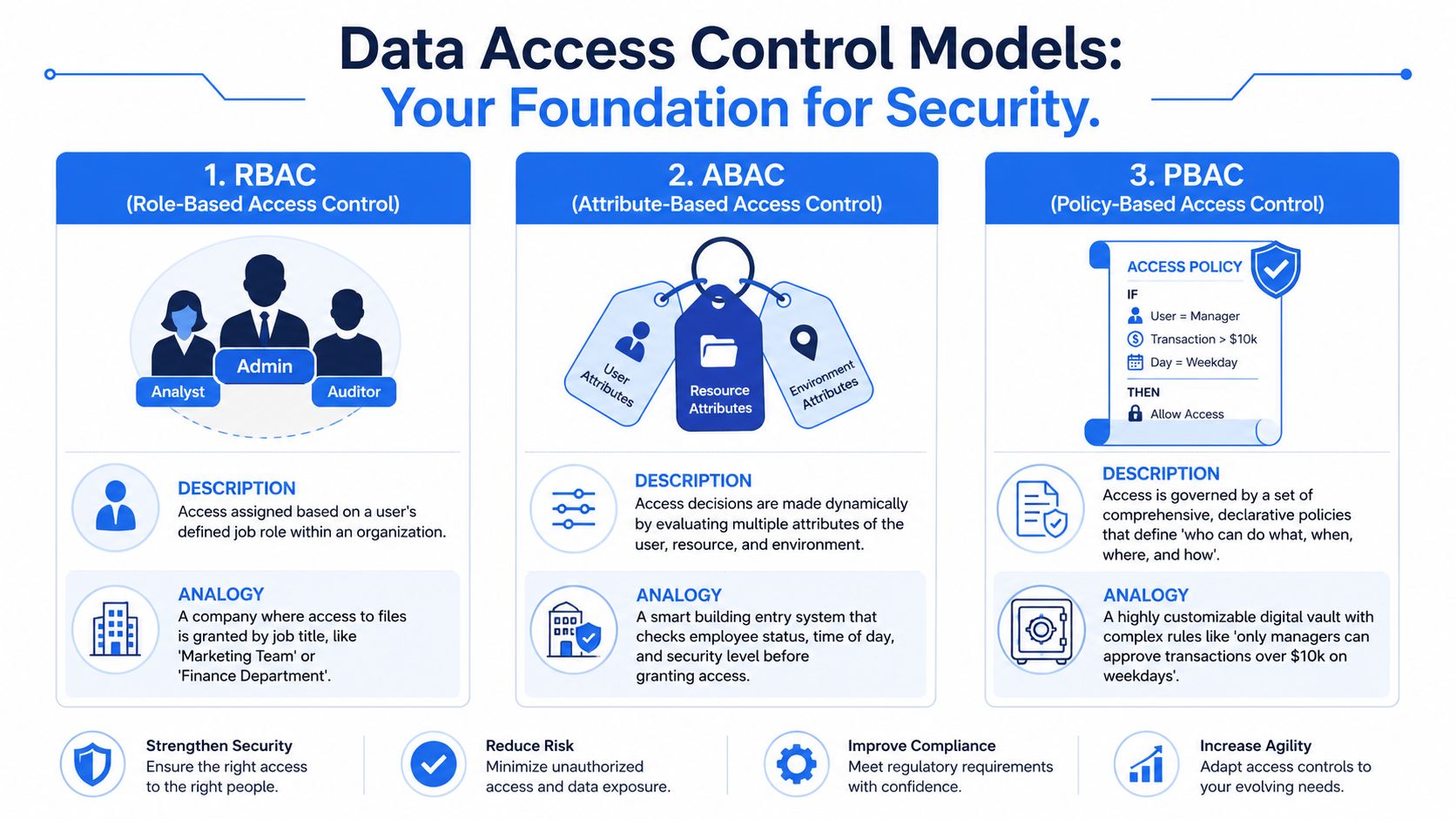
Role-Based Access Control (RBAC) is the company keycard model. If you're in Finance, you get Finance access. If you're an Analyst, you get Analyst permissions. It's simple, auditable, and fast to stand up.
RBAC is still useful for baseline boundaries:
Department-level separation: finance data vs product analytics
Environment controls: production vs development
Admin functions: who can create users, manage policies, or alter schemas
The problem is that real work rarely maps cleanly to a static role. Startups especially have mixed-function teams. A product lead may need conversion data, experiment results, and limited billing context. An ops manager may need support data plus selected financial fields. RBAC handles that by adding more roles. Then more exceptions. Then role sprawl.
When teams keep layering roles, they often end up with users who technically fit a role but practically have too much access. If you're evaluating warehouse-native tools or agent-based interfaces, that's why articles like Querio's guide to SOC 2 RBAC for secure AI analytics are useful starting points, but RBAC alone usually won't carry the whole design.
Why ABAC fits modern analytics
Attribute-Based Access Control (ABAC) works more like a smart sentry than a keycard. Instead of asking only "what role is this user," it asks a fuller set of questions. Who is requesting access? What data is being requested? What time is it? What environment is this running in? What sensitivity tag applies?
That matters because modern analytics is contextual. A request can be valid in one setting and risky in another.
In environments that support AI agent execution, ABAC reduces unauthorized data exposure by 68% compared to RBAC when fine-grained context policies are enforced, because it evaluates user, resource, and environmental attributes in real time, as described in Fortra's quick guide to data access control.
A practical ABAC policy might look like this in plain English:
User attribute: member of analytics
Resource attribute: dataset tagged internal
Environment attribute: work hours
Action condition: read allowed, export denied
That is much closer to how real businesses want access to behave.
RBAC answers "who are you?" ABAC answers "who are you, what are you trying to do, and does it make sense right now?"
Where PBAC fits
Policy-Based Access Control (PBAC) is best understood as the rulebook layer. It centralizes the logic that determines access decisions. In practice, PBAC often works with ABAC. The policy says what should happen, and attributes provide the facts needed to evaluate the rule.
For data teams, PBAC becomes valuable when policies need to stay consistent across systems:
Snowflake for warehouse queries
BigQuery or Databricks in another business unit
BI tools with their own permission models
AI notebooks or API consumers that shouldn't invent separate access rules
Data Access Control Model Comparison
Dimension | RBAC (Role-Based) | ABAC (Attribute-Based) | PBAC (Policy-Based) |
|---|---|---|---|
Core idea | Access by role | Access by evaluated attributes | Access by centrally defined policy |
Best use case | Stable teams and predictable permissions | Dynamic, context-sensitive access | Cross-platform governance and standardized rules |
Granularity | Coarse to medium | Fine-grained | Depends on policy design |
Scalability | Weakens as exceptions grow | Strong in complex environments | Strong when multiple systems need the same rule logic |
Operational overhead | Low at first, high later if roles sprawl | Higher design effort, better long-term fit | Higher policy discipline, cleaner governance |
Fit for AI agents | Poor on its own | Strong | Strong when combined with ABAC inputs |
The mistake isn't using RBAC. The mistake is stopping there.
How to Design an Effective Access Control Policy
Most access problems start before enforcement. They start in policy design. If your team can't explain who should access which data and under what conditions, no tool will save you.
Start with data classes not tool permissions
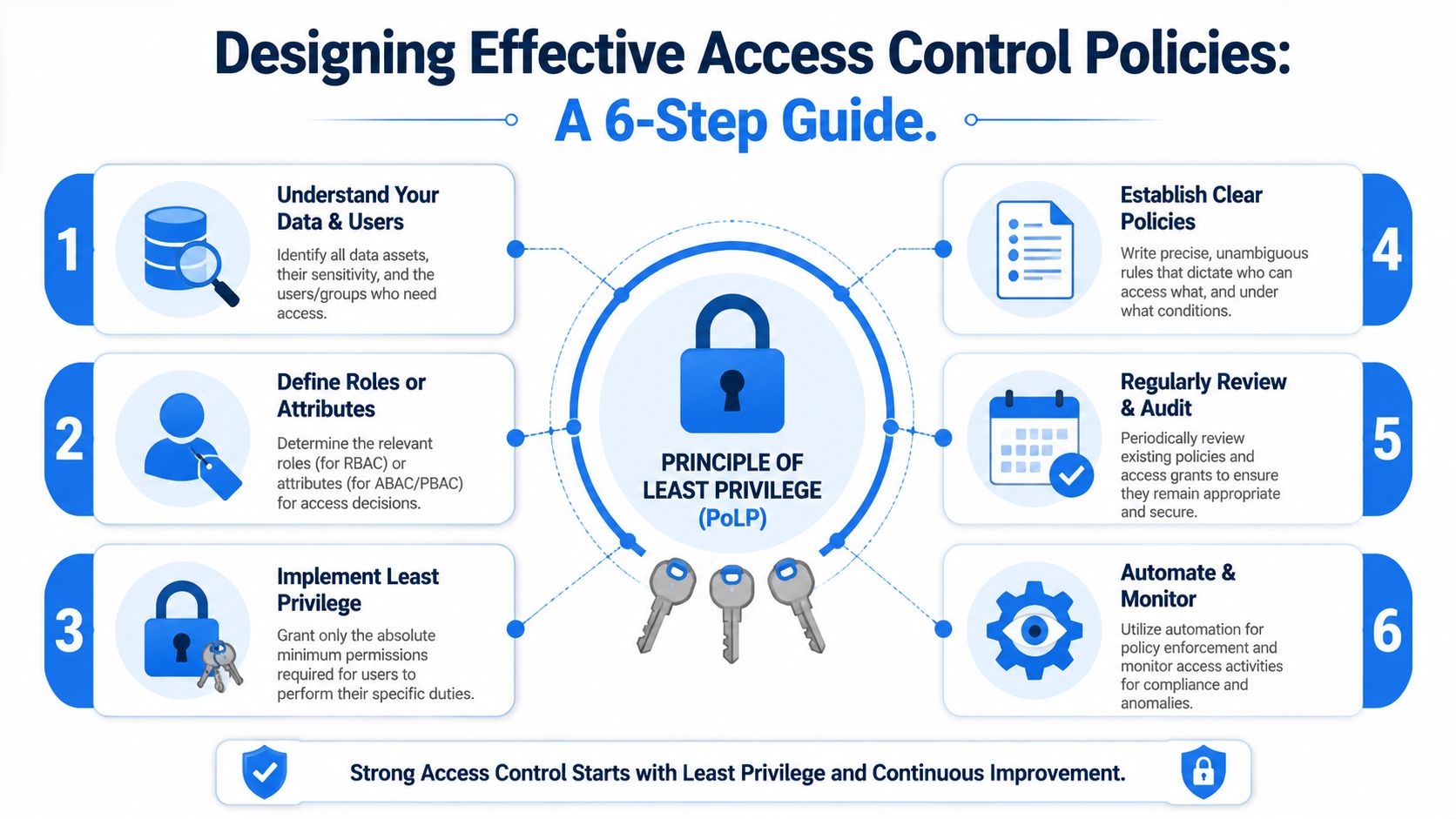
Teams often begin by mapping permissions to dashboards, schemas, or applications. That's backwards. Start by classifying the data itself.
A workable pattern is to define a small set of business-relevant classes such as public, internal, confidential, and restricted. The names matter less than consistent use. Each class should correspond to clear handling rules.
Then define the attributes that affect access decisions:
User attributes such as department, function, geography, employment status, or manager approval.
Resource attributes such as owner, sensitivity tag, regulatory scope, or domain.
Context attributes such as time window, environment, session type, or approved use case.
This is also where the Principle of Least Privilege (PoLP) becomes practical. Least privilege isn't about starving people of access. It's about giving exactly enough access for the task in front of them.
A major blind spot in current guidance is AI agents. The challenge is that AI coding agents often receive overly broad access by default, which creates insider risk and can violate regulations unless their permissions are dynamically scoped to a user's task and context, as outlined in Rudderstack's overview of data access control.
Write policies that operators can read
If a policy only makes sense to the engineer who wrote it, it won't survive contact with audits, incidents, or team growth.
Good policies are readable in plain language before they are translated into warehouse rules or policy code. For example:
Allowed: Product managers may view aggregated product usage metrics for products they own.
Conditioned: Support leads may access customer records for active cases during approved support workflows.
Denied: Contractors may not export restricted data to unmanaged destinations.
Those statements are operational. Legal, security, and data teams can all inspect them.
Write the human policy first. Then implement it in SQL grants, row filters, masking rules, or a policy engine. Not the other way around.
A strong review loop also matters:
Document ownership: every policy should have a business owner and a technical owner
Review triggers: new systems, new data classes, role changes, and incident findings should trigger policy review
Expiration logic: temporary access should expire
That last point is often underestimated. Permanent exceptions are one of the easiest ways to rot an access model from the inside.
Architectural Patterns for Modern Data Warehouses
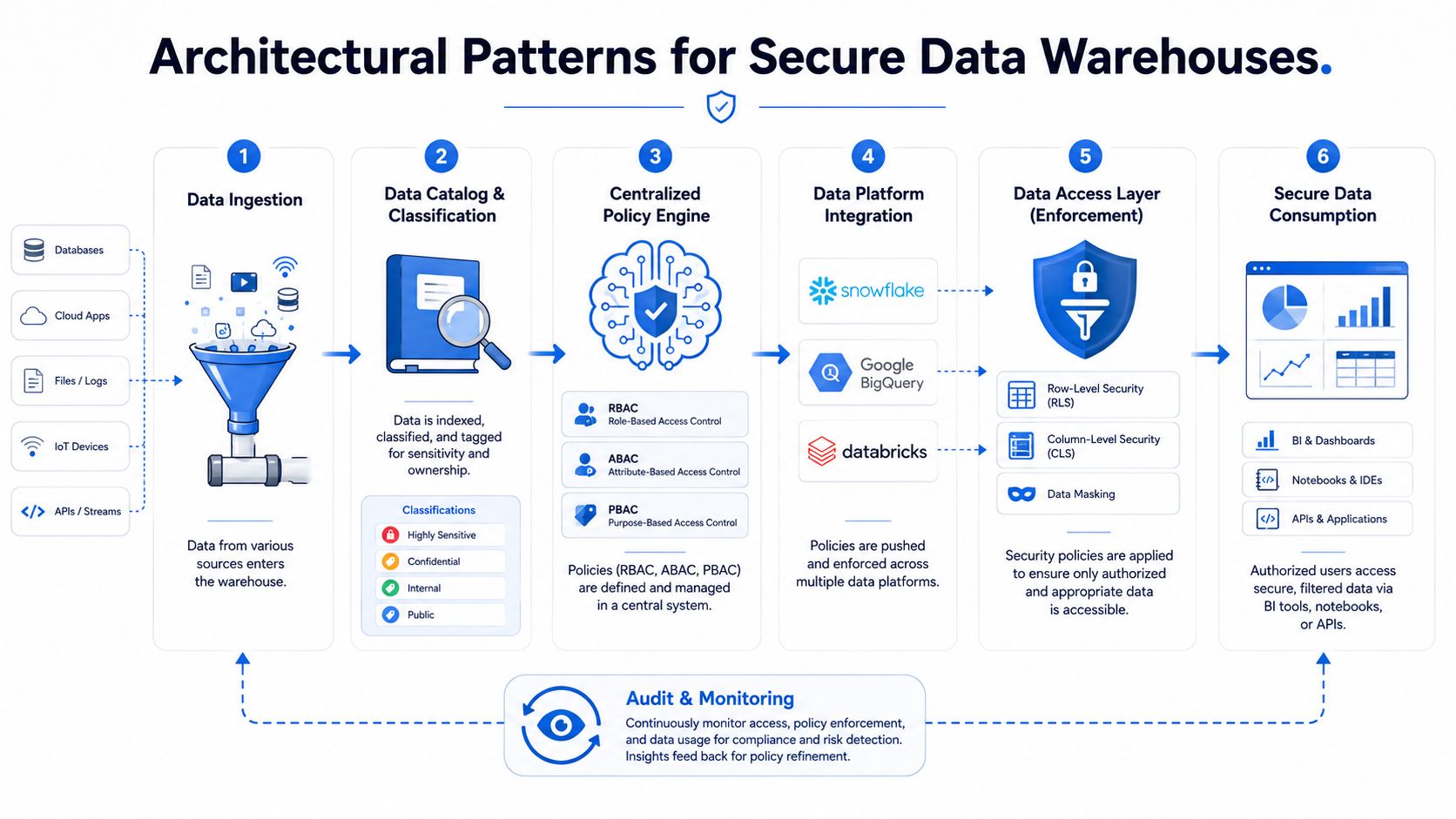
Policy design is one layer. Enforcement architecture is another. In this interplay, teams usually discover the trade-off between elegance on paper and maintainability in production.
Three enforcement patterns
Most warehouse-centric data access control implementations fall into one of three patterns.
Centralized gateway model
All access flows through a service layer that evaluates policy before queries reach Snowflake, BigQuery, Databricks, or another platform. This creates consistency and a strong control point. It can also become a choke point if every use case depends on one service path.
Native warehouse model
You lean heavily on built-in warehouse features such as row-level security, column masking, views, and object grants. This performs well and stays close to the data. The downside is policy fragmentation when multiple platforms or tools express the same rules differently.
Hybrid model
A central policy layer defines the rules, while native warehouse features enforce them where possible. This is usually the most practical model for growing companies because it balances governance with performance. Teams exploring these trade-offs in more depth should review different data warehouse architecture patterns before they commit to one enforcement strategy.
Why hybrid usually wins
Strict controls have measurable costs. In warehouse environments, Mandatory Access Control (MAC) with cryptographic labels reduces critical data breach incidence by 42% but can add 12–15% query latency overhead because every access operation must validate labels, according to NextLabs' explanation of data access control enforcement.
That trade-off is real. If every query pays the same enforcement penalty, users feel it immediately.
A more durable approach is to apply different controls to different classes of data:
Data class | Typical enforcement choice | Why |
|---|---|---|
Public or low-risk internal data | Native warehouse controls | Keep latency and operational friction low |
Sensitive internal data | ABAC-style dynamic rules | Add context without making all access expensive |
Restricted or high-risk data | MAC or stronger labeled controls | Reserve the heaviest enforcement for the smallest, riskiest surface |
This is why hybrid design tends to hold up better over time. You don't make every question traverse the strictest possible path. You apply hard controls where the business needs them.
Security architecture should be uneven on purpose. Put the heaviest controls around the smallest set of data that would hurt you most.
A startup doesn't need a maximalist design. It needs an architecture that can start simple, absorb new tools, and support stricter controls later without rewriting the whole access model.
Enabling Secure Self-Service Analytics with AI Agents
Static permissions break down fast once AI agents start querying the warehouse on behalf of users. The old assumption was that a human analyst sat between the business question and the data. The analyst understood context, knew where the sensitive joins lived, and often applied restraint manually.
That buffer disappears when an agent can generate SQL, run notebooks, and iterate through data requests at machine speed.
Why static permissions fail for agents
A static RBAC grant assumes the subject has a stable job function. Agents don't. Their scope changes with the user, task, notebook, dataset, and workflow state.
That creates a familiar failure mode. Teams give the agent broad warehouse read access because fine-grained permissions are too hard to model quickly. Self-service goes live. The system becomes useful. Then security realizes the agent can touch far more than any individual task requires.
The better pattern is scoped delegation. The agent should inherit permissions from the requesting user and the current task context, not hold a standing entitlement to large parts of the warehouse. That's what lets non-technical users work quickly without turning the agent into a privileged insider.
One practical example is a warehouse-native notebook workflow where a product manager asks for retention analysis. The agent should be able to read the relevant product events, limited customer dimensions, and approved aggregates for that manager's domain. It shouldn't automatically inherit access to adjacent finance or support data just because the warehouse account can technically reach it.
What dynamic agent access looks like
A workable agent access pattern has four parts:
User-bound scope: the agent acts within the requesting user's approved access boundary
Task-bound scope: permissions narrow to the specific question, notebook, or workflow
Time-bound scope: access expires when the session or delegated task ends
Decision logging: each allow or deny result is recorded with enough context to reconstruct why it happened
This is the difference between "the agent can query the warehouse" and "the agent can perform this bounded task."
Tools that run AI directly against warehouse data need this model. For example, Querio's write-up on AI agents for self-service analytics describes a file-system and notebook-oriented approach where technical and non-technical users can work from the same warehouse foundation. In that kind of setup, permissions have to follow the user and notebook context closely or self-service becomes unsafe.
A short product walkthrough makes the operational picture clearer:
The core design principle is simple. Don't grant an AI agent a permanent identity with permanent reach if what it performs is a series of temporary, user-scoped tasks.
The safest agent is not the one with the fewest capabilities. It's the one whose capabilities shrink to match the exact job it's doing.
When data leaders get this right, self-service stops being a tug-of-war between speed and control. It becomes a governed execution layer.
Auditing Monitoring and Ensuring Compliance
Access control that isn't observable will fail undetected. You'll have policies, grants, maybe even row filters, but you won't know whether they're working until someone asks for evidence after an incident or audit.
What to log every time
At minimum, log every access request with enough context to answer five questions:
Who requested access
What data or object was requested
Which action was attempted
What policy or rule evaluated the request
Whether the result was allow or deny
For warehouse environments, add session details, query identifiers, and the path used to access the data. For agent-based systems, log the agent identity, the human user behind the task, and the notebook or workflow context. That level of traceability is what turns monitoring from a passive archive into an operational control.
If you're implementing row filters and scoped views, warehouse-focused references like Querio's guide to row-level security are useful because they connect enforcement mechanics to what auditors eventually inspect.
Compliance needs evidence not intent
This isn't just a security hygiene issue. The EU's GDPR, enacted in 2018, established stringent access controls as a legal requirement, with penalties of up to 4% of a company's worldwide annual revenue for violations, as summarized by the IEEE discussion of global privacy law adoption.
That changed the conversation permanently. Access control is no longer only a technical feature. It's part of legal defensibility.
A mature monitoring setup should include:
Anomaly detection: unusual access patterns, unexpected data classes, or abnormal query behavior
Periodic recertification: managers and data owners review current grants, not just new requests
Control mapping: logs and policies should map cleanly to regulatory and financial control frameworks
For teams working across governance requirements, a practical companion resource is Understanding COSO for SOX and FTC. It helps connect technical controls to the broader internal control language executives, auditors, and compliance teams use.
The useful test is blunt. If an auditor asks why a user or agent accessed a sensitive dataset last month, can your team answer with evidence in minutes, not days?
Your Implementation Checklist for Scalable Access Control
A scalable data access control program doesn't start with buying another tool. It starts with reducing ambiguity.
Use this checklist to pressure-test the current state:
Audit existing grants: find broad roles, inherited permissions, stale accounts, and permanent exceptions that nobody reviews anymore.
Choose a baseline model: RBAC is fine for coarse boundaries. Plan early for ABAC or policy-driven controls where context matters.
Classify data first: tag datasets by sensitivity, ownership, and business domain before rewriting permissions.
Define enforcement layers: decide what belongs in the warehouse, what belongs in a policy engine, and what needs stronger controls.
Scope AI agents dynamically: make agent access user-bound, task-bound, and time-bound instead of permanent.
Log from day one: every permit and deny decision should be traceable.
Review on change: new products, new teams, new data sources, and new compliance obligations should trigger policy updates.
If you work in regulated or controls-heavy environments, it can also help to compare your operating model against adjacent governance guidance. A concise guide to access control for CEFs is a useful example of how structured control thinking translates across contexts.
The broader point is that access control should grow with the company. If your model can't support self-service, cross-functional analytics, and AI-assisted querying without widening risk, it isn't finished.
If your team is trying to scale self-service analytics without turning the warehouse into an open door, Querio is one option to evaluate. It runs AI coding agents directly on the data warehouse and supports patterns like role-based access, row-level security, and audit logging so teams can let more users explore data without relying on analyst tickets for every question.