Business Intelligence
Claude + Snowflake: 6 Ways to Set It Up (and Which Ones to Avoid)
Compare six ways to connect Claude to Snowflake and which setups deliver governed metrics, security, and reliable answers.

If I had to cut this down to one line, it’s this: for production use, I’d put Claude on top of a governed layer tied to Snowflake. The other five setups can work, but each one gives up control, answer quality, or both.
Here’s the simple version:
-
Best default: a warehouse-native governed layer
-
Fine for analysts: direct SQL, MCP, or notebooks with SQL review
-
Best for board and finance reporting: BI or semantic layer
-
Best when I need app logic: API middle layer
-
Worst fit for non-technical users: raw direct SQL without a shared metric layer
The article judges all six options using 4 checks:
-
least-privilege access
-
shared metric definitions
-
implementation effort
-
answer reliability
That matters because Claude can write SQL, but it does not keep your company’s metric rules in its head. If “revenue,” “active customer,” or “pipeline” mean different things across teams, answers drift fast.
I’d think about the six setups like this:
-
Warehouse-native governed layer - best mix of control and consistent answers
-
Direct SQL access - fastest path, but answer drift is a risk
-
Snowflake MCP server - tighter tool control, but no built-in business meaning
-
BI or semantic layer with Claude on top - strong fit for governed reporting
-
API middle layer - more app control, more build work
-
Notebook or agent workflow - useful for analysts or internal agents, but trust depends on the data model underneath
The big takeaway: if the cost of a wrong answer is high, I’d keep Claude close to governed Snowflake data and fixed metric definitions.
::: @figure 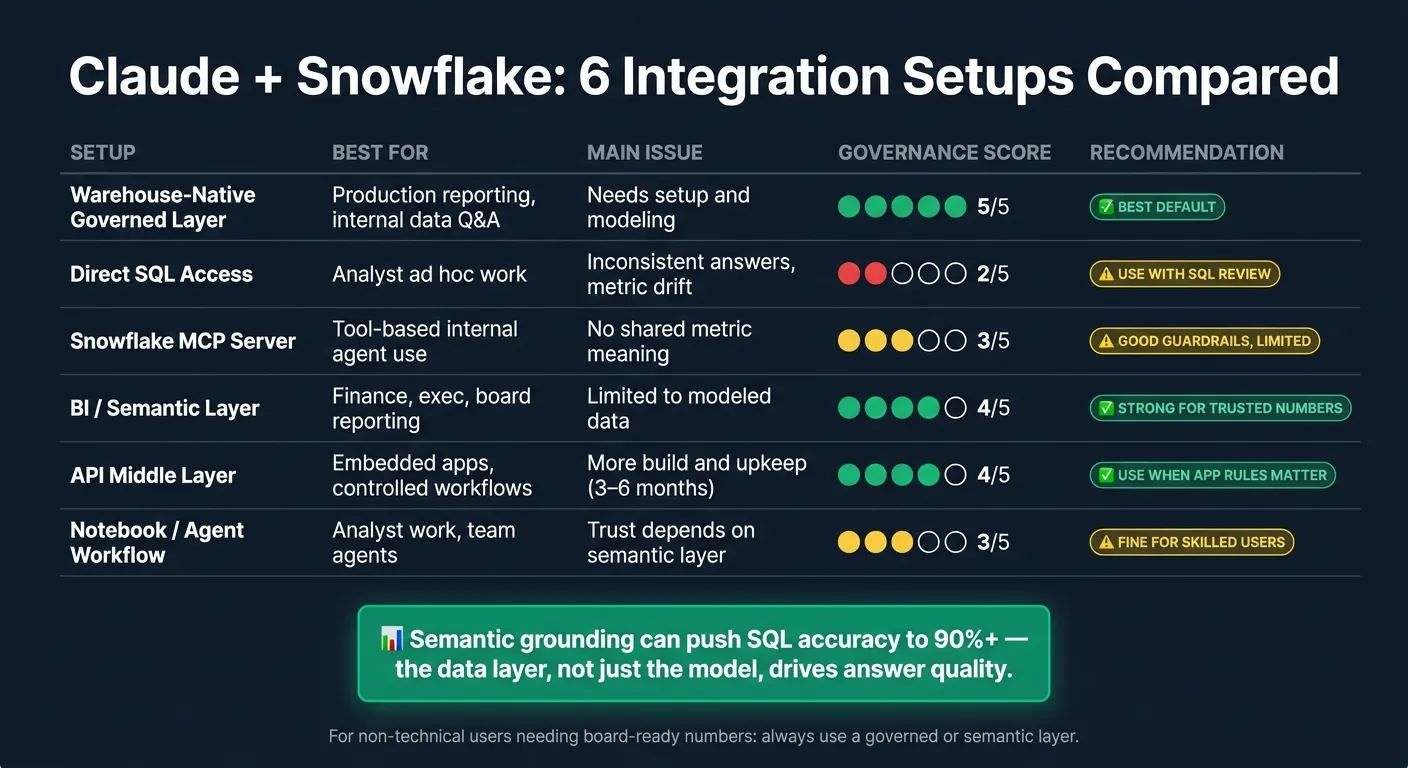 {Claude + Snowflake: 6 Integration Setups Compared}
:::
{Claude + Snowflake: 6 Integration Setups Compared}
:::
Claude Code + Snowflake: The Productivity Game-Changer
::: @iframe https://www.youtube.com/embed/q1y7M5mZkkE :::
sbb-itb-284a532
Quick Comparison
| Setup | Best for | Main issue | My take |
|---|---|---|---|
| Warehouse-native governed layer | Production reporting, internal data Q&A | Needs setup and modeling | Best default |
| Direct SQL access | Analyst ad hoc work | Inconsistent answers | Use with SQL review |
| Snowflake MCP server | Tool-based internal agent use | No shared metric meaning | Good guardrails, limited by context |
| BI / semantic layer | Finance, exec, board reporting | Limited to modeled data | Strong for trusted numbers |
| API middle layer | Embedded apps, controlled workflows | More build and upkeep | Use when app rules matter |
| Notebook / agent workflow | Analyst work, team agents | Trust depends on semantic layer | Fine for skilled users |
One stat stands out in the piece: semantic grounding can push SQL accuracy to 90%+ in some setups. That’s the clearest sign that the data layer - not just the model - drives whether answers hold up.
So if I were choosing fast: governed layer first, direct access only for low-risk analyst work, and semantic models anywhere numbers need to match official reports.
1. Warehouse-native governed layer with Claude via Querio
Querio keeps Claude inside Snowflake’s permissions and metric definitions, which makes it the safest setup for production use. It performs best on least-privilege access, shared metric definitions, upkeep, and answer consistency.
Permission control
Querio sits between Claude and Snowflake and enforces least-privilege access with approved query execution. It connects through a dedicated service user (QUERIO_SVC) and a least-privilege role (QUERIO_ROLE) limited to only the databases and schemas your admin grants. Authentication uses RSA key-pair auth instead of a password, and GRANT SELECT ON FUTURE TABLES keeps access current as new tables are added. [2]
Semantic governance
Access control answers who can see what. The semantic layer answers what the numbers mean.
"Point Claude at your warehouse and ask 'what was revenue last quarter.' Ask again tomorrow. You'll get a different query, sometimes a different number... Querio defines revenue once in a semantic layer, governs it, and every answer uses the same definition." - Querio [1]
Querio stores approved metric definitions, join paths, and trusted queries in version-controlled SQL, Markdown, and Python alongside dbt. That means Claude uses the same metric definitions each time, instead of making a new guess on every prompt. [1]
Setup and maintenance
From an ops point of view, the initial setup is pretty straightforward: a service user, a least-privilege role, RSA key-pair auth, and Snowflake metadata sharing. [2] Once that’s in place, schema syncing keeps the context layer up to date as schemas change. That cuts down on upkeep compared with DIY API layers, which often need manual updates. [2] [4]
Production reliability
Every answer shows the SQL, so analysts can review and edit it before sharing. Querio also supports audit logs, SOC 2 Type II, and HIPAA compliance, with BAAs available. [4]
If you skip a governed layer, the next path is the thinnest one: direct SQL access from Claude to Snowflake.
2. Direct SQL access from Claude to Snowflake
Direct SQL connects Claude straight to Snowflake through a least-privilege service role. It's the fastest path, but it works best when technical users can check the SQL Claude produces.
Permission control
The security basics are strong if you set things up the right way. A dedicated service user, a scoped role with only USAGE and SELECT grants, RSA key-pair auth, and SELECT ON FUTURE TABLES will get you most of the way there. Snowflake row-level security and column-level masking still apply, so sensitive fields can stay protected at the warehouse layer.
Semantic governance
This is where direct SQL starts to show its limits. Unlike the governed layer above, direct SQL removes the semantic contract and leaves Claude to figure things out from the raw schema.
That's the main weakness in production: direct access has no shared semantic layer, so Claude can generate different SQL - and different answers - for the same question as schemas change. It can read tables, sure. But it can't infer your business definitions. And on enterprise schemas, that gap gets bigger fast, because business context usually isn't spelled out in table names.
Setup and maintenance
Initial setup is fast. The ongoing work comes from keeping prompts, SQL, and access rules in sync as schemas, views, and business logic change.
Production reliability
Use direct SQL for ad hoc analysis by technical users who can review the SQL. Do not use it for governed reporting or broad self-serve analytics.
If Claude needs to work through Snowflake instead of connecting to it directly, the next option is the MCP route.
3. Snowflake MCP server connection for Claude
MCP sits between Claude and Snowflake as a tool layer. It exposes scoped actions like list_tables and execute_sql, so Claude doesn’t need broad warehouse access. That gives you more control than raw SQL, but it still falls short of a true semantic layer.
Permission control
MCP is safer than direct SQL for a simple reason: it limits what Claude can do. Tools can be scoped, access can default to read-only, and you can set row limits and timeouts. A smart way to start is small. Give access to one or two non-sensitive tables, check that joins and filters behave the way you expect, and only then open things up further.
Semantic governance
This is where the line gets clear. MCP controls access. It does not define business meaning. If you don’t have approved business definitions in place, Claude still has to guess based on table and column names. And when that happens, the same question can lead to different answers.
Setup and maintenance
The setup is lighter than building out a full semantic layer, but it’s not plug-and-play. You still need server config, tool scoping, and configured authentication. And when Snowflake schemas change, metric explanations and SQL can break [6].
Production reliability
MCP makes sense for technical users doing exploratory analysis who want guardrails without direct warehouse access. For company-wide reporting, though, it should not be the only governance layer.
If your team already uses a BI or semantic layer on Snowflake, that’s usually the next place to look. Teams with Looker, Hex, or another semantic layer should test Claude on top of that layer next.
4. BI or semantic layer connected to Snowflake with Claude on top
If MCP gives Claude tools, a semantic layer gives Claude business meaning.
When you place Claude on top of a BI or semantic layer like Looker, dbt Semantic Layer, ThoughtSpot, or Power BI models, it works from approved business definitions instead of raw Snowflake tables and columns. That makes a big difference in how much you can trust the output.
Permission control
Snowflake roles and the BI layer’s access model still handle row-level and column-level security. So Claude only sees the data each user is allowed to see.
Semantic governance
This is where this setup shines.
When “revenue” is defined once in LookML or a dbt semantic model, Claude can return the same number that appears in a dashboard. There’s no guessing based on column names and no metric drift between what the AI says and what the CFO’s report shows. Snowflake’s Cortex Analyst, which pairs agentic AI with semantic models, reports strong SQL accuracy on real-world use cases. Teams can further validate these results using specific metrics to test text-to-SQL accuracy. That’s a useful signal for what good governance can deliver. [5]
The downside is scope. Tables that aren’t modeled are off-limits. But for governed reporting, that’s often the whole point. It stops Claude from pulling in random data and muddying the answer.
Setup and maintenance
The plain truth: setup takes time. Think weeks to months.
If you already have LookML or dbt semantics in place, adding Claude is fairly direct. If you’re starting from zero, you’ll need a modeling project first. A 30-day shadow period before a broader rollout is a smart move. [3]
Production reliability
For board-level reporting and company-wide metrics, this pattern is very dependable. Metrics stay centralized, auditable, and consistent.
The main thing that can go wrong is drift between AI answers and dashboard definitions. If those stay aligned, this setup tends to hold up well in production.
| Governance Dimension | How It Holds Up | Common Failure Point |
|---|---|---|
| Metric Definitions | Strong metric consistency | Drift between AI answers and static dashboards |
| Row-Level Security | Enforced through Snowflake roles and the BI layer | Claude bypassing governed access paths |
| Auditability | High via query logs and prompt history | Missing lineage for derived metrics |
| Semantic Context | Solid with a mature model | Limited to modeled data |
If Claude needs to answer questions that go past modeled data, the next option is an API middle layer.
5. API middle layer between Claude and Snowflake
An API middle layer sits between Claude and your Snowflake warehouse and acts like a controlled front door. Use this setup when Claude needs an approved app interface to Snowflake, not raw query access. It lands in the middle ground: more controlled than direct SQL, but more custom than BI-native governance.
Permission control
Use a dedicated service account, a least-privilege Snowflake role, and read-only access by default. One big upside over direct SQL is simple: the API layer can check and reject bad requests before Snowflake runs them.
Semantic governance
This is where the API middle layer does the heavy lifting. Unlike a BI or metrics layer vs semantic layer, this setup is built for custom business workflows, not only governed metrics. The layer can enforce approved inputs, validate requests, and control outputs before anything hits Snowflake.
Most failures happen because the schema gets read the wrong way, not because Claude can't handle language. A governed API layer gives you a place to catch those mistakes before they turn into a wrong answer.
Setup and maintenance
Treat this like a real product build, not a shortcut. Mid-sized implementations typically require 3 to 6 months of upfront investment [5]. If a team builds its own API layer, it also owns the UX, audit logs, governance surfaces, and every schema change that breaks something downstream [4].
If you already have governed dashboards in place, use this pattern only when you need custom app logic around Snowflake. Otherwise, you're signing up for extra work that may not pay off.
Production reliability
When it's maintained well, this pattern is highly reliable. A well-designed API layer gives you a place to enforce validation and query cost guardrails that raw Claude access doesn't have.
The tradeoff is pretty clear: more build time, more control.
| Dimension | API Middle Layer |
|---|---|
| Permission model | Dedicated service account, least-privilege role, read-only by default |
| Validation control | High - requests validated before warehouse execution |
| Setup time | Days to months, depending on whether you build or buy |
| Schema drift handling | Requires active maintenance |
| Query cost control | Can be enforced with validation rules |
If your use case is notebooks or autonomous agent workflows, the next setup is more flexible but harder to govern.
6. Notebook or agent platform workflow connected to Snowflake
If you need more flexibility than a plain API layer, notebook and agent workflows are the next step.
There are two common setups here:
-
Notebook workflows for analysts
-
Agent platforms for business users
Both connect to Snowflake. But they don't need the same guardrails.
Permission control
Notebook platforms usually inherit Snowflake permissions straight from the user's role. So the notebook can only see what that analyst is allowed to access. For technical users, that's often a good fit because they already know how the warehouse works.
Agent platforms tend to add tighter controls at the app layer. That can include row-level security, SSO, SCIM, and audit logs. That's a big deal when non-technical users need answers but shouldn't get broad warehouse access.
Semantic governance
A notebook or chat agent doesn't know what "active customer" means in your business unless you spell it out. The notebook or chat UI isn't the control point. The semantic layer and Snowflake roles are.
"Large Language Models (LLMs) often lack domain-specific schema understanding, leading to misinterpretations of user queries." - Google Cloud [6]
Snowflake's Cortex Analyst reaches 90%+ SQL accuracy when it's paired with a broad semantic model [5]. Without that grounding, notebook assistants and chat agents can still generate SQL that looks right at first glance. The problem is trust. It becomes much harder to know whether the answer is correct.
That's why a governed semantic layer such as dbt MetricFlow, LookML, or Querio's context layer is the biggest driver of whether teams trust the output.
Auditability
Notebook workflows are easier to inspect because the SQL and Python are right there in front of you.
Agent platforms are only easy to audit when they store query logs, role checks, and context history. If those controls aren't in place, tracing what happened gets messy fast.
Setup and maintenance
Notebook workflows can be up and running in days for a single analyst. But turning them into governed data apps for broader teams usually takes weeks of modeling work [5].
Agent platforms sit somewhere in the middle. Production rollouts usually take 4 to 6 weeks once you include the semantic layer and governance work [5][7].
Maintenance also grows with analyst headcount, because a technical person still has to curate each app.
Production reliability
A practical rollout pattern is a 30-day shadow period. During that time, analysts validate every AI-generated answer before the agent goes live [3].
The table below shows the difference between analyst-led notebooks and user-facing agent workflows.
| Dimension | Notebook Platforms (e.g., Hex) | Agent Platforms (e.g., Bruin, Dot) |
|---|---|---|
| Primary user | Data analysts, engineers | Business users, ops, sales, CS |
| Interface | SQL/Python cells, data apps | Slack, Teams, chat |
| Permissions | Snowflake-inherited | RLS, SSO, SCIM, audit logs |
| Auditability | Easy to inspect in notebooks | Strong if logs and controls are in place |
| Setup time | Days to weeks | 4 to 6 weeks for production |
| Maintenance | High - analyst-led | Moderate - pipeline-led |
| Best for | Complex, multi-step analysis | High-volume ad hoc questions |
Pros, Cons, and Tradeoffs by Use Case
The right setup depends on who is asking the questions, how much control you need, and whether speed or trust matters more.
Some teams want answers fast. Others need tight control so every dashboard, report, and AI response lines up. That’s why there isn’t one setup that works for everyone.
For example, ad hoc analyst exploration needs room to move. Direct SQL and notebook workflows usually work best here because analysts can inspect the SQL or Python, test ideas, and iterate on the fly.
By contrast, governed business reporting needs a shared definition layer. That way, dashboards and Claude point to the same metrics instead of giving slightly different answers.
And internal AI data agents need a governed context layer. If joins, metric definitions, and trusted queries drift, the agent can go off the rails fast.
The table below maps each pattern to the job it fits best - and where it tends to fail.
| Setup Pattern | Main Pros | Main Cons | Best-Fit Use Case | Avoid If... |
|---|---|---|---|---|
| Warehouse-native governed layer (Querio) | Consistent definitions; respects row-level and column-level security; live warehouse connection | Requires initial semantic modeling effort | Governed business reporting | You have no existing data models or clean schemas |
| Direct SQL access | Fast to set up; no middle-layer costs | High risk of hallucinations; inconsistent numbers across sessions | Ad hoc analyst exploration | Non-technical users need reliable, board-ready reporting |
| Snowflake MCP server | Grounds Claude in company context; high reasoning capability | Requires MCP-compatible client | Internal AI data agents | You need a standalone, browser-based dashboard |
| BI / semantic layer (Looker, dbt) | High trust; reuses existing LookML/dbt definitions | Limited to pre-modeled data; high per-seat cost | Governed business reporting | You need to explore raw, unmapped data sources |
| API middle layer | Rapid deployment in one to two days; low technical barrier | Thin abstraction; breaks down when business terms vary by department | Simple, high-volume ad hoc questions | Business logic varies significantly by department |
| Notebook / agent platform (Hex, Bruin) | Reproducible; SQL is inspectable; handles complex multi-step logic | Can be overkill for simple KPI lookups | Ad hoc analyst exploration | You want a zero-interface, Slack-only experience |
Which Setup Should Your Team Choose
Most teams should pick a warehouse-native governed layer for production work and keep direct SQL or notebooks for technical exploration. The choice is pretty simple: who needs the answer, and what happens if the answer is wrong?
For governed business reporting - finance dashboards, executive summaries, and board metrics - use a semantic or governed layer. That’s the only setup that keeps metric definitions consistent across reports and AI responses. [1]
For ad hoc analyst work, a governed layer is still the safest default for self-serve reporting. Technical users can switch to direct SQL or notebooks when they need more speed and can check the output on their own.
For internal AI data agents, the governed layer is the safest bet. If join paths and metric definitions aren’t fixed in place, agents drift fast.
The matrix below shows where each setup fits best.
| Goal | Best Setup | Avoid |
|---|---|---|
| Ad hoc analysis | Warehouse-native governed layer | Direct SQL for non-technical users |
| Governed reporting | BI/semantic layer or Querio | Direct SQL for non-technical users |
| Embedded/API answers | API middle layer or Querio | Raw MCP without access controls |
| Internal AI agents | Warehouse-native governed layer with MCP | Direct SQL; no semantic context |
For production work, put governed definitions first. For analyst workflows, loosen controls only where the risk is low enough to live with.
The safest default for most teams - especially in B2B SaaS, healthcare, or finance with 100–500 employees - is a warehouse-native governed layer. It takes a bit more setup than direct access, but it holds up better as the team grows, the questions get tougher, and more people need answers they can trust.