Business Intelligence
Best python notebooks 2026
Enterprise Python notebooks pair reactive execution, AI assistance, and warehouse governance to bridge exploration and production.

Python notebooks in 2026 offer advanced tools for data analysis, AI integration, and collaboration. Here's a quick breakdown of the top options:
- Querio Notebooks: Focused on enterprise analytics with reactive execution, AI-assisted coding, and direct data warehouse connectivity. Includes built-in version control and governance tools. Best for large teams needing compliance and real-time collaboration.
- JupyterLab: Open-source and highly customizable, ideal for individual data scientists and researchers. Supports AI extensions, SQL Magic commands, and multi-file projects. Free to use but requires manual setup for governance and collaboration.
- Google Colab: AI-powered platform with tools like Gemini 2.5 Flash and Data Science Agent. Offers free and paid plans, making it accessible for learners and enterprise teams. Limited by session time and governance features.
- Hex: Combines SQL and Python with a reactive model for efficient workflows. Offers AI-powered agents, semantic layer integration, and interactive dashboards. Pricing tiers are flexible but may feel steep for smaller teams.
::: @figure 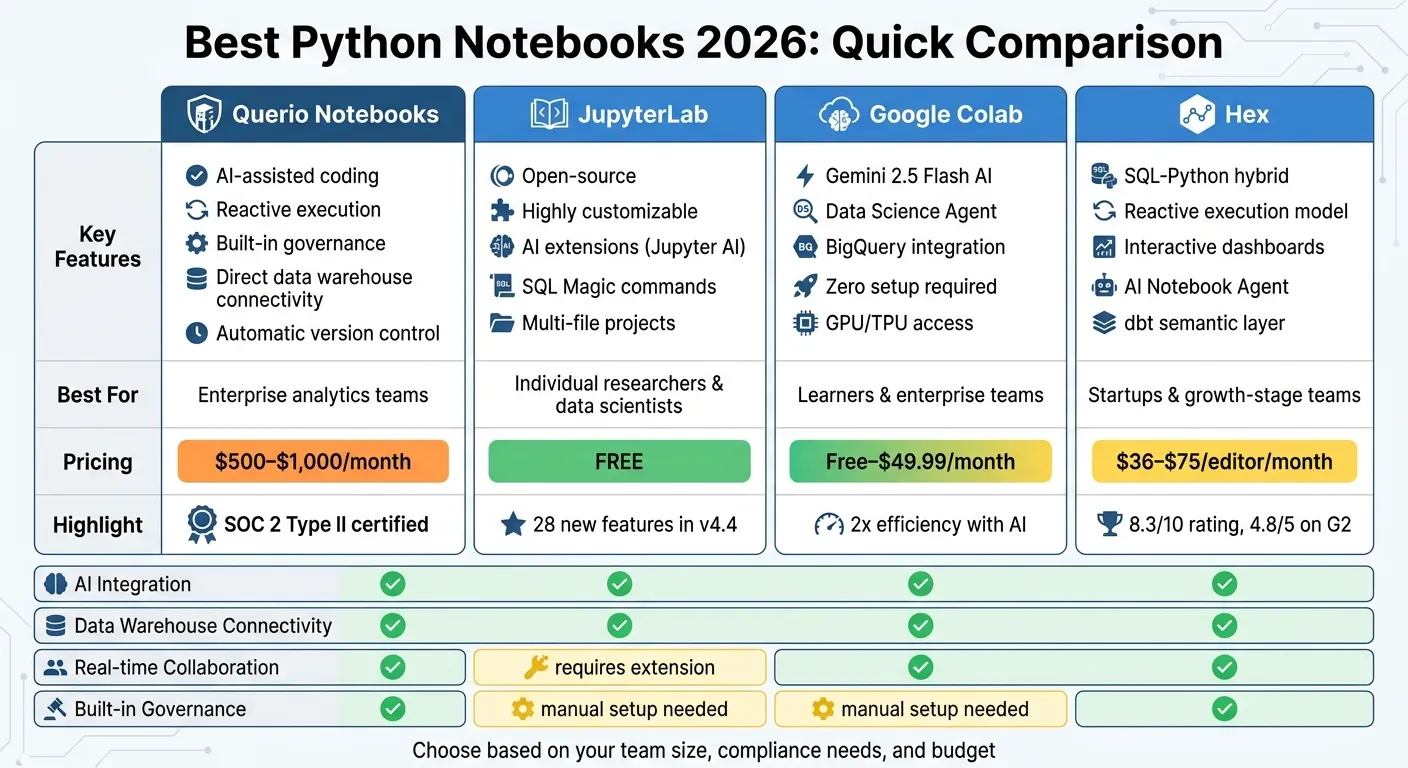 {Python Notebooks 2026: Feature and Pricing Comparison}
:::
{Python Notebooks 2026: Feature and Pricing Comparison}
:::
Meet Marimo, the next-gen Notebook - Sven Arends
::: @iframe https://www.youtube.com/embed/52xgoTVeuK4 :::
sbb-itb-284a532
Quick Comparison
| Platform | Key Features | Best For | Pricing |
|---|---|---|---|
| Querio | AI tools, reactive execution, built-in governance | Enterprise analytics teams | Free plan; Core $2,499/mo |
| JupyterLab | Open-source, customizable, AI extensions | Individual researchers | Free |
| Google Colab | AI-driven, integrates with Google Cloud | Learners and enterprise teams | Free–$49.99/month |
| Hex | SQL-Python hybrid, interactive dashboards | Startups, growth-stage teams | $36–$75/editor/month |
Each platform serves different needs. Querio excels in compliance and team collaboration, JupyterLab is perfect for those needing flexibility, Colab is great for quick experiments, and Hex bridges analytics with stakeholder-facing apps. This makes it easier to build dashboards for non-technical users.
1. Querio Notebooks
Querio Notebooks offers a powerful solution for enterprise analytics, designed to go beyond the limitations of traditional Jupyter notebooks. It combines reactive notebook execution with direct data warehouse connectivity, enabling teams to access data quickly and efficiently. Unlike standard notebooks that rely on manual version control via Git, Querio includes built-in version history with automatic tracking of changes. This feature ensures that every analysis is both auditable and reproducible without requiring additional setup.
AI Integration
Querio integrates AI features to simplify and accelerate data exploration. With intelligent code suggestions and automated profiling, analysts can write Python code faster and detect patterns or anomalies with minimal effort. The platform's AI-assisted query generation transforms natural language questions into executable code, making it easier for users - even those with limited Python experience - to perform advanced analytics. This combination of AI tools and seamless data connectivity enhances productivity and simplifies complex workflows.
Data Warehouse Connectivity
Querio connects directly to major data warehouses like Snowflake, BigQuery, Amazon Redshift, ClickHouse, and PostgreSQL. Setting up these connections is straightforward, requiring only credential configuration instead of complex API setups. Analysts can query data directly from the warehouse without downloading large datasets, which improves performance and reduces storage needs. The platform supports both SQL and Python queries, allowing real-time analysis of live production data while maintaining strong security and governance.
Collaboration
The platform supports real-time collaboration, enabling multiple users to work on the same notebook simultaneously. Features like live cursor tracking and instant syncing make teamwork seamless. Inline comments and discussion threads tied to specific code cells reduce the need for external communication tools. Role-based access controls allow teams to manage who can view, edit, or execute notebooks, making it especially useful for distributed teams with structured workflows for code review and approvals. These collaboration tools, combined with governance features, ensure smooth and compliant teamwork.
Governance
Querio is built with compliance in mind, offering detailed audit logs that track all modifications, query executions, and data access with timestamps and user attribution. The platform also includes data lineage tracking, which maps the flow of data from its source to its final output. This is particularly important for industries like finance, healthcare, and pharmaceuticals, where compliance is critical. SOC 2 Type II certification ensures data encryption during transit and at rest, while granular access controls and data masking protect sensitive information in development environments.
Pricing
Querio has a free plan, and Core is $2,499 a month (or $25,000 a year billed annually). There is no per-seat pricing: every plan includes unlimited users and unlimited data connections, and notebooks are included on Free too. Plans differ in included AI credits (500 a month on Free, 10,000 on Core), and usage past them is billed per credit, with usage alerts and spending caps. Larger organizations can opt for Enterprise, with custom pricing, a custom AI credit allowance, single-tenant hosting, and on-call support.
Best For
Querio is designed for mid-to-large organizations with advanced analytics needs. It's particularly effective for cross-functional projects where business analysts, data scientists, and engineers collaborate in shared notebooks. The platform is also well-suited for scenarios requiring strict compliance, thanks to its detailed audit trails and data lineage tracking. By combining reactive execution, AI tools, and direct warehouse connectivity, Querio transforms the analytical workflow, making it an excellent choice for enterprises looking to move beyond the limitations of traditional Jupyter notebooks.
2. JupyterLab
JupyterLab remains the go-to free, open-source tool for Python notebook environments in 2026. It provides a full IDE-style workspace, complete with tabs, terminals, and a file browser. This makes it perfect for tackling multi-file projects and building intricate machine learning pipelines. Version 4.4, released in May 2025, introduced 28 new features, supported by contributions from 56 developers [1]. Let’s take a closer look at how these updates enhance what JupyterLab can do.
AI Integration
JupyterLab has embraced AI capabilities with the Jupyter AI extension, offering generative AI features through a built-in chat interface and the %%ai magic command. Version 3.0 supports a wide range of large language models (LLMs) from providers like OpenAI, Anthropic, Gemini, and Hugging Face [5]. API keys can be managed directly in the Jupyternaut settings menu [3]. On top of that, the platform includes Language Server Protocol (LSP) support, which provides advanced coding assistance like autocomplete and hover documentation [4]. For resource-heavy tasks, the kernel subshells feature allows concurrent execution while monitoring GPU memory independently - a major boost for performance [1].
Data Warehouse Connectivity
JupyterLab makes working with data warehouses easier than ever. SQL Magic commands, such as %%sm_sql or %%read_sql, simplify data access. The platform also supports PySpark in batch mode, enabling it to process massive datasets - up to 1 billion rows (around 1.05 TB) - in just 18 minutes [6][7]. When handling large-scale data, switching from interactive to batch mode helps avoid memory issues and driver crashes, ensuring smoother workflows.
Collaboration
Real-time collaboration is now possible with the jupyter-collaboration package, allowing multiple users to work on notebooks simultaneously and engage in discussions [5]. The Content Providers API (v4.4) further improves third-party extension compatibility by eliminating the need for drive prefixes [1]. However, teams looking for built-in governance tools or automatic version control may find the manual setup process a bit restrictive.
Pricing
As an open-source platform, JupyterLab is entirely free to use [2]. Cloud-integrated versions - available through services like Amazon SageMaker or Google Cloud AI Platform - do come with costs tied to the underlying compute and storage resources. However, the core software remains free.
Best For
JupyterLab is ideal for individual data scientists and researchers who need a highly customizable environment and are comfortable managing their own infrastructure. It shines when it comes to handling complex machine learning pipelines and multi-file projects, especially for users who value deep integration with extensions. As the Deepnote Blog highlights:
JupyterLab has effectively become the extension-first interface. If you care about integrations - git, LSP, AI tooling - Lab is where development energy is going [4].
That said, teams requiring built-in governance, automatic version control, or seamless collaboration features may find JupyterLab's manual setup and limited enterprise options less appealing.
3. Google Colab
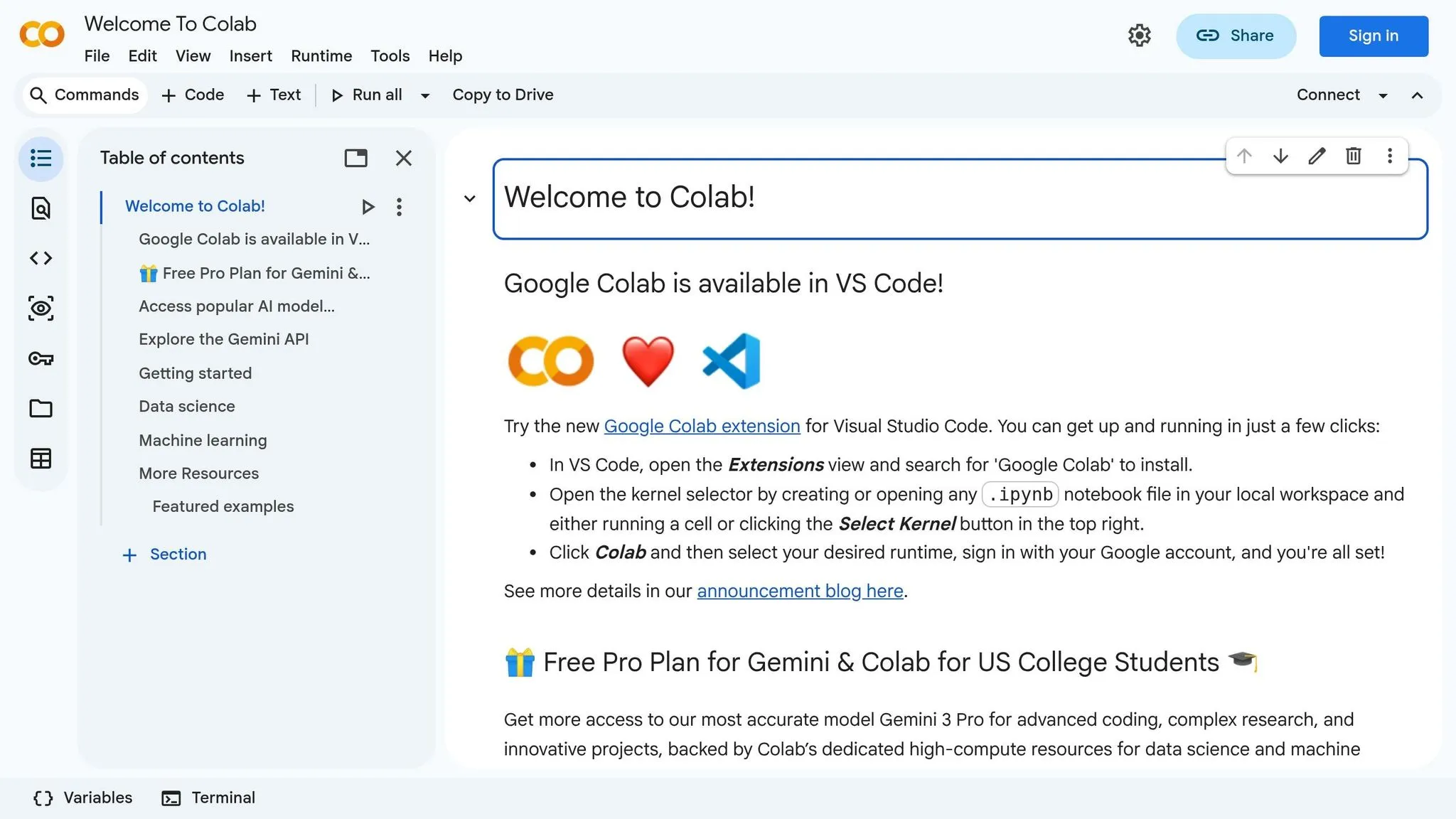
Google Colab has evolved into an AI-focused platform powered by Gemini 2.5 Flash, transforming the way data analytics is approached. Acting as a smart assistant, it can interpret your code, understand your goals, and assist throughout your entire notebook workflow[8]. In March 2025, Google introduced the Data Science Agent (DSA), which automates analytical workflows by planning tasks, executing code, and presenting results with minimal user input[8][9]. Internal research at Google revealed that integrating Gemini led to over double the efficiency for Colab users[8]. These advancements position Colab as a standout option among other notebook platforms, delivering an AI-driven experience.
AI Integration
Colab's AI features go far beyond simple code suggestions. By communicating with the AI, users can create labeled charts and visualizations quickly and easily. The diff view feature allows real-time review and acceptance of code suggestions or transformations[8][9]. For more complex analytical tasks, the side panel chat enables users to engage in detailed discussions with the AI, refining workflows interactively. This conversational approach can condense hours of work into a streamlined process[9].
Data Warehouse Connectivity
Colab Enterprise connects effortlessly with BigQuery and the broader Google Cloud ecosystem. You can execute SQL queries that incorporate Python variables, and the pre-configured BigQuery DataFrames API makes it simple to work with massive datasets using familiar tools like pandas and scikit-learn. This eliminates the need to transfer data out of the warehouse. For enterprise-level teams, Dataform offers versioned code management at scale, ensuring secure and efficient workflows.
Collaboration
With standard Colab, sharing is straightforward through Google Drive, complete with preset access controls. Colab Enterprise enhances this experience by offering centralized workspaces protected by Identity and Access Management (IAM). This ensures secure, team-based analytics projects. The platform's AI capabilities further boost collaboration by acting as an additional team member, providing real-time feedback during automated workflows. These features position Colab as a key player in the expanding field of modern AI-driven analytics tools.
Pricing
| Plan | Key Features | Best For |
|---|---|---|
| Free | No setup required, limited GPU/TPU access | Individual learners and students |
| Colab Pro | More compute power, faster accelerators, extra memory | Active data scientists |
| Colab Pro+ | Maximum compute resources, up to 24-hour background execution | High-demand BI workflows |
| Colab Enterprise | Scalable cloud computing, Vertex AI integration, IAM security | Enterprise teams |
Best For
Google Colab is ideal for teams working within the Google Cloud ecosystem, offering a zero-setup environment accessible from any device. Its AI-driven design provides automated analytical support and natural language-to-visualization functionality, aligning perfectly with the needs of modern business intelligence workflows.
4. Hex
Hex uses a graph-based, reactive model that automatically tracks cell dependencies, ensuring analyses are both efficient and easy to replicate. In 2026, the platform scored an 8.3/10 from industry reviewers for its seamless integration of SQL and Python capabilities[10]. Hex represents the next step in the evolution of notebooks by combining reactive execution with a wide range of tool integrations.
AI Integration
Hex includes an AI Notebook Agent that can generate SQL and Python code, create visualizations, and debug errors directly within cells. Its Threads interface allows users to ask data-related questions in natural language, whether through the web or tools like Slack. Another standout feature is the Context Studio, which acts as an observability layer where data teams can manage metadata, semantic models, and rules that guide the AI. Hex also supports the Model Context Protocol (MCP), enabling users to start data threads from external AI tools. By integrating with dbt's semantic layer, Hex ensures governed metrics provide consistent and accurate results[10].
Data Warehouse Connectivity
Hex connects directly to popular data warehouses like Snowflake, BigQuery, Redshift, Databricks, and PostgreSQL, as well as dbt. All connections are read-only, ensuring data security while providing direct access to enterprise data sources[12].
Collaboration
Hex offers real-time, collaborative editing with Git-style version control, including branching, merging, and rollback options. With a 4.8/5 rating on G2 from over 250 reviews, users frequently highlight its collaborative notebook experience. For example, RevOps teams have reported reducing recurring analytics requests by 50% thanks to Hex's self-serve apps[10][12].
"Hex's Slack integration unlocked silos of data, in governed ways, increasing trusted answers and insights." – Brandon Rochon[11]
Analysts can also create interactive dashboards with user-friendly controls like dropdowns and date pickers, enabling stakeholders to explore data without needing access to the underlying code[10][12].
Governance
Hex includes enterprise-grade governance tools such as SSO/SAML, HIPAA compliance, audit logs, and embedded analytics. The platform is SOC 2 Type II compliant and provides role-based access control for both Team and Enterprise tiers[10][12].
Pricing
Hex's pricing structure is designed to accommodate teams of varying sizes and needs.
| Plan | Price | Key Features |
|---|---|---|
| Community | Free | 5 notebooks, small compute, standard data connections |
| Professional | $36/editor/month | Unlimited notebooks, 5 published apps, AI agent credits |
| Team | $75/editor/month | Unlimited apps, scheduled runs, semantic model agent |
| Enterprise | Custom | SSO, HIPAA compliance, audit logs, embedded analytics |
Stakeholders who only view dashboards and apps do not require paid seats. However, some users have noted that the price jump from the Professional to Team plan is significant. Additionally, Python library management can feel less refined compared to dedicated tools like Jupyter[10].
Best For
Hex is well-suited for startups and growth-stage teams looking for a unified workspace that combines SQL, Python, and interactive reporting. To ensure AI-generated insights are accurate, teams should define metrics within a semantic layer like dbt. From there, Hex's drag-and-drop App Builder can transform those insights into interactive dashboards for stakeholders, making it a powerful tool for modern, AI-driven workflows[10][12].
Advantages and Disadvantages
Each platform brings its own set of strengths and drawbacks, making them suited for different needs.
Querio Notebooks shines as an AI-focused analytics workspace, capable of turning plain English questions into reliable SQL and Python queries. Its live connection to data warehouses ensures accurate, reproducible analyses without duplicating data. On the other hand, JupyterLab is highly valued for its customization options and offline capabilities. As an open-source tool, it provides flexibility for data scientists who need specific library setups or work in isolated environments. However, it comes with the challenge of managing infrastructure and version control, which can be a hurdle for smaller teams lacking dedicated resources.
Google Colab stands out for its affordability, offering GPU-powered computing for $9.99/month [13]. This makes it ideal for quick experiments and learning. But its 12-hour session limit makes it less suitable for extended production workflows or enterprise analytics that demand strict governance. While its integration with Google Drive simplifies collaboration, the platform focuses more on fast prototyping than on structured, well-governed analytics.
Hex takes a different approach, blending interactive analysis with business applications. Its graph-based reactive model and drag-and-drop App Builder enable the creation of stakeholder-facing apps. Additional features like an AI-powered notebook agent and semantic layer integration support governed insights. However, its pricing structure may be a barrier for some growing teams.
These differences influence how teams transition from data exploration to production analytics. For those seeking maximum customization and offline functionality, JupyterLab is the go-to choice. If rapid prototyping is the priority, Google Colab fits the bill. Hex is ideal for teams that need SQL-Python hybrid workflows and user-friendly apps for stakeholders. But for those requiring governed, AI-driven analytics with live data connectivity, Querio Notebooks is uniquely positioned to meet those demands.
Conclusion
Picking the right Python notebook in 2026 means finding a platform that combines AI-driven analytics, strong data governance, and production-ready capabilities. Based on a detailed feature breakdown, Querio stands out for its smooth integration of AI business intelligence tools and its focus on reliable data governance.
While there are budget-friendly options available, Querio offers enterprise-level features that make it worth the investment. Its ability to connect directly to your data warehouse and translate plain English queries into precise SQL and Python code ensures every analysis is both transparent and reproducible. This approach addresses the common "it works on my machine" challenges often seen with traditional notebooks.
Some platforms focus on quick prototyping, but Querio shines in bridging the gap between exploration and production. Its reactive execution model, built-in version control, and detailed audit logs provide the reliability and oversight that enterprise teams need. Unlike other notebooks that require significant manual setup, Querio integrates AI and governance seamlessly, reducing errors and ensuring actionable insights.
For businesses looking for a fully integrated workflow that handles advanced analytics while maintaining governance, Querio delivers a complete solution. It combines SQL and Python functionality with features designed for collaboration, all within a platform tailored for modern business intelligence. By maintaining shared business logic across the analytics process, Querio ensures transparency and control - key elements for AI-powered decision-making.
For teams prioritizing accuracy, governance, and live data connectivity, Querio Notebooks offers the tools needed to redefine enterprise analytics in 2026. Its comprehensive feature set transforms how organizations leverage data to drive decisions.
FAQs
::: faq
What makes a notebook “reactive” in 2026?
A notebook in 2026 is labeled as reactive when it can automatically re-execute dependent cells whenever changes are made. This ensures outputs stay consistent. The process relies on a reactive execution model, which typically uses a directed acyclic graph (DAG) to determine the correct execution order and avoid issues with hidden states. :::
::: faq
How does Querio handle governance and compliance?
Querio prioritizes transparency and accountability to support governance and compliance efforts. By providing features such as inspectable SQL and Python code, along with secure connections to leading data warehouses, it ensures that data governance standards are upheld with ease and reliability. :::
::: faq
Can Querio query live warehouse data without exports?
Querio allows users to access live warehouse data directly, without the need for exports. It converts plain English queries into SQL or Python, offering real-time data access while maintaining clarity for analytics and informed decision-making. :::