Business Intelligence
The Benefits of AI Analytics for Data Teams
AI analytics automates data cleaning, anomaly detection, and NLQ, enforces semantic layers, and speeds workflows to improve accuracy and enable self-service.

AI analytics is transforming how data teams work by automating tedious tasks like data cleaning, query writing, and transformation. This shift allows analysts to focus on discovering patterns, solving problems, and driving decisions. Here’s what you need to know:
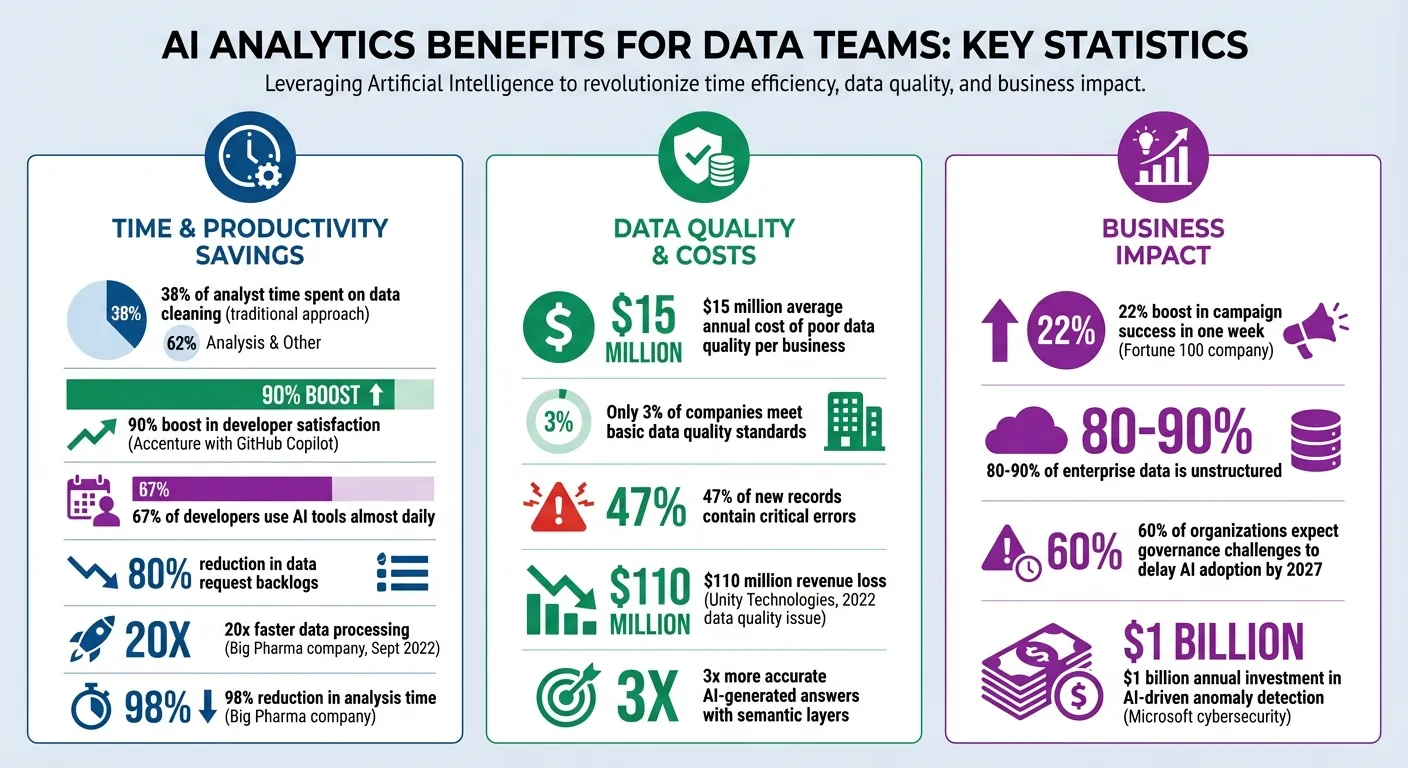
- Time Savings: Analysts spend 38% of their time cleaning data. AI reduces this by automating workflows.
- Accessibility: Non-technical users can ask questions in plain English and get instant answers.
- Improved Accuracy: AI detects errors and anomalies that manual processes often miss.
- Predictive Power: AI speeds up forecasting and suggests actionable strategies.
- Collaboration: Shared semantic layers ensure teams work with consistent, reliable data.
AI analytics doesn’t just save time - it makes data insights faster, smarter, and more accessible to everyone. Whether it's real-time dashboards, anomaly detection, or natural language queries, these tools are reshaping how organizations approach data-driven decisions.
How AI Analytics Speeds Up Data Workflows
AI analytics is changing the way data workflows operate by turning time-consuming manual tasks into automated processes, making decision-making faster and more efficient.
The real challenge in data analytics isn't the lack of data itself. It's the repetitive, manual tasks required to process and prepare that data. AI steps in by automating these tasks, freeing up time and resources.
Automated Data Cleaning and Transformation
Traditional data pipelines are fragile. A simple change, like renaming a field from "cust_id" to "customer_identifier", can disrupt the entire workflow. Fixing this requires manually updating code, testing, and redeploying. AI-powered ETL platforms solve this by using machine learning to dynamically map schemas. Instead of relying solely on metadata, they analyze the actual content, recognizing that different field names might mean the same thing [5].
Tools such as dbt Copilot and Gemini in BigQuery take automation further. They allow analysts to create SQL transformations and regex patterns using natural language, eliminating the need to write code from scratch [1]. For example, Accenture’s integration of GitHub Copilot led to a 90% boost in developer satisfaction, with 67% of developers using the tool almost daily [1]. Kathryn Chubb from dbt Labs highlights this benefit:
"Effectively deployed, AI-enhanced data transformation workflows can dramatically reduce the time spent writing, documenting, and reviewing code" [1].
AI also handles unstructured data - like documents, images, and free-text fields - which accounts for 80-90% of enterprise data [5]. While traditional ETL tools often struggle with these formats, AI extracts structured information automatically. Additionally, some systems feature self-healing pipelines that adjust to schema changes without manual intervention [2].
These improvements in data pipelines pave the way for faster predictive insights.
Simplified Predictive Modeling
In the past, predictive modeling required extensive preparation. Now, AI can condense this process into minutes or even seconds [3]. Tasks like data collection, cleaning, and normalization are automated, allowing analysts to focus on interpreting results instead of preparing data [6].
Modern AI tools do more than just predict outcomes - they suggest actionable steps. For instance, they might recommend strategies to address a forecasted sales decline [4]. AI can also predict and address potential slowdowns or spikes in data pipelines, rebalancing resources to avoid bottlenecks [2].
"AI for data analysis uses GenAI, agentic reasoning and unified open governance to deliver contextually accurate answers that understand your specific business and operations." - Databricks [4]
While AI speeds up forecasting and analysis, human oversight remains essential. Analysts validate AI-generated recommendations and incorporate business context, ensuring decisions are well-informed [4]. This collaboration between AI and human expertise combines the efficiency of automation with the nuanced judgment of professionals.
As predictive modeling becomes faster, AI also makes data more accessible to non-technical users.
Natural Language Querying for Non-Technical Users
For years, expert-level SQL skills have been a barrier for business users trying to access data. With natural language querying, this barrier is disappearing. A marketing manager can ask, "What were our top-performing campaigns in Q3?" and get an answer in seconds - no technical expertise required [8].
Modern AI assistants go beyond simple keyword searches. They understand context, recognizing business-specific terms like fiscal calendars, role-based metrics, or custom definitions (e.g., distinguishing between "enterprise customers" and "SMB customers") [4]. These tools even generate visualizations automatically based on queries [4].
This accessibility allows non-technical users to find answers independently, giving data teams more time to focus on complex, high-value tasks. Adding a structured semantic layer that defines business terms consistently can further enhance the accuracy of AI-generated answers, improving results by up to three times [1].
Improving Data Accuracy and Trust with AI
Speed means little if the data driving decisions is flawed. AI analytics tackles this issue by identifying errors and inconsistencies that manual processes often overlook, strengthening the reliability of insights. Accurate data forms the bedrock of the real-time analytics we’ve previously discussed.
Data quality problems are expensive - costing businesses an average of $15 million per year [13]. Shockingly, only 3% of companies meet basic data quality standards, while 47% of new records contain critical errors [13]. A stark example of this is Unity Technologies, which lost $110 million in revenue in 2022 due to a data quality issue [14].
The journey to trustworthy data starts with spotting anomalies early, which is where AI steps in.
AI-Driven Anomaly Detection
Traditional systems often rely on static thresholds that lack context. For instance, a drop in sales during a holiday might be perfectly normal, but the same dip on a regular Tuesday could signal a problem. AI overcomes this limitation by establishing a dynamic baseline of "normal" behavior based on historical data, then flagging deviations that matter [10][11].
AI systems can recognize three main types of anomalies:
- Point anomalies: Singular outliers, like a $1 million entry in a $100 transaction log.
- Contextual anomalies: Deviations that only stand out in specific conditions.
- Collective anomalies: Patterns that seem harmless individually but indicate issues when viewed together.
By analyzing multiple signals at once, AI can detect sudden changes that might otherwise go unnoticed [9][11][12].
Unsupervised learning adds another layer of capability, allowing AI to identify "unknown unknowns" and provide instant root cause analysis, speeding up resolutions [9][10][14]. For example, Microsoft invests over $1 billion annually in cybersecurity research, much of it focused on AI-driven anomaly detection to maintain service reliability [9].
"AI anomaly detection changes the process from a static set of statistical rules to a more flexible model trained to create a baseline for 'normal.'" - Michael Chen, Senior Writer, Oracle [10]
At the same time, experts like Kjell Carlsson from Domino Data Lab advise against over-cleaning data:
"Following an 80/20 approach often makes more sense - achieving substantial model value with minimal cleaning investment rather than pursuing perfection at exponential cost." [13]
Balancing automation with human oversight is crucial. Anomalies should be cross-verified across data sources, and domain experts should weigh in to separate noise from real risks [11][13].
Beyond detecting anomalies, ensuring consistent definitions across data sources is essential to build lasting trust in AI insights.
Governed Semantic Layers for Consistent Metrics
Even with clean data, inconsistent definitions can undermine trust. If the finance team calculates revenue differently than the sales team, decisions based on that data become unreliable. A governed semantic layer addresses this by standardizing definitions across all data sources, acting as a single source of truth [16].
This layer simplifies complex SQL and technical schemas into everyday business language, making data more accessible to non-technical users [4][16]. It also helps AI systems understand unique business terms and patterns. For example, when "revenue" is defined consistently across finance and sales dashboards, AI can deliver reliable insights organization-wide [4].
Structured metrics within a semantic layer have been shown to triple the accuracy of AI-generated answers [17]. Trevor Hall, Distinguished Engineer at Tableau, highlights the importance of this foundation:
"Your semantics are the brains behind your AI agents. Taking the time to curate and test for conflicts, correctness, and relevancy is paramount." [15]
Modern semantic layers also support "composable modeling", allowing teams to tailor global definitions to their specific needs without disrupting the overall consistency [15]. This approach is paving the way for "agentic analytics", where AI agents rely on semantic models to ensure their outputs are accurate and aligned with organizational policies [15]. The result? Faster, more informed decision-making without compromising control or precision.
Making Better Decisions with AI Insights
Accurate data and consistent definitions lay the foundation for insights that drive timely, informed decision-making.
When data is clean and reliable, AI can significantly speed up decision-making processes. Traditional analytics often delivers outdated information - by the time a report reaches stakeholders, market conditions might have already shifted. AI changes that by enabling near real-time analysis of vast datasets, uncovering patterns and trends as they happen [6]. This quick turnaround gives teams a clear advantage: they can respond to customer behaviors, operational challenges, or emerging market opportunities while they’re still relevant. AI doesn’t just answer “What happened?” - it tackles “What’s next?” and “What should we do about it?”, shifting teams from reactive fixes to proactive strategies [3][6].
Real-Time Dashboards and Reports
AI-powered dashboards keep stakeholders connected to the latest metrics without the need for manual updates. These live dashboards monitor data continuously, identifying trends or anomalies that periodic human-led reviews might miss [6]. For instance, if a key performance indicator (KPI) moves outside its expected range, decision-makers are alerted instantly, rather than discovering the issue in the next scheduled report.
The speed advantage is clear: AI can deliver insights in minutes - or even seconds - compared to the days or weeks traditional analytics might take [6]. Imagine sales leaders getting pipeline updates every Monday morning, finance teams receiving daily revenue summaries, or operations managers tracking supply chain metrics throughout the day. All of this happens seamlessly, pulling directly from live warehouse data, ensuring accuracy without the need for manual intervention.
Collaborative Notebooks for Deep Analysis
Building on these real-time insights, collaborative notebooks provide a space for deeper dives into data. When dashboards raise questions, these notebooks allow teams to dig in and explore further. They support SQL and Python analyses that automatically stay up-to-date as data or logic evolves. Unlike static reports, these notebooks adapt dynamically, reflecting any changes in metric definitions or new data inputs.
AI copilots within these environments handle repetitive tasks like cleaning and transforming data or training models [18][19]. This frees data scientists to focus on more strategic questions. AI can also test thousands of data combinations to uncover relationships that might escape manual analysis [6]. By combining human expertise with AI’s processing power, teams can move from questions to actionable insights much faster.
Human oversight remains critical to ensure that the insights generated align with business goals and ethical standards. This balance is essential, especially as governance challenges are expected to delay AI adoption for 60% of organizations by 2027 [7]. While AI excels at processing data and spotting patterns, humans bring creativity, judgment, and strategic perspective to the table [6].
Querio’s reactive notebooks are a good example of this collaboration. Someone asks a question in plain English, and Querio's agent answers with SQL and Python in a notebook your analysts can open, check and rerun. Every answer runs on live warehouse data and uses the same definitions as your scheduled reports and dashboards, because those definitions live as files in a git repo your team owns.
How AI Improves Collaboration Across Teams
One of the biggest hurdles to effective collaboration in data-driven organizations is the disconnect between data experts and business users. AI analytics bridges this divide by making data accessible to everyone, regardless of their technical skills. When business users can find answers on their own without relying on data teams - and when everyone uses the same definitions - collaboration becomes faster and more efficient.
Enabling Self-Service Analytics
With natural language queries, business users can ask questions in plain English and receive accurate answers without needing technical expertise [20][4]. Imagine a marketing manager typing, "What was our customer acquisition cost last month?" and instantly getting a precise answer. This eliminates the delay of waiting for a data analyst to craft a query.
The benefits are undeniable. In September 2022, a Top 5 Big Pharma company leveraged augmented analytics to process data 20 times faster and cut analysis time by 98% [21]. Similarly, a Fortune 100 company used AI analytics in 2022 to segment millions of customer records, boosting campaign success by 22% in just one week [21].
"With AI analytics, everybody is more productive: analysts can get help with their advanced analyses, and non-experts have a data-exploring assistant to guide them." – Tableau [3]
This self-service model doesn’t just speed up tasks - it transforms how data teams operate. Instead of being bogged down by repetitive report requests, data teams can focus on strategic work, like building semantic layers, creating governance frameworks, and conducting in-depth analyses that drive business growth [20][3]. Meanwhile, business users gain the independence to explore data on their own, creating a win-win scenario.
However, for this approach to succeed, it’s crucial to ensure that all teams work from a unified framework.
Shared Context for Consistent Insights
Self-service analytics works best when paired with a shared semantic or metrics layer that ensures all teams interpret data the same way. Without this shared context, departments might define key metrics - like "revenue" or "active users" - differently, leading to conflicting reports and undermining trust in the data.
When a semantic layer is implemented, AI-generated answers become three times more accurate because the system relies on structured, governed definitions instead of raw data [17]. This means every team - whether creating dashboards, running queries, or embedding analytics - uses a single, trusted source of truth. The result? No more debates over which numbers are correct.
Querio shows how this works in practice. Data teams define metrics and business terms once, as files in a git repo they own, and every analysis, dashboard and AI answer uses them. People in the app or Slack, and agents like Claude, ChatGPT, Claude Code and Cursor through Querio's MCP server and CLI, all answer from the same definitions. When an agent proposes a change to that context and a person saves it, that opens a pull request your reviewers approve, so the definitions everyone trusts don't drift.
Conclusion
AI analytics has become a game-changer for data teams looking for speed, precision, and better collaboration. By automating tasks like data cleaning and natural language querying in BI, AI allows teams to shift their focus to strategic initiatives that deliver measurable business outcomes.
AI-powered platforms can shrink the backlog of data requests[22]. This means data teams can spend less time on repetitive report requests and more time driving impactful projects, fundamentally changing how organizations use AI in data analytics to drive decision-making.
The real advantage of AI analytics is its ability to make data more accessible across the organization. Acting as a "co-analyst", AI takes care of routine tasks like data retrieval and preparation, leaving humans to focus on strategic thinking and creative problem-solving[4].
Take Querio, git-native analytics for data teams and their AI agents. Querio runs on live warehouse data and answers with SQL and Python code you can inspect. Its context and metric definitions are plain files in a git repo your team owns, so everyone, from finance teams to product managers to their AI agents, works from the same definitions. Agents do the work, and a person approves changes through pull requests.
Security is another cornerstone of Querio's design. It's SOC 2 Type II, HIPAA and GDPR compliant[22], and an agent only sees what its user may see, so you can open up data access without giving up control.
FAQs
How does AI analytics help improve the accuracy of data?
AI-powered analytics enhances data accuracy by automating essential tasks such as data profiling, quality checks, and anomaly detection. These automated processes catch and correct errors or inconsistencies early, preventing them from affecting critical decisions. By taking over manual data-cleaning tasks, AI not only reduces human error but also delivers more dependable datasets.
On top of that, AI tools simplify data preparation by handling repetitive tasks like cleansing and validation. This ensures the data is consistent, precise, and ready to generate actionable insights. The result? Cleaner, more reliable data that supports informed decisions and drives better business outcomes.
How does natural language querying improve AI analytics for data teams?
Natural language querying (NLQ) transforms how teams interact with data by letting them use plain English to ask questions and analyze information. This means you don’t need advanced technical know-how to explore trends, generate reports, or dive into data insights. Anyone on the team can jump in without waiting for help from data specialists.
By removing technical barriers, NLQ saves time, boosts productivity, and speeds up decision-making. It also encourages collaboration by making data accessible to everyone, regardless of their expertise, which helps build a stronger, data-focused culture. In short, NLQ streamlines workflows and enables businesses to make quicker, smarter decisions.
How does AI analytics improve teamwork and collaboration?
AI analytics simplifies teamwork by breaking down barriers to data access and understanding, making it easy for everyone - regardless of their technical background - to engage with insights. Features like natural language querying allow team members to ask questions in plain English. This means teams across departments, from marketing to finance to operations, can explore data and make decisions together without constantly turning to data specialists for help.
AI tools also enhance communication through features like automated insights and real-time dashboards. These tools spotlight key trends, flag anomalies, and offer forecasts, ensuring everyone stays aligned with the same information. By integrating these insights into the platforms teams already use, workflows become smoother, fostering a more collaborative and efficient work environment. The result? Faster, smarter decisions driven by shared, accessible data.