Business Intelligence
8 Best AI Data Analysis Tools in 2026 (For Every Use Case)
AI analytics tools must balance speed and governance; choose the platform that fits your data, skills, and compliance needs.

AI data analysis has reshaped how businesses make decisions. By 2026, these tools allow teams to analyze data faster and more efficiently, improving decision-making speed by up to 5x and operational efficiency by 75%. The eight tools listed below cater to various needs, from real-time insights to ad hoc analysis:
- Querio: Query live data warehouses in natural language with inspectable SQL/Python and strong governance.
- ChatGPT: Conversational analysis for uploaded datasets with Python-based interactive exploration.
- Julius AI: Quick data exploration with plain-English queries and visualization for non-technical users.
- Microsoft Copilot: Integrates AI into Microsoft 365 tools like Excel and Power BI for workflow analytics.
- Gemini: AI-driven insights within Google Workspace, with deep integration into BigQuery and Sheets.
- ThoughtSpot: Self-service BI with plain-English queries and anomaly detection across cloud warehouses.
- Domo: Unified platform for data pipelines, dashboards, and AI-powered workflows.
- Tableau: Advanced visual analytics with AI-assisted insights and strong compliance features.
Each tool is tailored for specific users and environments, from enterprise teams to individual analysts. Below is a quick comparison of their best use cases, data sources, and user types.
::: @figure 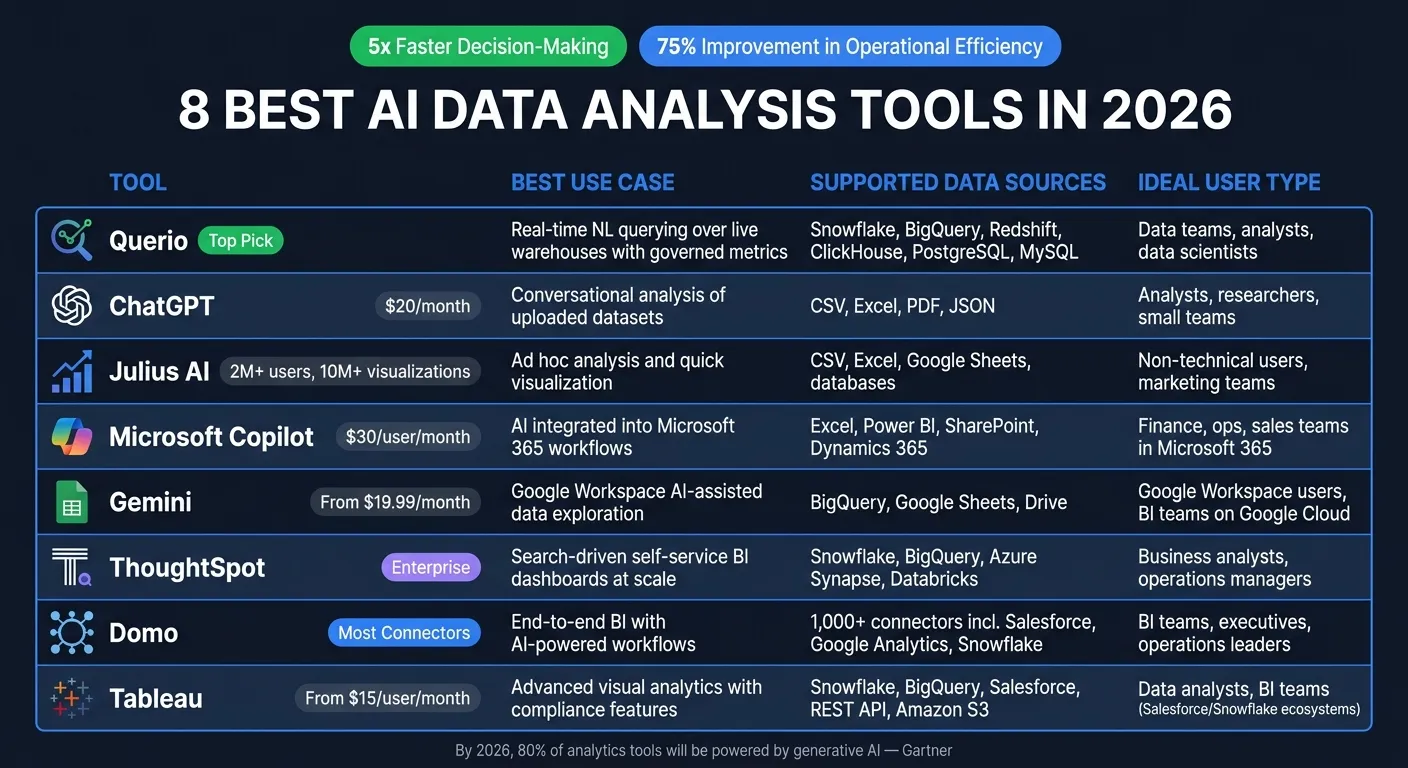 {8 Best AI Data Analysis Tools in 2026: Side-by-Side Comparison}
:::
{8 Best AI Data Analysis Tools in 2026: Side-by-Side Comparison}
:::
I Tested 53 AI Tools for Data Analysis - THESE 5 ARE THE BEST!
::: @iframe https://www.youtube.com/embed/RYTjU_x6fAQ :::
sbb-itb-284a532
Quick Comparison
| Tool | Best Use Case | Supported Data Sources | Ideal User Type |
|---|---|---|---|
| Querio | Real-time querying with governed metrics | Snowflake, BigQuery, Redshift, PostgreSQL, MySQL | Data teams, analysts, data scientists |
| ChatGPT | Exploratory data analysis of uploaded datasets | CSV, Excel, PDF, JSON | Analysts, researchers, small teams |
| Julius AI | Ad hoc analysis and visualization | CSV, Excel, Google Sheets, databases | Non-technical users, marketing teams |
| Microsoft Copilot | AI in Microsoft 365 workflows | Excel, Power BI, Dynamics 365, SharePoint | Teams using Microsoft 365 |
| Gemini | Google Workspace integration | BigQuery, Sheets, Drive | Google Workspace users |
| ThoughtSpot | Self-service dashboards at scale | Snowflake, BigQuery, Azure Synapse, Databricks | Business analysts, operations managers |
| Domo | End-to-end BI with AI-powered workflows | Salesforce, Snowflake, Google Analytics, CSV/Excel | BI teams, executives, operations leaders |
| Tableau | Visual analytics with compliance features | Salesforce, Snowflake, BigQuery, REST API | Data analysts, BI teams |
These tools simplify data analysis while addressing unique needs like transparency, governance, and integration. Choose the one that aligns with your team's skills, data environment, and security and compliance requirements.
1. Querio
Querio is an AI-powered analytics workspace built for teams that need fast and accurate insights from live data - without writing SQL. It connects directly to your data warehouse and translates plain-English questions into inspectable SQL or Python queries in just seconds.
With its live, warehouse-native connectivity, Querio ensures you're always working with real-time data. It integrates seamlessly with over nine data sources, including Snowflake, BigQuery, Amazon Redshift, ClickHouse, PostgreSQL, and MySQL. By using encrypted, read-only credentials, Querio eliminates the need for data duplication, extraction pipelines, or outdated snapshots.
One standout feature is its Context Layer, allowing teams to define business logic, metrics, and terminology once. This ensures consistent insights across all queries. For example, terms like monthly recurring revenue are understood and applied uniformly, cutting down ad-hoc reporting time by up to 80% [1].
Transparency and governance are central to Querio's design. Every response includes visible, editable SQL or Python code for engineering teams to review. The platform is SOC 2 Type II certified, supports role-based access controls and SSO, and ensures your data remains secure - it doesn't store or use your data to train AI models.
In 2025, Growdash Co-founder & CTO Enver Melih Sorkun replaced traditional BI tools with Querio, saving the company over $200,000 annually and significantly reducing reliance on manual analysis [2].
Querio is best suited for mid-sized to enterprise companies with modern data warehouses and increasing AI self-service analytics needs. Pricing starts at $680 per month (billed annually) for the Startup tier and scales to $3,517 per month for the Advanced tier, which includes cross-datasource querying and a dedicated EC2 instance. Most plans also offer unlimited viewers, making it a cost-effective choice as your team expands. Up next, discover another AI tool transforming how we analyze data.
2. ChatGPT
ChatGPT, developed by OpenAI, is a versatile AI assistant that doubles as a data analysis tool. Through its conversational interface, it can handle a wide range of analytical tasks, offering flexibility in data exploration and interpretation.
While its capabilities are broad, ChatGPT's data connectivity is somewhat limited compared to tools designed specifically for data warehouses. Users can upload up to 10 files, each up to 512 MB, in formats like CSV, Excel, PDF, and JSON. It also supports connections to platforms like Google Drive, OneDrive, and SharePoint [5]. However, it cannot directly connect to live data warehouses or make external API calls, so all data must be uploaded manually [5]. If datasets share identifiers, they are automatically merged for convenience [3].
On the analysis front, ChatGPT runs Python code within a stateful Jupyter-like environment [4]. This allows users to refine results and ask follow-up questions interactively. It handles a variety of analytical tasks, from calculating averages to conducting t-tests, ANOVA, and ARIMA time-series forecasting [3]. Visualizations are also supported, including bar, pie, scatter, and line charts, with customization options like hex color codes directly in the chat [3]. Results can be exported as CSV files or PNG images [3].
Transparency is a standout feature. Every analysis includes Python code with libraries like pandas and Matplotlib, allowing users to inspect the logic before making decisions [5]. For added security, Business and Enterprise plans offer SOC 2 Type 2 compliance, AES-256 encryption, SAML SSO, and HIPAA-compliant agreements. OpenAI ensures that data from these plans isn't used to train its models, and execution environments are automatically deleted after 13 hours of inactivity [5].
"ChatGPT is part of my toolkit for analyzing customer data, which has become too large and complex for Excel. It helps me sift through massive datasets, allowing me to conduct more data exploration on my own and reduce the time it takes to reach valuable insights." - David Vaughn, VP, The Carlyle Group [6]
ChatGPT is ideal for individual analysts, researchers, and small teams conducting exploratory or ad-hoc analyses on uploaded files. The Plus plan costs $20/month, making it an affordable option for solo users. However, it may not meet the needs of organizations requiring live data connections, consistent metrics, or robust governance across teams.
3. Julius AI
Julius AI is a conversational data analysis tool that makes it easy for non-technical users to get chart-ready answers in plain English. Since its launch in 2023, it has attracted over 2 million users and facilitated the creation of more than 10 million visualizations by mid-2025 [9].
One standout feature is its extensive data connectivity. Julius supports a variety of data sources, including popular file formats like CSV, Excel, JSON, Parquet, PDF, and even table images. It also connects to live databases and data warehouses such as Snowflake, Google BigQuery, PostgreSQL, MySQL, Microsoft SQL Server, MongoDB, and Amazon Redshift. Additionally, it integrates with cloud storage and productivity tools like Google Sheets, Google Drive, OneDrive, SharePoint, and Dropbox. However, live database connections are available only with the Pro plan, priced at $45/month [7]. This broad connectivity lays the foundation for its advanced analytical capabilities.
Julius comes equipped with a self-debugging loop that can write and execute Python or SQL code in a sandbox environment. It automatically resolves errors, ensuring smooth analysis [8]. The tool handles advanced statistical tests, including t-tests, ANOVA, regressions, K-means clustering, and time-series decomposition. It also offers over 40 interactive chart types, such as Sankey diagrams and geographic choropleth maps, powered by Plotly.
Users have shared positive experiences about its impact:
"Julius has replaced 80% of my ad hoc analytics requests. Our marketing team now self-serves most analyses that used to sit in a queue for days." - Head of Growth Analytics, Series B SaaS Company [7]
Julius prioritizes security and compliance. It is SOC 2 Type II certified and adheres to GDPR and TX-RAMP standards [10]. The platform ensures customer data is never used for training, with read-only connections secured by TLS 1.2+. Team and Business plans include admin controls, SSO, and customizable data retention policies. For transparency, every analysis displays the underlying Python or SQL code, allowing technical users to audit or export it to a Jupyter notebook.
Julius is an excellent choice for non-technical analysts, marketing managers, and researchers who need quick, ad hoc insights. However, it may not be the best fit for teams requiring scheduled dashboards or enterprise-level governance.
4. Microsoft Copilot
Microsoft Copilot is seamlessly integrated into the Microsoft 365 ecosystem, making it a natural choice for organizations already using tools like Teams, Excel, SharePoint, and Power BI. At its core is the Work IQ layer, which consolidates emails, files, meetings, and chats into a single, context-aware AI. This setup not only recognizes individual roles but also understands broader organizational data, allowing for smooth transitions between standard Microsoft tools and AI analytics platforms for advanced insights.
Data connectivity is one of Copilot's standout features. Using Microsoft Graph, it can access structured data from Dynamics 365 and Power Apps through Dataverse, as well as unstructured content stored in SharePoint and OneDrive. The Fabric IQ plugin enhances this by anchoring conversations directly in Power BI reports and semantic models. For external or sensitive live data, Federated Connectors utilize the Model Context Protocol (MCP), enabling real-time data access without traditional syncing. However, some advanced Fabric features require a paid F2 or P1 SKU [12][14].
On the analytical front, Copilot's code interpreter is a game-changer. It generates and executes Python code deterministically, ensuring results are reproducible. Microsoft explains:
"By using deterministic, reproducible computation, you can unlock trustworthy analysis inside agents instead of relying on large language model's inherent math and inference capabilities." [13]
In Excel, enabling Advanced Analysis mode creates a new sheet where Python code operates as refreshable cells, ideal for ongoing financial models or recurring reports. Looking ahead to 2026, the Agent Mode will take things further by allowing Copilot to autonomously perform multi-step workflows. Importantly, any write operation will still require explicit user approval [15]. These features enhance Copilot's analytical power, reflecting the future of data analytics through robust connectivity.
Governance is another area where Copilot shines. It automatically inherits existing Microsoft 365 permissions, sensitivity labels, and retention policies, reinforcing security and compliance protocols [11]. With Microsoft Purview, users gain access to auditing, eDiscovery, and Data Security Posture Management (DSPM) for AI interactions. Additionally, customer data is not used to train foundation models. For example, law firm DWF used Copilot's document analysis capabilities to cut down a seven-day contract review process to just seven hours [15].
Copilot is particularly well-suited for enterprise teams already embedded in the Microsoft ecosystem, such as data analysts working with Power BI, finance teams using Excel, or IT teams managing Fabric pipelines. However, for organizations outside the Microsoft stack, these integration benefits may not hold as much appeal. Additionally, the enterprise licensing fee of $30 per user/month [15] might be harder to justify for those not leveraging its full suite of features.
5. Gemini
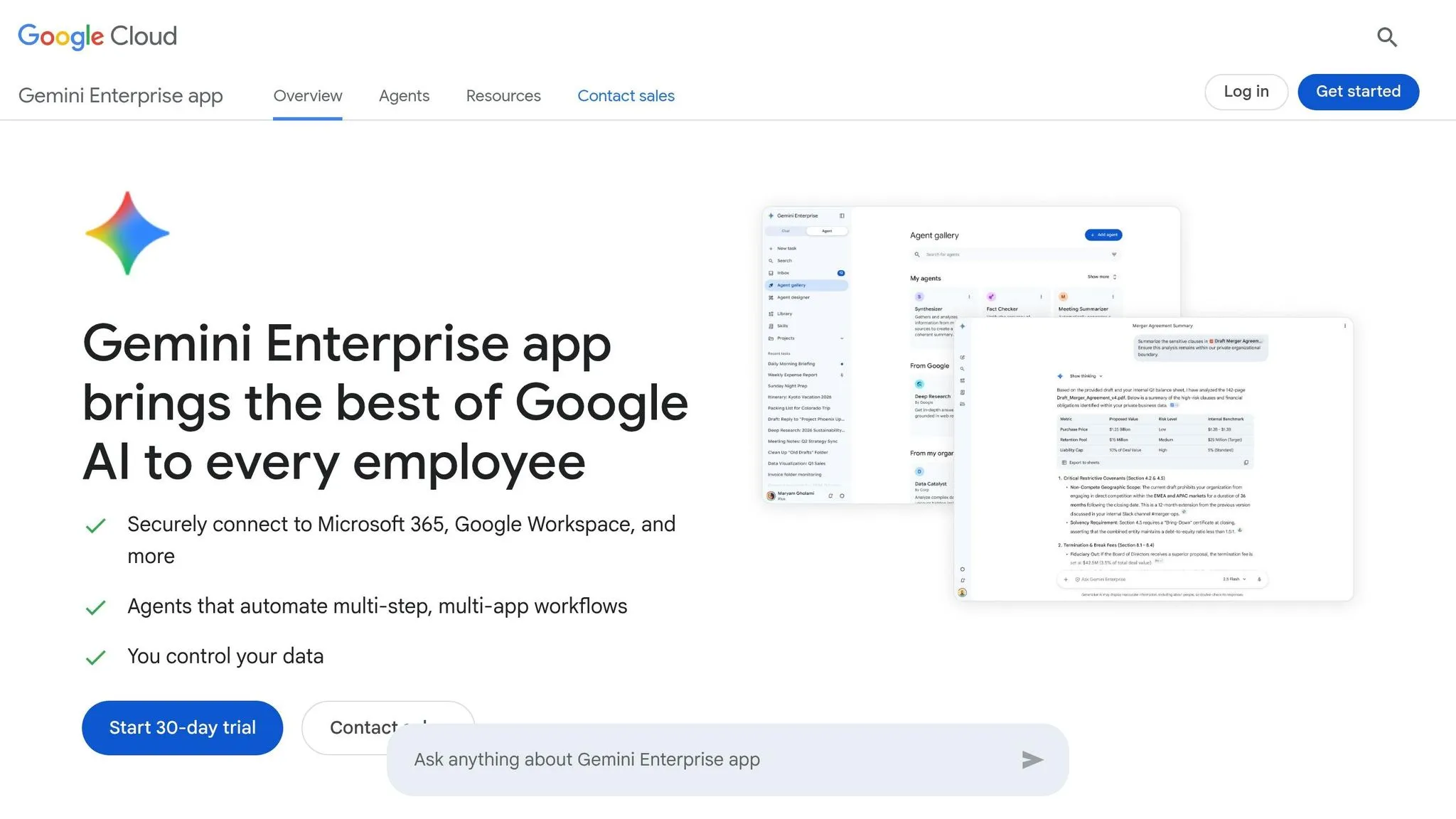
Google's Gemini is an excellent option for teams already working within the Google ecosystem. It seamlessly integrates with Google Sheets, BigQuery, Looker Studio, and Colab Enterprise, eliminating the need for third-party plugins. For external tools, Gemini Enterprise offers connectors to platforms like Salesforce, Jira Cloud, Slack, and HubSpot (currently in preview), making it versatile for accessing a broad range of business data sources. Additionally, Gemini supports multimodal inputs, allowing it to extract data directly from images or PDFs.
One standout feature is Gemini's BigQuery Data Canvas, which enables analysts to join datasets using plain English. The "Data Insights" feature further simplifies analysis by automatically identifying statistical patterns in table metadata - helpful when you're uncertain about where to begin. For more advanced tasks, Gemini can generate Python code, create ARIMA_PLUS forecasting models, and convert natural language into SQL. According to the 2026 GROWAI Practical Guide, Gemini 2.0 can cut down tasks like SQL writing, data cleaning, and chart creation from hours to just minutes [16].
However, Gemini's capabilities depend on access to up-to-date data. For sources outside the Google ecosystem, you might need a tool like Coupler.io to integrate external data into Gemini effectively.
Transparency and governance are key components of Gemini's design. The platform displays the underlying SQL or Python code and includes an "Explain this query" feature to help users understand complex logic. It also respects BigQuery's column-level access controls, ensuring users only see data they’re authorized to access. That said, there is a limitation: Gemini in BigQuery does not yet offer the same full compliance and security features as core BigQuery [18]. This could be a concern for organizations in highly regulated industries like finance or healthcare, so it's worth reviewing this issue before implementation.
Gemini is particularly well-suited for data analysts and business intelligence teams operating on Google Cloud. It integrates deeply with tools like BigQuery and Looker, streamlining workflows and reducing manual effort. However, for teams outside the Google ecosystem or those requiring complex, multi-step file transformations in a sandbox environment, other modern BI tools with AI capabilities might be more appropriate. Pricing starts at $19.99/month for Gemini Advanced (Google One AI Premium). More robust enterprise integrations require a Google Workspace Gemini add-on or a Gemini Enterprise subscription [16][17]. Up next, learn about another tool that pushes the boundaries of AI-driven analytics.
6. ThoughtSpot
ThoughtSpot is one of several warehouse-native data analysis tools that integrates seamlessly with platforms like Snowflake, Databricks, BigQuery, Redshift, and Azure Synapse, enabling quick, data-driven decision-making. Its SpotCache feature allows users to toggle between live or cached queries without compromising governance.
At the heart of its AI capabilities is Spotter 3, an AI reasoning agent that lets business users ask complex questions in plain English and receive answers from multiple data sources simultaneously - no need for SQL expertise. For more technical users, the platform’s Analyst Studio supports SQL, Python, and R. Additionally, the SpotIQ feature automatically identifies anomalies and patterns, making it especially helpful for tracking and managing multiple KPIs.
ThoughtSpot ensures robust security by inheriting row- and column-level permissions directly from your cloud data warehouse through OAuth live-query passthrough. This means any permissions set in tools like Snowflake or BigQuery are automatically applied. For industries with strict compliance standards, Virtual Private ThoughtSpot provides complete tenant isolation. The platform is also certified under SOC2 and ISO-27001, ensuring it meets rigorous security and privacy standards. These features combine to deliver advanced analytics while maintaining strong governance.
"Legacy BI requires a lot of technical resources, it's the antithesis of the AI revolution. ThoughtSpot gives business users the autonomy to manage their KPIs." - Jonathan Seppi, Group Manager Product Data Science, LegalZoom [19]
ThoughtSpot is ideal for mid-to-large enterprises with existing cloud data warehouses aiming to extend data access beyond their analytics teams. Pricing is flexible, offered on a per-user or per-query basis, and includes a free trial for ThoughtSpot Cloud. The next section will dive into another cutting-edge AI tool.
7. Domo
Domo stands out as a versatile AI-driven platform for data analysis, tailored to meet the varied needs of businesses. With its federated data capabilities, Domo connects seamlessly to multiple data sources, including Snowflake, BigQuery, and Redshift. This means you can query live data directly from these warehouses without needing to duplicate or migrate it. Essentially, your data stays right where it is but remains accessible across the platform. This feature forms the backbone of Domo's AI tools for data analysis.
On the AI front, Domo caters to a wide range of users. Business users can tap into AI Chat for natural language queries, while analysts benefit from Magic ETL, a no-code tool for automating data pipelines. For more technical users, Jupyter Workspaces enable Python and R-based model development. Developers have access to Domo MCP, which allows AI agents to trigger workflows and create assets programmatically. Additionally, Universal Models come pre-built for tasks like forecasting and sentiment analysis, making them accessible to general users.
| Feature | Functions | Best For |
|---|---|---|
| AI Chat | Natural language data exploration and visualization | Business users |
| Magic ETL | No-code data transformation and pipelines | Data analysts |
| Jupyter Workspaces | Python/R model building and data prep | Data scientists |
| Domo MCP | AI agents triggering workflows and building assets | App developers |
| Universal Models | Pre-built forecasting and sentiment analysis | General users |
Domo is particularly well-suited for mid-to-large organizations that need a unified platform capable of serving teams with varying technical expertise. Whether you're a non-technical business user or a data scientist, Domo offers tools that fit seamlessly into your workflow. Its ability to provide flexible, integrated access across different user groups makes it a strong choice for organizations looking for a cohesive analytics solution.
8. Tableau
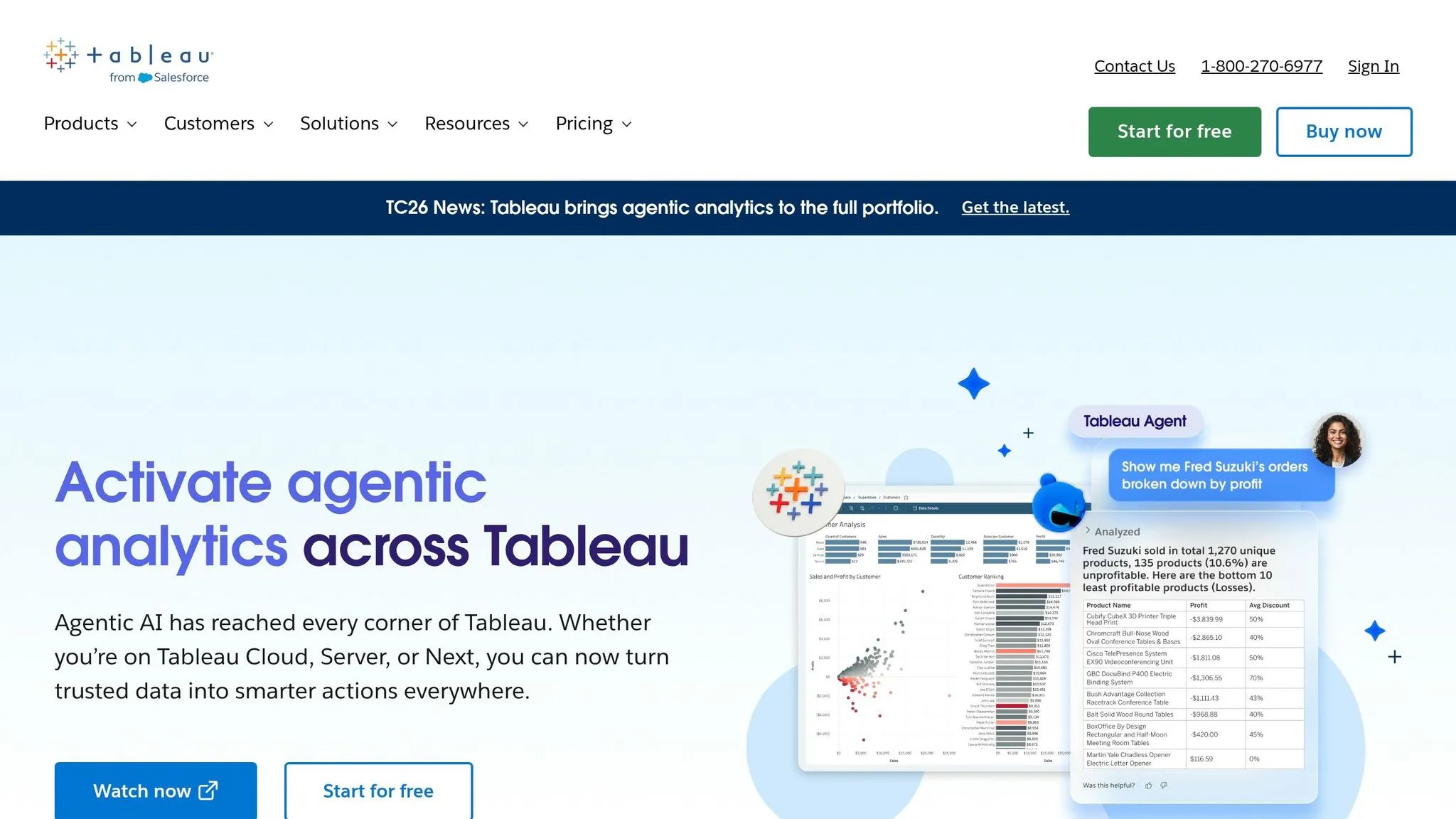
Tableau continues to push the boundaries of how AI is transforming data analytics by enhancing its connectivity and governance features. Known for its prowess in data visualization, Tableau has expanded its connectivity options significantly for 2026. Key updates include the REST API Connector, which replaces the Web Data Connector, and a native Google Looker Connector for accessing Looker’s governed data models. Other additions include an Amazon S3 Connector (Beta) for working directly with CSV and Parquet files, a Bring Your Own Connector (BYOC) pilot program for custom database drivers, and Mixed Geometry Support, which allows users to visualize spatial data - points, lines, and polygons - from a single column [20].
On the AI side, Tableau's Data Pro (Beta) uses natural language processing to map relationships in raw data and build structured semantic models. The platform is also making strides in analytics interoperability with Model Context Protocol (MCP) Servers, enabling its analytics engine to connect with custom AI agents. Additionally, Tableau Prep now supports in-database processing for Snowflake (Beta), cutting down on memory usage and speeding up processing for large datasets [20].
Security and governance remain top priorities for Tableau. Tableau Cloud employs the Einstein Trust Layer for features like PII masking, toxicity detection, and a zero-data retention policy. Meanwhile, Tableau Catalog provides essential tools such as data lineage tracking, impact analysis, quality warnings, and asset certifications to differentiate raw data from verified datasets. The platform meets compliance standards for HIPAA, PCI-DSS 4.0, SOX, and SOC, ensuring it aligns with strict organizational requirements [22][23][24][25]. Importantly, AI-generated outputs are based on metadata like field captions and data types, and any summaries sent to language models are discarded immediately after processing. As Tableau states:
"Trust is our #1 value, and we strive to make sure your data is secure while also creating experiences that are accurate and safe." [23]
For organizations that need both cutting-edge visualization and rigorous compliance, Tableau offers flexible pricing. Plans start at $15 per user/month for Viewers and $75 per user/month for Creators. Advanced AI features, such as Correlation Insights, are available through the Tableau+ edition [20][21]. Tableau remains a strong choice, particularly for businesses operating within the Salesforce and Snowflake ecosystems.
Comparison Table
Here's a quick overview of top AI data analysis tools, highlighting their best use cases, supported data sources, transparency features, and ideal users.
| Tool | Best Use Case | Supported Data Sources | Transparency Features | Ideal User Type |
|---|---|---|---|---|
| Querio | Natural-language querying over live warehouses with governed, reusable logic | Snowflake, BigQuery, Redshift, ClickHouse, PostgreSQL, MySQL, MariaDB, SQL Server | Provides inspectable SQL and Python for every answer, shared semantic/context layer, versioned logic, and SOC 2 Type II audit controls | Data teams, analysts, and data scientists working with modern warehouses |
| ChatGPT | Conversational analysis and interpretation of uploaded or exported datasets | CSV, Excel, PDF uploads; text-based data via chat; no native warehouse connections | Displays reasoning in chat and shows generated code in Code Interpreter, but lacks a persistent audit log | Analysts and knowledge workers needing help with data interpretation or drafting summaries |
| Julius AI | Ad hoc spreadsheet analysis, charting, and quick data exploration | CSV, Excel, Google Sheets uploads | Generates Python/R code with step-by-step explanations | Non-technical users and analysts conducting one-off data exploration |
| Microsoft Copilot | AI assistance integrated into Excel, Power BI, and Microsoft 365 workflows | Excel, SharePoint, OneDrive, Power BI datasets, Azure SQL, Dynamics 365 | Offers formula previews, natural-language explanations of Power BI visuals, and audit trails | Finance, operations, and sales teams already using Microsoft 365 |
| Gemini | AI-assisted data exploration and summarization within Google Workspace | Google Sheets, Docs, Drive; BigQuery (via Gemini in BigQuery) | Explains reasoning in chat, shows generated formulas, and surfaces SQL through BigQuery integration | Google Workspace users and analysts working in Sheets or BigQuery |
| ThoughtSpot | Search-driven, self-service BI dashboards at scale | Snowflake, BigQuery, Redshift, Azure Synapse, Databricks, Starburst, and other cloud warehouses | Includes AI-driven explanations with underlying query logic and data lineage tracking | Business analysts, operations managers, and BI teams needing self-serve dashboards |
| Domo | End-to-end cloud BI with AI-powered dashboards, data pipelines, and governance | 1,000+ connectors including Salesforce, HubSpot, Google Analytics, Snowflake, MySQL, CSV/Excel | Generates narrative summaries with data lineage tracking and strong access controls | BI teams, operations leaders, and executives in mid-market to enterprise organizations |
| Tableau | Advanced visual analytics and interactive dashboards with AI-assisted insights | Snowflake, BigQuery, Redshift, Salesforce, REST API Connector, Amazon S3 (Beta), Google Looker, CSV/Excel | Provides data lineage via Tableau Catalog, impact analysis, and robust compliance controls | Data analysts and BI teams creating rich dashboards, especially within Salesforce or Snowflake ecosystems |
This table highlights how different tools cater to varying needs, from live data warehouse connections to file-based analysis. Querio stands out with its real-time insights and unmatched transparency, offering fully inspectable SQL and Python code for every answer. On the other hand, tools like ChatGPT, Julius AI, Microsoft Copilot, and Gemini are better suited for environments centered around files, spreadsheets, or productivity platforms like Microsoft 365 and Google Workspace.
Querio sets itself apart by delivering confidence and control to data teams, ensuring every AI-generated answer is backed by transparent, governed logic.
Conclusion
There’s no one-size-fits-all solution when it comes to analytics. The best choice hinges on three things: where your data is stored, your team’s technical skills, and the level of governance you need. For teams prioritizing real-time data connectivity, governed metrics, and transparent logic, Querio emerges as a strong contender.
Whether your focus is quick file-based insights, seamless integration with existing tools, or a scalable platform with built-in governance, the right solution should fit your team’s expertise and your data environment.
According to Gartner, by 2026, 80% of analytics tools will be powered by generative AI, and 79% of enterprises are already exploring these innovations. This highlights the pressing need for solutions that combine speed with governance.
With Querio, teams benefit from fast, flexible exploration paired with analyst-grade dashboards that ensure consistent, trustworthy insights. It proves that speed and governance don’t have to be at odds - they can complement each other.
When evaluating tools, test them with real data and practical business scenarios. The ideal solution isn’t the one with the most features; it’s the one your team will trust and use confidently. By aligning your strategy with a platform like Querio, you position your team to gain insights that are both dependable and actionable.
FAQs
::: faq
How do I pick the right AI data analysis tool for my team?
To pick the best AI data analysis tool, consider your team’s size, data complexity, and budget. For mid-sized teams (5–50 users) that require precise, real-time access to live data sources such as Snowflake or BigQuery, Querio stands out. Its "glass box" design converts natural language into SQL or Python that you can inspect, giving you both control and auditability. Plus, its centralized semantic layer ensures metrics stay consistent. :::
::: faq
Can these tools query my live data warehouse without copying data?
Querio integrates seamlessly with your live data warehouse - whether you're using Snowflake, BigQuery, Amazon Redshift, Databricks, ClickHouse, or PostgreSQL. It delivers real-time insights by querying your data directly, without the hassle of copying or replicating it. By leveraging secure, encrypted, read-only credentials, Querio ensures your data stays in place, removing the need for ETL pipelines or duplicate storage. This approach keeps your analysis current while safeguarding sensitive information. :::
::: faq
What security and governance features should I require?
When selecting an AI data analysis platform, it's important to focus on a centralized semantic layer. This ensures your organization maintains consistent metrics and definitions, eliminating confusion and improving collaboration.
Security should never be an afterthought. Look for features like role-based access control (RBAC), row-level security, and column-level masking to safeguard sensitive data. Additionally, confirm the platform meets key compliance standards such as SOC 2 Type II, HIPAA, GDPR, and CCPA. Encryption for both data in transit and at rest is another must-have to keep your information secure.
For added transparency and protection, ensure the platform supports audit trails and enforces read-only connections to your data warehouse. These features help you maintain control and visibility over your data operations. :::