Business Intelligence
Omni Analytics vs querio BI tool features AI semantic layer
Compare Omni and Querio on AI semantic layers, governance, transparency, and UX to choose the right BI tool.

Choosing the right BI tool for AI-powered analytics comes down to governance, transparency, and user experience.
Omni Analytics and Querio both leverage AI semantic layers to simplify data access. Omni focuses on flexibility with a warehouse-native model and spreadsheet-like interfaces, while Querio emphasizes consistency with a shared context layer and transparent, inspectable SQL/Python outputs.
Key Highlights:
- Omni Analytics: Centralized semantic layer, AI-generated semantic queries, spreadsheet-style workbooks, Git-based version control, and strong governance.
- Querio: Shared context layer, plain-English queries converted to inspectable code, reactive notebooks, SOC 2 Type II compliance, and consistent metric definitions.
Querio is ideal for teams prioritizing unified definitions and transparency, while Omni suits those needing a mix of AI-driven insights and flexible exploration.
Quick Comparison:
| Feature | Omni Analytics | Querio |
|---|---|---|
| AI Output | Semantic queries (via semantic layer) | Inspectable SQL/Python code |
| Governance | Branch Mode, Git integration | Shared context layer, SOC 2 compliance |
| Primary Interface | Spreadsheet-style workbooks | Reactive notebooks, plain-English queries |
| Version Control | Git-based | Versioned by default |
| Security | Row-level security in semantic layer | Warehouse-level RLS, audit logs |
Verdict: Querio edges ahead with its transparent outputs and consistent logic, making it a strong choice for scaling analytics with confidence.
Overview of Omni Analytics
Omni Analytics simplifies data governance by centralizing it within its semantic layer. The platform's recent Series C funding, which valued the company at $1.5 billion [3][5], highlights its growing credibility in the market. It's designed for data teams seeking consistent, governed metrics while maintaining the freedom to explore data without constraints.
Core Features and Capabilities
Omni Analytics operates through three primary layers:
- Database: Handles raw data or integrates with dbt models.
- Shared Data Model: Provides governed metrics accessible across the organization.
- Workbook: A space for ad-hoc analysis and data exploration.
One of its key strengths is its just-in-time modeling, allowing analysts to experiment with data before committing to formalized metrics.
The platform’s AI capabilities extend beyond basic SQL generation. It can orchestrate multi-step analyses by leveraging existing tools and generates semantic queries rooted in the semantic layer. This ensures queries are accurate and contextually relevant, avoiding errors from misinterpreting raw table names [4].
Another standout feature is the integrated spreadsheet environment. Analysts can use familiar Excel-style formulas - like IF, VLOOKUP, and SUMIF - directly on live and governed data.
"It feels like Excel, but it's fully connected to our live data. We no longer have to download data in order to analyze it how we want to." - Laura Knipe, Staff Data Analyst, Sales & Finance [5]
Omni also offers seamless integration with dbt for model management and supports a wide range of data sources, including Snowflake, Google BigQuery, Databricks, Amazon Redshift, PostgreSQL, MySQL, ClickHouse, Trino, MotherDuck, and Microsoft SQL Server [6].
The platform’s commitment to governance ensures that all these features operate within a secure and controlled environment.
Governance and Security
Omni Analytics places a strong emphasis on governance at every level. Governed metrics remain consistent and secure, even when users interact with the platform’s AI query tools. Access controls are meticulously applied at the row, column, and field level, ensuring data security based on user attributes defined in the semantic layer. This level of control extends to AI chat interactions, maintaining strict compliance with access permissions.
The platform also incorporates Git integration for version control. Using Branch Mode, teams can test model updates in a sandbox environment before rolling them into production [6][2]. This feature is particularly beneficial for U.S.-based enterprises managing complex data setups across multiple departments.
When it comes to privacy, Omni Analytics enforces a no-training policy for external large language models (LLMs). Customer data is never used to train these models. For query generation, only metadata - like column names and limits - is shared with external systems. Full data results are transmitted only when users explicitly request summaries [3].
"Since data permissions and row-level filters live in the semantic layer, the proper security measures are enforced via user attributes on every query. Even when using AI, users only have access to the data they should." - Omni Analytics [3]
Overview of Querio
Querio takes the concept of a semantic layer and builds on it with an AI-driven analytics workspace. It’s designed to work seamlessly with modern cloud data warehouses like Snowflake, BigQuery, Amazon Redshift, ClickHouse, and PostgreSQL. By running live queries directly on these warehouses, Querio ensures analytics are always up-to-date, properly managed, and free from duplication.
AI-Powered Analytics Environment
At the heart of Querio is its semantic context layer, a shared catalog where data teams define and manage business concepts. Metrics such as Monthly Recurring Revenue (MRR), Net Revenue Retention (NRR), and churn rate are standardized with clear logic, ownership, and version history. This shared approach ensures that teams across finance, product, and marketing rely on the same trusted definitions, avoiding the discrepancies that often arise in executive discussions.
Querio's AI agents make querying data simple by converting plain-English requests into SQL or Python. For example, a product manager could type, “Show weekly new U.S. customers and average order value in USD for the last 90 days,” and receive a generated query they can inspect and refine. As Querio emphasizes:
"Every AI query is explicit code you can read or edit." [7]
This transparency is key. Analysts can review the generated code side-by-side with the results, ensuring the logic is sound before integrating it into reusable semantic objects or production reports. This process guarantees that teams across the organization work with consistent, verified metrics for informed decision-making.
Querio also features reactive notebooks that combine SQL, Python, visualizations, and narrative text within a single document. These notebooks automatically update dependent visualizations whenever a metric definition changes, eliminating the need for manual refreshes. This makes them ideal not only for exploratory analysis but also as semi-production tools that can be scheduled, shared, and embedded.
Support for U.S.-Based Teams
Querio is tailored for U.S. businesses, incorporating MM/DD/YYYY date formats, comma-separated thousands, decimal points, and USD currency formatting (e.g., $1,250.75). Scheduling and date rollups are aligned with U.S. time zones, from Pacific to Eastern, ensuring metrics reflect actual business hours.
For enterprise-grade security, Querio meets SOC 2 Type II compliance standards, with rigorous controls over access management, change tracking, monitoring, and incident response. It supports integrations with SSO providers like Okta and Azure AD, role-based access controls, and audit logs for both user and AI activity. Since Querio queries data directly from the warehouse, existing security policies - such as row-level security and data masking - remain intact, eliminating the need for additional permission models.
This governance-first approach is particularly valuable for U.S. mid-market and enterprise organizations preparing for audits, fundraising rounds, or IPOs, offering a streamlined and reliable framework for managing data securely [8][9]. These capabilities set the stage for a deeper dive into AI semantic tools in the upcoming section.
AI Semantic Layer: Feature Comparison
::: @figure 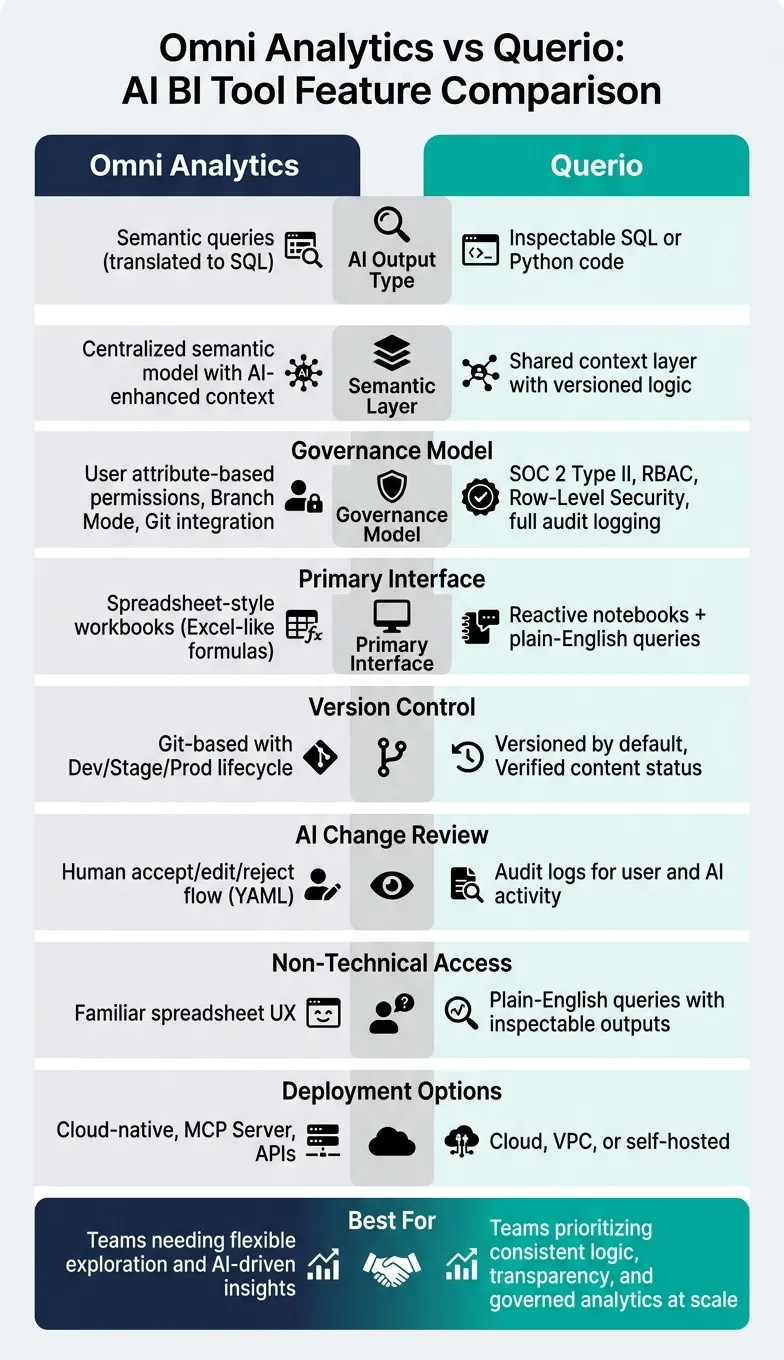 {Omni Analytics vs Querio: AI BI Tool Feature Comparison}
:::
{Omni Analytics vs Querio: AI BI Tool Feature Comparison}
:::
The semantic layer is where these platforms make their boldest architectural moves. The way each platform designs this layer, integrates AI, and enforces governance reveals a lot about their intended user base and priorities.
Semantic Layer Design and Usability
Both platforms use their semantic layers to enhance how users interact with data, but they take different approaches. Omni Analytics organizes its semantic layer as a central model that defines metrics, dimensions, joins, and access controls all in one place [10]. Instead of generating raw SQL, Omni's AI executes queries through this semantic layer. This design allows users to start with plain-English prompts and transition effortlessly to a point-and-click UI, SQL editor, or even spreadsheet-like formulas.
As Mike Doll, VP of Data, explains:
"Choosing Omni is solving for more than just BI. We've also primed ourselves to leap forward into AI because the semantic model is at the heart of the platform." [10]
Querio, on the other hand, employs a unified context layer. This approach eliminates ambiguity and ensures consistent definitions across all analytics activities. By defining metrics once, Querio delivers reliability and control in every data interaction [7].
AI-Driven Natural Language Querying
Omni's AI stands out by creating semantic queries instead of raw SQL. These queries are routed through the semantic layer, which translates them into SQL while applying row-level security and enforcing approved join paths [10]. This design minimizes errors by anchoring queries in certified definitions, mapping vague terms like "sales" or "retention" to their exact, pre-approved logic [1]. Omni also prevents common AI errors, like incorrect table joins, by enforcing grain rules [1].
In contrast, Querio's AI emphasizes transparency. It generates inspectable SQL or Python code that analysts can review and refine before execution [7]. This ensures users can validate every query, offering a clear advantage over systems with less visible query processes.
Governance and Control
Omni employs a structured governance framework. Data teams can experiment within "Branch mode", where they fine-tune AI context without affecting live models. Changes follow a clear progression through development, staging, and production environments, all managed with Git-based version control [1][6]. When the AI suggests updates to the model in YAML, a human must review and either accept, modify, or reject the changes via a "Learn from conversation" workflow [11]. This ensures no AI-driven changes go live without oversight.
Querio’s governance relies on its context layer to enforce consistency across all outputs. Verified boards highlight insights that have been reviewed by data teams, distinguishing them from ad hoc reports [7]. This approach gives business users confidence in the numbers they rely on. Together, these governance strategies streamline workflows and support better decision-making.
| Feature | Omni Analytics | Querio |
|---|---|---|
| AI Output Type | Semantic queries (translated to SQL) [10] | Inspectable SQL or Python code [7] |
| Control | ai_context fields, Branch mode [10] | Skills, Rules, versioned context layer [7] |
| Lifecycle | Dev/Stage/Prod + Git integration [1] | Versioned by default, Verified content status [7] |
| AI Change Review | Human accept/edit/reject flow (YAML) [11] | Audit logs for user and AI activity |
sbb-itb-284a532
Use Cases and Day-to-Day Workflows
An AI-driven semantic layer simplifies workflows, making both technical analysis and business decision-making more efficient.
Workflows for Data Teams
Data teams using Omni Analytics benefit from a unified environment that integrates AI prompts, point-and-click tools, and raw SQL access [10]. Here, Omni's AI functions like an automated analyst - planning multi-step analyses, checking assumptions, and validating results before delivering insights. Teams can further customize the AI by embedding specific instructions into the semantic layer. For instance, they can specify that a particular dataset should only be used for analyzing closed-won deals [10].
Querio, on the other hand, provides a reactive notebook where SQL and Python cells dynamically update whenever logic changes. By defining logic once in a shared context layer, this setup ensures that the same logic is applied consistently across notebooks, dashboards, and AI-generated answers. This approach can speed up reporting cycles by as much as 20× compared to traditional workflows [7].
These team-oriented workflows pave the way for smoother, self-service data interactions powered by a semantic layer.
Self-Service for Business Users
Building on team workflows, the self-service model puts more power directly in the hands of business users. For those less familiar with technical tools, Omni offers an interface resembling a spreadsheet, allowing users to interact with live data in a format they already understand.
Querio takes a different route, focusing on plain English queries for its self-service capabilities. Business users can type a question, and Querio’s AI translates it into inspectable SQL or Python, ensuring transparency and accuracy. Its Root Cause Analysis feature also breaks down metric shifts by factors like geography, product, or customer segment. This eliminates the back-and-forth between users and analysts, while the shared context layer maintains consistency across analyses.
| Capability | Omni Analytics | Querio |
|---|---|---|
| Primary Interface | Workbooks with spreadsheet-style formulas | Reactive notebooks + plain English queries |
| AI Interaction | Dashboard/Workbook agents | AI agents translating to inspectable SQL/Python |
| Ad Hoc Analysis | Point-and-click editor & spreadsheet formulas | Natural language queries & root cause analysis |
| Delivery | Slack, email, and data alerts | Slack, scheduled reports, and mobile push notifications |
| Non-Technical Access | Familiar spreadsheet UX | Plain-English queries with inspectable outputs |
Feature Breakdown and Recommendations
Side-by-Side Feature Comparison
Both platforms offer essential AI analytics capabilities, but Querio stands out with its shared context layer, delivering a level of transparency and consistency that's hard to match.
| Feature | Omni Analytics | Querio |
|---|---|---|
| Semantic Layer | integrated semantic model with AI-enhanced context | Shared context layer with versioned logic |
| AI Query Output | Semantic queries translated to SQL [10] | Transparent, editable SQL/Python [7] |
| Governance Model | User attribute–based permissions, Branch Mode | SOC 2 Type II, RBAC, RLS, full audit logging |
| Version Control | Git integration & Branch Mode [6] | Versioned logic maintained by data teams |
| Deployment Options | Cloud-native, MCP Server, APIs | Cloud, VPC, or self-hosted |
| Non-Technical Access | Spreadsheet-style workbooks | Plain-English queries with inspectable outputs |
| Reactive Workflows | Workbook-based, AI agent–assisted | Reactive notebooks that auto-sync on logic changes |
This comparison highlights the strengths of each platform, helping you determine which aligns with your operational goals.
Which Tool Fits Your Needs
Looking at the feature breakdown, Querio emerges as the better choice for teams that need a balance of strict control and user-friendly access.
Omni Analytics is a solid option for teams that prioritize flexibility. It allows analysts to move seamlessly between natural language queries, point-and-click tools, and raw SQL within the same workbook. Its automated semantic layer is particularly helpful for tackling complex analyses by reasoning through queries before presenting results. However, this automation can be less transparent for teams that require detailed verification at every step.
Querio, on the other hand, caters to organizations that demand consistent logic alongside self-service capabilities. Its shared context layer ensures that business definitions - like "Gross Revenue" - are applied uniformly across all analyses, from dashboards to AI-driven insights. This consistency simplifies data governance and provides inspectable, verifiable outputs that are crucial for making informed decisions. For U.S.-based teams aiming to scale analytics without additional headcount, this level of standardization offers a clear operational edge.
If your focus is combining engineering-level control with business-user accessibility, Querio delivers on both fronts. With SOC 2 Type II compliance, inspectable outputs, and plain-English querying, it effectively bridges the gap between technical rigor and ease of use. Its reactive notebooks are especially well-suited for handling high query volumes on top-tier cloud data warehouses.
Conclusion
Finding the right BI tool means choosing one that delivers reliable and transparent analytics every single day - and Querio does just that. While some platforms emphasize flexibility, they often sacrifice consistency by allowing mixed metric definitions. This can create confusion, especially when different teams interpret the same metrics in varying ways. Querio solves this problem by prioritizing governed analytics, ensuring uniformity and precision at scale.
Querio is designed to maintain centralized business logic, offering consistent and trustworthy analytics across the board. Its shared context layer ensures that metrics like "Gross Revenue" remain consistent across all outputs, eliminating discrepancies. Organizations using Querio have seen impressive results, including 20x faster reporting cycles [7] and data teams saving approximately 10 hours of analysis time per week per employee [10]. These efficiencies grow exponentially as team sizes increase.
For businesses looking to scale analytics without increasing headcount, Querio delivers unmatched accuracy and auditability. With its SOC 2 Type II compliance and a transparent AI output process, Querio sets itself apart as a reliable choice for scalable analytics. Features like inspectable SQL/Python outputs and plain-English querying make it easy to trust and verify the insights it provides.
If your team is ready to eliminate opaque AI outputs and disjointed data logic, Querio is the solution you've been waiting for.
FAQs
::: faq
How does Querio keep metrics consistent across teams?
Querio maintains consistent metrics by utilizing a centralized semantic layer, where all business rules, metric calculations, and data relationships are defined once and applied across the board. With governance tools like version control, role-based permissions, and audit trails, changes are managed systematically and automatically reflected everywhere. This approach eliminates discrepancies, avoids metric drift, and promotes teamwork by giving every team access to a single, reliable source of truth. :::
::: faq
Can I inspect and edit the SQL or Python that Querio generates?
Querio gives you the ability to inspect and review the SQL code it creates for every answer. Even better, you can directly edit the SQL within its interactive interface, giving you complete control over your queries and the results they produce. :::
::: faq
Does Querio work with my existing warehouse security and audits?
Querio works effortlessly with your data warehouse while adhering to your existing security and audit measures. It uses encrypted, read-only credentials and supports features like role-based permissions, row-level security, and audit logging. Designed to meet enterprise-grade standards, Querio complies with SOC 2 Type II, employs AES-256 encryption, and integrates with SSO and MFA for added protection. This setup ensures secure, real-time data access without the need for extra infrastructure or risking your security protocols. :::