Business Intelligence
ai native business intelligence tools
AI-native BI tools provide live data access, a governed semantic layer, and inspectable SQL/Python outputs for faster, accurate analytics.

AI-native business intelligence (BI) tools are transforming how organizations analyze data by integrating artificial intelligence directly into their core operations. Unlike traditional BI tools that rely on manual processes and rigid dashboards, AI-native platforms like Querio enable real-time, plain-English queries, ensuring faster, more accurate insights. Here's why they matter:
- Faster Insights: AI-native tools eliminate delays caused by manual SQL queries or report generation.
- Transparency: Users can inspect AI-generated SQL or Python code to verify results.
- Consistency: A semantic layer standardizes business logic across teams, reducing errors and ensuring reliable data.
- Live Data Access: Direct connections to data warehouses provide up-to-the-minute insights without relying on outdated extracts.
Querio stands out by offering a free plan and Core at $2,499 a month, with unlimited users on every plan, making it accessible for businesses needing scalable, efficient BI solutions.
Key takeaway: AI-native BI tools simplify analytics, empower non-technical users, and improve decision-making with speed, accuracy, and transparency.
Meet Golden Analytics, an AI-Native BI tool: With Francois Ajenstat
::: @iframe https://www.youtube.com/embed/Qgxu4UTUG6g :::
sbb-itb-284a532
Core Capabilities of AI-Native BI Tools
Querio builds on the benefits of AI-native BI by focusing on three key areas: handling plain English questions, maintaining consistent business logic, and connecting to live data. Each of these plays a crucial role in delivering faster, more reliable analytics for teams.
Natural Language Analytics and Querying
One standout feature of AI-native BI tools is the ability to ask questions in plain English and receive accurate, data-driven answers - no need for SQL expertise. However, not all natural language querying systems are equally accurate, and that difference can have serious implications when decisions hinge on the data provided.
What sets Querio apart is its inspectable output. When a plain-English question is converted into SQL or Python, the resulting code is fully visible to the user. This transparency allows teams to see exactly how an answer is generated, not just the answer itself. This approach fosters trust and ensures that results can always be verified. As one industry guideline suggests, users should leverage transparency features like SQL inspection to avoid relying on "confidently incorrect" AI outputs [1].
Semantic and Context Layers for Consistency
The reliability of a natural language interface depends heavily on the business logic supporting it. Without a clear framework, the same question can yield different answers depending on who asks - because terms like "revenue" might mean different things to different teams, such as finance and sales.
A semantic layer addresses this by standardizing metrics, joins, and terminology across the board. Querio’s shared context layer ensures that data teams define these rules once, and they’re applied consistently across all queries, dashboards, and AI-generated answers. This means irrelevant columns are hidden, field names are easy to understand, and every measure is clearly documented. These features help the AI better interpret what users are asking for [4].
"Trusted knowledge is what separates AI that looks good from AI that gets results." - Southard Jones, Chief Product Officer, Tableau [2]
By establishing consistent definitions, Querio makes real-time data interactions more dynamic and reliable.
Live Data Connectivity and Performance
Traditional BI tools often rely on scheduled data extractions, meaning dashboards can lag behind by hours or even days. In contrast, AI-native tools like Querio access live data directly, eliminating these delays.
Querio connects securely to major data sources without duplicating or extracting data. By blending in-memory processing with direct data access, it achieves both speed and flexibility [3]. This ensures operational teams have access to insights that reflect real-time conditions, not outdated snapshots. The result? Fast, accurate, and transparent analytics that meet the demands of modern BI.
Practical Use Cases for AI-Native BI Tools
Querio builds on its core features to deliver measurable benefits that improve business operations and streamline data workflows. Across industries, these tools are addressing challenges and creating meaningful solutions.
Self-Service Analytics for Business Teams
In many organizations, the real hurdle in analytics isn't the data itself - it's access to it. Non-technical users often have pressing questions but lack the technical skills, like SQL, to find the answers themselves. This creates a dependency on analysts, delaying decision-making. AI-native BI tools change that dynamic.
Querio's plain-English interface allows business users to bypass those delays. For example, a marketing manager can simply ask, "What were our top 5 revenue-generating campaigns last quarter?" and receive an accurate, SQL-backed response instantly - no analyst required. The shared context layer ensures consistency across the organization, so terms like "revenue" mean the same thing whether used by finance, sales, or marketing. Plus, every result is fully traceable back to its source, maintaining governance and trust.
"The BI tool that wins is the one that delivers insight without requiring users to open a dashboard." - Pradeep Kanaparthi, SVP of Product, Tableau [3]
This search-first, self-serve analytics approach is gaining traction. By 2026, platforms with natural language querying capabilities, like Querio, have seen strong enterprise adoption. These tools consistently deliver high accuracy, even for complex, multi-dimensional queries.
While these features empower business teams, they also enhance the efficiency of data teams by automating routine tasks and enabling better collaboration.
Accelerating Data Team Workflows
Self-service analytics doesn't eliminate the need for data teams - it frees them to focus on more strategic work. Querio automates repetitive tasks such as code generation, documentation, and anomaly detection, allowing analysts to dedicate their time to deeper insights and strategic initiatives.
Querio's reactive notebook environment is a game-changer for analysts. It allows them to write or generate SQL and Python, iterate in real time, and publish reusable logic for the entire organization. Because these notebooks are reactive, any changes to the logic automatically update downstream results. This eliminates manual rework and boosts efficiency across all reports and models.
The tool also takes care of time-consuming backend tasks. Automated metadata generation, semantic model suggestions, and cross-report discovery reduce the time analysts spend searching for datasets, letting them focus on interpreting and acting on the data instead.
Real-Time Reporting and Operational Insights
For industries like fintech, e-commerce, and logistics - where conditions change rapidly - static dashboards can be a liability. AI-native BI tools solve this problem by connecting directly to live data and identifying anomalies before they escalate.
Querio integrates seamlessly with data warehouses like Snowflake, BigQuery, and Amazon Redshift, ensuring teams always see up-to-the-minute data instead of outdated snapshots. This live connectivity, combined with AI-driven anomaly detection, allows operational teams to act on emerging issues in real time. Instead of taking hours to spot and respond to problems, organizations can now react within minutes. Scheduled reports also pull directly from live data, ensuring every insight reflects current conditions rather than relying on stale extracts.
Overview of Leading AI-Native BI Tools
In the world of business intelligence (BI), Querio emerges as a standout, being the only platform fully built with AI at its core. This overview highlights how Querio redefines AI-native analytics by offering fast, actionable insights with a clear focus on transparency.
Querio: AI-Native Analytics Workspace
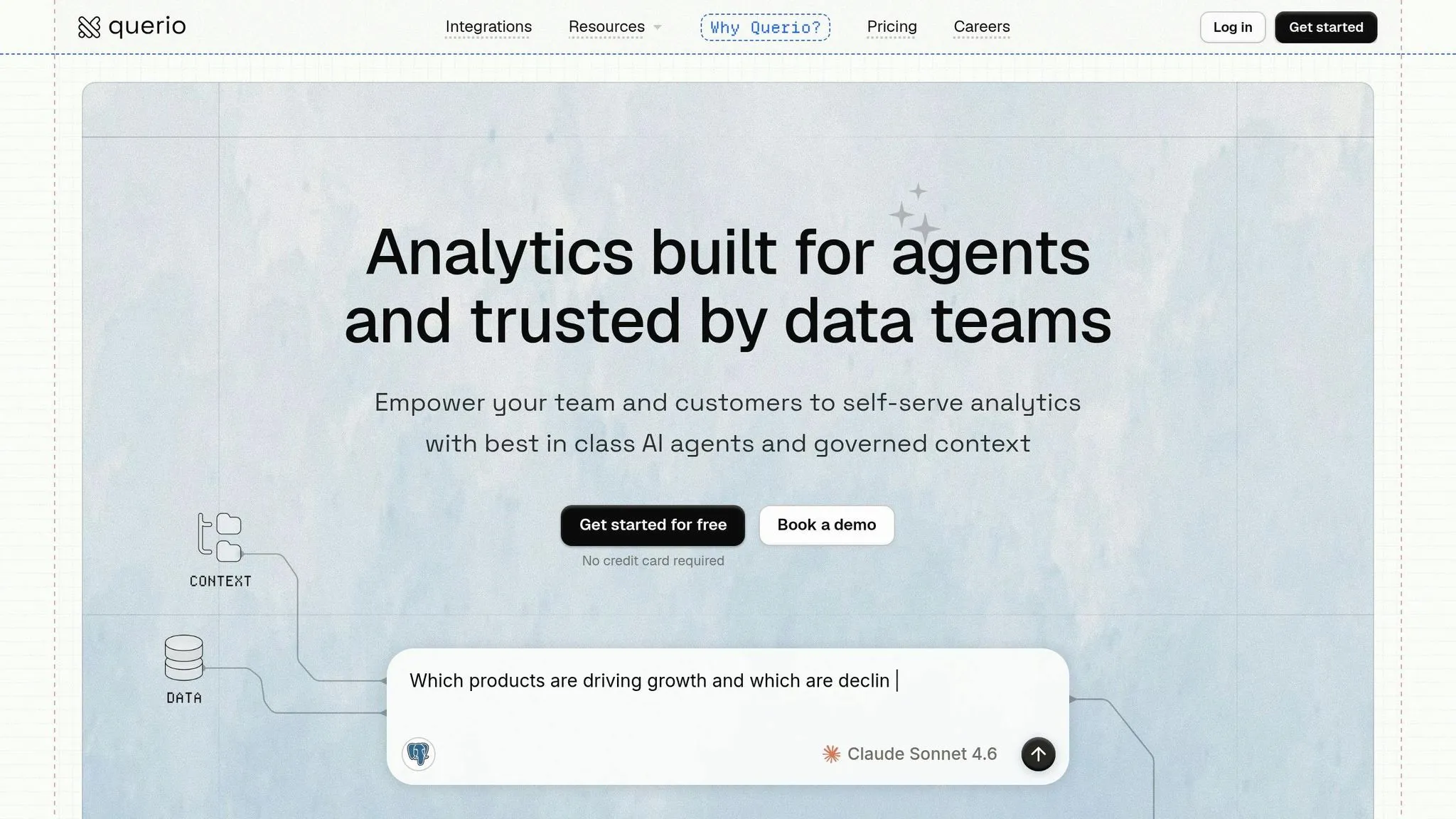
Querio takes a "glass box" approach by delivering answers backed by fully transparent, AI-generated SQL or Python code. This means every result can be reviewed, customized, or reused, ensuring trust and flexibility in the analytics process.
The platform directly connects to your data warehouse - whether it's Snowflake, BigQuery, Amazon Redshift, ClickHouse, PostgreSQL, MySQL, or others - without requiring ETL pipelines or duplicating data. Thanks to this zero-copy architecture and a centralized context layer that manages metric definitions, joins, and business terminology, Querio ensures accurate, consistent, and real-time results for all teams and reports.
Querio also keeps costs straightforward: a free plan, and Core at $2,499 a month (or $25,000 a year billed annually), with no seat limits. Each plan includes monthly AI credits, and admins can set a spending cap. This makes budgeting simpler while supporting unlimited users.
Implementation Guide for AI-Native BI
::: @figure 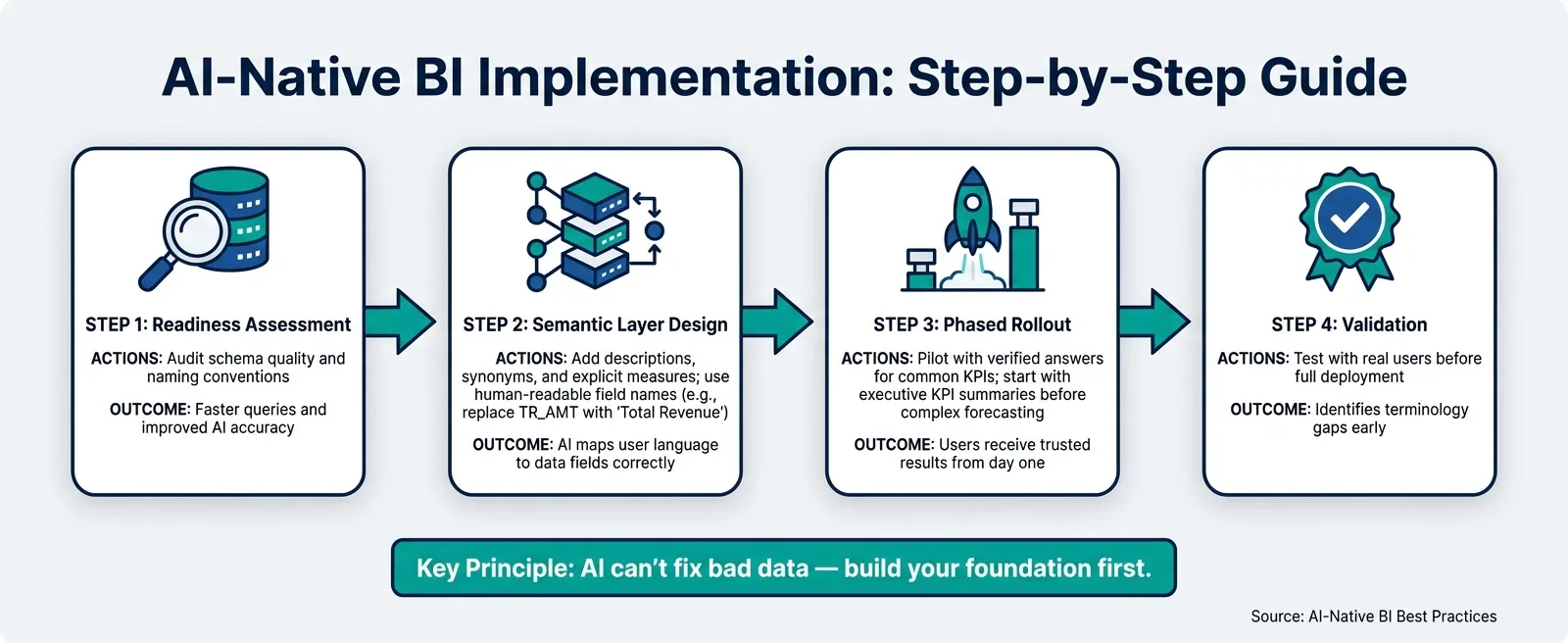 {AI-Native BI Implementation Guide: 4 Steps to Success}
:::
{AI-Native BI Implementation Guide: 4 Steps to Success}
:::
Getting the most out of AI-native BI isn’t just about picking the right tool - it’s about preparing the groundwork before you dive in. The sequence of steps you take is more important than many teams realize.
Assessing Readiness for AI-Native BI
Start by taking a hard look at your data foundation. AI can’t fix bad data - it will only produce incorrect answers faster and make them sound more convincing. Begin with a thorough audit of your data warehouse. Look for stale tables, inconsistent definitions, and unreliable refresh schedules. These issues will undermine any AI implementation.
Next, evaluate your semantic definitions (more on this in the following section). If business logic is being recreated in individual dashboards by different analysts, you’re setting yourself up for inconsistent AI outputs, no matter how advanced the tool is.
It’s also essential to map out who will use the tool. Will it be executives looking for quick summaries? Analysts who need deeper modeling capabilities? Or operational teams relying on real-time alerts? Your readiness plan should address the unique needs of each group.
Finally, focus on designing a structured semantic layer to ensure consistency in your business logic.
Designing a Governed Semantic Layer
A well-organized semantic layer is critical for reliable AI analytics. The goal is straightforward: define your business logic once so every query - whether generated by AI or typed by a user - pulls from the same consistent source.
Here’s how to do it:
- Use human-readable names for fields. Replace cryptic labels like
TR_AMTwith "Total Revenue" orProdIDwith "Product Name." - Write explicit SQL or DAX measures for every metric. AI tools often struggle with implicit aggregations, so clarity is key.
- Add metadata descriptions to your columns and tables. Pay special attention to the first 200 characters of each description, as these are crucial for helping the AI interpret the field’s purpose [5].
It’s just as important to remove unnecessary clutter. Hide fields like foreign keys, sort-order columns, or any technical data that doesn’t contribute to business analysis. Reducing irrelevant fields minimizes the chances of incorrect results. As Ruben Van de Voorde, Innovation Specialist at Tabular Editor, explains:
"Cleaning up naming conventions and filling in descriptions benefits analysts, developers, and future maintenance." - Ruben Van de Voorde [7]
Tools like Querio simplify this process by centralizing context. They allow you to define joins, metric definitions, and business terminology once, ensuring consistent application across queries, dashboards, and AI-generated answers.
Rolling Out AI-Native BI Across Teams
When it comes to deployment, phased rollouts are more effective than launching everything at once. Start with one or two high-value use cases - executive KPI summaries are a great starting point - before tackling more complex tasks like forecasting or operational reporting [9].
During the pilot phase, create a library of verified answers for your most common or sensitive questions. These pre-approved responses, tied to specific trigger phrases, ensure users get consistent and reliable results for important metrics. Once the pilot group is comfortable and any governance issues are addressed, gradually expand access while providing proper training.
It’s crucial to teach users to critically evaluate AI outputs rather than blindly trust them. AI-generated responses are nondeterministic, meaning the same question might yield slightly different answers depending on context [4][7]. This isn’t a flaw - it’s a characteristic that should be explained upfront to manage expectations.
By following these steps, you’ll establish a solid foundation for a successful and scalable AI-native BI implementation. Use the table below to summarize the key steps:
| Implementation Step | Actions | Outcomes |
|---|---|---|
| Readiness Assessment | Audit schema quality and naming conventions | Faster queries and improved AI accuracy [6][7] |
| Semantic Layer Design | Add descriptions, synonyms, and explicit measures | AI maps user language to data fields correctly [4][8] |
| Phased Rollout | Pilot with verified answers for common KPIs | Users receive trusted results from day one [4][6] |
| Validation | Test with real users before full deployment | Identifies terminology gaps early [4][6] |
Conclusion and Key Takeaways
AI-native BI is reshaping how we approach data analysis. Unlike traditional BI, which often required analysts to act as intermediaries, AI-native BI puts insights directly into the hands of users - quickly and efficiently.
What sets true AI-native BI apart is its focus on live connections, consistent logic, and transparent reasoning. These features ensure that every query delivers accurate and reliable results.
"AI in BI is only trustworthy when it is grounded in governed business definitions." - Omni Guide [1]
This insight highlights the importance of building strong data foundations and establishing clear semantic definitions. These are the keys to unlocking the full potential of AI-native BI.
For businesses in the U.S., a practical first step is to test your data for gaps in definitions or quality. By running a proof of concept with real business questions against your data warehouse, you can uncover issues like inconsistent naming conventions, unclear metric definitions, or poor data quality. This approach, tied to the data readiness assessment mentioned earlier, lays the groundwork for a successful AI-native BI implementation.
| What Matters Most | Why It Counts |
|---|---|
| Governed semantic layer | Ensures consistent AI-driven insights across teams |
| Inspectable AI output | Builds trust by offering transparency instead of blind reliance |
| Phased rollout | Helps identify and address issues early, minimizing risks |
FAQs
::: faq
How do I know the AI’s answer is correct?
Querio stands out with its Answer Explainer feature, which offers complete data transparency. It traces each number back to its source and breaks down the calculations and steps behind every result. Through search tokens, raw data is interpreted in a way that eliminates the need for SQL knowledge. This clarity allows your team to review and confirm the AI's logic, ensuring decisions are grounded in trustworthy, data-backed insights. :::
::: faq
What do I need in place before adopting AI-native BI?
Before diving into AI-native BI, it's crucial to start with a solid foundation. Make sure your data is clean, well-documented, and accurately labeled - AI thrives on high-quality semantic models to deliver precise insights. Keep in mind that data preparation is no small task; analysts typically dedicate 60–80% of their time to this process, so plan your budget accordingly.
Also, take a close look at your technical setup. You'll need to confirm that your environment has adequate cloud capacity and that AI features are properly enabled. These are essential for ensuring a smooth and efficient implementation. :::
::: faq
How do I build a semantic layer that works for everyone?
To make data accessible to everyone, move away from relying on manual dashboards. Instead, aim for a centralized model that mirrors your business's terminology. This involves using clear synonyms, labeled data columns, and well-defined indexing rules to translate raw data into terms that are easy for users to understand.
A universal semantic layer allows all users to engage with data confidently. By incorporating human-in-the-loop governance, you can refine AI-generated responses, build trust, and avoid the creation of isolated data silos. :::