Business Intelligence
top AI analytics platforms enterprise comparison
Side-by-side comparison of enterprise AI analytics platforms covering features, integrations, governance, pricing, and deployment to guide BI decisions.

When it comes to enterprise AI analytics, four platforms stand out: Querio, Tableau, Power BI, and Looker. Each offers unique strengths tailored to different business needs. Here's what you need to know:
- Querio: Focuses on transparency with real-time SQL/Python generation and a centralized semantic layer. Ideal for teams needing clear logic and governed data workflows.
- Tableau: Known for its visual storytelling and integration with Salesforce, Tableau offers tools like Tableau Agent and Einstein AI for natural language data querying tools and automated insights.
- Power BI: A Microsoft ecosystem favorite, it excels in AI-powered visuals, seamless integration with Azure, and cost-effective licensing for Office users.
- Looker: Built on a strong semantic layer (LookML) and tightly integrated with Google Cloud, Looker supports advanced AI features and advanced governance and live data querying.
::: @figure 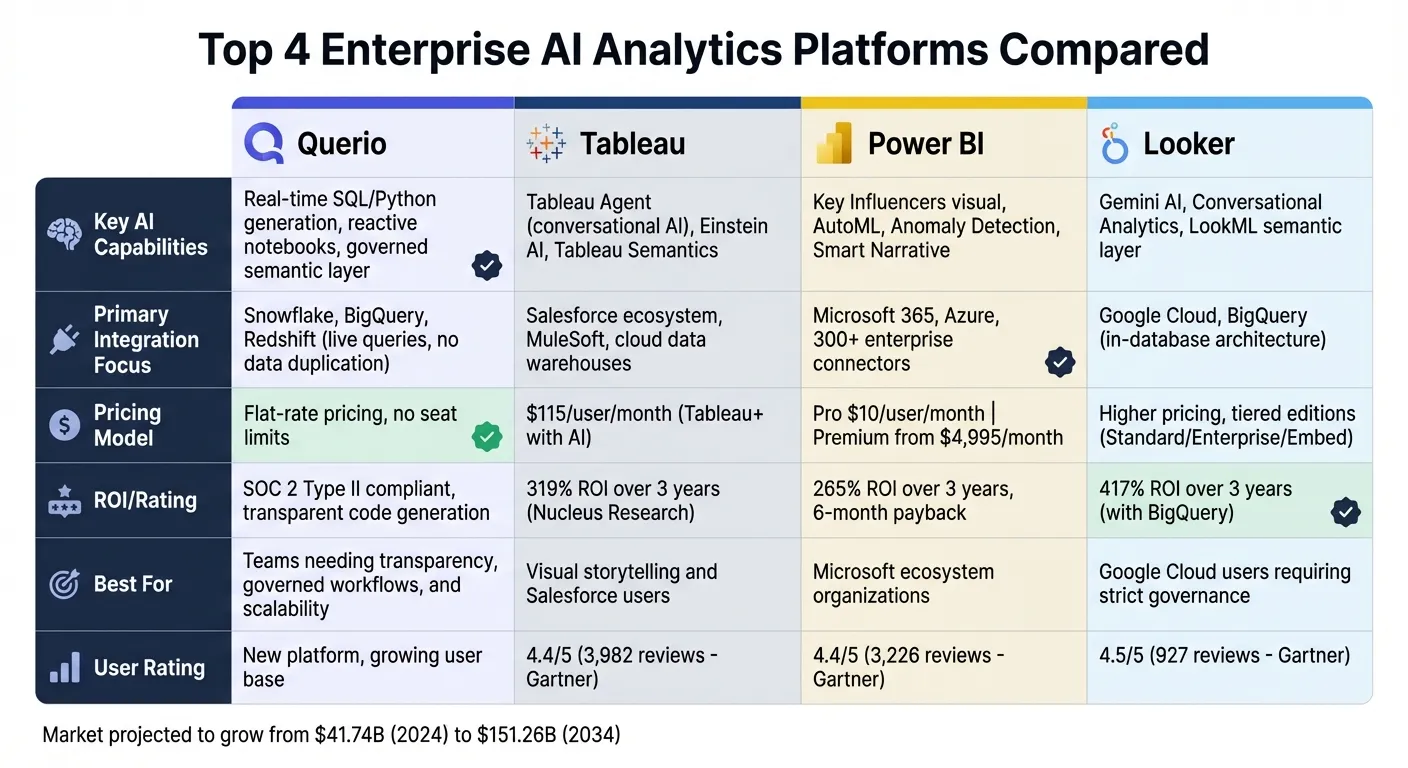 {Enterprise AI Analytics Platforms Comparison: Querio vs Tableau vs Power BI vs Looker}
:::
{Enterprise AI Analytics Platforms Comparison: Querio vs Tableau vs Power BI vs Looker}
:::
Quick Comparison
| Platform | Key Features | Integration Focus | Pricing Highlights |
|---|---|---|---|
| Querio | Real-time SQL/Python, live queries, governed semantic layer | Snowflake, BigQuery, Redshift | Free plan; Core $2,499/mo; no per-seat pricing |
| Tableau | Visual storytelling, Tableau Agent, Einstein AI | Salesforce ecosystem | $115/user/month for advanced AI tools |
| Power BI | AI visuals (Key Influencers, Anomaly Detection), AutoML, Azure ML | Microsoft 365, Azure | Pro tier: $10/user/month; Premium starts at $4,995/month |
| Looker | LookML semantic layer, Conversational Analytics, Google Cloud integration | Google Cloud, BigQuery | Higher pricing; tailored for Google Cloud users |
Each platform serves different priorities - whether it's transparency, scalability, or integration with specific ecosystems. Querio stands out for its simplicity and governed logic, while Tableau, Power BI, and Looker cater to organizations with specific ecosystem investments or advanced governance needs, or AI business intelligence tools for non-technical users.
sbb-itb-284a532
1. Querio
AI-driven analytics capabilities
Querio takes analytics to the next level by transforming natural language questions into real SQL and Python code in real time. This means teams can see exactly how answers are generated, making processes more transparent and debugging much simpler. Acting like a reactive notebook, Querio automatically updates results whenever there are changes in data or logic. This setup blends ease of use for non-technical users with the precision and control that data teams need.
"Querio establishes itself as a premier choice... by bridging the gap between accessible, self-serve analytics and the rigor of a code-native data platform." - Querio Founder's Guide [3]
A centralized semantic layer ensures consistency by applying predefined joins, metrics, and business terms across all analytics outputs - whether it's ad-hoc queries, dashboards, or AI-powered embedded analytics.
Data integration and connectivity
Querio integrates seamlessly with your existing data warehouse using encrypted, read-only credentials. It runs live queries directly on source systems, eliminating the need for data movement, extraction, or duplication. It supports popular platforms like Snowflake, BigQuery, Redshift, ClickHouse, PostgreSQL, MySQL, and MariaDB. Whether you prefer cloud-hosted, self-hosted (on-premises), or hybrid deployment, Querio offers options to meet your organization’s security and infrastructure needs.
Governance and security
With SOC 2 Type II compliance, Querio prioritizes security through features like role-based access controls (RBAC), data masking, and standard SSO integrations. Importantly, customer data is never used to train external AI models [3]. The platform’s versioned semantic layer ensures that all changes to business logic are tracked and consistently applied across workflows, strengthening governance.
This mix of transparency, strong security measures, and centralized management makes Querio an excellent fit for businesses with strict compliance requirements. By offering complete visibility and control, it empowers teams to make quick, informed decisions - key features that distinguish Querio in the analytics space.
2. Tableau
AI-driven analytics capabilities
Tableau is stepping into the future with AI-driven analytics, introducing tools like Tableau Next to transform how users interact with data. A standout feature is the Tableau Agent, a conversational assistant designed to handle natural language queries. It can perform tasks such as filtering, aggregation, and time-series analysis, while also suggesting follow-up actions to uncover deeper insights [2][5][6][7]. This conversational approach is bolstered by new semantic controls, making analytics more intuitive.
Another game-changer is Tableau Semantics, which fills a long-standing need for a governed semantic layer. This ensures consistent metric definitions across an organization, making data more reliable and easier to interpret [2][6]. To add a layer of trust, the Einstein Trust Layer ensures that AI-generated insights adhere to strict row-level and column-level security protocols [6][7].
These innovations have not gone unnoticed. Tableau was named a Leader in the 2025 Gartner® Magic Quadrant™ for Analytics and Business Intelligence Platforms [4]. Additionally, Nucleus Research highlighted a 319% ROI over three years for organizations using Tableau [5]. Companies like Jaguar Land Rover have reported tangible benefits, with $250 million in business value attributed to Tableau's ability to enhance both strategic clarity and operational efficiency by 2026 [4].
Data integration and connectivity
Tableau excels in connecting to modern data sources, making it a versatile tool for organizations. It offers native connectors to cloud data warehouses like Snowflake, Amazon Redshift, and Google BigQuery, as well as relational databases and SaaS platforms such as Salesforce [8][9]. With MuleSoft integration, users can tap into near real-time data from enterprise systems like SAP and Workday through reusable APIs [9].
Users can opt for "Live" connections for real-time data exploration or leverage Hyper engine "Extracts" for handling large datasets effectively [8][9]. For instance, KeyBank deployed Tableau across its enterprise, empowering 10,000 employees with democratized access to data [4]. To optimize performance, organizations are encouraged to handle data transformation at the source and use incremental refreshes to update only new or changed data. This approach minimizes resource use while maintaining high performance [8].
Pricing and deployment options
Tableau provides flexible pricing and deployment models to suit varied business needs. Advanced features, including the AI-powered tools, are available through the premium Tableau+ subscription. Organizations can choose between fully managed cloud deployments or self-hosted setups, ensuring adaptability to different operational requirements [2][4][5].
3. Power BI
AI-driven analytics capabilities
Power BI has transformed into a platform that leverages AI to enhance analytics. Its AI visuals bring reports to life, turning them into tools for active decision-making. For instance, the Key Influencers visual identifies drivers behind metrics, while the Decomposition Tree digs into root causes. Features like Smart Narrative create automated executive summaries using natural language generation, and Anomaly Detection spots statistical outliers in real-time data streams [10].
For those without coding expertise, AutoML in Dataflows enables quick creation, training, and deployment of prediction models. Advanced users, on the other hand, can integrate Power BI with Azure Machine Learning and Cognitive Services for deeper insights and model analysis. These AI-powered tools can significantly cut down the time spent on data cleaning - by as much as 40% to 60% [10].
Power BI also delivers a 265% ROI over three years, with an average payback period of just six months [5]. By defining synonyms in the semantic model (e.g., mapping "headcount" to "Employee Count"), users can improve the accuracy of natural language queries. Organizations are encouraged to start with the platform's built-in AI visuals before exploring advanced options like AutoML or Azure ML [10].
All these AI features integrate seamlessly with Power BI's extensive connectivity options.
Data integration and connectivity
Power BI offers native integration with the Microsoft ecosystem, including tools like Excel, Teams, SharePoint, PowerPoint, and Dynamics 365. Beyond that, it supports over 300 enterprise connectors, such as Oracle, SAP HANA, Salesforce, Snowflake, BigQuery, Redshift, and Databricks [11][12]. Real-time data flows are enabled through Event Hubs and Fabric Eventstreams.
For organizations transitioning from Oracle-based BI systems, Power BI can simplify data pipelines, cutting complexity by 30% to 50% [11]. Its Direct Lake mode eliminates data import latency through a zero-copy architecture, unlike the traditional Import mode that requires data duplication and scheduled refreshes. For companies already invested in Microsoft 365, licensing costs are reduced by 40% to 60% [11].
Governance and security
Power BI is designed to meet enterprise needs for secure and transparent data handling. It uses Microsoft Entra ID for single sign-on and provides granular access control through Row-Level Security and Object-Level Security. Additionally, Microsoft Purview Information Protection ensures sensitivity labels remain intact when exporting data to formats like Excel, PowerPoint, or PDF. Microsoft Defender for Cloud Apps adds another layer of security by monitoring sensitive data in real time, including activities like report sharing.
Network security is enhanced with Azure Private Link and Azure Virtual Network, ensuring data traffic stays securely within Microsoft's infrastructure. Administrators have the flexibility to enable or disable AI features - such as Copilot, AutoML, and Q&A - at the tenant or workspace level. All AI-related interactions are logged and can be exported to Microsoft Sentinel for auditing. Deployment pipelines make it easier to move content through development, testing, and production stages, while multi-geo deployments help organizations comply with regulations like GDPR [13].
Pricing and deployment options
Power BI offers three primary licensing tiers to fit different needs:
- Pro tier: Supports 1 GB model sizes and allows for eight daily refreshes.
- Premium Per User tier: Increases limits to 100 GB models, allows 48 daily refreshes, and provides access to AutoML and Cognitive Services.
- Fabric Capacity: Starts at the F64 SKU (~$6,483/month) and supports models ranging from 25 GB to over 400 GB, with full Copilot integration and advanced governance features.
For larger enterprises, Premium Capacity starts at around $4,995 per month for the P1 SKU. This capacity-based pricing allows unlimited viewers, making it a cost-effective solution for organizations with extensive user bases [11][5][13].
4. Looker
AI-driven analytics capabilities
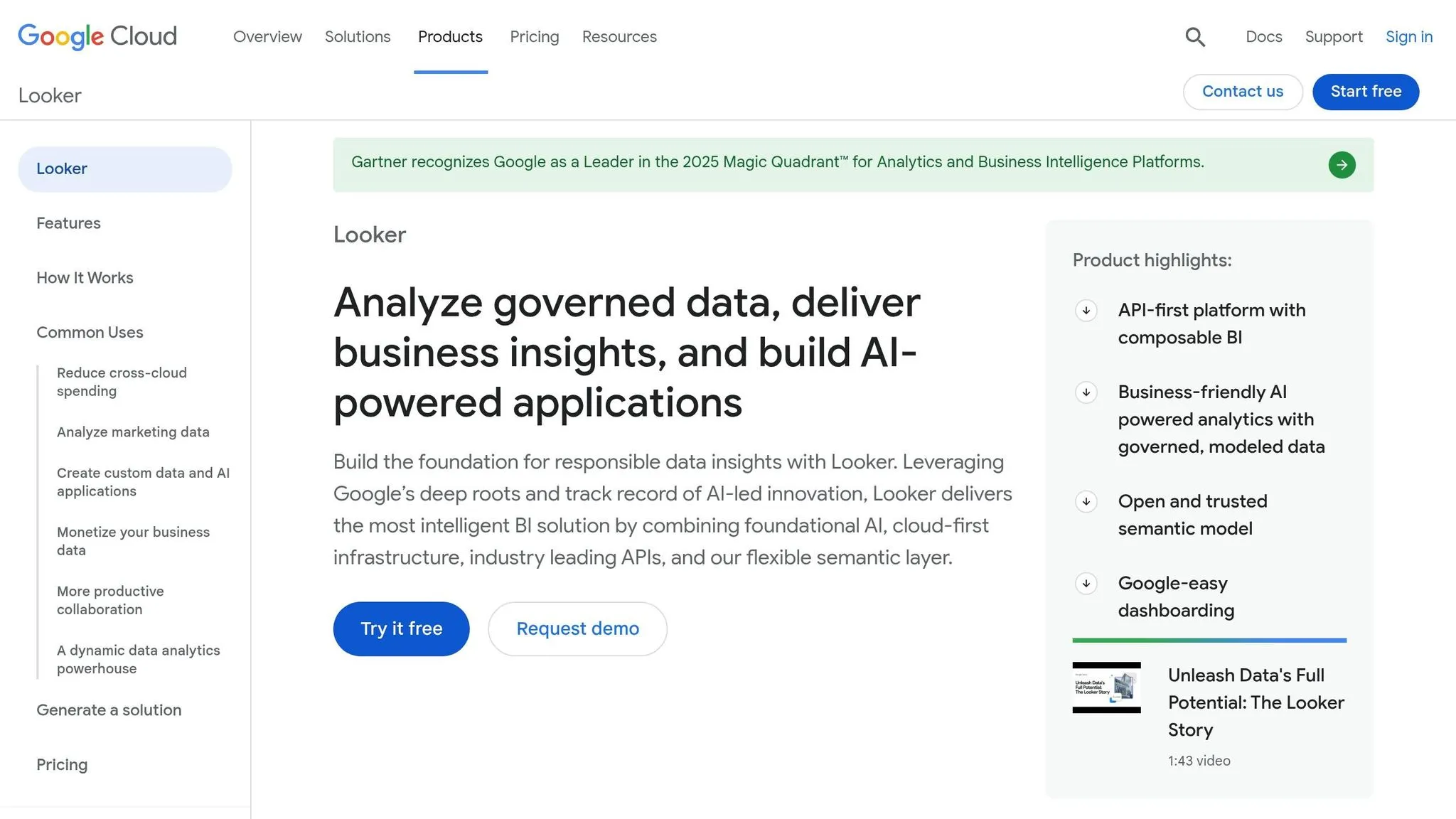
Looker uses Gemini, a suite of AI tools, to turn plain-English questions into actionable insights. With Conversational Analytics, teams can ask questions in everyday language and get instant answers. The Visualization Assistant automatically creates charts, while the Formula Assistant helps generate custom calculations on the spot [14][15].
The platform’s Code Interpreter takes things further by generating Python code for tasks like forecasting and anomaly detection, making advanced analytics accessible even to non-technical users [14][15]. Looker also streamlines reporting by creating text summaries and slide decks directly from reports [14].
What makes Looker stand out is its LookML semantic layer, which reduces data errors in AI-generated insights by 66%. This centralized system ensures that key metrics - like "revenue" or "customer lifetime value" - are consistently defined and applied across all reports [15][5].
"Looker's unique foundation is its semantic layer, which ensures everyone works from a single source of truth. Combined with Google's AI, Looker now delivers intelligent insights and automates analysis." - Peter Bailis, VP of Engineering at Google Cloud [14].
As of January 2026, Looker holds a 4.4/5 rating on AI:PRODUCTIVITY [15]. Its Conversational Analytics API uses advanced Google technologies like NL2SQL, RAG (Retrieval-Augmented Generation), and VizGen to deliver precise and meaningful responses [14].
Data integration and connectivity
Looker’s data integration capabilities ensure insights come straight from live enterprise data. Its in-database architecture queries data directly from platforms like BigQuery and Snowflake, eliminating the need to move or duplicate sensitive information. The LookML semantic layer centralizes business logic, maintaining consistency across all reports and AI analyses.
According to Forrester research, organizations using Looker alongside unified data platforms like BigQuery have achieved a 417% ROI over three years [5]. The platform’s Git-based version control allows teams to collaboratively build and manage data models, audit changes, and maintain consistent metrics across the organization. While Looker requires knowledge of SQL and LookML - making it more challenging to learn - it’s a go-to choice for enterprises focused on strict data governance and consistency [5][15].
Governance and security
Looker’s governance framework ensures data consistency and security at every level. By centralizing business logic through the LookML semantic layer, the platform prevents conflicting definitions from disrupting trust in data. Teams can track changes, collaborate on development, and maintain a clear audit trail using Git-based version control, avoiding the chaos of "rogue spreadsheets."
For security, Looker integrates seamlessly with Google Cloud IAM for single sign-on and supports role-based access controls to manage permissions. The Enterprise Edition includes advanced features like VPC Service Controls (VPC-SC) to secure data within a controlled perimeter and Customer-Managed Encryption Keys (CMEK) for full encryption control. Additionally, the "Looker Block for Workspace" provides pre-built security audit dashboards, complete with row-level audit log details to monitor data usage [15][5].
This robust framework is designed to deliver reliable insights while protecting sensitive information.
Pricing and deployment options
Looker offers three main editions tailored to different needs:
- Standard Edition: Supports up to 50 users, includes 1,000 monthly query API calls, and offers 10 Standard plus 2 Developer users.
- Enterprise Edition: Provides unlimited user access, 100,000 monthly query API calls, and enhanced security features like VPC-SC and CMEK.
- Embed Edition: Designed for external analytics, offering unlimited users and 500,000 monthly query API calls, along with white-label embedding options.
While Looker’s pricing is often seen as high compared to competitors, and its reliance on SQL and LookML can pose a learning challenge, its tight integration with Google Cloud infrastructure can help offset costs. Improved data governance and reduced AI errors make it an attractive option for organizations already invested in Google’s ecosystem.
Strengths and Weaknesses
Each analytics platform offers its own mix of advantages and trade-offs, making it important for enterprise teams to find tools that balance precision, usability, and transparency. Here's a quick breakdown of the core strengths and limitations of some major platforms:
| Platform | Key Strengths | Notable Limitations |
|---|---|---|
| Querio | Excels in natural language accuracy while providing inspectable SQL/Python code; governed semantic layer ensures consistent definitions; live connections to Snowflake, BigQuery, and Redshift without duplicating data; reactive notebooks; flexible deployment with no seat restrictions | Relatively new platform with a smaller user base; requires a modern data warehouse infrastructure |
| Tableau | Offers visual storytelling through a drag-and-drop interface; integrates well with Salesforce ecosystem; rated 4.4/5 from 3,982 reviews on Gartner Peer Insights [17]; features Tableau Pulse and Einstein AI for automated insights | Advanced features come with a medium learning curve; costs $115 per user/month for Tableau+ with advanced AI capabilities [19][2] |
| Power BI | Seamless integration with Microsoft 365 and Azure; familiar interface for Office users; supports 1,000+ third-party connectors like Salesforce and Google Analytics 4; rated 4.4/5 from 3,226 reviews on Gartner Peer Insights [17]; competitively priced | Advanced AI features require Fabric F2+ or Premium P1+ capacity upgrades; autoscaling is limited to premium tiers; may underperform in non-Microsoft ecosystems |
| Looker | Features a centralized LookML semantic layer and API-first architecture; rated 4.5/5 from 927 reviews on Gartner Peer Insights [17] | Requires proficiency in SQL and LookML, which can lower ease of use [18][2]; higher pricing and steep learning curve make it ideal for organizations already invested in Google Cloud |
Beyond these platform-specific details, the broader analytics market is undergoing rapid transformation. The global business intelligence (BI) market is expected to grow from $41.74 billion in 2024 to over $151.26 billion by 2034 [16]. This explosive growth is fueled by a shift toward data democratization, enabling non-technical users to query and analyze data without relying on technical teams.
This shift creates opportunities for platforms like Querio, which combine conversational interfaces with transparent and governed logic. Traditional tools may struggle to balance accessibility with technical complexity, but Querio’s approach aligns well with the growing demand for actionable insights and user-friendly analytics.
Another key trend is the rise of agentic analytics, where AI systems autonomously investigate root causes and generate polished reports [2]. With the increasing adoption of AI agents, platforms that blend strong governance with natural language precision - like Querio - are positioned to meet the evolving needs of enterprise analytics teams [1].
Conclusion
Querio stands out as a top choice among top business intelligence tools, thanks to its natural language precision, clear code generation, and straightforward pricing with no per-seat fees. These features set it apart in a crowded market.
What makes Querio shine is its blend of transparency and scalability. By providing code-level insights and a design that grows with businesses, Querio meets the needs of both small teams and large enterprises. Its pricing has no per-seat fees, and admins can set spending caps on AI credits. That keeps costs predictable, which is crucial for budgeting in dynamic environments.
Another standout feature is Querio's native integration, which avoids data duplication and ensures that all users - whether data experts or business teams - can access meaningful insights. This balance of accessibility and technical depth makes it a trusted tool for any organization.
As companies seek tools that can grow with their needs while maintaining reliability, Querio's conversational interface, governed logic, and transparent AI make it a smart choice for enterprises aiming to stay ahead in the evolving world of business intelligence.
FAQs
::: faq
How does Querio’s natural language feature stay accurate?
Querio’s natural language feature achieves a high level of accuracy by utilizing a centralized semantic layer. This layer is designed to interpret the specific business context of your organization, ensuring that insights are not just consistent but also relevant to your unique needs. By aligning with your operational framework, it delivers reliable results that you can depend on. :::
::: faq
Will Querio work with my existing data warehouse setup?
Querio works effortlessly with leading data warehouses such as Snowflake, BigQuery, and Databricks. By leveraging direct connections, it allows for warehouse-native analysis without requiring time-consuming migrations.
It also supports real-time data connections, offering seamless integration into your existing workflows. Plus, with transparent SQL/Python outputs, Querio ensures compatibility while delivering the scalability and adaptability needed for enterprise-level operations. :::
::: faq
How does Querio handle security, access controls, and compliance?
Querio takes a comprehensive approach to ensure security, access control, and compliance tailored for enterprise needs. By integrating strong governance practices and maintaining live data connections, it provides a secure foundation for managing sensitive information.
Additionally, Querio delivers transparent and explainable insights, giving organizations the confidence to make informed decisions without compromising data integrity. These measures work together to protect your data while meeting the stringent requirements of modern enterprises. :::