Business Intelligence
ai analytics tools natural language SQL BI tools comparison
Compare Querio, Tableau, Power BI, and ThoughtSpot on NLQ accuracy, SQL transparency, governance, integration, and usability.

AI-powered analytics tools now let you ask data questions in plain English and get instant answers. Instead of relying on analysts, you can query your data warehouse directly. This article compares AI analytics tools like Querio, Tableau, Power BI, and ThoughtSpot based on:
- Natural Language SQL (NLQ): How well does the tool convert plain English into SQL?
- SQL Transparency: Can you inspect or modify the generated SQL?
- Governance: Does it handle access controls and metric consistency well?
- Integration: How well does it connect with US-based tools like Snowflake, BigQuery, and Salesforce?
- Usability: Is it easy for both non-technical users and analysts?
Quick Comparison
| Feature | Querio | Tableau | Power BI | ThoughtSpot |
|---|---|---|---|---|
| NLQ Approach | Conversational AI | Metrics-driven | Generative Copilot (DAX) | Search-driven |
| NLQ Accuracy | High (Inspectable SQL) | 4.0/5 | 4.1/5 | 4.6/5 |
| SQL Transparency | Full SQL visibility | Limited (proprietary logic) | Limited (DAX focus) | Full SQL or logic view |
| Governance | Strong auditability | Security via Trust Layer | RLS/OLS limitations | Metadata privacy default |
| Integration | Wide data warehouse support | Best with extracts | Best with Microsoft tools | Live cloud query |
| Usability | Simple for all users | Steep learning curve | Moderate (DAX knowledge) | User-friendly interface |
| Best For | Fast insights, compliance | Visual dashboards | Microsoft ecosystems | Non-technical users |
| Main Weakness | Fewer integrations | High cost, limited NLQ | DAX complexity | High cost, setup effort |
Querio stands out for its SQL transparency and fast setup, while ThoughtSpot excels in NLQ accuracy and user-friendly design. Tableau and Power BI are better suited for organizations with specific needs like advanced visualizations or Microsoft integration. Choose based on your team's priorities.
::: @figure 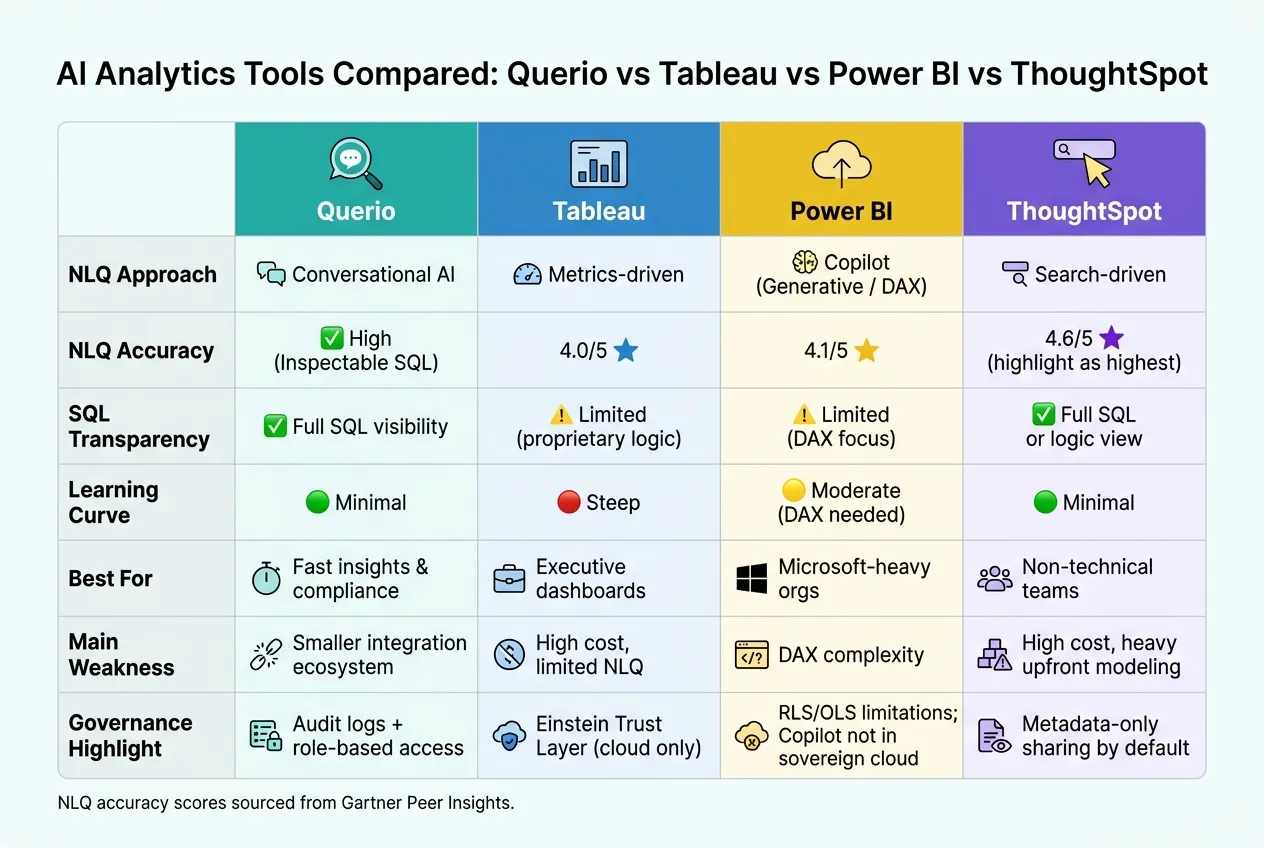 {AI Analytics Tools Compared: Querio vs Tableau vs Power BI vs ThoughtSpot}
:::
{AI Analytics Tools Compared: Querio vs Tableau vs Power BI vs ThoughtSpot}
:::
1. Querio
Querio is an AI-powered analytics workspace that works alongside your existing data warehouse. Instead of replacing your current tools, it acts as an interface where business users can ask questions in plain English and get SQL-driven answers.
Natural Language SQL Capabilities
Querio translates plain-English questions into SQL queries by interpreting user input, linking business terms to data columns, and delivering visual results instantly. A key feature is its ability to handle follow-up questions, allowing users to refine their queries with commands like, "Now break this down by region" or "Show only the West Coast."
However, like other natural language-to-SQL tools, Querio's performance depends heavily on its semantic layer. Tasks involving intricate logic - such as cohort-based churn analysis with multiple conditions - can be tricky unless administrators have pre-defined the necessary business terms.
This intuitive query process reflects Querio's focus on clarity and user control.
SQL Transparency and Governance
Querio stands out for its transparency. Each query result includes the underlying SQL, which analysts can view, copy, and refine as needed. This feature ensures that critical decisions can be traced back to their data sources.
On the governance side, administrators can define key metrics (e.g., "Gross Revenue" or "Customer Lifetime Value") in a centralized semantic layer. This keeps terms like "revenue" or "sales" consistent across the organization. Role-based access controls restrict data visibility based on permissions, while audit logs record who ran which queries and when - essential for compliance and troubleshooting.
Integration with Modern Data Warehouses
Querio connects seamlessly with platforms like Snowflake, Google BigQuery, Amazon Redshift, ClickHouse, Databricks SQL, PostgreSQL, MySQL, and Microsoft SQL Server. By running queries directly in the data warehouse, it eliminates the need for ETL pipelines or duplicate data storage, while also taking advantage of existing governance and cost management policies.
Usability for Different User Types
Querio is built for a range of users. Business users can ask questions using a simple interface with SSO, while analysts and engineers can fine-tune and manage queries. According to customer feedback, implementing Querio has led to a 50% drop in data-related Slack and direct messages - a clear indicator of its effectiveness [2].
sbb-itb-284a532
2. Tableau
Tableau is well-known for its data visualization capabilities and now incorporates AI-powered analytics through Tableau Agent. When assessed on natural language SQL, transparency, governance, integration, and usability, Tableau offers notable advantages along with certain trade-offs.
Natural Language SQL Capabilities
Tableau Agent interprets natural language prompts and converts them into its proprietary visualization language rather than generating raw SQL queries. This approach means that the results are shaped by Tableau's internal logic, which might not suit teams needing direct database-level control. Ambiguous prompts can lead to less accurate results, so users - especially those without technical expertise - may need to refine how they phrase their queries to get the desired output.
In addition to query handling, Tableau Agent places a strong focus on maintaining data security and clarity.
SQL Transparency and Governance
Tableau Agent employs a grounding system to align user prompts with actual data, minimizing inaccuracies. To enhance security, the Einstein Trust Layer offers features like PII masking, toxicity scoring, and a zero-data retention policy, ensuring that user prompts remain private and are not used to train external models. Tableau also extends its existing role-based access controls and row/column-level security policies to AI interactions.
However, for organizations using Tableau Server (v2025.3+), the Einstein Trust Layer does not apply. In these cases, companies must manage their own compliance measures, including PII masking and large language model (LLM) integration.
For Tableau+ subscribers, audit logging is available via the Audit Trail in Data 360, providing greater compliance visibility compared to standard plans.
Integration with Modern Data Warehouses
Tableau integrates seamlessly with a variety of data sources, such as Snowflake, Google BigQuery, and Amazon Redshift. To maximize AI workflow efficiency, Tableau recommends using .hyper extracts instead of live connections. The choice of integration method can significantly influence how quickly non-technical users can access actionable insights.
Usability for Different User Types
Tableau has long been a favorite among analysts and data professionals. However, its AI-driven features are only available with higher-tier subscriptions, which may limit accessibility for broader self-service use due to the increased cost.
3. Power BI
Power BI is Microsoft's leading business intelligence platform, tightly integrated with the Microsoft 365 ecosystem. It's currently undergoing a major transformation in how it handles natural language queries.
Natural Language SQL Capabilities
Power BI is transitioning from its traditional rules-based Q&A engine to an AI-driven Copilot that relies on DAX instead of raw SQL. Microsoft plans to retire the Q&A feature by December 2026, replacing it entirely with Copilot [4]. After this date, existing Q&A visuals will no longer function. However, for teams that need direct SQL outputs or greater transparency at the database level, Copilot's reliance on DAX presents a notable limitation.
SQL Transparency and Governance
The Copilot feature includes a diagnostic tool called "How Copilot arrived at this", which helps verify outputs [4][5]. However, during its preview phase, Copilot may bypass Row-Level Security (RLS), potentially exposing sensitive data. To mitigate this, Microsoft advises using Object-Level Security (OLS) for protecting sensitive columns. It's also worth noting that Copilot is not supported in sovereign cloud environments [4]. For Tableau+ subscribers, compliance visibility is enhanced through the Audit Trail feature in Data 360, which provides more detailed audit logging compared to standard plans.
Integration with Modern Data Warehouses
Power BI supports both live connections and in-memory data imports, offering flexibility for connecting to sources like Azure Synapse, Snowflake, and Google BigQuery. Its strongest integrations are within the Microsoft ecosystem - Azure, Excel, and Teams - making it especially appealing for organizations already using these tools. On Gartner Peer Insights, users frequently praise this seamless connectivity as one of Power BI's standout strengths [5]. These integration capabilities provide a solid foundation for evaluating its usability.
Usability for Different User Types
For Copilot to perform effectively, Power BI requires well-prepared semantic models. Authors need to include clear descriptions - limited to 200 characters - for every measure, table, and column to ensure accurate results [3][4]. Without this preparation, the quality of outputs can suffer. For non-technical users who simply want to ask questions and receive answers, this setup can feel like a significant hurdle. Despite these challenges, Power BI maintains a 4.4/5 rating across 3,190 reviews on Gartner Peer Insights, with 84% of users saying they would recommend it [5]. These numbers reflect the platform as a whole rather than its AI-specific features.
4. ThoughtSpot
In the world of AI-powered business intelligence, ThoughtSpot stands out with its search-first approach. Instead of requiring complex SQL skills, ThoughtSpot allows users to simply type questions into a search bar - powered by SearchIQ - or interact with an AI assistant called Spotter to get answers.
Natural Language SQL Capabilities
ThoughtSpot's Spotter has undergone significant evolution. It started with token-based search and inspectable SQL, transitioned to explainable formulas, and now, with Spotter 3 (currently in early access), it delivers analyst-level reasoning with a verifiable query plan. This progression demonstrates ThoughtSpot's focus on integrating AI deeply into its core functionality, rather than treating it as an afterthought. The result? A system designed to offer clarity and precision in its outputs.
SQL Transparency and Governance
Transparency is one of ThoughtSpot's defining features. By default, only metadata is shared with the language model, ensuring that your actual data values remain private. However, organizations can choose to share data values for more accurate responses, maintaining control over their data-sharing preferences. Importantly, every version of Spotter generates either inspectable SQL or explainable logic, enabling analysts to understand and verify the processes behind the scenes. While this transparency is a strength, it does require robust data modeling to ensure accurate and reliable results.
Integration with Modern Data Warehouses
ThoughtSpot operates on a zero-copy, live query model, directly querying cloud data warehouses. This ensures that users always work with the most up-to-date data. However, frequent querying can lead to increased compute costs, so organizations should be mindful of their usage patterns.
Usability for Different User Types
ThoughtSpot's search interface is designed to be user-friendly, offering a Google-like experience for business users who prefer to explore data without constant IT involvement. However, the reliability of this experience depends heavily on the quality of the underlying semantic model. While the interface simplifies data exploration, technical expertise is still needed behind the scenes to ensure the system functions effectively.
| Feature | Spotter Classic (v1) | Spotter Agent (v2) | Spotter 3 (Early Access) |
|---|---|---|---|
| Data Sharing with LLM | Metadata only (default) | Opt-in for data values | Opt-in for data values |
| Query Logic | Token-based search | Explainable formulas | Analyst-grade reasoning |
| Transparency | Inspectable SQL | Explainable logic | Verifiable plan/reasoning |
Pros and Cons
This section breaks down the strengths and trade-offs of each platform, focusing on five key factors: natural language SQL (NLQ), SQL transparency, governance, integration, and usability. These insights aim to help you make informed decisions based on practical needs.
Querio takes a straightforward, transparency-first approach. Its AI-generated answers are fully inspectable, ensuring clarity in results. The platform also boasts a quick 15-minute setup that uses a shared context layer, keeping business definitions aligned across teams. While it doesn’t offer the extensive integrations of more established tools, its focus on accuracy and fast, ad-hoc responses makes it a strong option for teams that value speed and precision.
Tableau shines in creating visual narratives and tracking key performance indicators through its Pulse feature. With a 14.8% share of the global BI market [1], Tableau has a strong foothold in the industry. However, its NLQ capabilities are less flexible, and the platform’s high cost and steep learning curve can limit its appeal for tasks beyond pre-designed visualizations.
Power BI is a natural fit for organizations deeply embedded in the Microsoft ecosystem. Its Copilot feature brings generative AI capabilities, contributing to a solid NLQ accuracy score of 4.1/5. However, the platform’s reliance on DAX formulas can be a hurdle for non-technical users. Additionally, the planned discontinuation of its legacy Q&A feature in 2026 adds a layer of uncertainty for future users.
ThoughtSpot delivers standout NLQ accuracy with a 4.6/5 rating, supported by a search-driven interface that simplifies queries for business users. Privacy is a priority, as it shares only metadata by default, and its query logic is fully verifiable through either inspectable SQL or explainable logic. On the downside, its higher cost and the need for significant upfront data preparation can make it less accessible for smaller teams or those with limited resources.
| Feature | Querio | Power BI | Tableau | ThoughtSpot |
|---|---|---|---|---|
| NLQ Approach | Conversational AI | Copilot (Generative) | Metrics-driven | Search-driven |
| NLQ Accuracy | High (Inspectable SQL) | 4.1/5 | 4.0/5 | 4.6/5 |
| Learning Curve | Minimal | Moderate (DAX needed) | Steep | Minimal |
| AI Integration | Core experience | Copilot (Q&A retiring 2026) | Einstein/Pulse | Core experience |
| Data Connection | Live warehouse | Import or DirectQuery | Extracts or live query | Live cloud query |
| Best For | Fast, ad-hoc answers | Microsoft-heavy organizations | Executive dashboards | Non-technical teams |
| Main Weakness | Smaller integration ecosystem | DAX complexity | NLQ limited to metrics | High cost; heavy upfront modeling |
These comparisons help outline the strengths and limitations of each platform, offering a clearer path to choosing the right natural language data querying tools for your needs.
Conclusion
When your team needs AI-native analytics, a platform that delivers fast, clear, and auditable SQL answers is essential. While other tools may have their advantages, Querio stands out by prioritizing transparency and control.
Many platforms come with compromises - whether it's limited natural language query (NLQ) flexibility, the complexity of DAX, or the need for extensive upfront modeling. These hurdles can slow teams down and make it harder to understand how results are generated. Querio eliminates these challenges.
Querio is designed for teams that want the benefits of AI-driven analytics without giving up control. Every query it generates is real, inspectable SQL - not a mysterious black box. This makes Querio an excellent choice for U.S. teams navigating strict governance requirements, such as SOX compliance, HIPAA data segregation, or environments where auditability is a top priority. Its shared context layer ensures consistent metric definitions, and its quick deployment means teams see results fast.
Ultimately, Querio’s ability to deliver consistent, inspectable SQL and its ease of deployment make it a standout option. For teams that need clear, auditable answers and the ability to generate insights on the fly, Querio provides the solution they’ve been looking for.
FAQs
::: faq
How do I set up Querio’s semantic layer for accurate NLQ?
To configure Querio’s semantic layer for precise Natural Language Query (NLQ) interpretation, start by standardizing business terms, metrics, and relationships. This step ensures queries are understood consistently. Add detailed metadata, including descriptions and synonyms, to make the data more accessible. Define critical metrics, such as Monthly Recurring Revenue, for clarity.
Next, set up Querio’s context layer to incorporate business rules and metric definitions. Once configured, link it to your data warehouse for seamless integration. Make it a habit to regularly validate and update the semantic layer to keep everything accurate and aligned with your business needs. :::
::: faq
Can I edit or reuse the SQL Querio generates?
Querio gives you the ability to review, tweak, and reuse the SQL it creates. This means you can fully customize the queries to match your exact requirements. It's built to make working with SQL straightforward and adaptable, whether you're a beginner or an experienced user. :::
::: faq
What governance features help Querio stay compliant?
Querio prioritizes secure and transparent data management with a strong focus on compliance. It incorporates robust data governance tools such as role-based access control (RBAC), encryption, and audit trails. Additionally, Querio aligns with key standards like SOC 2 Type II, GDPR, and CCPA, ensuring users' data remains protected and handled responsibly. :::