Business Intelligence
How to Add Governed AI Analytics on Top of Databricks
Set up governed AI on Databricks: use Unity Catalog, curated metric views, semantic mapping, inspectable SQL, and audit trails.

If you want AI answers on top of Databricks without metric drift, I’d do 4 things first: lock access in Unity Catalog, limit AI to curated tables and views, define KPIs once in Metric Views or SQL views, and make every AI answer traceable back to inspectable SQL.
Here’s the short version: I would not let AI query the full lakehouse, guess joins, or invent KPI logic. Instead, I’d put AI on top of a governed Databricks SQL Warehouse, keep row- and column-level controls in force, and make analysts review the first answers before rollout. That cuts the risk of a second, messy path to data.
What matters most:
- Unity Catalog stays in control of access
- Curated tables and views only go to the AI layer
- One KPI definition should power dashboards and AI answers
- Semantic mapping should link business terms to the right joins and time logic
- Inspectable SQL should back every answer
- Audit trails should show who asked what, when, and under which permissions
One stat worth noting: the article points to a 30–90 day rollout path, starting small with a sales or finance pilot instead of a company-wide launch.
For me, the core idea is simple: AI should speed up self-service analytics without creating a second source of truth.
Databricks Unity Catalog: The Safe Way to Govern AI
::: @iframe https://www.youtube.com/embed/xZqU-jyIBJM :::
sbb-itb-284a532
Quick Comparison
| Option | Governance | Live Databricks access | SQL review | Best fit |
|---|---|---|---|---|
| Databricks-native AI | Good Unity Catalog tie-in | Yes | Partial | Technical teams |
| BI semantic-layer tools | Strong model control | Sometimes via connectors or extracts | Often less visible | Teams with modern business intelligence tools |
| Querio on Databricks | Governed model plus live query layer | Yes | High; SQL and Python are editable | Lean SaaS data teams |
If I were setting this up today, I’d start with a small list of approved questions like MRR, ARR, churn, or NRR, then have analysts check each answer before opening access to more users.
1. Prepare Databricks for governed self-serve analytics
Before you add AI, tighten up Databricks around Unity Catalog, curated views, and one source of truth for KPI definitions.
Use Unity Catalog as the control plane for data access
Unity Catalog is the place where Databricks governance happens. Permissions for catalogs, schemas, tables, and views all run through it. Use least-privilege access and match the same role-based rules you already rely on for reporting.
If someone can't access a table directly, the AI layer shouldn't show it either. That keeps AI answers tied to the same rules as your dashboards and SQL.
Once access is locked down, the next move is simple: only expose the curated data products the AI should read.
Expose only curated tables and views for AI access
Don't give AI analytics access to every table in the lakehouse. That's asking for messy answers.
Instead, limit access to approved tables and views that support the workflow you're trying to serve. Define joins and relationships in the governed model rather than letting the AI guess. Business users get a smaller, safer set of data to work with instead of the full lakehouse.
With that data surface under control, you can define shared KPI logic in one governed layer.
Define shared KPIs with Metric Views or governed SQL views
Nothing kills trust faster in self-serve analytics than inconsistent metric definitions. If MRR or ARR can be calculated in more than one way, AI answers will drift from the numbers in dashboards and executive reports.
Define each KPI once in a governed SQL view or Databricks Metric View, then have downstream tools use that same definition every time. This keeps KPI logic out of dashboards and out of prompts.
If the KPI definition changes, every AI answer should change too. When analysts update the definition, reporting and AI answers that rely on it update with it.
That definition layer becomes the foundation for the semantic model in the next step.
2. Add a semantic layer that AI can reliably use
AI needs context to turn plain-English questions into the right SQL. That context lives in the semantic layer, which sits between your governed tables and the questions people ask.
Map business terms, joins, and time logic into a governed model
Think of the semantic layer as the bridge between business language and SQL. It defines entities like accounts, subscriptions, and invoices. It also sets the join paths between them and bakes in time logic like month-end snapshots and other fixed time grains.
If your dbt models already reflect the right grain and relationships, start there. Don’t rebuild what your team has already nailed down. The semantic layer should inherit those definitions and map business terms to the governed logic your team has already approved. So if someone asks for churn rate, that request should point to ONE approved definition, not three slightly different versions floating around the company.
It also helps to label relationships as source-derived or AI-inferred. That sounds like a small detail, but it matters. When a result looks off, analysts need to see right away whether the join was set on purpose or guessed by the system. That kind of visibility makes audits a lot less painful.
Connect Querio to live Databricks SQL Warehouses
Querio connects straight to Databricks SQL Warehouses using encrypted, read-only credentials. That means every question runs as live SQL, with query logic that people can inspect and edit.
Here’s why that matters. Say a sales manager asks, “What’s our net revenue retention by cohort this quarter?” If the number looks strange, an analyst can open the generated query, read through it, make changes, and run it again. Nothing is hidden behind a black box. That makes the result useful for analysts and easier for business users to trust.
Bring metadata forward so AI uses the right definitions
Metadata often makes the difference between AI that writes SQL you can use and AI that takes a wild swing. Column descriptions, table certifications, owner tags, and clear naming all help the system choose the right field when several columns could answer the same question.
This comes up all the time with KPIs. One team says “ARR,” another says “annual recurring revenue,” and a third uses an internal label no one outside finance knows. Without direct metadata mapping, AI can treat those as separate ideas. That’s where things go sideways fast.
Pull descriptions and certifications forward from Databricks objects. Add plain-English labels where they’re missing. When meaning and metadata line up, AI is much more likely to stick to approved business definitions. From there, you can move into access controls and query-level audit trails with a lot more confidence.
"Agent behavior must also adapt as products, policies, and user behavior change. That requires more than a model: it requires the systems, evaluations, and deployment expertise to improve agents... without giving up control." - OpenAI [1]
3. Enforce access, explainability, and auditability end to end
Keep Databricks permissions in force for every AI query
Every AI-generated query needs to inherit Unity Catalog permissions and any row- or column-level controls at execution time. This part can't be loose. If Finance can view customer-level margin data and Sales can only view territory-level bookings, the AI layer must return only what each group is allowed to see - or refuse the request.
That rule keeps the AI layer from becoming a side door into data people shouldn't have.
Once access is enforced at query time, the next job is simple: make the generated logic visible.
Require inspectable SQL and editable logic
If users can't inspect the SQL, they can't trust the answer or fix it when something looks wrong. Unreadable SQL isn't a nice extra risk. It's a liability.
Say a finance analyst asks for net revenue retention by cohort and the number looks off. They need to inspect the query, review the filters, and verify the join logic. Otherwise, they're stuck guessing.
Querio generates inspectable SQL and Python, so teams can review, edit, and reuse the logic in reactive notebooks. That loop - ask, inspect, refine, reuse - is what makes AI analytics useful in production instead of just impressive in a demo.
A simple practice helps here: tag whether a join or business rule was explicitly found in the source or inferred by the AI. That makes it much easier for analysts to tell what came from source data versus AI inference.
Once the logic is exposed, teams can review how answers were produced and audit them later.
Audit who asked what and how each answer was produced
Query history alone isn't enough. Teams need the user, query logic, source context, and permission state for every answer. That kind of traceability turns AI-driven analytics from a trust problem into something your team can defend. If a CFO asks why Q2 bookings look different from last week's board report, your team should be able to pull the exact query, the logic behind it, and the user who ran it.
| Auditing Capability | What It Captures | Why It Matters |
|---|---|---|
| Who asked | User, timestamp, question asked | Accountability and usage patterns |
| SQL/logic run | Generated SQL or Python, filters, joins, aggregations | Validate correctness and fix logic gaps |
| Source context | Prompt context or source references | Understand what informed the response |
| Confidence tags | What was extracted vs. inferred | Distinguish source-grounded facts from AI reasoning |
| Permissions in force | Access scope at query time | Compliance and review evidence |
With permissions, inspectable logic, and audit trails in place, you can roll out natural-language analytics to a small user group without weakening metric trust.
4. Roll out natural-language analytics without breaking metric trust
::: @figure 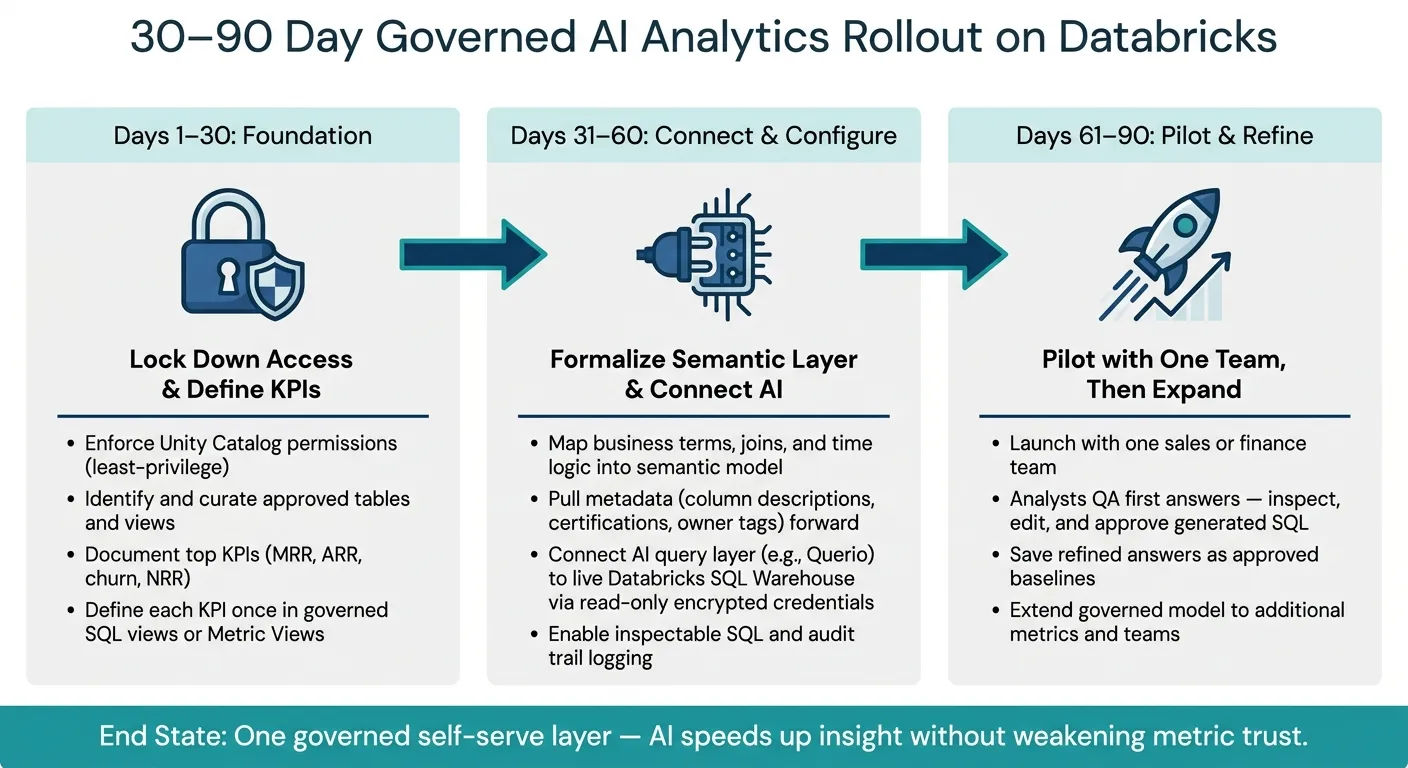 {30–90 Day Rollout Plan for Governed AI Analytics on Databricks}
:::
{30–90 Day Rollout Plan for Governed AI Analytics on Databricks}
:::
Start with a small set of high-value metrics questions
Once permissions, metric definitions, and semantic logic are set, keep the launch tight. Start with a short list of approved, high-value questions, such as MRR reporting or churn analysis. These should be questions tied to stable metric definitions, not areas where the business is still changing its mind every other week.
Each launch question should map to an approved metric view or a governed SQL view in Unity Catalog. That gives you a clean line from the question someone asks to the logic your team already trusts.
Use analysts to validate the first round of answers
Think of the first rollout as an analyst QA pass, not a company-wide release. The goal isn’t to hand access to everyone on day one. The goal is to make sure the first answers are right.
Analysts should review those early answers, fix ambiguous joins or filters, and approve the baseline before you open things up more broadly.
Querio's reactive notebooks fit this process well. Analysts can ask a question, inspect the generated SQL, fix ambiguous joins or filters, and save the refined version as the baseline. Once approved, that answer becomes the baseline.
Comparison table: Databricks-native AI vs BI tools vs Querio on Databricks
The table below shows how the main options differ when you look at governance, live access, and how easy it is to review what the system is doing.
| Criteria | Databricks-native AI | Governed BI semantic-layer tools | Querio on Databricks |
|---|---|---|---|
| Semantic governance | Tied to Unity Catalog; limited business logic mapping | Strong, centralized semantic layers; requires manual modeling | Maps business terms, joins, and time logic into a governed, inspectable model |
| Natural-language query quality | Strong for basic SQL; can struggle with multi-step business logic | High, but limited to pre-defined models | High; grounded in real SQL and Python |
| Inspectable SQL/Python | Available, but requires technical knowledge to verify | SQL is often hidden behind proprietary layers | Every query is inspectable and editable; analysts can verify and sign off on first answers during launch |
| Live warehouse access | Native to Databricks SQL Warehouses | Often requires extracts or dedicated connectors | Connects directly to live Databricks SQL Warehouses; no exports. |
| Fit for lean B2B SaaS data teams | Good for technical users; higher overhead for broad self-serve | Powerful, but typically needs more modeling overhead | Built for lean teams that need governed self-serve without a large BI layer. |
After that, use the reviewed launch set as the pattern for the next batch of questions. When those answers are approved, extend the same approach to nearby metrics.
Conclusion: A practical blueprint for governed AI analytics on Databricks
Once the pilot shows the model works, the same governed setup can extend to more metrics and more teams. On Databricks, that means using Unity Catalog, curated tables and views, shared metric definitions, and a live AI query layer like Querio. Business users can ask questions in plain English, and the system returns inspectable SQL that follows permissions and approved business logic.
That setup changes the day-to-day in a simple way: people get answers faster, analysts spend less time handling repeat requests, and metric drift gets smaller because each answer points back to the same definition.
To implement self-service analytics for your team, follow a simple 30–90 day rollout:
- Lock down access and document the top KPIs
- Formalize those KPIs and connect the AI layer to a governed Databricks SQL Warehouse
- Pilot with one sales or finance team, then refine definitions based on actual usage
The end state is one governed self-serve layer where AI speeds up insight without weakening trust.
FAQs
::: faq
How much setup is needed before AI can query Databricks safely?
You need two things: a secure Databricks connection and a governed semantic layer.
Set up a SQL Warehouse or cluster first. Then connect with a dedicated read-only service principal or token that has access only to the catalog, schema, and tables you actually need. That keeps the setup tight and helps limit what the system can see.
Next, sync existing definitions from tools like dbt so metrics, joins, and column descriptions stay standardized. With warehouse-level role-based access controls in place, AI can generate consistent, explainable SQL without getting around your current security rules. :::
::: faq
What should we include in our first Databricks AI analytics pilot?
Focus on the metrics that move the business: revenue, pipeline, churn, and customer health. Start by reviewing your current data catalog, then pull in approved definitions, such as those from dbt, into one central context layer.
That gives you a single source of truth. So when people ask AI questions, the answers stay consistent and easier to explain.
It also helps to add role-based access controls and audit logging. That way, business users can ask questions in plain English without getting around warehouse-native governance. :::
::: faq
How do we keep AI answers consistent with dashboard metrics?
Use a governed context layer as the single source of truth for business logic. Define metrics, joins, and business terms once in your warehouse or dbt, then sync those definitions into a shared semantic layer.
This gives the AI pre-checked definitions to work from instead of making sense of raw data on its own. The result is simpler: answers stay in line with the same logic your team already uses in existing dashboards. :::