Business Intelligence
7 Best Microsoft Copilot Alternatives for Data Analysis
A quick guide to seven Copilot alternatives for governed, warehouse‑native data analysis with inspectable SQL and varied workflows.

If you work outside the Microsoft stack, Copilot is often not the best fit. In this list, I’d narrow the top options to Querio, ThoughtSpot, Tableau Pulse, Looker with Gemini, Sigma Computing, Snowflake Cortex Analyst, and Bruin.
Here’s the short version:
- Querio: best if you want live warehouse queries, inspectable SQL/Python, and no per-seat pricing
- ThoughtSpot: best for search-led BI across many warehouses
- Tableau Pulse: best for pushed metric updates in Tableau
- Looker with Gemini: best for BigQuery teams already using LookML
- Sigma Computing: best for spreadsheet-style work on live warehouse data
- Snowflake Cortex Analyst: best if your team is all-in on Snowflake
- Bruin: best for chat-based, multi-step analysis across SQL and Python
What matters most is simple:
- Connectivity: does it query Snowflake, BigQuery, Redshift, or Postgres live?
- Workflow: do you get search, chat, notebooks, or spreadsheets?
- Governance: can your team check metrics, permissions, and query logic?
- Cost: fixed fee, per-user, usage-based, or warehouse compute on top?
Copilot can make sense for Microsoft-first teams. But if your team works in other warehouses, tools with live access and visible SQL are often easier to trust and easier to fit into your current setup.
Quick Comparison
::: @figure 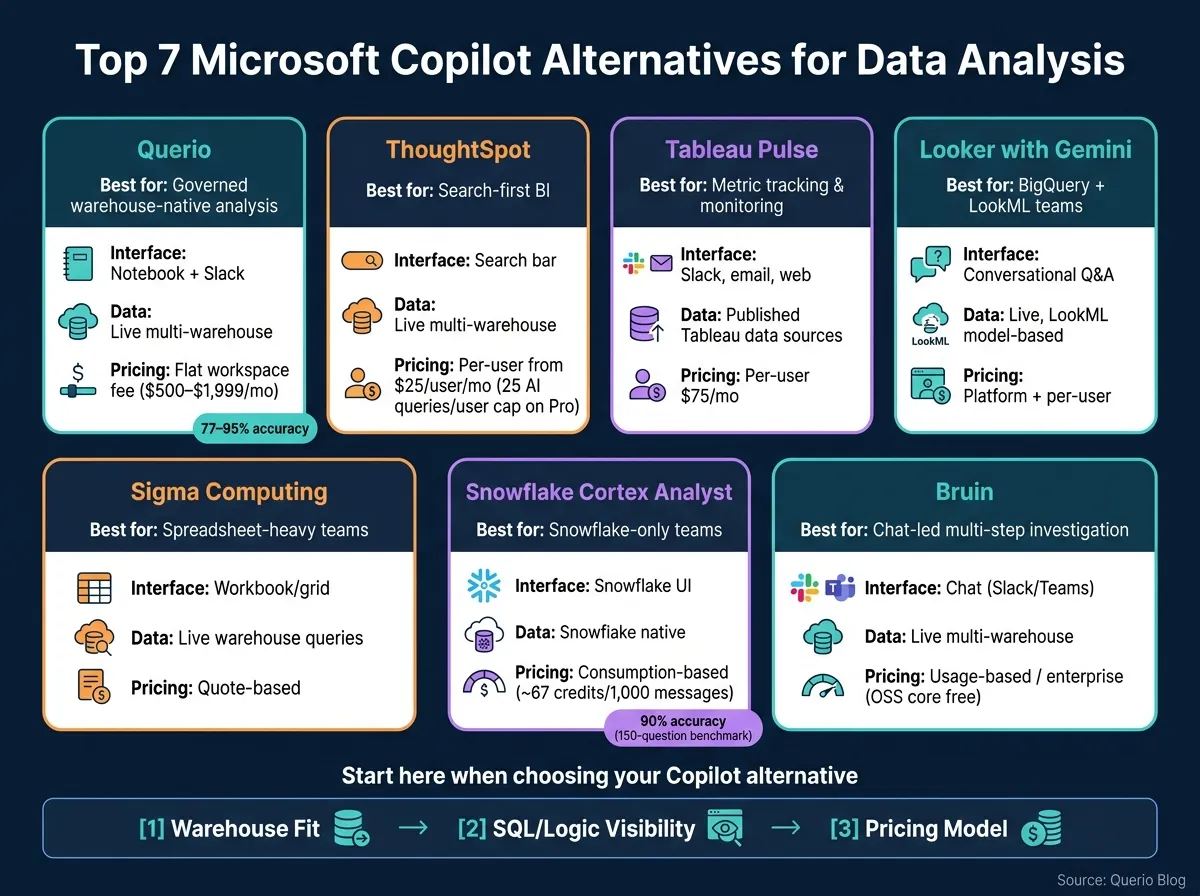 {Microsoft Copilot Alternatives for Data Analysis: Side-by-Side Comparison}
:::
{Microsoft Copilot Alternatives for Data Analysis: Side-by-Side Comparison}
:::
| Tool | Best for | Main interface | Data setup | Pricing style |
|---|---|---|---|---|
| Querio | Governed warehouse-native analysis tools | Notebook, Slack | Live multi-warehouse | Free plan; Core $2,499/mo |
| ThoughtSpot | Search-first BI | Search bar | Live multi-warehouse | Per-user / usage |
| Tableau Pulse | Metric tracking | Slack, email, web | Published Tableau data sources | Per-user |
| Looker with Gemini | BigQuery + LookML teams | Conversational Q&A | Live, model-based | Platform + per-user |
| Sigma Computing | Spreadsheet-heavy teams | Workbook | Live warehouse queries | Quote-based |
| Snowflake Cortex Analyst | Snowflake-only teams | Snowflake UI | Snowflake native | Consumption-based |
| Bruin | Chat-led investigation | Chat | Live queries across many databases | Usage-based / enterprise |
If I were choosing, I’d start with warehouse fit first, then look at how much of the SQL or logic I can inspect, and then compare pricing and features.
1. Querio
Querio is built for B2B data teams that need governed, warehouse-native AI analysis. It works best for teams that want live warehouse analysis, governed metrics, and SQL they can inspect and edit.
Data connectivity
Querio connects live, in read-only mode, to Snowflake, BigQuery, Redshift, ClickHouse, Postgres, and MySQL. There are no CSV exports, data copies, or ingestion pipelines in the middle. Every query runs right against your warehouse, so the team works from one source of truth.
AI analysis workflow
That live connection changes the day-to-day experience. Instead of giving static answers, the agent can query current warehouse data as questions come in.
A teammate can ask something in Slack, Microsoft Teams, the Querio web app, or inside Claude via MCP. Querio then writes inspectable SQL or Python and opens it in a reactive notebook. Analysts can review and edit each SQL or Python query, and any connected charts update on their own. Querio is reported to answer 77%–95% of analytical questions accurately [2] and refuses to guess when the data is missing.
Governance model
Querio’s context layer stores metric definitions, joins, and queries as plain SQL, Markdown, and Python files. These sync to GitHub in the same repo as your dbt project. The agent can suggest definitions, but people still approve and commit them.
OAuth and RBAC keep each query within the logged-in user’s warehouse permissions. The platform is SOC 2 Type II certified and HIPAA-compliant, and Querio signs BAAs for healthcare teams.
Pricing and fit
| Plan | Price | Users | Connections |
|---|---|---|---|
| Free | $0 | Unlimited | Unlimited |
| Core | $2,499/month ($2,099/month billed annually) | Unlimited | Unlimited |
| Enterprise | Custom | Unlimited | Unlimited |
Querio has no per-seat pricing. Each plan includes AI credits (500 a month on Free, 10,000 on Core), and admins can set a spending cap, which makes budgeting simpler. It brings governed self-serve analysis, notebook inspection, and Slack-based querying into one platform. That makes it a strong fit when connectivity, governance, and inspectable workflows matter more than dashboard-only reporting.
2. ThoughtSpot
ThoughtSpot is a search-first BI platform built for governed self-serve analytics platforms. It isn't just a thin chat layer sitting on top of your warehouse. [5] In plain English, that means it's a better match for teams that want a search-led BI experience, not notebook-style warehouse analysis.
Data connectivity
ThoughtSpot connects live to Snowflake, BigQuery, Redshift, and other major warehouses through direct connectors. Queries run against the warehouse itself, not a copied dataset. As of mid-2026, it also integrates with Snowflake Cortex through the Model Context Protocol (MCP). [1]
AI analysis workflow
Spotter handles natural-language queries, visualizations, and code help. SQL visibility is more limited, with only a basic query inspector available. [5]
That creates a clear tradeoff. The semantic layer handles much of the modeling work, which gives teams more control, but it also means governance sits at the center of the setup.
Governance model
ThoughtSpot uses a worksheet-based semantic layer to define joins, metrics, and table relationships. It also supports rule-based row-level and column-level security. Setup can take weeks because joins and tables often need to be modeled by hand. [5]
Pricing and fit
| Plan | Price | AI Query Limit |
|---|---|---|
| Essentials | Starts at $25/user/month [5][2] | - |
| Pro | Starts at $50/user/month [5][3] | 25 Spotter AI queries/user/month [3] |
| Enterprise | Custom pricing [5][3] | Usually needed for unlimited AI usage [3] |
The Pro tier's 25-query cap makes frequent AI use harder. ThoughtSpot is strong in enterprise governance and embedded analytics, so it tends to fit larger organizations with dedicated BI teams best. [5][3]
3. Tableau Pulse
Tableau Pulse is built for monitoring first. It sends metric summaries to people in Tableau Cloud, Slack, or email without waiting for them to go look things up.[1] That makes it a stronger fit for tracking defined metrics than for broad, open-ended analysis.
Data connectivity
Pulse works only with published data sources in Tableau Cloud or Tableau Server.[1] In plain English, it sits on top of data that has already been prepared and published. So Pulse acts more like a governance-first reporting layer than a tool that queries your warehouse directly.[1]
AI analysis workflow
The main experience in Pulse is the metric digest: plain-language summaries that explain how a metric moved.[1] Instead of asking users to dig through dashboards, Pulse pushes the update to them in a format that’s easier to scan.
Governance model
Pulse inherits governance from the semantic layer behind each published data source, so the quality of that modeling shapes trust and accuracy. If the upstream model is clean and well set up, Pulse can deliver dependable reporting. If it isn’t, the issue starts before Pulse ever enters the picture.[1]
Pricing and fit
Tableau Pulse and Ask Data are included with Tableau Creator at $75 per user/month. Tableau+ adds Tableau Agent and enhanced Q&A through contact sales.[1] For most buyers, this pricing setup matters most when the team already runs on Tableau.
Pulse is a strong match for Salesforce and Tableau shops that want metric monitoring pushed to users. Teams outside the Tableau stack should expect more setup work and extra licensing overhead.[1]
4. Looker with Gemini
For teams already set on Google Cloud, Looker with Gemini keeps analysis inside a governed semantic layer. Looker runs on LookML, a code-based semantic layer, and Gemini adds conversational Q&A on top of that governed model.
Data connectivity
Looker connects live to BigQuery, Snowflake, Redshift, and Postgres. The best fit is usually BigQuery, where the setup tends to feel more natural.
AI analysis workflow
Gemini follows LookML definitions, which helps keep metrics in sync across queries. It also supports Q&A and presentation-ready output in Google Workspace. But there’s a clear boundary here: outside the LookML model, Gemini has less room to work.
Governance model
That same control is the main tradeoff. Governance sits in version-controlled LookML files, with inherited permissions and metric definitions managed in one place. That gives teams a steady source of truth, but it also adds setup work. LookML needs data engineering support to build and maintain.
Pricing and fit
Looker makes the most sense for teams already invested in Google Cloud and ready to support LookML over time. In that setup, it’s a stronger governance-first pick than a lightweight self-serve tool.
| Feature | Looker with Gemini |
|---|---|
| Semantic Layer | LookML (version-controlled) |
| Warehouse Fit | Best on BigQuery; supports Snowflake, Redshift, Postgres |
| AI Interaction | Conversational Q&A within governed model scope |
| Governance | Centralized LookML policies; inherited permissions |
| Main Constraint | Requires data engineering to build and maintain LookML |
5. Sigma Computing
Sigma is a spreadsheet-style BI tool built for teams that want self-serve analysis with guardrails on live warehouse data. It runs live queries against cloud warehouses, so the data stays where it is [3]. In plain English, that makes Sigma a strong pick for teams that want BI-style digging and reporting without moving data out of the warehouse.
Data connectivity
Sigma uses direct queries, which means data stays in place instead of getting copied into another system [3]. That setup is handy for teams that want one source of truth. The tradeoff is pretty simple: if usage climbs, warehouse costs can climb with it [3].
AI analysis workflow
Ask Sigma is built for single questions, while Sigma Agents are meant for multi-step or guided investigations [3]. The nice part is that follow-up work stays in the grid, so the workflow feels close to working in a spreadsheet [3]. Sigma can also generate formulas and show a SQL preview, but it is not a fully editable SQL workflow [3]. In practice, Sigma tends to work best when teams already have pre-modeled datasets and metrics in place.
Governance model
Sigma uses attribute-based row-level security (RLS) to control what each person can see, layering permissions on top of existing warehouse models [3]. That makes it a good fit for governed self-serve analytics. The catch is that teams need to do some setup first, especially around datasets, metrics, and RLS rules.
Pricing and fit
Sigma does not publish pricing, so you have to contact sales for a quote [3]. Since it runs straight on warehouse compute, total cost also depends on usage patterns and query volume [3]. Sigma makes the most sense for teams that want spreadsheet-native analysis for finance, operations, and business users, all inside a governed warehouse model.
If your team is already Snowflake-native and wants analysis to stay inside the platform, the next option is even more tightly coupled to that workflow.
6. Snowflake Cortex Analyst
For teams that want to stay inside Snowflake but do more than spreadsheet-style BI, Cortex Analyst adds natural-language querying on warehouse data. It turns plain-English questions into SQL by using Snowflake Semantic Views, which are set up in YAML for tables, metrics, and joins.
That setup matters. Access control remains inside Snowflake, so permissions keep following your existing warehouse roles. The upside is clear: everything stays in one place. The trade-off is just as clear: it works only within the Snowflake world.
Data connectivity
Cortex Analyst queries Snowflake natively, so it makes the most sense for Snowflake-first workflows.
AI analysis workflow
Cortex Analyst is single-turn. So if someone asks a follow-up question, it doesn't keep that thread going in one conversation. For multi-step analysis, teams need Cortex Agents instead.
In an August 2024 benchmark, Cortex Analyst reached 90% accuracy across 150 questions [3].
Pricing and fit
Pricing follows Snowflake's consumption model. The standalone API costs about 67 credits per 1,000 messages [3].
Teams that need broader, multi-step investigation should look at the next section or explore other natural language data querying tools.
7. Bruin
Bruin is a multi-step option for teams that want chat-based investigation across SQL and Python inside one governed workflow. It’s chat-first, not dashboard-first. And it presents itself as a single platform for ingestion, SQL and Python transformations, quality checks, and conversational AI analysis in one place.
Data connectivity
Bruin connects natively to Snowflake, BigQuery, Databricks, Redshift, Postgres, ClickHouse, DuckDB, MySQL, and SQL Server, and it queries those systems live without copying data [5]. It also comes with built-in connectors for SaaS sources like Stripe, HubSpot, and Mixpanel, along with other product and mobile sources. That makes it a practical pick for teams that want ingestion and analysis in the same tool [5].
AI analysis workflow
Users can ask questions in plain English through Slack, Microsoft Teams, or a browser [5]. Bruin turns those questions into SQL or Python, runs the query straight against the connected warehouse, and returns a chart or short summary [5].
This setup makes Bruin a better fit for iterative investigation than one-off question answering. It keeps context from earlier questions, so follow-ups like "now split that by region" work naturally. For data teams running repeated investigations on the same dataset, that matters a lot [5].
The generated SQL is inspectable, which lets analysts check each query before it runs [5].
Governance model
Bruin uses a governed semantic layer, along with lineage, quality checks, and audit logs, to keep analysis traceable [5]. That focus on reviewable output helps support repeatable metrics and build trust in business analysis over time.
Pricing and fit
Bruin’s open-source core, including its CLI and ingestr connectors, is free [5]. Cloud and enterprise plans are also available, and enterprise pricing avoids per-viewer fees [5]. Agentic analytics layers like Bruin usually add LLM costs between $0.04 and $0.50 per query [2].
That flexibility comes with tradeoffs, which the pros-and-cons section covers next.
Pros and Cons of Each Tool
Each tool handles a different kind of data-analysis job. The table below helps you line up each option with its strong points, weak spots, and the kind of team it tends to suit best.
| Tool | Main Strengths | Main Limitations | Best-Fit Team Profile |
|---|---|---|---|
| Querio | Live warehouse access; inspectable SQL/Python; Git-synced context layer; no per-seat pricing | Requires upfront context layer setup | 100–500-person SaaS, healthcare, or finance teams with a real warehouse |
| ThoughtSpot | Search-first UX; multi-warehouse support | High upfront Worksheets modeling effort; Pro tier caps AI queries at 25 Spotter AI queries per user per month [3] | Mid-market and enterprise teams replacing legacy BI tools |
| Tableau Pulse | Automated metric digests | Limited SQL visibility; requires published data sources | Salesforce-heavy organizations |
| Looker with Gemini | Consistent metrics via LookML governance; Git-backed semantic layer | Heavy LookML dependence; clunky for unmapped tables; BigQuery-centric | Google Cloud teams with a mature LookML practice |
| Sigma Computing | Spreadsheet-style exploration on live warehouse data; human-in-the-loop agents | Pricing opacity for the Agents layer; requires pre-defined datasets for best results | Spreadsheet-literate teams who want warehouse power without writing SQL |
| Snowflake Cortex Analyst | Native Snowflake security and RBAC; no data movement; reported high accuracy with a mature semantic model [2][4] | Snowflake-only; requires significant YAML semantic view setup | Snowflake-native regulated enterprises in finance or healthcare |
| Bruin | Unified pipeline from ingestion to AI analysis; Slack/Teams-native; open-source core; no per-viewer fees [5] | Consolidating legacy BI tools takes time; newer entrant in the market | 20–500-person teams wanting Slack-native self-serve alongside a unified data pipeline |
When you read this table, focus on two things:
- How much of the query logic you can actually inspect
- Where the semantic layer lives
That’s where the biggest tradeoffs tend to show up.
Some tools give you a clean, search-style experience, but make it harder to see the SQL underneath. Others let you inspect the logic directly, which matters a lot if your analysts need to verify numbers, debug outputs, or tweak how a query works.
The other fault line is the semantic layer. In some products, that layer sits inside a governed model like LookML or a Snowflake semantic view. In others, it lives closer to the warehouse or in a Git-synced context layer. That choice shapes how fast your team can move, who owns metric definitions, and how much setup work comes before people can start asking useful questions.
If your team cares most about control and traceability, SQL visibility will matter fast. If your bigger problem is keeping metrics consistent across teams, the semantic layer design may matter even more.
Conclusion
The best Microsoft Copilot alternative for data analysis depends on your warehouse, your governance setup, and how your team likes to work. For most teams, the choice gets pretty simple once you sort out what matters most: governed warehouse-native analysis, search-first BI, spreadsheet-style analysis, or agentic investigation.
So start with warehouse fit and governance, then look at the interface. Snowflake Cortex Analyst is a fit for Snowflake-native teams. Looker with Gemini works well for teams built around LookML governance. Sigma Computing is a good match for spreadsheet-style analysis. Tableau Pulse is geared toward metric monitoring. Bruin is built for multi-step investigation. ThoughtSpot is the pick for search-first enterprise BI.
Querio stands out for B2B SaaS, healthcare, and finance teams that want live warehouse access, inspectable SQL or Python, and governed self-serve analysis in one workflow.
After that, the smartest move is to test the finalist with a real business question. Not a simple lookup, but something messy and a bit open-ended, like: "What's our NRR trend for customers acquired before the last pricing change?" That kind of prompt tells you a lot. You can see whether the tool shows the SQL, flags missing data, and gives your team an answer they can actually defend.
FAQs
::: faq
How should I evaluate warehouse fit first?
Start with governed metrics and live data connectivity, not dashboard features. The tool should connect natively to your warehouse - like Snowflake, BigQuery, or Postgres - without data exports or proprietary middleware.
Then make sure it respects your existing semantic layer. After that, test it with 5–10 real, ambiguous business questions. Look at syntax accuracy, governance enforcement, and whether the AI can explain its logic with inspectable SQL or Python. :::
::: faq
What level of SQL visibility do teams need?
Most teams need enough SQL visibility to check the AI’s work and make sure the output is accurate, even if they don’t write SQL every day. Inspectable and editable SQL gives teams a clear way to review joins, filters, and metric calculations against trusted benchmarks.
That kind of transparency helps data teams spot errors early, stop metric drift, and keep trust in self-serve analytics. Even basic SQL knowledge still matters as a guardrail. :::
::: faq
How can I estimate total cost beyond license pricing?
Look beyond per-seat pricing and estimate total cost across four areas: capacity and infrastructure, usage caps, operational overhead, and scaling costs.
Check whether AI features need extra cloud capacity - for example, Microsoft Fabric starts at around $9,000 per year. Also look at whether plan limits push you into an enterprise upgrade, whether data exports or ETL create extra maintenance work, and whether pricing goes up with every viewer or casual user. :::