Business Intelligence
What Querio's file-system architecture means for data teams that work like engineers
Centralize metrics and joins in Git-backed files so data teams get consistent, auditable, reusable analytics built like engineered software.
Querio is reshaping how data teams handle analytics by applying software engineering principles like version control, modularity, and automation. Instead of relying on scattered spreadsheets or inconsistent SQL scripts, Querio centralizes business logic - metrics, joins, and calculations - into Git-managed files. This approach ensures consistency, traceability, and scalability for analytics workflows.
Here’s the big picture:
Shared Context Layer: Centralizes definitions for metrics (like "monthly active users") and table joins into reusable files, ensuring every analysis uses the same logic.
Reactive Notebooks: Automatically update visualizations and calculations when logic changes, speeding up workflows and reducing manual adjustments.
Version Control: Tracks every change, logs updates, and provides a clear audit trail, mirroring workflows familiar to software engineers.
By combining these features, Querio empowers data teams to build consistent, modular, and scalable analytics pipelines. Teams save time, reduce errors, and simplify collaboration, making analytics workflows as reliable as engineered software systems.
If your team struggles with inconsistent definitions, manual updates, or lack of transparency, Querio offers a structured solution to modernize your processes.
Data Versioning and CI/CD in data engineering
Core Features of Querio's File-System Architecture
Querio's architecture revolves around three key components: a shared context layer, reactive notebooks, and version control. Together, these elements tackle common analytics challenges, like scattered logic across multiple tools or reliance on individual expertise. Here's a closer look at how each component reshapes analytics workflows.
Shared Context Layer for Metrics and Joins
The Shared Context Layer acts as a centralized hub for all business logic. Key metrics - like "monthly active users" or "customer lifetime value" - and table join relationships are defined once and stored as files in Git. This ensures that every notebook, dashboard, or AI-generated output pulls from the same consistent definitions. For example, if "gross margin" is updated in the Shared Context Layer, all related analyses automatically sync, eliminating manual adjustments. This approach can cut the time spent on repetitive ad-hoc queries by over 50% [3].
Reactive Notebooks for Modular Analysis
Querio's notebooks are designed to be dynamic and responsive. When upstream dependencies - like a shared metric or a join filter - are modified, all downstream visualizations and calculations update instantly. This interactivity speeds up iterative development. For instance, a marketing analyst who tweaks the "attributed conversions" metric in the Shared Context Layer can immediately see the updated results in their visualizations. Teams have reported saving around 10 hours per week on analysis tasks [1]. Plus, Querio's environment supports both SQL and Python, allowing analysts to switch seamlessly between the two without leaving the platform.
Version Control and Auditability
Querio stores metrics, joins, and notebooks as Git-tracked files, making every change traceable. Teams can branch, review changes via pull requests, and revert updates as needed, mirroring practices common in software development. This level of traceability is particularly important for compliance and accountability. For instance, a fintech team might log a change like "v1.2.3: Updated join on transaction_date - 04/10/2026, Analyst: Jane Doe", ensuring a clear audit trail for regulatory purposes. By adopting version-controlled workflows, data teams have reported reducing debugging time by 65% compared to traditional BI tools [4].
Feature | What It Does | Engineering Equivalent |
|---|---|---|
Shared Context Layer | Centralizes metric and join definitions | Shared library or semantic model |
Reactive Notebooks | Auto-updates outputs when logic changes | React components with live props |
Version Control | Tracks every change with full history | Git repository for data logic |
Engineering Workflows You Can Build with Querio
With Querio's core features in place, data teams can implement real engineering workflows that simplify both reuse and automation. Tools like the Shared Context Layer, reactive notebooks, and version control work together to enable shared logic, automated pipelines, and faster iteration.
Code Reusability Through Shared Logic
In many analytics environments, SQL logic often gets repeated across multiple notebooks. For instance, one analyst might define "active users" using a 30-day window, while another opts for 28 days. The result? Inconsistent quarterly reports. Querio solves this by letting teams define logic once and use it everywhere.
Metric and join definitions are stored as files - such as metrics/customer_retention_rate.yaml or joins/active_users.sql - and can be referenced in any notebook or pipeline with a simple import. When you update one of these files, Querio’s reactive engine ensures the changes flow through automatically.
This method significantly reduces maintenance and ensures consistent KPIs. For example, an e-commerce team consolidated 50 scattered SQL queries into just 8 shared files, cutting maintenance time by 70% while ensuring uniformity for reports tracking over $10 million in revenue [5]. A fintech client saw 40% fewer errors in quarterly reports after switching to shared join files, with audit trails confirming zero discrepancies across more than 200 assets [5][6].
"Teams achieve 80% less boilerplate code, freeing analysts for high-value modeling." - Querio's lead architect [5]
This streamlined reusability also lays the groundwork for automating workflows with AI-driven pipelines.
Automating Analytics Pipelines with AI Agents
Querio takes automation a step further with AI agents designed to speed up and simplify pipeline creation. These agents can transform plain-English queries into SQL or Python code by leveraging shared definitions. For example, a query like "Show monthly revenue by region for Q1 2025" generates governed, consistent code automatically [6][8].
Because the AI integrates tightly with Querio’s file system, the generated code is inspectable, version-controlled, and built on validated shared logic. One SaaS company with 50 analysts used Querio's AI agents to automate 80% of ad-hoc SQL tasks for dashboard updates, reducing pipeline build time from 4 hours to just 15 minutes per request. This saved an estimated 1,200 engineering hours annually - equivalent to $180,000 in labor costs at $150 per hour [7][9]. Similarly, a retailer deployed 20 inventory forecasting pipelines in a single week - work that previously took two months - and improved forecast accuracy by 15% thanks to reusable join logic [7][9].
As Querio emphasizes: "Every AI query is explicit code you can read or edit." [1]
Querio in Practice: Concrete Use Cases
These workflows show how Querio operates in real team settings - from ensuring consistent KPI definitions to streamlining join logic deployment across growing data teams.
Building Version-Controlled Metrics for Consistent KPIs
One of the most common challenges in data teams is inconsistent metric definitions, which can lead to conflicting dashboards and reports. Querio addresses this with an engineering-inspired system where all dashboards, reports, and AI-generated answers pull from a centralized, versioned semantic layer. This ensures that KPI definitions remain consistent across the organization. Plus, updates to metrics are tracked through Git, providing a clear audit trail - especially useful for teams delivering precise metrics to finance or leadership.
Here’s a comparison of Querio’s file-system approach versus traditional ad-hoc analytics:
Feature | Querio File-System Architecture | Traditional Ad-Hoc Analytics |
|---|---|---|
Metric Storage | Centralized, versioned files | Scattered across dashboards and SQL scripts |
Version Control | Git-integrated with audit trails | Manual tracking or none |
Consistency | Single source of truth for all teams | Conflicting definitions across reports |
Logic Reusability | High; metrics and joins are modular | Low; logic is often hard-coded per report |
User Access | Governed self-service via AI agents | Ticket-based requests to data teams |
By aligning metrics, Querio also makes it easier to apply the same principles to join logic. Scalable management of joins ensures exploratory analysis can evolve into consistent, enterprise-grade reporting.
Testing and Deploying Join Logic at Scale
Updating join logic manually across multiple reports is time-consuming and prone to errors. Querio flips this process on its head by letting teams start with exploratory analysis in reactive notebooks. Analysts can test new joins directly against live warehouse data. Once the logic is validated and refined, it’s promoted to a shared file in the context layer (e.g., joins/order_attribution.sql). This makes the join logic accessible to every notebook and AI agent on the platform.
Querio’s AI agents play a key role here by validating data structures before the logic is formalized. This approach - “explore first, harden later” - allows teams to experiment and iterate quickly while ensuring only proven logic is locked in. It’s a workflow inspired by software development, where iterative refinement leads to stronger, scalable solutions [2].
Benefits of Querio for Scalable, Governed Analytics
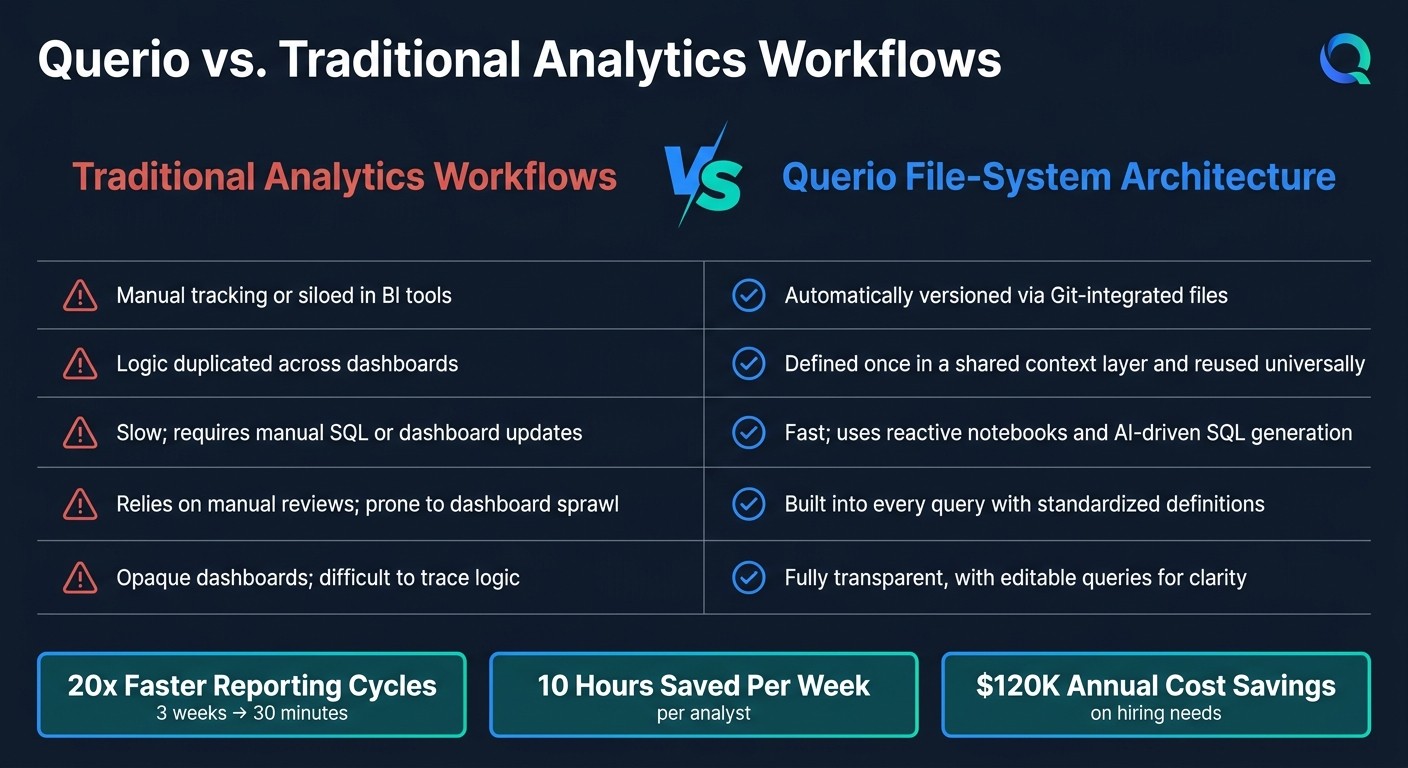
Querio File-System Architecture vs. Traditional Analytics Workflows
Scaling analytics can feel like an uphill battle, especially as more users demand consistent definitions, dependable outputs, and clear accountability. Querio tackles this challenge with its file-system architecture, offering a solution that ensures strong governance while enabling seamless scalability. By defining joins, metrics, and business logic just once in shared context files, teams can expand from managing a handful of KPIs to hundreds - without rewriting code or creating inconsistencies. The results speak for themselves: Querio users have reported 20x faster reporting cycles, cutting the time to create new reports from 3 weeks down to just 30 minutes [1].
Old Workflows vs. Querio: A Side-by-Side Comparison
The contrast between traditional analytics workflows and Querio's file-system approach becomes strikingly clear when you compare how they handle common pain points:
Aspect | Standard Analytics Workflows | Querio File-System Architecture |
|---|---|---|
Version Control | Manual tracking or siloed in BI tools | Automatically versioned via Git-integrated files |
Logic Reusability | Logic duplicated across dashboards | Defined once in a shared context layer and reused universally |
Deployment Speed | Slow; requires manual SQL or dashboard updates | Fast; uses reactive notebooks and AI-driven SQL generation |
Governance | Relies on manual reviews; prone to dashboard sprawl | Built into every query with standardized definitions |
Trust & Verification | Opaque dashboards; difficult to trace logic | Fully transparent, with editable queries for clarity |
In traditional workflows, even a minor change to a metric definition can create a ripple effect, requiring teams to manually update every dashboard or script that references it. Querio eliminates this hassle. By updating the shared context file, changes automatically propagate across the entire system, ensuring consistency. This streamlined approach doesn’t just save time - it fosters collaboration and trust, as shown in the next section.
Better Collaboration and Trust Across Data Teams
Querio's approach to common, versioned logic builds a strong foundation of trust among analysts, engineers, and stakeholders. With features like "Verified Boards", teams can approve analyses and clearly separate finalized reports from exploratory work.
Every modification to a metric or join is logged with a complete audit trail, similar to a Git commit history. This transparency allows teams to quickly trace changes and maintain accountability. By uniting everyone around a single source of truth, Querio helps eliminate disagreements and ensures that all stakeholders access the same validated insights. As Querio aptly puts it:
"Analytics should work like software that your team and AI can operate on."
Conclusion: How Querio Helps Data Teams Work Like Engineers
Data teams have faced ongoing challenges like scattered logic, manual updates, and the absence of version history. Querio addresses these issues by applying engineering principles to analytics, treating it the same way engineers handle code: stored as files, versioned in Git, and designed for reuse.
Instead of fragmented workflows, Querio centralizes metrics and join logic in a shared semantic layer. Reactive, Python-enabled notebooks automatically update when dependencies change, and every AI-generated answer is presented as clear, version-controlled SQL or Python. As Querio explains:
"Querio's core strength is that every AI-generated answer resolves into readable SQL or Python, stored as files and versioned in Git." [10]
This structured approach delivers real results. Teams can save up to 10 hours of analysis time per week, and organizations can cut costs by $120,000 annually on hiring needs alone [1]. These savings stem from adopting engineering best practices - like modularity, reusability, and auditability - into analytics workflows that previously relied on manual processes and ad hoc methods.
For data teams ready to modernize their workflows, Querio provides a straightforward solution: define your logic once, version it, and let both humans and AI build on it consistently. It’s more than just streamlining processes - it transforms how data operations are managed.
FAQs
How does Querio prevent KPI definition drift?
Querio tackles the challenge of KPI definition drift by using semantic and metrics layers to standardize and store KPI definitions. This approach ensures that metrics remain consistent and accurate across different teams. Plus, it translates complex data into easy-to-understand, business-friendly terms whenever needed. These layers act as a dependable framework, helping teams maintain clarity and stay aligned in their analytics processes.
How do you review and roll back metric changes in Git?
The search results don't offer detailed instructions on reviewing or rolling back metric changes in Git. However, in general, Git provides tools to review and manage changes effectively. For instance, you can use git diff to inspect modifications between commits or working directories. If you need to undo updates, commands like git revert (to undo changes safely by creating a new commit) or git reset (to move the branch pointer to a previous state) can be used, depending on your workflow and requirements.
How do AI agents stay governed by shared definitions?
AI agents rely on shared definitions through semantic layers and standardized context to keep data workflows consistent. Querio’s setup brings everything together - business metrics, table relationships, and glossary terms - so AI agents and users stay on the same page with clear, uniform definitions. Features like collaborative notebooks, version-controlled workflows, and transparent AI queries make it easier for teams to stay aligned. These tools help maintain consistency, simplify updates to shared logic, and cut down on misunderstandings in automated insights and decision-making.
Related Blog Posts