Business Intelligence
Mode vs Hex: What Happened to the SQL-First Notebook?
A shift from SQL-to-report to reactive SQL+Python notebooks turns analysis into interactive apps, changing workflows and governance.

If I had to sum it up in one line: Mode is built to turn SQL into reports, while Hex is built to turn SQL and Python into interactive notebooks and apps.
If you work in Snowflake, BigQuery, Redshift, or Postgres, that difference shapes how your team works every day. I’d frame the choice like this:
- Choose Mode if your team mostly ships scheduled KPI reports
- Choose Hex if your team needs SQL + Python in one workspace
- Choose Querio if your goal is governed self-serve analytics on live warehouse data
- The main split is not “old tool vs new tool.” It’s report output vs app output
- Hex also changes the workflow with a reactive model, where upstream SQL changes can rerun downstream steps
One point stands out to me: Hex did not just copy Mode. It changed what people expect from a SQL-first notebook. In Mode, the report is usually the finish line. In Hex, the notebook itself can become the product that people use.
That matters for teams in B2B SaaS, healthcare, and finance, where warehouse governance, live data access, and audit trails often matter more than flashy BI layers or CSV-based handoffs.
::: @figure 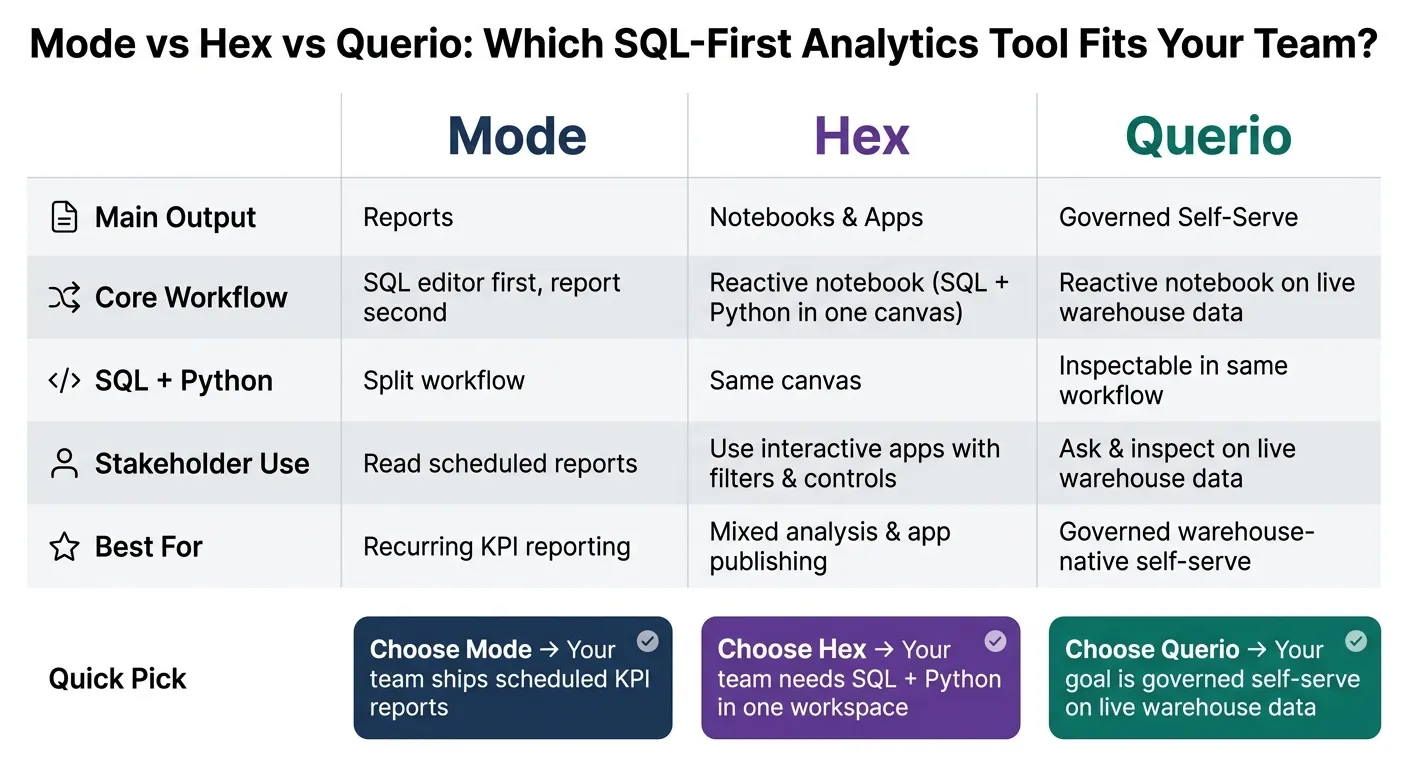 {Mode vs Hex vs Querio: SQL-First Analytics Tools Compared}
:::
{Mode vs Hex vs Querio: SQL-First Analytics Tools Compared}
:::
Meet Hex, an AI-Powered Analytics Platform with Notebooks, Apps and more: featuring Rachel Herrera
::: @iframe https://www.youtube.com/embed/4RN8HGvY2sM :::
sbb-itb-284a532
Quick Comparison
| Criteria | Mode | Hex | Querio |
|---|---|---|---|
| Main output | Reports | Notebooks and apps | Governed self-serve |
| Core workflow | SQL editor first | Reactive notebook | Reactive notebook on live warehouse data |
| SQL + Python | Split workflow | Same canvas | Inspectable in same workflow |
| Stakeholder use | Read reports | Use apps with filters and controls | Ask and inspect on live data |
| Best for | Recurring KPI reporting | Mixed analysis and app publishing | Governed warehouse-native self-serve |
So when I read this comparison, the answer feels simple: Mode still fits fixed reporting, Hex fits mixed analysis and stakeholder-facing apps, and Querio fits teams that want live, governed self-serve without leaving the warehouse.
How Mode defined the SQL-first notebook
Mode built a SQL-first analytics workflow. Analysts begin in a dedicated SQL editor, use the schema browser and query history to find tables, run queries against the live warehouse, and then turn those results into a shareable report. Python and R came after SQL, not before it. In that setup, the notebook worked as a governed path from SQL query to shared report.
Mode's core workflow: SQL editor first, report second, notebook third
The report is the main output. The notebook layer comes second. In most Mode workflows, the end result is a published report scheduled for stakeholder distribution, not an open notebook people keep working in.
What Mode's model did well
In practice, that setup made Mode strongest for repeatable reporting work. Query variables let analysts parameterize date ranges and customer segments, so reports could be rerun with a single filter change instead of being rewritten from scratch.
| Job to Be Done | Mode's Approach | Strength / Limit |
|---|---|---|
| Ad hoc investigation | SQL editor with schema browser and query history | Fast for analysts; less accessible for stakeholders |
| Recurring KPI reporting | Parameterized reports with date and segment filters | Highly repeatable and easy to govern |
| Collaboration | Shared workspace with live cursors | Real-time for analysts; stakeholders mostly read |
That made Mode a strong fit for SQL-proficient teams running scheduled KPI reporting. Hex keeps the warehouse-native starting point, but moves the workflow toward a reactive notebook and app layer.
How Hex changed the model: from SQL-first notebook to reactive notebook and app
Hex keeps SQL-first analysis, but it changes one big thing: the notebook becomes the thing you share. SQL, Python, and charts all sit in one reactive canvas. For teams working straight in Snowflake, BigQuery, Redshift, or Postgres, that shift matters. It changes how analysts move through ad hoc work, recurring reports, and the final handoff to stakeholders.
Hex's core workflow: SQL and Python in one reactive canvas
In Hex, SQL, Python, Markdown, and charts all live in a single canvas. Hex runs on a reactive dependency graph, which means a change to an upstream SQL query automatically triggers downstream cells to run again. You don't have to rerun those dependent cells by hand.
That sounds small, but in practice it's a big deal. An ad hoc question often starts in SQL, then drifts into Python once the work gets messier. In Hex, that whole path stays in one place instead of getting split across tools.
How apps and AI became part of the notebook story
Analysts can turn a finished notebook into an interactive app with parameter controls, filters, and drill-downs. Stakeholders get a clean front end, while the underlying SQL and Python stay out of sight. User reviews often point to this as one of Hex's best moves: it makes it easy to turn analysis into something people can actually use.
AI is part of that same workflow through Hex Magic. Hex Magic can auto-generate SQL, generate Python, and suggest joins based on schema context. Another feature, Threads, lets business users ask plain-language questions against the notebook's context.
The gap between Hex and Mode shows up most clearly in execution, sharing, and AI-assisted work.
| Dimension | Hex | Mode |
|---|---|---|
| Execution model | Reactive dependency graph; automatic downstream updates | Linear; manual query execution |
| Language mix | SQL, Python, Markdown, and charts in one canvas | SQL-first with a separate Python/R workbench |
| Stakeholder surface | Interactive app with parameter controls, filters, and drill-downs | Scheduled reports and dashboards |
| AI role | Writes SQL/Python and suggests joins from schema context | AI assistance alongside SQL workflows |
There are tradeoffs. Large notebooks can lag in the browser, and Hex offers fewer visualization choices than Tableau. That shift in model is why the next section looks at Mode and Hex in actual SQL-first work, not just product ideas.
Mode vs Hex on the core SQL-first notebook jobs
Writing SQL and running ad hoc analysis
The difference shows up fast in day-to-day work: ad hoc queries, recurring KPIs, and handing results to stakeholders.
Mode's SQL editor is built for a clear job: write a query, check the result, and turn it into a report without much friction. If you're a SaaS analyst tracking down a funnel drop or a data team checking a KPI in Snowflake, that straight line from editor to shareable output is the big draw. For pure SQL investigation, Mode is still the faster, simpler option.
Hex starts to pull ahead when the work doesn't stop at SQL. In Hex, SQL and Python live in the same notebook, so a funnel investigation can move straight into Python for cohort cuts or deeper slicing without jumping to another tool. That makes Hex a better match for questions that need Python follow-up before the answer is ready to share.
Parameterized KPI reporting, Python follow-up, and stakeholder sharing
You see the same split in reporting and sharing.
Both tools support parameters, but they fit different kinds of work. Mode's query variables are a good match for scheduled KPI reports. That's handy for recurring packs where the date range, segment, or business unit changes, but the output stays mostly fixed. If your team sends monthly KPI packs, Mode fits that job well.
Hex uses parameters inside an interactive notebook or published app. So instead of asking for a fresh report every time, stakeholders can filter the analysis themselves. That's useful when a GTM or finance lead wants to slice pipeline or revenue performance by region, rep, or time period. And since SQL and Python stay in the same workspace, Python follow-up analysis remains tied to the original notebook instead of drifting into a separate script.
Collaboration and AI-assisted workflows
Mode's collaboration model is centered on shared reports and scheduled delivery. Analysts build the work, and stakeholders consume the result.
Hex is stronger when the team wants analysis, editing, exploration, and publishing to happen in one workspace. It's also more active on the AI side. Instead of just helping draft SQL, Hex Magic can read schema, suggest joins, and help generate Python alongside SQL. That makes it easier to go from an open question to a shareable notebook or published app.
How to choose between Mode and Hex - and where Querio fits
Best fit by team shape and workflow
Hex didn’t replace Mode. It took the SQL-first notebook idea and pushed it into reactive analysis and app-building.
So the choice is mostly about what your team needs to produce day to day: recurring SQL reports, mixed SQL/Python analysis, or governed self-serve on live warehouse data. The table below makes that easier to scan.
If your main output is governed SQL reporting and recurring KPI work, Mode is the better fit. It works best when the end product is a governed report.
If your analysts and data scientists often switch between SQL and Python in the same investigation, and they need to ship interactive apps or data products, Hex is the better fit. Its reactive notebook model is built for mixed SQL/Python analysis and stakeholder-facing work.
| Primary Job | Best Fit |
|---|---|
| Recurring KPI reporting, governed SQL output | Mode |
| Mixed SQL/Python analysis, interactive apps | Hex |
| Governed self-serve on live warehouse data | Querio |
If the main need is governed self-serve, not reporting or app-building, Querio fills that gap. Querio connects to Snowflake, BigQuery, Redshift, and Postgres with live warehouse access. It keeps SQL and Python inspectable in a reactive notebook, and it stores shared metric context in plain-text files synced to GitHub.
That matters for teams that want live analysis in Snowflake, BigQuery, Redshift, or Postgres without CSV exports. In that case, that workflow can matter more than a broader BI layer or app-building layer.
Key takeaways for data leaders
Put simply: Mode defines the original SQL-first notebook, Hex extends it into a reactive notebook and interactive app layer, and Querio fits teams that want governed self-serve without leaving the warehouse.
FAQs
::: faq
Did Hex replace Mode?
No. Hex did not replace Mode; it expanded the SQL-first notebook model with app-building and team features.
Mode helped popularize the SQL-first workspace for analysts. Hex took that core idea and pushed it further into a notebook-to-app platform. In practice, teams usually choose between them based on what fits their workflow: Mode’s SQL-to-report path or Hex’s more integrated environment. :::
::: faq
When is Mode the better fit?
Mode is a better fit for analyst teams that are strong in SQL and prefer a set reporting rhythm instead of a notebook-first setup.
It works best when the main deliverable is a recurring, parameterized SQL report for stakeholders, and the goal is to go from SQL to a shareable dashboard without much friction. For analyst-led reporting and SQL-driven investigation, it’s a lightweight option that keeps the workflow simple. :::
::: faq
How is a reactive notebook different?
A reactive notebook updates results on its own when upstream code or logic changes. That means the analysis stays current without manual reruns.
Unlike standard notebooks, it keeps track of dependencies and refreshes downstream results for you. This helps recurring analysis and more complex workflows stay consistent, while also making iteration and reuse much easier. :::