Business Intelligence
Lightdash Pricing Explained (2026)
Open-source to enterprise: unpack Lightdash's true costs — license, hosting, warehouse compute, and security tradeoffs.

Lightdash can cost anywhere from $0 in license fees to $36,000+ per year before warehouse spend, hosting, and security add-ons. If I were pricing it today, I’d treat it as a 3-part cost model: Lightdash plan, warehouse queries, and setup/admin work.
Here’s the short version:
- Open Source: $0 software cost, but I still need to pay for self-hosting, upgrades, monitoring, and team time.
- Cloud Pro: about $3,000/month or $36,000/year, with unlimited internal users.
- Enterprise: custom quote, usually for teams that need SAML SSO, SCIM, audit logs, or private deployment.
- Warehouse spend is separate: queries hit Snowflake, BigQuery, Redshift, or Postgres directly, so usage can push total cost up.
- Embedded analytics is separate too: internal BI may be flat-rate, but embedding can add usage-based charges. Alternatively, some teams use AI to generate dashboards automatically to bypass manual setup costs.
- The main pricing split is simple: license vs. hosting vs. compute vs. security requirements.
If you already run dbt and a warehouse, Lightdash may look low-cost at first. But if you need private deployment, compliance controls, or less admin work, the bill can change fast.
Lightdash: The Agentic Data Platform for Modern Data Teams
::: @iframe https://www.youtube.com/embed/LPsHglF_b-E :::
Quick comparison
| Plan | Starting price | Best for | Main extra costs | What to watch |
|---|---|---|---|---|
| Open Source | $0 license | Teams with in-house engineering time | Hosting, monitoring, upgrades, staff time | Higher admin load |
| Cloud Pro | $3,000/month | Mid-size teams that want managed hosting | Warehouse compute, embedded usage | No SSO/SCIM on this tier |
| Enterprise | Custom | Teams with compliance or private deployment needs | Setup, support, SLA, warehouse spend | Sales-led pricing |
My takeaway is simple: the lowest sticker price is not always the lowest total cost. Before I ask for a quote, I’d check dbt readiness, warehouse query volume, business user analytics tools, and security needs.
How Lightdash pricing works
Lightdash isn't seat-priced for internal users. But that doesn't mean your cost stays fixed. In practice, total spend shifts based on warehouse usage and how you deploy it. So for most teams, the main issue isn't the sticker price. It's the full cost of running Lightdash in your setup.
That also means you need to look past plan names and ask a simpler question: What does each tier include, and what will you still pay for elsewhere?
Open Source, Cloud Pro, and Enterprise: the three plan types
These three options fit very different setups.
Open Source is self-hosted. There is no software license fee, but you run it yourself. That means handling upgrades, connecting it to dbt and your warehouse, and keeping the system up.
Cloud Pro is the managed plan. Lightdash takes care of hosting and maintenance, and you get unlimited internal users.
Enterprise works on a custom contract. Pricing is negotiated directly with Lightdash's sales team.
What is flat-rate and what is usage-based
For internal use, Cloud Pro uses a flat-rate subscription. If you add embedded analytics, you also add usage-based charges tied to embedded views.
That pricing only covers the Lightdash subscription itself. Warehouse and infrastructure costs are separate.
What the sticker price does not cover
Three costs sit outside the subscription.
First, warehouse compute. Every query Lightdash runs goes straight to your warehouse, whether that's Snowflake, BigQuery, or Redshift. Those queries create compute charges billed by your warehouse provider, not Lightdash.
Second, self-hosting infrastructure. Open Source teams don't pay a Lightdash license fee, but they do pay for servers, container orchestration, monitoring, and the engineering time needed to keep everything running.
For Cloud Pro, plan on about $36,000/year before warehouse compute and any existing hosting or dbt infrastructure costs.
Next, it's worth looking at what each plan includes and where the tradeoffs show up in day-to-day use.
What each Lightdash plan includes
::: @figure 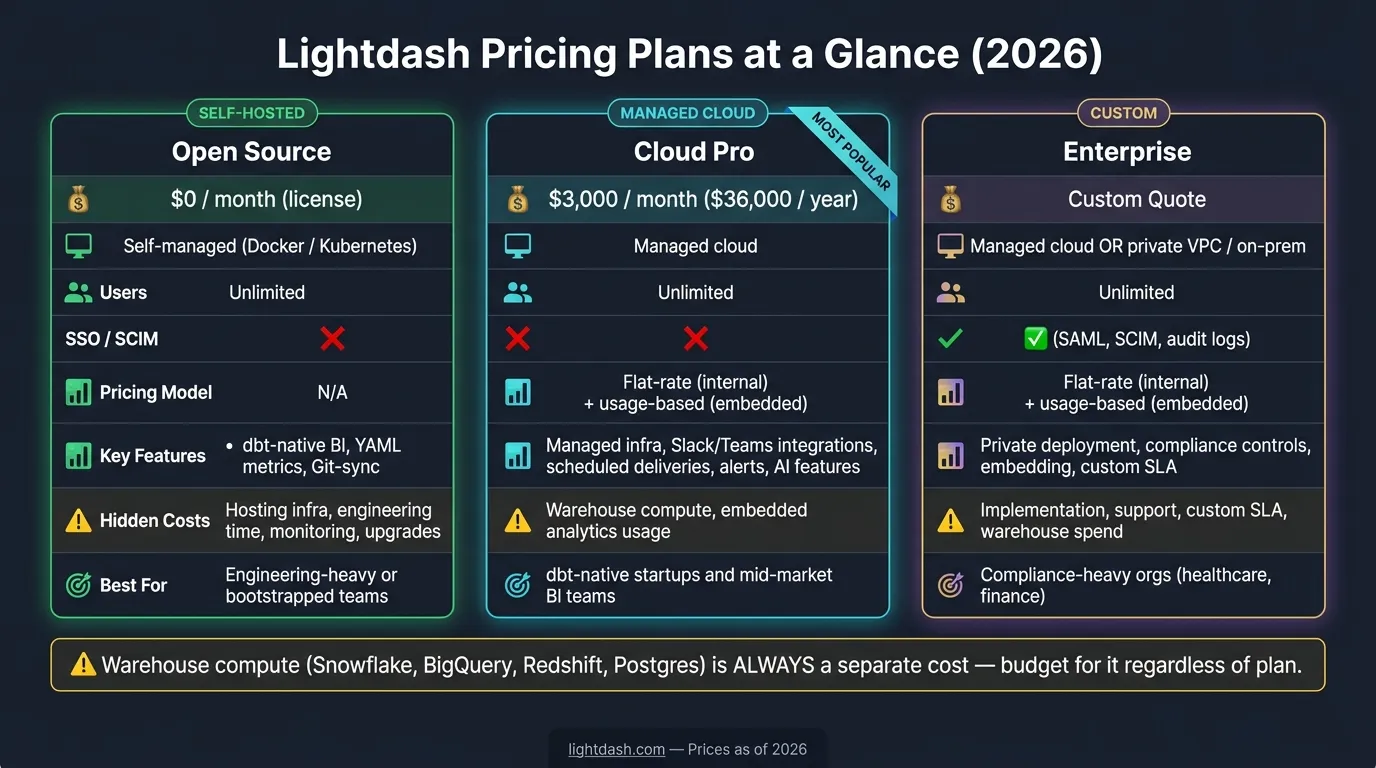 {Lightdash Pricing Plans Compared: Cost, Features & Best Fit (2026)}
:::
{Lightdash Pricing Plans Compared: Cost, Features & Best Fit (2026)}
:::
Here’s what each tier gives you beyond the sticker price.
Open Source: self-hosted on top of dbt
Open Source is self-hosted. Your team deploys Lightdash, connects it to dbt, and runs the stack in-house.
You define metrics, dimensions, and relationships in YAML right alongside your existing models. That setup keeps dbt at the center of how your team models data.
The tradeoff isn’t license cost. It’s engineering time. Your team takes care of hosting, upgrades, security, and scaling.
Cloud Pro: managed BI with unlimited users
Cloud Pro is a managed plan that costs $3,000/month ($36,000/year) and includes unlimited internal users.
It also comes with scheduled deliveries, Slack and Microsoft Teams integrations, and AI features connected to your dbt semantic layer. Dashboard and metric updates still move through dbt, so it stays the source of truth.
The move from Cloud Pro to Enterprise isn’t mainly about modern BI features. It’s more about control, security, and where you can deploy the product.
Enterprise: security, compliance, and deployment control
Enterprise uses custom pricing.
It adds SSO, SCIM, and audit logs. It also gives teams more control over deployment. Customers can run Lightdash in a private VPC or on-prem, which matters for regulated organizations in healthcare and finance.
Those differences drive most of the cost tradeoffs in the comparison below.
Plan comparison: costs, features, and tradeoffs
Side-by-side plan comparison table
The table below shows the differences that matter most when you’re trying to estimate total cost and decide which plan fits.
| Feature | Open Source | Cloud Pro | Enterprise |
|---|---|---|---|
| Monthly Cost | $0 (license) | $3,000 | Custom quote |
| Deployment | Self-managed (Docker/Kubernetes) | Managed cloud | Managed cloud or private deployment |
| User Limits | Unlimited | Unlimited | Unlimited |
| SSO / SCIM | No | No | Yes (SAML, SCIM, audit logs) |
| Pricing Model | N/A | Flat-rate (internal); usage-based (embedded) | Flat-rate (internal); usage-based (embedded) |
| Key Capabilities | dbt-native BI, YAML metrics, Git-sync | Managed infra, Slack/Teams, scheduled deliveries, alerts | Embedding, private deployment, compliance controls |
| Extra Cost Drivers | Engineering time and ops overhead, infrastructure | Warehouse compute, embedded usage | Implementation, support, custom SLA |
| Best-Fit Team | Engineering-heavy or bootstrapped teams | dbt-native startups and mid-market BI teams | Compliance-heavy orgs in healthcare or finance |
This table gives you the list price and feature set. But list price is only part of the story. The full budget usually comes down to usage, infrastructure, and implementation.
The biggest cost drivers beyond the subscription fee
The subscription fee is only one piece of total cost.
For self-hosted teams, the biggest swing factor is internal time. Open Source cuts out license fees, but that cost doesn’t just vanish. It moves into engineering hours, ops work, and infrastructure. So while the line item says $0, the day-to-day lift can still add up.
For Cloud Pro, the main variable is warehouse compute, not hosting. If your team has heavy dashboard traffic or sends lots of scheduled deliveries, compute costs can stack on top of the $3,000/month plan fee. Embedded analytics adds another layer because pricing there is usage-based, not just flat-rate. That’s the kind of thing you want to model early, not after rollout.
There’s another catch: if your dbt models are still messy or half-finished, plan for cleanup before launch with a data dashboard planner. That work can eat time fast.
For Enterprise, the extra costs usually come from implementation, support, and custom SLA work. In plain terms, the quoted subscription is rarely the whole number. Enterprise budgets should also include implementation and support.
What teams should expect to pay: three scenarios
These examples take the plan differences above and turn them into rough budgets for three common team setups.
Scenario 1: small dbt-powered startup team
A small startup with a mature dbt project can run on Open Source with a $0 license fee. That said, it’s not free in practice. Self-hosting, upgrades, monitoring, and engineering time still add real spend [1].
If you’d rather skip that ops work, Cloud Pro costs $3,000/month and takes that burden off your team.
Scenario 2: mid-size BI team at a 100–500-employee company
For a BI team at a 100–500-employee company, Cloud Pro is often a good fit because unlimited internal users help keep costs predictable. The main rollout cost usually comes from the time needed to clean up and standardize dbt semantics [1].
As the team gets bigger, the budget tends to shift away from user count and toward governance, compliance, and deployment control.
Scenario 3: enterprise rollout with compliance requirements
For an enterprise rollout, plan for a custom subscription along with security, compliance, and support needs such as SSO and SCIM. If your team works in a regulated industry, make sure the dbt project is mature enough to support the rollout [1].
It also helps to set aside admin time for permissions and governance, since that work can add up fast.
How to choose the right Lightdash plan
Use the scenarios above to match your team to the right tier. Focus on three things: operational overhead, security and compliance needs, and budget predictability.
Open Source makes sense for teams with engineering time that want a $0 license and are fine handling upgrades, monitoring, and maintenance in-house. Cloud Pro is $3,000/month and works well for growing teams that want a managed setup with a steady monthly bill. Enterprise is the fit if you need SAML, SCIM, audit logs, or private deployment choices like VPC or on-prem. The best plan isn't always the one with the lowest sticker price. It's the one that cuts hidden spend.
Before you request a quote, write down answers to these five checks:
- Embedded analytics scope: Split internal usage from any embedded analytics rollout. Embedded usage can shift total cost.
- Security requirements: If you need SSO, SCIM, audit logs, or deployment control, go with Enterprise.
- Warehouse compute costs: Budget for warehouse spend on its own, since usage can push that bill up.
- Admin and governance time: Count engineering hours for self-hosting, upgrades, permissions, and dbt YAML maintenance.
- dbt semantic layer readiness: Make sure your dbt governance setup is ready before rollout.
Put those answers in writing before you ask for a quote.
FAQs
::: faq
How much should I budget beyond the Lightdash subscription?
Budget for two things beyond Lightdash: your data warehouse bill and internal engineering time.
Lightdash runs queries on the warehouse you already use, like Snowflake, BigQuery, or Redshift. That means your usual compute and storage charges still apply.
If you go with the self-hosted open-source version, set aside engineering time to run, secure, and scale the setup. If you choose Cloud Pro, the platform fee stays flat, but warehouse usage is still on you. :::
::: faq
When does Open Source cost more than Cloud Pro?
Open Source ends up costing more than Cloud Pro once the engineering time needed to deploy, secure, maintain, and upgrade a self-hosted setup goes past $3,000 per month.
The software itself is free to download. But your team still has to handle the day-to-day work that comes with running it.
That means the price isn’t just the software. It’s also the hours spent setting things up, locking things down, keeping them running, and dealing with upgrades.
If engineering bandwidth is tight, Cloud Pro’s flat monthly fee is often the more cost-effective and predictable option. :::
::: faq
What usually pushes a team to Enterprise?
Teams usually move to Enterprise when they need more control than a standard SaaS setup can give them.
That often means tighter security, more choice in how they deploy, or infrastructure built for larger and more complex setups.
Common reasons include self-hosting or private cloud, physical data separation, SSO and SCIM, embedded analytics, cross-datasource querying, and dedicated support. In plain English, Enterprise tends to make sense when standard workspaces no longer fit governance rules or day-to-day operating needs. :::