Business Intelligence
Power BI Pricing: The Copilot Costs Nobody Mentions
Counts Fabric capacity, licenses, prompt-driven usage, and review labor to show Power BI Copilot's true annual cost.

Power BI Copilot is not a simple add-on. If I price it the right way, I have to count Fabric capacity, user licenses, prompt-driven capacity use, model cleanup, and human review time.
Here’s the short version:
- Pro or PPU alone does not unlock Copilot
- I need Fabric capacity or Premium capacity first
- The lowest entry point is about $262.80/month for F2, but that is often too small for shared use
- Many teams end up looking at F32 ($4,204.80/month) or F64 ($8,409.60/month)
- Below F64/P1, many viewers still need $14/user/month Pro licenses
- Prompt use can slow refreshes, pipelines, and report queries because it uses the same capacity pool
- I also need time for semantic model cleanup, governance, and answer checks
That means the invoice is only part of the cost.
If I’m building a budget, I’d test five inputs before rollout:
- Capacity SKU
- Author and viewer licenses
- Prompt volume and prompt length
- Governance labor
- Review time for Copilot answers
Here’s the main takeaway: Copilot can look low-cost at first, then get expensive when shared usage, viewer access, and review work start piling up.
A fast way to think about it:
| Cost area | What I need to count |
|---|---|
| Fixed platform cost | Fabric/Premium capacity |
| User cost | Pro or PPU for authors, and sometimes viewers |
| Usage cost | Capacity consumed by prompts and outputs |
| Data prep cost | Semantic model cleanup, metadata, and sync with dbt |
| Review cost | Analyst and BI lead time to check answers |
So before I treat Copilot as “included,” I need to ask a simpler question: what will it cost me per year once people start using it?
How to Enable Copilot in Power BI: Pricing and Licensing Explained
::: @iframe https://www.youtube.com/embed/ArFFD2dV23s :::
The fixed cost floor before anyone asks Copilot a question
::: @figure 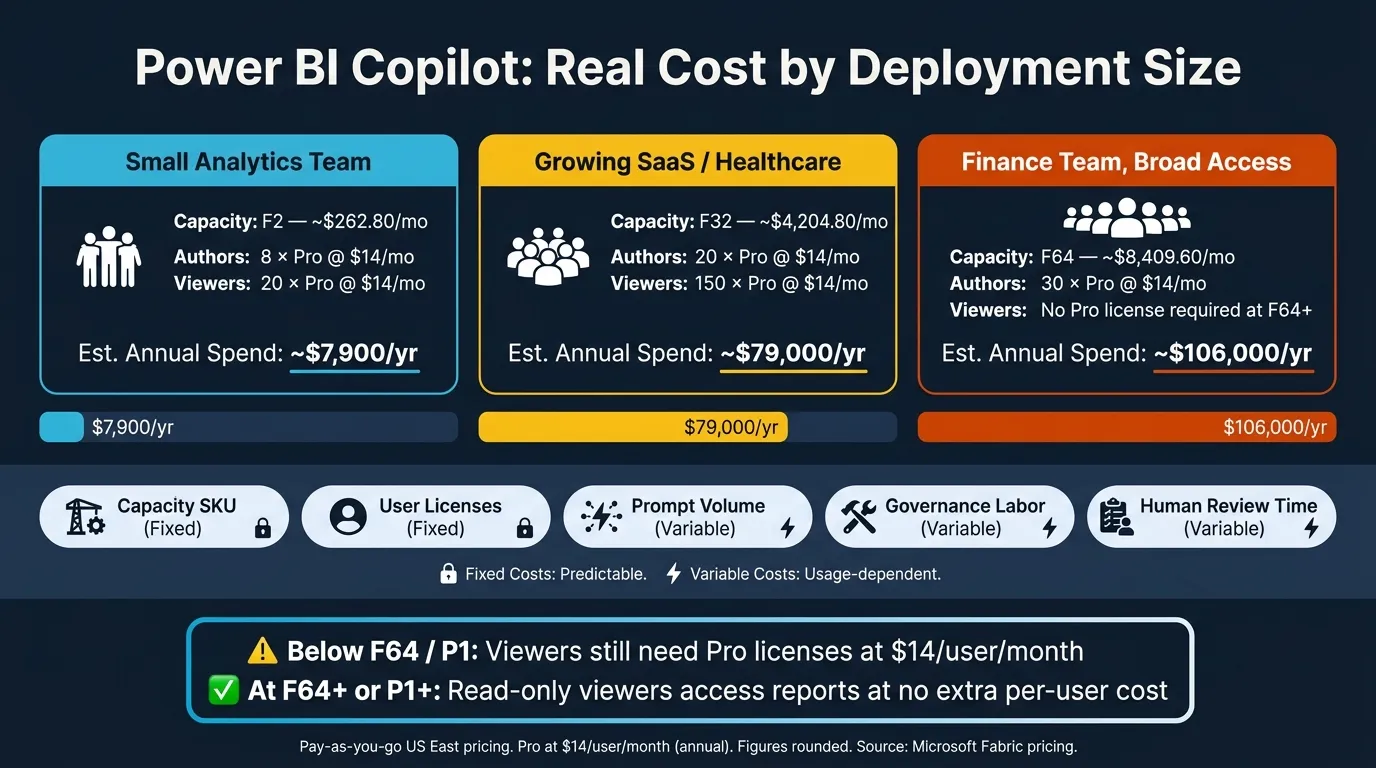 {Power BI Copilot Total Cost of Ownership: SKU Tiers & Hidden Costs}
:::
{Power BI Copilot Total Cost of Ownership: SKU Tiers & Hidden Costs}
:::
Fabric capacity is the real gatekeeper
Power BI Copilot doesn’t start with a free switch you can flip on. It starts with paid Fabric capacity, using an F SKU, or Power BI Premium capacity, using a P SKU. Free capacity and trial plans don’t qualify.[3][12][13]
The lowest way in is F2, which runs about $262.80 per month on pay-as-you-go pricing in East US. That may sound like a small starting point, but there’s a catch: F2 shares compute across refreshes, pipelines, and queries. So when several jobs hit the same pool at once, smaller SKUs can get throttled.[9][2]
For teams that expect people to use the system at the same time, the floor often lands much higher. In practice, many teams end up looking at F32 ($4,204.80/month) for department-level analytics or F64 ($8,409.60/month) for broader rollouts where lots of viewers don’t need their own Pro licenses. And some Copilot features need F64 or P1+, which means the usable starting point can sit well above the bare minimum.[8][9][10][16]
Per-user licenses still stack on top
Capacity isn’t the whole bill. Authors still need user licenses on top of it. That includes analysts, BI developers, and data stewards who publish content, manage semantic models, and use Copilot in a workspace backed by paid capacity. For those users, the options are Power BI Pro ($14/user/month) or Premium Per User (PPU, $24/user/month).[11][15]
Viewer access works differently. At F64 and above or P1 and above, read-only users can open reports without their own Pro licenses because the capacity covers report consumption. Below that line, viewers still need Pro or PPU. That’s where the math can change fast as more people need access.[11][14]
Cost comparison: small, mid-size, and heavy-use deployments
Using September 2026 pricing and pay-as-you-go capacity rates, the table below shows the baseline spend just to keep Copilot available. If usage climbs, you may still need to move to a larger capacity tier.
| Scenario | Capacity | Author Licenses | Viewer Licenses | Estimated Annual Spend (Capacity + Power BI Licenses) |
|---|---|---|---|---|
| Small analytics team (8 authors, 20 viewers) | F2 ~$262.80/mo | 8 Pro @ $14/mo | 20 Pro @ $14/mo | ~$7,900/yr |
| Growing SaaS or healthcare (20 authors, 150 viewers) | F32 ~$4,204.80/mo | 20 Pro @ $14/mo | 150 Pro @ $14/mo | ~$79,000/yr |
| Finance team, broad access (30 authors, 300 viewers) | F64 ~$8,409.60/mo | 30 Pro @ $14/mo | No Pro license for viewers | ~$106,000/yr |
Assumptions: Pay-as-you-go US East pricing at $0.18/CU-hour, 730 hours/month. Pro licenses at $14/user/month (annual). Viewer access is free only at F64+ or P1+. Microsoft 365 Copilot add-on excluded. Figures rounded.[9][11][15]
That fixed floor is just the opening number. Once people start sending prompts, shared capacity limits and validation work add another layer of spend.
The variable costs teams notice after rollout
How prompts and outputs consume Fabric capacity
Once you’ve set the capacity floor, the next thing that starts driving cost is usage. Every Copilot prompt and response pulls from the same Fabric capacity pool, measured in CU-seconds. That’s the very same pool used by refreshes, queries, warehouses, dataflows, and pipelines.[4][19]
The big thing to know is this: cost follows token volume, not the number of prompts. So two teams can send the same number of questions and still burn through very different amounts of capacity. A short, direct question may use only a few hundred tokens. But a back-and-forth session with pasted business rules, extra context, and a long answer can turn into several exchanges with thousands of tokens each.[4][17]
Some tasks also cost more than others. Asking for DAX generation with explanations, or requesting detailed report summaries, tends to use more capacity than plain Q&A.[17][20]
You also won’t see this appear as its own neat “Copilot” charge on the invoice. It gets folded into total CU usage. So the first sign is often indirect: dashboards feel slower, or utilization starts climbing during the workday.[19][7]
Why shared capacity creates surprise costs
Copilot doesn’t sit in a separate lane. It competes with your other workloads on the same capacity, including refreshes and pipelines.[19][6] If several analysts are running Copilot sessions during a refresh window, something has to wait.
That’s where teams usually get caught off guard. In shops doing heavy data engineering along with Power BI, the friction shows up fast. Analysts see slower report loads. Data engineers run into pipeline delays. Stakeholders start asking why the numbers look stale.[18][21][7]
And this is where the bill can jump. Moving from an F2 to an F32 or F64 can add thousands of dollars per month, even if no single Copilot session seemed expensive by itself.[19][1][22]
So SKU choice matters, sure. But usage patterns matter just as much.
Microsoft does offer a way to separate this out: a Copilot-designated capacity that routes AI usage to its own pool instead of the one holding your content.[5] That gives teams cleaner visibility and helps protect performance. The tradeoff is simple: you’re paying for extra headroom.
Fixed vs. variable spend: what drives each
The table below shows the difference between fixed capacity costs and spend that changes with usage.
| Cost Driver | Type | What Triggers It | Scales With | Mitigation Options |
|---|---|---|---|---|
| Reserved capacity | Fixed | Tenant setup and Copilot enablement | Total workload across AI, refreshes, and pipelines | Baseline CU usage before rollout; upgrade only after measuring impact |
| Prompt complexity | Variable | Long inputs, pasted context, iterative follow-ups | Token volume per session | Train users to ask focused questions and avoid unnecessary context |
| Output volume | Variable | Narrative summaries, DAX generation, and report summaries | Complexity of the request | Reserve generative tasks for higher-value work and use quick Q&A for routine checks |
| Workload contention | Variable | Copilot running during peak refresh or pipeline windows | Concurrent Fabric activity | Schedule heavy data engineering jobs off-peak to reduce competition |
In practice, the real cost of Copilot comes from how people use it day to day, not just from the SKU you pick.
The people costs: governance, semantic modeling, and answer validation
Once you’ve covered capacity and usage, the next layer of cost is people time. License fees and compute are only part of the bill. Teams also spend time on analyst work, BI engineering, and answer checks. In finance and healthcare, that work isn’t optional. It’s the price of making AI answers safe to use.
Copilot depends on model quality, not magic
Copilot works off the semantic model: table names, measures, relationships, and metadata. When that layer is clean, answers are more likely to be right. When it’s messy, Copilot can give wrong answers with a lot of confidence. This is why many teams look for ways to keep NLQ answers compliant by enforcing security at the data layer.[26][10][30]
Getting the model ready takes real work. Teams often need to:
- Remove unused fields
- Check joins and grain
- Make sure fact tables connect cleanly to dimensions
- Use clear names for tables, columns, and measures
For example, Claims should join cleanly to Payers, and Net Patient Revenue should exist as a defined measure.[26][10][30]
Metadata matters just as much. Microsoft notes that descriptions help Copilot understand the model, so teams should add descriptions for tables and columns, along with synonyms and AI-specific instructions, to improve answer quality.[24][34] If your team uses dbt upstream, those model definitions need to stay in sync with Power BI measure logic. When they drift apart, metric mismatches follow fast, and Copilot tends to surface them almost immediately. Certifying the datasets approved for AI use also helps guide users to trusted models.[26][27][31]
The semantic layer also needs upkeep over time. This isn’t a one-and-done setup.
Human review is part of the operating cost
Even with a well-prepared model, Copilot outputs don’t certify themselves. Someone still has to check the work. In practice, that review usually falls into a few repeatable checks.
| Review Task | Who Does It | What It Catches |
|---|---|---|
| DAX review | BI developers | Incorrect filters, time intelligence errors, RLS and RBAC gaps |
| Narrative check | Analysts | Misleading trend statements, wrong aggregations |
| Report comparison | Analysts / BI leads | Discrepancies against golden-source reports |
| Consistency check | BI leads | Prompt sensitivity, model drift over time |
Here’s one concrete way to think about the staffing. A mid-size healthcare organization might assign one to two senior analysts five to ten hours per week to validate Copilot outputs across finance and quality dashboards, plus a BI lead spending two to four hours on governance checks and incident reviews.[10][32] Put that on an annual basis, and it becomes part of the real cost of Copilot.
There’s also the non-determinism issue. Copilot can return different answers to the same prompt across sessions. That means regulated teams need a process to detect and investigate inconsistencies, not just review outputs once at launch.[27][29][32] PwC’s guidance on generative AI makes the same point: human review and verification for high-value or high-risk use cases belongs in the operating model.[33]
How governed, inspectable workflows cut rework
When teams can see the SQL or DAX Copilot generates through PBIP projects, Git-tracked query views, or development pipelines, validation gets a lot more grounded.[23][25][27][28] The question shifts from “Does this answer look right?” to “Does this code match agreed business logic?”
That change matters. Governed, inspectable SQL and DAX reduce rework because reviewers can verify the logic itself instead of judging only the final output.
This is the hidden labor cost buyers need to price before rollout. It’s often the line between a useful pilot and an expensive one.
When Power BI Copilot is worth the cost and when it is not
Good fit: Microsoft-heavy teams with stable governance
When you count capacity, licenses, and review work, the main question is simple: does Copilot bring down your total BI cost compared to AI-first alternatives?
It tends to make sense when certified models and review workflows are already in place. That matters even more when the semantic layer lines up cleanly with Snowflake, BigQuery, Redshift, or Postgres models built in dbt. In that setup, Copilot has less chaos to work around.
A mid-size finance or healthcare team with 20–50 report authors and 200–500 viewers can usually spread fixed capacity costs across enough people to keep the per-user cost in check. That’s the key. If the base setup already works well, Copilot has room to help. But the safer way to frame it is this: treat productivity gains as upside, not as the thing that makes the budget work.
Poor fit: thin BI teams, messy models, or low usage
The same cost stack gets tough to defend when usage is light or the semantic layer keeps shifting.
If you don’t already have Fabric or Premium capacity, you’re taking on a new fixed cost. An F2 runs roughly $9,000/year. And if only a small number of analysts use Copilot once in a while, the effective cost per prompt can get expensive fast.
This is where many small BI teams run into trouble. They often can’t spare the time for semantic prep, governance upkeep, and the validation work Copilot needs. Instead of saving time, it adds another layer of work. At that point, Copilot starts to look like overhead rather than leverage.
Conclusion: the total-cost test every buyer should run
Before you commit, build a simple annual TCO model with five inputs: capacity cost, licenses, estimated prompt volume, governance labor, and human review time.
| TCO Input | What to Estimate |
|---|---|
| Capacity (Fabric/Premium SKU) | Annual cost of F2, F32, F64, or P1 |
| Licenses | Pro/PPU per author |
| Prompt volume | Expected daily prompts × average prompt complexity |
| Governance labor | Analyst/architect hours per month × internal rate |
| Human review time | Hours per week spent validating outputs × team rate |
Use this table before the rollout decision, not after.
FAQs
::: faq
Do I need Fabric capacity to use Copilot?
Yes. Power BI Copilot needs Microsoft Fabric capacity. A user license alone isn’t enough.
In most cases, that means at least Fabric F2 or Power BI Premium P1. Many organizations run F64 or higher to get full functionality and better performance at scale, so capacity costs sit on top of standard Power BI Pro or Premium Per User seat fees. :::
::: faq
When do viewers still need Pro licenses?
Viewers still need Power BI Pro or Premium Per User (PPU) licenses to access Power BI content, even when Copilot is turned on.
Here’s the simple version: Copilot doesn’t change the licensing needed for people who open and use Power BI content. If someone wants to view or interact with reports, workspaces, or data models, they still need a Power BI Pro or PPU license.
Copilot also needs Fabric capacity (F64+) or Premium capacity (P1+). But that capacity requirement is separate. It does not replace the per-user license required for access. :::
::: faq
How should I estimate Copilot's real annual cost?
Add up three cost buckets: per-user licenses, required Fabric capacity, and rollout overhead.
For user licenses, you’re looking at Power BI Pro at $14 per user/month or Premium Per User at $24 per user/month. On top of that, add the Copilot add-on at $30 per user/month.
Then there’s the platform cost. Copilot requires Fabric F64 or higher, with an F64-style baseline of about $6,400/month or roughly $76,800/year. That means Copilot isn’t just a per-seat purchase. There’s a platform spend underneath it, and that can be the part teams overlook at first.
You should also budget for rollout work. Plan for a 1–3 week setup phase, plus ongoing governance and metric-modeling work so outputs stay trustworthy. In plain terms, the software cost is only part of the picture. You also need time and people to set it up well and keep it on track. :::