Business Intelligence
Omni Review (2026): An Honest Look After the Hype
A governed semantic layer and clear metric ownership make AI-driven BI useful; without them it becomes extra maintenance and risk.

My short answer: Omni is still worth a close look in 2026, but only for teams with clean data, clear metric ownership, and time to maintain the model. If your numbers already drift across reports, Omni will not fix that by itself.
Here’s the plain version:
- Best fit: U.S. teams with 100–500 employees, a live warehouse, and a small data team that already works well
- Main strength: one governed metric layer for dashboards, self-serve analysis, and AI
- Main risk: if the model is weak, AI and self-serve spread the same mistakes
- Cost reality: pricing is still mostly quote-based, and total cost goes far beyond license fees
- What matters most: test one metric end to end before you buy
I’d judge Omni on six things:
- Metric accuracy: do MRR, churn, revenue, and retention match finance exactly?
- Analyst review: can I inspect SQL, joins, filters, and AI output?
- Access control: do role rules, row limits, and field restrictions hold up?
- Ease of use: can business users answer basic questions without drifting off-model?
- Upkeep: how many hours go into model changes, QA, training, and permissions?
- Three-year cost: licenses, migration, compute, AI usage, support, and renewals
A few facts from the article stand out:
- Omni had a 4.8/5 rating from 65 G2 reviews as of January 2026
- Public pricing is unclear, with one review mentioning about $15 per user per month, while other sources say pricing is not public
- One customer case says a move from Metabase, Tableau, and Looker to Omni took under two months, but that will vary a lot by setup
If I were buying, I would not start with feature lists. I would run a proof of concept around one business flow:
- Model MRR, churn, and gross retention
- Certify one shared metric
- Let a business user query it
- Ask the AI to explain a month-over-month change
- Test row-level access with a restricted user
- Compare the result to raw SQL and finance reports
Here’s the simple takeaway: Omni can work well when your warehouse, dbt work, and metric rules are already in good shape. If they are not, Omni adds another layer to maintain. That’s the lens I’d use for the rest of this review.
::: @figure 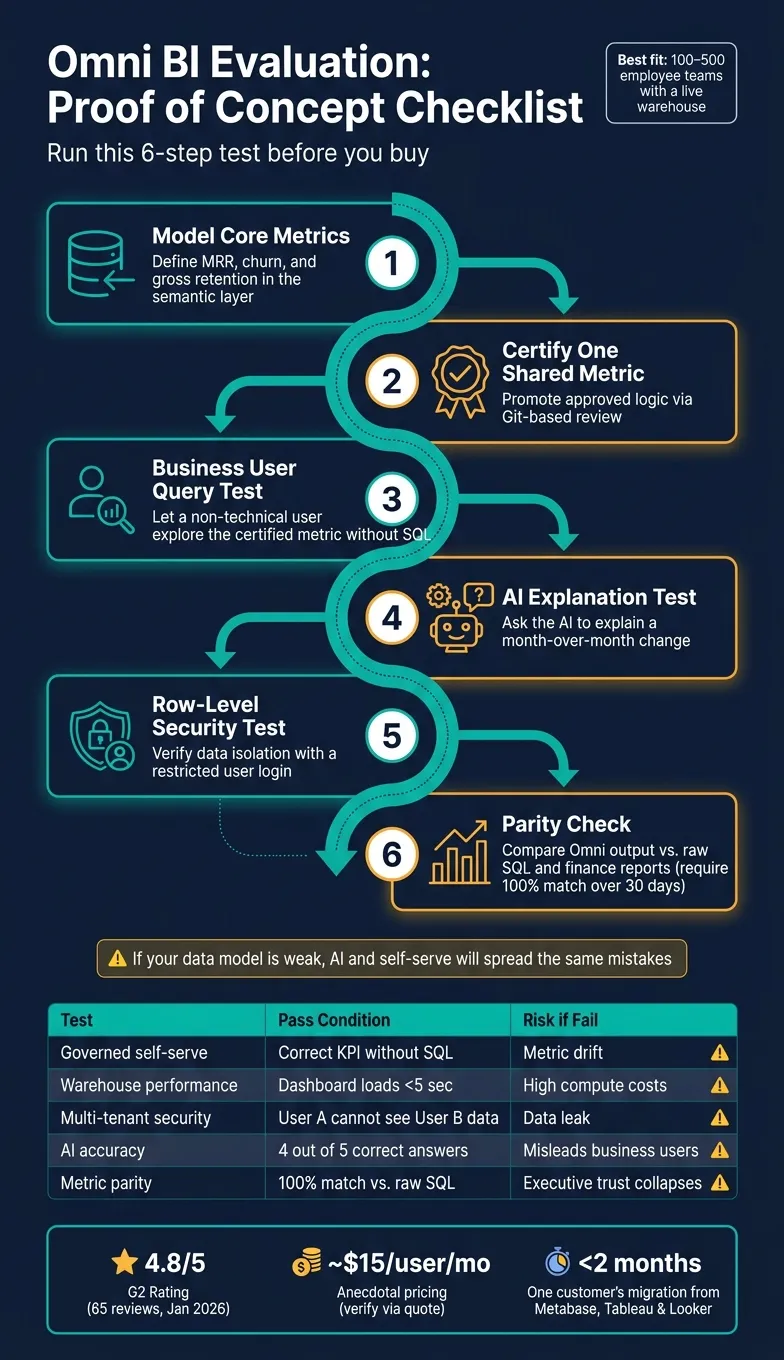 {Omni BI Proof of Concept: 6-Step Evaluation Framework}
:::
{Omni BI Proof of Concept: 6-Step Evaluation Framework}
:::
AI in Omni, backed by a semantic model for accuracy
::: @iframe https://www.youtube.com/embed/Z8G2culbFWs :::
Semantic layer and governance: where Omni's value starts
This is where Omni starts to pay off in practice: when the semantic layer is clean, every surface stays in sync. Omni separates raw schema fields, certified shared metrics, and workbook exploration. Under that sits the warehouse - Snowflake, BigQuery, Redshift, or Postgres. On top sit dashboards, ad hoc analysis, and AI responses.
Analysts can test ideas in a workbook, then move approved logic into the certified shared layer through a Git-based review. Omni also treats dbt as an input source. So if a team already manages metric definitions there, they don't need to redefine ARR or gross margin again inside the BI layer.
For lean teams, the big test is simple: can one model serve Finance, Sales, and self-serve users without the numbers drifting?
A concrete workflow: from revenue question to governed metric
Say a finance analyst needs a governed gross margin number the CFO will recognize. The data team defines the metric once in the shared model, including its logic and joins, then certifies it after review. When the analyst opens a workbook and uses that certified metric, the result matches what every other surface in the company will return.
That consistency is the whole point. Build the model once, review it, and then let people use it across workflows. But there’s still a catch: ad hoc questions need somewhere to land, too.
Where semantic modeling helps and where it adds friction
The upside and the drag look different depending on who’s using the model.
| Area | Where Omni is strong | Check | Main friction point |
|---|---|---|---|
| Metric governance | Centralized YAML model; dbt-aware definitions | Parity with finance definitions; naming conventions | Analysts carrying the maintenance overhead |
| AI grounding | AI uses certified metrics and join paths | Join logic accuracy; behavior on out-of-model questions | Users asking questions the model doesn't cover yet |
| Self-serve access | Point-and-click exploration for business users | Filter behavior on incomplete models | Non-technical users when the model has gaps |
| Promotion workflow | Workbook-to-shared-model promotion with Git review | Git review cycle length and team capacity | Data teams during initial setup |
The safest way to roll this out is in phases. Start with one team. Run Omni alongside existing reports. Switch only after the numbers match.
That matters because the semantic layer acts like a gatekeeper for adoption. If it isn’t stable, self-serve and AI inherit the same holes.
Once the semantic layer is stable, the next test is whether AI can use it without adding review overhead.
AI workflows and inspectability: useful assistant or extra review burden?
Omni's AI does its best work when the semantic layer in business intelligence under it is in good shape. If that layer has gaps, the AI picks them up too. So the job doesn't disappear. It changes. Instead of writing every query by hand, analysts spend time checking the system's assumptions.
That leads to a simpler test: can analysts see what the AI did and fix it fast?
Testing AI on governed questions, follow-ups, and unclear requests
The best way to test this isn't with one polished prompt. It's with a sequence.
Start with a governed question, like churn by customer segment using an approved metric. Then change one thing at a time: the last 90 days, a plan, or a segment. Omni should keep the original metric definition steady and only adjust the filter or grouping you asked for.
A more revealing test is to take a conversion-rate dashboard, spot an unexpected drop in March 2026, and ask the AI to isolate the shift by acquisition channel, device type, and geography. Then check for silent substitution. That means watching for things like users turning into sessions, booked revenue turning into recognized revenue, or event date turning into reporting date.
Ambiguous prompts tell you even more because they expose hidden metric assumptions. Ask, "Why did conversion fall?" and see what Omni does next. Does it ask for clarification? Does it state its assumptions? Or does it just pick a default?
A response you can trust makes those assumptions visible. A risky one doesn't.
That's the real test of whether AI helps a small data team or just adds another layer of review.
What analysts can inspect
Because Omni sends AI through the governed layer, analysts can review metric and join choices, not just the prompt itself. Omni generates governed query objects instead of raw SQL, and every AI answer runs through that governed layer. Analysts can move between the natural-language prompt, a point-and-click UI, and a SQL editor to inspect the output. AI-suggested model updates also require human approval before they are applied, so analysts have to accept or reject changes before anything goes live.
That's a solid safeguard. But it doesn't remove review work.
Analysts still need to check:
- metric selection
- date grain
- join logic
- population definitions
- whether row-level security stayed active across follow-up questions
| Workflow | Analyst review required | Tradeoff |
|---|---|---|
| Governed churn question | Validate metric mapping against a trusted report | Dependent on semantic-model quality |
| Follow-up change | Check for silent changes in date field, grain, or population | Conversational speed can conceal assumption shifts |
| AI-assisted dashboard | Review chart choice, filter scope, and business interpretation | Visual plausibility can mask analytical errors |
| Conversion drop investigation | Validate causality claims and inspect contributing segments | Correlation may be mistaken for explanation |
| Ambiguous request | Decide whether to add data, define a metric, or reject | Honest failure is preferable but may interrupt user flow |
| Security-sensitive question | Test with multiple roles and review audit records | Strong controls require upfront setup |
There isn't a public benchmark that measures Omni on standardized churn, conversion, follow-up, or ambiguous-query tests. Buyers should ask for a proof of concept using their own governed metrics instead of leaning on broad AI claims.
The open question is whether that inspection work stays manageable in live use.
Implementation friction, usability, and operating cost
All of that inspection work only matters if a small team can keep the model up to date without taking on a whole new layer of upkeep.
With Omni, the day-to-day cost doesn't stop at the quote. You also need to account for model upkeep, training, support, and governance. The sticker price is just the starting point.
What small data teams are likely to like
Lean teams will probably like the workbook setup when business users need to dig into governed metrics without waiting on an analyst to step in.
What creates rollout risk in practice
In practice, the biggest rollout risk is maintenance. If the semantic model drifts behind the business, self-serve analysis and AI answers stop lining up. And once that happens, trust starts to slip.
Permissions can also get messy. Complex SSO and group rules often need manual mapping into Omni permissions, and errors here can create data isolation risk. Before go-live, make sure a single filter reaches every tile the way you expect.
That gets to the core issue: which parts of implementation turn into steady upkeep later on?
| Capability Area | Main Friction | What to Test Before Rollout |
|---|---|---|
| Semantic Modeling | Translating complex SQL/dbt logic into Omni's model syntax. | Parity check: Do finance KPIs match the legacy system exactly? |
| Permissions & RLS | Manual remapping of complex SSO and group rules. | Test with a "wrong" tenant token to ensure data isolation. |
| Self-Serve | Model sprawl if users create ungoverned definitions. | Adoption rate: Can users answer basic questions without analyst help? |
| Dashboarding | Manual rebuild of every tile, drill path, and visual layout. | Filter behavior: Do dashboard filters pass correctly to all tiles? |
| AI Workflows | Keeping the semantic model current so AI answers stay correct. | Accuracy: Does the AI interpret the schema correctly on messy data? |
The hidden cost is maintenance: model updates, permission mapping, and dashboard QA. Those operating costs feed straight into the pricing and fit decision.
Pricing, fit, and final buying judgment
Once you understand the implementation drag, pricing stops being a simple seat-count discussion. It becomes a total cost discussion regarding the hidden expenses of BI platforms.
Omni does not publish public pricing, so treat it like a sales-led purchase. Judge it on three-year total cost of ownership, not on a per-seat number. One G2 review snippet mentions paying around $15 per user per month, but that's only an anecdotal data point, not a verified list price. The same reviewer also said it felt expensive for many occasional users.[1]
And the license is only one line item.
Ask for a three-year TCO in U.S. dollars that includes:
- implementation
- migration
- warehouse compute
- AI usage
- support
- renewals
Questions to ask before you accept a quote
Before you sign, get written answers to the points below.
- User and embed pricing: How are named seats, viewers, embedded users, and external users priced - named seat, concurrent, or usage-based?
- AI usage and caps: Are AI features part of the quoted plan, and are prompts, tokens, or API calls metered or capped?
- Onboarding, migration, and training: Are semantic modeling, migration, and training part of the deal, or billed on top? What response-time commitments apply, and do you get a dedicated technical contact?
- Environments included: Are sandbox, development, staging, and production environments part of the plan, or does each one need another license?
- Renewal terms and price increases: What are the contract term, notice period, annual price-increase cap, and expansion pricing?
- Warehouse usage assumptions: Which queries run against your Snowflake, BigQuery, Redshift, or Postgres instance, and what usage assumptions sit behind the quote?
Separate Omni's fees from your own warehouse, data pipeline, and AI infrastructure costs.
Also ask a plain but important question: What happens to your data, models, and embeds if you terminate?
Once those terms are on the table, the fit comes down to how much warehouse maturity your team already has, and whether your team can own the semantic layer over time.
Where Omni fits well and where it does not in 2026
Omni fits best when your warehouse setup is already in good shape, your dbt discipline is strong, and your team can keep metric definitions in order over time.
That usually means:
- a production warehouse on Snowflake, BigQuery, Redshift, or Postgres
- dbt-based transformation discipline
- business users who need governed self-serve analytics without writing SQL
In that setup, the semantic layer can pull its weight.
It is a weaker fit when the warehouse has inconsistent definitions, shaky joins, incomplete history, or source systems that no one has documented well. A semantic layer can standardize business logic, but it cannot rescue bad upstream data without more engineering work.
It is also a weaker fit when no one owns the semantic layer or checks metric changes over time. If ownership is fuzzy, the license fee may end up being the smallest part of the problem.
Conclusion: a conditional yes, pending proof of concept
That leads to a conditional buying answer.
Omni remains a credible shortlist option for governed BI and semantic-layer-aware AI in 2026, but only if the proof of concept passes and the commercial terms stay reasonable.
The right move is a structured proof of concept built around one real business workflow. Model MRR, churn, and gross retention from your production warehouse. Publish one certified metric. Let a business user explore it in a workbook. Ask an AI question about a month-over-month change. Then embed the result for a restricted test audience.
While that test runs, record:
- implementation hours
- modeling changes
- query counts
- warehouse cost
- AI response review time
- support interventions
Omni's case-study index reports one customer migrating internal and embedded analytics from Metabase, Tableau, and Looker into Omni in under two months.[2] Whether that timeline works for your team depends on your migration scope and data complexity.
Set pass/fail criteria before the proof of concept starts, not after. Here's a practical framework:
| Requirement | Evidence Omni Provides | Proof-of-Concept Test | Pass Condition | Risk if It Fails |
|---|---|---|---|---|
| Governed self-serve | Shared semantic layer for metrics | Non-technical user builds a report from a defined metric | User gets the correct KPI without writing SQL | Metric drift and loss of stakeholder trust |
| Warehouse performance | Live, read-only warehouse connection | Run a dashboard with 10+ concurrent tiles | Dashboard loads in under 5 seconds without warehouse spiking | High compute costs or slow user experience |
| Multi-tenant security | Row-level security (RLS) | Log in as User A and attempt to view User B's data | User A sees only their assigned rows | Data leak between customers |
| dbt integration | Native dbt model support | Import dbt metrics and use them in a workbook | Metrics sync without manual re-entry | Duplicate logic and fragmented definitions |
| AI accuracy | Inspectable SQL/Python grounded in the semantic model | Ask five complex questions via the AI assistant | AI generates correct joins and filters in 4 out of 5 cases | AI answers mislead business users |
| Metric parity | Governed semantic definitions | Compare core KPIs (MRR, churn) in Omni vs. raw SQL | 100% numerical match across 30 days of data | Executive trust in the platform collapses |
A conditional yes is the honest verdict - but only if the proof of concept passes and the commercial terms hold up under scrutiny.
FAQs
::: faq
Is Omni a good fit for my team?
Omni is a strong fit for warehouse-first teams that already rely on shared metric definitions. Its AI sits on top of a governed semantic layer, version-controlled business logic, and inspectable SQL, which helps keep answers consistent.
It tends to work best for business-facing BI, especially when non-technical users need self-serve workbooks, shared dashboards, or scheduled reporting. If your semantic or modeling foundation isn’t mature yet, you should expect some setup friction. :::
::: faq
How much work does Omni take to maintain?
Maintenance is mostly about day-to-day governance: keeping the shared semantic/model layer up to date, under version control, and in sync with warehouse definitions.
Because AI answers depend on that layer, Omni is not a “set and forget” tool. When metrics, joins, or business logic change, the model layer has to change too. That means teams also need a clear process for moving workbook logic into governed metrics instead of letting one-off logic pile up.
Setup also tends to take weeks, not days. And on top of that, AI cost forecasting stays on the list, since usage can shift over time. :::
::: faq
What should I test in an Omni proof of concept?
Run a 30-day proof of concept on your own warehouse data, not sample data.
Focus on a few things that matter day to day:
- Governance and consistency across roles, point-and-click exploration, and SQL
- AI grounding and transparency, with inspectable, editable SQL against Snowflake, BigQuery, or Redshift
- dbt integration and the Git-based review process
- How it handles vague or complex prompts
That last point matters more than most teams expect. Simple demo questions are easy. The real test is whether the tool can deal with messy requests, half-formed ideas, and prompts that sound like the way people actually talk at work.
You’ll also want to see if people can move between interfaces without the numbers changing. If an analyst writes SQL, a manager clicks through a dashboard, and an ops lead asks a question in plain English, the answer should still come from the same source and follow the same rules.
And when the AI gives you SQL, you should be able to inspect it, edit it, and trust where it came from. No black box. No mystery logic. Just SQL your team can review against Snowflake, BigQuery, or Redshift, with dbt and Git still part of the process. :::