Business Intelligence
Hex vs Jupyter: When a Managed Notebook Is Worth It
Weigh Hex vs Jupyter by cost, setup, permissions, sharing, reproducibility, and time-to-ship to pick the right notebook for teams.

If your notebook is turning into a team workflow, I’d pick Hex. If it stays personal, I’d stick with Jupyter.
That’s the short answer. From what I see in this piece, the choice comes down to six things: cost, setup work, permissions, sharing, repeatability, and time to ship. Jupyter has a $0 license cost, but teams often pay in setup time. Hex starts at $75 per editor per month, and that price can make sense when you need shared access, scheduled runs, live warehouse connections, and outputs people can open without extra tooling.
Here’s the article in plain English:
-
Choose Hex when you need:
- Shared notebooks for multiple analysts
- Built-in access control
- Direct connections to Snowflake, BigQuery, Redshift, or Postgres
- Scheduled reporting
- Interactive apps for business users
- Less setup, fewer moving parts, and better standardization of data
-
Choose Jupyter when you need:
- One-person analysis
- Local control over packages and environments
- Free, open-source tooling
- Short-lived work that does not need handoff
-
The main tradeoff:
Jupyter gives you control, but your team has to wire up scheduling, sharing, secrets, and access rules on its own. Hex moves more of that into the product. -
One extra point from the article:
If you care about governed AI answers tied to dbt logic and warehouse data, the article says tools like Querio sit in a different spot than notebook tools.
::: @figure 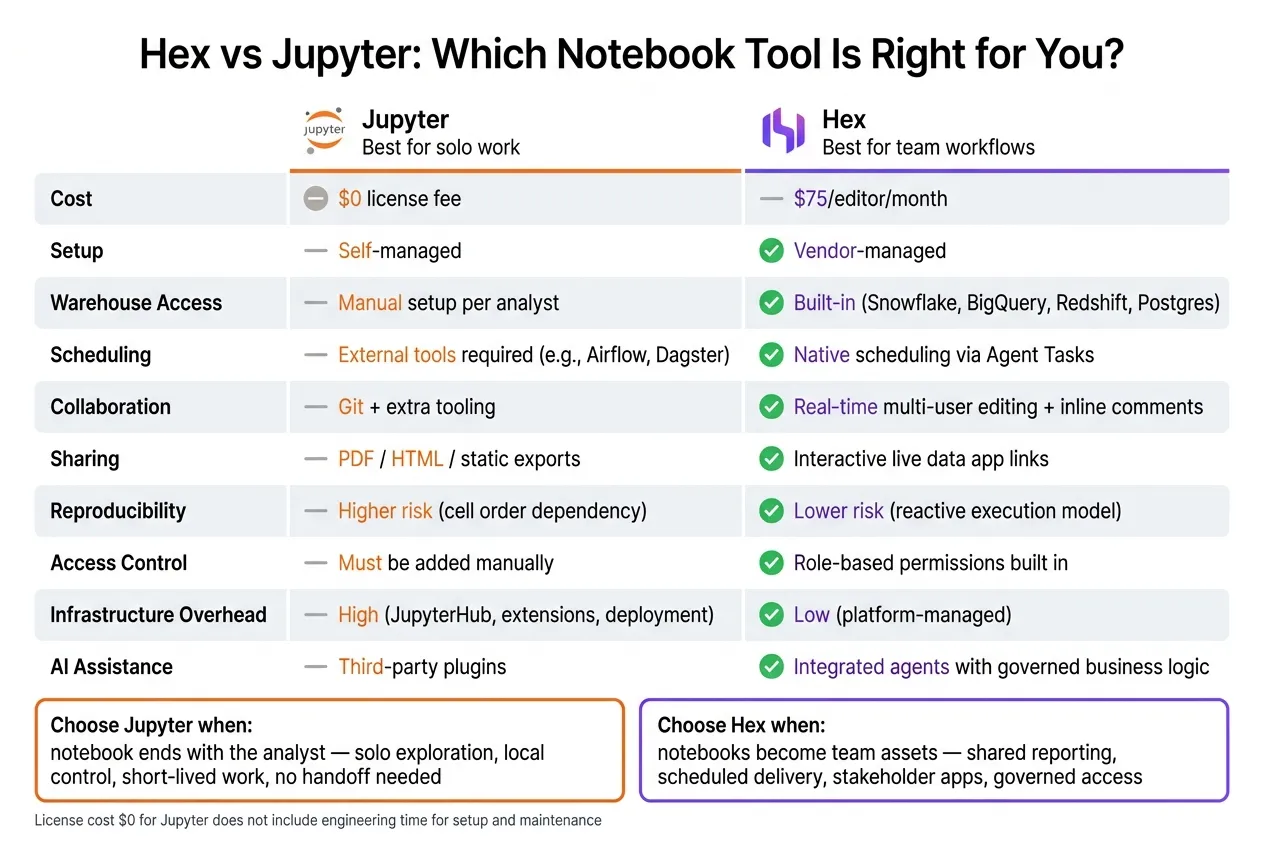 {Hex vs Jupyter: Side-by-Side Tool Comparison for Data Teams}
:::
{Hex vs Jupyter: Side-by-Side Tool Comparison for Data Teams}
:::
Create Observable and Reproducible Notebooks with Hex: Why Hex (Part 1)
::: @iframe https://www.youtube.com/embed/_BjqCrun4nE :::
sbb-itb-284a532
Quick Comparison
| Criteria | Jupyter | Hex |
|---|---|---|
| Cost | $0 license | $75/editor/month |
| Best for | Solo work | Team workflows |
| Setup | Self-managed | Vendor-managed |
| Warehouse access | Manual setup | Built-in native tools |
| Scheduling | External tools needed | Native scheduling |
| Sharing | Files, Git, exports | Live apps and shared workspaces |
| Repeatability | More risk from cell order | Reactive model helps reduce that |
| Stakeholder delivery | PDF/HTML/static options | Interactive app links |
My read: this article is not saying Hex replaces Jupyter for everyone. It’s saying Hex starts to make more sense when notebooks stop being scratchpads and start acting like shared reporting systems.
That framing is what ties the whole piece together.
Where Hex pays off for data teams
Hex pays off when a notebook stops being one person’s scratchpad and starts working like a team system. That shift matters when several analysts need to use the same project and business teams expect outputs they can count on. The biggest upside tends to come from permissions, live warehouse access, and repeatable delivery.
Collaboration, permissions, and live warehouse access
Hex has shared workspaces, inline comments, and version history built in. A reviewer can comment right on a cell and roll a project back to an earlier version. Role-based sharing also makes it clear who can edit and who can only view.
Hex connects directly to Snowflake, BigQuery, Redshift, and Postgres, building a modern data layer for live analysis. That means analysts can query live warehouse data without passing around CSV exports or shared credentials. Once teams have that access under control, scheduled delivery becomes the next big win.
Scheduled workflows and notebook-to-app sharing
Hex's Agent Tasks let teams schedule a notebook to run on its own. For example, a finance team can run weekly variance reviews automatically and send the results to Slack or email. Hex also lets teams publish a notebook as an interactive app for non-technical stakeholders.
That’s a big difference from Jupyter. In Jupyter, this usually means stitching together Voila, Streamlit, or a custom front end, then keeping that extra layer running over time. When the workflow is repeatable, handoff gets easier too, and results are easier to reproduce.
Reproducibility and lower infrastructure overhead
Jupyter’s linear execution model can get shaky when a notebook moves from one analyst to a team workflow. Hex uses a reactive execution model, where cells recompute when upstream data changes. That helps cut down on state-related errors during handoff.
Hex can also trim infrastructure work. The Team tier costs $75/editor/month [2], which teams can weigh against the cost of running JupyterHub, managing extensions, and maintaining deployment workflows for shared, governed analytics.
Where Jupyter is still the right tool
Hex is stronger for governed team workflows, but Jupyter still comes out ahead when the work is personal and self-contained. It makes sense for individual work, short-lived analysis, and highly customized environments. It’s open source, free to use, and can run locally or on self-hosted servers.
One-off analysis and custom coding environments
For one-off exploration, model prototyping, or a single SQL vs Python investigation in Snowflake or BigQuery, Jupyter is often enough. You also avoid license cost.
Jupyter also works well for local prototypes and custom package environments. If you need a specific pandas version or an exact package mix, you can pin it down and keep full control.
Use Jupyter when the notebook ends with the analyst.
What teams must be willing to own
The tradeoff isn’t capability. It’s ownership.
Choosing Jupyter means taking on the surrounding stack yourself. That can be fine for light workloads, but the overhead adds up fast.
In practice, that usually means:
- Handling version control manually through Git
- Managing secrets without a built-in secrets layer
- Setting up scheduling through external tools like Airflow or Dagster [1]
- Sharing results through a separate deployment layer, then securing and maintaining it [3]
- Adding access control and permissions on top
The main question is simple: does the team want to spend engineering time building and maintaining that setup?
The next comparison is how each tool handles the same day-to-day analytics work.
Hex vs Jupyter across real analytics tasks
The biggest differences show up when a notebook stops being personal scratch work and turns into something a team uses every day. That’s where Hex and Jupyter start to part ways.
Here’s how they compare across common analytics work:
| Analytics task | Jupyter | Hex |
|---|---|---|
| One-off SQL + Python analysis | Sufficient - local setup, full control | Sufficient - faster warehouse connection setup |
| Shared team notebooks | Requires Git and extra tooling | Real-time multi-user editing and comments built in |
| Recurring business reporting | Needs external scheduler and deployment layer | Built-in Agent Tasks handle scheduling natively |
| Stakeholder-ready outputs | Export to PDF, HTML, or static view | Interactive data apps with a shareable live link |
| AI-assisted workflows | Third-party plugins | Integrated agents with governed business logic |
Exploratory SQL and Python on Snowflake, BigQuery, Redshift, and Postgres
For one-off analysis in Snowflake, BigQuery, Redshift, or Postgres, Jupyter is enough. You get local control and a familiar notebook setup. If the work stays with one person, that often does the job.
Hex starts to matter when that same notebook becomes shared work. Warehouse connections are managed in one place, so teams don’t need to pass credentials around or repeat setup on each machine. Multiple analysts can work in the same notebook at the same time, leave threaded comments, and watch changes happen live.
Jupyter can get close with Git plus extra tooling. But each extra layer means more setup and more upkeep.
Reproducibility is another big split. In Jupyter, execution depends on cell order, so a notebook that worked yesterday can fail today if someone runs cells out of sequence. Hex uses a reactive execution model that tracks dependencies and recomputes when needed. Once a notebook is shared, that setup difference turns into a workflow difference.
Recurring business reporting and stakeholder-ready outputs
Getting a weekly operating review or an executive KPI summary out of Jupyter usually means adding a separate scheduler, handling deployment, and setting up a secure way to share results with non-technical viewers.
Hex cuts down that path. Agent Tasks handle scheduling natively, and notebooks can be published as interactive data apps without extra infrastructure. Instead of sending a PDF or static HTML file, teams can share a live link.
For teams running recurring reports on Redshift or BigQuery, that lower operational overhead adds up fast. Once delivery is repeatable, the next issue is whether AI can stay inside governed business logic.
AI-assisted workflows and where Querio fits

Both Hex and Jupyter offer AI help. In Jupyter, that usually comes through third-party plugins. In Hex, it comes through integrated agents built to generate SQL that follows governed business logic and consistent metric definitions [2].
Querio sits at a different layer. It provides a governed context layer: definitions, joins, and trusted queries stored as plain SQL, Markdown, and Python files synced to GitHub alongside your dbt project. That means every AI-generated answer shows up as real, inspectable SQL and Python in a reactive notebook, with nothing leaving the warehouse as a CSV export.
That tradeoff matters most for teams that want AI self-serve analytics, not just faster notebooks. For growing teams, choosing an AI data notebook is about balancing speed with long-term governance.
How to choose the right notebook setup
Use the task-level comparison above to decide whether notebook ownership should sit with analysts or with the platform.
Match your choice to team size and workload
The main split is simple: is the notebook personal, or is it turning into a shared reporting asset?
Solo analysts will often stick with Jupyter. Shared workflows make a stronger case for Hex. Once notebooks move from one-person use to repeat team use, the overhead of self-managed Jupyter starts piling up. That’s where Hex can earn its per-editor subscription. Built-in scheduling, live warehouse connections, and publishable data apps cut down on extra tools and manual handoffs.
For regulated teams in healthcare, finance, and B2B SaaS, the big issue is auditability, stable metric definitions, and controlled access. That matters even more when shared reporting has to stay aligned across Snowflake, BigQuery, Redshift, or Postgres.
Cost, maintenance, and speed-to-production checklist
The fastest way to make the call is to compare your current workflow with the day-to-day burden each tool creates.
| Question | Jupyter | Hex |
|---|---|---|
| Who manages warehouse credentials? | Each analyst, manually | Managed in the platform |
| Scheduling | External scheduler required | Built-in scheduling |
| Sharing | Manual notebook sharing | Shareable live data app link |
| Are metric definitions reusable? | Manual, per notebook | Project-level structure |
| Reproducibility risk | Higher with manual setup and execution order | Lower with project structure and version control |
| Upfront engineering cost | Low license fee, high setup and maintenance time | Per-editor subscription, lower infrastructure overhead |
Jupyter has no license fee. But that leaves out the engineering hours spent on environment setup, credential management, scheduling infrastructure, and keeping notebooks reproducible across machines. For a team billing analyst time at U.S. market rates, that hidden cost can shrink the gap fast.
"Hex wins when you have a notebook-heavy data team and ship analysis as data apps." - Bruin [4]
If your team also needs governed self-serve - where business users can ask questions in plain English and get answers backed by approved metric definitions, with every query visible as real SQL - Querio can fit alongside a notebook tool or take the place of one in some workflows. Its context layer stores definitions, joins, and trusted queries as plain files synced to GitHub, in the same repo as your dbt project. That means it works across Snowflake, BigQuery, Redshift, and Postgres, and moves with your dbt project instead of staying trapped inside one platform.
FAQs
::: faq
When does Hex justify its cost?
Hex earns its price when a team needs one place for collaborative SQL and Python work that can also power apps for stakeholders.
It makes the most sense for analyst-heavy teams that rely on scheduled reporting, self-serve interactive dashboards, and strong governance. It’s also a good fit for teams that want less notebook setup and maintenance than a self-managed Jupyter stack. :::
::: faq
When is Jupyter still the better fit?
Jupyter is still the better fit when your team wants maximum control over the Python runtime and a flexible, code-first setup for skilled analysts.
It also makes sense when your team is comfortable handling permissions, reproducible environments, and sharing on its own. Put simply: Jupyter is great for technical exploration, while managed notebooks are better for smoother collaboration, governance, and production. :::
::: faq
How much setup does Jupyter need for teams?
For teams, Jupyter often comes with extra engineering work. Someone has to set up notebook environments, manage dependencies and kernels, control data access, handle governance, and keep servers, updates, and warehouse integrations running.
Then there’s the day-to-day teamwork side of it. People may need to rerun cells just to see someone else’s changes, and it can be hard to keep outputs aligned across notebooks. What feels simple for one person can turn into a support headache once more people get involved. :::