Business Intelligence
Column-Level Lineage for LLMs: Why It Changes AI Accuracy
Give LLMs column-level lineage (origins, transforms, grain, joins) so generated SQL uses certified metrics and avoids double-counting.
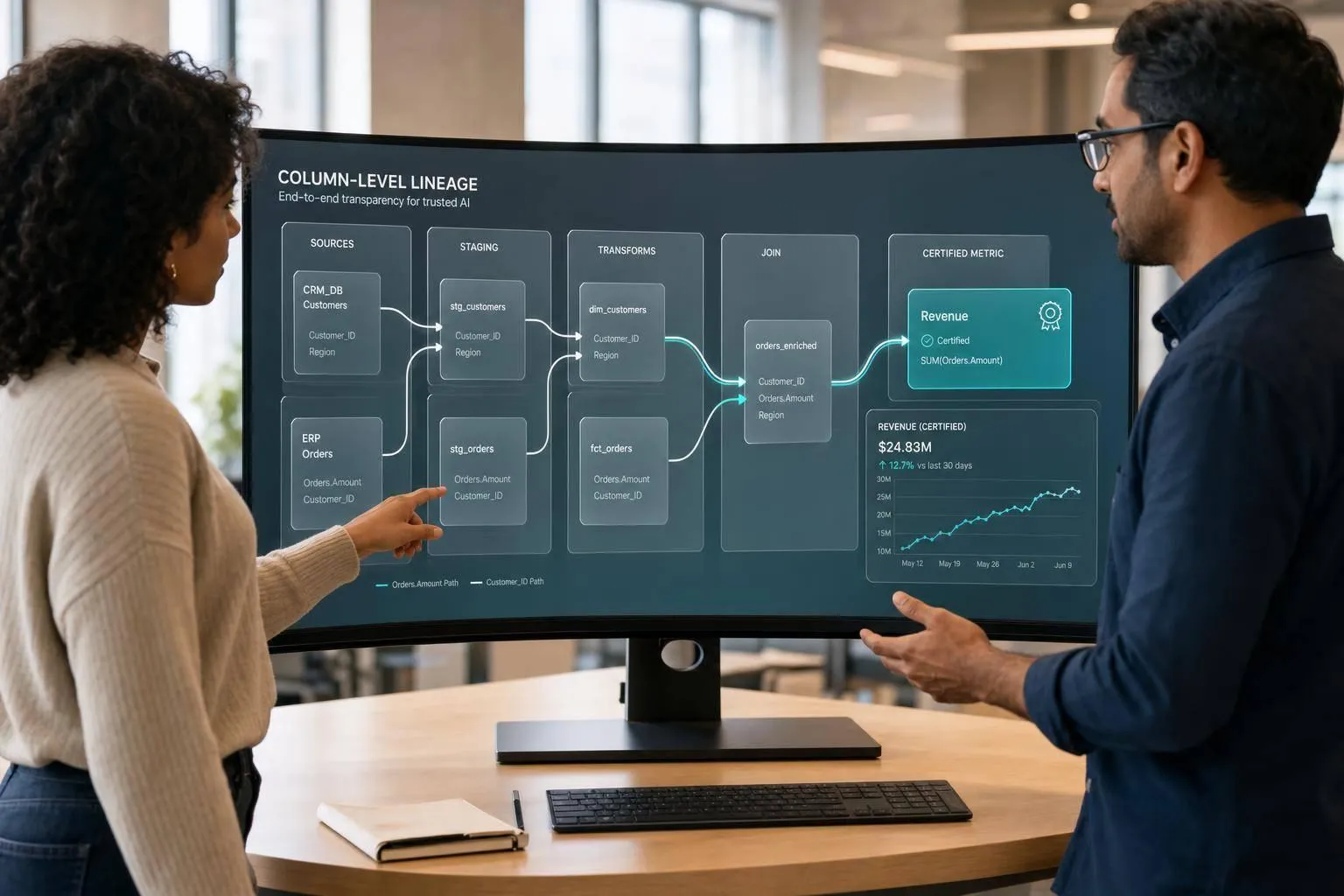
If an AI assistant can’t see how a metric is built, it will guess. And that’s where bad BI answers start.
I’d sum up the article like this: column-level lineage gives an LLM field-by-field context, so it can pick the right columns, use the right join path, follow the approved metric logic, and avoid old or restricted data. Without that context, SQL may look right but still return the wrong number.
Here’s the short version:
- Schema names are not enough. A model can see
gross_revenueandnet_revenue, but it can’t know which one your team approves. - Table-level lineage is not enough either. It shows table relationships, not how each field was built.
- Row grain matters. If the model doesn’t know a table is one row per account per month, it can double-count.
- Approved join paths matter. They help stop one-to-many join inflation and two-fact-table double counting.
- Governance matters too. Certified tags, deprecation tags, freshness checks, and access rules help the model avoid bad or blocked queries.
- This is already a live issue. The article cites a dbt benchmark showing complex Text-to-SQL accuracy moved from 32.7% in 2023 to 64.5% in 2026. Better metadata helps push that further in scoped use cases.
A simple way to think about it:
| Metadata level | What the model knows | Main risk |
|---|---|---|
| Basic schema | Names only | Picks columns by guesswork |
| Table-level lineage | Which tables connect | Misses metric logic and safe field usage |
| Column-level lineage | Field origin, logic, grain, and joins | Lower risk of wrong joins and KPI drift |
So if you want better AI answers in Snowflake, BigQuery, Redshift, or Postgres, I’d focus on four inputs first:
- Column origin
- Transformation logic
- Row grain
- Approved join paths
Then I’d add governance signals:
- Certified vs. experimental
- Deprecated vs. approved
- Freshness and completeness
- Column- and row-level access rules
Bottom line: column-level lineage changes AI accuracy because it gives the model the business meaning behind the data, not just the names of tables and columns.
That’s the difference between SQL that merely runs and SQL that returns the right answer.
::: @figure 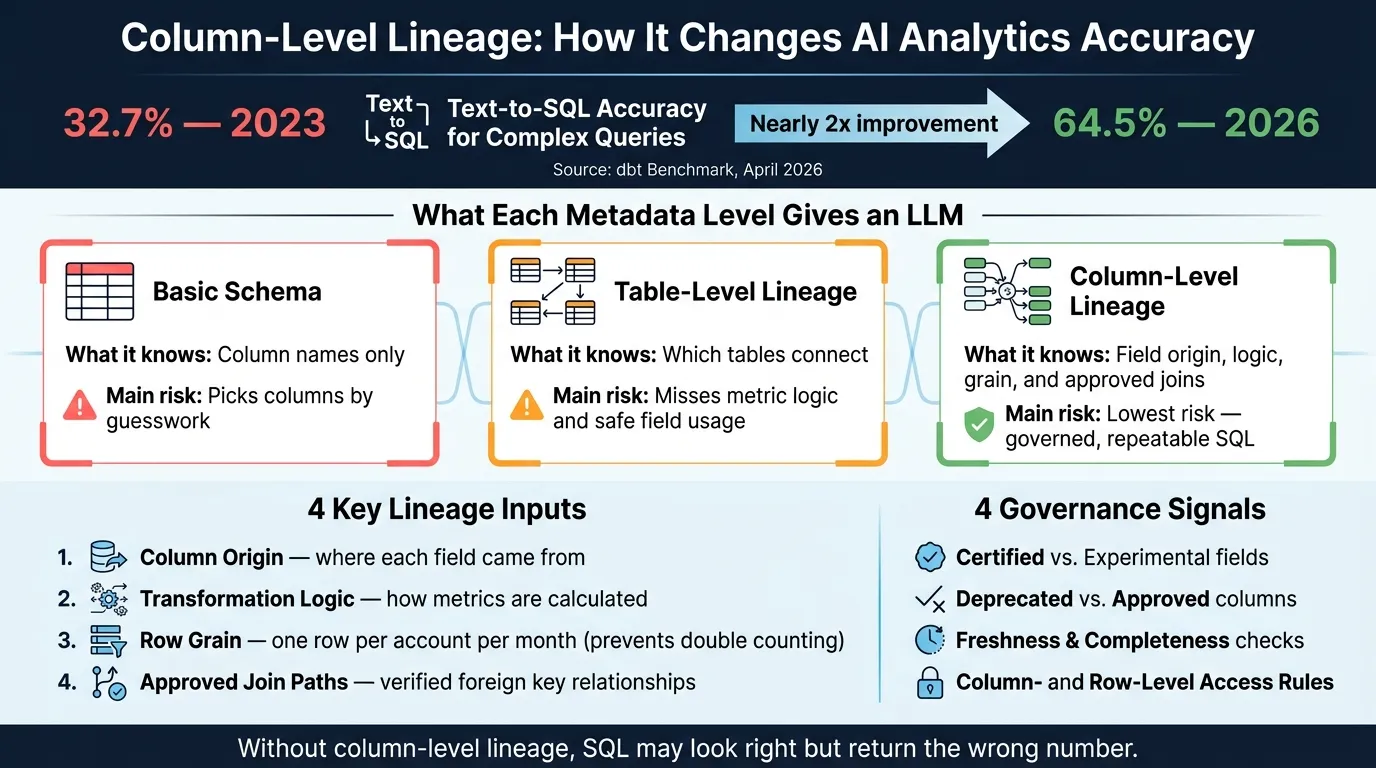 {LLM Analytics Accuracy: With vs. Without Column-Level Lineage}
:::
{LLM Analytics Accuracy: With vs. Without Column-Level Lineage}
:::
Unlocking the power of Column-level Lineage as an AI-context
::: @iframe https://www.youtube.com/embed/Mie9z2b7lr8 :::
Why LLMs get analytics wrong without column-level lineage
Without column-level lineage, LLMs miss the field-level context that keeps analytics on track. Then the guesswork starts. That’s when you get the wrong joins, the wrong columns, and metric logic that looks fine on the surface but falls apart under scrutiny.
Wrong joins, deprecated columns, and broken business definitions
The worst mistakes don’t announce themselves. They slip in quietly.
An AI assistant might join orders to order_items without pre-aggregation. The result? Values get multiplied by the number of line items. The same thing happens when it joins two fact tables like orders and support_tickets through a shared customers dimension. Now both sets of metrics are inflated.
Column names add another trap. If lineage isn’t there, an LLM tends to grab the column that looks closest. It may choose gross_revenue instead of the certified net_revenue. Or it may pull from revenue_old instead of the approved mart. In finance, that can push ARR up by including test accounts, pending refunds, or the wrong activation cutoff.
| Failure Mode | Technical Cause | Business Impact |
|---|---|---|
| One-to-many join inflation | Join without pre-aggregation | Inflated ARR/MRR; double-counted revenue |
| Two-fact-table double counting | Two fact tables joined via a shared dimension | Over-counted pipeline and support volume |
| Unapproved KPI definition | AI improvises KPI definitions and filters | Inconsistent churn and expansion reporting |
| Wrong Column | Picking gross_revenue instead of net_revenue |
Financial decisions based on inflated figures |
| Deprecated Table | AI selects legacy table over certified mart | Decisions based on stale or duplicated records |
Why table-level lineage and schema introspection fall short
Once you look at what the model can’t tell from table names alone, these errors stop feeling random.
Table-level lineage can show that a revenue table depends on Stripe. But it can’t tell the model which columns define ARR, how refunds are removed, or which join path avoids duplicates. That’s the gap where the KPI drifts away from the approved definition. The AI fills in the blanks, writes SQL that seems reasonable, and returns a number that feels right but isn’t.
Schema introspection runs into the same wall. Reading column names from a Snowflake or BigQuery information schema tells an LLM what the data looks like, not what it means. It can see created_at and booked_at, but it can’t tell which one matches the approved business standard. Without column origin, transformation logic, grain, and safe join paths, it’s still guessing the business rules.
| Feature | Table-Level Lineage | Column-Level Lineage |
|---|---|---|
| Dependency Tracking | Shows Table A depends on Table B | Shows Column A depends on Column B |
| Metric Accuracy | High risk of metric drift | Enforces canonical formulas (e.g., Net Revenue) |
| Join Safety | Shows tables can join | Defines how tables must join (prevents fan traps) |
| Governance | Identifies table owners | Identifies sensitive fields (PII) and certified metrics |
| AI Reliability | Plausible but often incorrect SQL | Repeatable, governed, and inspectable SQL |
The fix is simple in theory: give the model column-level metadata it can use.
What metadata an LLM needs from column-level lineage
An LLM needs more than column lineage alone. It also needs governance metadata to choose the right field, the right join, and the right metric definition. Otherwise, it starts filling gaps with guesses. In practice, this metadata fits into two groups: lineage and governance.
Source lineage, transformations, grain, and approved join paths
Four metadata types do most of the work here.
Column origin tells the model where a field came from. If arr traces back through a dbt model that removes churned accounts, the model has a clear basis for choosing it. It isn't just matching on a column name and hoping for the best.
Transformation details matter just as much. Say arr is calculated by multiplying monthly recurring revenue by 12 and filtering out churned accounts. That logic needs to be spelled out. Central metric definitions in tools like MetricFlow or LookML store that logic, and the semantic layer should expose it to the model.
Row grain is what stops double counting. If fct_mrr is defined as one row per account per month, the model knows how to aggregate it without inflating the result. This is a big deal. A model can pick the right table and still give the wrong answer if it doesn't know the grain. A dbt benchmark from April 2026 found that Text-to-SQL accuracy nearly doubled from 32.7% in 2023 to 64.5% in 2026 for complex queries [1]. Well-modeled semantic layers can improve accuracy in scoped queries [1].
Approved join paths round this out. Field-level foreign key mappings between columns show the model how to move from fct_orders to dim_customers without falling into a fan trap. In plain English: the join path is stated up front instead of left to chance.
| Metadata Type | Problem Solved | Where It Lives |
|---|---|---|
| Column origin | Wrong column selection | dbt column-level lineage |
| Transformation logic | Metric drift | MetricFlow, LookML definitions |
| Row grain | Double counting | dbt model documentation |
| Approved join paths | Fan/chasm traps | Semantic layer foreign key mapping |
Governance signals: certified fields, deprecations, freshness, and access rules
Lineage tells the model what a field is. Governance tells it whether that field is safe to use.
Certified vs. experimental tags are the clearest signal. If a field like net_revenue is marked certified in Snowflake or BigQuery Data Catalog, the model can treat it as the approved definition. If a field has no such tag, it shouldn't be assumed to be ready for production use.
Deprecation metadata matters too. If revenue_old has been replaced by net_revenue_v2, that handoff needs to be explicit. A buried comment in a dbt model description is easy for a model to miss or misread.
Freshness and completeness checks help the model judge whether the data is current before it writes a query. A last_updated timestamp on a dbt source, paired with an expected update frequency, gives the model enough context to warn users about stale data.
Column- and row-level security keeps the model from writing SQL that fails or reaches data it shouldn't touch. Native controls in Snowflake, BigQuery, and Redshift can mask PII fields or limit row access by role. The model needs those rules in context so it doesn't expose restricted data or generate queries that get blocked.
How column-level lineage changes answer quality in practice
With column-level lineage, an AI assistant stops guessing about keys, fields, and metric logic. That doesn't just clean up the SQL. It changes the answer.
In practice, the shift shows up in the result itself. The assistant is no longer making a best guess from column names or table labels. It's working from approved relationships, certified definitions, and governance rules.
Scenarios where lineage changes the result
Scenario 1: Wrong join key in BigQuery
Without lineage, the assistant joins orders to customers on user_id because the name looks close enough. The query can still run, which makes the mistake easy to miss.
With column-level lineage and approved join paths, it uses customer_id from the start. Same question, different join, different metric.
Scenario 2: Deprecated source in Snowflake
Without lineage, the assistant may choose the legacy table because its name is the closest lexical match. On the surface, that can seem fine. Under the hood, it's pulling from the wrong source.
With lineage metadata, certified fields and deprecation tags steer it to the certified mart. Lineage also keeps the assistant away from restricted fields.
Scenario 3: ARR definition drift in dbt
Without lineage, the assistant may sum a raw arr column. That's the kind of shortcut that looks reasonable until someone checks the business logic.
With lineage, it uses the certified ARR definition instead.
The pattern stays the same across joins, metrics, and governance: lineage changes the outcome before the query runs.
These failures are common in warehouse-first BI.
Comparison table: LLM analytics with vs. without column-level lineage
The next step is exposing that lineage in a form the assistant can use directly.
| Dimension | Without Lineage | With Lineage |
|---|---|---|
| Join correctness | Guesses keys by name similarity; prone to fan and chasm traps | Follows verified join paths and foreign key relationships |
| Metric alignment | Infers formulas from raw columns; misses business filters | Uses certified definitions from dbt MetricFlow or the dbt Semantic Layer |
| Deprecated column usage | Picks legacy or staging tables if the name is the closest lexical match | Respects certified vs. deprecated tags in warehouse metadata |
| Security and compliance | May include PII columns if they appear relevant to the query | Skips columns tagged as PII or sensitive; respects row-level security |
| Auditability | Black-box reasoning; hard to trace why a column was selected | Every answer ties back to inspectable SQL and source transformations |
| Complex-query reliability | Drops fast when fields, joins, and metric logic are ambiguous | Improves materially when grounded in governed lineage and semantic definitions |
That gap matters. Answer quality goes up only when the assistant can read governed lineage, approved definitions, and safe join paths for itself.
How to make lineage usable for AI assistants in BI environments
Build and expose lineage from dbt and your warehouse metadata
Generating lineage is the first step. Making it usable for an AI assistant is the harder part.
Most teams already have the raw metadata sitting in dbt and warehouse catalogs. The issue is turning that scattered metadata into one governed context layer the assistant can query. In plain English: lineage has to be exposed as usable context, not just stored somewhere in the stack. That shift is what moves SQL generation from guesswork to governed retrieval.
The approach that tends to work is simple: link lineage to semantic definitions before you expose it. For an AI assistant, a column's upstream source is only part of the story. What matters more is what the column means, which join path is approved, and whether the field is certified or deprecated. That context should live next to metric definitions, grain documentation, and governance tags, then be surfaced through a structured API or repo-based files the assistant can query at runtime.
For a small data team, the assistant needs a short set of inputs to pick the right fields and joins:
- Extract upstream dependencies and transformations from dbt
- Pull
INFORMATION_SCHEMAkeys and data types from the warehouse - Annotate certified, deprecated, and PII-tagged fields in dbt metadata
- Expose the combined metadata as structured context linked to canonical metrics
Without a semantic layer, the assistant sees metadata, not meaning. And that's the core execution problem this setup has to solve.
Where Querio fits: governed context, live warehouse queries, and inspectable SQL/Python
Once the metadata is defined, the next job is making it queryable at runtime.
Querio stores joins, metric definitions, and trusted queries as version-controlled SQL, Markdown, and Python files synced to GitHub alongside dbt. Lineage and semantic definitions sit in the same place, stay version-controlled, and remain readable by any agent or MCP client.
Querio derives lineage from approved query usage, not schema names alone. When the agent writes a query, it can propose context updates, but only human-reviewed definitions get committed. That human-in-the-loop step helps keep the context layer trustworthy over time instead of letting it drift.
At execution time, Querio connects straight to Snowflake, BigQuery, Redshift, and Postgres through live, encrypted, read-only credentials. No CSV exports. No cached extracts. Every answer is returned as real, inspectable SQL and Python in an interactive notebook, so teams can open any result and see exactly which columns were used and which join path was followed.
FAQs
::: faq
How is column-level lineage different from a semantic layer?
A semantic layer and column-level lineage do different jobs.
The semantic layer defines the what. It sets shared business logic for metrics, dimensions, and join paths so people use the same definitions across reports and tools.
Column-level lineage defines the how and where. It shows where data started, how it changed, and where it landed.
Put together, the semantic layer keeps definitions consistent, while lineage makes the data path auditable and easier to check. :::
::: faq
What metadata should we expose first to improve LLM SQL accuracy?
Start with a governed semantic layer: canonical metric definitions, explicit join relationships, and a business glossary. Focus first on the 20 most common business questions, then build certified, documented views around them. Include machine-readable caveats, like test-account filters or time windows, so people and systems can see the limits up front.
Also expose structural metadata: live DDL, column descriptions, and authoritative dataset tags. Mark tables as certified or deprecated, and check generated SQL against INFORMATION_SCHEMA before execution.
:::
::: faq
When does column-level lineage make the biggest difference in BI?
Column-level lineage matters most in BI when teams need to tell similar fields apart, find deprecated columns, or debug why a metric looks off.
It shows exactly where data came from and how it changed along the way. That helps AI avoid stale or wrong sources when generating SQL. In practice, analysts and AI assistants can trace results back to the right source columns and rely on authorized, current data. :::