Business Intelligence
Notebooks vs Chat: Where Should AI Data Analysis Actually Live?
Use chat for fast answers, notebooks for auditable logic, and a hybrid with a shared semantic layer for reliable AI data analysis.

Use both. If you need a fast answer, start in chat. If you need work you can inspect, rerun, and check later, move it to a notebook.
Here’s the short version:
- Chat is best for plain-English questions, meeting follow-ups, and self-serve access for non-technical teams.
- Notebooks are best for SQL and Python work that needs review, version control, and a clear record.
- Hybrid is the best fit for most teams using Snowflake, BigQuery, Redshift, or Postgres with dbt-based metrics.
- The main rule is simple: chat should ask and narrow; notebooks should store and show the final logic.
If I had to reduce the whole article to one line, it would be this: chat owns the interface, notebooks own the artifact.
That matters because a fast answer is not the same as a checked answer. A chat tool can reply in seconds, but if the SQL, joins, and metric rules stay hidden, the result can look right and still be off. A notebook takes more work, but it gives me the query, the code, the filters, and the path to rerun the same analysis next week or next quarter.
For most teams, the split looks like this:
- Use chat-first for KPI checks, anomaly triage, and stakeholder follow-ups.
- Use notebook-first for ARR, churn, active users, finance metrics, healthcare reporting, and anything tied to audit or review.
- Use hybrid when business users need self-serve answers, but analysts still need SQL, Python, Git history, and metric alignment with dbt.
The biggest risk is not picking chat or notebooks. It’s letting them use different metric definitions. When that happens, teams end up comparing two answers that were never based on the same logic.
::: @figure 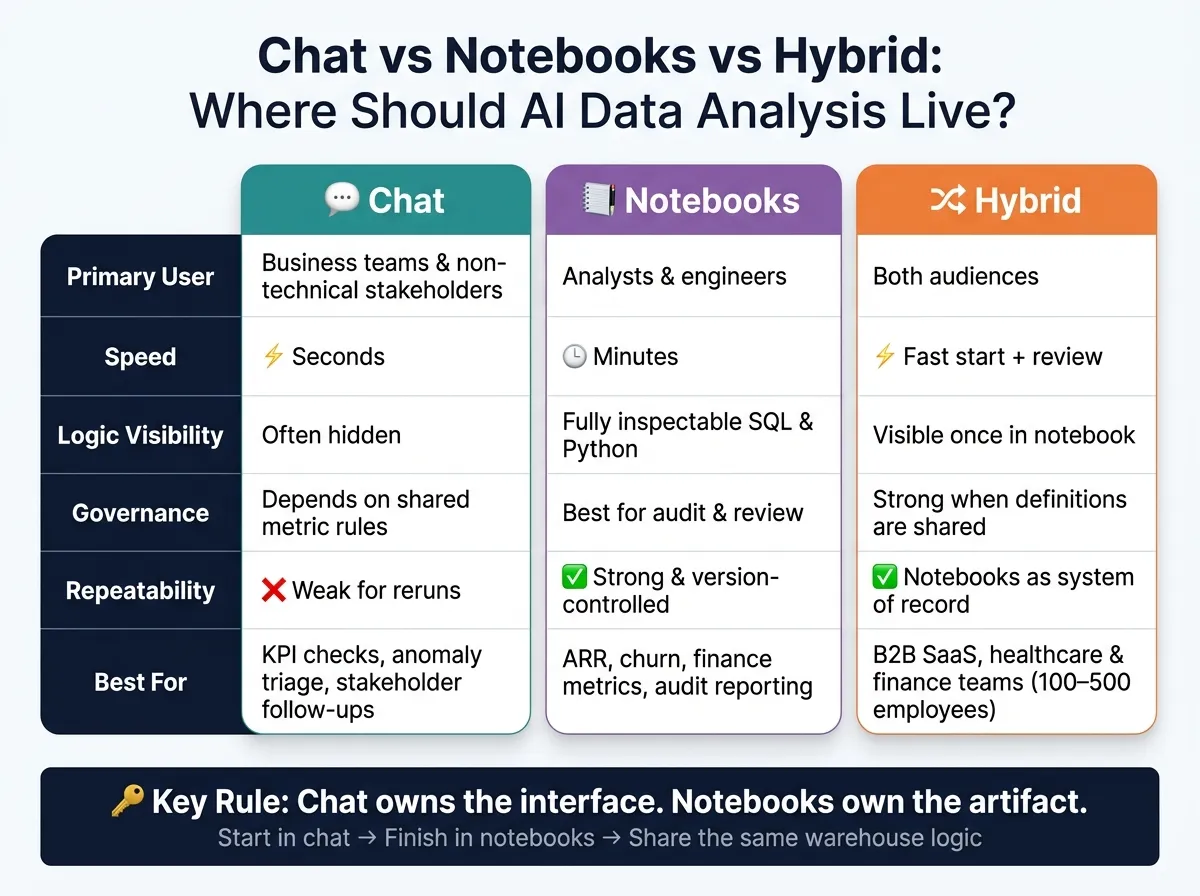 {Chat vs Notebooks vs Hybrid: AI Data Analysis Decision Guide}
:::
{Chat vs Notebooks vs Hybrid: AI Data Analysis Decision Guide}
:::
Quick Comparison
| Area | Chat | Notebooks | Hybrid |
|---|---|---|---|
| Main use | Fast Q&A | Repeatable analysis | Fast access plus a checked record |
| Best user | Business teams | Analysts and engineers | Both |
| Speed | Seconds | Minutes | Fast start, then review |
| Logic visibility | Often hidden | Visible SQL and Python | Visible once work lands in notebook |
| Reruns | Weak | Strong | Strong if notebook is the record |
| Governance | Depends on shared metric rules | Best fit for review and audit | Works well if both use one context layer |
So if you’re deciding where AI analysis should live, I’d keep the answer simple: start in chat, finish in notebooks, and make sure both use the shared semantic context.
How chat and notebooks work differently for warehouse-native analysis
For warehouse-native analysis, chat and notebooks do different jobs. Chat is built for speed. Notebooks are built to keep logic in place. On Snowflake, BigQuery, Redshift, or Postgres, the real choice is simple: do you need a fast answer, or do you need something you can rerun and trust later?
That’s where a lot of teams get stuck. They use chat for work that needs inspection, or they use notebooks for work that just needs a quick answer. Either way, the tool starts fighting the job.
Chat is the fastest layer for questions, follow-ups, and self-serve access
Chat interfaces let people ask a plain-English question and get an answer in seconds. No SQL. No analyst ticket. A business user can ask, “What’s our churn rate this quarter?” or “Break that down by region” and get a response during the meeting, not two days later.
That’s the upside.
The problem starts when the logic behind the answer is hidden, a common challenge as AI is transforming data analytics. If a chat tool writes a query from scratch without using your dbt metric definitions or governed context, the result can look correct and still be wrong. Multi-step workflows also break without strong validation and workflow state[3]. And if all you have is a chat transcript, you’re missing the SQL, the audit trail, and the path to rerun the work.
So yes, chat is fast. But that speed falls apart once someone needs to inspect the answer, reuse it, or audit it.
Notebooks are the best layer for repeatable analysis and code-level control
Notebooks - Jupyter and Colab - put the full chain of logic right in front of you. Every join, filter, and calculation is visible. Analysts can write SQL and Python directly, connect to live BigQuery, Redshift, or Postgres data, and build analysis that can be versioned in Git, reviewed by a teammate, and rerun later with the same logic.
That audit trail is why notebooks fit metric validation, stakeholder reporting, and other repeatable workflows. If chat is a quick hallway conversation, a notebook is the written record you can come back to next week and still follow.
The tradeoff is pretty obvious: notebooks take more time, and they assume the user knows how to work with code. Most non-technical stakeholders aren’t going to self-serve in Jupyter. They need an analyst to publish the output for them.
The sweet spot is keeping that code-level control without shutting the door on self-serve access.
Where Querio fits: chat on the front end, reactive notebooks underneath
The strongest setup isn’t picking one surface over the other. It’s splitting the interface from the artifact.
With Querio, a business user can ask a plain-English question in the Querio app, in Slack, or inside Claude via MCP. The analytics-native agent then answers by writing real, inspectable SQL and Python in a reactive notebook connected straight to live warehouse data. If the SQL changes, the charts update on their own. And even if the question starts in Slack, the answer still carries a full audit trail.
Querio also keeps joins, metric definitions, and trusted queries as plain SQL, Markdown, and Python files synced to GitHub in the same repo as your dbt project. The agent can suggest what it learns, but only logged-in users can approve what gets saved. That keeps chat-based answers tied to the same governed definitions analysts already use in notebooks.
| Feature | Chat Interface | Notebook Environment |
|---|---|---|
| Primary user | Business stakeholders | Data analysts / engineers |
| Speed | Seconds | Minutes |
| Logic visibility | Often hidden | Fully inspectable SQL/Python |
| Governance | Hard to audit if logic is opaque | Version-controlled, Git-integrated |
| Output type | Ephemeral answers, one-off charts | Reusable notebooks, shared analyses |
That difference matters once you start matching actual tasks to chat, notebooks, or a mix of both.
Task-by-task comparison: chat, notebooks, or hybrid
Here’s the practical split for common warehouse tasks.
Ad hoc SQL investigation and anomaly follow-up
When a metric shifts out of nowhere in Snowflake or Redshift - revenue drops, failed transactions jump, or active users fall - chat is usually the fastest place to start. You can ask, "Why did DAU drop on Tuesday?" and get a draft query or a first-pass theory without even opening Jupyter.
That speed helps early on. But as soon as the work gets messier - custom joins across behavior events and CRM data, multi-step filters, or Python-based root cause analysis - chat starts to hit a wall. General LLMs can still fumble funnels and retention because they generate queries without deterministic execution [2]. The SQL may look fine, while the logic underneath is off.
A better pattern is simple: use chat to narrow the question, then move the final query and validation steps into a notebook. In Querio, a question asked in Slack can spin up a reactive notebook behind the scenes, so the investigation already has an audit trail and inspectable SQL when an analyst steps in.
So chat is the entry point, not the final record.
Metric validation and stakeholder reporting
Once the question turns into a reported number, the standard changes.
ARR, churn, active users, and claims metrics need logic that people can inspect and trace back to dbt. If a chat answer doesn’t match Looker or the warehouse, someone has to sort out the mismatch - and model output alone won’t cut it. Notebooks make that process auditable. Analysts can trace a metric back to the raw Postgres or BigQuery table, confirm that it matches the dbt definition, and share a notebook that a teammate can rerun with the same logic.
Chat still has a place here. It can handle live follow-up questions on top of a governed report - "Break that churn number down by plan tier" - without forcing anyone to rebuild the logic from scratch. The key is governance: the chat answer needs to use the same metric definitions as the notebook, not invent a new one on the fly.
| Task | Best Surface | Why |
|---|---|---|
| Quick operational question ("What was DAU last week?") | Chat | Fast answers for non-technical users |
| Ad hoc anomaly investigation | Chat → Notebook | Chat narrows the problem; the notebook becomes the durable artifact |
| Metric validation (ARR, churn, active users) | Notebook | Needs dbt alignment and source reconciliation |
| Live stakeholder Q&A on a governed report | Hybrid | Chat handles follow-ups; the notebook or dashboard remains the source of truth |
Chat is good at handling the long tail of questions. Notebooks own the artifact people can rerun, inspect, and trust.
A decision framework for choosing the right home
Use the task examples above to pick the default home for each type of analysis. Four factors make the choice easier: speed, governance, collaboration, and repeatability. For ad hoc SQL investigation, anomaly follow-up, metric validation, and stakeholder reporting, those factors usually point in one direction pretty fast. Once you know which factor matters most, the default surface tends to sort itself out.
Choose chat-first when speed and broad business-user access matter most
Chat works best for mid-meeting KPI checks, ad hoc follow-ups, and other low-friction questions. If DAU suddenly drops, chat is often the best place to start.
A common setup across data teams is to pair an AI data analyst for ad hoc questions with 10 to 20 high-signal, curated dashboards for executive summaries [1]. Chat handles the day-to-day question volume. Governed definitions help keep answers aligned.
In practice, chat should narrow the question, not serve as the final record.
Choose notebook-first when governance and repeatability matter most
If the work needs to be reopened months later, traced back to the source table, and rerun with confidence, it belongs in a notebook. That includes metric validation and stakeholder reporting.
The baseline here is clear:
- Version control
- Inspectable SQL or Python
- Shared definitions
If a metric in a notebook doesn't match what the team signed off on, an analyst should be able to trace the gap to a specific join, filter, or transformation. That's why notebooks are the better home for work that needs review, reruns, and reporting.
Choose hybrid when you want self-serve without losing control
For most 100–500-employee B2B SaaS, healthcare, and finance teams, hybrid is the practical default.
But here's the catch: hybrid only works when chat and notebooks share one governed context layer. In plain English, both surfaces need the same definition of what a metric means. That way, a question answered in chat and a metric checked in a notebook pull from the same source. If that shared layer isn't there, the two surfaces drift and teams end up arguing over different metric definitions.
A simple way to handle it is this: use chat to start the work, then let the notebook hold the governed result. Querio's live warehouse connections and reactive notebooks support that pattern, so chat can surface an inspectable notebook without giving up governance.
That split shows up clearly below.
| Decision Factor | Chat-First | Notebook-First | Hybrid |
|---|---|---|---|
| Speed | Fastest for quick answers | Slower setup, but flexible | Fast access with an audit path |
| Governance | Depends on the context layer | Highest auditability | Strong when definitions are shared |
| Collaboration | Broad access for non-technical users | Deep collaboration for analysts | Both audiences |
| Repeatability | Weak for reruns | Strong and version-controlled | Notebooks remain the system of record |
Conclusion: notebooks own the artifact, chat owns the interface
The framework above points to a clear answer: use both, but for different jobs. AI data analysis shouldn’t live only in chat or only in notebooks. The practical setup is a hybrid one. Chat works as the front end for asking questions and getting fast answers. Notebooks serve as the reusable record for repeatable analysis and code-level control.
Chat owns the interface. It kicks off questions, helps business users, and handles ad hoc analysis follow-ups. Notebooks own the artifact. They show the SQL, keep the logic in place, and let teams rerun the analysis later.
That split matters most when people are doing the work day to day. Chat is the right place to start, but notebooks are the record teams come back to. If you go chat-only, analysis can turn into a black box. If you go notebook-only, most of the company won’t get access. That’s the pattern the comparison above shows across investigation, validation, and reporting.
For teams using Snowflake, BigQuery, Redshift, or Postgres, live warehouse connections keep chat and notebooks tied to the same source of truth. That’s the hybrid model: chat surfaces the question, notebooks hold the answer. The test is simple: can non-technical users get fast answers, and can analysts still inspect, edit, and rerun the work?
FAQs
::: faq
When should I move an analysis from chat to a notebook?
Move an analysis from chat to a notebook when you need reproducibility, tighter control over the code, or a clean shift from one-off exploration to a workflow you can run again.
Chat works best for fast back-and-forth and rough exploration. A notebook is the better fit when the work needs structure and an audit trail, especially for complex analysis, saved logic, documented caveats, or SQL and Python that others can inspect for high-stakes reporting. :::
::: faq
How do I keep chat and notebooks using the same metric definitions?
Use a governed semantic layer as the shared source of truth instead of relying on LLM guesswork. Define business terms, formulas, and join paths once so metrics stay consistent across both chat and notebooks.
Connect both tools to that same source, whether that’s dbt models or a dedicated context layer. When definitions change, update them there so outputs stay aligned and metric drift doesn’t creep in. :::
::: faq
What does a good hybrid workflow look like for my data team?
A good hybrid workflow gives business users speed without leaving your data team to clean up a mess later.
Use chat in Slack or Teams for fast, ad hoc questions. It’s the easiest way to get quick answers when someone needs a number on the fly. Then use reactive notebooks for reproducible, production-grade analysis when the work calls for deeper control.
The key is to connect both to a shared governed semantic layer, such as dbt. That keeps metrics like revenue or churn consistent across the company, so people aren’t working from two different versions of the truth.
Analysts can also inspect and edit AI-generated SQL before sharing it. That extra review step helps keep results trustworthy and auditable. :::