Business Intelligence
AskYourDatabase vs BlazeSQL vs Querio: AI SQL Chat Tools
Choose AI SQL chat tools by database fit, query transparency, and governance—not just speed of answers.

If I had to cut this down to one answer: AskYourDatabase fits secure database access, BlazeSQL fits simple SQL self-serve for business users, and Querio fits governed warehouse analytics with editable SQL and Python.
I’d judge these three tools on four things first: database support, SQL visibility, governance, and deployment. That’s because AI SQL tools often fail on schema understanding, not language skill alone. And with semantic-layer setups often landing around 85% to 90% accuracy, I’d want to know how each product handles context, permissions, and review before I let it touch production data.
Here’s the short version:
- AskYourDatabase: best when I need a desktop-first tool for secure access across mixed databases
- BlazeSQL: best when I want business teams to ask routine questions in Slack or Teams with less analyst help
- Querio: best when I need warehouse-native analytics, GitHub-synced context, and notebook-based review
- Main tradeoff to watch: BlazeSQL has a 300-table cap per database
- Main trust check: Can I see, edit, and audit the SQL before people act on it?
Quick Comparison
| Tool | Best for | Main data platforms | What stands out | Main limitation |
|---|---|---|---|---|
| AskYourDatabase | Secure database access | Large production databases | Desktop app, embedded chat, on-prem option | Less suited to shared browser-based team workflows |
| BlazeSQL | Fast self-serve SQL chat | Snowflake, BigQuery, Redshift, Postgres | Slack/Teams support, offline desktop mode | 300-table cap per database |
| Querio | Governed analytics work | Snowflake, BigQuery, Redshift, ClickHouse, MotherDuck, Postgres, MySQL | Editable SQL/Python notebooks, GitHub-synced context, RBAC | More focused on governed warehouse use than lightweight chat alone |
What follows breaks down which team each tool fits, where each one gets limited, and what I’d test before connecting any of them to live production data.
How AskYourDatabase, BlazeSQL, and Querio differ
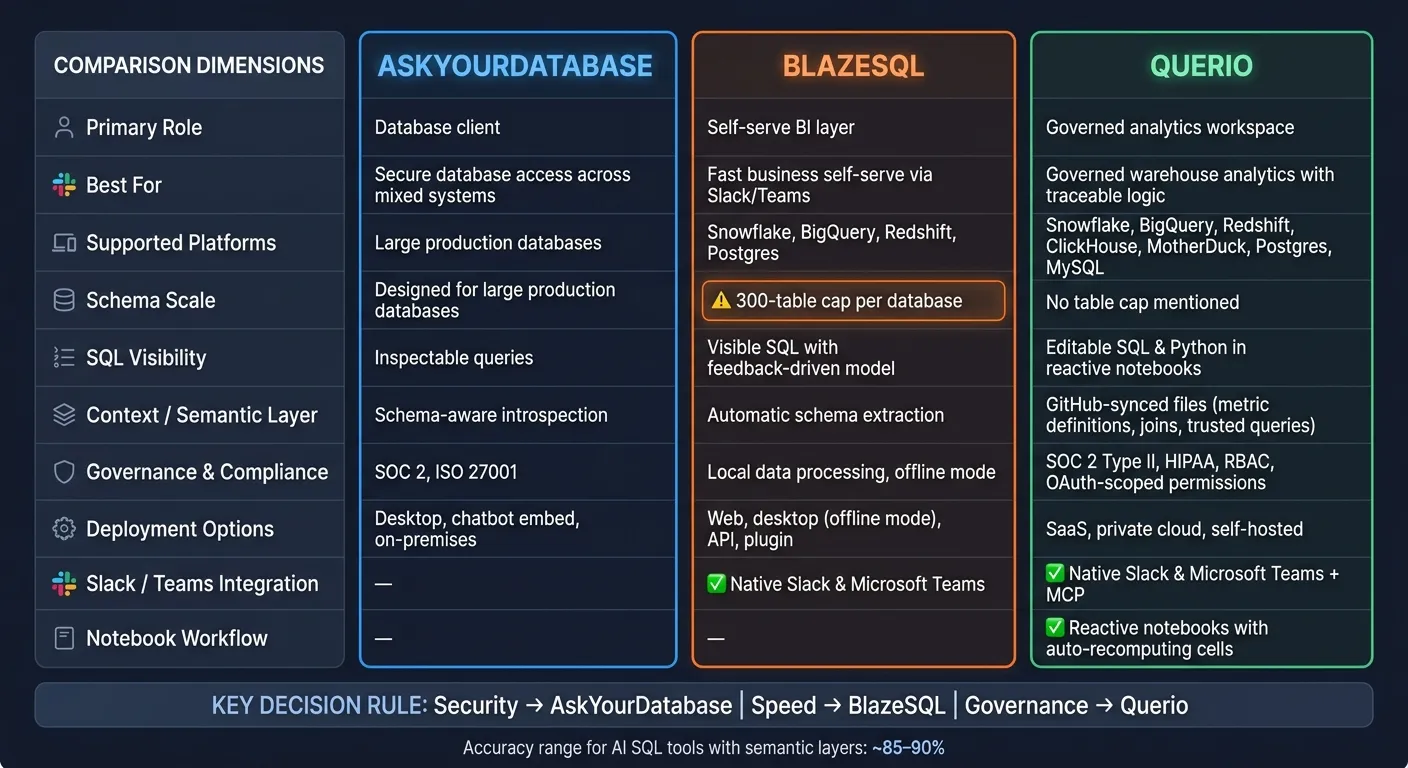
The main gaps come down to warehouse fit, query transparency, and governance. Those three things shape how much data a tool can reach, how easy it is to trust the output, and how safely a team can roll it out.
Database connectivity and warehouse fit
AskYourDatabase connects to large production databases through a desktop app or an embeddable chatbot. BlazeSQL supports Snowflake, BigQuery, Redshift, and Postgres, with automatic schema extraction and some scale limits when schemas get very large. Querio connects live to Snowflake, BigQuery, Redshift, ClickHouse, MotherDuck, Postgres, and MySQL with no data duplication or CSV exports. On Snowflake and BigQuery, per-user OAuth means queries run as the person; on Postgres, Redshift and ClickHouse, a service account plus Querio's policies controls access.
That matters more than it may seem at first glance. Connectivity sets the boundary for what the tool can safely access inside the warehouse.
SQL generation accuracy and query transparency
BlazeSQL uses automatic schema extraction and a feedback-driven model that improves from user feedback. AskYourDatabase uses schema-aware introspection to produce queries for large production databases. Querio generates runnable SQL or Python inside a reactive notebook, which makes the work easier to inspect and change.
When the logic changes, connected cells and charts update automatically. Querio also keeps its context layer as plain SQL, Markdown, and Python files synced to GitHub in the same repo as your dbt project. That context includes joins, metric definitions, and trusted queries. The agent can suggest updates, but each one opens a pull request under your repo's own reviewers, so people still decide what stays.
Once a query is out in the open, the next issue is control: who can use it, and under what rules.
Permissions, governance, collaboration, and deployment
BlazeSQL offers a desktop app with an offline mode that keeps database rows local while the AI works from metadata. AskYourDatabase offers desktop deployment and an on-premises option. Querio combines live warehouse access with role-based access control, OAuth-scoped permissions through MCP, so an agent sees only what its user sees. It runs in the cloud by default, and Enterprise adds single-tenant hosting, AWS GovCloud and on-prem deployment.
It also handles teamwork a bit differently. Slack answers create notebooks, which helps keep the work auditable instead of letting it vanish into chat. Every query and agent action is logged too.
| Dimension | AskYourDatabase | BlazeSQL | Querio |
|---|---|---|---|
| Primary role | Database client | Self-serve BI layer | Git-native analytics for data teams and their AI agents |
| Warehouse fit | Large production databases | Snowflake, BigQuery, Redshift, Postgres | Snowflake, BigQuery, Redshift, ClickHouse, MotherDuck, Postgres, MySQL |
| Query transparency | Inspectable queries | Visible SQL with feedback-driven model | Inspectable, editable SQL/Python in reactive notebooks |
| Context / semantic layer | Schema-aware introspection | Automatic schema extraction | File-based context layer synced to GitHub |
| Governance | Desktop deployment, on-premises option | Local data processing, offline mode | SOC 2, HIPAA, RBAC, OAuth-scoped permissions |
| Deployment | Desktop, chatbot embed, on-premises | Web, desktop, offline | Cloud; single-tenant, AWS GovCloud or on-prem on Enterprise |
Best fit by team and workflow
Use these fits to match the tool to the job: secure database access, fast business self-serve, or governed analytics.
AskYourDatabase: best for AI-assisted database access across mixed data systems
AskYourDatabase works well for teams that move between mixed database setups. Think of an analyst who needs to query both operational databases and warehouse tables. Its desktop and on-prem deployment options also make sense for security-heavy teams.
That said, it works best as a flexible AI database client. If your team wants a browser-based place to work together or a shared semantic layer, the desktop-first setup can get in the way.
If your main goal is chat-based self-serve for non-technical users, BlazeSQL is the closer match.
BlazeSQL: best for fast business self-serve on SQL warehouses
BlazeSQL is a good fit for small to mid-sized teams that want non-technical coworkers to answer their own questions in Slack or Microsoft Teams without waiting on an analyst. Sales pipeline summaries, weekly finance checks, and marketing performance cuts over Snowflake or BigQuery are the kind of routine, ad hoc requests where BlazeSQL can pay off fast.
There is a practical limit, though. BlazeSQL caps at 300 tables per database, so large schemas need pruning or splitting to stay accurate [1]. Once schema size starts to grow, that cap becomes a real constraint.
If the team needs auditability and production-ready governance, Querio is the better fit.
Querio: best for governed self-serve and production-ready AI analytics
Querio fits teams that need governed, consistent answers in Snowflake, BigQuery, Redshift, or PostgreSQL.
A context-aware AI analytics layer is what sets it apart in day-to-day use. Metric definitions, joins, and trusted queries sync to GitHub in the same repo as your dbt project, and every answer comes out as inspectable SQL and Python in a reactive notebook. Changes go through pull requests, and Claude, ChatGPT, Claude Code and Cursor read the same definitions through Querio's MCP server and CLI. That helps keep definitions consistent no matter where people ask questions.
For teams that need SOC 2 Type II compliance, HIPAA coverage with signed BAAs, role-based access control, and live warehouse connections without extracts or CSV round-trips, Querio is a strong match.
Feature comparison table
Features that matter most in a real warehouse environment
This table focuses on the features that shape day-to-day warehouse work, not just sales-page claims. The goal is simple: compare what changes accuracy, control, and rollout once you're working in a live warehouse.
| Feature | AskYourDatabase | BlazeSQL | Querio |
|---|---|---|---|
| Schema scale | Designed for large production databases [2] | 300-table cap per database [1] | No table cap mentioned |
| Context / semantic layer | Schema-aware introspection | Automatic schema extraction [1] | Metric definitions, joins, and trusted queries stored as plain files synced to GitHub in the same repo as dbt |
| SQL visibility | Inspectable queries | SQL in technical mode | Inspectable, editable SQL and Python |
| Notebook workflow | No notebook workflow stated | No notebook workflow stated | Reactive notebooks where cells recompute automatically when dependencies change [3] [4] |
| Governance and privacy | SOC 2 and ISO 27001 [2] | Local privacy via desktop app [1] | SOC 2 Type II, HIPAA, and BAAs; RBAC with OAuth-scoped permissions |
| Deployment options | Desktop app and on-premises [2] | Web, desktop (offline mode), API, and plugin [1] | Cloud; single-tenant hosting, AWS GovCloud or on-prem on Enterprise |
| Slack / Teams delivery | No integration stated | Native Slack and Microsoft Teams integration [1] | Slack agent; MCP server for Claude, ChatGPT and custom agents; CLI for Claude Code and Cursor |
The three rows that tend to shape the buying call most are schema scale, notebook transparency, and the context layer.
BlazeSQL's 300-table cap [1] is the clearest hard limit here, especially for teams dealing with large schemas. That's not a small footnote. If your warehouse already feels like a maze, that cap can narrow your options fast.
Querio stands apart most clearly on reactive notebooks and GitHub-synced context files. That matters for teams that want analysis they can inspect, reuse, and track in the same repo as dbt. Put plainly, it's the difference between getting an answer and being able to trace how that answer was built.
These are the gaps worth using to narrow fit before moving into the buying decision.
How to choose the right AI SQL chat tool
Choose based on self-serve needs, security, and production-readiness
Pick the tool that fits what you need right now: secure database access, fast self-serve for business teams, or more controlled analytics. That’s the easiest way to tell the difference between a fast launch and self-serve that won’t turn messy a month later.
Here’s the short version:
- Security and deployment control → AskYourDatabase, with SOC 2 or ISO 27001 controls [2] and on-premises deployment
- Speed of rollout for business users → BlazeSQL, with native Slack and Teams integration and automatic schema extraction [1]; its 300-table cap is the main tradeoff [1]
- Governed self-serve with traceable logic → Querio, for teams that need governed self-serve, traceable answers, and consistent metrics in Snowflake, BigQuery, Redshift, or Postgres
Key points to carry into vendor evaluation
Once you have a likely fit, test it on actual data. Skip the polished demo path. Use a real business question, point the tool at your live warehouse, and check four things:
- Does the tool respect your existing permissions?
- Can you read and edit the SQL it generated?
- Are metric definitions stored somewhere your dbt repo can reference?
- Did it reduce the number of questions landing in your analysts' inboxes, or just move them somewhere else?
There’s one more gate before production use: failure handling. Ask the vendor to explain what happens when the tool gets something wrong, times out, or hits a permission boundary. That part matters more than the happy-path demo.
Favor tools that default to read-only access, limit access to specific tables and columns, and log every query that runs [2].
If a tool can’t pass that test, don’t connect it to production.
FAQs
How should I evaluate SQL accuracy before rollout?
Test your own use cases on your actual data, not just generic benchmarks. That’s the only way to see how the system performs in the messiness of day-to-day work.
Document your schema clearly so the AI can read table relationships, column definitions, and data types the right way. If that setup is vague, the output can go off the rails fast.
Use a governed semantic layer to define metrics, joins, and terminology up front. Then review inspectable SQL and Python so you can audit the logic before a broader rollout.
What matters most for governed AI analytics?
A centralized semantic layer matters most. It standardizes business metrics, table relationships, and terminology so everyone works from a single source of truth and avoids inconsistent reporting.
It also needs SQL and Python that teams can inspect directly, along with secure live warehouse connections. That setup helps keep analytics reliable, able to scale, and ready for audits.
When does schema size become a blocker?
Schema size turns into a roadblock when it pushes past a tool’s built-in limits.
For example, BlazeSQL has a hard cap of 300 tables per database connection. If your schema goes past that, you have to trim tables by hand or change your setup just to keep access working.
Querio takes a different route. Its agent searches table and column docs kept as files in your GitHub repo and describes tables on live warehouse connections. That means teams working with large, fast-changing schemas can skip arbitrary table caps and the manual cleanup that comes with them.