Business Intelligence
Cube vs dbt Semantic Layer vs MetricFlow: 2026 Update
Pick dbt Semantic Layer for dbt-native governance; choose Cube when low-latency, high-concurrency serving matters.

If you use dbt, start with dbt Semantic Layer. If you need API delivery, embedded analytics, or low-latency metric serving at high concurrency, pick Cube. If you’re weighing MetricFlow as a separate tool, don’t - it's the engine under dbt Semantic Layer.
I’d frame the choice this way: where your metric rules live, how metrics get served, and whether latency matters for dashboards, apps, and AI assistants. That matters more in 2026 because governed metrics now feed both BI tools and AI workflows. And semantic grounding can make a big difference: one figure in the article cites 95%+ SQL accuracy for natural-language querying with semantic context, versus 69% without it.
Here’s the short version:
- Cube: best for APIs, caching, embedded analytics, and high request volume
- dbt Semantic Layer: best for dbt-first teams that want metric governance inside dbt
- MetricFlow: best understood as dbt’s SQL-generation engine, not a standalone buying choice
- Main decision points: governance, serving path, performance, permissions, workflow, and cost
- Best fit warehouses in this comparison: Snowflake, BigQuery, Redshift, and Postgres
Quick Comparison
| Tool | Best for | How it works | Main tradeoff |
|---|---|---|---|
| Cube | Embedded apps, APIs, AI assistants, high concurrency | Serves metrics through APIs with caching and pre-aggregations | Separate project and serving layer |
| dbt Semantic Layer | Teams already centered on dbt | Keeps metric logic in dbt and serves it through dbt integrations/API | Warehouse execution can be less suited for heavy serving loads |
| MetricFlow | Teams focused on dbt metric compilation behavior | Compiles dbt metric YAML into warehouse SQL | Not a separate product for most buyers |
So if I had to reduce the whole article to one line, it would be this: choose dbt Semantic Layer for dbt-native metric control, choose Cube for serving scale, and treat MetricFlow as the engine behind dbt’s setup.
How Cube, dbt Semantic Layer, and MetricFlow differ
Cube serves metrics through APIs and caching. dbt Semantic Layer keeps metric rules inside dbt. MetricFlow turns dbt metrics into warehouse SQL. Those differences matter most when you look at governance, query speed, warehouse support, and how each option works with BI tools and AI assistants.
Cube: semantic APIs, caching, and embedded analytics tools
Cube sits between your warehouse and the tools or apps that use data. It exposes governed metrics through REST, GraphQL, SQL, and MDX, so connected systems query approved metrics instead of raw tables.
Its pre-aggregation engine, Cube Store, builds common aggregations ahead of time. That helps Cube serve metrics with low latency for dashboards and AI assistants, even under high-concurrency workloads.
dbt Semantic Layer: metric governance inside dbt
The dbt Semantic Layer keeps metric definitions inside your dbt project, next to transformations, tests, and docs. That makes it easier to centralize governance and share the same metric logic across downstream tools like Looker or Hex. Users can access it through dbt Cloud integrations or the dbt Semantic Layer API.
The Philadelphia Inquirer used the dbt Semantic Layer to give business teams direct access to trusted data and cut back on analyst help for routine dashboard building [2]. Brian Waligorski, Lead Data Engineer at The Philadelphia Inquirer, said [2]:
"Self-serve doesn't just mean 'analysts building dashboards, faster.' It's gaining direct access to trusted data faster." [2]
The main question isn't just how each tool defines a metric. It's where that metric runs and who gets to use it.
MetricFlow: the dbt-native metrics engine
MetricFlow compiles dbt metric definitions into warehouse SQL. That execution model is why the next section looks at governance, performance, permissions, and serving paths, not just metric definitions.
Side-by-side comparison: Cube vs dbt Semantic Layer vs MetricFlow
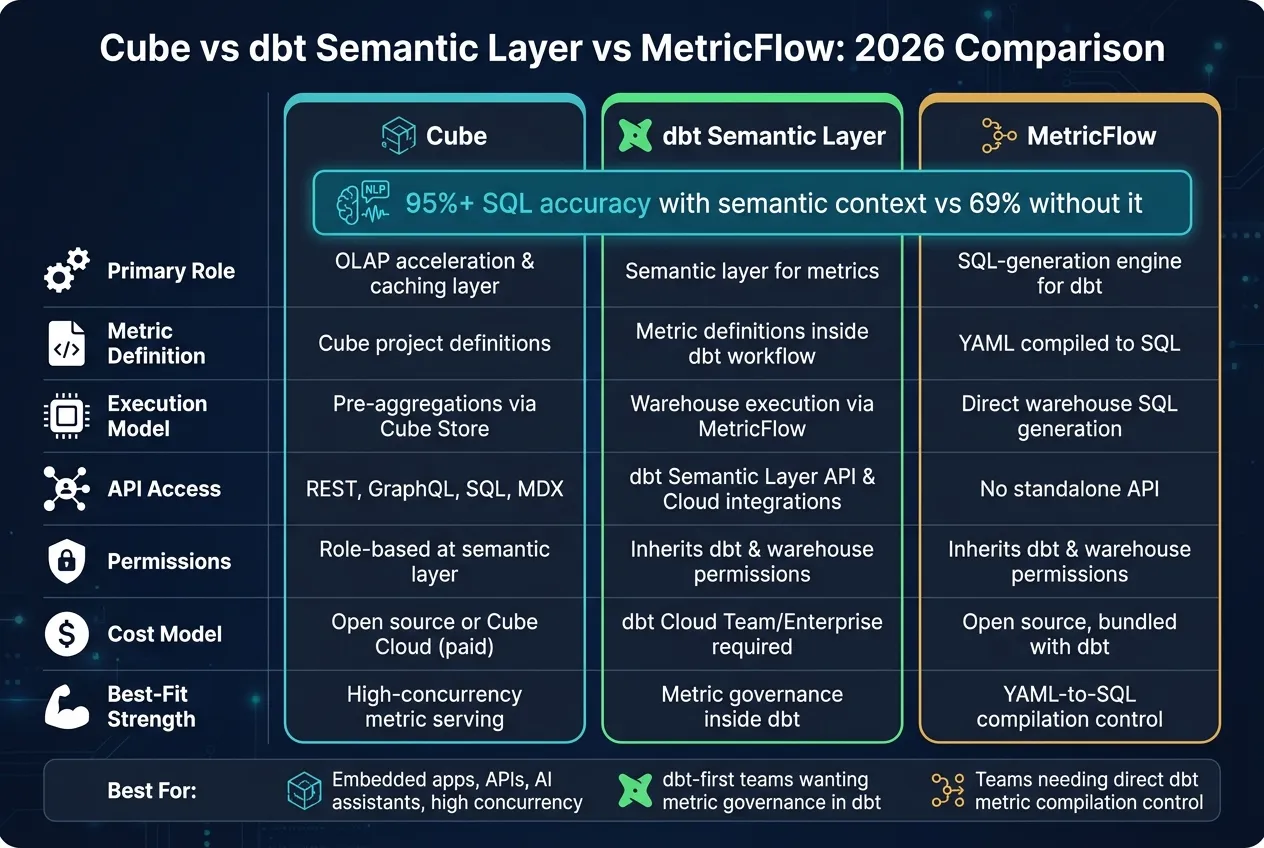
With the roles mapped out, the next step is simpler: compare them on the things buyers usually care about.
Comparison table: governance, performance, compatibility, APIs, permissions, workflow, and cost
| Criterion | Cube | dbt Semantic Layer | MetricFlow (the execution engine behind dbt Semantic Layer) |
|---|---|---|---|
| Primary role | OLAP acceleration and caching layer | Semantic layer for metrics | SQL-generation engine for the dbt Semantic Layer |
| Metric definition model | Cube project definitions | Metric definitions in the dbt workflow | YAML metric definitions compiled to SQL |
| Execution model | Cube Store pre-aggregations for fast serving | Warehouse execution via MetricFlow | Direct warehouse SQL generation |
| Warehouse compatibility | Snowflake, BigQuery, Redshift, Postgres, and others | Snowflake, BigQuery, Redshift, Postgres via dbt adapters | Inherits dbt adapter support |
| API access | REST, GraphQL, SQL, MDX | dbt Semantic Layer API and Cloud integrations | No standalone API; accessed through dbt Semantic Layer |
| Permissions model | Role-based access at the semantic layer | Inherits dbt and warehouse permissions | Inherits dbt and warehouse permissions |
| Developer workflow | Separate Cube project alongside dbt | Metric definitions live inside the dbt project | YAML definitions inside dbt; compiled at query time |
| Cost model | Self-hosted (open source) or Cube Cloud (paid tiers) | dbt Cloud Team/Enterprise plan required | Open source; bundled with dbt Core and dbt Cloud |
| Best-fit strength | High-concurrency metric serving | Keeping shared metric logic close to dbt | Turning YAML metric definitions into warehouse SQL |
Metric definition and change management across dbt projects
When a shared metric changes, the big issue is where the semantic contract lives and how downstream conflicts get blocked. That matters most when the same metric has to stay aligned across dbt projects, BI tools, and AI-facing surfaces.
MetricFlow keeps metric logic in YAML inside the dbt project. So if your team already lives in dbt, definition changes stay close to the modeling work. That can make reviews, version control, and day-to-day edits feel more straightforward.
Cube leans harder into fast serving through pre-aggregations. That makes it a strong fit when scale and concurrency are the main pressure points. If many users or apps are hitting the same metrics at once, that speed layer can be the difference between a smooth experience and a sluggish one.
So the split is pretty clear. Teams trying to keep business definitions tightly tied to dbt will usually lean toward MetricFlow. Teams that care most about fast, curated metric delivery at scale will usually lean toward Cube.
Serving metrics to dashboards and AI assistants
Serving metrics isn't only about getting data from point A to point B. It's also about making sure every dashboard, report, and AI answer uses the same governed metric context.
That's where a semantic layer earns its keep. Without that shared context, two tools can answer the same question in two different ways, which is exactly the mess most teams are trying to avoid. Semantic parsing for natural-language querying grounded in a semantic layer has been reported to reach 95%+ SQL accuracy, compared with 69% for generic LLMs without business context [1].
Cube stands out when fast serving and high concurrency matter most. MetricFlow fits teams that want metric definitions to stay in dbt and compile into warehouse SQL. In plain English, the choice usually comes down to serving scale versus dbt-native governance.
Which tool fits which team in 2026
Use the table below to match each tool with the team it serves best.
Best fit for dbt-centered teams standardizing metrics
If your team already manages models in dbt, it usually makes sense to keep the metrics and semantic layers there too. For dbt-first teams, the dbt Semantic Layer keeps metric governance inside the same workflow as models, tests, and docs.
Best fit for API-first embedded analytics and high-concurrency serving
If your main issue is serving speed and scale, Cube is often the stronger pick. It works well for teams powering customer-facing dashboards, embedded analytics, or AI agents that need fast, consistent metric responses at scale.
When MetricFlow is the right fit
MetricFlow makes sense when your team wants execution-level control instead of a separate serving layer. It fits teams that want direct control over how dbt metric YAML compiles into warehouse SQL, especially when tight control over complex joins and SQL generation is the top priority.
| Team situation | Best fit | Core reason |
|---|---|---|
| dbt-centered metric governance | dbt Semantic Layer | Metrics live beside dbt models; lowest-friction choice |
| Customer-facing apps, embedded analytics, AI agents | Cube | Fast delivery and high concurrency at scale |
| Direct control over dbt metric compilation | MetricFlow | Precise control over complex joins and SQL generation |
Conclusion: a decision framework for data teams
Choose based on three factors: where metric governance lives today, how metrics need to be served, and how much query latency matters for your use case. Those three constraints show up directly in the comparison table above.
In practice, the choice usually becomes pretty clear. If you need embedded analytics or API delivery with low-latency, high-concurrency responses, Cube is the stronger fit. If dbt already owns your metric governance, dbt Semantic Layer is usually the lowest-friction path. MetricFlow fits a narrower case: teams that want dbt-native governance first and warehouse-native SQL generation above all else.
Pick one governed semantic layer before expanding into AI analytics.
Some teams do use more than one layer. But for most, it makes more sense to standardize on one. Start with where governance already lives, match the serving model to your actual latency and concurrency needs, and build from there.
FAQs
Can I use Cube and dbt together?
Yes. Many teams use dbt for data transformation and for keeping metric definitions consistent. Then they use Cube as the caching and API layer for external apps, AI workflows, or dashboards with lots of concurrent users.
In this setup, dbt serves as the source of truth for metrics, while Cube delivers those metrics through REST, GraphQL, or Postgres-compatible SQL interfaces.
When does warehouse latency become a real problem?
Warehouse latency turns into a real issue when query complexity, especially multi-hop joins, pushes response times beyond what your use case can handle.
Simple metric queries may take 2 to 3 seconds. More complex queries can land in the 8 to 12 second range.
That’s often too slow for interactive BI or high-concurrency embedded analytics. If you need near-instant, sub-second responses for hundreds of concurrent users, relying on raw warehouse compute alone, without caching or pre-aggregation, usually leads to bottlenecks.
How should I choose for AI-driven analytics?
Prioritize tools that tie natural language queries to a governed semantic layer, not plain text-to-SQL.
The right pick depends a lot on your data stack. Native warehouse tools can give you solid governance with less setup. Dedicated semantic platforms make more sense for teams that need the same metrics across BI tools and embedded products.
For AI-native workflows, look for a governed context layer, consistent metrics, and SQL you can inspect. And make sure to test the tool with your own business questions. No product can paper over a weak semantic foundation.