Business Intelligence
How to Automate Your Monday Metrics Review
Automate weekly revenue, conversion, and retention reviews: validate sources, set thresholds, use AI summaries, and send verified briefings.

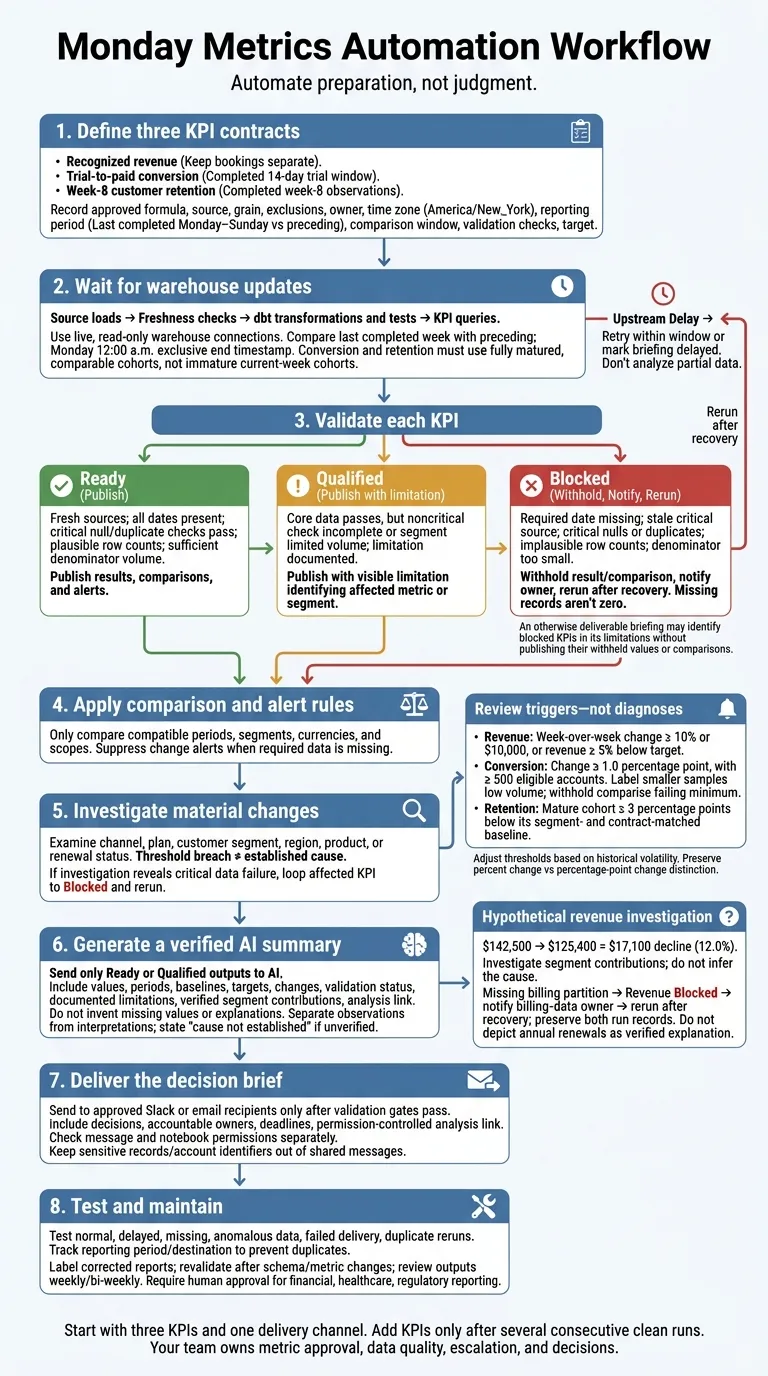
I’d automate Monday’s metrics review by starting with three KPIs, checking the data, and sending a short briefing before the meeting. Revenue, conversion, and retention are enough to start - with approved definitions, owners, reporting periods, and targets.
Here’s the workflow I’d use:
- Schedule warehouse queries after data loads finish, using the last completed reporting period and the right comparison window.
- Check data before comparing results. Missing records aren’t zero. Withhold affected numbers and notify their owner.
- Flag changes worth reviewing, such as a revenue move of at least 10% or $10,000. A threshold breach calls for investigation - not a guessed explanation.
- Use AI to summarize checked results, including limitations and a link to the underlying analysis.
- Send the briefing to approved Slack or email recipients, with clear decisions, owners, and deadlines. Test delays, failures, permissions, and duplicate sends before scheduling delivery.
My rule: automate preparation, not judgment. Your briefing should show what passed checks, what’s blocked, and who acts next.
Define Metrics, Reporting Periods, and Alert Rules
For every weekly run, use a metric contract to record the source, grain, exclusions, comparison window, and validation checks. Include the approved formula, owner, time zone, and target.
For a Monday review, compare the last completed week with the week before it in America/New_York. Use Monday at 12:00 a.m. as the exclusive end timestamp so current-week records stay out of the results.
Agree on Revenue, Conversion, and Retention Definitions
The contract should make each number’s meaning clear. Assign an owner for revenue, conversion, and retention.
| KPI | Approved definition | Comparison baseline | Required validation and Monday action |
|---|---|---|---|
| Recognized revenue | Revenue recognized for delivered services under the company’s accounting policy. Document how refunds, credits, taxes, and cancellations are treated, along with the recognition date, invoice-line grain, and currency rules. Keep bookings separate. | Previous completed Monday–Sunday period and the approved revenue target | Reconcile with the Finance-approved source. Check duplicate invoice lines, late adjustments, and currency conversion for discrepancies that need Finance review. |
| Trial-to-paid conversion | Distinct eligible trial accounts that become paid within 14 days ÷ distinct eligible accounts starting trials in the cohort period. Exclude internal, test, duplicate, and fraudulent accounts. | Previous fully matured trial cohort and its target | Confirm that every account has completed its 14-day window, every account in the numerator belongs to the denominator, and the denominator meets the minimum before investigating conversion changes. |
| Week-8 customer retention | Eligible customer accounts still active at week 8 ÷ accounts in the starting cohort. Specify when cancellation takes effect and how pauses, grace periods, and reactivations count. | Comparable cohorts at week 8, matched by segment and contract type, plus the target | Check cohort membership, distinct accounts, cancellation status, and completed observation windows before prioritizing retention follow-up. |
Keep executable definitions with their documentation. Maintain approved models, measures, and tests in dbt so downstream queries use the same metric definition. Store ownership, caveats, and alert rules as context files in your Querio git repo. Version editable SQL, Markdown, and supporting Python files in GitHub, and require a reviewed pull request before changing a formula or exclusion.
Set Thresholds for Changes Worth Reviewing
Set separate review triggers for each metric:
- Revenue: A week-over-week change of at least 10% or $10,000, or revenue at least 5% below target.
- Conversion: A change of at least 1.0 percentage point, with at least 500 eligible accounts. Label smaller samples low volume.
- Retention: A mature cohort at least 3 percentage points below its segment- and contract-matched baseline.
Adjust these thresholds based on historical volatility.
Separate performance alerts from data-quality failures before making comparisons. Compare targets only when the period, segment, currency, and scope match. If required data is missing, mark the KPI as not available, identify the source and owner, and suppress its change alert. Don’t substitute zero.
A threshold breach is a reason to investigate - not proof of a cause. Include the next diagnostic cut, such as channel, plan, or customer segment.
Use these contracts and thresholds to guide the weekly warehouse queries and validation checks in the next step.
Build and Validate the Weekly Workflow
Use the metric contracts and alert thresholds defined above to guide each weekly run.
Run Queries After Warehouse Updates Finish
Run the workflow through warehouse orchestration. Query Snowflake, BigQuery, Redshift, or Postgres through live, read-only connections, not CSV exports.
Keep the steps in this order: source loads → freshness checks → dbt transformations and tests → KPI queries → comparisons and alert rules → investigation → verified summary → delivery.
Publish only when the job succeeds, sources are fresh, and the reporting period is complete. If a dependency is late, retry within a defined window or mark the briefing delayed. Don’t analyze partial data.
Record completion times, test results, model run IDs, and the analysis link. Only successful runs should reach anomaly checks.
Check Missing Data and Investigate Anomalies
Before publishing, check revenue, conversion, and retention against the statuses below. Assign a status to each KPI so a failed source doesn’t hide valid results.
| Status | Required checks | Publication action |
|---|---|---|
| Ready | Fresh sources; all expected dates present; critical null and duplicate checks pass; plausible row counts; sufficient denominator volume | Publish results, comparisons, and alerts. |
| Qualified | Core data passes, but a noncritical check is incomplete or a segment has limited volume; the limitation is documented | Publish with a visible limitation and identify the affected metric or segment. |
| Blocked | Required date missing; stale critical source; critical nulls or duplicates; implausible row counts; denominator too small for a reliable comparison | Withhold the affected result or comparison, notify its owner, and rerun after recovery. |
Use revenue to walk through a threshold breach.
Hypothetical revenue investigation: Revenue falls from $142,500 to $125,400, a $17,100 decline (12.0%). Break the $17,100 decline across plan type, customer segment, region, product, and renewal status; if annual renewals explain most of it, check renewal count, value, timing, cancellations, payment status, and missing billing records. If a billing partition is missing, mark revenue Blocked, notify the billing-data owner, and rerun after recovery. Preserve both run records.
Send only Ready or Qualified outputs to the summary step.
Summarize Verified Results with AI
Before saving the recurring analysis, review the data warehouse model, including SQL/Python joins, date filters, and denominator logic. Use Querio’s reactive notebook to keep results open to inspection, and the definitions in your git repo to keep them consistent. Give AI only validated outputs, along with their documented limitations.
Create the Monday metrics briefing from the verified results.

For revenue, conversion rate, and customer retention, report:
- Current value and reporting period
- Comparison baseline, target, and variance to target
- Change in percentage points and percent change where applicable
- Validation status: Ready or Qualified
- Verified segment contributions to material changes
- Limitations, missing data, or low denominators
- Link or reference to the underlying analysis

Do not redefine metrics or invent missing values or explanations.
Separate observations from interpretations. State causation only
when verified; otherwise, say “cause not established.”
Pass the verified summary to the Slack or email briefing step.
Send the Weekly Briefing to Slack or Email
Set up a scheduled automation to send the verified weekly briefing to email, or to Slack on Core. Use the verified summary from the prior step as the only input, and send only after validation passes. Include a link to the inspectable notebook - not raw query output.
Send the briefing only to approved Slack channels or email recipients. Keep sensitive records, account identifiers, and financial details out of shared messages. Check message permissions and notebook permissions separately. Access to a Slack channel does not grant access to the linked analysis.
Copy the Weekly Briefing Template
Fill in the template with verified outputs, not raw queries. Mark unavailable values Blocked rather than leaving them blank or entering zero. Format USD as $125,400, include rate denominators, and state the period for each target.
MONDAY METRICS REVIEW  -  [Monday date]
Reporting window: [start date–end date]
Prior-week baseline: [start date–end date]
Reporting time zone: [approved time zone]
Last refreshed: [date, time, and time zone]
Validation status: [Verified / Qualified / Blocked]

EXECUTIVE READOUT  -  3 sentences
[State the most important verified change.]
[State progress against the target for its stated period.]
[State the decision needed and any material limitation.]

KPI SCORECARD
Revenue: [USD value] | Prior week: [USD value]
WoW: [USD change; percent change]
Target for [reporting period]: [USD value]
Variance to target: [USD value; percent]

Conversion rate: [rate; conversions / eligible opportunities]
Prior week: [rate; conversions / eligible opportunities]
WoW: [percentage-point change]
Target for [reporting period]: [rate]
Variance to target: [percentage points]

Customer retention rate: [rate; retained / eligible customers]
Prior week: [rate; retained / eligible customers]
WoW: [percentage-point change]
Target for [reporting period]: [rate]
Variance to target: [percentage points]

MEANINGFUL CHANGES
[Threshold breached; verified finding; analysis reference]

LIMITATIONS
[Affected KPI; missing or limited data; comparison withheld;
recovery owner and expected update time - or “None identified”]

DECISIONS
[Decision requested; accountable owner; due date and time]

INSPECTABLE ANALYSIS
[Permission-controlled Querio notebook link]
Test and Maintain the Automation
Before turning on recurring delivery, complete the checklist below. Name a briefing owner to review permissions, failures, and analysis changes, focusing on collaboration KPIs for data governance. Their job is to keep delivery tied to governed metrics rather than ad hoc edits.
- [ ] Approved metric definitions, live warehouse connections, and completed warehouse updates.
- [ ] Validation gates, correct comparison and target periods, and anomaly thresholds.
- [ ] Verified AI summary, working notebook links, and recipient and viewer permissions.
- [ ] Escalation owners for data failures, unresolved anomalies, and delivery failures.
- [ ] Human approval where financial, healthcare, or regulatory reporting requires it.
Test normal, delayed, missing, and anomalous data, along with failed delivery and duplicate reruns. Confirm that delays produce a status notice and blocked metrics stay out of the scorecard. Anomalies should trigger investigation - not unsupported explanations.
Track delivery by reporting period and destination so retries don’t create duplicate briefings. Label corrected reports clearly. Revalidate after schema or metric changes, and review outputs weekly or every two weeks.
Conclusion: Use Monday to Make Decisions
Once the weekly checks pass, the report becomes a decision brief, not a data project. Start with three KPIs - revenue, conversion rate, and customer retention - and one delivery channel. Add KPIs only after several consecutive clean runs.
Querio supports this workflow with metric definitions kept as files in a git repo you own, and analysis your team can inspect. Its automations can send the briefing to email, or to Slack on Core. Your team still owns metric approval, data quality, escalation, and decisions. Monday stays focused on interpreting the results and taking action.
Automate preparation, not judgment. Monday’s briefing should show what’s trusted, what’s blocked, and who decides next.
FAQs
How do I set thresholds for seasonal KPIs?
Factor in known events, product launches, and historical seasonal patterns when setting thresholds to avoid false positives. Define those thresholds in a governed semantic layer so alerts trigger only when metrics move outside expected, seasonally adjusted ranges.
Use a consistent comparison period, such as year-over-year or a rolling window, to account for predictable fluctuations. This helps your team focus on meaningful anomalies rather than seasonal noise.
How should I handle late revenue adjustments?
Define accounting logic and edge-case rules once, in a centralized, governed semantic layer - not through manual workarounds [1][2]. When adjustments are needed, update the underlying dbt model or warehouse view. The changes then flow automatically to every dashboard and AI-generated report [1][3].
Document the rules and assign a clear business owner. This keeps adjustments consistent, maintains a single source of truth, and prevents metric drift [1][2][3].
When should an AI briefing require human approval?
Require human approval for high-impact executive assets, including dashboards tied to revenue, churn, or Net Revenue Retention (NRR). Approval is also required when AI-generated metrics differ from a source-table spot check by more than 0.5–1%.
If data fails dbt uniqueness or referential integrity tests, block the briefing until the issues are resolved. People still need to review complex, messy data and results with low AI confidence.